An Emotional User Interface Authoring Framework
for Mobile E-Learning Applications
Eun-jung Lee*, Kyu-wan Kim*, Woo-bin Kim*, Byung-soo Kim** and Mi-Ae Kang**
Kyonggi Univ*, Yaginstek Co.,Ltd**
[email protected], [email protected], [email protected], [email protected], [email protected]
ABSTRACT
The development of mobile applications is an emerging issue in research on e-learning. One of the most difficult problems in particular is developing qualitative user interfaces (UIs). Here we consider a UI design framework that facilitates the development of rich emotional user interactions and integration of design results with native codes. We present the three-tier architecture of an authoring framework for developing platform-independent UIs with visual effects and animations. We also describe the implementation of a prototype, the DAT4UX system, which demonstrates the feasibility of our design proposals.
KEYWORDS
Mobile E-learning, Mobile App, User Interface, Mobile Application Development, Emotional Awareness. 1 INTRODUCTION
Developing mobile applications for e-learning software is a challenge because of the multiplicity of platforms, lack of skilled programmers, and rapid change of technologies.
Although many approaches provide
frameworks for developing cross-platform applications, they are more programmer-oriented and based on specific technologies than are web development tools[1], [2].
Similar to the early days of web technology, collaboration between designers and programmers is one of the main challenges[3], [4]. For designers working on mobile platforms, the difficulties stem from 1) coping with platform-dependent image rendering
mechanisms and various screen sizes, 2) integrating the design result with the program codes, and 3) lack of tools to create animated and dynamic interactions. From the viewpoint of management, the variety of platforms and the lack of helpful tools also raise the cost of developing mobile applications.
To mitigate these problems and smoothly coordinate the collaboration between designers and developers, we need an authoring tool that allows designers to create platform-independent user interface (UI) designs on their own and integrate them into the program codes with minimal programming efforts. After inspecting various alternative architectures, in this paper we present an approach for designing visual authoring tools for mobile multi-platform applications, and implement it in a prototype called DAT4UX. Our contributions are four-fold:
1) Several architectural alternatives are considered for mobile e-learning applications. In particular, we discuss the roles of the native application component in various hybrid application structures.
2) After reviewing current frameworks for platform-independent UI authoring, we describe a three-tier architecture that consists of a front-end, an intermediate representation (IR), and a back-end. The back-end manages most of the platform-dependent issues so that the front-end is free from such problems.
3) We describe an approach for designing
authoring frameworks for dynamic UI
behaviors in terms of animations and event handling.
4) We describe the implementation of a prototype of the proposed model.
This paper consists of the following sections. In the next section (Section 2), previous work on the development of mobile e-learning applications is discussed. Subsequently, Section 3 gives an overview of the architectural alternatives of mobile e-learning applications. The design of the platform-independent authoring framework is given in Section 4. Implementation of the prototype DAT4UX system is presented in Section 5. We conclude by discussing our experience..
2 BACKGROUND
Interface design is a critical aspect of e-learning systems, as it has a significant influence on learning effectiveness [5], [6]. Although the design of the information structure and user interface should be based on educational models and learning activities, building a qualitative and reactive user interface remains a practical goal of learning system development.
Recently, many studies have investigated the application of mobile learning models to various areas [7], [8]. However, few studies have focused on the development of mobile learning applications and user interface design. Although several studies have developed and applied mobile learning clients to feature phones [9], [10], they need to be extended to smart mobile devices which are in widespread use at present.
The development of multi-platform mobile applications remains an active research topic. There are two main trends: web and native [11], [12]. Moreover, as discussed in several recent surveys [2], [3], [12], there remain many challenges to mobile app development. In order to overcome the variation in different computing environments, platform-independent frameworks for designing and developing multi-platform mobile applications have been created. Some of these frameworks are based on web technologies such as HTML, JavaScript, and jQuery [13].
On the other hand, several studies have presented frameworks for developing native apps. Usually, such frameworks have an editor that enables users to design interfaces, control the behavior of mobile apps, and generate native apps (codes or executables). Lartorre et al. presented a comparative survey of webapp authoring tools for e-learning [12]; however, these tools are specialized for specific purposes. For general purposes, authoring tools such as mbizmaker and app cooker are useful [14], [15]. However, apps developed using these tools have restricted forms and functions predefined by the tools..
3 ARCHITECTURE OF MOBILE E-LEARNING APPLICATIONS
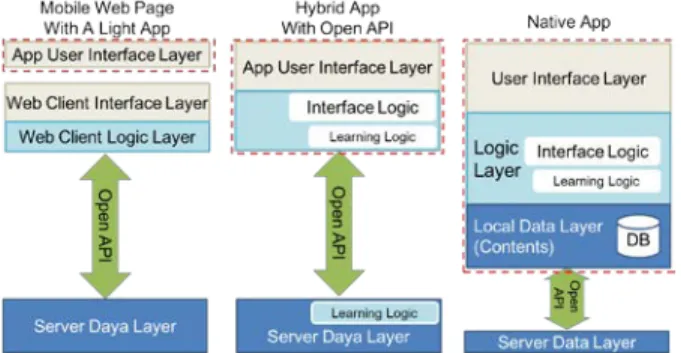
The architecture of a mobile e-learning app may differ greatly depending on the use of mobile web and server content: that is, portions of the native application components may vary between applications. In other words, an e-learning app consists of e-learning material, learning logics, and a UI, which are referred to as the data, logic, and UI layers in Figure 1, respectively. The data/content layer includes learning objects such as images, files, and video clips. The logic layer contains user logics and learning logics such as navigation events and user activities as well as their overall structure. The UI includes visual and control objects as well as their event-handling mechanisms.
We can construct a so-called stand-alone native app—an app that contains all of these components on a local device (Figure 1(c)). At the other extreme, we can create an app by using a web site and placing a link on a mobile device. Generally, developing and reusing online content is known to be easy with a web-centered architecture. Alternatively, a native
component–oriented architecture may work
more stably once installed because it contains most of the resources locally. Figure 1 shows the types of mobile application architectures along with their relationships to web content.
The corresponding functions of the native app modules are as follows:
1) Mobile web page with a light app As shown in Figure 1(a), Mobile apps of this type usually have only a few functions: showing an opening view, connecting to the
web page, and occasionally presenting
important notices or management information before commencing the learning sessions. Once connected, the app only performs certain tasks such as calculating statistics and monitoring. 2) Native app with open API (Figure 1(b))
Mobile apps of this type not only have UI functions but also their own interface and learning logics. An open API is a predefined set of APIs that are published by the server and which can be invoked from any client system. Often, the learning material remains on the server with which the client interfaces via open APIs. Some of the learning logics may also reside on the server. In this type of architecture, the app becomes quite complicated because it contains most of the UI and logic layer functionalities locally and must communicate with the server intensively.
3) Stand-alone native app (Figure 1(c)) Native mobile apps contain not only the UI and logic layers but also the data layer at local devices. The local database may hold learning objects such as resources and files as well as the navigation logics and content. Often, this type of native app connects to the server to retrieve a larger amount of content, beyond that which can be accommodated in the mobile device. Therefore, the issue of caching may increase the complexity of the apps.
For all three types, the UI is the essential component of mobile apps. Moreover, meeting the higher level of user expectations is one of the greatest challenges of current mobile e-learning development.
4 DESIGN OF PLATFORM-
INDEPENDENT UI AUTHORING FRAMEWORK
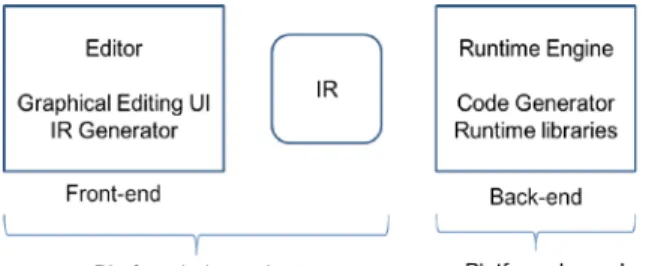
Although well-established development environments for mobile applications exist (e.g., XCode for iPhones [16], Eclipse for Android [17]), many efforts have been made to provide platform-independent development tools. These approaches are categorized into two groups: those that use standardized web technology, and those that use common UI representations created by editors. Popular examples of the former approach are PhoneGap [18] and Appcellerator [19]. In this paper, we focus on the latter approach in which a framework usually consists of an editor, an IR, and a mobile runtime engine. After authors design the UI and the necessary behaviors, the design result is stored in the form of an IR. This representation is then parsed by the platform-dependent mobile runtime engine to generate the necessary resources and program codes for the target platform. Therefore, the framework consists of the front-end, IR, and back-end runtime engine (Figure 2). The back-end runtime engine is the key to handling platform dependencies.
A. Platform-Independent UI Authoring In this section, we consider the design of the front-end, an editor subsystem that provides user design activities. The components of the
Figure 1. Types of mobile app architecture. .The dashed boxes show the native part of the clients.
UI are objects, views as containers of objects, and events as well as the behaviors they trigger. In fact, because the UI for e-learning applications does not greatly differ from those of general mobile software systems, this section discusses mobile UI design in general. Platform-independent UI design requires a type of editor that supports neutral feature editing and outputs the design results into IR data. We consider some issues for these components and the overall UI authoring framework.
Although static rendering data for an UI object are well defined, the dynamic behaviors of objects (i.e., animation and event handling) are difficult to design and render on different platforms. However, a qualitative UI requires a certain amount of dynamic behaviors for providing user interactions. The following issues should be considered in constructing an authoring editor for designing mobile UIs. 1) Object properties
UI objects might be images, drawables, text, and multimedia objects. To obtain platform-independent rendering data, the author determines the file location, size, and other properties. These properties are well standardized in web technologies. A view may be regarded as an object in which other objects are embedded with layouts and structures.
2) Animation
Animations enable enhanced learning
because they add emotional interactions in addition to increasing the attractiveness of an interface. However, authoring animations requires a large amount of intensive work and proper support of the running platform. This
makes authoring animations for mobile apps more challenging.
Active efforts to use animations on mobile platforms are still ongoing. Each platform provides its own animation framework (e.g.,
CoreAnimation in iOS [20], drawable
animations in Android [21]). Several
frameworks are available for platform-independent animation authoring; these include, among others, openGL[22], Flash, and animated CSS [23]. Although its efficiency and richness are restricted compared with those of a proprietary framework, openGL is one of the mature open approaches available in various mobile platforms. Therefore, authoring UI designs for animations requires that the underlying animation framework of the target runtime environment be determined in advance.
One possible approach is to use a sprite mechanism, which implements animations by a sequence of frames, to compose several images and drawables. The simplicity and intuitiveness of the sprite approach allows both platform independence and expressive freedom to designers at the cost of user design efficiency and rendering overheads. For sprite animations, the editor interface should provide a way to edit frames and image fractions as well as their sequences.
3) Dynamic event behaviors
Events and the actions they trigger enable dynamic behaviors along with animations. An authoring tool should provide ways to define events for each object and event-triggered reaction by linking events and their handlers. There are two types of events: intra-view and inter-view navigation events. The former includes rendering or user action events that cause reactions within a view. Navigation events are an important means of structuring learning sequences and logics.
Although the mechanisms of event
transmission and triggering vary widely between platforms, general event types and their handling mechanisms are well defined by web technology standards.
Figure 2. Conceptual diagram of mobile multi-platform authoring framework.
B. Intermediate Representation
The IR format for outputting the design results of the front-end is crucial for the framework design and performance of the back-end. The static properties of text and images are represented by CSS (Cascade style script) []. A unique identifier should be assigned to each object, event, and view. Identifiers are an important means of representing various objects in UIs; they connect design objects to the program code and perform mapping between separate modules of the framework and mobile app components. The front-end editor creates a set of identifiers and their unique values. In contrast, animations are represented differently
depending on the underlying solution.
Representations for Open GL and/or flash style animations are available. When the framework determines a specific solution, the corresponding representation is selected.
The dynamic behaviors of a client mobile app are defined by the event mechanism. For this purpose, various representation languages to describe UI behavior have been developed. Most of these are based on XML format, well-defined, and extensible. Adopting a standard representation burdens the back-end runtime engine to support the whole representation language.
Once the IR format is defined, the front-end editor generates the IR data in a straightforward manner. The data generated as output should be parsed in at the beginning of the back-end subsystem.
C. Design of a Runtime Rendering Engine The approach described thus far leaves platform-dependent issues to the back-end engine to liberate the front-end. In general, for the frameworks considered here, most platform-specific functions at the back-end are handled either by the code generated by the framework engine or by linking predefined runtime libraries.
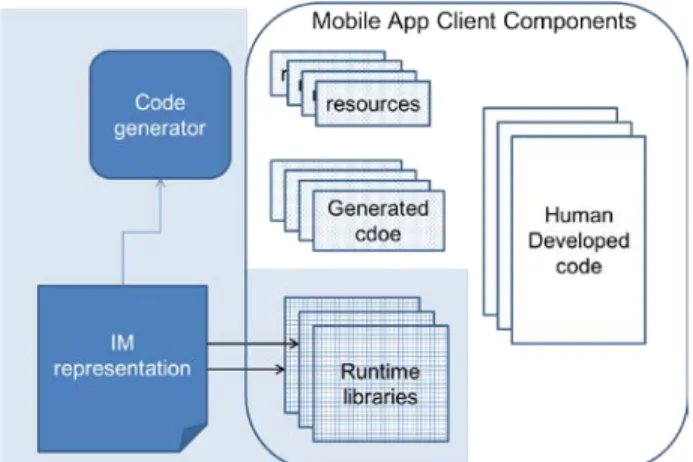
Figure 3 shows the typical architecture of the runtime rendering engine subsystem. The code generator module generates resources and data representations in a platform-dependent format. The format may differ between platform operating systems or development languages. In addition, some program codes are generated for the views designed at the front-end. Because a view is a unit of visual structure as well as a structure for navigation and control, the way to handle views depends on the language and platform.
The overall program may be generated automatically if the structure is simple and predictable. One example of such a program is app books, which includes the expected sequential structure of pages, where navigation events have simple predefined forms and a page includes a number of objects and event handlers.
As shown in Figure 5, a set of manually developed codes should be integrated with the generated code by a set of identifiers. A set of to-be-defined identifiers is also generated by the code generator. The manually developed codes should refer to this information to properly map the objects designed at the front-end.
However, in cases where most of the rendering and running mechanisms might be determined beforehand for each platform,
Figure 3 Mobile runtime engine architecture and the mobile app client structure.
predefined libraries are superior to code generation. In particular, the implementation of animations should be supported by runtime libraries that are a part of the framework.
Several problems must be solved to support multi-platform authoring. First, the screen size and rendering mechanism must be adapted to each rendering object or view. Generally, using bitmap representations and point unit sizes, the IR achieves platform-neutral representations. The second issue involves event handling, because the framework may adopt a standard representation language or define its own IR format, which the back-end runtime system interprets to generate the corresponding native event processing codes. The last problem concerns animation, which was discussed in the previous section.
How these platform-dependent issues are solved for each platform, and how the architecture of the generated codes, runtime libraries, manually developed codes, and the integration between them are designed will depend on the implementation.
4 PROTOTYPE IMPLEMENTATION DAT4UX is an emotional multi-platform UI/UX authoring tool currently being developed by our research group. The motivation for developing the system is to provide a tool for designers to author mobile
apps without the help of developers. Because the cost of UI design and development for mobile apps is excessive compared with that for web or desktop software, we decided to develop a design tool with which designers could develop qualitative interfaces on their own. We developed a framework following the front- and back-end architecture introduced in the previous section. Moreover, we focused on the ease of integration between automatically generated modules and manually developed codes. Another design goal of the framework was to provide unrestricted design functionalities for dynamic visual effects that enable emotional user experiences. To achieve these goals, we developed a front-end desktop editor subsystem and back-end runtime rendering engines for and Android platforms.
The ability to adapt the screen size and rendering mechanism to each rendering object or view should be supported to enable
multi-platform authoring. By using bitmap
representation and point unit size, the IR provides neutral representations. In addition, the target screen size and corresponding preview can be set with the editor.
The front-end editor is implemented in Visual Studio 2012, using C# language. We selected C# to guarantee performance of image processing, because implementing frame animations requires significant computing speed. We adopt a sprite-style animation
(a) Editor screenshot (front-end) (b) IR codes (part)
mechanism to allow abundant and unrestricted animation effects, as shown in Figure 4(a). Authors enjoy the Power-Point–style editing tool, which supports various animation effects. To support richer and more active dynamic effects, we are considering the open GL animation platform.
We defined our own XML format for IR to implement the prototype. The IR includes information for representing the design results of the editor in a platform-independent manner, as shown in Figure 4(b).
The back-end runtime engine of DAT4UX consists of a code generator and the runtime engine. The code generator creates resource files from the IR information, and the runtime engine consists of platform-dependent libraries that render the views and visual effects. User-developed codes can use the libraries to show the view. The mobile app project would include resources and libraries.
5 CONCLUSION
As mobile e-learning has propagated, it becomes more important to develop mobile user interface in e-learning system development practice. However, there are difficulties from multi-platform and platform dependence issues in mobile computing environment. We surveyed current approaches for these problems including web- or native-app based frameworks.
In this paper, we proposed a design of multiplatform native app development frameworks consisting of front- and back-end subsystems. The front-end subsystem is an editor which enables designers to author the user interface without help of developers. Also, the editor would emit intermediate representation of the design result, which is used as rendering information for the back-end. The back-end system provides runtime environment for the specific platform, which consists of a code generator and runtime libraries.
The proposed design is implemented as a prototype system called DAT4UX. This system
is a multi-platform, codeless, qualitative interface authoring tool, with which designers can work with animation or dynamic effects of user interface without developer’s help. We presented implementations for Android platform. We have a plan to extend the system with enhanced functionalities and usability while preserving the advantage of general architecture.
6 ACKNOWLEDGEMENTS
This research was supported by the MSIP(Ministry of Science, ICT and Future Planning), Korea, under the Specialized Cooperation between industry and academic support program
(NIPA-2014-H0806-14-1004) supervised by the NIPA(National IT Industry Promotion Agency)
7 REFERENCES
[1] A. Charland, and L. Brian, "Mobile application development: web vs. native." Communications of
the ACM 54.5 (2011): 49-53.
[2] I. Dalmasso, S.K. Datta, C. Bonnet and N. Nikaein, "Survey, comparison and evaluation of cross platform mobile application development tools."
Wireless Communications and Mobile Computing
Conference (IWCMC), 2013 9th International. IEEE,
2013.
[3] M.E. Joorabchi, A. Mesbah, and P. Kruchten, "Real challenges in mobile app development." Empirical Software Engineering and Measurement, 2013 ACM/IEEE International Symposium on. IEEE, 2013.
[4] F. Shull, "Designing a World at Your Fingertips: A Look at Mobile User Interfaces." Software, IEEE
29.4 (2012): 4-7. 071
[5] D. Guralnick, "Designing effective e-learning user interfaces." IADIS International Conference on the WWW and the Internet. October 5-8, 2007, Vila Real, Portugal. 2007.
[6] S. Levy and J. Yupangco, "A picture is worth 1000 words: Visual design in e-learning." Learning Solutions: Design Techniques (2008): 1-8.
[7] J. Potts, N. Moore and S. Sukittanon, "Developing mobile learning applications for electrical engineering courses." Southeastcon, 2011 Proceedings of IEEE. IEEE, 2011.
[8] Y. Park, "A pedagogical framework for mobile learning: Categorizing educational applications of mobile technologies into four types." The International Review of Research in Open and
Distance Learning 12.2 (2011): 78-102.
[9] M. Sharples, J. Taylor and G. Vavoula, (2007) “A Theory of Learning for the Mobile Age.” In R. Andrews and C. Haythornthwaite (eds.)The Sage Handbook of E-learning Research. London: Sage, pp. 221-47.
[10] M. Virvou, and E. Alepis, "Mobile educational features in authoring tools for personalised tutoring."
Computers & Education 44.1 (2005): 53-68.
[11] A. Gordillo, E. Barra, D. Gallego, J. Quemada, "An online e-Learning authoring tool to create interactive multi-device learning objects using e-Infrastructure resources." Frontiers in Education Conference, 2013 IEEE. IEEE, 2013.
[12] M. Latorre, A. Robles-Gomez, L. Rodriguez, P. Orduna, E. San Cristobal, A.C. Caminero, L. Tobarra, I. Lequerica, S. Ros, R. Hernandez, M. Castro, D. Lopez-de-Ipina, J. Garcia-Zubia, "A review of webapp authoring tools for e-learning."
Global Engineering Education Conference
(EDUCON), 2014 IEEE. IEEE, 2014.
[13] A. Zibula and T.A. Majchrzak, "Cross-Platform Development Using HTML5, jQuery Mobile, and PhoneGap: Realizing a Smart Meter Application."
Web Information Systems and Technologies.
Springer Berlin Heidelberg, 2013. 16-33.
[14] App Cooker, http://www.appcooker.com/
[15] m-BizMaker - world best mobile platform,
http://www.mbizmaker.com/ups/mbizmaker/index.ht ml
[16] Xcode, https://developer.apple.com/xcode
[17] Android Development Tools (ADT),
http://developer.android.com/tools/sdk/eclipse-adt.html
[18] PhoneGap Home, http://phonegap.com/
[19] Appcelerator, http://www.appcelerator.com/
[20] Core Animation Programming Guide,
https://developer.apple.com/library/mac/documentati on/Cocoa/Conceptual/CoreAnimation_guide/Introdu ction/Introduction.html
[21] Drawable animation for Android,
http://developer.android.com/guide/topics/graphics/d rawable-animation.html
[22] OpenGL, https://www.opengl.org/
[23] CSS3 animations,