The Shortcut Guide To
Improving IT
Service Support
through ITIL
Rebecca Herold
sponsored by
Chapter 2: Effective Change Management Through ITIL...18
The Change Management Process ...18
Change Management Benefits ...19
Inputs, Outputs, and Relationships ...20
Inputs...20
Outputs...20
Relationships...21
About RFCs ...24
Planning ...26
Why Do We Need to Create the CMDB?...26
What Should Be in the CMDB?...27
Why Is Automation Important? ...30
Automation Has Positive Business Impact ...30
Automation Tool Features ...30
Avoid Common Pitfalls ...32
Costs...32
People Costs...32
Technology Costs...32
Measuring Success...33
Change Efficiency Rate ...34
Change Success Rate ...34
Change Reschedule Rate...34
Change Incident Rate...34
Other Useful Metrics...34
Copyright Statement
© 2007 Realtimepublishers.com, Inc. All rights reserved. This site contains materials that have been created, developed, or commissioned by, and published with the permission of, Realtimepublishers.com, Inc. (the “Materials”) and this site and any such Materials are protected by international copyright and trademark laws.
THE MATERIALS ARE PROVIDED “AS IS” WITHOUT WARRANTY OF ANY KIND, EITHER EXPRESS OR IMPLIED, INCLUDING BUT NOT LIMITED TO, THE IMPLIED WARRANTIES OF MERCHANTABILITY, FITNESS FOR A PARTICULAR PURPOSE, TITLE AND NON-INFRINGEMENT. The Materials are subject to change without notice and do not represent a commitment on the part of Realtimepublishers.com, Inc or its web site sponsors. In no event shall Realtimepublishers.com, Inc. or its web site sponsors be held liable for technical or editorial errors or omissions contained in the Materials,
including without limitation, for any direct, indirect, incidental, special, exemplary or consequential damages whatsoever resulting from the use of any information contained in the Materials.
The Materials (including but not limited to the text, images, audio, and/or video) may not be copied, reproduced, republished, uploaded, posted, transmitted, or distributed in any way, in whole or in part, except that one copy may be downloaded for your personal, non-commercial use on a single computer. In connection with such use, you may not modify or obscure any copyright or other proprietary notice.
The Materials may contain trademarks, services marks and logos that are the property of third parties. You are not permitted to use these trademarks, services marks or logos without prior written consent of such third parties.
Realtimepublishers.com and the Realtimepublishers logo are registered in the US Patent & Trademark Office. All other product or service names are the property of their
respective owners.
If you have any questions about these terms, or if you would like information about licensing materials from Realtimepublishers.com, please contact us via e-mail at
[Editor's Note: This eBook was downloaded from Realtime Nexus—The Digital Library. All leading technology guides from Realtimepublishers can be found at
http://nexus.realtimepublishers.com.]
Chapter 2: Effective Change Management Through ITIL
Change happens every day and in every way within every business. Information technology (IT) changes historically did not often occur back when all processing was done within a central mainframe that used dumb terminals for business inputs. However, technology continues to change increasingly more often, resulting in more frequent changes to business processes to improve services, reduce the number of incidents, lessen costs, and generally improve business. Complex networks and systems coupled with numerous necessary changes are a recipe for disaster if not successfully managed. Implementing the ITIL Change Management processes can help not only to demonstrate that IT is a necessary cost to your business but also to actually show how IT can add value to your business.
There are generally three types of modifications made within Change Management.
• Changes—Planned changes to the IT infrastructure to keep the processing going, these changes can range from installing a workstation on the network to relocating a server or a mainframe. These types of changes can introduce new errors into the IT environment and may not be recognized for a long time unless a good change management process is in place.
• Corrective measures—Put simply, these are fixing the errors that exist.
• Improvements and innovations—These are implementing new services, technical capabilities, components, or technologies into the IT architecture. These often result in unexpected consequences and long-term errors.
The Change Management Process
The ITIL Change Management process has two authorities; the Change Manager and the Change Advisory Board (CAB), as defined in Chapter 1. The Change Manager is responsible for
obtaining authorizations for the requested changes and planning and coordinating the
implementation of the approved changes. The CAB is a group that regularly meets to review significant change requests and progress, prioritize changes, and help plan the changes. The CAB should include representatives from each IT area.
The scope of the Change Management process is coordinated with the scope of Configuration Management and Release Management processes. Configuration Management processes determine the impact of changes and updates the change management database (CMDB). Change Management does not include activities considered Standard Changes, such as creating and deleting user IDs. Activities considered Standard Changes are not done under the Change
Change Management Benefits
Numerous incidents significantly impacting business have been the result of IT changes. These incidents occurred because of poor planning, insufficient resources, inadequate testing, sloppy work practices, ignoring business impact analysis for planned changes, and unknown bugs. The goal of implementing Change Management within the ITIL framework is to consistently and efficiently mange the change process, which will, as a consequence, reduce errors and prevent incidents by providing:
• Controlled implementation of changes
• The service and Help desk with information on current and future change activity as well as change history
• Up-to-date information to customers on change progress
• Management with a history of how efficiently changes are made
Successful implementation of the ITIL Change Management process will result in many benefits to the business, including:
• Better estimates for proposed change costs
• Better management information about changes allow for better problem diagnosis • Fewer reversed changes
• More smoothly executed back-outs
• Improved IT personnel productivity because of fewer distractions caused by emergency changes or back-out procedures
• Improved user productivity because of more stable IT services
• Better ability to make more frequent changes without creating an unstable IT environment
• Reduced adverse impacts of changes
How will you know if you are realizing these benefits? By maintaining Change Management metrics, which I discuss later in this chapter. However, first it is important to understand what is involved with the Change Management process to help you understand and appreciate the benefits measurements.
Inputs, Outputs, and Relationships
At the core of Change Management are the inputs and outputs for the process and the many important connections Change Management has with the other ITIL processes. Historically, ad hoc change management resulted in wasted time and resources by performing unnecessary changes. These types of changes also typically created problems and resulted in costly incidents. Change Management creates a repeatable, efficient way to implement changes throughout the enterprise.
Inputs
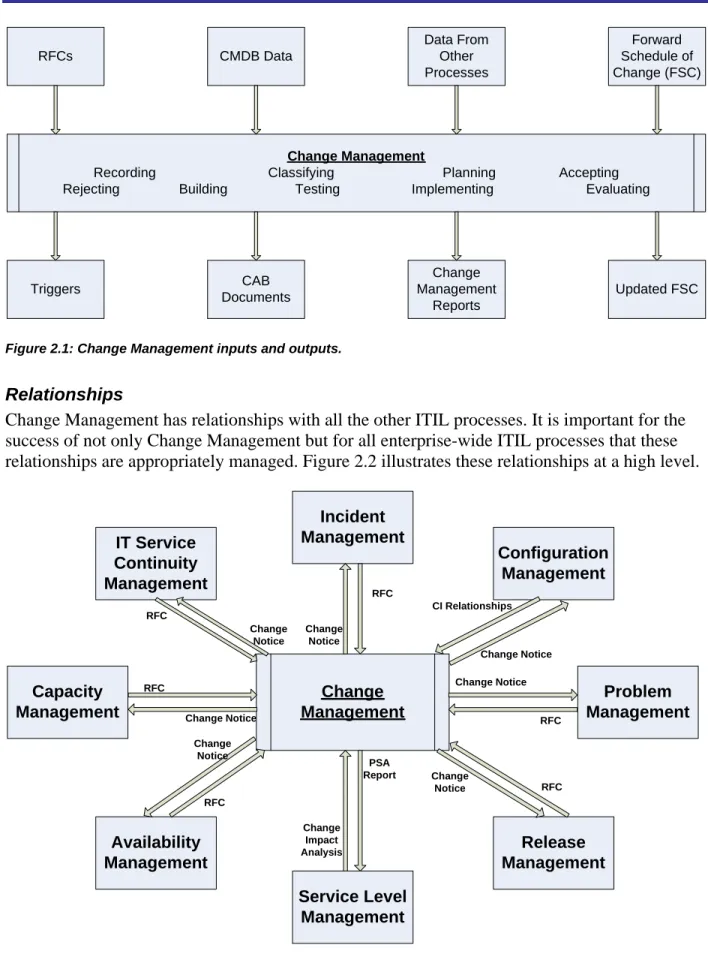
One of the goals of Change Management is to be able to determine with a high level of certainty whether the change being considered is appropriate. This is accomplished using a request for change (RFC), as defined within Chapter 1.
The Change Manager will facilitate the CAB to determine whether the change should be made. It is up to the CAB to determine the potential impact of the requested change. To enable this
determination, the CAB considers four types of information: • The RFC
• The CMDB data
• Information from other processes (budgets and the Capacity Database to name just two examples)
• Forward Schedule of Change (FSC)
The CMDB data is critical for performing the change impact analysis.Outputs
The outputs of the Change Management process include: • The updated FSC
• Triggers to use for Configuration Management and Release Management • CAB agenda, minutes, discussions, decisions, and action items
• Change Management reports
The FSC, sometimes called a Change Schedule, lists all approved changes and their planned implementation dates.RFCs CMDB Data Data From Other Processes Forward Schedule of Change (FSC) Change Management
Recording Classifying Planning Accepting
Rejecting Building Testing Implementing Evaluating
Triggers CAB Documents Change Management Reports Updated FSC
Figure 2.1: Change Management inputs and outputs.
Relationships
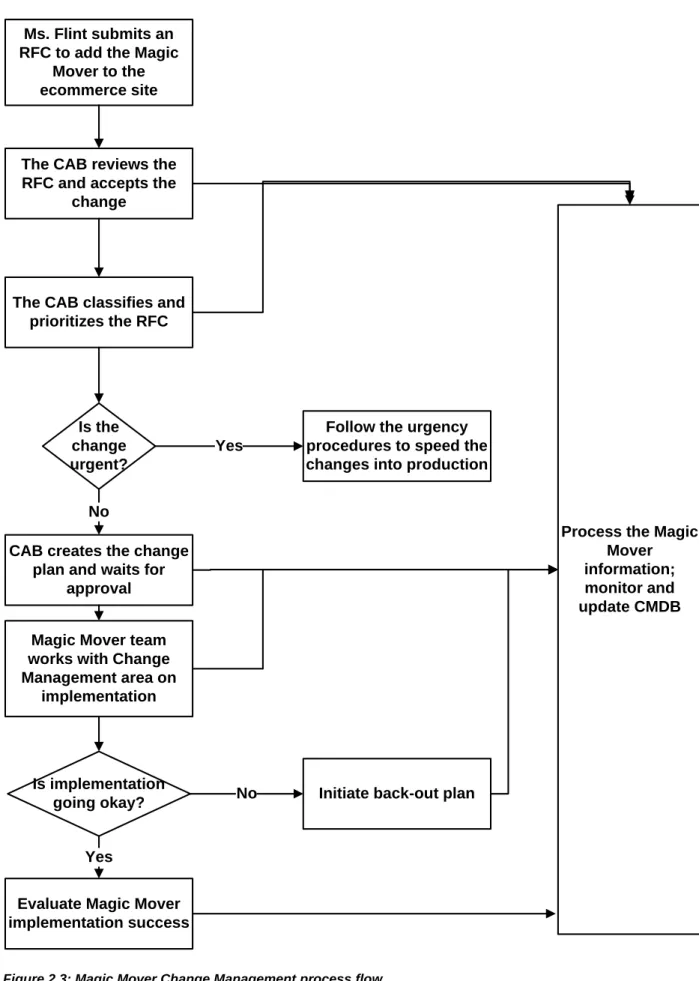
Change Management has relationships with all the other ITIL processes. It is important for the success of not only Change Management but for all enterprise-wide ITIL processes that these relationships are appropriately managed. Figure 2.2 illustrates these relationships at a high level.
Capacity Management IT Service Continuity Management Incident Management Configuration Management Change Management Availability Management Service Level Management Release Management Problem Management RFC Change Notice CI Relationships RFC Change Notice Change Notice Change Notice RFC PSA Report Change Impact Analysis RFC Change Notice RFC Change Notice Change Notice RFC
As this figure shows, Change Management activities impact all other ITIL processes in one way or another. It is important for effective communications channels to exist to communicate key activities. Let’s step through an example to see how all these processes are related.
ACME Super Duper Supplies is going to implement a new ecommerce Web site that will allow for online merchandise ordering and payments for their new product, Magic Mover. This is a significant change in their IT infrastructure in addition to having a major impact on their
business. The change must be implemented in a coordinated way to ensure all impacted areas are aware of the change, and that any potential negative impacts are minimized as much as possible. By following ACME’s Change Management process, Ms. Flint, the manager of the Magic Mover business unit, will help ensure the change is implemented as successfully as possible. Ms. Flint submits an RFC for the change to the Change Management team. The ACME Change Manager gives the RFC to the CAB, which approves the change. The Change Manager works closely with the Configuration Management area to provide the data from the associated CMDB to identify the relationships between the configuration item (CI) associated with adding Magic Mover to the site and determines what is affected by the change.
The CAB works with the Availability Management team to estimate the potential impact of making the changes to add the Magic Mover to the e-commerce Website. Availability
Management will in turn make the changes necessary to help improve service availability as it may be affected as a result of the changes.
The Change Manager notifies the Incident Management, Problem Management, and the Release Management teams of the planned change so that they can determine how this change will affect them. The Change Manager sends a report to the Service Level Management team that lists the changes that will need to be made to the SLAs along with the impact of the FSC on the service availability.
The Change Manager will communicate the change details to the Capacity Management team so that they can determine what the cumulative effects will be of adding the Magic Mover item to the e-commerce Web site, and they will determine what the cumulative impact of that change will be over an extended time. They may find that response time will be impacted and that more processing power is necessary.
The Change Management and the CAB will work closely with the IT Service Continuity
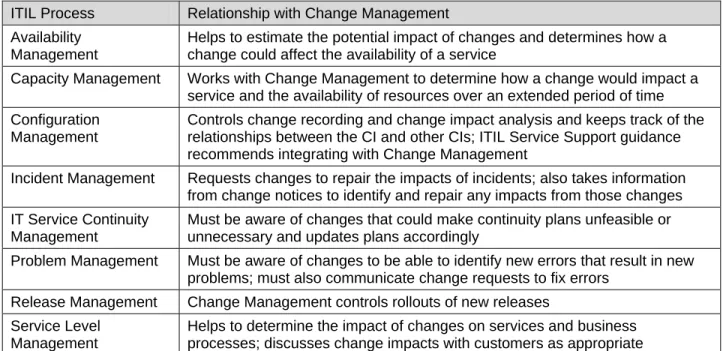
Management team to ensure it is aware of all the changes that will be made as a result of adding the Magic Move to the Web site and determine how this will impact the existing recovery plans. They can then ensure that the appropriate steps are taken to update the plans so that recovery can be completed successfully. Figure 2.3 shows now the Change Management process would flow to make the Magic Mover Web site implementation.
Ms. Flint submits an RFC to add the Magic
Mover to the ecommerce site
The CAB reviews the RFC and accepts the
change
The CAB classifies and prioritizes the RFC
Is the change urgent?
CAB creates the change plan and waits for
approval
Is implementation going okay?
Evaluate Magic Mover implementation success
Initiate back-out plan
Process the Magic Mover information; monitor and update CMDB Magic Mover team
works with Change Management area on implementation Yes No Yes No
Follow the urgency procedures to speed the changes into production
Table 2.1 provides the high-level descriptions about the relationships between Change
Management and the other ITIL processes that I pointed out in the Magic Mover scenario. These relationships will be similar for any type of change.
ITIL Process Relationship with Change Management Availability
Management
Helps to estimate the potential impact of changes and determines how a change could affect the availability of a service
Capacity Management Works with Change Management to determine how a change would impact a service and the availability of resources over an extended period of time Configuration
Management
Controls change recording and change impact analysis and keeps track of the relationships between the CI and other CIs; ITIL Service Support guidance recommends integrating with Change Management
Incident Management Requests changes to repair the impacts of incidents; also takes information from change notices to identify and repair any impacts from those changes IT Service Continuity
Management
Must be aware of changes that could make continuity plans unfeasible or unnecessary and updates plans accordingly
Problem Management Must be aware of changes to be able to identify new errors that result in new problems; must also communicate change requests to fix errors
Release Management Change Management controls rollouts of new releases Service Level
Management
Helps to determine the impact of changes on services and business processes; discusses change impacts with customers as appropriate Table 21: Change Management relationships.
About RFCs
RFC’s Legislation Customers Suppliers Project Management Problem Management IT Personnel Figure 2.4: RFC originators.
The RFCs can contain a wide amount of varying information depending upon your own unique organization, business, technologies, and so on. A few examples of the types of information to collect on RFCs include:
• Requestor’s name, location, phone number, email address • Submission date
• RFC identification number • Problem number
• CI to be changed • Description of change
• Justification and business benefit for change • Estimated resources
The RFC will be recorded when submitted. From the information on the RFC, Change
Management will be able to determine whether the request will be treated as a service request, as a change, or will be denied. This categorization is good because it helps to sort out the service requests so that the CAB does not need to spend valuable time considering them. Change Management also makes an initial decision for denying RFCs if they do not make sense, are impractical, incomplete or unnecessary; this saves additional time for the CAB. If the CAB accepts an RFC, they give it a priority and determine the category to put it in.
Planning
Change Management uses an FSC to keep track of when each change will occur. The FSC will inform the recipients of upcoming changes. The FSC should contain enough information for the person responsible for the change to determine whether the change is going to affect them. The FSC allows both the IT and business areas to schedule changes appropriately.
The Change Manager may need to obtain the approval of IT management for major changes before submitting an RFC to the CAB. Approval for major changes is typically necessary for three issues:
• Business approval—The areas impacted by the change may need to provide approval. • Financial approval—The IT area may need to perform a cost/benefit analysis and budget. • Technical approval—The IT area will need to determine the impact, necessity, and
feasibility of the change.
If these approvals are obtained, the CAB will help plan significant changes and act as an advisory committee. To help facilitate effective use of time and make the most informed decisions, the Change Manager should communicate the details of the RFC to CAB members prior to the CAB meeting.
Why Do We Need to Create the CMDB?
To be successful with using the ITIL Change Management process, it is important that the people, processes, and technologies are working together in a coordinated manner to overcome the political roadblocks that usually inhibit cooperation between groups in the same organization. The primary goal of the CMDB is to house the CIs that exist throughout the enterprise and the relationships between them, revealing the status for each configuration at any time.
The contents of the CMDB will vary from organization to organization. For example, an organization with a comparably small IT area may be experiencing problems with application troubleshooting because the business units throughout the enterprise regularly implement new software at their own discretion. The CMDB solution they implement will need to constantly, and preferably automatically, track in excruciating detail application configurations so that quick configuration comparisons before and after a problem can be analyzed to identify root causes.
The situation would likely be quite different for a very large IT department with the same types of application troubleshooting problems. The resolution process would typically span the Help desk area, many different IT experts, the customer relationship area, and the related business unit managers. For a large organization, simply capturing all configuration details in the CMDB will not improve the coordination effort; too many details will be confusing to the different players who only need to know some of the details. Instead, this large organization will probably decide to share the many different infrastructure relationships across the Change Management team members. Their CMDB could then contain the most basic device configuration data, relationship information, and information that points to additional sources of more detailed information. These two CMDB implementations are much different but they both provide benefits to business. They allow for shorter applications and systems problem solving and more efficient and error-free changes. By performing thoughtful and enterprise-wide efforts to prioritize
process improvements, take into consideration the players involved, and identify the data sharing and use needs throughout the enterprise, each organization will be able to determine the best items to put into each of their respective CMDBs.
The CMDB will provide a centralized enterprise repository of information that contains all the details related to the IT architecture. It will allow for a unified view of every IT component within the enterprise. This centralized, unified capability will allow all the business leaders to make better business, as well as technical, decisions. A CMDB will facilitate the capabilities for:
• Automated discovery • Service-centric views
• Automated and out-of-the-box change processes • Integration to other change management solutions
What Should Be in the CMDB?
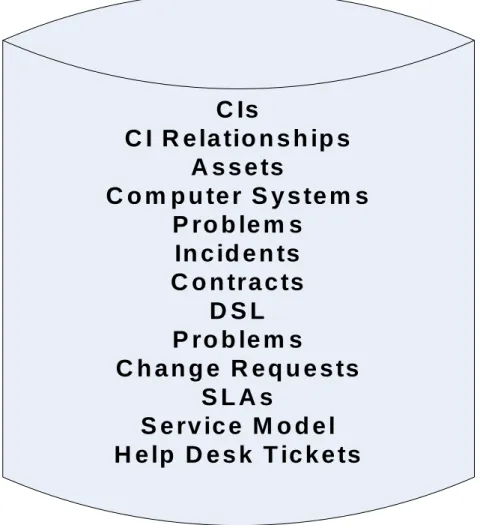
The CMDB will contain data about hardware and software deployments. The CMDB will allow users to quickly see and report on the technical environmental details. The CMDB can contain data about servers, network devices, workstations, software, and any other network component. There are multiple tools and methods available to enter data into the CMDB. Most CMDB tools can populate the database as well as create customized reports to run at scheduled times as well as upon demand. The CMDB can track and create reports about the different components within the IT architecture and maintain the current CIs. Coincidentally, ITIL also directs that the CMDB should hold data related to CIs; some possibilities are shown in Figure 2.5.
C Is
C I R e la tio n s h ip s
A s s e ts
C o m p u te r S y s te m s
P ro b le m s
In c id e n ts
C o n tra c ts
D S L
P ro b le m s
C h a n g e R e q u e s ts
S L A s
S e rv ic e M o d e l
H e lp D e s k T ic k e ts
Figure 2.5: CMDB data items.
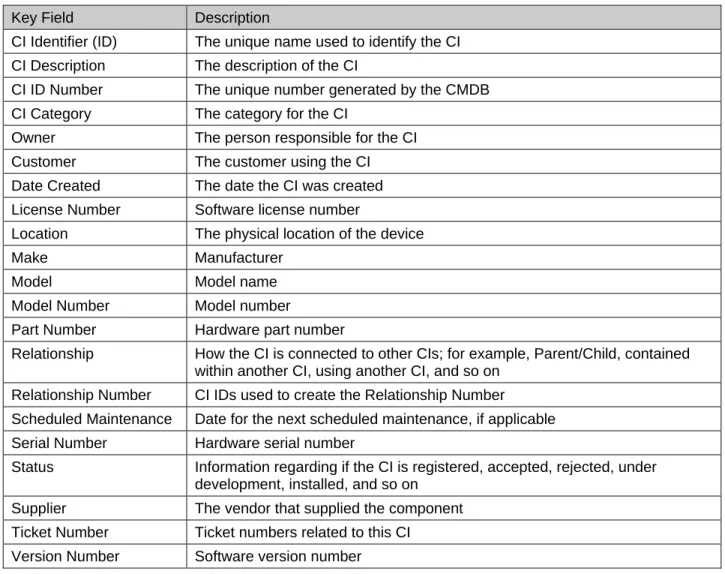
A single, centralized, all-encompassing CMDB should have all the key information available to the entire organization to track all the CIs in the system, map dependencies of CIs, track the status of CIs, determine the history of CIs, and track requests for change for CI verification. Some of the fields you will want to consider using as keys to track the status for each CI are listed in Table 2.2.
Key Field Description
CI Identifier (ID) The unique name used to identify the CI CI Description The description of the CI
CI ID Number The unique number generated by the CMDB CI Category The category for the CI
Owner The person responsible for the CI Customer The customer using the CI Date Created The date the CI was created License Number Software license number
Location The physical location of the device Make Manufacturer
Model Model name
Model Number Model number
Part Number Hardware part number
Relationship How the CI is connected to other CIs; for example, Parent/Child, contained within another CI, using another CI, and so on
Relationship Number CI IDs used to create the Relationship Number
Scheduled Maintenance Date for the next scheduled maintenance, if applicable Serial Number Hardware serial number
Status Information regarding if the CI is registered, accepted, rejected, under development, installed, and so on
Supplier The vendor that supplied the component Ticket Number Ticket numbers related to this CI
Version Number Software version number Table 2.2: Key fields within the CMDB.
These key fields will not only help to make Change Management more efficient, the data can also be used to help measure the success with Change Management activities and automate the some or all of the Change Management process.
Why Is Automation Important?
A great benefit of the CMDB is that it can work with other IT automation tools. Many data center automation tools exist that can store information in the CMDB. By automating the
CMDB, it can more efficiently achieve the goal of using the CMDB to provide IT personnel with a centrally managed storage repository for of IT data.
Automation Has Positive Business Impact
The Change Management process enables IT to successfully deliver results that link people, processes, and technology throughout the enterprise to most efficiently meet business demands. Automating these relationships for the collection, orchestration, and management infrastructures, will accelerate ITIL processing and changes within the CMDB.
When the triggers that launch changes to configurations and workflows are automated, IT does not need as much training as if it were all done manually. So time is not only saved by
automating the processes but also by not needing to do as much training and not having to correct human errors. This automation will reduce downtime and make Change Management more controlled, consistent, and efficient from both a time perspective as well as a resources perspective. Automation also has the added benefit of being able to generate activity logs that in turn establish accountability for the actions that occur.
Automation Tool Features
When choosing an automation tool, look for the following features and requirements: • Capabilities to store, track, sort, and reconcile asset data, configuration data, and
operational change activity
• Change event coordination that can track, trigger, and make changes using the ITIL Change Management processes, all the way from RFC submission to implementation • Capabilities to granularly report each configuration along with the change impact
assessments for the relationships between the changes
• Compliance reporting and reconciliation actions necessary for noncompliance issues and settings
• Configuration comparisons and associated reports • Configuration search and auto-discovery capabilities
• CI definitions listings and reports along with relationship mapping • Diagnostics capabilities and change tracking
• Ability to enforce compliance controls •
• Ability to be used throughout the entire IT infrastructure coverage; all servers, applications, network devices, storage locations, and so on
• Maintain baseline configurations and generate reports against those baselines at any point in time
• Event management between all enterprise IT systems
• Dependency mapping of CIs to determine business impact assessment, service desk activities, and event management consoles
• Ability to generate role-defined dashboards
• Software developer kits (SDKs) and application program interfaces (APIs) for data integration
• Configurable triggers for workflows and specific events that include send notifications and create incidents to investigate
A good and effective automation product that is successfully implemented within an organization can provide the following business benefits:
• Increased ITIL adoption throughout the enterprise for all eight ITIL processes
• ITIL implementation acceleration by making previously manual tasks automated and utilizing standardized ITIL processes, speeding up adoption and business-impact analysis • Standardization of tasks and workflows throughout the enterprise and at all levels for
noticeable positive day-to-day process impact
• Verification that the Change Management processes are being performed correctly and are effectively communicating with the other ITIL processes
• Communications between teams improve resulting in a decrease of operational costs • Granular configuration tracking, reconciliation, and auditing capabilities result in more
detailed and accurate compliance reports, enabling audits to be performed more quickly using historical change tracking, point-in-time references, and remediation capabilities • More efficient provisioning and change management of new application services based
on standardized configurations that allow for faster time to production
• Improvement in change and configuration management processes using automated workflows and integration across multiple enterprise IT sources using federation improves IT service availability
• Server repurposing results in reduced hardware costs
• Creating a single source for provisioning and compliance tasks that produces
comprehensive tracking streamlines processes, brings cross-silo teams together, reduces human errors, and results in lower operations costs
• The ability to create real-time accurate reports showing the current state of the environment, comparisons to baseline data, and trending analysis on change activity based on CMDB data allows for more useful and valuable reports
Avoid Common Pitfalls
Organizations often fall into common pitfalls during the implementation of ITIL Change Management automation tools:
• Lack of executive sponsorship—Executive visibility and leadership buy-in is essential for describing political and silo concerns and for getting cooperation enterprise-wide
• Lack of integration—Lack of solution integration between the chosen vendor products and with existing third-party tools used within the enterprise
• Cross-silo configurations—Limited configuration capabilities for network components, server, applications, storage, and so on that span multiple enterprise silos without a federated data scheme
• Inability to calculate return on investment (ROI)—Limited ROI discussion and long-term projection with only a narrow perspective on short-term cost savings
• Excessive deployment and professional services costs—Planning sessions considering deployment timelines and key ROI objectives with a quarter-to-quarter perspective and focus on the role of integrators for deployment customization and data, event, and interface integrations
• Poor ITIL alignment—Overlooked opportunities to standardize processes based on ITIL-defined process workflows to increase the impact of changes on IT services
• Lack of closed-loop processes—Many vendor solutions do not have a closed-loop change management process; without a closed-loop process, you will need to spend time and resources to integrate the products, which will be a very complicated task
Whatever automation tool you use, it should seamlessly integrate all Change Management processes to avoid costly in-house time making it fit with your other systems.
Costs
It is important for you to consider the costs involved with implementing ITIL Change Management processes. These costs will basically fall into two categories; people costs and technology costs.
People Costs
You likely already have personnel throughout the enterprise performing Change Management tasks. If you are not already using ITIL, it is likely that they are performing these tasks, but in silos, meaning they are repeating tasks. When implementing Change Management processes, you should be able to use some of these personnel that are now freed up for implementation.
However, you will still need to utilize personnel to be on the CAB.
Measuring Success
Change Management metrics can help improve business. But to demonstrate this, it is important to create statistics and metrics to clearly show the improvements. Success must be documented in terms of improvements to the business.
As it has often been said, you cannot manage what you cannot measure. What kind of change management measurements and associated data can be used to measure improvements? The following are some for you to consider and build upon:
• Total changes planned; “in the pipeline” • Total changes implemented
• Number of failed changes • Number of emergency changes • Number of unauthorized changes • Number of rescheduled changes • Average process time per change
• Number of changes that resulted in incidents • Change management tooling support level • Change management process maturity • Total labor hours to coordinate changes
• Total labor hours available for coordinating changes • Total labor hours to implement changes
So where do you find this data? They can be found in such places as: • Change management system reports
• Incident management system reports • Labor reports
• HR reports • Audit reports • CMDB reports
What kind of evaluations can you make from these seemingly nondescript numbers? Now is the fun part, when you get to do some math! The following are just some of the metrics you can calculate from the data.
Change Efficiency Rate
You can determine the change efficiency rate by dividing the total changes implemented by the total changes in the pipeline. For example, if you did 20 changes this week and you had 40 to do in the pipeline, your efficiency rate is 20/40, or 50%. This will tell your management how efficient you are at handling changes. This can be used to demonstrate your improvement in implementing changes by using ITIL compared with when you did not.
Change Success Rate
You can determine the success rate and failure rate percentages for your changes by dividing the number of failed changes by the total number of changes implemented. For example, if you implemented 10 changes, but 2 of them failed, you would have a 2/10, or a 20% failure rate. Subtract this from 100% and this gives you an 80% success rate.
Change Reschedule Rate
You can determine how well you implement changes on schedule by calculating the change reschedule rate. Do so by dividing the number of changes rescheduled by the number of changes you had scheduled. For example, if you had planned for 40 changes this week but rescheduled 5 of them, your reschedule rate would be 5/40, or 12.5%.
Change Incident Rate
A very useful metric to reveal how changes impacted business productivity is the change incident rate. You can calculate this by taking the number of changes that created incidents and divide it by the total number of changes implemented. For example, if you implemented 30 changes this week and 5 of them caused incidents, your change incident rate would be 5/30, or 16.7%.
Other Useful Metrics
These should give you a good idea of what metrics you can use to determine your successes and challenges with Change Management processes. There are many more you can compute using the data you have gathered in a successfully implemented Change Management process. A few of these include:
• Emergency change rate
• Average process time per change • Unauthorized change rate
• Personnel time utilization for changes
• Change Management technology tools support utilization • Change Management process maturity
Summary
Implementing the ITIL Change Management process will be an evolutionary process. It will take time and investment up front. It will be a learning experience. But, when done correctly, it will make your business more efficient and make IT more valuable in the eyes of your business leaders.
Change Management implementation success will take the strong and steady commitment of your executive management to get through these growing pains. Be sure you have that to get the subsequent commitment of your ITIL team members and ultimately improve your Change Management processes.
Download Additional eBooks from Realtime Nexus!
Realtime Nexus—The Digital Library provides world-class expert resources that IT
professionals depend on to learn about the newest technologies. If you found this eBook to be informative, we encourage you to download more of our industry-leading technology eBooks and video guides at Realtime Nexus. Please visit http://nexus.realtimepublishers.com.