Asterisk Reference Information
Version 1.8.0-rc2
Asterisk Development Team
Asterisk.org
Contents
1 Introduction 11 1.1 License Information . . . 11 1.1.1 Hold Music . . . 12 1.2 Security . . . 13 1.2.1 Introduction . . . 13 1.2.2 Network Security . . . 13 1.2.3 Dialplan Security . . . 13 1.2.4 Log Security . . . 14 1.3 Hardware . . . 14 1.3.1 Introduction . . . 141.3.2 DAHDI compatible hardware . . . 15
1.3.3 Non-DAHDI compatible hardware . . . 16
1.3.4 mISDN compatible hardware . . . 16
1.3.5 Miscellaneous other interfaces . . . 17
2 Configuration 18 2.1 General Configuration Information . . . 18
2.1.1 Configuration Parser . . . 18 2.1.2 Asterisk.conf . . . 22 2.1.3 CLI Prompt . . . 25 2.1.4 Extensions . . . 26 2.1.5 IP Quality of Service . . . 27 2.1.6 MP3 Support . . . 31 2.1.7 ICES . . . 31 2.2 Database Support . . . 31
2.2.1 Realtime Database Configuration . . . 31
2.2.2 FreeTDS . . . 35
2.3 Privacy . . . 35
2.3.1 First of all . . . 35
2.3.2 Next, Fight against autodialers!! . . . 35
2.3.3 Next, Fight against the empty CALLERID! . . . 35
2.3.4 Next, use a WELCOME MENU ! . . . 36
2.3.5 Next: Torture Them! . . . 37
2.3.6 Using Call Screening . . . 38
2.3.7 The ’N’ and ’n’ options . . . 39
2.3.8 Recorded Introductions . . . 40 3 Channel Variables 43 3.1 Introduction . . . 43 3.2 Parameter Quoting . . . 43 3.3 Variables . . . 44 3.4 Variable Inheritance . . . 44 3.4.1 Example . . . 45
3.5 Selecting Characters from Variables . . . 45
3.6 Expressions . . . 46
3.6.1 Spaces Inside Variables Values . . . 46
3.6.2 Operators . . . 47
3.6.3 Floating Point Numbers . . . 49
3.6.4 Functions . . . 50 3.6.5 Examples . . . 51 3.6.6 Numbers Vs. Strings . . . 53 3.6.7 Conditionals . . . 53 3.6.8 Parse Errors . . . 54 3.6.9 NULL Strings . . . 54 3.6.10 Warning . . . 54 3.6.11 Incompatabilities . . . 55 3.6.12 Debugging Hints . . . 56
3.7 Asterisk standard channel variables . . . 58
3.7.1 Application return values . . . 59
3.7.2 Various application variables . . . 60
3.7.3 The MeetMe Conference Bridge . . . 61
3.7.4 The VoiceMail() application . . . 61
3.7.6 DUNDiLookup() . . . 62
3.7.7 chan dahdi . . . 62
3.7.8 chan sip . . . 62
3.7.9 chan agent . . . 62
3.7.10 The Dial() application . . . 63
3.7.11 The chanisavail() application . . . 63
3.7.12 Dialplan Macros . . . 63
3.7.13 The ChanSpy() application . . . 64
3.7.14 OSP . . . 64
3.7.15 Digit manipulation . . . 65
4 AEL: Asterisk Extension Language 66 4.1 Introduction . . . 66
4.2 Asterisk in a Nutshell . . . 67
4.2.1 Contexts . . . 67
4.2.2 Extensions and priorities . . . 67
4.2.3 Macros . . . 68
4.2.4 Applications . . . 68
4.3 Getting Started . . . 69
4.4 Debugging . . . 69
4.5 About ”aelparse” . . . 69
4.6 General Notes about Syntax . . . 70
4.7 Keywords . . . 71
4.8 Procedural Interface and Internals . . . 73
4.8.1 AEL version 2 BNF . . . 73
4.9 AEL Example USAGE . . . 76
4.9.1 Comments . . . 76 4.9.2 Context . . . 77 4.9.3 Extensions . . . 77 4.9.4 Includes . . . 78 4.9.5 #include . . . 79 4.9.6 Dialplan Switches . . . 79 4.9.7 Ignorepat . . . 79 4.9.8 Variables . . . 79 4.9.9 Local Variables . . . 80 4.9.10 Loops . . . 81 4.9.11 Conditionals . . . 81
4.9.13 goto, jump, and labels . . . 83
4.9.14 Macros . . . 85
4.10 Examples . . . 85
4.11 Semantic Checks . . . 86
4.12 Differences with the original version of AEL . . . 88
4.13 Hints and Bugs . . . 90
4.14 The Full Power of AEL . . . 91
5 SLA: Shared Line Appearances 92 5.1 Introduction . . . 92 5.2 Configuration . . . 92 5.2.1 Summary . . . 92 5.2.2 Dialplan . . . 92 5.2.3 Trunks . . . 93 5.2.4 Stations . . . 94 5.3 Configuration Examples . . . 95 5.3.1 Basic SLA . . . 95
5.3.2 SLA and Voicemail . . . 96
5.4 Call Handling . . . 98
5.4.1 Summary . . . 98
5.4.2 Station goes off hook (not ringing) . . . 98
5.4.3 Station goes off hook (ringing) . . . 98
5.4.4 Line button on a station is pressed . . . 99
6 Channel Drivers 100 6.1 IAX2 . . . 100 6.1.1 Introduction . . . 100 6.1.2 Why IAX2? . . . 100 6.1.3 Configuration . . . 102 6.1.4 IAX2 Jitterbuffer . . . 102 6.2 mISDN . . . 105 6.2.1 Introduction . . . 105 6.2.2 Features . . . 105
6.2.3 Fast Installation Guide . . . 106
6.2.4 Pre-Requisites . . . 106
6.2.5 Configuration . . . 106
6.2.6 mISDN CLI commands . . . 109
6.2.8 Debugging and sending bug reports . . . 110 6.2.9 Examples . . . 110 6.2.10 Known Problems . . . 110 6.3 Local . . . 110 6.3.1 Introduction . . . 110 6.3.2 Examples . . . 111
6.3.3 Trivial Local channel example . . . 111
6.3.4 Delay dialing devices . . . 113
6.3.5 Dialing destinations with different information . . . 114
6.3.6 Using callfiles and Local channels . . . 115
6.3.7 Understanding When To Use /n . . . 117
6.3.8 Local channel modifiers . . . 120
6.4 Mobile . . . 121
6.4.1 Introduction . . . 121
6.4.2 Features . . . 121
6.4.3 Requirements . . . 122
6.4.4 Concepts . . . 122
6.4.5 Configuring chan mobile . . . 122
6.4.6 Using chan mobile . . . 123
6.4.7 Dialplan hints . . . 124
6.4.8 MobileStatus Application . . . 125
6.4.9 SMS Sending / Receiving . . . 125
6.4.10 DTMF Debouncing . . . 126
6.4.11 Debugging . . . 126
7 Distributed Universal Number Discovery (DUNDi) 128 7.1 Introduction . . . 128
7.2 DUNDIQUERY and DUNDIRESULT . . . 129
7.3 Peering Agreement . . . 129
8 ENUM 143 8.1 The ENUMLOOKUP dialplan function . . . 143
8.1.1 Arguments . . . 144
8.1.2 Examples . . . 145
8.1.3 Usage notes and subtle features . . . 147
9 AMI: Asterisk Manager Interface 151
9.1 The Asterisk Manager TCP/IP API . . . 151
9.2 Command Syntax . . . 152
9.3 Manager commands . . . 152
9.4 Examples . . . 152
9.5 Ensuring all modules are loaded . . . 153
9.6 Device status reports . . . 154
9.7 Some standard AMI headers . . . 154
9.8 Asynchronous Javascript Asterisk Manger (AJAM) . . . 158
9.8.1 Setup the Asterisk HTTP server . . . 158
9.8.2 Allow Manager Access via HTTP . . . 158
9.8.3 Integration with other web servers . . . 159
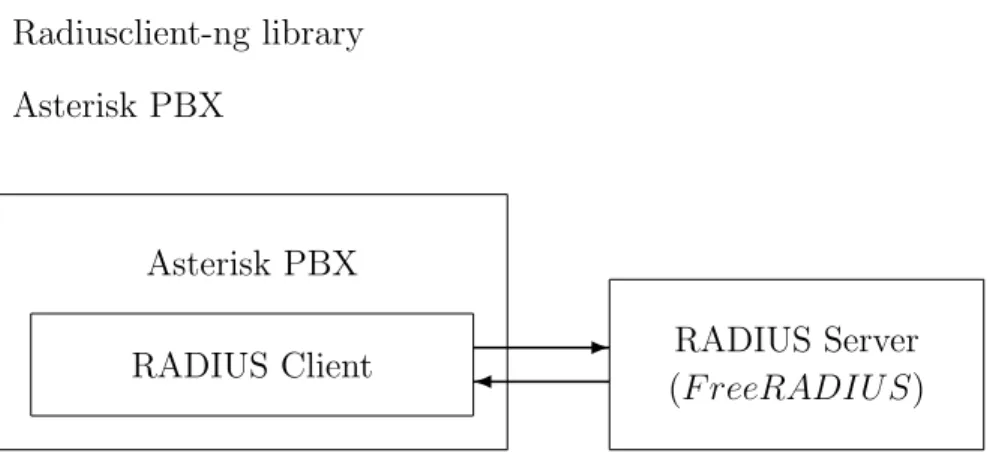
10 CDR: Call Detail Records 160 10.1 Applications . . . 160 10.2 CDR Fields . . . 160 10.3 Variables . . . 162 10.4 Storage Backends . . . 163 10.4.1 Microsoft SQL Server . . . 163 10.4.2 MySQL . . . 166 10.4.3 PostgreSQL . . . 166 10.4.4 SQLite 2 . . . 167 10.4.5 SQLite 3 . . . 167 10.4.6 RADIUS . . . 167
11 CEL: Channel Event Logging 172 11.1 Design Goals . . . 172
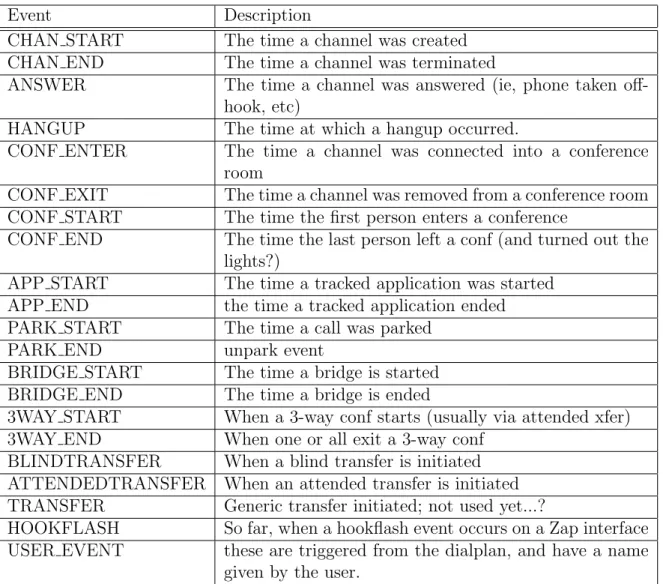
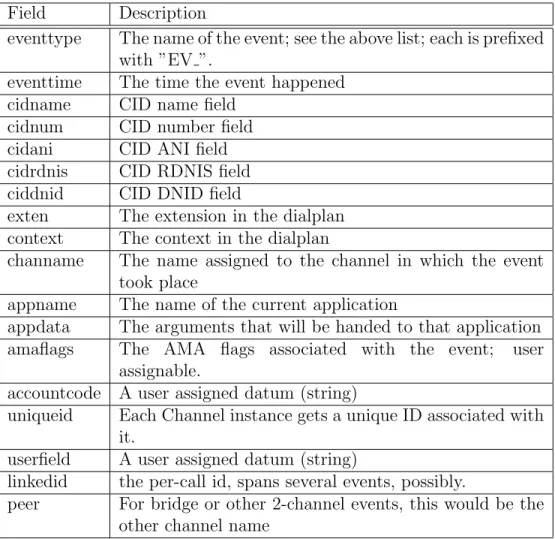
11.2 Events & Fields . . . 188
11.3 Applications & Functions . . . 189
11.3.1 CEL Function . . . 189
11.3.2 CELGenUserEvent Application . . . 190
11.4 Configuration Files . . . 190
11.5 Generating Billing Information . . . 191
11.6 Storage Backends . . . 191
11.6.1 Microsoft SQL Server . . . 191
11.6.2 MySQL . . . 195
11.6.3 PostreSQL . . . 195
11.6.5 RADIUS . . . 196 12 Voicemail 201 12.1 ODBC Storage . . . 201 12.2 IMAP Storage . . . 202 12.2.1 Installation Notes . . . 202 12.2.2 Modify voicemail.conf . . . 204 12.2.3 IMAP Folders . . . 205
12.2.4 Separate vs. Shared Email Accounts . . . 205
12.2.5 IMAP Server Implementations . . . 205
12.2.6 Quota Support . . . 206
12.2.7 Application Notes . . . 206
13 SMS 208 13.1 Introduction . . . 208
13.2 Background . . . 208
13.3 Typical use with Asterisk . . . 209
13.4 Terminology . . . 209 13.5 Sub address . . . 210 13.6 extensions.conf . . . 210 13.7 Using smsq . . . 211 13.8 File formats . . . 217 13.9 Delivery reports . . . 219 14 Queues 220 14.1 Introduction . . . 220
14.2 Configuring Call Queues . . . 220
14.2.1 queues.conf . . . 220
14.2.2 Routing incoming Calls to Queues . . . 221
14.2.3 Assigning agents to Queues . . . 224
14.2.4 Controlling The Way Queues Call the Agents . . . 227
14.2.5 Pre Acknowledgement Message . . . 229
14.2.6 Caveats . . . 229
14.3 Queue Logs . . . 230
15 Phone Provisioning 233 15.1 Introduction . . . 233
15.2.1 The [general] section . . . 233
15.2.2 Creating phone profiles . . . 234
15.3 Configuration of users.conf . . . 235
15.3.1 The [general] section . . . 235
15.3.2 Invdividual Users . . . 236
15.4 Templates . . . 236
15.5 Putting it all together . . . 238
16 Calendaring 240 16.1 Introduction . . . 240
16.2 Configuring Asterisk Calendaring . . . 240
16.2.1 Module-independent settings . . . 241 16.2.2 Module-dependent settings . . . 242 16.3 Dialplan functions . . . 242 16.3.1 Read functions . . . 242 16.3.2 Write functions . . . 243 16.4 Dialplan Examples . . . 243 16.4.1 Office hours . . . 243 16.4.2 Meeting reminders . . . 244 16.4.3 Writing an event . . . 244 17 Security Framework 245 17.1 Introduction . . . 245 17.2 Framework Overview . . . 246
17.2.1 Security Event Generation . . . 246
17.2.2 Security Event Logger . . . 246
17.3 Events to Log . . . 247
17.4 Security Log File Format . . . 248
18 Secure Calls 252 18.1 Introduction . . . 252
18.2 Channel-specific configuration . . . 252
18.3 Security-based dialplan branching . . . 253
18.4 Forcing bridged channels to be secure . . . 253
19 Manipulating Party ID Information 254 19.1 Introduction . . . 254
19.2.1 CALLERID dialplan function . . . 255
19.2.2 CONNECTEDLINE dialplan function . . . 255
19.2.3 REDIRECTING dialplan function . . . 256
19.2.4 Special REDIRECTING considerations for ISDN . . . 257
19.2.5 Dial() and Queue() dialplan application ’I’ option . . . 257
19.2.6 Interception macros . . . 257
19.3 Manipulation examples . . . 258
19.3.1 Simple recording playback . . . 259
19.3.2 Straightforward dial through . . . 259
19.3.3 Use of interception macro . . . 259
19.3.4 Simple redirection . . . 260
19.4 Ideas for usage . . . 260
19.5 Troubleshooting tips . . . 261
19.6 For further reading... . . 261
20 Call Completion Supplementary Services 262 20.1 Introduction . . . 262
20.2 What is CCSS? . . . 262
20.3 Glossary of Terms . . . 263
20.4 The CC Process . . . 264
20.4.1 The Initial Call . . . 264
20.4.2 Requesting CC . . . 264
20.4.3 Cancelling CC . . . 265
20.4.4 Monitoring the Called Party . . . 265
20.4.5 Alerting the Caller . . . 266
20.4.6 If the Caller is unavailable . . . 266
20.4.7 The CC recall . . . 266
20.5 Miscellaneous Information and Tips . . . 267
20.6 Simple Example of generic call completion . . . 270
21 Packet Loss Concealment 272 21.1 What is PLC? . . . 272
21.2 How does Asterisk detect packet loss? . . . 272
21.3 A bit of background on translation . . . 273
21.4 Additional restrictions and caveats . . . 274
21.5 Summary . . . 275
22 Sounds Packages 277
22.1 Introduction . . . 277
22.2 Getting The Sounds Tools . . . 277
22.3 About The Sounds Tools . . . 278
22.3.1 audiofilter . . . 278
22.3.2 makeg722 . . . 278
22.3.3 scripts . . . 279
23 Development 280 23.1 Backtrace . . . 280
Chapter
1
Introduction
This document contains various pieces of information that are useful for reference purposes.
1.1
License Information
Asterisk is distributed under the GNU General Public License version 2 and is also available under alternative licenses negotiated directly with Digium, Inc. If you obtained Asterisk under the GPL, then the GPL applies to all loadable Asterisk modules used on your system as well, except as defined below. The GPL (version 2) is included in this source tree in the file COPYING.
This package also includes various components that are not part of As-terisk itself; these components are in the ’contrib’ directory and its subdirec-tories. These components are also distributed under the GPL version 2 as well.
Digium, Inc. (formerly Linux Support Services) holds copyright and/or sufficient licenses to all components of the Asterisk package, and therefore can grant, at its sole discretion, the ability for companies, individuals, or or-ganizations to create proprietary or Open Source (even if not GPL) modules which may be dynamically linked at runtime with the portions of Asterisk which fall under our copyright/license umbrella, or are distributed under more flexible licenses than GPL.
If you wish to use our code in other GPL programs, don’t worry – there is no requirement that you provide the same exception in your GPL’d
prod-ucts (although if you’ve written a module for Asterisk we would strongly encourage you to make the same exception that we do).
Specific permission is also granted to link Asterisk with OpenSSL, OpenH323 and/or the UW IMAP Toolkit and distribute the resulting binary files.
In addition, Asterisk implements two management/control protocols: the Asterisk Manager Interface (AMI) and the Asterisk Gateway Interface (AGI). It is our belief that applications using these protocols to manage or control an Asterisk instance do not have to be licensed under the GPL or a compatible license, as we believe these protocols do not create a ’derivative work’ as referred to in the GPL. However, should any court or other judiciary body find that these protocols do fall under the terms of the GPL, then we hereby grant you a license to use these protocols in combination with Asterisk in external applications licensed under any license you wish.
The ’Asterisk’ name and logos are trademarks owned by Digium, Inc., and use of them is subject to our trademark licensing policies. If you wish to use these trademarks for purposes other than simple redistribution of Asterisk source code obtained from Digium, you should contact our licensing depart-ment to determine the necessary steps you must take. For more information on this policy, please read:
http://www.digium.com/en/company/profile/trademarkpolicy.php If you have any questions regarding our licensing policy, please contact us:
+1.877.344.4861 (via telephone in the USA) +1.256.428.6000 (via tele-phone outside the USA) +1.256.864.0464 (via FAX inside or outside the USA) IAX2/pbx.digium.com (via IAX2) [email protected] (via email)
Digium, Inc. 445 Jan Davis Drive Huntsville, AL 35806 USA
1.1.1
Hold Music
Digium has licensed the music included with the Asterisk distribution From opsound.org for use and distribution with Asterisk. It is licensed ONLY for use as hold music within an Asterisk based PBX.
1.2
Security
1.2.1
Introduction
PLEASE READ THE FOLLOWING IMPORTANT SECURITY RELATED INFORMATION. IMPROPER CONFIGURATION OF ASTERISK COULD ALLOW UNAUTHORIZED USE OF YOUR FACILITIES, POTENTIALLY INCURRING SUBSTANTIAL CHARGES.
Asterisk security involves both network security (encryption, authentica-tion) as well as dialplan security (authorization - who can access services in your pbx). If you are setting up Asterisk in production use, please make sure you understand the issues involved.
1.2.2
Network Security
If you install Asterisk and use the ”make samples” command to install a demonstration configuration, Asterisk will open a few ports for accepting VoIP calls. Check the channel configuration files for the ports and IP ad-dresses.
If you enable the manager interface in manager.conf, please make sure that you access manager in a safe environment or protect it with SSH or other VPN solutions.
For all TCP/IP connections in Asterisk, you can set ACL lists that will permit or deny network access to Asterisk services. Please check the ”permit” and ”deny” configuration options in manager.conf and the VoIP channel configurations - i.e. sip.conf and iax.conf.
The IAX2 protocol supports strong RSA key authentication as well as AES encryption of voice and signalling. The SIP channel does not support encryption in this version of Asterisk.
1.2.3
Dialplan Security
First and foremost remember this:
USE THE EXTENSION CONTEXTS TO ISOLATE OUTGOING OR TOLL SERVICES FROM ANY INCOMING CONNECTIONS.
You should consider that if any channel, incoming line, etc can enter an extension context that it has the capability of accessing any extension within that context.
Therefore, you should NOT allow access to outgoing or toll services in contexts that are accessible (especially without a password) from incoming channels, be they IAX channels, FX or other trunks, or even untrusted sta-tions within you network. In particular, never ever put outgoing toll services in the ”default” context. To make things easier, you can include the ”default” context within other private contexts by using:
include => default
in the appropriate section. A well designed PBX might look like this: [longdistance] exten => _91NXXNXXXXXX,1,Dial(DAHDI/g2/${EXTEN:1}) include => local [local] exten => _9NXXNXXX,1,Dial(DAHDI/g2/${EXTEN:1}) include => default [default] exten => 6123,Dial(DAHDI/1)
DON’T FORGET TO TAKE THE DEMO CONTEXT OUT OF YOUR DEFAULT CONTEXT. There isn’t really a security reason, it just will keep people from wanting to play with your Asterisk setup remotely.
1.2.4
Log Security
Please note that the Asterisk log files, as well as information printed to the Asterisk CLI, may contain sensitive information such as passwords and call history. Keep this in mind when providing access to these resources.
1.3
Hardware
1.3.1
Introduction
A PBX is only really useful if you can get calls into it. Of course, you can use Asterisk with VoIP calls (SIP, H.323, IAX, etc.), but you can also talk to the real PSTN through various cards.
Supported Hardware is divided into two general groups: DAHDI de-vices and non-DAHDI dede-vices. The DAHDI compatible hardware supports pseudo-TDM conferencing and all call features through chan dahdi, whereas non-DAHDI compatible hardware may have different features.
1.3.2
DAHDI compatible hardware
• Digium, Inc. (Primary Developer of Asterisk) http://www.digium.com
– Analog Interfaces
∗ TDM400P - The TDM400P is a half-length PCI 2.2-compliant card that supports FXS and FXO station interfaces for con-necting analog telephones and analog POTS lines through a PC.
∗ TDM800P - The TDM800P is a half-length PCI 2.2-compliant, 8 port card using Digium’s VoiceBus technology that supports FXS and FXO station interfaces for connecting analog tele-phones and analog POTS lines through a PC.
∗ TDM2400P - The TDM2400P is a full-length PCI 2.2-compliant card for connecting analog telephones and analog POTS lines through a PC. It supports a combination of up to 6 FXS and/or FXO modules for a total of 24 lines.
– Digital Interfaces
∗ TE412P - The TE412P offers an on-board DSP-based echo cancellation module. It supports E1, T1, and J1 environments and is selectable on a per-card or per-port basis.
∗ TE410P - The TE410P improves performance and scalability through bus mastering architecture. It supports E1, T1, and J1 environments and is selectable on a per-card or per-port basis.
∗ TE407P - The TE407P offers an on-board DSP-based echo cancellation module. It supports E1, T1, and J1 environments and is selectable on a per-card or per-port basis.
∗ TE405P - The TE405P improves performance and scalability through bus mastering architecture. It supports both E1, T1, J1 environments and is selectable on a per-card or per-port basis.
∗ TE212P - The TE212P offers an on-board DSP-based echo cancellation module. It supports E1, T1, and J1 environments and is selectable on a per-card or per-port basis.
∗ TE210P - The TE210P improves performance and scalability through bus mastering architecture. It supports E1, T1, and
J1 environments and is selectable on a per-card or per-port basis.
∗ TE207P - The TE207P offers an on-board DSP-based echo cancellation module. It supports E1, T1, and J1 environments and is selectable on a per-card or per-port basis.
∗ TE205P - The TE205P improves performance and scalability through bus mastering architecture. It supports both E1 and T1/J1 environments and is selectable on a card or per-port basis.
∗ TE120P - The TE120P is a single span, selectable T1, E1, or J1 card and utilizes Digium’s VoiceBusTMtechnology. It supports both voice and data modes.
∗ TE110P - The TE110P brings a high-performance, cost-effective, and flexible single span togglable T1, E1, J1 interface to the Digium line-up of telephony interface devices.
1.3.3
Non-DAHDI compatible hardware
• QuickNet, Inc. http://www.quicknet.net
– Internet PhoneJack - Single FXS interface. Supports Linux tele-phony interface. DSP compression built-in.
– Internet LineJack - Single FXS or FXO interface. Supports Linux telephony interface.
1.3.4
mISDN compatible hardware
mISDN homepage: http://www.misdn.org/
Any adapter with an mISDN driver should be compatible with chan -misdn. See the mISDN section for more information.
• Digium, Inc. (Primary Developer of Asterisk) http://www.digium.com
– B410P - 4 Port BRI card (TE/NT) • beroNet http://www.beronet.com
– BN8S0 - 8 Port BRI card (TE/NT)
– Billion Card - Single Port BRI card (TE (/NT with crossed cable))
1.3.5
Miscellaneous other interfaces
• Digium, Inc. (Primary Developer of Asterisk)
– TC400B - The TC400B is a half-length, low-profile PCI 2.2-compliant card for transforming complex VoIP codecs (G.729) into simple codecs.
• ALSA http://www.alsa-project.org
– Any ALSA compatible full-duplex sound card • OSS http://www.opensound.com
Chapter
2
Configuration
2.1
General Configuration Information
2.1.1
Configuration Parser
Introduction
The Asterisk configuration parser in the 1.2 version and beyond series has been improved in a number of ways. In addition to the realtime architecture, we now have the ability to create templates in configuration files, and use these as templates when we configure phones, voicemail accounts and queues. These changes are general to the configuration parser, and works in all configuration files.
General syntax
Asterisk configuration files are defined as follows: [section]
label = value label2 = value
In some files, (e.g. mgcp.conf, dahdi.conf and agents.conf), the syntax is a bit different. In these files the syntax is as follows:
[section] label1 = value1 label2 = value2 object => name
label3 = value3 label2 = value4 object2 => name2
In this syntax, we create objects with the settings defined above the object creation. Note that settings are inherited from the top, so in the example above object2 has inherited the setting for ”label1” from the first object.
For template configurations, the syntax for defining a section is changed to:
[section](options) label = value
The options field is used to define templates, refer to templates and hide templates. Any object can be used as a template.
No whitespace is allowed between the closing ”]” and the parenthesis ”(”. Comments
All lines that starts with semi-colon ”;” is treated as comments and is not parsed.
The ”;--” is a marker for a multi-line comment. Everything after that marker will be treated as a comment until the end-marker ”--;” is found. Parsing begins directly after the end-marker.
;This is a comment label = value ;-- This is a comment --;
;-- Comment --; exten=> 1000,1,dial(SIP/lisa)
Including other files
In all of the configuration files, you may include the content of another file with the #include statement. The content of the other file will be included at the row that the #include statement occurred.
#include myusers.conf
You may also include the output of a program with the #exec directive, if you enable it in asterisk.conf
In asterisk.conf, add the execincludes = yes statement in the options section:
[options] execincludes=yes
The exec directive is used like this: #exec /usr/local/bin/myasteriskconfigurator.sh
Adding to an existing section [section]
label = value
[section](+) label2 = value2
In this case, the plus sign indicates that the second section (with the same name) is an addition to the first section. The second section can be in another file (by using the #include statement). If the section name referred to before the plus is missing, the configuration will fail to load.
Defining a template-only section [section](!)
label = value
The exclamation mark indicates to the config parser that this is a only a template and should not itself be used by the Asterisk module for config-uration. The section can be inherited by other sections (see section ”Using templates” below) but is not used by itself.
Using templates (or other configuration sections) [section](name[,name])
label = value
The name within the parenthesis refers to other sections, either templates or standard sections. The referred sections are included before the configura-tion engine parses the local settings within the secconfigura-tion as though their entire contents (and anything they were previously based upon) were included in the new section. For example consider the following:
[foo] disallow=all allow=ulaw allow=alaw
[bar] allow=gsm allow=g729 permit=192.168.2.1 [baz](foo,bar) type=friend permit=192.168.3.1 context=incoming host=bnm
The [baz] section will be processed as though it had been written in the following way: [baz] disallow=all allow=ulaw allow=alaw allow=gsm allow=g729 permit=192.168.2.1 type=friend permit=192.168.3.1 context=incoming host=bnm
It should also be noted that there are no guaranteed overriding semantics, meaning that if you define something in one template, you should not expect to be able to override it by defining it again in another template.
Additional Examples (in top-level sip.conf)
[defaults](!) type=friend nat=yes qualify=on dtmfmode=rfc2833 disallow=all allow=alaw #include accounts/*/sip.conf (in accounts/customer1/sip.conf) [def-customer1](!,defaults) secret=this_is_not_secret context=from-customer1 callerid=Customer 1 <300> accountcode=0001
[phone1](def-customer1) mailbox=phone1@customer1
[phone2](def-customer1) mailbox=phone2@customer1
This example defines two phones - phone1 and phone2 with settings inher-ited from ”def-customer1”. The ”def-customer1” is a template that inherits from ”defaults”, which also is a template.
2.1.2
Asterisk.conf
Asterisk Main Configuration File
Below is a sample of the main Asterisk configuration file, asterisk.conf. Note that this file is not provided in sample form, because the Makefile creates it when needed and does not touch it when it already exists.
[directories]
; Make sure these directories have the right permissions if not ; running Asterisk as root
; Where the configuration files (except for this one) are located astetcdir => /etc/asterisk
; Where the Asterisk loadable modules are located astmoddir => /usr/lib/asterisk/modules
; Where additional ’library’ elements (scripts, etc.) are located astvarlibdir => /var/lib/asterisk
; Where AGI scripts/programs are located astagidir => /var/lib/asterisk/agi-bin
; Where spool directories are located
; Voicemail, monitor, dictation and other apps will create files here ; and outgoing call files (used with pbx_spool) must be placed here astspooldir => /var/spool/asterisk
; Where the Asterisk process ID (pid) file should be created astrundir => /var/run/asterisk
; Where the Asterisk log files should be created astlogdir => /var/log/asterisk
[options]
;Under "options" you can enter configuration options ;that you also can set with command line options
verbose = 0
; Debug: "No" or value (1-4) debug = 3
; Background execution disabled (-f) nofork=yes | no
; Always background, even with -v or -d (-F) alwaysfork=yes | no
; Console mode (-c) console= yes | no
; Execute with high priority (-p) highpriority = yes | no
; Initialize crypto at startup (-i) initcrypto = yes | no
; Disable ANSI colors (-n) nocolor = yes | no
; Dump core on failure (-g) dumpcore = yes | no
; Run quietly (-q) quiet = yes | no
; Force timestamping in CLI verbose output (-T) timestamp = yes | no
; User to run asterisk as (-U) NOTE: will require changes to ; directory and device permissions
runuser = asterisk
; Group to run asterisk as (-G) rungroup = asterisk
; Enable internal timing support (-I) internal_timing = yes | no
; Language Options
documentation_language = en | es | ru
; These options have no command line equivalent
; Cache record() files in another directory until completion cache_record_files = yes | no
record_cache_dir = <dir>
; Build transcode paths via SLINEAR transcode_via_sln = yes | no
; send SLINEAR silence while channel is being recorded transmit_silence_during_record = yes | no
; The maximum load average we accept calls for maxload = 1.0
; The maximum number of concurrent calls you want to allow maxcalls = 255
; Stop accepting calls when free memory falls below this amount specified in MB minmemfree = 256
; Allow #exec entries in configuration files execincludes = yes | no
; Don’t over-inform the Asterisk sysadm, he’s a guru dontwarn = yes | no
; System name. Used to prefix CDR uniqueid and to fill \${SYSTEMNAME} systemname = <a_string>
; Should language code be last component of sound file name or first? ; when off, sound files are searched as <path>/<lang>/<file>
; when on, sound files are search as <lang>/<path>/<file> ; (only affects relative paths for sound files)
languageprefix = yes | no
; Locking mode for voicemail
; - lockfile: default, for normal use
; - flock: for where the lockfile locking method doesn’t work ; eh. on SMB/CIFS mounts
lockmode = lockfile | flock
; Entity ID. This is in the form of a MAC address. It should be universally ; unique. It must be unique between servers communicating with a protocol ; that uses this value. The only thing that uses this currently is DUNDi, ; but other things will use it in the future.
; entityid=00:11:22:33:44:55
[files]
; Changing the following lines may compromise your security ; Asterisk.ctl is the pipe that is used to connect the remote CLI ; (asterisk -r) to Asterisk. Changing these settings change the ; permissions and ownership of this file.
; The file is created when Asterisk starts, in the "astrundir" above.
;astctlpermissions = 0660 ;astctlowner = root ;astctlgroup = asterisk ;astctl = asterisk.ctl
2.1.3
CLI Prompt
Changing the CLI Prompt
The CLI prompt is set with the ASTERISK PROMPT UNIX environment variable that you set from the Unix shell before starting Asterisk
You may include the following variables, that will be replaced by the current value by Asterisk:
• %d - Date (year-month-date)
• %s - Asterisk system name (from asterisk.conf) • %h - Full hostname • %H - Short hostname • %t - Time • %u - Username • %g - Groupname • %% - Percent sign
• %# - ’#’ if Asterisk is run in console mode, ’>’ if running as remote console
• %Cn[;n] - Change terminal foreground (and optional background) color to specified A full list of colors may be found in include/asterisk/ term.h
On systems which implement getloadavg(3), you may also use: • %l1 - Load average over past minute
• %l2 - Load average over past 5 minutes • %l3 - Load average over past 15 minutes
2.1.4
Extensions
The Asterisk dialplan
The Asterisk dialplan is divided into contexts. A context is simply a group of extensions. For each ”line” that should be able to be called, an extension must be added to a context. Then, you configure the calling ”line” to have access to this context.
If you change the dialplan, you can use the Asterisk CLI command ”di-alplan reload” to load the new di”di-alplan without disrupting service in your PBX.
Extensions are routed according to priority and may be based on any set of characters (a-z), digits, #, and *. Please note that when matching a pattern, ”N”, ”X”, and ”Z” are interpreted as classes of digits.
For each extension, several actions may be listed and must be given a unique priority. When each action completes, the call continues at the next priority (except for some modules which use explicitly GOTO’s).
Extensions frequently have data they pass to the executing application (most frequently a string). You can see the available dialplan applications by entering the ”core show applications” command in the CLI.
In this version of Asterisk, dialplan functions are added. These can be used as arguments to any application. For a list of the installed functions in your Asterisk, use the ”core show functions” command.
Example dialplan
The example dial plan, in the configs/extensions.conf.sample file is in-stalled as extensions.conf if you run ”make samples” after installation of Asterisk. This file includes many more instructions and examples than this file, so it’s worthwhile to read it.
Special extensions
There are some extensions with important meanings:
• s
– What to do when an extension context is entered (unless over-ridden by the low level channel interface) This is used in macros,
and some special cases. ”s” is not a generic catch-all wildcard extension.
• i
– What to do if an invalid extension is entered
• h
– The hangup extension, executed at hangup
• t
– What to do if nothing is entered in the requisite amount of time.
• T
– This is the extension that is executed when the ’absolute’ time-out is reached. See ”core show function TIMEOUT” for more information on setting timeouts.
• e
– This extension will substitute as a catchall for any of the ’i’, ’t’, or ’T’ extensions, if any of them do not exist and catching the error in a single routine is desired. The function EXCEPTION may be used to query the type of exception or the location where it occurred.
And finally, the extension context ”default” is used when either a) an extension context is deleted while an extension is in use, or b) a specific starting extension handler has not been defined (unless overridden by the low level channel interface).
2.1.5
IP Quality of Service
Introduction
Asterisk supports different QoS settings at the application level for various protocols on both signaling and media. The Type of Service (TOS) byte can be set on outgoing IP packets for various protocols. The TOS byte is used
by the network to provide some level of Quality of Service (QoS) even if the network is congested with other traffic.
Asterisk running on Linux can also set 802.1p CoS marks in VLAN pack-ets for the VoIP protocols it uses. This is useful when working in a switched environment. In fact Asterisk only set priority for Linux socket. For mapping this priority and VLAN CoS mark you need to use this command:
vconfig set_egress_map [vlan-device] [skb-priority] [vlan-qos]
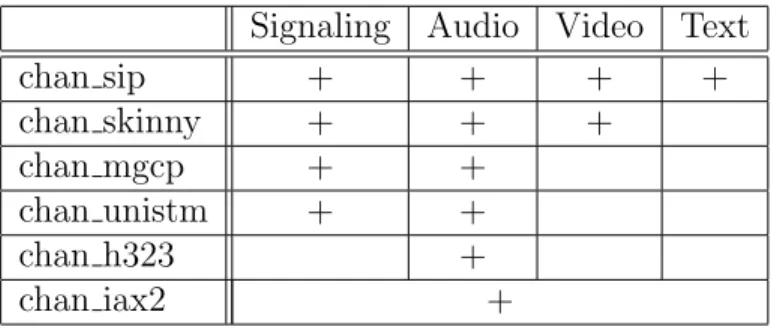
The table below shows all VoIP channel drivers and other Asterisk mod-ules that support QoS settings for network traffic. It also shows the type(s) of traffic for which each module can support setting QoS settings.
Signaling Audio Video Text
chan sip + + + + chan skinny + + + chan mgcp + + chan unistm + + chan h323 + chan iax2 +
Table 2.1: Channel Driver QoS Settings
Signaling Audio Video Text dundi.conf + (tos setting)
iaxprov.conf + (tos setting)
Table 2.2: Other ToS Settings
IP TOS values
The allowable values for any of the tos* parameters are: CS0, CS1, CS2, CS3, CS4, CS5, CS6, CS7, AF11, AF12, AF13, AF21, AF22, AF23, AF31, AF32, AF33, AF41, AF42, AF43 and ef (expedited forwarding),
Note that on a Linux system, Asterisk must be compiled with libcap in order to use the ef tos setting if Asterisk is not run as root.
The lowdelay, throughput, reliability, mincost, and none values have been removed in current releases.
802.1p CoS values
Because 802.1p uses 3 bits of the VLAN header, this parameter can take integer values from 0 to 7.
Recommended values
The recommended values shown below are also included in sample configu-ration files: tos cos Signaling cs3 3 Audio ef 5 Video af41 4 Text af41 3 Other ef
Table 2.3: Recommended QoS Settings
IAX2
In iax.conf, there is a ”tos” parameter that sets the global default TOS for IAX packets generated by chan iax2. Since IAX connections combine signalling, audio, and video into one UDP stream, it is not possible to set the TOS separately for the different types of traffic.
In iaxprov.conf, there is a ”tos” parameter that tells the IAXy what TOS to set on packets it generates. As with the parameter in iax.conf, IAX packets generated by an IAXy cannot have different TOS settings based upon the type of packet. However different IAXy devices can have different TOS settings.
SIP
In sip.conf, there are four parameters that control the TOS settings: ”tos -sip”, ”tos audio”, ”tos video” and ”tos text”. tos sip controls what TOS SIP call signaling packets are set to. tos audio, tos video and tos text control what TOS values are used for RTP audio, video, and text packets, respec-tively.
There are four parameters to control 802.1p CoS: ”cos sip”, ”cos audio”, ”cos video” and ”cos text”. The behavior of these parameters is the same as for the SIP TOS settings described above.
Other RTP channels
chan mgcp, chan h323, chan skinny and chan unistim also support TOS and CoS via setting tos and cos parameters in their corresponding configuration files. Naming style and behavior are the same as for chan sip.
Reference
IEEE 802.1Q Standard: http://standards.ieee.org/getieee802/download/ 802.1Q-1998.pdf Related protocols: IEEE 802.3, 802.2, 802.1D, 802.1Q
RFC 2474 - ”Definition of the Differentiated Services Field (DS field) in the IPv4 and IPv6 Headers”, Nichols, K., et al, December 1998.
IANA Assignments, DSCP registry Differentiated Services Field Code-points http://www.iana.org/assignments/dscp-registry
To get the most out of setting the TOS on packets generated by Asterisk, you will need to ensure that your network handles packets with a TOS prop-erly. For Cisco devices, see the previously mentioned ”Enterprise QoS Solu-tion Reference Network Design Guide”. For Linux systems see the ”Linux Advanced Routing & Traffic Control HOWTO” at http://www.lartc.org/.
For more information on Quality of Service for VoIP networks see the ”Enterprise QoS Solution Reference Network Design Guide” version 3.3 from Cisco at: http://www.cisco.com/application/pdf/en/us/guest/netsol/ns432/ c649/ccmigration_09186a008049b062.pdf
2.1.6
MP3 Support
MP3 Music On Hold
Use of the mpg123 for your music on hold is no longer recommended and is now officially deprecated. You should now use one of the native formats for your music on hold selections.
However, if you still need to use mp3 as your music on hold format, a format driver for reading MP3 audio files is available in the asterisk-addons SVN repository on svn.digium.com or in the asterisk-addons release athttp: //downloads.asterisk.org/pub/telephony/asterisk/.
2.1.7
ICES
The advent of icecast into Asterisk allows you to do neat things like have a caller stream right into an ice-cast stream as well as using chan local to place things like conferences, music on hold, etc. into the stream.
You’ll need to specify a config file for the ices encoder. An example is included in contrib/asterisk-ices.xml.
2.2
Database Support
2.2.1
Realtime Database Configuration
Introduction
The Asterisk Realtime Architecture is a new set of drivers and functions implemented in Asterisk.
The benefits of this architecture are many, both from a code management standpoint and from an installation perspective.
The ARA is designed to be independent of storage. Currently, most drivers are based on SQL, but the architecture should be able to handle other storage methods in the future, like LDAP.
The main benefit comes in the database support. In Asterisk v1.0 some functions supported MySQL database, some PostgreSQL and other ODBC. With the ARA, we have a unified database interface internally in Asterisk, so if one function supports database integration, all databases that has a realtime driver will be supported in that function.
• ODBC: Support for UnixODBC, integrated into Asterisk The UnixODBC subsystem supports many different databases, please checkwww.unixodbc. org for more information.
• MySQL: Native support for MySQL, integrated into Asterisk • PostgreSQL: Native support for Postgres, integrated into Asterisk Two modes: Static and Realtime
The ARA realtime mode is used to dynamically load and update objects. This mode is used in the SIP and IAX2 channels, as well as in the voicemail system. For SIP and IAX2 this is similar to the v1.0 MYSQL FRIENDS functionality. With the ARA, we now support many more databases for dynamic configuration of phones.
The ARA static mode is used to load configuration files. For the Asterisk modules that read configurations, there’s no difference between a static file in the file system, like extensions.conf, and a configuration loaded from a database.
You just have to always make sure the var metric values are properly set and ordered as you expect in your database server if you’re using the static mode with ARA (either sequentially or with the same var metric value for everybody).
If you have an option that depends on another one in a given configuration file (i.e, ’musiconhold’ depending on ’agent’ from agents.conf) but their var -metric are not sequential you’ll probably get default values being assigned for those options instead of the desired ones. You can still use the same var metric for all entries in your DB, just make sure the entries are recorded in an order that does not break the option dependency.
That doesn’t happen when you use a static file in the file system. Al-though this might be interpreted as a bug or limitation, it is not.
Realtime SIP friends
The SIP realtime objects are users and peers that are loaded in memory when needed, then deleted. This means that Asterisk currently can’t handle voicemail notification and NAT keepalives for these peers. Other than that, most of the functionality works the same way for realtime friends as for the ones in static configuration.
With caching, the device stays in memory for a specified time. More information about this is to be found in the sip.conf sample file.
If you specify a separate family called ”sipregs” SIP registration data will be stored in that table and not in the ”sippeers” table.
Realtime H.323 friends
Like SIP realtime friends, H.323 friends also can be configured using dynamic realtime objects.
New function in the dial plan: The Realtime Switch
The realtime switch is more than a port of functionality in v1.0 to the new architecture, this is a new feature of Asterisk based on the ARA. The real-time switch lets your Asterisk server do database lookups of extensions in realtime from your dial plan. You can have many Asterisk servers sharing a dynamically updated dial plan in real time with this solution.
Note that this switch does NOT support Caller ID matching, only exten-sion name or pattern matching.
Capabilities
The realtime Architecture lets you store all of your configuration in databases and reload it whenever you want. You can force a reload over the AMI, Asterisk Manager Interface or by calling Asterisk from a shell script with
asterisk -rx ”reload”
You may also dynamically add SIP and IAX devices and extensions and making them available without a reload, by using the realtime objects and the realtime switch.
Configuration in extconfig.conf
You configure the ARA in extconfig.conf (yes, it’s a strange name, but is was defined in the early days of the realtime architecture and kind of stuck).
The part of Asterisk that connects to the ARA use a well defined family name to find the proper database driver. The syntax is easy:
The options following the realtime driver identified depends on the driver. Defined well-known family names are:
• sippeers, sipusers - SIP peers and users • iaxpeers, iaxusers - IAX2 peers and users • voicemail - Voicemail accounts
• queues - Queues
• queue members - Queue members
• extensions - Realtime extensions (switch)
Voicemail storage with the support of ODBC described in file docs/ odbcstorage.tex (12.1).
Limitations
Currently, realtime extensions do not support realtime hints. There is a workaround available by using func odbc. See the sample func odbc.conf for more information.
FreeTDS supported with connection pooling
In order to use a FreeTDS-based database with realtime, you need to turn connection pooling on in res odbc.conf. This is due to a limitation within the FreeTDS protocol itself. Please note that this includes databases such as MS SQL Server and Sybase. This support is new in the current release.
You may notice a performance issue under high load using UnixODBC. The UnixODBC driver supports threading but you must specifically enable threading within the UnixODBC configuration file like below for each engine:
Threading = 2
This will enable the driver to service many requests at a time, rather than serially.
2.2.2
FreeTDS
The cdr tds module now works with most modern release versions of FreeTDS (from at least 0.60 through 0.82). Although versions of FreeTDS prior to 0.82 will work, we recommend using the latest available version for performance and stability reasons.
The latest release of FreeTDS is available from http://www.freetds.org/
2.3
Privacy
So, you want to avoid talking to pesky telemarketers/charity seekers/poll takers/magazine renewers/etc?
2.3.1
First of all
the FTC ”Don’t call” database, this alone will reduce your telemarketing call volume considerably. (see: https://www.donotcall.gov/default.aspx) But, this list won’t protect from the Charities, previous business relationships, etc.
2.3.2
Next, Fight against autodialers!!
Zapateller detects if callerid is present, and if not, plays the da-da-da tones that immediately precede messages like, ”I’m sorry, the number you have called is no longer in service.”
Most humans, even those with unlisted/callerid-blocked numbers, will not immediately slam the handset down on the hook the moment they hear the three tones. But autodialers seem pretty quick to do this.
I just counted 40 hangups in Zapateller over the last year in my CDR’s. So, that is possibly 40 different telemarketers/charities that have hopefully slashed my back-waters, out-of-the-way, humble home phone number from their lists.
I highly advise Zapateller for those seeking the nirvana of ”privacy”.
2.3.3
Next, Fight against the empty CALLERID!
A considerable percentage of the calls you don’t want, come from sites that do not provide CallerID.
Null callerid’s are a fact of life, and could be a friend with an unlisted number, or some charity looking for a handout. The PrivacyManager appli-cation can help here. It will ask the caller to enter a 10-digit phone number. They get 3 tries(configurable), and this is configurable, with control being passed to next priority where you can check the channelvariable PRIVA-CYMGRSTATUS. If the callerid was valid this variable will have the value SUCCESS, otherwise it will have the value FAILED.
PrivacyManager can’t guarantee that the number they supply is any good, tho, as there is no way to find out, short of hanging up and calling them back. But some answers are obviously wrong. For instance, it seems a common practice for telemarketers to use your own number instead of giving you theirs. A simple test can detect this. More advanced tests would be to look for -555- numbers, numbers that count up or down, numbers of all the same digit, etc.
PrivacyManager can be told about a context where you can have patterns that describe valid phone numbers. If none of the patterns match the input, it will be considered a non-valid phonenumber and the user can try again until the retry counter is reached. This helps in resolving the issues stated in the previous paragraph.
My logs show that 39 have hung up in the PrivacyManager script over the last year.
(Note: Demanding all unlisted incoming callers to enter their CID may not always be appropriate for all users. Another option might be to use call screening. See below.)
2.3.4
Next, use a WELCOME MENU !
Experience has shown that simply presenting incoming callers with a set of options, no matter how simple, will deter them from calling you. In the vast majority of situations, a telemarketer will simply hang up rather than make a choice and press a key.
This will also immediately foil all autodialers that simply belch a message in your ear and hang up.
Example usage of Zapateller and PrivacyManager [homeline]
exten => s,1,Answer
exten => s,3,Zapateller,nocallerid exten => s,4,PrivacyManager
;; do this if they don’t enter a number to Privacy Manager exten => s,5,GotoIf($[ "${PRIVACYMGRSTATUS}" = "FAILED" ]?s,105)
exten => s,6,GotoIf($[ "${CALLERID(num)}" = "7773334444" & "${CALLERID(name)}" : "Privacy Manager" ]?callerid-liar,s,1:s,7) exten => s,7,Dial(SIP/yourphone) exten => s,105,Background(tt-allbusy) exten => s,106,Background(tt-somethingwrong) exten => s,107,Background(tt-monkeysintro) exten => s,108,Background(tt-monkeys) exten => s,109,Background(tt-weasels) exten => s,110,Hangup
I suggest using Zapateller at the beginning of the context, before anything else, on incoming calls.This can be followed by the PrivacyManager App.
Make sure, if you do the PrivacyManager app, that you take care of the error condition! or their non-compliance will be rewarded with access to the system. In the above, if they can’t enter a 10-digit number in 3 tries, they get the humorous ”I’m sorry, but all household members are currently helping other telemarketers...”, ”something is terribly wrong”, ”monkeys have carried them away...”, various loud monkey screechings, ”weasels have...”, and a hangup. There are plenty of other paths to my torture scripts, I wanted to have some fun.
In nearly all cases now, the telemarketers/charity-seekers that usually get thru to my main intro, hang up. I guess they can see it’s pointless, or the average telemarketer/charity-seeker is instructed not to enter options when encountering such systems. Don’t know.
2.3.5
Next: Torture Them!
I have developed an elaborate script to torture Telemarketers, and enter-tain friends. (Seehttp://www.voip-info.org/wiki-Asterisk+Telemarketer+ Torture )
While mostly those that call in and traverse my teletorture scripts are those we know, and are doing so out of curiosity, there have been these others from Jan 1st,2004 thru June 1st, 2004: (the numbers may or may not be correct.)
• 603890zzzz – hung up telemarket options.
• ”UNITED STATES GOV” – maybe a military recruiter, trying to lure one of my sons.
• 800349zzzz – hung up in charity intro
• 800349zzzz – hung up in charity choices, intro, about the only one who actually travelled to the bitter bottom of the scripts!
• 216377zzzz – hung up the magazine section
• 626757zzzz = ”LIR ” (pronounced ”Liar”?) hung up in telemarket intro, then choices
• 757821zzzz – hung up in new magazine subscription options.
That averages out to maybe 1 a month. That puts into question whether the ratio of the amount of labor it took to make the scripts versus the benefits of lower call volumes was worth it, but, well, I had fun, so what the heck.
but, that’s about it. Not a whole lot. But I haven’t had to say ”NO” or ”GO AWAY” to any of these folks for about a year now ...!
2.3.6
Using Call Screening
Another option is to use call screening in the Dial command. It has two main privacy modes, one that remembers the CID of the caller, and how the callee wants the call handled, and the other, which does not have a ”memory”.
Turning on these modes in the dial command results in this sequence of events, when someone calls you at an extension:
1. The caller calls the Asterisk system, and at some point, selects an option or enters an extension number that would dial your extension. 2. Before ringing your extension, the caller is asked to supply an
intro-duction. The application asks them: ”After the tone, say your name”. They are allowed 4 seconds of introduction.
3. After that, they are told ”Hang on, we will attempt to connect you to your party. Depending on your dial options, they will hear ringing indications, or get music on hold. I suggest music on hold.
4. Your extension is then dialed. When (and if) you pick up, you are told that a caller presenting themselves as <their recorded intro is played>
is calling, and you have options, like being connected, sending them to voicemail, torture, etc.
5. You make your selection, and the call is handled as you chose. There are some variations, and these will be explained in due course. To use these options, set your Dial to something like:
exten => 3,3,Dial(DAHDI/5r3&DAHDI/6r3,35,tmPA(beep)) or
exten => 3,3,Dial(DAHDI/5r3&DAHDI/6r3,35,tmP(something)A(beep)) or
exten => 3,3,Dial(DAHDI/5r3&DAHDI/6r3,35,tmpA(beep))
The ’t’ allows the dialed party to transfer the call using ’#’. It’s optional. The ’m’ is for music on hold. I suggest it. Otherwise, the calling party gets to hear all the ringing, and lack thereof. It is generally better to use Music On Hold. Lots of folks hang up after the 3rd or 4th ring, and you might lose the call before you can enter an option!
The ’P’ option alone will database everything using the extension as a default ’tree’. To get multiple extensions sharing the same database, use P(some-shared-key). Also, if the same person has multiple extensions, use P(unique-id) on all their dial commands.
Use little ’p’ for screening. Every incoming call will include a prompt for the callee’s choice.
the A(beep), will generate a ’beep’ that the callee will hear if they choose to talk to the caller. It’s kind of a prompt to let the callee know that he has to say ’hi’. It’s not required, but I find it helpful.
When there is no CallerID, P and p options will always record an in-tro for the incoming caller. This inin-tro will be stored temporarily in the
/var/lib/asterisk/sounds/priv-callerintros dir, under the name NO-CALLERID <extension> <channelname>and will be erased after the callee decides what to do with the call.
Of course, NOCALLERID is not stored in the database. All those with no CALLERID will be considered ”Unknown”.
2.3.7
The ’N’ and ’n’ options
Two other options exist, that act as modifiers to the privacy options ’P’ and ’p’. They are ’N’ and ’n’. You can enter them as dialing options, but they
only affect things if P or p are also in the options.
’N’ says, ”Only screen the call if no CallerID is present”. So, if a callerID were supplied, it will come straight thru to your extension.
’n’ says, ”Don’t save any introductions”. Folks will be asked to supply an introduction (”At the tone, say your name”) every time they call. Their introductions will be removed after the callee makes a choice on how to handle the call. Whether the P option or the p option is used, the incoming caller will have to supply their intro every time they call.
2.3.8
Recorded Introductions
Philosophical Side Note
The ’P’ option stores the CALLERID in the database, along with the callee’s choice of actions, as a convenience to the CALLEE, whereas introductions are stored and re-used for the convenience of the CALLER.
Introductions
Unless instructed to not save introductions (see the ’n’ option above), the screening modes will save the recordings of the caller’s names in the directory
/var/lib/asterisk/sounds/priv-callerintros, if they have a CallerID. Just the 10-digit callerid numbers are used as filenames, with a ”.gsm” at the end.
Having these recordings around can be very useful, however...
First of all, if a callerid is supplied, and a recorded intro for that number is already present, the caller is spared the inconvenience of having to supply their name, which shortens their call a bit.
Next of all, these intros can be used in voicemail, played over loudspeak-ers, and perhaps other nifty things. For instance:
exten => s,6,Set(PATH=/var/lib/asterisk/sounds/priv-callerintros) exten => s,7,System(/usr/bin/play ${PATH}/${CALLERID(num)}.gsm&,0)
When a call comes in at the house, the above priority gets executed, and the callers intro is played over the phone systems speakers. This gives us a hint who is calling.
(Note: the ,0 option at the end of the System command above, is a local mod I made to the System command. It forces a 0 result code to be returned, whether the play command successfully completed or not. Therefore, I don’t
have to ensure that the file exists or not. While I’ve turned this mod into the developers, it hasn’t been incorporated yet. You might want to write an AGI or shell script to handle it a little more intelligently)
And one other thing. You can easily supply your callers with an option to listen to, and re-record their introductions. Here’s what I did in the home system’s extensions.conf. (assume that a Goto(home-introduction,s,1) exists somewhere in your main menu as an option):
[home-introduction]
exten => s,1,Background(intro-options) ;; Script: ;; To hear your Introduction, dial 1. ;; to record a new introduction, dial 2. ;; to return to the main menu, dial 3. ;; to hear what this is all about, dial 4. exten => 1,1,Playback,priv-callerintros/${CALLERID(num)} exten => 1,2,Goto(s,1) exten => 2,1,Goto(home-introduction-record,s,1) exten => 3,1,Goto(homeline,s,7) exten => 4,1,Playback(intro-intro) ;; Script:
;; This may seem a little strange, but it really is a neat
;; thing, both for you and for us. I’ve taped a short introduction ;; for many of the folks who normally call us. Using the Caller ID ;; from each incoming call, the system plays the introduction ;; for that phone number over a speaker, just as the call comes in. ;; This helps the folks
;; here in the house more quickly determine who is calling. ;; and gets the right ones to gravitate to the phone.
;; You can listen to, and record a new intro for your phone number ;; using this menu.
exten => 4,2,Goto(s,1) exten => t,1,Goto(s,1) exten => i,1,Background(invalid) exten => i,2,Goto(s,1) exten => o,1,Goto(s,1) [home-introduction-record]
exten => s,1,Background(intro-record-choices) ;; Script: ;; If you want some advice about recording your ;; introduction, dial 1.
;; otherwise, dial 2, and introduce yourself after ;; the beep.
exten => 1,1,Playback(intro-record)
;; Your introduction should be short and sweet and crisp. ;; Your introduction will be limited to 4 seconds. ;; This is NOT meant to be a voice mail message, so ;; please, don’t say anything about why you are calling. ;; After we are done making the recording, your introduction ;; will be saved for playback.
;; If you are the only person that would call from this number, ;; please state your name. Otherwise, state your business ;; or residence name instead. For instance, if you are ;; friend of the family, say, Olie McPherson, and both ;; you and your kids might call here a lot, you might
;; say: "This is the distinguished Olie McPherson Residence!" ;; If you are the only person calling, you might say this:
;; "This is the illustrious Kermit McFrog! Pick up the Phone, someone!!"
;; If you are calling from a business, you might pronounce a more sedate introduction,like, ;; "Fritz from McDonalds calling.", or perhaps the more original introduction:
;; "John, from the Park County Morgue. You stab ’em, we slab ’em!". ;; Just one caution: the kids will hear what you record every time ;; you call. So watch your language!
;; I will begin recording after the tone.
;; When you are done, hit the # key. Gather your thoughts and get ;; ready. Remember, the # key will end the recording, and play back ;; your intro. Good Luck, and Thank you!"
exten => 1,2,Goto(2,1)
exten => 2,1,Background(intro-start)
;; OK, here we go! After the beep, please give your introduction. exten => 2,2,Background(beep) exten => 2,3,Record(priv-callerintros/${CALLERID(num)}:gsm,4) exten => 2,4,Background(priv-callerintros/${CALLERID(num)}) exten => 2,5,Goto(home-introduction,s,1) exten => t,1,Goto(s,1) exten => i,1,Background(invalid) exten => i,2,Goto(s,1) exten => o,1,Goto(s,1)
In the above, you’d most likely reword the messages to your liking, and maybe do more advanced things with the ’error’ conditions (i,o,t priorities), but I hope it conveys the idea.
Chapter
3
Channel Variables
3.1
Introduction
There are two levels of parameter evaluation done in the Asterisk dial plan in extensions.conf.
1. The first, and most frequently used, is the substitution of variable ref-erences with their values.
2. Then there are the evaluations of expressions done in $[ .. ]. This will be discussed below.
Asterisk has user-defined variables and standard variables set by various modules in Asterisk. These standard variables are listed at the end of this document.
3.2
Parameter Quoting
exten => s,5,BackGround,blabla
The parameter (blabla) can be quoted (”blabla”). In this case, a comma does not terminate the field. However, the double quotes will be passed down to the Background command, in this example.
Also, characters special to variable substitution, expression evaluation, etc (see below), can be quoted. For example, to literally use a $ on the string
”$1231”, quote it with a preceding\. Special characters that must be quoted to be used, are [ ] $ ” \. (to write\itself, use \).
These Double quotes and escapes are evaluated at the level of the asterisk config file parser.
Double quotes can also be used inside expressions, as discussed below.
3.3
Variables
Parameter strings can include variables. Variable names are arbitrary strings. They are stored in the respective channel structure.
To set a variable to a particular value, do: exten => 1,2,Set(varname=value)
You can substitute the value of a variable everywhere using ${variablename}. For example, to stringwise append $lala to $blabla and store result in $koko, do:
exten => 1,2,Set(koko=${blabla}${lala})
There are two reference modes - reference by value and reference by name. To refer to a variable with its name (as an argument to a function that requires a variable), just write the name. To refer to the variable’s value, enclose it inside ${}. For example, Set takes as the first argument (before the =) a variable name, so:
exten => 1,2,Set(koko=lala) exten => 1,3,Set(${koko}=blabla)
stores to the variable ”koko” the value ”lala” and to variable ”lala” the value ”blabla”.
In fact, everything contained ${here} is just replaced with the value of the variable ”here”.
3.4
Variable Inheritance
Variable names which are prefixed by ” ” will be inherited to channels that are created in the process of servicing the original channel in which the variable was set. When the inheritance takes place, the prefix will be removed in the channel inheriting the variable. If the name is prefixed by ” ” in the
channel, then the variable is inherited and the ” ” will remain intact in the new channel.
In the dialplan, all references to these variables refer to the same variable, regardless of having a prefix or not. Note that setting any version of the variable removes any other version of the variable, regardless of prefix.
3.4.1
Example
Set(__FOO=bar) ; Sets an inherited version of "FOO" variable Set(FOO=bar) ; Removes the inherited version and sets a local
; variable.
However, NoOp(${ FOO}) is identical to NoOp(${FOO})
3.5
Selecting Characters from Variables
The format for selecting characters from a variable can be expressed as: ${variable_name[:offset[:length]]}
If you want to select the first N characters from the string assigned to a variable, simply append a colon and the number of characters to skip from the beginning of the string to the variable name.
; Remove the first character of extension, save in "number" variable exten => _9X.,1,Set(number=${EXTEN:1})
Assuming we’ve dialed 918005551234, the value saved to the ’number’ vari-able would be 18005551234. This is useful in situations when we require users to dial a number to access an outside line, but do not wish to pass the first digit.
If you use a negative offset number, Asterisk starts counting from the end of the string and then selects everything after the new position. The following example will save the numbers 1234 to the ’number’ variable, still assuming we’ve dialed 918005551234.
; Remove everything before the last four digits of the dialed string exten => _9X.,1,Set(number=${EXTEN:-4})
We can also limit the number of characters from our offset position that we wish to use. This is done by appending a second colon and length value to the variable name. The following example will save the numbers 555 to the ’number’ variable.
; Only save the middle numbers 555 from the string 918005551234 exten => _9X.,1,Set(number=${EXTEN:5:3})
The length value can also be used in conjunction with a negative offset. This may be useful if the length of the string is unknown, but the trailing digits are. The following example will save the numbers 555 to the ’number’ variable, even if the string starts with more characters than expected (unlike the previous example).
; Save the numbers 555 to the ’number’ variable exten => _9X.,1,Set(number=${EXTEN:-7:3})
If a negative length value is entered, Asterisk will remove that many charac-ters from the end of the string.
; Set pin to everything but the trailing #. exten => _XXXX#,1,Set(pin=${EXTEN:0:-1})
3.6
Expressions
Everything contained inside a bracket pair prefixed by a $ (like $[this]) is considered as an expression and it is evaluated. Evaluation works similar to (but is done on a later stage than) variable substitution: the expression (including the square brackets) is replaced by the result of the expression evaluation.
For example, after the sequence: exten => 1,1,Set(lala=$[1 + 2])
exten => 1,2,Set(koko=$[2 * ${lala}])
the value of variable koko is ”6”. and, further:
exten => 1,1,Set,(lala=$[ 1 + 2 ]);
will parse as intended. Extra spaces are ignored.
3.6.1
Spaces Inside Variables Values
If the variable being evaluated contains spaces, there can be problems. For these cases, double quotes around text that may contain spaces will force the surrounded text to be evaluated as a single token. The double quotes will be counted as part of that lexical token.
exten => s,6,GotoIf($[ "${CALLERID(name)}" : "Privacy Manager" ]?callerid-liar,s,1:s,7)
The variable CALLERID(name) could evaluate to ”DELOREAN MO-TORS” (with a space) but the above will evaluate to:
"DELOREAN MOTORS" : "Privacy Manager"
and will evaluate to 0.
The above without double quotes would have evaluated to:
DELOREAN MOTORS : Privacy Manager
and will result in syntax errors, because token DELOREAN is immedi-ately followed by token MOTORS and the expression parser will not know how to evaluate this expression, because it does not match its grammar.
3.6.2
Operators
Operators are listed below in order of increasing precedence. Operators with equal precedence are grouped within { } symbols.
• expr1 | expr2
Return the evaluation of expr1 if it is neither an empty string nor zero; otherwise, returns the evaluation of expr2.
• expr1 & expr2
Return the evaluation of expr1 if neither expression evaluates to an empty string or zero; otherwise, returns zero.
• expr1 {=, >, >=, <, <=, !=} expr2
Return the results of floating point comparison if both arguments are numbers; otherwise, returns the results of string comparison using the locale-specific collation sequence. The result of each comparison is 1 if the specified relation is true, or 0 if the relation is false.
• expr1 {+, -} expr2
Return the results of addition or subtraction of floating point-valued arguments.