2013
Designing visitor experience for open-ended
creative engagement in art museums: A conceptual
multi-touch prototype design
Kegeng Liu Iowa State University
Follow this and additional works at:https://lib.dr.iastate.edu/etd
Part of theArt and Design Commons,Art Education Commons, and theOther History of Art, Architecture, and Archaeology Commons
This Thesis is brought to you for free and open access by the Iowa State University Capstones, Theses and Dissertations at Iowa State University Digital Repository. It has been accepted for inclusion in Graduate Theses and Dissertations by an authorized administrator of Iowa State University Digital Repository. For more information, please [email protected].
Recommended Citation
Liu, Kegeng, "Designing visitor experience for open-ended creative engagement in art museums: A conceptual multi-touch prototype design" (2013).Graduate Theses and Dissertations. 13559.
Designing visitor experience for open-ended creative engagement in art museums: A conceptual multi-touch prototype design
by
Kegeng Liu
A thesis submitted to the graduate faculty
in partial fulfillment of the requirements for the degree of MASTER OF FINE ARTS
Major: Graphic Design
Program of Study Committee: Lisa Fontaine, Major Professor
Sunghyun Kang Dale Niederhauser
Barbara Caldwell
Iowa State University Ames, Iowa
2013
TABLE OF CONTENTS
List of Figures ... iv
List of Tables ... x
Acknowledgements ... xi
Research Questions ... xii
Abstract ... xiii
Operational Definitions ... xiv
Chapter 1: Introduction ... 1
Chapter 2: Literature Review ... 5
Museum Design ... 5
Museum Interactivity ... 5
Exhibition Design ... 8
Digital Interaction in Museum Design ... 10
Museum as Educational Infrastructure ... 12
Learning from Museums ... 12
Art Education ... 17
Art Museum Education ... 20
Human-Computer Interaction Design ... 23
User Interface Design... 23
Multi-Touch Interface Design ... 27
Multi-touch Tabletop Research and Design... 31
Summary ... 41
Chapter 3: Methodology ... 44
Introduction ... 44
Field Observations ... 44
Field Observations at Science Museums ... 45
Field Observations at Natural History Museums ... 51
Field Observation at Art Museums ... 55
Summary ... 62
The Conceptual Prototype for an Art Museum ... 63
Rationales for Designing the Prototype ... 63
Introduction of Instructional Content ... 67
Interactions Designed for Instruction ... 70
Basic Features of the Prototype ... 74
Information Architecture of the Prototype ... 76
Designing the Interface ... 79
Limitation of this Methodology ... 140 Chapter 4: Conclusion... 142 References ... 145
LIST OF FIGURES Figure 1. Interface design working flow. Concluded and created
by author. ... 25
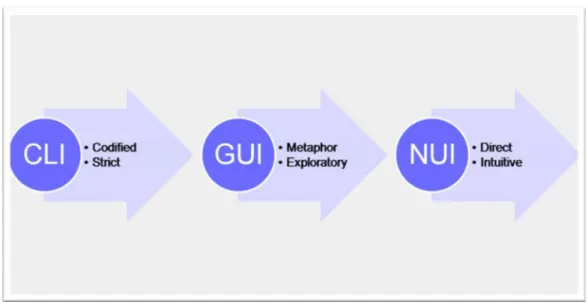
Figure 2. Evolution of user interface. Created by August de los Reyes. ... 30
Figure 3. "Lazy susan table" menu. ... 34
Figure 4. Futura interactive multi-touch tabletop. ... 35
Figure 5. Futura user interface. ... 35
Figure 6. Seamless experience – card game on a multi-touch tabletop. ... 36
Figure 7. Interface of “TouristPlanner”. ... 37
Figure 8. People stand around and interact with “TouristPlanner”. ... 38
Figure 9. Interface of “CityWall”. ... 39
Figure 10. Visitors interacting with “Tree of Life.” ... 40
Figure 11. Welcoming screen of "Create a Tornado." ... 46
Figure 12. A female narrator explaining the basic science behind tornadoes in "Create a Tornado." ... 46
Figure 13. Interface of the control panels in "Create a Tornado." ... 46
Figure 14. "Create a Tornado" panels working together to generate a tornado... 46
Figure 15. A long, horizontal tabletop for user interaction in " Electromagnetic Spectrum." ... 47
Figure 16. Appearance changes under different EM spectra in "Electromagnetic Spectrum." ... 48
Figure 17. Both sides of the "Electromagnetic Spectrum" display provide users with information. ... 48
Figure 18. Visitors interact with "Electromagnetic Spectrum" by dragging and rotating cards. ... 48
Figure 19. Welcoming screen for "Academy Lab." ... 49
Figure 20. The interface of a subsection of "Academy Lab." ... 50
Figure 21. Video screenshot of "Academy Lab" with an activated button. ... 50
Figure 22. The "Academy Lab" display in front of the real lab the installation describes. ... 51
Figure 23. The large wall diagram of the exhibit. ... 52
Figure 24. Simulated display on screen... 52
Figure 25. A visitor interacting with the program. ... 52
Figure 26. Screenshot highlighting the problematic small interface of the program. ... 52
Figure 27. A visitor interacting with the game. ... 53
Figure 28. A screenshot of the game. ... 54
Figure 29. Display of early human skulls from the exhibit. ... 54
Figure 30. Interface of the first category. ... 55
Figure 31. Interface of the third category. ... 55
Figure 32. Movement of portraits along button moves. ... 55
Figure 33. A two-section interface. ... 56
Figure 34. Interface for the art collection. ... 57
Figure 35. Interface showing Karoliks family members. ... 57
Figure 36. Embedded video... 57
Figure 37. Interface of the portfolio on an iPad. ... 58
Figure 38. Detail of the portfolio... 58
Figure 39. Welcoming screen of the digital exhibit. ... 60
Figure 41. Detailed view of an artifact. ... 60
Figure 42. Details and description of an artifact. ... 61
Figure 43. Freestanding iPad display. ... 61
Figure 44. Integration of iPad display with seating... 61
Figure 45. Welcome screen of "What Inspires You?" prototype. ... 80
Figure 46. Hexagon as metaphor in the prototype. ... 81
Figure 47. Hexagons as a basic element of the grid system. ... 81
Figure 48. The simplified grid system. ... 82
Figure 49. Britannic Bold. ... 83
Figure 50. Helvetica Neue Light. ... 83
Figure 51. Welcoming Screen of the prototype. ... 91
Figure 52. The main navigation screen for the three sections (no items selected). ... 92
Figure 53. The main navigation screen for the three sections with “What Inspires Artists” selected. ... 93
Figure 54. Navigation screen for the learning section. ... 94
Figure 55. Navigation screen for the learning section with "Artists Inspired by Image" selected. ... 95
Figure 56. The learning section A-1: a warm-up matching game. ... 96
Figure 57. The learning section A-2: matching cards through the touch interface. ... 97
Figure 58. The learning section A-3: correctly matched cards. ... 98
Figure 59. The learning section A-4: all cards correctly matched. ... 99
Figure 60. The learning section A-5: an incorrect match. ... 100
Figure 61. The learning section A-6: additional learning material about the inspiration of artists, such as Picasso. ... 101
Figure 62. The learning section B-1: the music-based warm-up
activity... 102 Figure 63. The learning section B-2: Connecting shapes with how
music makes the listener feel. ... 103 Figure 64. The learning section B-3: arranging shapes. ... 104 Figure 65. The learning section B-4: adding color to shapes. ... 105 Figure 66. The learning section B-5: completed user-created
music-inspired art with "learn more" selected. ... 106 Figure 67. The learning section B-6: the navigation screen for
music-based learning material. ... 107 Figure 68. The learning section B-7: available learning material for
a music-inspired artist. ... 108 Figure 69. The doing section: The welcoming screen of "What
Inspires You." ... 109 Figure 70. The doing section: Navigation screen. ... 110 Figure 71. The doing section A-1: images available to inspire the
user. ... 111 Figure 72. The doing section A-2: an item from the top row
selected. ... 112 Figure 73. The doing section A-3: Window with user options pops
up after image selection. ... 113 Figure 74. The doing section A-4: pop-up interface with ““Choose
this image” selected. ... 114 Figure 75. The doing section B-1: interface for selecting music for
inspiration (follows screen shown in Figure 70. ... 115 Figure 76. The doing section B-2: interface when a piece of music
is selected. ... 116 Figure 77. The doing section B-3: Window with user options pops
Figure 78. The doing section C-1: Transition from image or music
to subject. ... 118 Figure 79. The doing section C-2: subject interface. ... 119 Figure 80. The doing section C-3: Window with user options pops
up after subject selection. ... 120 Figure 81. The doing section D-1: screenshot from animated
tutorial for drawing step. ... 121 Figure 82. The doing section D-2: second screenshot from tutorial,
guiding visitor through available drawing tools. ... 122 Figure 83. The doing section D-3: invitation to begin drawing that
displays after tutorial... 123 Figure 84. The doing section D-4: the “Show Images” option
allows users to see images that other visitors have
chosen as references for drawing. ... 124 Figure 85. The doing section E-1: the “Send and Share” interface. ... 125 Figure 86. The doing section E-2: the “Send to email” interface... 126 Figure 87. The doing section E-3: the sending process with the
animated “Send” button activated. ... 127 Figure 88. The doing section E-4: The “Leave a comment” dialog
option. ... 128 Figure 89. The doing section E-5: the “Leave a comment” dialog
screen with an in-progress response to a prompt from the
“Question list” on the left. ... 129 Figure 90. The sharing section: the navigation screen. ... 130 Figure 91. The sharing section A-1: the “Drawings inspired by
Images” interface. ... 131 Figure 92. The sharing section A-2: the user can “like” previous
drawing by selecting the star. ... 132 Figure 93. The sharing section A-3: the detailed view of a previous
Figure 94. The sharing section B-1: the interface of the
“Comments” section. ... 134 Figure 95. The sharing section B-2: the “Comments” interface with
LIST OF TABLES
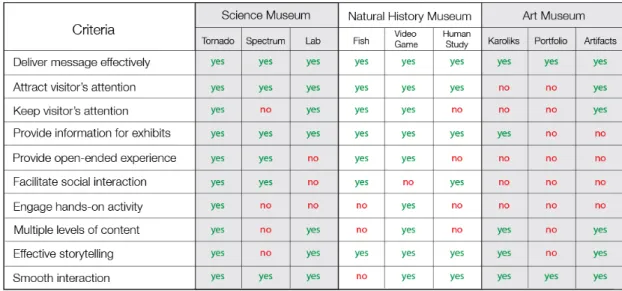
Table 1. The presence of effective criteria for museum interactivity
as observed in three types of museums. ... 63
Table 2. The information architecture of the prototype. ... 78
Table 3. Criteria for effective museum interactivity. ... 137
ACKNOWLEDGEMENTS
First and foremost, I would like to thank the members of my committee for their support. I thank Professor Lisa Fontaine for helping me with various aspects of conducting research, designing prototype and writing this thesis. It was her guidance, support and assurance
throughout the whole process has helped me accomplish this complex but promising project. I would also like to thank Professor Sunghyun Kang, who opened my eyes to the world of
interface and interactive design two years ago, and Professor Dale Niederhauser for his patience and understanding. I would like to offer my sincere gratitude to Professor Barbara Caldwell. Without her valuable suggestions from the perspective of art education, this project would be less effective and practical.
I would also like to extend my appreciation to my friends in Ames, fellow graphic design students, and all my professors in my master’s education. They have helped me get through difficulties and shared my joy of successes in the precious three years.
Last but not least, I would like to express my immense gratitude to those who have been there for me no matter where I am and what I do. They are my wise and diligent parents, my beloved grandmother, and my friends in China.
RESEARCH QUESTIONS
1. What theories and approaches have been used to develop digital interactivity in museums in order to reach their educational goals?
2. Compared to science museums and natural history museums, how do digital interactives of art museums fall short of the learning potential?
3. How can designers change the passive visitor experience in art museums into an active engagement through the design of open-ended interactions?
ABSTRACT
The popularity and influence of digital interaction in museum design has greatly increased along with developments of society and technology. Science museums and natural history museums treat digital interactions, such as multi-touch displays, as important tools in exhibition design that improve the interactivity of visitor experience through open-ended activities. Art museums, however, which mostly focus on displaying art collections and lack hands-on activities in exhibits, have yet to embrace this type of interactivity. The visitor experience in art museums is still relatively passive: their digital interactions are limited to catalogs of art history, which offer few opportunities for personal input. Furthermore, modern art is especially difficult for visitors to interpret and engage. This study is an attempt to address this gap in usage of interactive displays in art museums by introducing open-ended interactions as a way to engage visitors about modern art. It culminates in the design of a multi-touch application,
What Inspires You?, to demonstrate possible approaches that can be used to enrich the visitor experience in art museums through educative perspectives. Museum education literature shows that constructivism is an effective theory for guiding interaction design to personalize visitors’ learning experiences at museums. The conceptual prototype developed in this study is informed by constructivism and a way for art museums to help visitors bridge modern art and personal experience by engaging them with the inspirations that affect art creation and then allowing them to experiment with artistic expression themselves. The prototype combines concepts of museum interactivity, pedagogies of museum education, and multi-touch interface design to enhance dynamic experience so visitors can create their own unique learning experience. This prototype is a new potential approach that can help art museums to engage their visitors more effectively through open-ended interactivity.
OPERATIONAL DEFINITIONS
Interactivity
The degree to which two or more communication parties can act on each other, on the communication medium, and on the messages and the degree to which such influences are synchronized. It includes user interaction, or machine interaction and user-message interaction. (Liu & Shrum, 2002)
Discovery (in context of museum education)
This method encourages visitors to explore information and knowledge through open-ended activities rather than on getting the right answers. (Witcomb, 2006)
Constructivism (in context of museum education)
Constructivism is a theory to explain how human construct knowledge when information comes into contact with existing knowledge that had been developed by experiences. (Glaserfeld, 1989)
Museum interactives informed by a constructivist learning theory are based on a more nuanced understanding of the nature of communication in which the production of
knowledge is embedded in the process of communication, and there is awareness that this is two-way. There is the opportunity for visitors to create their own personal story out of offered information. It allows visitors to make their own meanings and then document those for others. (Witcomb, 2006)
Information utility (in context of museum education)
Information utility is a channel to add value to museums by opening two-way flows of information between museums and visitors. If we define information broadly, it may be
an experience involving some combination of intellectual, aesthetic, sensory, spiritual or emotional character. Key functions of museums: to collect, preserve, study, exhibit, and interpret. The museum can be defined as information utility to public and encourage the transition from displaying artifacts as the main function to information communication for adapting to the new world. (MacDonald & Alsford, 1991)
Multi-touch
Multi-touch technology allows a touch screen to sense input from two -- or more -- points of contact at the same time. This allows you to use multiple finger gestures to do things like pinch the screen to zoom in, or spread the screen to zoom out.
Visitor experience
There are two dimensions to the visitor experience: inside and outside.
Inside: the experience happens in the visitors’ perceptions. It’s seen from their point of view, created by a combination of their feelings, sensations and prior experiences. Outside: an experience is made up of many separate pieces outside the visitor. The outside dimension begins the instant a person decides to visit, continues throughout visiting time, and ends when the person leaves. (Weaver, 2007)
CHAPTER 1: INTRODUCTION
According to the International Council of Museums (ICOM),
“A museum is a non-profit making, permanent institution in the service of society and of its development, and open to public, which acquires, conserves, researches,
communicates and exhibits, for purpose of study, education and enjoyment, material evidence of people and their environment.” (ICOM, 2005)
Museum design is content-driven, informative, educational, and entertaining. Exhibitions in museums can either be in place for decades or travel around in a relatively short time. In general, the interpretive techniques must be accessible to all types of audiences. A combination of static/passive and dynamic/interactive components provides diverse audiences with multiple layers of information to get into the story. History museums mainly use artifacts, text, and archival images to answer the question “what happened before?” in a linear chronological path. Science museums try to translate dry and confusing scientific concepts into a story that the public can easily digest. The story can be told using multimedia and interactives in various ways. Children’s museums use a large amount of interactions in colorful exhibits, which engage
children to learn through creativity and experimentation. These exhibits challenge children physically, socially, and emotionally (Lorenc et al., 2008).
However, unlike the previous museum types, art museums have not found it easy to provide interactive visitor experiences. Exhibition design in art museums is in some sense limited, because their focus is not on teaching broad concepts, but rather on displaying collections of objects (such as paintings, sculptures, multimedia works, and installations) that visitors can only interact with through passive observation. In an attempt to increase visitor interactivity, most art museums provide handheld guides with audio tour in order to enhance art
interpretation and empathy (Tallon & Walker, 2008). Recently, some of them have started utilizing apps on smart phones to replace traditional handheld guides. These apps integrate multiple functions, such as tour guide, exhibits information, membership activities, and maps. However, they are static in nature because they are simply collections of information. Another limitation to these applications is that they are presented through small screens that only allow one person to interact at a time.
In general, the public feels dissatisfied with cultural institutions for five reasons: 1. Cultural institutions are irrelevant to the visitor’s life. 2. The institution never changes. 3. The authoritative voice of the institution doesn’t include the visitor’s view or give the visitor context for understanding what’s presented. 4. The institution is not a creative place where visitors can express themselves and contribute to history, science, and art. 5. The institution is not a
comfortable social place for the visitor to talk about ideas with friends and strangers (Simon, 2010).
Exhibits in art museums play the role of a dominating lecturer. When walking into an art exhibit, visitors only expect to communicate with artwork and the theme of the exhibit visually and mentally. Vision is useful for quick digestion, but weak in facilitating deep art interpretation. Additionally, these exhibits are typically aimed at adults because it is difficult to keep children and teenagers’ attention onto passive content. However, museum interactivity and art education research have shown that hands-on activities and social interactions greatly improve
effectiveness of exhibits (Beale, 2011; Wachowiak & Clements, 2001). Art museums are fundamentally concerned with visitors’ ability to apply what they learned at the museum in the context of daily life, and could therefore benefit by applying this research and integrating more interactive and social displays. In the past, art museums have challenges when attempting to
engage visitors with physical hands-on activities due to space limitations. Instead, art workshops, which are operated in independent areas of museum buildings, take over the function and
responsibility of interactivity and approachability to visitors, especially children and teenagers. However, these workshops are usually disconnected with exhibits, and require specially
scheduled, often lengthy activities.
Recent improvements in multi-touch technology and related interaction design help make such technology a potential way for art museums to integrate interactive exhibit design in a space-efficient way that engages visitors near relevant art displays. The general public is familiar with touch screens and multi-touch applications, making them an attractive option for engaging visitors in museum displays. Research has suggested that multi-touch technology is particularly attractive to children and teenagers (Marshall et al., 2011), an audience art museums traditionally have trouble reaching. Therefore, a multi-touch tabletop application is a good choice to explore the possibility of interactivity in art museum displays. Such applications are flexible to install and attractive to visitors. Furthermore, interactive applications on large multi-touch tabletops are working effectively in science museums and natural history museums. Therefore, it is likely that art museums could also effectively use this kind of display.
The main goal of this study is to develop a meaningful conceptual prototype with
interactive content that allows art museum visitors to learn through open-ended experiences. The prototype is intended for use with a large multi-touch screen on a kiosk. It would be installed in an area of an art museum that provides seating for visitors, which will help attract families with children and school groups. Visitors may interact with this prototype individually or share their experience in a group through collaboration.
To achieve this goal, the prototype was researched and designed through a combination of museum interactivity, museum education, and interface design theories that center on multi-touch technology. Each area has its own fully developed philosophy and system. The following chapter closely examines the relevant literature in these areas. To get a complete picture of existing digital interactives in the museum world, field observation of museum digital
interactives around the United States has been conducted. Information collected in these field observations is documented and analyzed in the methodology chapter of this thesis. The
methodology section culminates in a conceptual prototype of a multi-touch tabletop application,
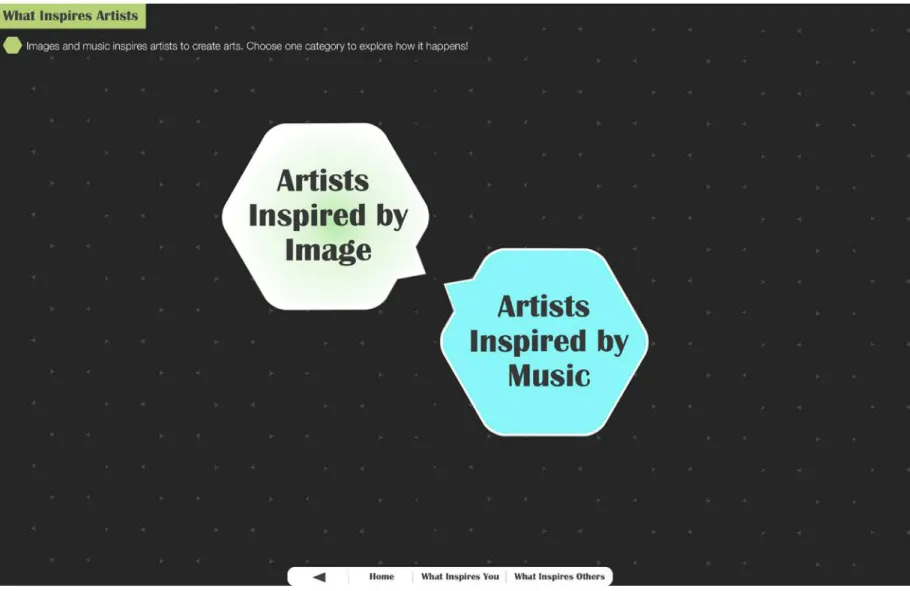
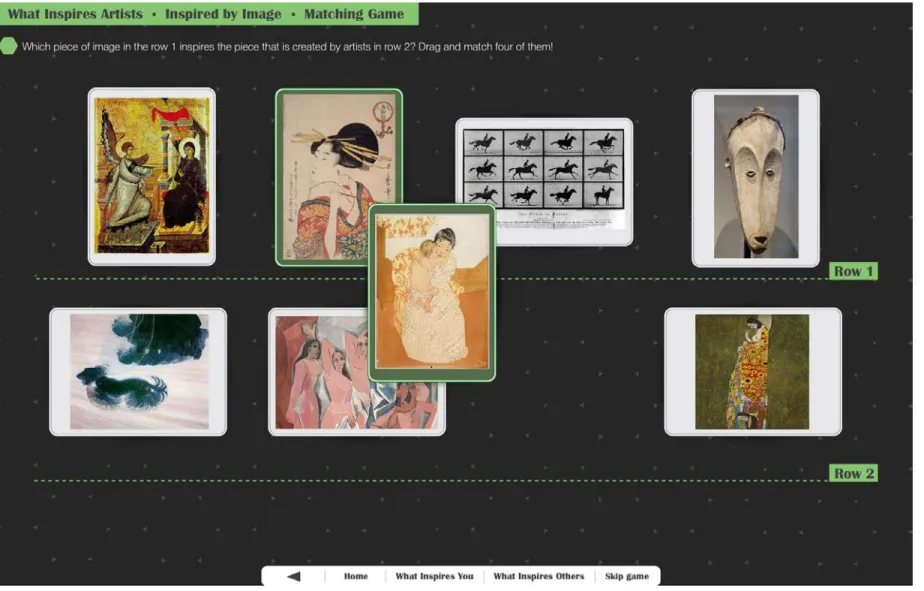
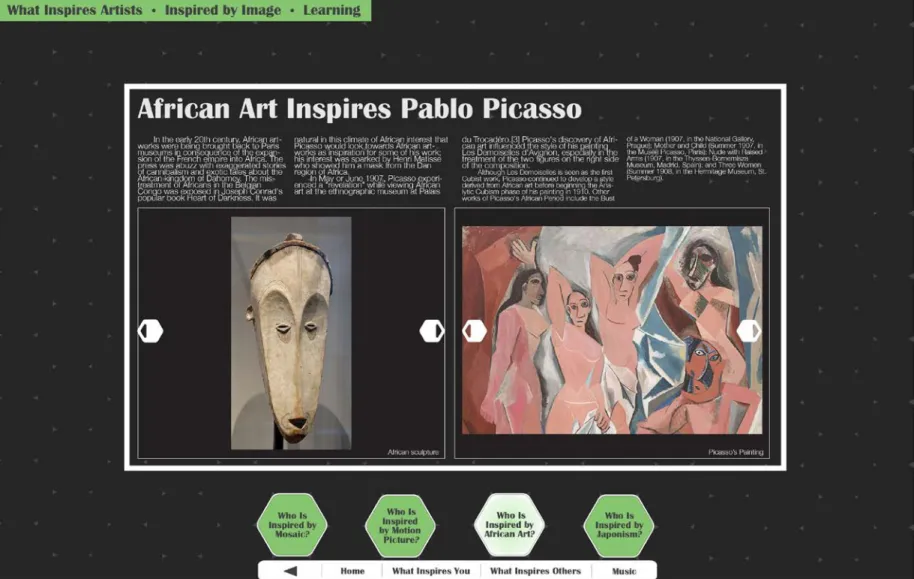
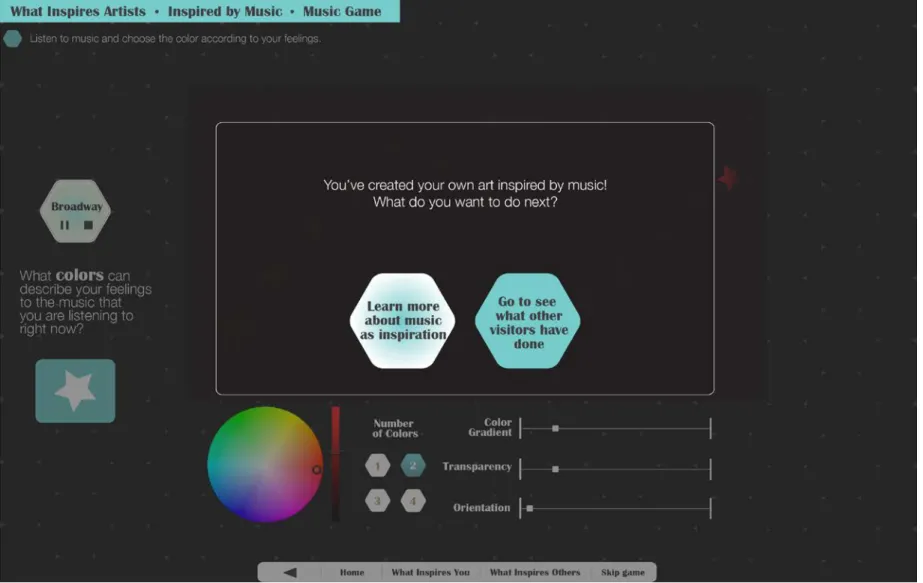
What Inspires You?, which allows open-ended immersive experiences that engage the visitor through personalized learning that connects modern art to their daily lives. Two tables of criteria – one for museum interactivity and one for interactive design – were constructed based on the literature and used as guidelines and evaluation criteria for this application.
CHAPTER 2: LITERATURE REVIEW Museum Design
Museum design involves a variety of areas, including exhibition design, 3D design, museum interactivity, graphic design, digital interaction design, and information design. Each branch of design has its own emphasis. In this section, museum interactivity, exhibition design, and digital interaction have been explored for this study.
Museum Interactivity
A museum is a place that materializes and visualizes knowledge (Fyfe, 2006). A
museum’s function is to collect, preserve, and present information and knowledge for the public to appreciate and learn from. To compete with the entertainment industry, modern museums are attempting to move away from the perception that they are boring educational institutes by becoming active learning centers where people, especially young children, can discover new knowledge about the world and challenge themselves (Falk & Dierking, 2000). Therefore,
interactivity becomes one of the most important design tools to attract visitors to come back to museums. Hands-on exhibits, playful programs, and educational adventures refresh visitors’ minds with new experiences while they are visiting “traditional” museums. A combination of ordinary displays of objects and images with creative interactions offers an effective method for designers and museum experts to make the visiting experience more attractive and meaningful.
The idea of interactive exhibits has a long history. It can be traced back to 1889, when the Urania in Berlin contained visitor-activated models and was popularized in the 1960s when the New York Hall of Science, the Lawrence Hall of Science, and the Exploratorium all started adopting interactivity into their exhibits. There is a strong association between interactivity and science museums and science centers. Science museums and centers use diverse hands-on
exhibits to enhance learning experience of visitors. Those hands-on exhibits are usually presented through some technological media: for example, an exhibit with a device involving physical activity that the visitor can operate is added to the main display (Witcomb, 2006). These interactive programs successfully attract people to spend more time manually manipulating components of exhibits (Hinrichs, 2008). Interactive exhibits are especially attractive to children and families, who form the mainstay of museum audiences (Kidd et al., 2011).
The entertainment and media industries adopted interactive features into their developing process relatively quickly. However, interaction in the museum context is different because it not only provides a playful experience but also allows the visitor to become more engaged with the material. The museum world can be treated as part of a contemporary language of the mass media (Witcomb, 2006). Especially in the twenty-first century, interactive media (such as the Internet, smart phones, and video games), have become a main part of people’s lives. One-way instruction is gradually replaced by interactive communication that offers an immersive learning experience.
When designing interactive exhibits, designers and museum experts usually utilize
discovery and constructivism as pedagogies to construct interactivity in the context of the museum. In modern museums, these two pedagogies work together to promote the construction of meaning. Compared to the didactic expository model (when the visitor can only receive information passively) and stimulus-response model (when the visitor can only stimulate one correct answer to get response), the discovery approach empowers the visitor to explore open-ended results. The focus is on exploration rather than on getting the right. Andrea Witcomb calls these interactions “dialogic interactivity”. She explains that
dialogically interactive exhibitions tend to make an effort to connect with visitor by representing aspects of visitors’ own cultural backgrounds and using open-ended narratives. (2003)
For example, some exhibitions have incorporated visitor comments into the exhibition space and a few art museums have even encouraged visitors to add their own labels to displayed works (Nashashibi, 2002).
Another approach towards museum interactivity is “play”, which integrates games, interactions and learning to create immersive visiting experiences (Beale, 2011). Games enable discovery and also allow the museum to become a social space so that it can facilitate co-experience. In games, the player is more important than the objects in the context of the
museum1. “Often games enable the audience to be in charge, gaining a closer relationship to the museum objects or stories” (Beale, 2011).
The key to successful visitor learning is to “help bridge the original contexts of museum objects with visitors everyday lived context” (Froes et al., 2011; Falk & Dierking, 2000). That is why designers should think about a single sentence message of “what you want the visitor to take away from the game” before idea creation starts (Cutting, 2011).
Spaces that achieve poetic and affective responses through a highly aesthetic form of exhibition are also working with notions of “immersion” and “experience.” Compared to science museums and centers that incorporate a large amount of interactive exhibits, art museums and galleries are still struggling with this issue. Various art museums have also begun to explore the possibility of interactive exhibits especially for children. For example, at museums such as Art Museum of Western Virginia and Arizona Museum for Youth, exhibitions displayed
1Objects in the museum will be the collection.
A variety of styles of presentation, conceptual approaches and educational philosophies but all incorporated a variety of sensory experiences and interactive elements to attract the interest of children, encourage creative thinking and enhance learning about visual arts. Some exhibits examined the processes of art production, the tools and techniques of artists; others explored the formal elements such as pattern, line, color, or the subjects which fascinated the artists. (Simpson, 2002)
These examples demonstrate that art museums and galleries are beginning to include more interactivity into exhibits to make art more accessible to the visitor. However, they still have a long way to go compared to science museums and natural history museums. They have a great deal of room to use interactivity to improve the visiting experience. It is important for that art museums make this change, because interactivity in museums is not just a trend. Rather, interactive exhibits will be a key tool in engaging visitors and creative immersive educational experiences for them.
Exhibition Design
Exhibition design creates environments that communicate with people by melding
communication design and the built environment. Exhibition design is an integrative process that involves a large number of factors (such as environmental graphic design, print graphics,
electronics and digital media, mechanical interactives, lighting, audio, interior design,
architecture), requiring exhibition designers to work in multidisciplinary teams (Lorenc et al., 2008). Exhibition design can be applied in public spaces, such as museums, public centers, trade shows, and showrooms.
Exhibition environments are usually located at places of intense social interaction. A host of people gathering around and interacting with the exhibition environment makes exhibition
design unique and dynamic. However, the dynamic of groups also helps establish rules for designers. When working on projects, designers need to decide who their viewers will be. These rules also impact exhibition design. “It is important to work with a client to determine the types of visitors they already attract, as well as those they want to bring in” (Lorenc et al., 2008).
Usually, people behave very differently based on their identities and backgrounds. For example, if a family wants to enjoy an exhibit together, then content and communicative techniques should be presented in multiple layers so that each age group is able to participate simultaneously.
The understanding of exhibition design is changing over time. Exhibitions are now judged on the quality of their stories and presentation instead of the collections they display. Storytelling has become recognized a very powerful way to communicate ideas. Designers have moved exhibition design toward immersive environments and large-scale spectacle, both of which help tell stories by creating affective and sensory experiences. Although human tour guides in museums probably will never be replaced, tools from new technology (such as touch-screen kiosks, personal digital devices, apps, and the Internet) are enriching visitor experience. Therefore, experience design and participatory design work effectively in exhibition design, especially when interactive elements make passive exhibitions dynamic and help to enhance visiting experiences.
The goal of exhibition design is to inform and promote this topic of each exhibit to audiences. Furthermore, it enhances visitor experience by providing an immersive and
communicative environment with a compelling story and dynamic interpretive techniques. This provides a powerful tool to museums for creating appeallilng educational exhibits: “The desire to be surrounded by a story in a public space, to be told stories dynamically, and to have an
interactive experience blended with real environments will forever drive design decisions” (Lorenc et al., 2008).
Digital Interaction in Museum Design
The museum as information utility to public encourages the transition from displaying artifacts as the main function to being center of information while adapting to the new world. In the current culturally diverse and dynamic society, museums serve a vital role as witnesses to civilization. (MacDonald & Alsford, 1991). To enable museums to fulfill their role as
information providers for society, museum design has stepped into the digital age. A variety of technological means have been used to enrich learning experiences and information sharing, such as websites, handheld guides, apps on smart phones and tablets, QR codes, tabletops with
multi-touch interfaces, and even gesture-based technology.
However, although it is easy to introduce interactivity at relatively superficial levels, it is challenging to provide meaningful participation (MacDonald & Alsford, 1991). Interactive digital programs have gone through many experiments and practical applications. Especially in the context of science museums, museum designers are using exhibition design to integrate a large amount of digital technology into their displays. Consequently, visiting a science museum has become a journey through immersive technology shows. Nowadays, museum websites are building virtual spaces to engage viewers by including digital objects and information on the Internet (Huhtamo, 2002). A variety of handheld technologies have been explored and utilized in different settings, including traditional audio tours in art museums and apps on smart phones and digital tablets in various museums. Apps are gradually becoming a main tool of museum tours, and are replacing traditional audio tours. Additionally, they integrate diverse functions, such as artifact information, exhibition schedule and location, floor plans including GPS, and even social
interaction. Furthermore, Konstantinos Arvanitis believes that mobile media not only bring museums into everyday life by offering their users the opportunity to access the museum content remotely in their own space and time, but they also attract visitors back to museum for the everyday knowledge (2005). Therefore, museums “without walls” are able to serve better as the information utility.
This growing recognition of the importance of social interaction in museums and galleries can be seen as part of a broader trend, a trend that is increasingly placing
‘interactivity’ at the heart of the agenda, not only in science museums and science centers but also increasingly in the arts – and not just the contemporary arts. (Heath & Lehn, 2003)
Collaboration is another way to help visitors learn and engage with knowledge and objects. However, most interactive exhibits only focus on single users rather than enhancing collaboration and social interaction among visitors. Of course, the purpose of the interactivity is to enable visitors to look at objects with a deeper understanding. Early kiosk-based computer exhibits featuring mostly film and audio content are gradually being replaced by multi-touch tabletops; consequently, a new generation of multi-touch interfaces is being introduced in museum design. Interactions with multi-touch technology and computer interactives keep visitors at exhibits longer, which allows the concepts and content of exhibits to have more opportunity to trigger meaningful interpretation from visitors. Multi-touch interfaces are usually designed to be playful, imaginative, and immediate, which attracts visitors to touch and dig deeper. Furthermore, museum designers and experts tend to integrate these interfaces into the narrative flow of exhibits to make interactions even more natural (Kidd et al., 2011). The visual appeal of interfaces in a museum context is highly important because it influences visitors’
motivation and helps the visitor to derive information through interaction and context. In general, interaction techniques for museums should be as intuitive as possible, based on the “walk-up-and-use” principle, to help visitors understand the interaction and information easily. According to different time spans that visitors might spend on these interactives, both short-term and long-term exploration should be rewarded. Collaborative exploration of information encourages social interaction among visitors, and requires careful design of division of labor in case multiple visitors interact with interfaces simultaneously (Hinrichs et al., 2008). Because modern museum design tends to empower visitors, usability comes into designers’ focus as well. Ben Gammon has compiled a list of findings on interaction design from five years of watching visitors getting computer exhibits wrong. He found, for instance, that some visitors probably have “techno-fatigue rather than technophobia,” or that they are “expecting something exciting, colorful, challenging, with graphics, sound, movement” from interactives rather than a simple information display (1999).
Gesture-based technology is a promising means for engaging the public because it is user-friendly and familiar to the general public, because it has been widely adopted in consumer electronics. It has recently been adopted into science museums and centers. Usually this
technology integrates video and animation, such as games on Wii and Xbox Kinect. Because researchers are still working on its accuracy of reacting area in public space (Roccetti et al., 2011), this technology needs more time to demonstrate its potential for museum use in the future.
Museum as Educational Infrastructure Learning from Museums
Museums, by their very nature, are educational institutions. This fact had been recognized since at least the early nineteenth century (Hooper-Greenhill, 1991) Although
museum education doesn’t have a very long history, it has profoundly affected European
museums during two “reform” periods: the first from the mid-nineteenth century to World War I, and the second in the inter-war period, 1919-39. The first reform was characterized by a strong emphasis on illustrating national and imperial strength. The second period emphasized
nationalistic political themes as well as on exhibiting new conceptions of art and science (Hein, 2006). In a seminal report by the American Association of Museums, Excellence and Equity, the educational role of museums was identified as the core to museums' service to the public. The report “speaks to a new definition of museums as institution of public service and education, a term that includes exploration, study, observation, critical thinking, contemplation and dialog” (American Association of Museums, 1992).
Because museum education currently plays a significant role in museum settings, educational theories have been researched and developed to improve it. Research from the past century has resulted in almost universal agreement that learning is an active process that requires engagement. This process is significantly modulated by the learner’s previous experience, culture, and the learning environment (Bransford et al. 1999; Falk & Dierking, 2000). This recognition of the active learning process has resulted in a shift in perspective toward focusing on visitors. The social sense of museums and constant changes of current social constitutions have necessarily increased importance of multiple viewpoints of museum interpretation.
On this point, Falk and Dierking, who are chief researchers at the Institute for Learning Innovation and have focused on museum education for more than two decades, developed one concept to emphasize the necessity of understanding visitors. This book, Learning from Museums, explores three different contexts that affect learning experience of all visitors: the personal context, the sociocultural context, and the physical context. Learning is a very personal
experience. Usually, learning flows from appropriate motivational and emotional cues. Learning is also facilitated by personal interest and expressed within appropriate contexts. “New”
knowledge is constructed from a foundation of prior experience and knowledge.
Falk and Dierking suggest that learning in museums is a fundamentally social experience, which is affected by social cognition, culture, communities of learners (families, couples,
friends, etc.), story-telling, and modeling. Furthermore, learning is immersed within a physical context, but still requires ability of transfer from one context to another in order for visitors to digest and use knowledge that they learn from exhibits. Usually, visitors come to museums with expectations based on their personal motivations, interests, or history relative to museum-going. Exhibition design affects family learning and interaction of families visiting museums. The museum activities encourage children from school groups to interact socially with one another and engage in related learning experiences back at school. Besides learning new knowledge in museums, adults also get benefits to maintain social relationships, forge new sociocultural bonds and reinforce old ones. The physical place for learning is also very important. It is the point where exhibit design plays a significant role. Design facilitates conceptual organization, which allows visitors to create meaningful chunks of knowledge. Successful museum exhibitions can move visitors to a higher level of understanding. Today, there are more factors that allow visitors to follow up and extend their museum learning experiences as means of reinforcing experiences outside the museum, such as the Internet (Falk & Dierking, 2000).
Falk and Dierking also developed the “Contextual Model of Learning,” which bases the concept that learning is a dialogue between the individual and his or her environment through time. This model identifies eight key factors that influence learning:
1. Motivation and expectations
2. Prior knowledge, interests, and beliefs 3. Choice and control
Sociocultural Context
4. Within-group sociocultural mediation 5. Facilitated mediation by others Physical Context
6. Advance organizers and orientation 7. Design
8. Reinforcing events and experiences outside the museum
To evaluate museums as educational institutions, evaluation studies must be conducted through interviews, surveys and observations. Questions in surveys and interviews should focus on certain details of knowledge in exhibits. The difference between visitors’ pre-impression and post-reactions towards a sample topic is also an effective measurement in evaluation. Falk and Dierking list and describe several examples to demonstrate this point. One exhibit, World of Life
at California Science Center, has been documented in detail regarding how visitors reacted to one specific point in this exhibit before and after visit, which proved its success. In Art Around the Corner program of the National Gallery of Art, school students visited exhibitions and talked about some specific paintings by following educators in gallery. Students’ written responses were analyzed along four dimensions: (1) vocabulary used to describe the painting; (2)
interpretive devices used to analyze the painting; (3) support for the interpretive devices used; and (4) overall response to the painting. The exhibit was judged to be successful because
students were able to use some professional vocabularies and interpretations in art appreciation and criticism (Falk and Dierking 2000).
In order to understand museum education, we must understand the informal and voluntary nature of most learning associated with museums. Therefore constructivism became popular in museum education.
If the educational intention of museum exhibitions is to facilitate visitor meaning-making, then this has a profound impact on the nature of exhibitions and how they are
conceptualized and constructed. Most obviously, if the goal is to facilitate visitors’ opportunities to reach their own understandings, then the authoritative curatorial voice needs to be muted and modified. Museums have addressed this issue in a variety of ways, including by providing several different interpretations of an object or exhibit or by encouraging visitors to add their comments. Some exhibitions have incorporated visitor comments into the exhibition space and a few art museums have even encouraged visitors to add their own labels to displayed works (Nashashibi, 2002). Other strategies have included posing provocative questions to visitors, rather than answers; or seeking to upset linear or chronological representation. (Hein, 2006)
George Hein suggests that having a “meaningful experience” is more effective than attempting “defined content outcome” in museum settings. Museums and exhibits need to find a way to lead visitors toward inquiry for further education. (Hein, 2004) Then visitors may apply the inquiry and solution of problems into their daily life.
Art Education
Interactives in art museums offer not only background information to the public, but also serve educational purposes by inviting, as well as providing, interpretation to visitors when they react to art works.
“The essence of art is the spark of insight and the thrill of discovery – first experienced by the maker, then built into the work of art, and finally experienced by the viewer” (Perble & Perble, 1994).
Art is influenced by a series of experiences that affect things such as perception, awareness, ways of seeing, visual thinking, beauty, aesthetics, and creativity. Even if people think art is only the personal expression of artists, it is still a form of visual communication and language that can reach a broad audience.
In her article “Art – A Serious Work,” Carol Seefeldt says that children need many interesting experiences in classroom and community, and encouragement to think, talk, and create art in response to their experiences (1995). Visitors in an art museum, including children and their parents, also need interesting experiences as their sensory memories are involved with emotions and creativity to produce art. Personal experience serves as a main factor of art
motivation (Clements & Wachowiak, 2010).
To communicate a basic understanding of the visual aspects of art, some fundamental elements and principles of art should be conveyed to learners when educators design educational art activities. It is difficult to learn about art without references to the visual aspects of art as people strive to express their feelings and ideas. These elements are line, shape, value, color, space, texture, and pattern. Principles are balance and symmetry, variety, repetition, emphasis, and domination-subordination. Learners are supposed to get basic experience about these
elements and principles and learn to use these professional vocabularies as a result of art education (Perble & Perble, 1994; Clements & Wachowiak, 2010).
One of the teacher’s greatest challenges is to help students become aware of the color, structure, pattern, beauty, and variety in nature and daily life. A general tendency to promote motivation for artistic creation is to combine recalled experience and direct perception in nature and daily life. Recalled experience means impressive and interesting memories that the learner has had before and now recalls. Direct perception involves objects or events that are presented in front of one’s eyes. Both methods supplement each other effectively. Exhibiting one’s work is also motivating. In school, teachers sometimes put students’ work on walls along hallways to encourage further motivation from students.
Students should be urged to draw and make art about what they have learned. They should also be urged to talk about art. It is important for teachers to conduct discussions of aesthetics. The most effective teaching strategy in leading discussions is to encourage students to question, which promotes critical thinking. Aesthetics focuses on the ideas behind the artwork and the beauty of the artwork shown through design and means while art criticism focuses on one artwork itself. Therefore aesthetics usually tracks back to the reason and meaning to create art, which is meaningful and inspiring for amateurs. Some examples of aesthetic topics and questions include:
• “Can a picture that looks like the artist just threw paint around be called good art?”
• “If someone gets a different idea or meaning than you intended from your picture, does that mean your art is not as good? Is it better if the person knows exactly what you wanted to say?”
• “Are artists born or made? Does art that looks as though little children made it mean that it is not good art? Do people with many years of education usually make better art than people with less education?” (Clements & Wachowiak, 2010) Because human interaction is becoming more global and international, and thereby greatly influenced by diverse cultures, technology, politics, and immigration, art is now becoming influenced by multiculturalism much more than before.
Multiculturalism, more than an attitude but less than a theory. It can mean a cultural pluralism in which the various ethnic groups collaborate and dialog with one another without having to sacrifice their particular identities and this is extremely desirable. But it can also mean the bankrupt concept of the melting pot with its familiar connotations of integration, homogenization and pasteurization. (Joo et al. 2011)
Art education under multicultural pluralism, especially in the United States, is changing from the mastery of a language to one of interpretation. Whether in an art museum or an elementary school class, learners come from various cultural backgrounds, which bring attention and respect onto art works from different cultures. Cultural democracy encourages art educators to think about art in perspectives such as race, gender, class, nation, and religion. As one of society’s major institutions dealing with the transmission of culture, the museum in America plays a major role in determining what is considered art (Clements & Wachowiak, 2010). In this cultural democracy, learners belong to a culture of their own, with values specifically determined by their personal identity and history. The only conditions necessary for the creation of environmental learning are access to an equal space of learning where learners have confidence to speak their own understanding and to show their own creations. (Joo et al. 2011)
Technology can also be involved in art education. There are many diverse applications (games/online videos) claiming that they are aids for learning art. However, in discussing the notion of “networked equality,” Omar Wasow, a leading technology theorist, talked about the downside of these aids. He thought some digital products were like junk food, which was not necessarily increasing critical thinking. Designers need to focus much more on how to produce high-quality educational software in order to allow digital products function like a tutor, which helps cultivate wisdom (Joo et al. 2011).
Electronic media, such as computers, smartphones and tablets, encourage the
constructivist view of art education. Students construct their personal knowledge bases through active learning. Some digital educational programs not only support children’s drawing and painting, but also integrate slide shows, QuickTime movies, and sound recording. Pictures created by children can be emailed to parents. Children can also post their artworks onto blog in order to receive feedbacks of peers. Research also shows that computer art can be taught to small groups of children because they can learn computer skills as effectively in small groups as they can individually. Therefore collaborative projects can be encouraged in art classes. This is a natural call from the development of technology. Art educators certainly should take advantage of technology to contribute to their own work (Clements & Wachowiak, 2010).
Art Museum Education
Art museum education is a melting pot of museum education and art education, where both fields meet and function in a mutual manner. Art museum education attempts to find a balance between these two fields and keep developing them as times change.
Art museum education and practice has been a dynamic field since the 1960s. Many museum education theories and art education theories have been tested in practice. However, the
field continues to change due to developments in of society, technology, politics, philosophy, and economics.
A visit to the art museum in 1960s was like “taking a dose of cultural medicine – it’s good for you but tasted bad going down.” At the time, educators were trained as art historians who had academic knowledge of art and teaching practice. They acted as lecturers who were models of authority and transmit expert information about the collections to the passive visitor (Mayer, 2005).
In the 1970s, educators started looking into educational psychology, the psychology of vision, and art learning through interactive techniques, which included concepts such as creative drama, creative writing, questioning strategies, looking games, storytelling, hands-on activities. (Sternberg, 1989) Art museum educators looked for ways to displace passive listening with interactive tours. In the late 1970s, Lee coined a phrase visual literacy, which suggested that aesthetic education should be the “primary task” of an art museum (1978). Based on this theory, educators began to use phrases such as “aesthetic awareness”, “appreciation”, “skill of looking”, and “know how to see” (Mayer, 2005).
In the 1980s, visual literacy and master teaching became popular in art museum education practice. Master teaching, developed by Philip Yenawine for use in museum education, takes visual literacy as a basic component. It indicates values of great teachers and their teaching skills. It actually enables learners to “get” a concept by providing related information, focuses, context of the artworks and the learner’s life. It started encouraging personal connections of visitors with artworks (Mayer, 2005).
“Interpretations are born when people make connections between what they see and what they know about art and life. Multiple interpretations, even contradictory ones, work together to illuminate a work.” (Hubard, 2007)
In the 1990s, museums empowered visitors based on the ideas of educators who thought the function of museum was to serve people instead of objects. It was a strong statement and radical reform. However, it fit into larger societal development. Theories supporting this new concept are also called “postmodern art museum pedagogy”. Danielle Rice identified this
pedagogy as an interpretive dialogue between viewer, work of art and respective contexts (1995). Visitors may get personally significant experiences with museum objects this way. The center of meaning making had been moved to construction of visitors’ own museum meanings. (Mayer, 2005)
Juliet Moore Tapia believes that there are three distinct categories that constitute modernist traditions in museum education. They are (1) Humanist Pragmatism, which includes institutes such as the Boston Museum of Fine Arts and the Metropolitan Museum of Art, which are “civilized” and “capitalist”; (2) Idealistic Inclusiveness, which describes institutes such as Newark Museum, which could be seen as an “Institute of visual instruction”; (3) Aesthetic Formalism, which includes institutes such as Cleveland Museum of Art, which holds that museum should help “the establishment of standards of truth and beauty” (Tapia, 2008).
On the other hand, diverse educational theories have been utilized in terms of different features of exhibits in these types of museums1 based on the educational backgrounds of educators and curators. Some of them belong to postmodernist theories. As most museum
1These theories have informed the practice of a large number of museum educators and the research of education:
Howard Gardner’s theory of Multiple Intelligences, Abigail Housen & Phil Yenawine’s Visual Thinking Strategies, Csikszentmihalyi’s Flow or Psychology of optimal Experience, Piaget’s Theory of Cognitive Development, and Vygotsky’s Sociocultural Theory of Learning.
curators and educators today would claim that they are constructivists, constructivism and the “Contextual Model of Learning”by Falk and Dierking are becoming popular in interpreting this world through the perspective of museums. (Ebitz, 2008) Visitors come from different personal, sociocultural and physical contexts, which also means that they are real and constructive in interpretation. Curators, educators, and visitors together construct museum worlds. Through the integration of curators’ intention and information, educators’ knowledge and strategy and visitor’s contexts, meanings of artworks get fulfilled. The process of construction generates an impressive experience for visitors.
Human-Computer Interaction Design
Nowadays, people are surrounded with a variety of digital media that require interactions between human and computer. Interactive media has become one of the main methods of
receiving information. Because museums function as information utility, it is the author’s belief that an increased use of interactive media will empower visitors and enrich the visitor
experience, and museums will keep attracting people to come back by offering information in an appealing way. Therefore, principles and practices for human computer interaction need to be explored in order to develop better design solutions for museum interactivity.
User Interface Design
In speaking about the human-computer interface and user interface design, Bill Buxton says, “this has always been about where the human and the computer meet” (2007). Interface design takes as its responsibility to make communication and interaction between human and computer easier to use and understand. Interactions become enjoyable and smooth when good user interface design does its job. There are several versions of golden rules of interface design
in professional world. The most famous is from Ben Shneiderman’s “Eight Golden Rules of Interface Design”, which are insightful, easy to grasp, and practical to use:
1. Strive for consistency 2. Cater to universal usability 3. Offer informative feedback 4. Design dialogs to yield closure 5. Prevent errors
6. Permit easy reversal of actions 7. Support internal locus of control
8. Reduce short term memory
(Shneiderman, 2003)
When users try to work with a computer screen, they are expecting an easy and smooth experience that cares about each move they make and each option the interface presents in the right place. Suzanne Watzman (2008) has commented on the importance of visual design:
Good visual design is the tangible representation of product goals. It is concerned with the ‘look’, the method, and the style in which the information is presented. It should be the result of a thoughtful, well-considered process, not merely a decorative afterthought.” A well-designed interface should be able to motivate users, increase ease of use and accessibility, increase the accuracy and retention of information, and focus on needs of its users. (Watzman, 2008)
According to work flow now common in the professional field, several steps help
designers to create a usable interface. These steps have been described in a variety of ways, with differences originating from different perspectives of design and details of motivating projects,
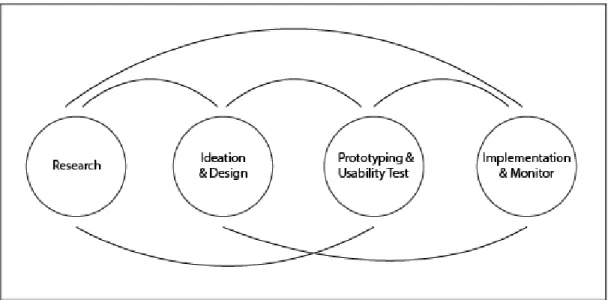
but they are still fundamentally similar.1 Generally, four steps are necessary to make a successful design. First, designers need to research their target audiences (users) and working context by asking questions such as: “who are our users? When will they use this product? How can the design most efficiently and effectively present information required for ease-of-use of this product?” Second, designers need to brainstorm ideas and design the product according to previous research about users and contexts. Thirdly, designers and programmers must work together to build prototypes for usability testing and then test these prototypes, because the design becomes more refined as ideas are tested and evaluated. Finally, the product needs to be implemented and monitored in order to re-evaluate and re-design it. This process is a continuous cycle, in which steps can happen simultaneously and be repeated based on needs (Figure 1).
Figure 1. Interface design working flow. Concluded and created by author.
Universal principles of visual communication and organization of interface design include harmony, balance, and simplicity. In order to achieve these requirements, design elements (such as typography, layout, grid structure, graphics, icons and colors) work together dynamically to construct an effective and enjoyable user experience. Designers also need to take
1These versions can be found in book The Human-Computer Interaction Handbook 2nd edition, Lawrence Erlbaum Associates, New York, NY, 2008
physical, emotional, and cultural context into consideration when designing a new interface. Designers need to ask questions such as “with what medium will this interface be presented? In which circumstance will this interface be placed? In which culture will this interface be used?” Consistent, appropriate, and familiar visual language that takes less short memory and leverages existing knowledge makes navigation much easier. “The simplest, most redefined design is direct and includes only the essential elements” (Watzman, 2008).
Although simplicity is a critical feature of interface design, Donald Norman thinks that what we want is not a “simple design” but a “good design,” which tames “complexity”
successfully, because our world is overwhelmed by chaos. He writes:
The whole point of human-centered design is to tame complexity, to turn what would appear to be a complicated tool into one that fits the task, one that is understandable, usable, enjoyable (2011).
However, interaction design varies according to different user groups. For example, interface design for children is very different from design for the elderly. One way of
conceptualizing different types of design for different ages of children is through Jean Piaget’s division of children’s development (Piaget, 1970). She described four stages: sensorimotor (birth-2 years), preoperational (ages 2-7), concrete operational (ages 7-11), and formal operational (age 11 and up). For children in the sensorimotor and preoperational stages, interaction is dominated by non-textual contents, such as illustrations, animations, and audio. Children in concrete operational stage can read words at appropriate reading levels.
Development for children in the formal operational stage is more similar to that for an adult. Children would be more likely working with familiar metaphors and gestures, especially in a walk-up-and-use situation. Smooth interactions trigger their interests to dig deeper into the
contents. Children would like to work with more than one person at a single computer. Multiple input devices increase their productivity and satisfaction. Furthermore, technology for children can be divided into two genres: education and entertainment. Most of the time, designers try to mix these two genres to attract use of children and parents, which is called “edutainment”. As digital instruction tools come out, the learner-centered method is becoming popular in the human-computer interaction field and instructional design field. Leaner-centered design is based on several steps, including needs analysis, pedagogy, media and technology, prototype,
formative evaluation, iterative design, and summative evaluation (Bruckman & Bandlow, 2008). This process is also very close to the design process of instructional design of E-learning
(Morrison et al., 2007).
Multi-Touch Interface Design
As multi-touch systems become popular and useful in modern society, the mouse is joined by the finger as an input device for pointing and clicking tasks. However, using fingers to touch is more powerful than using a mouse in certain situations due to its direct gestural
application on screen, such as pinch and rotate. Multi-touch technologies have a long history. Bill Buxton’s group at the University of Toronto was working on multi-touch in 1984, and their work was not the first in the field (Buxton, 2012). However, multi-touch systems didn’t attract much attention in daily life among public until Apple released the iPhone in 2007. The iPhone earns praise and admiration through its very smooth interaction and outstanding industrial design. After the iPhone, multi-touch devices have largely increased popularity in daily life. Multi-touch systems become a major way to interact with digital devices today.
For more than 20 years, several design concepts have been explored, researched and applied by interface designers, interactive engineers and academic researchers. Graphical User
Interface (GUI), which allows users to interact with electronic devices through graphical icons and visual indicators, is fundamental for other concepts. Natural User Interface (NUI), Tangible User Interface (TUI) and Gestural Interface (GI) have appeared with technological development and increasing needs of multi-touch system. All of these areas share many common features, but each focuses on different aspects of interactivity. NUI emphasizes “walk-up-and-use” features to simplify and smooth interactions (Wigdor & Wixon, 2011). TUI puts more efforts on tangible sense while a person interacts with digital information through the physical environment (Antle et al., 2009). GI focuses on use of gestures, which is widely used in motion-aware games such as Wii and Microsoft’s Kinect (Roccetti et al., 2011).
Many basic guidelines from famous researchers of human-computer interaction help modify interface design. Even Donald Norman and Jakob Nielsen suggest
“several fundamental principles of interaction design that are completely independent of technology: (1) Visibility; (2) Feedback; (3) Consistency (also known as standards); (4) Non-destructive operations (hence the importance of undo); (5) Discoverability: all operations can be discovered by systematic exploration of menus; (6) Scalability: the operation should work on all screen sizes, small and large; (7) Reliability: operations should work. Period. And events should not happen randomly.” (2010)
There is not yet an agreed-upon, unified multi-touch user-interface language (Derboven et al., 2012) because multi-touch systems have been applied to diverse devices and contexts. Different sizes of screen, locations, orientations and gestures result in different treatments of interface design and ways of interaction (Buxton, 2012). For example, the use of an iPhone is much different from that of a large-scale tabletop kiosk. The interactive space of an iPhone is limited, which restricts the ability to display large visual subjects, while the tabletop device
allows showing subjects in great detail. Also, an iPhone normally only allows one user to interact with compared to the tabletop device that enables collaboration of multi-users. However, an iPhone is small enough to be taken with users anywhere, while a tabletop device has to be be installed in a fixed position. A research group has explored interfaces and applications for combining mobile multi-touch input with large-scale visualization displays (Keefe et al., 2012). However, researchers in this case only used mobile multi-touch input to control data on large-scale displays. There are no direct interactions through gestures happening on large-large-scale displays in this case.
NUI was created by the research team of Microsoft Surface during their work for Surface research and development. NUI is similar to GUI, but it has some different features. The first evolution for interface design was from the Command Line Interface (CLI)1 to GUI. GUI freed users by using metaphors to enable interaction, such as Microsoft Windows. It relies on a known set of user interface elements, commonly referred to as WIMP: windows, icons, menus, and pointers, which significantly lowered the barrier for users to operate a computer system compared to a command line interface (Figure 2).
1
Command Line Interface (CLI) is a means of interacting with a computer program where the user issues commands to the program in the form of successive lines of text (command lines).