Firewall
In This Chapter
This section describes Application Assurance stateful firewall (FW) configurations for protecting residential and WiFi subscribers.
Topics in this section include: • Applicability on page 1412
• Overview on page 1413
• Configuration on page 1417
Applicability
Applicability
This configuration note is applicable to all 7750 SR/SR-c and 7450 ESS chassis supporting Application Assurance (AA).
Overview
The AA SR OS 11.0R1 FW feature extends AA-ISA application level analysis to provide an in-line integrated stateful service that protects subscribers from malicious attacks. AA stateful packet filtering feature combined with AA L7 classification and control, empowers operators with advanced, next generation firewall functionality that is integrated within the Service Router. The AA stateful firewall (FW) and application firewall runs on AA-ISA. Using stateful inspection, the AA firewall not only inspects packets at layers 3-7, but also monitors and keeps track of the connection's state. If the operator configures a deny action within a session filter, then the matching packets (matching both the AA Application QoS policy (AQP) and associated session filter match conditions) are dropped and no flow session state/context is created.
AA FW can be used in all deployments of AA-ISA; mobile (MGOS) and fixed (SROS), however the configurations examples here, while still very applicable (and almost 100% identical in mobile deployments) are focused on AA-ISA deployments in fixed networks.
The AA-ISA FW enabled solution provides:
• Stateful (and stateless) packet filtering and inspection with application-level gateway (ALG) support
• DoS attack protection
The objective of this section is to describe the required configuration within AA-ISA (divert to AA-ISA basic knowledge is assumed) in order to enable AA FW and protect AA subscribers from attacks (Unsolicited attacks and DoS attacks), while still allowing pin-holing through the firewall, so that applications like peer to peer gaming and various ALGs (such as FTP) are not affected.
Stateful Filtering
By performing stateful inspection, AA-ISA takes into account which side initiated a session and acts accordingly. Stateful flow processing and inspection utilizes IP layers 3/ 4 header information to build a state of the flow within AA-ISA. Layer 7 inspection is used in order to provide ALG support. Stateful flow/session processing takes note of the originator of the session and hence can allow traffic to be initiated from the subscriber, while denying (when configured) traffic
originating from the network. Packets received from the network are inspected against the session filter and only those that are part of a subscriber initiated session are allowed.
Stateful Filtering
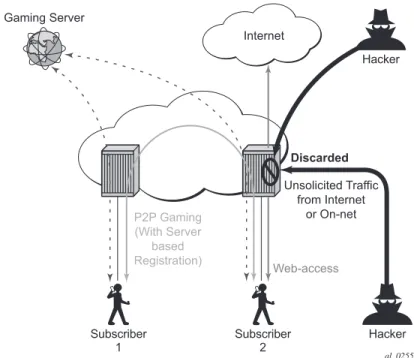
Figure 211: Block Unsolicited Traffic
To support the example shown in Figure 211, AA is configured with an action to block unsolicited traffic; traffic that is not originated/initiated from the subscriber. The direction field in match criteria of AQPs is utilized to enable this functionality.
Figure 212: SFW — Allow Gaming
al_0254 Internet
alcatel-lucent.com Stateful Packet
Inspection Firewall
This was requested by a computer on the home network, deliver it.
This was not requested by a computer on the home network, drop it.
Here’s the web page you asked for.
Hacker Here’s the web file transfer you asked for. Request a web page. Subscriber Device 1 1 3 2 2 al_0255 Hacker Hacker Subscriber 1 Subscriber 2 Internet Gaming Server Web-access Unsolicited Traffic from Internet or On-net P2P Gaming (With Server based Registration) Discarded
Figure 212 shows a similar concept. It is used to allow UDP traffic for peer to peer applications (such as gaming). Once the traffic from one peer is seen by AA-ISA, a pin-hole is opened in the reverse direction to allow for the corresponding UDP traffic from the peer.
Stateless packet filtering on the other hand does not take note of the session initiator. It discards or allows packets independently of any previous packets. In addition to AA-ISA’s support for stateless (and stateful) filtering, stateless packet filtering can be performed in the system using line card ACLs (and/or MGISM PCC rules in mobile gateway deployments).
Application Layer Gateway Filtering
Figure 213: ALG Support Example — FTP
AA FW inspection of packets at Layer 7 offers Application Layer Gateway functionality for a large list of applications (for example, FTP, SIP, RTSP, PPTP, IRC, etc.). These applications make use of control channels or flows that spawn other flows. AA FW inspects the payload of these control flows so it can open a pinhole in advance for unspawned data flows. Figure 213 depicts an example of AA ALG support for FTP traffic.
Command Port 21 al_0256 Client AA-FW 2. AA FW inspects the flow and open a pinhole for the dataport (38069)
1. AA FW allows the flow since it is initiated by the user Data Port 38069 Command Port 37843 Server Data Port 20
Client uses random port to connect to server’s port 21 to
establish connection
Server then opens data connection from server’s port 20 to client’s computer on a random port
Active Mode FTP
Connection
Application Layer Gateway Filtering
Denial Of Service (DOS) Protection
DoS attacks work by consuming network and system resources, making them unavailable for legitimate network applications. Network flooding attacks, malformed packets and port scans are examples of such DoS attacks.
The aim of AA FW DOS protection is to protect subscribers and prevent any abuse of network resources.
Using AA FW stateful session filters, operators can protect their subscribers from any port scan scheme. This can be done by configuring the session filters to disallow any traffic that is initiated from the network.
Furthermore, AA ISA provides configurable flow policers. These policers, once configured, prevent a wide range of flooding attacks (such as ICMP PING flooding, UDP flooding, SYN Flood Attack...etc.). These policers provide protection at multiple levels; per system per application/application groups and per subscriber per applications/applications groups.
There are two types of AA ISA flow policers; flow setup rate policers and flow count policers. Flow setup rate policers limit the number of new flows, while flow count policers limit the total number of active flows.
In order to protect hosts and network resources, AA FW validates/checks different fields in the packet’s header (checksum, TCP Flag, etc.) and if any fails it declares the packet to be invalid. This complements the 7x50 subscriber management enhanced security features, such as IP (or MAC) anti-spoofing protection (such as protecting against LAND attacks) and network protocol DoS protections. The cut-through-drop AQP action must be configured in order to drop these types of invalid packets.
Virtual FW/Zone-Based FW
AA FW can provide up to 128 virtual FWs, each with its own FW policies. This is achieved through the use of AA-partitions.
In addition, AA subscribers within the same AA partition can have different application profiles with different Application Service Options (ASO) values. This provides a further control mechanism to enable/disable firewall rules.
For example, the operator may want to have some subscribers possess full firewall protection, while others (who have not subscribed to this service) to have a partial firewall protection that focuses on protecting network resources, rather than network and subscribers resources.
Configuration
AA-ISA AQPs are enhanced in R11.0R1 with several new AQP actions that provide session filtering functionality. As is the case of all AQPs, these have partition level scope, which allows different FW policies to be implemented by utilizing AA partitions concepts within the same AA-ISA group. Hence, multiple virtual AA FW instances can be realized, without the need for multiple physical instances of FWs to implement different FW policies.
The AA FW stateful session filter consists of multiple entries (similar to ACLs) with a match an action per entry. Actions are deny or permit. A deny action results in packets being discarded without creating a session/flow context. Match conditions include IP protocol types, source and destination IP addresses and ports. An overall default action is also configurable in case of no match to any session filter entry.
Note that AQPs with session filter actions need to have, as a matching condition; traffic direction, ASOs and/or a subscriber name. These AQP match rules cannot have any references to
applications and/or application groups.
An AQP action to drop malformed/errored packets is also available.
Statistics are incremented when packets are dropped by a session filter. These are accounted against:
protocol = denied by default policy, application= unknown,
application group = unknown.
Configuration
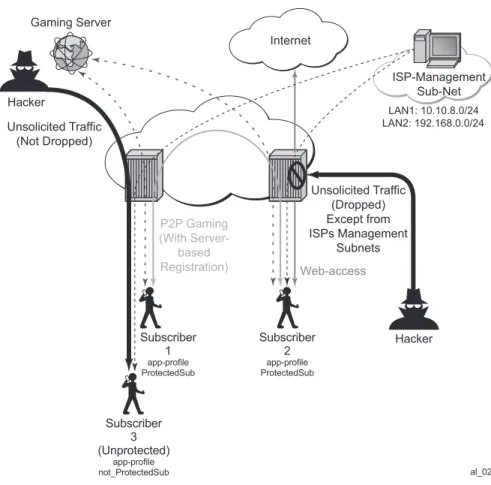
Figure 214: Configuration Topology
Step 1. Application Profile configuration:
There is nothing new introduced in application profiles in order to support FW. This section deals with how to configure the application profile to allow differentiated FW services for different subscribers. In a nut shell, the AA common building construct/attribute for differentiated policy is ASO.
To configure an ASO for FW protection:
configure application-assurance group 1:2 policy begin
app-service-options
characteristic "FW-Protection" create value "None"
value "ON"
default-value "None" exit
characteristic "ISP-Protection" create value "None" value "ON" al_0257 Hacker Hacker Subscriber 1 app-profile ProtectedSub Subscriber 3 (Unprotected) app-profile not_ProtectedSub Subscriber 2 app-profile ProtectedSub Internet ISP-Management Sub-Net LAN1: 10.10.8.0/24 LAN2: 192.168.0.0/24 Gaming Server Web-access Unsolicited Traffic (Not Dropped) Unsolicited Traffic (Dropped) Except from ISPs Management Subnets P2P Gaming (With Server-based Registration)
default-value "None" exit
characteristic "DOS-Protection" create value "None"
value "ON"
default-value "None" exit
exit
In the above example:
• ASO FW protection allows the operator to select if the subscriber is FW protected or not. • ASO DOS protection refers to if the subscriber is protected from DOS attacks.
• ASO ISP protection is different from the above two as it protects the ISP resources by (in the example that follows) not allowing unsolicited traffic. This should be ON for all subscribers (it is then arguable if someone needs it to be defined in the ASO list, instead of merely configuring an AQP to protect ISP resources all the time).
These ASOs are referenced in appProfiles (and later in AQPs) as follows:
configure application-assurance group 2:103 policy begin
app-profile "Protected" create divert
characteristic "FW-Protection" value "ON" characteristic "ISP-Protection" value "ON" characteristic "DOS-Protection" value "ON"
exit
The above application profile Protected is assigned to subscribers who opted/subscribed to the firewall protection service; for example sub 1 and sub 2 in the example shown in Figure 214 on page 1418.
Subscribers who are not protected (for example sub 3 in Figure 214) are assigned a different profile:
configure application-assurance group 2:103 policy begin
app-profile "unProtected" create divert
characteristic "FW-Protection" value "ON" characteristic "ISP-Protection" value "ON" characteristic "DOS-Protection" value "ON"
Configuration
who are not protected. This configuration is simpler and provides statistics per partition. This example however covers the more complex case using ASOs/appProfiles.
Step 2. Flow count policer configuration:
configure application-assurance group 2:203 policer Dos_police_Flow_count type flow-count-limit granularity subscriber create
flow-count 500 exit
The configuration above limits the number of flows a subscriber can have at any time to 500. This is done to protect against DoS attacks. The value 500 is arbitrary and requires tuning for each deployment.
configure application-assurance group 2:203 policer Dos_Police_ICMPFlows type flow-count-limit granularity system create
flow-count 5000 exit
This configuration limits the total number of flows that matches the configured AQP matching condition. It is used for ICMP applications to prevent mass port scanning.
Step 3. Application configuration
The following configuration is standard with AppDB. It is shown here for reference.
configure application-assurance group 2:203 policy begin application ICMP create
exit app-filter entry 1540 create protocol eq "non_tcp_udp" ip-protocol-num eq icmp application "ICMP" no shutdown exit entry 35500 create protocol eq "non_tcp_udp" ip-protocol-num eq ipv6-icmp application "ICMP" no shutdown exit
Step 4. AQP configuration:
configure application-assurance group 2:103 policy begin
app-qos-policy
description "Protecting ISP1 from DoS attacks from subs" entry 100 create
traffic-direction subscriber-to-network characteristic "ISP-Protection" eq "ON" dst-ip eq 10.10.8.0/24 exit action flow-count-limit Dos_police_Flow_count exit no shutdown exit entry 105 create
description "Protecting ISP2 from DoS attacks from subs" match
traffic-direction subscriber-to-network characteristic "ISP-Protection" eq "ON" dst-ip eq 192.168.0.0/24 exit action flow-count-limit Dos_police_Flow_count exit no shutdown exit
These AQPs protect the ISP network by limiting the number of concurrent flows. Dropping malformed packets is done by entry 130 (later).
To guard against ICMP flooding attacks, a flow count policer (defined earlier) is used as follows:
configure application-assurance group 2:103 policy begin app-qos-policy entry 107 create match traffic-direction both application eq icmp exit action flow-count-limit Dos_Police_ICMPFlows exit no shutdown exit
In order to protect ISP LAN2 from all incoming traffic (unsolicited), the operator configures entry 120.
entry 120 create match
traffic-direction subscriber-to-network characteristic “ISP-Protection" eq “ON"
Configuration
ProtectISPLan2 session filter drops all unsolicited traffic to LAN2 (highly secure) except for access to FTP services coming from ISP LAN1. Details of these configurations are shown in
Session-Filter on page 1422.
To enable stateful protection for opted-in subs:
configure application-assurance group 2:103 policy begin
app-qos-policy entry 110 create
description "FW for managed opted-in subs" match
traffic-direction network-to-subscriber characteristic "FW-Protection" eq "ON" exit action session-filter "denyUnsolictedwMgntCntrl " exit no shutdown exit
The above AQP protects opt-in subscribers from unsolicited traffic but still allows unsolicited traffic from ISP subnets to manage the subscriber’s network.
Dropping malformed/illegal packets and protecting against DOS attacks is done via entry 130 below.
entry 130 create match
traffic-direction both
characteristic "DoS-Protection" eq "ON" exit action cut-through-drop flow-count-limit Dos_police_Flow_count exit no shutdown exit Step 5. Session-Filter
The following displays session-filter configuration commands.
configure application-assurance group 1:1 session-filter <name> create description <description>
default-action permit|deny# default=deny entry n create
description <entry-description> match
no src-ip <ip4_or_v6-address/mask> no dst-ip <ip4_or_v6-address/mask> no src-port {eq|gt|lt} <port-num> #or
range <start-port-num> <end-port-num> no dst-port {eq|gt|lt} <port-num> #or
range <start-port-num> <end-port-num> exit
action permit|deny exit
entry m create . . .
Configuration
Parameters
• entry n — A session filter can have multiple action rules, each of these match-action rules represent an entry within the session-filter. The entries are executed in order. If a match is found, within one entry, the subsequent entries within the session-filter are skipped (not evaluated).
• default-action [permit|deny] — This action is performed if no match is found for any of the configured entries within the session-filter. Default is deny.
→ A deny action will drop the packet and will not allow a flow record to be allocated for
that flow. Note that a drop action within AA AQP will drop the packet but it will still create flow record.
→ A permit action will allow the packet to flow through the system. A flow record is
also allocated. Note that the packet may get dropped by other configured AQP actions (due to header check failures).
• description description-string
This configures a text string, up to 80 characters, which can be used to describe the use of the session-filter.
• match — Keywords to perform the action specified under the action keyword only if the conditions in the match section are met.
→ ip-protocol ip-protocol-number ip-protocol-number — 1..255
− Decimal, hexadecimal or binary representation − Supported IANA IP protocol names:
crtp, crudp, egp, eigrp, encap, ether-ip, gre, icmp, idrp, igmp, igp, ip, ipv6, ipv6-frag, ipv6-icmp, ipv6-no-nxt, ipv6-opts, ipv6-route, isis, iso-ip, l2tp, ospf-igp, pim, pnni, ptp, rdp, rsvp, sctp, stp, tcp, udp, vrrp
→ src-ip/dst-ip ipv4-address/mask
src-ip/dst-ip iv6-address/mask
− Source/destination IP address within the packet header. − IPv4 or IPv6 formats are allowed, with prefixes masks. → src-port src-port-numbers
src-port {eq|gt|lt} port-num
eq — equal, exact match
gt — match port numbers that are greater than the one specified. lt — match port numbers that are smaller than the one specified.
port-num — 0..65535 (Applicable to TCP, UDP and SCTP protocols only.)
range — Keyword- that match port numbers within the specified range: start-port-num — 0..65535
end-port-num — 0..65535
→ dst-port dst-port-number
− Same as source port number explained above, but applied against destination port
number. • action deny|permit
→ deny or permit action is only executed if a match is found. → deny action will drop the packet and will not create a flow record.
→ permit action will allow the packet to go through (unless another different action is
found that causes it to be dropped). • no entry entry-id
→ Causes the entry to be deleted.
• no session-filter session-filter-name → Causes the session filter to be deleted. config application-assurance group 1:2
session-filter " denyUnsolictedwMgntCntrl" create description “S-FW opted-in sub – allow ISP access" default-action deny
entry 10 create
description "allow ICMP access from ISP LAN1" match ip-protocol-num icmp src-ip 10.10.8.0/24 exit action permit exit entry 20 create
description "allow ICMP access from ISP LAN2" match ip-protocol-num icmp src-ip 192.168.0.0/24 exit action permit exit entry 30 create
description "allow all TCP (e.g. FTP/telnet)access from ISP LAN2" match ip-protocol-num tcp src-ip 192.168.0.0/24 exit action permit entry 40 create
Configuration
action permit exit
This session filter is used to protect systems located in LAN2. It drops all unsolicited traffic except for FTP coming from LAN1.
configure application-assurance group 1:2 session-filter "protectISPLan2" create
description "S-FW to deny all unsolicited requests to LAN2" default-action deny
entry 10 create
description "allow ftp access from ISP LAN1" match ip-protocol-num tcp src-ip 10.10.8.0/24 dst-port eq 21 exit action permit exit
Show Routine — AQP:
*A:PE-1# show application-ass group 2:103 policy app-qos-policy 110 ===========================================================
Application QOS Policy Entry 110 (Default Subscriber Policy) =========================================================== Description : FW for managed opted-in subs
Admin State : in-service Hits : 95 flows Conflicts : 0 flows Match :
Traffic Direction : network-to-subscriber ASO Characteristics :
FW-Protection : eq FW-Protection Action :
Session Filter : denyUnsolictedwMgntCntrl
================================================================
Show Routines — Session Filter:
*A:PE-1# show application-ass group 2:1 session-filter "denyUnsolictedwMgntCntrl" ===========================================================
AA Session Filter Instance "denyUnsolictedwMgntCntrl" =========================================================== Description : S-FW opted-in sub gallow ISP access
Default Action : deny AQP Entries : 110
---Filter Match Criteria
---Entry : 10
Description : allow ICMP access from ISP LAN1 IP Protocol : icmp Source IP : 10.10.8.0/24 Action : permit Hits : 3 flows ---Entry : 20
Description : allow ICMP access from ISP LAN2 IP Protocol : icmp Source IP : 192.168.0.0/24 Action : permit Hits : 21 flows ---Entry : 30
Description : allow TCP access from LAN2 IP Protocol : tcp Source IP : 192.168.0.113/32 Action : permit Hits : 50 flows ---Entry : 40
Description : allow HTTP access from LAN1 IP Protocol : tcp Source IP : 10.10.8.0/24 Source Port : eq 80 Action : permit Hits : 2 flows ---No. of entries : 4 ==========================================================
Conclusion
Conclusion
The AA stateful packet filtering feature combined with AA Layer 7 classification and control empowers operators with an advanced, next generation firewall functionality that is integrated within the SR/ESS. This section focused on traditional stateful and stateless session firewall functionality.