Data Management System - Developer
Guide
Marcin Wolski
<[email protected]>Pawel Spychala
<[email protected]>Data Management System - Developer Guide
by Marcin Wolski, Pawel Spychala, and Maciej Labedzki Copyright © 2006 PSNC
Table of Contents
1. Introduction ... 1
2. Basic functional assumptions ... 2
Fundamental features ... 2
Data management ... 2
Metadata management ... 3
File states ... 4
Uploading a file ... 4
Uploading a zero-sized file ... 5
Updating a file ... 5
Duplicating a file ... 6
Error codes repository ... 7
3. DMS interfaces ... 10
Data Broker interface ... 10
The data management interface ... 11
The metadata management interface ... 13
The interface for external databases ... 14
The Policy interface ... 15
Metadata Repository interface ... 16
The interface for the Data Broker ... 16
The interface for the Data Container ... 17
Data Container interface ... 18
The interface for the Metadata Repository ... 18
The interface for a user application ... 18
SRS Container ... 18
The interface for the Data Broker ... 19
4. The DMS use cases ... 21
Basic operations on a datafile ... 21
Login ... 21
Retrieving the user's home directory ... 21
Adding a datafile ... 22
Creating a file location ... 22
Data transfer confirmation ... 22
Adding a metadata schema ... 23
List of Figures
2.1. File states during uploading operation (size <> 0) ... 4
2.2. File states during uploading operation (size = 0) ... 5
2.3. File states during updating operation ... 5
2.4. File states during duplicating operation ... 6
3.1. Data Broker public interface ... 10
3.2. Meta data directory management services ... 11
3.3. Meta data file managing ... 12
3.4. Data broker metadata services ... 13
3.5. External databases services (Proxy services) ... 14
3.6. Policy services ... 15
3.7. Data Repository for Data Broker interface ... 16
3.8. Data Repository for Data Container interface ... 17
List of Examples
Chapter 1. Introduction
This document covers the issues connected with public and internal interfaces of the DMS modules. It also presents basic functional assumptions useful for client application developers. Internal functionality description concerns the level of the exported services (use case diagrams) and should be treated as an extension for the Java API documentation (in JavaDoc format) which can be found in the installation package of the Data Broker module.
The Data Management System is a distributed system featuring data access and delivery. It is based on SOA [http://en.wikipedia.org/wiki/Service-oriented_architecture] model, which is an architectural style of building software applications that promotes loose coupling between components so that you can reuse them. The con-cept of a service is nothing new, but the notion of a SOA has evolved over the past couple of years and now is treats as new design principle of building modern applications. Web Services [http://en.wikipedia.org/wiki/Web_service] technology, which covers a stack of technologies enabling the cre-ation of distributed appliccre-ations implemented in any programming language and executed on any platform, seems to be the most viable option to implement SOA. According to those definitions, each DMS module can be treated as a separate service using XML messages and passing them in a form of SOAP [http://en.wikipedia.org/wiki/SOAP] envelopes to external applications.
DMS is a kind of a virtual file system keeping the data organized in a tree structure. The main units of this struc-ture are meta-directories, which make it possible to catalog other objects and meta-files. Meta-files represent a logical view of computational data regardless of their physical storage’s location. The computational resources managed by DMS can be described by metadata, which create an abstract, semantic and explorable layer of re-sources. The flexible access to data requires DMS to support various transmission protocols – DMS enables to store and share data files through the FTP, GridFTP [http://www.globus.org/grid_software/data/gridftp.php] and FTPS protocol.
DMS does not duplicate the databases features – the basic concepts which lied down at the its creation were the development and implementation of the environment allowing flexible access to data stored inside the system, accessible by the most popular protocols and opened to standards defined by grid organizations.
The Data Management System contains three logically distinguished modules: Data Broker (DB), Metadata Repository (META) and Data Container (STOR), which together create the basic layer of the data management environment, the so-called DMS core. Each system module is treated as a separate network service communi-cating with the external environment with the help of the SOAP protocol. DMS provides its services in a form of Web Services API to the front-end applications. It is important to mark the DMS position in an open grid en-vironment – DMS is a middleware system, belonging to the collective layer as well as the resource layer (Data Container), according to the grid services view.
Chapter 2. Basic functional
assumptions
This chapter presents basic concepts related to the file managing in the DMS environment. It brings closer the main functional assumptions for files and directories and presents a few guidelines for storing and retrieving data. Moreover, it explains in detail how file state changes according to different type of operations executed on them. A separate section is devoted to a metadata schema, which makes it possible to describe the semantics of DMS resources.
Fundamental features
There are a few fundamental features, which are common for all group of services belonging to the DMS inter-face. These are:
• Operations in DMS are executed in the user context. That means that if e.g. Data Broker (???) recieves a re-quest to return a list of directory elements, it is equivalent with the fact that the user with the given ID sent that request.
• All objects in the DMS are identified by their unique identification numbers (ID). • Data Broker checks the user rights before any operation on a given resource is executed.
• During typical workload some exceptional situation may occur. All of these have the unique identifier de-scribing the error class, which they belong to. Please find detailed information about errors in the DMS Ad-ministrator Guide (???).
Data management
The following section introduces the basic functional assumptions related with data services, that is storage and sharing of data. These are:
• The node name - the node name has to start with an ASCII character with number greater than 32. ASCII character number 47, that is ’/’ can’t appear in the name, because it is directory separator. The length of a name can’t be greater than 128 characters.
• The root directory - there exists a main directory (without a parret), which is the root of a metadirectory tree. It is calledroot.
• Names uniqueness - there can’t be two elements with the same name in one metadirectory.
• URL standard - the services connected with storage and access to the files are based on URLs, which speci-fies the place where a file is stored unambiguously. The structure of such an URL is described in RFC1738 specification [xxx] and has the following form:
Example 2.1. The URL format
<protocol>://<user>@<password>:<host>:<port>/<full path>
http://storage01.dms.progress.psnc.pl:3043/./data/6d7is3ao6e7d.888
• Data Container transparency - DMS chooses data container independently, basing on the up-to-date knowl-edge about the active containers, and stores the file in it.
• The process of uploading data file in the DMS contains the following three steps: • Creation of the logical instance of the data file in the Metadata Repository;
• Reservation of the disk space in the Data Container, parametrized by the file size, the reservation life-time and optionally the preferred protocol;
• Data file transfer to the Data Container using its external transport server (e.g. FTP server). • The data file downloading process contains two phases:
• Request of an access to the data file from Data Container resources parametrized with the reservation lifetime and optionally protocol type;
• Data transfer to the client machine from the Data Container throught the appropriate transfer protocol (e.g. HTTP)
• Transfer protocols - files stored on Data Container are accessible using all the protocols supported by this container.
• File states - there are four possible states of a file:
• BARE – a state of the file after adding it to the DMS. It indicates that the file doesn’t exist physically on any server, nor it is being transferred to one;
• IN_TRANSFER – a file is being transferred to the server and doesn’t exist on any server yet;
• PERMANENT – a file is actually on at least one server. URL to this file can be obtained and thus it can be downloaded. Note that the file in this state can currently undergo replication process, which preclude the deletion of the file;
• INACCESSIBLE – file is locked. Probably it is being used by another process.
• On-demand file replication - user can initialize file replication at any time. File replication increases safety of the stored data.
Metadata management
The following section introduces the basic functional assumptions related with metadata services, which are used primarily to describe the resource stored in DMS. These are:
• Metadata can be assigned to any DMS object (file files or directories).
• Predefined metadata set - the Dublin Core is a predefined metadata standard in the DMS. Moreover, defin-ing own file description schemas is possible.
• Internationalization - the metadata structure is multi-languages oriented. Schemas and their attributes always have a description in a default language version, which is created along with the schema. Additional lan-guage versions can be added later on.
• The metadata schema structure contains the following fields: • Name: mandatory field with maximum length of 200 characters; • Description: optional field with maximum length of 1024 characters; • Version: optional field with maximum length of 10 characters; • Authority: optional field with maximum length of 100 characters;
• Each schema can contain 0 or more attributes. Structure of its attributes is following: Basic functional assumptions
• Name: mandatory field with maximum length of 150 characters; • Description: optional field with maximum length of 1024 characters;
• It is possible to assign schema to the DMS object (data file, directory) by setting the schema attributes val-ues for this object. Each DMS object may be described with few schema, but one schema may describe only one DMS object. The value of the schema attribute may be empty, but if it is set its maximal length is 200 characters.
File states
The present section describes how file state changes according to the operations executed on them. The possibil-ities include uploading, updating and replication of a file. The changes of the file states differ when the file is zero sized
Uploading a file
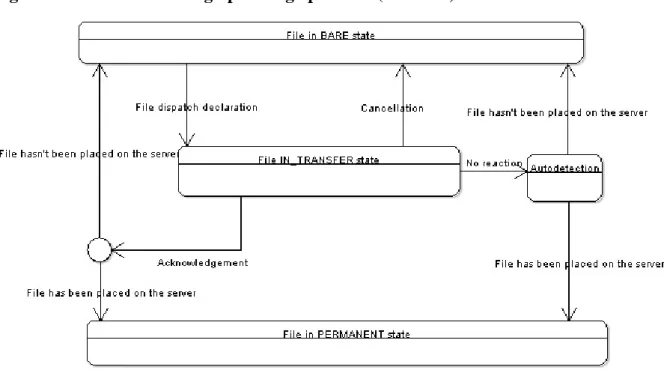
Figure 2.1. File states during uploading operation (size <> 0)
Initially the file is in a BARE state. A request to create a physical instance of a file together with a lifetime of the reservation and estimated file size is delivered. The file goes into a IN_TRANSFER state. The following possibilities arise:
• Cancel of the file transfer – all the reservations are canceled, file returns to initial state – BARE;
• Confirmation of the transfer ending – Data Container checks, whether the file has been actually put on a server (i.e. at least one byte is written). In that case the file goes into PERMANENT state, in opposite case it returns to a BARE state;
• No reaction – Data Container automatically checks the transfer state after lifetime of the reservation. If there are no locks on the file at the moment (i.e. it’s not being transferred at the moment) the operation is finished. Data Container checks, whether the file has been actually copied on a server (i.e. at least one byte is writ-ten). In that case the file goes into PERMANENT state, in opposite case returns to BARE state.
Uploading a zero-sized file
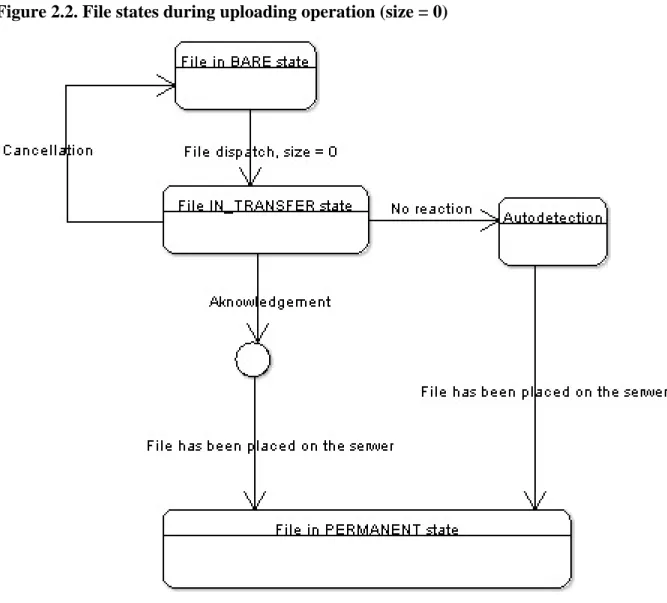
Figure 2.2. File states during uploading operation (size = 0)
Initially the file is in a BARE state. A request to create a physical instance of a file together with a lifetime of the reservation and estimated file size is delivered. The file goes into the IN_TRANSFER state. The following possibilities arise:
• Cancel of the file transfer – all the reservations are canceled, file returns to initial state – BARE;
• Confirmation of the transfer ending – the operation is finished and the file goes to the PERMANENT state no matter how many bytes of data were transferred;
• No reaction – Data Container automatically checks the transfer state after the lifetime of the reservation. If there are no locks on the file at the moment (i.e. it’s not being transferred at the moment) the operation is finished. The file goes to the PERMANENT state no matter how many bytes of data where copied.
Updating a file
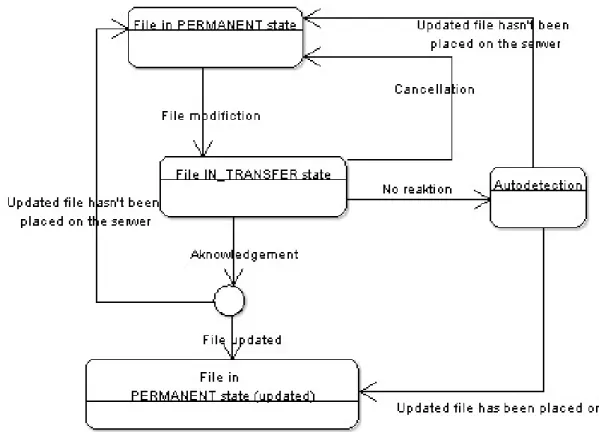
Figure 2.3. File states during updating operation
Initially the file is in a PERMANENT state. A request to create a physical instance of a file together with a life-time of the reservation and estimated file size is delivered. The file state remains PERMANENT. The following possibilities arise:
• Cancel of the file transfer – all the reservations are canceled, file returns to initial state – PERMANENT; • Confirmation of the transfer ending – Data Container checks, whether the file has been actually put on a
server (i.e. at least one byte is written). In that case the file goes into a PERMANENT state with a new loca-tion, in opposite case it stays in a PERMANENT state without new location;
• No reaction – Data Container automatically checks the transfer state after the lifetime of the reservation. If there are no locks on the file at the moment (i.e. it’s not being transferred at the moment) the operation is finished. Data Container checks, whether the file has been actually copied on a server (i.e. at least one byte is written). The file goes into a PERMANENT state.
Duplicating a file
Figure 2.4. File states during duplicating operation
Initially the file is in a PERMANENT state. A request to create a physical instance of a file together with a life-time of the reservation and estimated file size is delivered. The file state goes into an IN_TRANSFER state. The following possibilities arise:
• Cancel of the file transfer – all the reservations are canceled, file returns to initial state – PERMANENT; • Confirmation of the transfer ending – Data Container checks, whether the file has been actually put on a
server (i.e. at least one byte is written if nonzero size is declared) and whether the file is accessible (whether the file is still used by process uploading the user data). In that case the file goes into PERMANENT state with a new location, in opposite case it stays in a PERMANENT state without new location;
• No reaction – Data Container automatically checks the transfer state after the lifetime of the reservation. If there are no locks on the file at the moment (i.e. it’s not being copied at the moment or, in case when the de-clared size is 0, whether the file is unused) the operation is finished. Data Container checks, whether the file has been actually transferred on a server (i.e. at least one byte is written). If yes, the file goes into a PER-MANENT state with updated location and size. Otherwise, it returns to the initial state.
Error codes repository
DMS system is used by different external application modules. Such collaboration demands a coherent and legi-ble mechanism for generating and passing exceptions and error information. Additionally it is necessary to held the error string localisation. To deliver such functionality the ResourceBundle Java language mechanism is used. It allows to load values of error strings from the property files according to the localisation of the operat-ing system. DMS modules uses thepl.psnc.progress.szd.messages.messages.propertiesfile for loading exception message contents. Each of it's exception messages are prefixed with DMS-X-Y-Z-L, where:
• X is the module number
• Y is the module's interface number in cases when a module contains few web service interfaces • Z describes the error type
• L is the error ordering number
Following assumptions for the error codes have been taken:
• 0 – represents common classes for DMS modules:
• 1 – package:pl.psnc.progress.szd.common; • 2 – package:pl.psnc.progress.szd.database;
• 3 – package:pl.psnc.progress.szd.messages; • 4 – package:pl.psnc.progress.szd.soap;
• 5 – package:pl.psnc.progress.szd.services. • 1 – Data Broker module:
• 0 – common classes;
• 1 – Data Broker (SOAPDataBroker);
• 2 – Metadata Broker (SOAPMetaDataBroker); • 3 – SRS Proxy Broker (SOAPSRSBroker);
• 4 – Policy Broker (SOAPPolicyBroker). • 2 – Metadata Repository module:
• 0 - common classes;
• 1 – file access services:SOAPDirectoryService;
• 2 – directory access services:SOAPStorageService;
• 3 – metadata services:SOAPMetadataService;
• 4 – security services:SOAPLoginService;
• 5 – services for registration DMS components:SOAPServiceRegistration.
• 5 – SRS Data Container module: • 0 – common classes.
• 6 – DMS Administrative Portal: • 0 – common classes;
• 1 – helper classes (packagehelper);
• 2 – DMS services access classes (WSHandler).
• 7 – Data Container module: • 0 – common classes;
• 1 - file based and tape archive based Data Container; • 2 - database based Data Container;
• 3 - secure file based and tape archive based Data Container; • 4 - secure database based Data Container.
• 8 – Heimdall (Authorization and Authentication module): • 0 – common classes.
Error types:
• 1 – illegal input data; • 2 – network layer error; • 3 – database error; • 4 – file routine error;
• 5 – jaxb library or berkeley database internal error; • 6 – authorization error;
• 7 - DMS internal error; • 8 - system error.
Chapter 3. DMS interfaces
This chapter presents each DMS module interface. Description of these interfaces is useful when external appli-cation that uses DMS system and its modules is prepared. In that case the most important for developer module interfaces are: the Data Broker interface, the Metadata Repository interface, the Data Container module inter-face, the SRS Container proxy interface and the Policy Broker interface. All of these are described below.
Data Broker interface
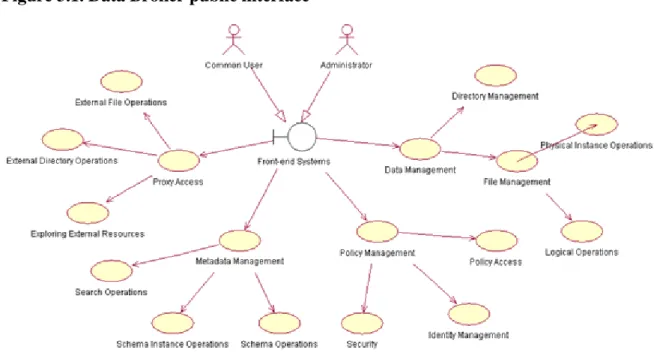
Data Broker delivers services for managing and serving data, managing data logical structure and external data banks access. All their services are exported through the Web Service technology basing on the Axis implemen-tation. Data broker is modular set of components which are:
• Data Management – the primary module delivering data manipulating operations on files and directories; • Metadata Management - enhances the basic functionality with the possibility of adding metadescriptions and
performing metadata-based exploring;
• Proxy Access module - delivers services for accessing external data sources which are not integrated with the DMS resources. The predefined Proxy module allows to access the SRS [http://www.biowisdom.com/solutions/srs/] biological data bases
• Policy Management - it consists of the services for data access restriction (Security), data access policy man-agement (Access policy) and user and groups information manman-agement (Identity Manman-agement). The all kind of operations provides in Heimdall security subsystem.
Figure 3.1. Data Broker public interface
DMS Data Broker delivers the integrated set of services that can be divided into following functional groups:
• Data Management Services:
(Logical Operations) and physical file manipulation services as adding physical data file instance or re-moving physical file instance (Physical Instance Operations).
• Metadata Management Services:
• Schema Operations - for adding schema or retrieving schema attributes;
• Schema Instance Operations - schema instance is defined as schema assigned to the DMS object (a file element or a directory node) with specific values of the schema attributes
• Search Operations - for searching through DMS resources basing on the schema attribute values of the schema instances assigned to the DMS objects.
• External Database Access Services:
• External Directory Operations - to read external directories contents. As it is defined in example of the SRS data bank access it allows to retrieve the data banks list grouping data sets. Such databank is de-fined as logically separated libraries of data entries stored in flat files containing separate entries or groups of entries;
• External File Operations - a set of operations for managing data entries from the databanks (retrieving single data or data sets);
• Exploring External Resources - searching through external data sets basing on the metadata schema de-scribing them. SRS Proxy bases on the metadata attributes dede-scribing the data entries. During the query building, user specifies fields to search and sets values for them. The returned list of entries consists of these records, which fulfills query conditions. The search engine has to be prepared to search through databases with different metadata attributes describing entries, depending on the internal databank struc-ture.
• Policy Management Services:
• Security aspect - mechanisms for protecting resource access. It includes the authentication mechanism and access authorization.
• Identity Management - users identification and their belonging to the groups of users. User groups al-lows to define a common access policy for a set of users and allow to simplify the procedure of defini-tion the resource access policy.
• Policy Access - a set of functions allowing to create the policy for resource access authorization. It deliv-ers a possibility of creating operation definition and resource definition objects and giving the privileges to users or user groups on DMS objects (as resource, service and operations).
The data management interface
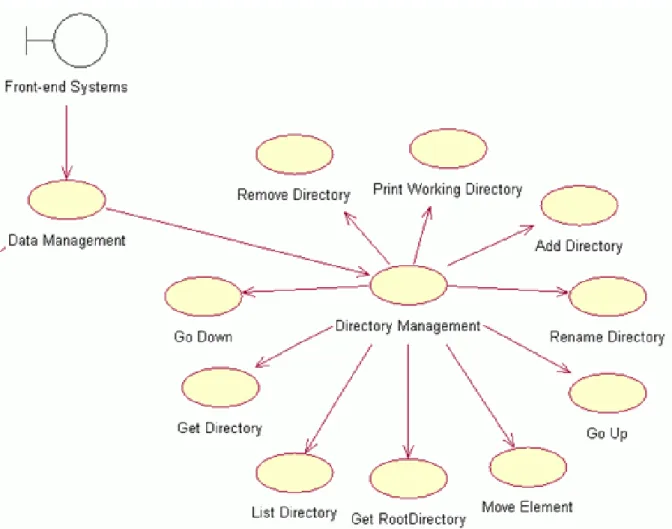
The following figure presents the set of DMS services collected to the data access operations group. This groups of functions conforms theISOAPDataBroker interface. The description of the use case and meaning of these
method is described in the JavaDoc for DMS. Please refer to the Java documentation for further information.
Figure 3.2. Meta data directory management services
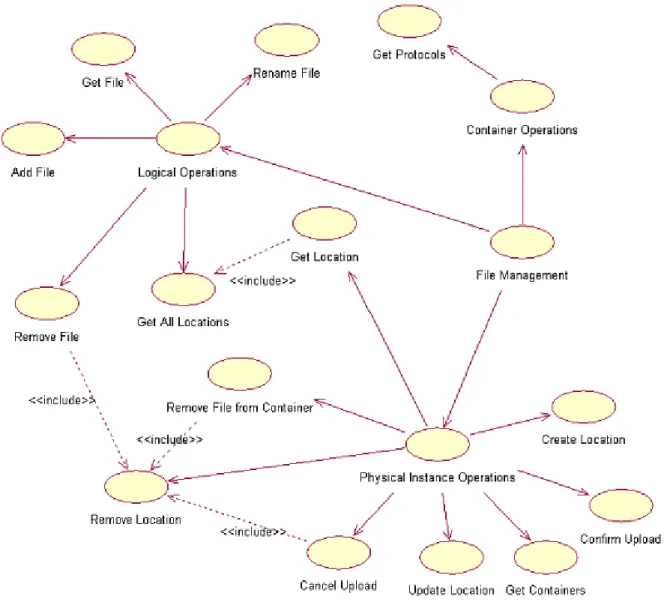
The following diagram presents the services structure for managing data files. Please refer to the Java documen-tation for the use case description and further information.
Figure 3.3. Meta data file managing
The metadata management interface
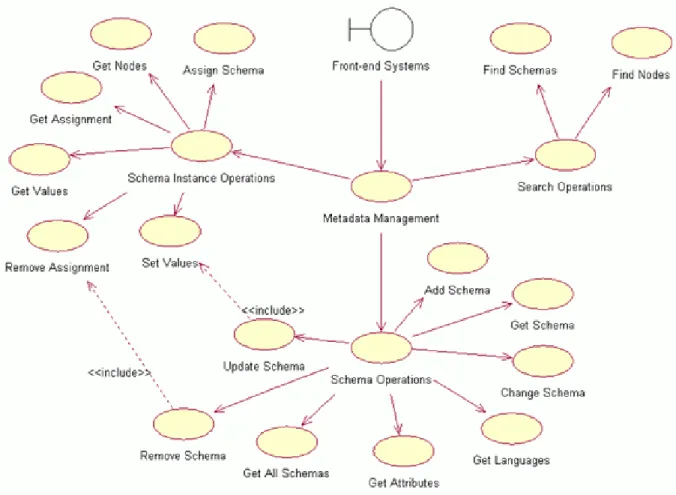
The metadata management interface is an extension of the Data Broker interface with the possibility of perform-ing metadata search and retrievperform-ing metainformation about DMS objects.
Figure 3.4. Data broker metadata services
Functional meaning of these use cases fulfils the interface methods of the Data Broker (ISOAPMetadataBroker) described in the Java documentation (JavaDoc). Please refer to the Java documentation for the use case descrip-tion and further informadescrip-tion.
The interface for external databases
External databases interface provides a unified set of services for managing external resources with hierarchical structure. These resources can be described with an additional layer of the metadata. These metadecryption makes it possible to data exploration and perform search. At the pilot installation of the DMS environment it is enabled access to the data sets of the SRS system (biological set of databases) with following functionality:
• exploring the SRS databank; • data access proxy;
• executing the queries enabling to search through the SRS content according to the user defined conditions.
Figure 3.5. External databases services (Proxy services)
Functional meaning of these use cases conforms to the interface methods of the Data Broker
ISOAPProxyBro-(ker) described in the Java documentation (JavaDoc). Please refer to the Java documentation for their detailed
description and further information.
The Policy interface
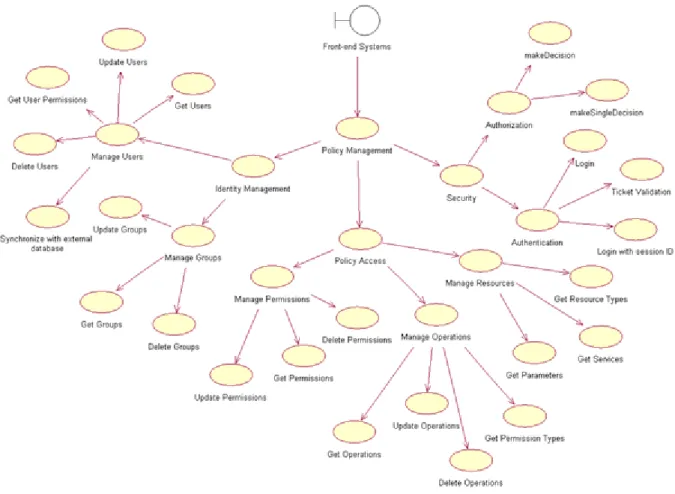
Policy management services are delivered in a common interface creating comprehensive set of functionality for defining a security policy and protection of DMS resources. It covers a set of services for widely mean system security which constitutes identification mechanisms, authorization mechanisms, identity managing services and definition of data access policy services for internal resources, DMS modules and system operations.
According to the assumptions for DMS system, each user who sents a request has to pass out the identity infor-mation (basing on login procedure) which allows to authorize a his/her access to the DMS resources and opera-tions. It is possible to login directly i.e. using standard login procedure with user name/password or identify through the user certificates set on the connection layer, what is a recommended option.
Figure 3.6. Policy services
Functional meaning of these use cases conforms the interface methods of the Data Broker (ISOAPPolicyBroker) described in the Java documentation (JavaDoc). Please refer to the Java documentation for the use case description and further information.
Metadata Repository interface
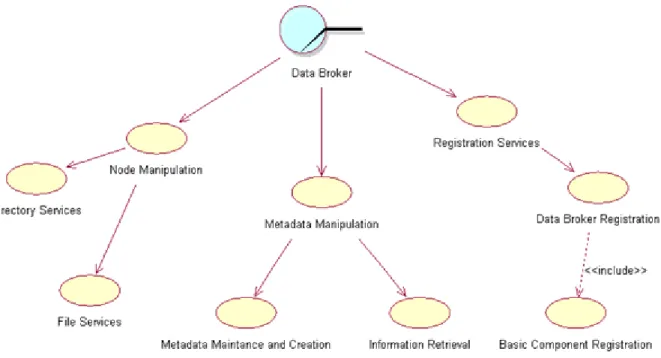
DMS Repository is a central system module. It is the knowledge base for any taking decision in the data man-agement environment. Repository is a communication point which provides services for other DMS modules as Data Broker and Data Container. It exposes a separate interfaces with a group of services for both these mod-ules.
The interface for the Data Broker
Metadata Repository provides following services for the Data Broker module:
• Node manipulation services allowing to manage the data delivered by the Data Broker through its interface • Metadata managing services allowing to process the metadata description delivered by the Data Broker in its
interface
• Registration services allowing to register Data Brokers in the Metadata Repository
Figure 3.7. Data Repository for Data Broker interface
This set of functionality is well described in the technical documentation of the Repository module (JavaDoc API). The main rule which was taken during the project phase assumes that each of the Data Broker interface method has a corresponding method in the Repository interface, usually with the identical name.
The interface for the Data Container
The Data Container uses Repository interface methods to register itself (during system startup) and notify about user data set transfer to/from the data server. On the basis of the information Repository dynamically reacts to the changing of data files states and updates the knowledge base about file locations.
Figure 3.8. Data Repository for Data Container interface
Data Repository provides following set of services for the Data Container:
• Notification about data transfer finishing - method which allows to inform the Repository about adding new instances of the user data file to the Data Container or about update of the data set content (Upload
ished);
• Notification about data transfer canceling - service used by Data Container when adding new data file in-stance was interrupted (Upload Failed) or when update of data content was interrupted (Update Failed). It informs the Data Repository about failure of the user data file transfer.
• Data Container registration - a set of the services allowing to register the Data Container in the DMS envi-ronment, notify about actually active data transfer servers and their configuration and allowing to perform the data knowledge integration between the Data Repository records and Data Container.
All these services are described in details in the JavaDoc API for Data Repository technical documentation.
Data Container interface
Data Container provides a set of services for the Metadata Repository which are required to perform its re-sources managing. The communication between the DMS Repository and the Data Container is described with the designed interface common for different instances of data storage module. These instance may vary accord-ing to the different type of used resources (file system, data archivaccord-ing system basaccord-ing on tapes and database or external publicly available information source, like SRS system), and with the technology used to prepare the module. There is only one main condition which have to be fulfilled - all these modules have to derive the com-mon interface and functionality covered by it. Similar to other DMS modules, Data Container communicates with all other components basing on the SOAP protocol. Its Web Services are used by the Repository module to handle the data access user requests.
The interface for the Metadata Repository
Data Container delivers a set of services for control the resource access by the Repository module. Data sets stored with use of Container are available for users after its appropriate preparing. Preparation of this data is performed on a user request sent to the controlling whole process Repository. The Data Container services may be divided into following groups:
• Access services for Container resource - creating data reservation (performed before data file is sent to the container), initiating the data update, performing the data file downloading and deleting data sets from the container resources;
• information services for Container - getting the size of the available space in the container resources, the size of the space used by user data files, the size of the overall space in the container resource and the reserved container space for future transfer;
• A set of administrative services for container module initiating, enabling/disabling data transfer server, checking a file or a persistence of reservation.
You can find more detailed information connected with Data Container module functionality in the JavaDoc technical documentation.
The interface for a user application
Data stored in the Data Containers modules are available for user applications with the use of standard data transfer servers. According to the configuration, Data Container may cooperate with the FTP, GASS or GSIFTP server. User application sends a data access request to the Data Repository which returns the data URL location address to the container resources storing required data files. Further communication between users application and data storage module is performed with the use of transfer server operating under the URL address. It makes the container resources visible for the world through the configured data access servers according to the holding protocols. Data Container Web Services are used only by the Data Repository to initialize the data access on the user requests.
SRS Container
SRS Data Container delivers data controlled by external biological database called SRS. In fact it collects the functionality of the external data repository (by delivering services for getting listing of the database contents, retrieving data objects and metadata connected with them) and Data Container (serving data access using GASS server or FTP, GSIFTP, HTTP and HTTPS protocols) in a way similar to the standard DMS Data Container module. Because of the specific nature of the SRS external database (read only data access mode) and necessity of the SRS content delivering, SRS Data Container implements its own interface which differs from the stan-dard Data Container interface.
Figure 3.9. SRS Data Container interface
The interface for the Data Broker
SRS Data Container provides following services for the Data Broker:
• Resource access services - services allowing to retrieve data from the SRS and share them using the chosen protocol. It is possible to get single data entry of the database library and the set of query result entries
merged into one data file;
• Data access procedures - services for retrieving of the SRS contents. It is possible to retrieve the listing of databanks library, listing of the single databank, retrieving the metadata description of the data stored from the databank, the databank data entries and performing query in the dabanks resources.
The following service methods are available for the SRS Data Container:
• Getting the databank element (lock data for reading) - a method for retrieving databank entries content under request protocol, time interval and data format;
• Getting data merged into data set - method for retrieving merged data file containing set of data entry files being result of user query. Merged file is available under request protocol, time interval and in reqested data format;
• Retrieving databanks list; • Retrieving databanks entries list;
• Retrieving databanks entries list in extended mode, that is with a possibility of paging the result; • Retrieving the number of databanks elements;
• Retrieving the list of available transfer servers (protocols) on the SRS Data Container; • Retrieving databanks attributes (SRS library fields);
• Retrieving the entry single attribute and its value for single data entry;
• Getting the list of attributes of the databanks elements and their values (SRS entry fields value) in a raw for-mat;
• Performing query on the SRS resources according to the user defined criteria;
• Retrieving the number of entries being result set of the query on the SRS resources according to the user de-fined criteria;
The Data Container module functionality is also well described in the JavaDoc technical documentation. DMS interfaces
Chapter 4. The DMS use cases
The use cases described in this point allows to introduce the basic principles of the DMS use. Each of this sec-tion presents hypothetical schema of the user activity in the DMS. These schema presents an example of typical actions taken by the user. These actions are: loging into the system, creating a new data file (with its physical lo-cation), adding a metadata schema and using this schema to describe data file. Further information about func-tionality of used method is presented in the JavaDoc Data Broker API. It can be found in the installation pack-age of the DMS.
Basic operations on a datafile
This section describes basic schema of user activity when datafile is uploaded or retrieved. This schema usually consists of the login operation, retrieving user's home directory, changing path and uploading data. Additionally this section describes some basic metadiretory operation as creating metaschema and adding metadescription to the datafile.
Login
This point describes the login procedure using one of the following methods:
• AuthorizationStatus loginGSI();
• AuthorizationStatus login(String, String, String);
• AuthorizationStatus loginSession (String).
According to the DMS configuration and the character of the subject using DMS there exist separate login pro-cedures for login basing on user certificates (paramlessloginGSIprocedure), user name - password - domain triple or login method basing on the session identifier. The result object of the login method called Authoriza-tionStatus. If the DMS authorization process finishes with success (check the AuthorizationSta-tus.getOperationStatus) then theAuthorizationStatus contains the user identifier
AuthorizationSta-(tus. getUserID()), user time ticked (AuthorizationStatus.GetTicket(), not used when certificate based user authentication is used) and the identifier of the user home directory
AuthorizationSta-(tus.getUserHomeDirectoryID).
Note
The user home directory identifier is not valid for users from DMS_SEC_AUTHORITY domain. This is a distinguished method which indicates users not having the home directory. Users from this domain may use the system root directory to start the data structure exploring (by the Data Broker's getSys-temRootDirectorymethod).
Note
The user autenthication methods used in the DMS are based on the user certificates (certificates are sent in the protocol layer) or on the user tickets (user uses ticket got after login), according to the DMS configuration. Both these authentication methods are described in the DMS Admin Guide in the Heim-dall module description section.
Retrieving the user's home directory
Listing of the user home directory is possible by the following method:
• Vector listUserDirectory(int , String)
privilege. This method is expecting the identifier of the directory to list (e.g. user home directory fromVector listUserDirectory(int , String)). The second parameter represents a time ticked (also available after user
login fromAuthorizationStatus.GetTicket()method).
Note
The time ticked is not used in case of user certificate based authentication. Time ticked may be null in that case or may be used a real one - got from theAuthorizationStatus.GetTicket().
Note
The certificate-based authentication allows to use the DMS services without direct login. User is au-thenticated and access is authorized on each DMS call on the base of his/her certificate.
Adding a datafile
Adding a data file is possible with use of the following method:
• FileElement AddUserFile(String, int, String).
This method allows to pass the file name string and the identifier of the file parent directory element. The parent directory identifier may reference to any valid directory from the directory structure to which user is able to write (has appropriate privilege). In most cases it will be the user home directory, which identifier is available from theAuthorizationStatus.getUserHomeDirectoryID. The third parameter of this method is a user time
ticked. As a result it is returned theFileElementobject representing metadescription of the new file.
Note
Please keep in mind that this method creates a logical instance of the new file as a DMS Repository en-try.
Note
The user certificate based authentication allows to use the DMS services without prior login. User is authenticated and access is authorized on each DMS call basing on user certificate.
Creating a file location
To create a physical file location for the logical file created in the previous step it is possible to use following methods:
• URL makeUserFileLocation(int, long, long, boolean, String, String); • URL updateUserFileLocation(int, long, long, boolean, String, String).
The updateUserFileLocation method is an extension of themakeUserFileLocation method - it allows to overwrite the file content existing on the server. It has to be mentioned however that when the file is replicated, using theupdateUserFileLocationis interrupted and an exception is thrown. The result of these two method is a URL address identifying the physical destination location of the file to upload. User uses this address to ini-tiate real data transfer.
Note
The certificate-based authentication allows to use the DMS services without prior login. User is authen-ticated and access is authorized on each DMS call basing on a user certificate.
Data transfer confirmation
After data transfer finishes, the DMS can be informed about it by using method:
• boolean confirmUserFileUpload(int, URL, String)
This functionality helps to inform DMS Repository immediately abut user data transfer finishing. It is used on special need when Repository changes have to be visible right the operation ends. The confirmUserFileU-ploadmethods expects the identifier of the data file and URL address of the physical location of the transferred data. Both those parameter are available as return results of the previously described AddUserFile and makeUserFileLocation/updateUserFileLocationmethods.
TheconfirmUserFileUploadreturns logical value TRUE if DMS detects a data transfer finish and updates the
Repository state about data file state.
Note
Please keep in mind that DMS automatically updates the file state in the Repository node after detect-ing file transfer. The finish data transfer detection is performed just after the time interval of the reser-vation has been exceed. This time is given during the location creation. Because the reserreser-vation time may be apparently too long, this functionality allows to inform Repository immediately after data trans-fer finishes.
Note
The certificate-based authentication allows to use the DMS services without prior login. User is authen-ticated and an access is allowed on each DMS call basing on user certificate.
Adding a metadata schema
Adding metadata schema is possible with the use of the following method:
• Schema addMetaSchema(Schema, Attributes, String);
Adding metadata schema requires to specifying the schema parameters as its name or description and list of op-tional attributes. These parameters have to be passed to theaddMetaSchemamethod in fields of specially de-signed objects calledSchemaandAttributes. After proper finish user gets as a return theSchemaobject with
the schema identifier.
Note
The certificate-based authentication allows to use the DMS services without prior login. User is authen-ticated and an access is allowed on each DMS call basing on user certificate.
Assigning a schema to the data file
The previously created metadata schema (please see above) may be assigned to the data file using following method:
• SchemaInstance assignMetaSchemaToFile (Schema, AttributesInstance, int, String);
Having metadata schema it is possible to assign them to the data file or directory node objects. To describe data file with the metaschema it is necessary to chose the file for describing (defined by the identifier) and set the schema attribute values. The array of values are passed to the method by theAttributesInstanceobject. After that step it is possible to assign the metaschema to the data file object by using one of the available assign-MetaSchemaToFilemethod version.