AndroSAT: SECURITY ANALYSIS TOOL FOR ANDROID
APPLICATIONS
SAURABHOBEROI
A THESIS
IN
THE CONCORDIAINSTITUTE FORINFORMATIONSYSTEMSENGINEERING
PRESENTED INPARTIALFULFILLMENT OF THEREQUIREMENTS
FOR THEDEGREE OF MASTER OFAPPLIED SCIENCE ININFORMATIONSYSTEMS SECURITY
CONCORDIA UNIVERSITY
MONTRÉAL, QUÉBEC, CANADA
JUNE 2014 c
CONCORDIA
UNIVERSITY
Schoo
l
of
Gradua
te
S
tud
ies
Thisisto certifythatthethesis prepared By:
Entitled:
and submittedin partial fulfillment ofthe requirements forthe degree of
complies withthe regulations ofthe University and meetsthe accepted standards with respectto originality and quality.
Signed bythe final examining committee:
______________________________________ Chair ______________________________________ Examiner ______________________________________ Examiner ______________________________________ Supervisor
Approved by ________________________________________________ Chair of Department or Graduate Program Director
________________________________________________ Dean of Faculty
C
ONCORDIA
U
NIVERSITY
School of Graduate Studies
This is to certify that the thesis prepared
By: Saurabh Oberoi
Entitled: AndroSAT: Security Analysis Tool for Android Applications
and submitted in partial fulfillment of the requirements for the degree of Master of Applied Science in Information Systems Security
complies with the regulations of this University and meets the accepted standards with re-spect to originality and quality.
Signed by the final examining committee:
Chair Examiner Examiner Examiner Supervisor Co-supervisor Approved
Chair of Department or Graduate Program Director
20
Dr. Christopher Trueman, Dean
ABSTRACT
AndroSAT: Security Analysis Tool for Android Applications
Saurabh Oberoi
With about 1.5 million Android device activations per day and billions of applications installation from Google Play, Android is becoming one of the most widely used operating systems for smartphones and tablets.
Besides typical personal usages, Android mobile devices are also being integrated into enterprises, government organizations, and military networks. Consequently, these devices hold valuable sensitive information which makes them face the same level of malicious
attacks that have targeted the desktop environments over the past three decades.
In this thesis, we presentAndroSAT, a Security Analysis Tool for Android applications. The developed framework allows us to efficiently experiment with different security aspects
of Android apps through the integration of (i) a static analysis module that scans Android apps for malicious patterns. The static analysis process involves several steps such as n -gram analysis of dex files, de-compilation of the app, pattern search, and analysis of the
AndroidManifest file; (ii) a dynamic analysis sandbox that executes Android apps in a controlled virtual environment which logs low-level interactions with the operating system.
The effectiveness of the developed framework is confirmed by testing it on popular apps collected from F-Droid, and malware samples obtained from a third party and the
Android Malware Genome Project dataset. As a case study, we show how the analysis reports obtained fromAndroSAT can be used for studying the frequency of use of different Android permissions and dynamic operations, and detection of Android malware.
Acknowledgments
First of all, I would like to express my deepest gratitude to my supervisor, Dr. Amr Youssef,
for his constant support, heartily guidance and enduring patience during my graduate study. This thesis would not have been possible without his help. His attitude and enthusiasm for scientific and academic research will always be my role model.
I also wish to express my appreciation to all the faculty and people at Concordia In-stitute for Information Systems Engineering for having such a warm and cosy working environment. To each of my professors, I owe a great debt of gratitude for their wonderful
teaching, which has helped me in reaching this stage.
I thank my grandmother, parents and sister for teaching me valuable lessons of life. I also thank my fiancée who always kept me going and helped me in my hard times.
Last, but not least, I would like to thank my colleagues at Concordia University, specif-ically, Song Weilong, Eman Alzahrani, Rohit Upadhyay, Maryam Asgariazad and Dhruv Jariwala for making my time at the University and in Montreal pleasurable and memorable.
Contents
List of Figures ix List of Tables xi 1 Introduction 1 1.1 Motivation . . . 2 1.2 Objectives . . . 3 1.3 Contributions . . . 4 1.4 Thesis Organization . . . 5 2 Background 6 2.1 Android Overview . . . 6 2.2 Android Security . . . 82.2.1 Secure Android Operating System Development . . . 10
2.2.2 System Level Security . . . 11
2.2.3 Application Level Security . . . 13
2.4 Past, Present and Future of Android Malware . . . 19
2.4.1 Past . . . 20
2.4.2 Present . . . 24
2.4.3 Future . . . 28
2.5 Efforts Made to Improve Android Security . . . 30
2.5.1 Assessing current Android security . . . 30
2.5.2 Extensions proposed to improve Android security . . . 31
2.5.3 Tools developed to analyze Android applications . . . 33
3 AndroSAT 39 3.1 Introduction . . . 39
3.1.1 Droid-Shelf . . . 44
3.1.2 Droid-Repository . . . 45
3.1.3 Analyzer . . . 45
3.2 Static Analysis Module . . . 46
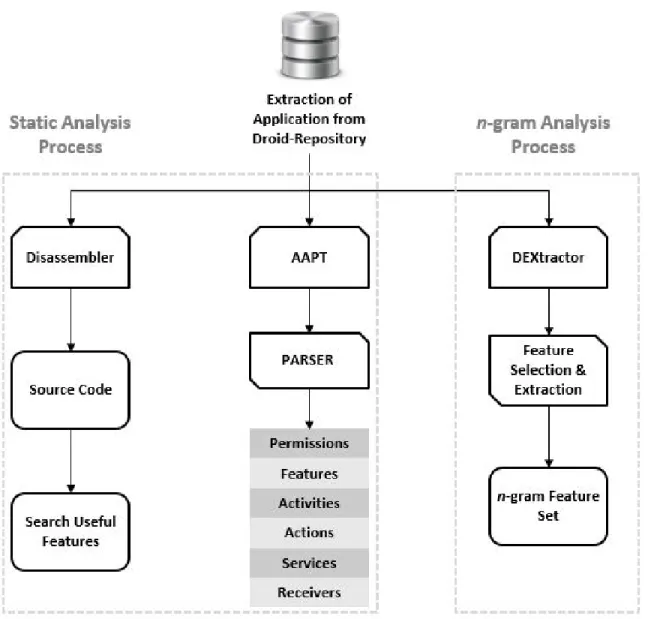
3.2.1 Static Analysis Process . . . 48
3.2.2 N-gram Aanlysis Process . . . 49
3.2.3 Features extracted from the AndroidManifest file . . . 50
3.2.4 Feature Extraction from Source Code . . . 51
3.3 Dynamic Analysis Module . . . 52
3.3.1 Dynamic Analysis Process . . . 54
3.4 Using AndroSAT . . . 57
4 Experimental Results 60
4.1 Frequent Permissions and Dynamic Operations . . . 61
4.2 Cyber-intelligence . . . 64 4.3 Malware Detection . . . 66
5 Conclusions and Future Work 71
5.1 Conclusion . . . 71 5.2 Future Work . . . 72 Bibliography . . . 74
List of Figures
1 Android Architecture [15] . . . 7
2 Multi-layered Security Architecture of Android Platform [33] . . . 9
3 The GUI for the Verify Apps functionality [38] . . . 17
4 An Example for Verify Apps functionality detecting malicious application installation [38] . . . 18
5 Premium SMS Warning . . . 18
6 Server application accessing exact location of the client RAT . . . 24
7 Ransom message and encrypted files byAndroid/Simplocker.A[20] . . . . 26
8 An Example for Fake Facebook token generator used byiBanking[21] . . 27
9 Overview ofAndroSAT . . . 40
10 The main menu ofDroid-Shelf . . . 44
11 Overview of the static analysis module . . . 46
12 Overview of the dynamic analysis module . . . 53
13 Graphical User Interface ofAndroSAT . . . 58
14 Top 15 permissions used by malicious applications . . . 62
16 Top 15 dynamic operations performed by malicious applications . . . 63
17 Top 15 dynamic operations performed by benign applications . . . 63
18 Geographical Presentation of the locations of suspected IPS . . . 65
19 Accuracy obtained by different classification techniques . . . 66
20 Precision obtained by different classification techniques . . . 67
21 Recall obtained by different classification techniques . . . 67
List of Tables
Chapter 1
Introduction
Android is one of the most popular operating system these days. It powers more than a billion smart devices that include phones, tablets, wearables and consoles [5]. Around one million android devices are activated every day and more than one billion applications are downloaded every month, worldwide [6]. Android powered devices have replaced everyday use of laptops and desktops. Most of the smartphones these days have a better hardware configuration as compared to the laptop and desktop computers used in the 90’s.
Android is the biggest open source mobile operating system. Its open source nature makes it flexible and customizable while maintaining the easy to use quality [5]. On the other hand, being an open source platform, Android opens itself to numerous amount of sophisticated attacks. At the same time, it also gives an opportunity to the developers to quickly learn its possible vulnerabilities and keep it vaccinated against attacks. Overall, being an open source helps Android to remain up to date against attacks as compared to many other mobile platforms and, in turn, Android can build strong prevention and detection techniques.
Over the past years, Android applications with malicious intent were observed not only at the third party app stores but also at the Google Play store. These malicious applications include virus, worms, Trojans, remote access tools, botnets and coin-miners. Although
Google has exerted a large effort to get rid of malicious applications from the Google Play store, there were thousands of victims before Google realized the malicious existence of such malware. All these malicious applications were proved to be dangerous to the smart-phone users as they aimed for stealing the personal information of users including contacts, emails, pictures, text messages, call logs and banking information. One of the most dan-gerous types of malware is remote access tools, also known as RATs, which can remotely control a smartphone without the user’s knowledge and installation of such malware does not even need a rooted device.
1.1
Motivation
According to a recent report from Juniper Research [30], smartphone sales have increased by 49% year-on-year since the third quarter of 2012. In the third quarter of 2013, more than 250 million smartphones were sold worldwide. This rapid increase of smartphone usage has moved the focus of many attackers and malware writers from desktop computers to smartphones. Today, mobile malware is far more widespread, and far more dangerous, especially in Bring Your Own Device (BYOD) arrangements where mobile devices, which are often owned by users who act as defacto administrators, are being used for critical busi-ness and are also being integrated into enterprises, government organizations and military networks [32, 35].
Android, being one of the utmost market share holders, not only for smartphones and tablets, but also in other fields such as automotive integration, wearables, smart TVs and video gaming systems, is likely to be facing the biggest level of threat from malware writ-ers. As an open-source platform, Android is arguably more vulnerable to malicious attacks than many other platforms. According to a report from Juniper Networks [29], mobile mal-ware grew 614% for a total of 276,250 malicious apps from March 2012 to March 2013. Another recent report from Kaspersky [17] shows that 99% of all mobile malware in the
wild is attacking the Android platform. Kaspersky also mentioned that mobile malware is no longer an act of an individual hacker; some rogue companies are investing time and money to perform malicious acts such as stealing credit card details and launching phishing attacks, to gain profit. According to the Kaspersky report, the number of unique banking Trojans has risen from 67 to 1321 from the start to the end of 2013. Thousands of users were forced to pay millions of dollars due to the gradual dissemination of infected apps. In extreme cases, an application with malicious intent can do more than just sending premium text messages–they can turn a phone into a spying tool. These spying tools can track the current location of a smartphone, make phone calls, send and receive text messages, and send stolen private information to remote servers without raising any alarm.
1.2
Objectives
Throughout this work, we focus on building a prototype to analyze Android applications and record their interaction with the Android emulator. The idea is to make the whole process automated so as to keep the Android apps security analysis easier and faster by analyzing numerous Android applications at once without manual intervention.
The developed prototype aims at recording security relevant information that can be obtained by observing the actions performed by Android apps when they run on Android devices. This information can then be used to perform different case studies or infer the intentions of an Android app.
The objective of this work can be summarized as follows:
• Design and implement a static analysis tool for Android apps • Design and implement a dynamic analysis tool for Android apps
• Integrate static and dynamic analysis tools in order to automate the whole analysis procedure
• Perform case studies on information collected during static and dynamic analysis of Android apps in order to confirm the effectiveness of the developed framework
1.3
Contributions
In this thesis, we present a Security Analysis Tool for Android applications, named An-droSAT. The developed framework allows us to experiment with different security aspects of Android apps. In particular,AndroSAT comprises of:
• A static analysis module that scans Android apps for malicious patterns. This process involves several steps such as n-gram analysis of dex file (compiling an Android application generates a dex file, also known as Dalvik executable, as a part of the APK package), de-compilation of the app, pattern search, and extracting security relevant information from the AndroidManifest files.
• A dynamic analysis sandbox that executes Android apps in a controlled virtual envi-ronment which logs low-level interactions with the operating system. The developed sandbox allows not only for observing and recording of relevant activities performed by the apps (e.g., data sent or received over the network, data read from or written to files, and sent text messages) but also manipulating, as well as instrumenting the Android emulator. Many modifications were made to the Android emulator in order to evade simple detection techniques used by malware writers.
• Analysis tools and add-ons for investigating the output of the static and dynamic analysis modules.
In order to demonstrate the effectiveness of our framework, we tested it on popular apps collected from F-Droid [22] which is a Free and Open Source Software (FOSS) repository for Android applications, and a malware dataset obtained from a third party as well as
from the Android Malware Genome Project. The reports produced by our analysis were used to perform three case studies that aim to investigate the frequency of use of different Android permissions and dynamic operations, detection of malicious apps, learning about the deciding factors in distinguishing between benign and malicious apps, interpreting data collected during the static and dynamic analysis of Android apps and generating cyber in-telligence about domain names involved in mobile malware activities. The results obtained by the first case study can be utilized to narrow down the list of features that can be used to determine malicious patterns. In the classification experiment, using the features extracted from our analysis reports, we applied feature space reduction, and then performed classifi-cation on the resultant dataset. The obtained classificlassifi-cation results are very promising. All these experiments show the versatility as well as the wide variety of possible usages for the information obtained byAndroSAT.
1.4
Thesis Organization
The rest of this thesis is organized as follows. Android security, malware on Android and related work are reviewed in the next chapter. In chapter 3, we present AndroSAT, a Security Analysis Tool for Android applications. In chapter 4, we present the case studies on security relevant information obtained during static and dynamic analysis of Android applications in order to confirm the effectiveness of the developed framework. Finally, in chapter 5, we present a summary of our research and some possible future research directions.
Chapter 2
Background
2.1
Android Overview
Android is an emerging platform with about 19 different versions till date [47]. Table 1. shows different Android versions and their corresponding release date. As shown in Figure 1, the Android framework is built over a Linux kernel [15] which controls and governs all the hardware drivers such as audio, camera and display drivers. Android contains open-source libraries such as SQLite, which is used for database purposes, and SSL library which is essential to use the Secure Sockets Layer protocol. The Android architecture contains
Dalvik Virtual Machine(DVM) which works similar to the Java Virtual Machine (JVM). However, DVM executes .dex files whereas JVM executes.class files. Every application runs in its own Dalvik virtual environment or sandbox in order to avoid possible interfer-ence between applications and every virtual environment running an application is assigned a uniqueUser-ID(UID).
The application layer consists of the software applications with which users interact. This layer communicates with the application framework to perform different activities. This application framework consists of different managers which are used by Android apps. For example, if an app needs access to incoming/outgoing phone calls, it needs to access
Android Version OS Name Release Date 1.0 Alpha 09/2008 1.1 Beta 02/2009 1.5 Cupcake 04/2009 1.6 Donut 09/2009 2.0-2.1 Eclair 10/2009 2.2 Froyo 05/2010 2.3.x Gingerbread 12/2011 3.1-3.2 Honeycomb 02/2011 4.0.3-4.0.4 Ice Cream Sandwich 10/2011 4.1.x-4.3 Jelly Bean 08/2012 4.4 KitKat 09/2013
Table 1: Android version history [47]
TelephonyManager. Similarly, if an app needs to pop-up some notifications, it should interact withNotificationManager.
An Android application, also known as an APK package, consists of AndroidMani-fest.xml, res, META-INF, assets and classes.dex files. The AndroidManifest.xml file con-tains information about supported versions, required-permissions, services-used, receivers-used, and features-used [15]. META-INF contains the certificate of the application devel-oper, resource directory (res) contains the graphics used by an applications such as back-ground, icon and layout [15]. The assets directory contains the files used by an Android application, for example: SQLite database, and images. The classes.dex file is an exe-cutable file in a format that is optimized for resource constrained systems.
2.2
Android Security
The multi-layered security architecture of Android gains it a significant advantage and allows it to become secure compared to its counterparts. This multi-layer security archi-tecture keeps it secure from apps with malicious intent. Figure 2 depicts the multi-layered security architecture of the Android platform. Android permissions is one of the layers in the secure operating system multi-layered architecture. However, the open source nature of Android makes it somewhat dependent upon the users and developers to do the right thing. To perform any given task, an application needs control over the users data and the device resources. At the time of the application installation, the users are asked to grant these permissions to the application which makes the operating system secure provided that users always manage to make the right decision at this step. Users can deny or allow all the permissions requested by an app. In other words, users have the privilege to grant a lot of permissions as requested by an application and may access the depths of Android operating system if the device is rooted.
Figure 2: Multi-layered Security Architecture of Android Platform [33]
sensitive data or functionality by granting corresponding permission to an app. However, as a secure operating system Android also tries to keep sensitive data and functionalities safe from the mistakes of the users by warning them of possible malicious outcomes. For example, when a new application is installed, Android advices the user for possible issues which might occur if a particular permission is granted. Despite of such warnings, Android devices usually get open to a lot of malicious applications not because Android is insecure but because users make it insecure. However, security-savvy developers and users can keep the Android operating system more secure and flexible to use in day to day life operations. Android security can be divided into three different levels:
• Secure Android Operating System Development • System Level Security
2.2.1
Secure Android Operating System Development
According to Google, for making and keeping an operating system secure, it is always necessary to think about security from the very first development steps of the operating system. The key steps in secure Android operating system development process are listed below [11]:
• Design Review : The security process starts from the very first step in the operating system life cycle. Design of the operating system is then reviewed by chief security professionals at Android [11]. The development process of the Android operating system goes to the next steps only if the design passes all the security aspects of an operating system.
• Penetration Testing and Code Review : During the development process of the Android operating system, it goes through plenty of pen-testing processes. The code is reviewed and penetrated by the Android Security Team, Google Information Se-curity Engineering team, and independent seSe-curity consultants [11]. The main aim of these tests and reviews is to check the code for possible vulnerabilities and known weaknesses to fix them before moving to the next steps.
• Open Source and Community Review :Google allows the Android operating sys-tem to be reviewed by external security professionals, security developers, code re-viewers and secure code reviewing communities [11]. After all, security by obscurity does not work and it is better to get scrutiny done by experts.
• Incident Response :Even after shipping the operating system, security issues might occur in an operating system. New vulnerabilities might get discovered while the product is shipped and being used by millions of users. Android has a special re-sponse team for all vulnerabilities that are discovered once the operating system is live. The goal of this team is to eradicate any vulnerability that is discovered, as
quickly as possible. The usual tasks of this team include fixing the vulnerability, re-leasing fixed updates to the users and removing the malicious applications from the Google Play store [11].
2.2.2
System Level Security
The Android platform provides an extra layer of security at the operating system level. Some of the security aspects that come under system level security of Android platform are mentioned below:
• Linux Security : The Android platform is based upon a Linux kernel and conse-quently, it inherits all the security aspects of this Linux Kernel [11]. The Linux platform is also an open source platform and is used by millions of users and security experts. Being an open source platform, Linux was built, designed, researched, tested and fixed by security experts all over the planet which makes it a reliable, robust and trusted platform.
• SE Linux :Android applies the functionalities of Security Enhanced Linux to make the operating system more secure and reliable [11]. SE Linux is used most widely in the areas which need very high security like government servers, military systems and other security oriented departments. In Android 4.3 and later versions, discre-tionary access control environment is replaced by mandatory access control [13]. Mandatory access control limits an app with root privileges to write to raw block device specified in the associated policy. Hence, overcoming the issues with discre-tionary access control environments where an app can write to any raw block device.
• Root Access : Generally, no third party application can gain root access to an An-droid device. Only the kernel and few core applications have root access and can execute with root privileges [11]. An application with root privileges can access
everything on an Android platform whether it is another application’s data, user’s private data or private banking information. With root privileges, any application can take over the whole operating system and learn about all the information stored on that device. In this case, even encryption does not work because the decryption key itself is stored onto the device which is controlled by the rogue application.
For any application to gain root access, it needs the operating system to be rooted which can be easily done by installing a custom OS image onto the device. With a rooted device, users can access extra functionalities of the Android device - for example, using a custom firewall, Tor browser, packet sniffers, ad blockers and CPU tuners.
• Application Sandbox :Every Android application installed on the operating system is assigned a unique User ID (UID) and each user operates under a separate process. This creates a sandbox for every application which means that each application runs in its own Dalvik virtual environment or sandbox in order to avoid possible interfer-ence between applications [11].
This technique is a bit different than that of the usual Linux operating system and can only be bypassed if the Linux kernel is compromised. The application sand-box keeps the application secure from other applications and keeps the application specific data/information secure and private. It would be a disaster if a third party application can have control over banking applications or if a malicious application takes control of the e-mail clients. The idea of keeping the applications in their own sandbox keeps the operating system secure yet simple.
• Safe Mode : All devices powered by Android can be booted in a safe mode which starts the operating system in an environment which is free from third party appli-cations where users can only access pre-installed appliappli-cations which come with the
operating system [11]. As this mode is free from third party applications, it is ex-tremely secure and is vaccinated against malicious attacks.
• Cryptography : Android offers cryptographic techniques which can be used by applications to keep the sensitive data, such as credentials and banking information, secure from any external or network intrusions. These techniques use cryptographic primitives such AES, SHA, RSA and DSA [11].
• Password Protection : Android protects the data from unauthorized access through different device locking techniques. There are six different ways of locking an An-droid device which include swipe, face unlock, face and voice, pattern, PIN and password.
2.2.3
Application Level Security
• Applications from Unknown Sources : By default, the Android platform does not allow any application from third party stores to be installed on the device unless the user specifically tells it to. Android gives an option to allow installation of applica-tions from sources other than the Google Play store. Since it is considered insecure by Android, this functionality is not activated by default and can only be activated manually with the consent of the user.
• Application Signing :Every application must be signed by its developer before it is uploaded to the Google Play store [11]. Signing helps to uniquely identify the author of the application and makes it easier for the Google Play store to keep track of the application’s developer for security purposes.
While the application is installed onto the Android device, its certificate is verified with the signature to make sure that the integrity of the application is maintained. Ap-plication signing is used to assign the apAp-plications to the apAp-plication sandbox. Thus,
two applications with similar application signature will share the same application sandbox.
• Android Permission Model : On an Android device, no application can access user or system sensitive data of an Android device [11]. An application, by default, uses no permissions until and unless it needs access over user or system specific resources. The user can either allow or deny all the permissions asked by an application. As of now, there is no feature like denying or allowing only a specific subset of the permis-sions requested by an application. Once the permispermis-sions requested by an application are granted, there is no way to take them off from that application.
• Cost-Sensitive APIs :Android distinguishes the APIs which might incur cost to the users in some sense and names them Cost-Sensitive APIs [11]. To use these APIs, the application should ask for their corresponding Android permissions. Some of the Cost-Sensitive APIs are mentioned below:
– SMS/MMS :Android applications use this API to send or receive SMS/MMS. An application with malicious intent can subscribe to premium messaging ser-vices using this API.
– Network : Using this API, some malicious applications may use cellular data to download huge amount of data using the victim’s Android device and hence, incurring unwanted data usage cost.
– Telephony : The application with malicious intent can use this API to make calls to premium numbers without the user’s knowledge.
– In-App Purchase : Many users set-up their credit cards on their Android de-vices to make the process of In-App purchase or buying an application easier and faster. Malicious applications using this API can cost the user a lot of money by making irrelevant purchases without the user’s knowledge.
2.3
Evolution of Android Security over time
The main aim of the Android developers was to keep the Android platform secure yet simple. These developers have paid a lot of attention in keeping the platform secure from all the attacks and vulnerabilities that were discovered. They have maintained this security by not only maintaining the operating system level security but also application level security. Android security has evolved over recent years with the new outcoming versions of the Android operating system. Some of the recently added security features in the Android platform to keep the platform secure from the known vulnerabilities/issues are:
• Memory Management Enhancements : The enhancements made to the memory management in the context of security are mentioned below [11]:
– Android 1.5 :
Extensions to OpenBSD dlmalloc to prevent double free() vulnerabilities and to prevent exploits against heap corruption
OpenBSD calloc to prevent integer overflows during memory allocation ProPolice to prevent stack buffer overruns
safe_iop to reduce integer overflows – Android 2.3 :
Hardware-based No eXecute (NX) to prevent code execution on the stack and heap
Linux mmap_min_addr to mitigate null pointer dereference privilege esca-lation
Format string vulnerability protections – Android 4.0 :
Address Space Layout Randomization to randomize key locations in mem-ory
– Android 4.1 :
Avoid leaking kernel addresses
Position Independent Executable support – Android 4.2 :
FORTIFY_SOURCE for system code – Android 4.3 :
ADB Authentication
Android sandbox reinforced with SELinux
• Device Encryption : Full device encryption was introduced in Android 3.0 and is supported by all its following versions. The device can be encrypted using the dmcrypt implementation of AES128 with CBC and ESSIV:SHA2561 [12]. The en-cryption key accepted by Android is only user entered password and not pattern as seen in lock-screen of an Android device. This password/encryption key is secured by AES 128 and, to keep it secure from password guessing attacks, a salt is added to it and repeated hash is generated using SHA1 [11].
• Device Administration :Device Administration API was introduced in Android 2.2 and is supported by all its following versions. Device Administration API allows an application to access the device as an administrator. An application with administra-tor privileges can evade its uninstallation and perform administrative tasks such as restoring the Android device to factory defaults. It is most widely used by the soft-ware installed on the laptop or desktop computers to communicate with the Android 1Encrypted salt-sector initialization vector technique is used to generate initialization vectors for block encryption in cipher-block chaining
Figure 3: The GUI for the Verify Apps functionality [38]
device (for example, Samsung Kies and Sony PC Companion). Also, it is used to remotely wipe all the data from the device, restore the factory defaults, lock-screen and reset the lock code.
• Application Verification : The application verification (See Figure 3) was intro-duced in Android 4.2 and is supported by all its following versions. By selecting the option named “Verify Apps” under security settings in Android devices, users can verify the third party apps to identify known malware. Application verifier verifies the application with the Google’s malicious applications database and if the veri-fier suspects it to be harmful for the device, it may stop the installation process and display a message as shown in Figure 4.
• Premium SMS Warning : This functionality was introduced in Android 4.2. The premium SMS warning warns the user if any application tries to send a premium SMS and if that SMS will incur premium charges as shown in Figure 5. In such cases, the user can either go ahead and send the message by selecting the Send button on the notification or cancel it by hitting Cancel.
• Keychain : Keychain was introduced in Android 4.0 and is available in all its fol-lowing versions. Keychain is used to store private keys and their corresponding cer-tificates in credential storage. These keys and cercer-tificates can then be accessed by
Figure 4: An Example for Verify Apps functionality detecting malicious application instal-lation [38]
their corresponding applications. This functionality provides user convenience by not prompting the users to enter the keys again and again.
• READ_LOGS permission : TheREAD_LOGSpermission is used to allow any ap-plication to read all the system level log files which might contain privacy-sensitive data and activities performed on the Android device. These log files store all the actions performed by the user and the data involved in those actions. Every activity on an Android device including SMS sent, received with the data inside the message, call received, websites browsed, applications opened and credentials entered are writ-ten in the system log files. Recently, Android prevented third party applications from accessing theREAD_LOGSpermission due to security issues.
2.4
Past, Present and Future of Android Malware
With the increasing number of activated Android devices, attackers are trying to utilize every chance to gain control over these millions of devices either to earn money, mine electronic coins, perform a DDoS attack or maintain a sophisticated botnet. Being an open-source platform, Android faces many security challenges every day and Android developers are trying their best to keep the platform secure from any known or unknown malicious activity that might result into user inconvenience. Most Android users are unaware of the vulnerabilities of the platform and do not see any malicious activity coming their way. This does not mean that Android is perfectly secure. Android malware have made it quite clear that Android is not as safe as users consider it to be.
Millions of users were forced to pay billions of dollars due to infected Android devices. According to the Android developers, they have made their platform very powerful and gave all the power to its users. It is the user’s responsibility to keep it safe and away from the malicious intentions. As seen in case of windows and many other platform, we individuals
are lazy and tend to ignore warnings issued by the operating system. The ignorance of users has made them pay a hefty amount to attackers. Most of the malicious applications in the wild depend on social engineering techniques to get installed on the users’ devices. We believe that with reasonable attention and understanding of the Android capabilities these threats can be avoided.
In this section, we discuss the past, present and possible future of Android malware.
2.4.1
Past
In the past, Android malware was proved to be a challenge for the Android developers. Malware writers abused all possible vulnerabilities of Android to earn money and gain control over millions of devices without the user’s knowledge. Some of the malware that made their way to the Google Play store and proved out to be very dangerous are listed below:
• DroidKungFu : In June 2011, the first version ofDroidKungFuwas discovered by researchers at NC State University followed by its second and third versions in July and August, respectively [51]. These researchers were also successful in identifying the fourth, fifth and sixth variants of DroidKungFu named DroidKungFu4, Droid-KungFuSapp and DroidKungFuUpdate, respectively. The medium of infection of
DroidKungFuwas through repackaged applications and it was considered the most sophisticated family of Android malware. DroidKungFucomprised of root exploits, C&C servers, shadow payloads and obfuscation.
DroidKungFu was the first malware family that had an encrypted root exploits to avoid easy detection by signature based analysis schemes and anti-virus tools. Also, the encryption keys of the encrypted root exploits varied with changing versions. However, only four out of six variants had encrypted root exploits. DroidKungFu
device and perform particular tasks on the device according to the attacker’s will. C&C servers were included in all versions of DroidKungFu. Moreover, attackers paid a lot of attention to keep the C&C servers secret from the malware researchers and security professionals. They started from storing the server address in plaintext to encrypted text and finally encrypted with home-made encryption scheme [51]. The malware writers also increased the number of C&C servers.
Shadow payload was one of the important constituents ofDroidKungFu. It contained an embedded application with the same malicious payload within theDroidKungFu
package. DroidKungFu installs this embedded application onto the Android device once the root exploit succeeds. The reason behind installing the embedded applica-tion was that even if the original repackaged applicaapplica-tion is removed by the user, this application will be functional. Initially, this embedded application, once installed, showed up as a fake Google search icon which was later fixed and displayed no icon on the screen. DroidKungFu was heavily obfuscated malware which had strings, server address, embedded application and root exploits encrypted with changing en-cryption key with varying versions.
• AnserverBot : AnserverBotwas initially distributed in Chinese third party Android application stores and it piggybacked on popular or paid Android applications [50]. It was discovered in September 2011 and was considered as a sophisticated malware because it exploited several vulnerabilities to stay undetected. The three main tech-niques used by AnserverBotwere anti-analysis, C&C servers and security software detection [51].
One of the main aims of AnserverBotwas to keep it secure from analysis done by security researchers and professionals. To avoid any analysis, AnserverBot detects any changes done to the package which might result into change of signature or the
integrity of the application which contains it. If the application’s integrity is not main-tained, AnserverBotwon’t unfold its payload. Also, the developers ofAnserverBot
did a lot of obfuscation to make the code very hard to read. The payload of Anserver-Botwas divided into three different parts, the first one was the application installed and the other two were embedded in a package sharing the same name.AnserverBot
loads one of them dynamically without actually installing it and the other one was installed using the update attack. This proved out to be the biggest challenge for malware analyzers.
AnserverBotalso paid a special attention to avoid its detection by any security related software installed on the Android device like anti-virus. In particular,AnserverBot
included encrypted string of package name of three of the most popular anti-virus software at that time and performed a search operation to match the application in-stalled on the device. If the matching application is found, AnserverBot kills it by calling the restartPackage function. This technique helps to avoid any detection from well-known anti-virus software installed on the Android device.
AnserverBot uses two types of C&C servers. One of them is just a normal C&C server that receives commands from the attacker whereas the other one is used to upload the payload and server address for the first C&C server. The second type is maintained by service providers like Sina and Baidu. AnserverBot connects to the popular blog site to obtain the encrypted new payload and server address. This en-sures that even if the traditional C&C server is offline, its payload and server address will be updated with the second type of C&C server.
• AndroRAT :As the name suggests, AndroRAT is a remote access tool used to con-trol Android devices remotely [44]. AndroRAT consists of a server and a client. The client application is the infected Android application that is installed onto the Android device whereas server application is a Jar file which can be executed on
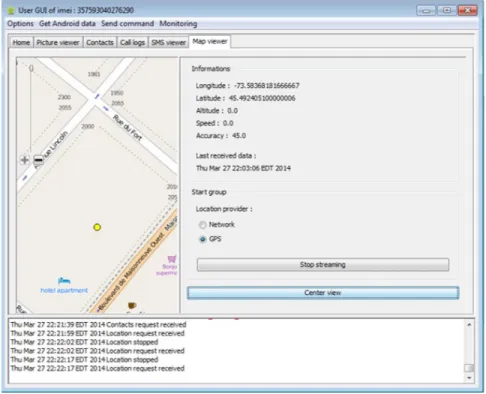
Windows, MAC or Linux environment. Initially, AndroRAT was introduced as an open-source remote access tool in November 2012 which can gain almost complete control over an Android device. To remotely control the victim’s Android device, the attacker needs to install the RAT application with modified server IP address and port onto the Android device. Once the application is installed and starts running on the device, it communicates with the server application and creates a connection with the server. After this, the server can perform the following actions over the controlled device:
– Monitor phone calls and SMSs – Make phone calls and send SMSs – Obtain all the contacts
– Download files stored on the device – Obtain exact location of the device – Display toast messages on device – Take pictures
– Stream video or audio
Figure 6 shows an example illustrating the location of the Android device being con-trolled throughAndroRAT. One of the problems withAndroRAT was the installation of the RAT application on the Android device. However, the recent introduction of
AndroRAT APK binderhas made this tool more dangerous and easier to spread. An-droRAT APK binder can be used to bind the RAT application with any popular or well-known application using the “bind+build” functionality of this tool. This makes the infection easier, faster and more widespread.
The biggest advantage of AndroRAT is that it does not need root privileges to per-form the actions mentioned below. Moreover, variants to AndroRAT are introduced
Figure 6: Server application accessing exact location of the client RAT
in underground markets every now and then with new features and functionalities. Dendroid is one of the variant of AndroRAT. Dendroid is a HTTP remote access tool with APK binder and a sophisticated PHP panel through which an attacker can control the infected Android devices [41].
2.4.2
Present
The current focus of Android malware is not to exploit any vulnerability in the operating system but perform the malicious activities by using the useful functionalities offered by Android platform. Malware writers have moved their focus on developing malware using the extra and powerful functionalities offered by Android platform. This technique helps to easily evade any signature based malware detection by well-known antivirus software. Some of the recent malware identified in the wild in the last few weeks are mentioned below:
• Android/Simplocker.A : Few weeks ago, a file-encrypting ransomware which is named asSimplocker was discovered by ESET’s security engineers [20]. The sam-ple was discovered in the form of an Android application “Sex xionix”. According to their findings, this application acts as a Trojan, it scans the SD card installed on the Android device for certain type of files such as doc, docx, jpg, jpeg, txt, avi and png. It then encrypts them using the AES encryption algorithm. Meanwhile, it displays a ransom message to decrypt all the files. Figure 7 shows an example for the ran-som message displayed by the application once it is installed and finished encrypting photos in camera directory. The message is written in Russian and the ransom is 260 Ukrainian hryvnias (21 US dollars) which makes it safe to assume that the source and target of this Trojan are Russians. The last few lines translates to“After payment your device will be unlocked within 24 hours. In case of no PAYMENT YOU WILL LOSE ALL DATA ON your device!”. To keep the identity secret, the application asks the user to pay the ransom using Monexy [36]. Simplocker also sends device spe-cific information to its C&C server which is hosted on a TOR domain to maintain anonymity.
Similarly, a fake anti-virus (Android/FakeAV) application namedAndroid Defender
was discovered and analyzed last year by Sophos [40]. The application poses itself to be a genuine anti-virus. According to Sophos engineers, this anti-virus, in the initial scan, prompts the user about two viruses, one Trojan and one malware which it offers to get rid of, only if the user clicks onBuy and eliminate threatsbutton. Symantec discovered more aggressive version ofAndroid Defender which almost locks down the device [42]. The User might not have an option of uninstalling the application or performing a factory restore as the malware attempts to prevent other applications from launching. Since the application is not stable on all Android applications, few lucky users might get a chance to uninstall the malware as it crashes.
Figure 7: Ransom message and encrypted files byAndroid/Simplocker.A[20]
• iBanking : It was initially introduced as an SMS stealer which is now turned into a sophisticated and powerful Android Trojan. According to Symantec [43], the source ofiBanking is Russian cybercrime gangs and it is proved to be the most expensive malware sold in the underground markets/forums, priced at 5000 US dollars with updates and technical support. The strongest aspect ofiBankingis that its application code is obfuscated. Social engineering techniques are used by the attackers to lure the user to installiBankingapplication.
Consider a user infected with a Trojan on her PC. When the user visits a banking, social networking, e-mail account website, she is shown a message instructing her install a two-step verification token generator to keep the account secure from the ever increasing attacks. The user is prompted to enter her phone number and select the type of operating system she is using. If the operating system is Android, the user will be given a link to download the token generator client. She can also use a QR
Figure 8: An Example for Fake Facebook token generator used byiBanking[21]
code2to download the token generator client. The victim also receives a text message
containing a link to iBanking application. The installed application is a complete imitation of a genuine banking, social networking or email account application which generates token for two-step verification. Figure 8 shows a fake Facebook token generator used byiBanking.
Once installed on a victim’s device,iBankingcan be controlled by the attacker either through HTTP or SMS control. The attacker can perform the following tasks using
iBankingC&C server:
– Steal sensitive information
– Intercept, forward SMS and phone calls to the server
– Upload contacts, GPS location and recorded audio to the server
2QR code is also known as Quick Response code which is a trademark for matrix barcode. Smartphones
– Redirect a call to the attacker’s number – Prevent its removal or uninstallation – Restore device to factory defaults
• Android/Samsapo.A : Android/Samsapo.Awas first discovered by ESET malware researcher and security professional [19]. This malware uses a technique similar to computer worms and tries to spread itself. It relies totally on social engineering where a victim installs the application thinking of it as a useful link. Hence, the installation process is totally dependent on the user’s ignorance. If an application gets installed on an Android device, it sends an SMS message to all users in the contact list with a message that says “Is this your photo?” in Russian and a link which contains the malware package. The capabilities ofAndroid/Samsapo.Acan be summarized as follows:
– It looks like a system utility with package namecom.android.tools.system v1.0
– No icon is generated after installation and the application has no GUI – Download malicious files
– Upload sensitive information to server
– Register for premium message service – Block phone calls and modify alarm settings
2.4.3
Future
The future of Android malware is vast. Unlike past and similar to present, future malware may focus on the use of advanced functionalities offered by the Android operating system to obtain sensitive information and perform malicious activities. Hasanet al.[26] explore a
applications such as the wide variety of sensors. The idea of exploiting the wide variety of sensors is to generate a malware that can target a very large amount of victims.
Malware in the past used to depend upon the traditional command and control servers which can be operated through a centralized server or by sending a text message. However, these new generation of malware would not need any centralized server to take control of the infected Android devices, it may make use of out-of-band channels. These communica-tion channels allow the attacker to reach out to a very large number of users at once without raising an alarm in the user’s mind.
This technique offers a very high level of anonymity and keeps it almost impossible for any malware analyzer to detect any malicious intent. The idea is to make use of sensor enabled channels instead of network-based communications which makes it very hard to identify the malicious activity by monitoring cellular or wireless communication data. In [26], Hasanet al. presented C&C servers based on visual, magnetic, audio and vibrational signals. For example, a malware can monitor the audio sensor and trigger the malicious payload when a specific song, announcement or message is played on radio or television. This technique can trigger billions of devices to perform a specific action at the same time. Examples of such malicious actions include performing factory restore, DDoS attack on a website, playing same song on billions of devices, send premium messages or make phone calls. Think of a situation where all the Android devices in the airport after listening to a particular announcement to perform a DDoS attack on a carefully chosen airport server causing all flight-ground communication to fail.
A malware with such capabilities can easily cause a worldwide disaster. Using this technique, a botnet can be controlled without using traditional networks and will be ex-tremely hard for any malware analyzer or antivirus to detect it. This kind of malware can be used as a weapon against many facilities around the world. An intrusion detection sys-tem can be installed to monitor sensors and identify any malicious activity. However, a
sophisticated malware can use a virtualization layer between the sensor and the application to avoid detection. There is a serious need to think about eradicating these kind of attacks before they even come into existence.
2.5
Efforts Made to Improve Android Security
Due to sudden increase in the number of Android malware, researchers too have moved their focus and resources towards securing the Android platform from the rising threats. Most of the security researchers and professionals have realized that Android is a very powerful platform and all its power is being controlled by its user. If the user is smart enough to properly use these powers, then there will be no need to take any actions against the rising threats. However, it is almost impossible for every user to totally understand the Android platform. Most of the users are even unaware of the possible actions they may allow an application to perform by allowing a specific permission.
Due to the gaps between Android security and user’s understandings, malware pro-fessionals and researchers have developed ways to save users from the possible malicious actions performed by any application with malicious intents. We have divided the work related to our thesis into three different parts as mentioned below:
• Assessing current Android security
• Extensions proposed to improve Android security • Tools developed to analyze Android applications
2.5.1
Assessing current Android security
In [51], Yajin and Xuxian collected over 1200 malware samples from 49 different families to systematically characterize the existing Android malicious applications. According to
Yajin and Xuxian, more than 14 different families of Android malware were discovered on Google Play store. Furthermore, according to their characterization results, around 86% of Android malware are repackaged version of most popular applications, around 37% of An-droid malware focus on exploiting platform level vulnerabilities, about 45% of the malware tries to subscribe to premium services by sending out SMSs without the user’s knowledge and 93% of them showed bot like capabilities. Then, Yajin and Xuxian chose four leading antivirus software for Android devices and installed them on different smartphones. After this, they executed all the samples, one by one, on those smartphones and monitored the response from the anti-virus software. They received very astonishing results where only one of the anti-virus was able to reach an accuracy of about 79% whereas the worst de-tection rate was as low as 20%. According to them, current anti-malware solutions are not good enough to diligently identify the presence of even known malicious applications and there is a need to develop better anti-malware solutions to fight the outgrowing number of malicious applications.
2.5.2
Extensions proposed to improve Android security
Enck et al. [18] proposed an extension to current Android platform named TaintDroid.
TaintDroid is designed to provide the user with adequate amount of visibility and control over third party applications. TaintDroid performs a real-time dynamic taint tracking to detect if any third party application tries to access sensitive information. To perform dy-namic taint tracking, TaintDroid defines labels or taint for data that is privacy-sensitive which includes user data, device specific information or data stored on the device. Enck
et al. claimed thatTaintDroid can track multiple labels at the same time and record the information to generate logs. The key goal ofTaintDroidis to achieve very high efficiency due to limited amount of resources in smartphones.TaintDroidachieved high efficiency by combining four different levels of granularity together, namely, file-level, variable-level,
message-level and method-level. TaintDroid was tested with 30 samples collected ran-domly from distinct repositories and the results came out promising. It detected that 20 out of 30 applications misused the user’s private information in 68 instances. Moreover, 15 out of 30 applications sent the user’s current location to the remote servers.
Russelloet al.[39] presented an Android extension namedYAASE(yet another Android security extension).YAASEprovides a policy enforcing mechanism and incorporates taint-ing mechanism fromTaintDroid [18] for labelling the sensitive data and monitoring how the data is spread within the operating system and leaves the operating system through the Internet connection. Due to the policy enforcing mechanism introduced in YAASE, appli-cations are limited to access specific labels only which provides an opportunity to the user to keep the sensitive data far away from the user. It also allows the users to assign network capabilities to an application and limit them to certain links only resulting into controlled Internet access; hence, keeping the device safe from any data being uploaded to the remote servers.YAASEtags the data using user-defined labels such as public, private and confiden-tial; hence, providing access to the public tags to all the applications while keeping private and confidential data untouched. Russello et al. claimed that the results show possible overheads. However, it can be further optimized to reduce the overheads by limiting the focus on monitoring data leaving the operating system through Internet connections.
Naumanet al.[37] presented a framework named Apex that allows policy enforcement mechanism for Android platform. Their biggest concern is why users need to allow all the permissions to an application to use it and not grant only specific permissions. They also constraint the use of resources by any specific application even after it is installed on the device. Nauman et al. aimed at allowing users to control the resources accessible by any third party application. Apex is an extension for current Android operating systems which can be practiced by modifying very small part of the code. Their idea was to add this functionality while installing the application. Users should be able to select which
permissions to allow and which permissions to deny before an application is installed onto the device. Also, if an application asks forSEND_SMSpermissions, it should specify how many text messages an application is planning to send out every day, weekly or monthly so that users can useApexGUI to constraint that application to that many number of short messages. Similarly, other resources can be constrained to keep the device secure from any unknown data leakage by applications with malicious intentions.
Tanget al.[45] proposed an extension to the current Android operating system using a security distance model named asASESD(extension of Android Security Enforcement us-ing Security Distance model). Accordus-ing to Tanget al., a permission alone cannot do much to compromise sensitive data on an Android device but certain combinations of permissions can be a huge threat to the users. Also, some combinations are extremely malicious whereas others are used to provide normal functionality to the users. For example, the combination of READ_PHONE_STATE and RECEIVE_SMS or INTERNET and RECEIVE_SMS per-missions poses no threat to the user. However, a combination ofREAD_PHONE_STATE
andINTERNETorRECEIVE_SMSandSEND_SMScan result into a huge amount of data leakage. ASESDcalculates the security distance based upon the severity of the permission combinations used by an application. Security distance is defined as safe, normal, danger-ous and severe dangerdanger-ous, based upon the security distance 0, 1, 5 and 25, respectively. Security distance helps in determining the threat level of an application. Tanget al. tested their proposed system on 100 Android applications where about 80 applications lied be-tween security distance or threat level of 1-20, less than 20 applications lied bebe-tween 21-50 and a few between 51-100.
2.5.3
Tools developed to analyze Android applications
Burgueraet al. [16] proposed a solution to analyze Android applications and differentiate between malicious and benign application using Crowdsourcing. Keeping in mind the
limitations of resources and the limited battery life of a smartphone, they came up with an idea of completely analyzing the applications on a dedicated remote server instead of the Android device. The authors also developed a client named Crowdroid which can be downloaded and installed from the Google Play store. The client, once installed on an Android device, monitors and records all the system calls (Linux Kernel) issued by any application installed on that device. Crowdroid uses a well-known Linux system call tracing tool named Strace. Later, the monitored data is sent to the centralized remote server which parses the received data from different users. The server generates a set of system call feature vector that defines the application behavior. There are more than 250 Linux system calls and this server counts the number of times a particular system call is issued by an application in the data received from Crowdroid. The feature vector is nothing but the count of every system call in an application. According to the authors, the accuracy is directly preoperational to the number of users practicingCrowdroid. Finally, Burgueraet al.performed partitioning clustering techniques to cluster the data into benign and malicious applications. The clustering algorithm they used wask-means because of its efficiency, speed and simplicity. Burguera et al. tested their system for both self-written and real malware specimens. They claimed that they obtained an accuracy of 100% for all the self-written malware. Burguera et al. also tested it with two real world malware specimens which resulted in 100% and 85% accuracy.
Graceet al.[24] built an Android zero-day malware detection tool namedRiskRanker. They wanted to overcome the limitation of detecting only the known families of malware most frequently used by anti-virus companies through signature based detection. Graceet al. claimed thatRiskRankeraims towards analyzing the application’s behavior to assess se-curity risks posed by zero-day vulnerabilities as well as known vulnerabilities. RiskRanker
namely,first-order andsecond-ordermodule. First-orderanalysis module focuses on ap-plications which do not use any obfuscation technique and then distinguishes that applica-tion into high or medium-risk applicaapplica-tion where applicaapplica-tion using platform level exploits (for e.g., RATC, Asroot and Exploid) are categorized as high-risk, and applications that might result into spending money without user’s direct involvement are categorized as medium-risk. Whereas, second-order focuses more on applications that use obfuscation techniques and dynamic code loading. However, the applications cannot be assumed to be malicious only because of obfuscation and dynamic code loading. The authors claimed that, if an application use these techniques with any malicious intentions that might make an application really dangerous. Grace et al. collected more than 118K applications and performed analysis on all these applications usingRiskRankerin less than four days; hence, achieved very high analysis speed. The authors were successful in identifying a large num-ber of applications with zero-day vulnerabilities and known vulnerabilities (from known malware families). Graceet al. also claimed thatRiskRankeris the only tool that identifies applications with zero-day vulnerabilities with minimal analysis time.
Blasing et al. [14] proposed a sandbox named AASandbox which can perform both static and dynamic analysis on Android applications and then detect suspicious applica-tions. They suggested that it can be deployed onto a cloud server to perform analysis of Android applications in a much faster way. In static analysis, an application under analysis in disassembled and then searched for known malicious signatures or patterns. To perform dynamic analysis on Android applications, they used a LKM (Loadable Kernel Module) to load a custom kernel image onto the Android emulator which allows logging of low level interactions of Android applications with the device. Similar toCrowdroid [16], AASand-box also counts the number of times a particular system call is issued by an application. The information obtained during the static and dynamic analysis of Android applications is then logged and can be used for further investigations.
In [27], Isohara et al. proposed a kernel based behavior analysis system for Android applications. Similar to Crowdroid [16], they have also used Strace. Strace records all the system calls issued by a process and any signal received by a process. Kernel based behavior analysis for Android malware detection consists of two main modules, namely, log collector and log analyzer. Log collector logs all the kernel level logs using Strace
whereas log analyzer parses the collected logs. Log collector collects the logged system calls issued be all the applications on a device and sends it to a remote server for further analysis by the log analyzer. Log analyzer removes the noise from the logs received by filtering it to show the logs regarding the application in question and then further filters it for the selected number of system calls. Then, to identify any information leakage, it searches for signatures such as IMEI, IMSI and Android ID. For identifying any platform level exploitations, it searches for signatures like asroot, exploid and gingerbreak. It also looks for any application that uses “su” command in its activities. The authors performed their analysis over 230 samples and claimed that their solution detected 37 leakage applications, 14 platform exploits and 13 applications using “su”.
Zhouet al.[52] presented a system namedDroidRangerwhich detected the malicious applications amongst the samples collected from five app stores including Google Play store. The collected applications were stored in a repository which feeds the applications to
DroidRangerone by one for analysis. They claimed that their tool can detect new malware applications which belong to known malware families and malicious applications contain-ing zero-day vulnerabilities. To detect malware from known malware families, it performs apermission based behavioral footprinting, looks for API call sequence, searches for pos-sible SMS interception or monitoring (abortBroadcast method) and matches the structural, hierarchical layout of an application. To detect unknown malware,DroidRangerperforms
heuristics-based filteringand dynamic execution monitoring. The authors analyzed more than 200K Android applications from well-known market places including the Google Play
store. DroidRanger detected 211 malicious applications which include 32 from Google Play store and also uncovered two zero-day vulnerabilities in 40 applications which in-clude one application from Google Play store.
Wu et al. [48] proposed an application analysis technique purely based upon static fea-tures named asDroidMat. This techniques use the permissions, API calls, intent message passing and deployment of components to identify the behavior of the application. The first step in the analysis of an Android application is to extract the useful information from Android manifest file such as permissions used and identify different components used by the application. Based on the information collected from the manifest file, it drills down the components used in an application such as activity, service and receiver to identify API related to the permissions used. DroidMatappliesk-means clustering with the number of clusters being decided by theSingular Value Decompositionmethod. Finally, to classify the application into benign and malicious categories, it applies k-nearest neighbor algorithm. The testing results ofDroidMat were promising. Wuet al. claimed that even without us-ing any dynamic analysis, DroidMatoffers a high accuracy of about 97%. Moreover, the absence of the dynamic analysis makes the analysis process extremely fast.
Alazab et al. [4] investigates the behavior of Android applications by using a well-known dynamic analysis tool namedDroidBox. In this thesis, we have also utilized Droid-Box to perform dynamic analysis of Android applications. Alazabet al. used DroidBox
to obtain behavioral and treemap graphs for each application under analysis and generate patterns to identify and classify the applications into different families. They collected mal-ware samples from different families and then compared behavioral and treemap graphs of the applications to classify similar graphs into same families. Alazabet al.claimed that the results achieved by their analysis have proved that behavioral and treemap graphs generated by DroidBox can be used to accurately classify malware samples into different families. The authors also claim that the comparison between their system and three well-known
antivirus vendors proved the antivirus vendors wrong. Moreover, they also discovered that some of the applications which were tagged as benign by these vendors turned out to be leaking data.
Chapter 3
AndroSAT
3.1
Introduction
In this chapter, we presentAndroSAT, a Security Analysis Tool for Android applications. The developed framework allows us to efficiently experiment with different security aspects of Android apps. This can be achieved through the integration of (i) a static analysis module that scans Android apps for malicious patterns. The static analysis process involves several steps such as n-gram analysis of dex files, de-compilation of the app, pattern search, and analysis of the AndroidManifest file; (ii) a dynamic analysis sandbox that executes Android apps in a controlled virtual environment and logs API level interactions with the operating system.
AndroSAT comprises a local web-server where we can upload the Android applications to our Droid-Repository (MySQL database of Android applications to be analyzed) through a PHP webpage (DroidShelf). As depicted in Figure 9, AndroSAT includes three main modules, namely:
• Droid-Shelf • Droid-Repository
• Analyzer
Analyzer further includes two modules, a static analysis module and a dynamic analysis module, which are used together to produce analysis reports in both XML and PDF formats. The produced XML reports can be processed using several add-ons and analysis tools.
Moreover,AndroSAT uses the Android emulator to perform the dynamic analysis. As a matter of fact, all security professionals and researchers prefer to use a virtual machine as their testing and analyzing environment. They do that for plenty of reasons including:
• A malware with malicious intents might corrupt the operating system and make the device inoperative forever. On the other hand, using a virtual machine as the analysis environment helps to keep the physical device intact.
• It is easier to automatically install new applications in the virtual machine.
• Generating a fresh copy of the operating system for analysis of each application is only feasible in a virtual machine. Doing this ensures that no residue is left behind by the previous analysis process.
• Using a virtual machine allows random or specific clicks over the user interface of the application. This helps to unveil all the facets of the application under analysis.
• In a virtual machine, it is easier to record interactions between the operating system and an installed application.
• Virtual environments make it easier to switch between different versions of the oper-ating system.
• It is easier to feed a virtual machine with mock user data every time a fresh copy is generated.
Because of the reasons mentioned above, most of the security professionals and re-searchers remain inclined towards using a virtual environment for the dynamic analysis of malicious applications. However, using a virtual environment also has its own drawbacks. All the malware writers are aware that d
![Figure 1: Android Architecture [15]](https://thumb-us.123doks.com/thumbv2/123dok_us/763048.2596524/19.918.272.703.553.961/figure-android-architecture.webp)
![Figure 2: Multi-layered Security Architecture of Android Platform [33]](https://thumb-us.123doks.com/thumbv2/123dok_us/763048.2596524/21.918.299.676.117.518/figure-multi-layered-security-architecture-android-platform.webp)
![Figure 3: The GUI for the Verify Apps functionality [38]](https://thumb-us.123doks.com/thumbv2/123dok_us/763048.2596524/29.918.351.623.108.306/figure-gui-verify-apps-functionality.webp)
![Figure 4: An Example for Verify Apps functionality detecting malicious application instal- instal-lation [38]](https://thumb-us.123doks.com/thumbv2/123dok_us/763048.2596524/30.918.244.731.171.521/figure-example-verify-functionality-detecting-malicious-application-instal.webp)
![Figure 7: Ransom message and encrypted files by Android/Simplocker.A [20]](https://thumb-us.123doks.com/thumbv2/123dok_us/763048.2596524/38.918.217.756.106.503/figure-ransom-message-encrypted-files-android-simplocker.webp)
![Figure 8: An Example for Fake Facebook token generator used by iBanking [21]](https://thumb-us.123doks.com/thumbv2/123dok_us/763048.2596524/39.918.162.810.108.501/figure-example-fake-facebook-token-generator-used-ibanking.webp)