(Version 1.0)
The American Physical Society∗ 1 Research Road, Ridge, NY 11961
(Dated: August 10, 2010)
CONTENTS
I. Introduction 1
II. Formatting 1
II.1. Preprint, reprint, and twocolumn
options 1
II.2. Paper size 2
III. Marking up front matter 2
III.1. Title 2
III.2. Authors, affiliations, and collaborations 2
III.3. Abstract 2
III.4. PACS codes 2
IV. References and footnotes 2
V. Body of the paper 3
V.1. Sectioning and cross-referencing 3
V.2. Appendices 3 V.3. Acknowledgments 3 V.4. Counters 3 V.5. Fonts 3 V.6. Environments 3 V.6.1. Lists 3 V.6.2. Other Environments 4 V.7. Boxes 4 V.7.1. Margin Notes 4
VI. Math Markup 4
VII. Figures 4
VII.1. Figure inclusions 4
VII.2. Figure placement 4
VIII. Tables 5
VIII.1. Doubled rules and table formatting 5
VIII.2. Wide tables 5
VIII.3. Table placement 5
VIII.4. Aligning columns on a decimal point 5
VIII.5. Tablenotes 5
IX. Author-defined macros 5
X. Summary 5
∗REVTeX Support: [email protected]
I. INTRODUCTION
Articles published in American Physical Society jour-nals are converted to an XML file during final journal production. Other formats such as PDF are derived di-rectly from the XML, which constitutes the version of record. Even before journal production, the APS edito-rial process can make use of the information in a properly prepared manuscript. Information such as title, authors, affiliations, PACS codes, etc., can be automatically ex-tracted and used to populate our manuscript database. References can also be culled, cross-checked for accuracy, and used to create a linked version for referees and ed-itors. Moreover, time can be saved as referrals can be made electronically rather than by conventional mail. Thus, a well-prepared electronic manuscript can enhance the entire peer review process from author to reader while making the whole process less expensive. To this end, au-thors should follow the guidelines in this document when preparing their submissions to Physical Review Letters,
Reviews of Modern Physics,Physical Review A-E, Physi-cal Review Special Topics - Accelerators and Beams, and
Physical Review Special Topics - Physics Education Re-search.
Updated versions of this document will be made avail-able athttp://authors.aps.org/revtex4/. For more complete descriptions of how to use the REVTEX 4.1 macros, please see theREVTEX 4.1 Author’s Guide in-cluded with the REVTEX 4.1 distribution. Questions about REVTEX 4.1 and using it to submit to APS jour-nals may be emailed [email protected].
II. FORMATTING
II.1. Preprint, reprint, and twocolumn options REVTEX 4.1 offers a new reprint class option to typeset a manuscript in a format that is a close approx-imation to the actual journal’s appearance. It should be emphasized that this is only an approximation; a manuscript may be substantially different in length or appearance after it goes through our production process. This is mostly due to the choice of fonts and the scaling of figures.
REVTEX 4.1 is designed to make it straightforward to switch between two-column and single-column format-ting just by changing the class option. Authors may submit with either the reprintor the twocolumnclass options. The preprint primarily does three things: It increases the font size to 12pt, increases the line spacing,
and changes the formatting to single column.
II.2. Paper size
Manuscripts should be submitted to APS formatted for letter size paper. Papers are sent electronically to referees who may want to print them out. Letter size formatting ensures that this will be trouble free for all referees.
III. MARKING UP FRONT MATTER Perhaps the most important macros are those pertain-ing to the markup of the front matter (title, authors, af-filiations, abstract, PACS codes, etc.). Note that proper use of the REVTEX 4.1 macros means that explicit cen-tering environments in the front matter are not needed and should not be used.
III.1. Title
The title of the manuscript should be specified using the\title macro. A double backslash\\ may be used to force a line break in a long title.
III.2. Authors, affiliations, and collaborations REVTEX 4.1 makes it straightforward to markup up author names and link them up properly with affiliations. Authors should let REVTEX 4.1 do the work of grouping authors and affiliations and, if using the superscript style, numbering affiliations. Please follow these guidelines:
• Use a single\authormacro for each author’s name. REVTEX 4.1 automatically puts in all commas and the word ‘and.’
• Use the \surname macro to explicitly indicate if an author’s family name consists of more than one name or if the family name is not the author’s last name.
• The \email macro may be used to specify an au-thor’s e-mail address. The \thanks macro must not be used for this. Only the e-mail address itself may appear in the macro’s required argument.
• The \homepage macro may be used to specify a URL associated with an author. The \thanks macro must not be used for this. Only the URL may appear in the macro’s required argument.
• The\altaffiliationmacro may be used to spec-ify an alternate affiliation or temporary address for an author. The \thanks macro must not be used for this. Only the affiliation may appear in the macro’s required argument.
• The\thanksmacro may be used only if one of the more specific macros list above does not apply.
• Use a single\affiliationfor each affiliation.
• Superscripts linking authors to affiliations must be accomplished using thesuperscriptaddressclass option rather than putting in explicit superscripts by hand.
• A collaboration may be specified by using the
\collaborationmacro. The\authormacro must not be used for collaborations.
III.3. Abstract
The abstract must be specified using the abstract environment. Note that in REVTEX 4.1, the abstract must come before the\maketitlecommand. REVTEX 4.1 now allows the the use of thedescription environ-ment within the abstract to providestructured abstracts. For instance, Physical Review C would like authors to provide abstracts with sections summarizing the paper’s Background,Purpose,Method,Results, and Con-clusions. This can be accomplished in the following manner:
\begin{abstract} \begin{description}
\item[Background] This part would describe the context needed to understand what the paper is about.
\item[Purpose] This part would state the purpose of the present paper.
\item[Method] This part describe the methods used in the paper.
\item[Results] This part would summarize the results.
\item[Conclusions] This part would state the conclusions of the paper.
\end{description} \end{abstract}
III.4. PACS codes
If supplying suggested PACS codes, they must be sup-plied as a comma-separated list using a single \pacs macro.
IV. REFERENCES AND FOOTNOTES Authors are strongly encouraged to use BibTEX when preparing their bibliographies. If BibTEX is used, cur-rent production processes require that the.bbl file be included directly into the manuscript’s main .tex file. REVTEX 4.1 comes with two BibTEX style files for for-matting references, one for thePhysical Review journals
and one for Review of Modern Physics. The BibTEX styles support the optional display of journal article ti-tles in the bibliography. To display the titi-tles, use the longbibliographyclass option.
The following apply whether BibTEX is used or not.
• Authors should use the\citeand\bibitem com-mands to create bibliographies and to refer to items in the bibliography. “By hand” numbering of ref-erences should be avoided.
• REVTEX 4.1 provides new syntax for combining
multiple citations into a single entry in the bibliog-raphy and for putting extra text before and after a reference. Please refer to REVTEX 4.1 Author’s
Guideincluded with the REVTEX 4.1 distribution
for full details.
• Footnotes must be specified using the \footnote macro. REVTEX 4.1 will place the footnotes in the bibliography for the Physical Review journals. Please note that even if you don’t use BibTEX, you may have to run BibTEX to get the footnotes to appear. Footnotes giving additional information about authors (such as e-mail addresses) must not be specified using the \footnote macro (see Sec-tion III.2).
• Avoid custom footnotes using \footnotemark and
\footnotetext[except in the context of tables (see Section VIII.5)].
• References should be formatted and specified ac-cording to the Physical Review Style Guide. Note that using BibTEX automatically ensures this.
• In journal styles that use superscript citations (e.g., Phys. Rev. B), use \onlinecite to create refer-ences that appear on the baseline (i.e., Ref. 4). For superscript citations, use the proper journal class option rather than creating superscripts by hand.
• URLs should be specified using the \url macro. BibTEX will automatically take care of this if the urlfield is used.
• E-print identifiers should be included using the
\eprint macro. BibTEX will automatically take care of this if the eprintfield is used.
V. BODY OF THE PAPER V.1. Sectioning and cross-referencing For sectioning a manuscript, the basic rule is to use the appropriate sectioning commands (\section,
\subsection, \subsubsection, etc.). Cross-referencing a section must be done by using the proper \label and
\ref commands. Cross-referencing by hand is not al-lowed. \part,\chapter, and\subparagraphshould not be used.
V.2. Appendices
Appendices should be specified using the \appendix command which specifies that all following sections cre-ate with the \section commands are appendices. If there is only one appendix, then the \appendix* com-mand should be used instead.
V.3. Acknowledgments
Any acknowledgments should be included by using the acknowledgmentsenvironment. Note that in REVTEX 4.1, this is an environment and not a command.
V.4. Counters
No counters may be created and the standard ones may not be altered. If an exceptional label is needed for an equation, the\tagcommand (requires theamsmathclass option) should be used. Please note that the use of the
\tagcommand may conflict with the use of thehyperref package due an incompatibility between amsmath and hyperref.
V.5. Fonts
It is preferable to avoid the older TEX and LATEX 2.09
macros for controlling fonts such as\rm,\it,etc. Rather, it is better to use the macros introduced in LATEX 2ε. If
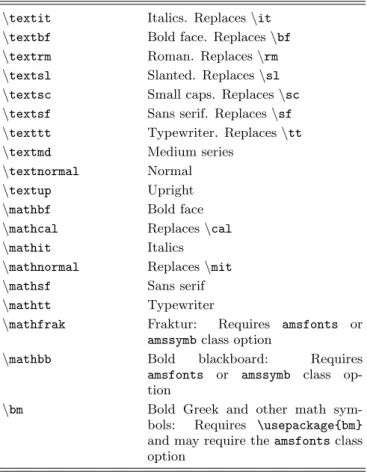
the older font commands are used (they really should be avoided!), be sure to use curly braces to properly limit the extent of the font change. {\bf ...}is the correct method. Commands for controlling text and math font changes are summarized in Table I.
Bold Greek letters and other bold math symbols should be accomplished with the use of bm.sty which is dis-tributed as a required tool with the latest versions of LATEX 2ε and should be loaded via \usepackage{bm}.
This package introduces the\bmmacro. Some bold char-acters may require using theamsfontsclass option.
New fonts may not be declared with \newfont. Font attribute commands for selecting a font family, shape, and series are all disallowed; the standard LATEX 2ε font
selection macros list above should be used instead. Finally, the\symbolmacro is also not allowed.
V.6. Environments V.6.1. Lists
The standard list environments itemize, enumerate, and description are allowed. The \item macro with or without the optional argument is also allowed. Cus-tomization of the list environments (with macros such as\labelstyle,\labelitemi,\labelenumi,\itemsep,
TABLE I. LATEX 2ε and AMS-LATEX font summary. \textit Italics. Replaces\it
\textbf Bold face. Replaces\bf
\textrm Roman. Replaces\rm
\textsl Slanted. Replaces\sl
\textsc Small caps. Replaces\sc
\textsf Sans serif. Replaces\sf
\texttt Typewriter. Replaces\tt
\textmd Medium series
\textnormal Normal
\textup Upright
\mathbf Bold face
\mathcal Replaces\cal
\mathit Italics
\mathnormal Replaces\mit
\mathsf Sans serif
\mathtt Typewriter
\mathfrak Fraktur: Requires amsfonts or amssymbclass option
\mathbb Bold blackboard: Requires
amsfonts or amssymb class op-tion
\bm Bold Greek and other math sym-bols: Requires \usepackage{bm} and may require theamsfontsclass option
etc.) is allowed but may be ignored in produc-tion. Generalized lists (\begin{list}) and trivial lists (\begin{trivlist}) are not allowed.
V.6.2. Other Environments
Creating generalized new environments with
\newenvironment is not allowed. Creating a new theorem environment with \newtheorem is allowed though.
The tabbing environment and the macros\=,\>,\‘, and \’ are allowed but may be ignored in production. Conversion programs used in production should recognize the escapes\a=,\a’, and\a‘for using the corresponding accents within a tabbing environment though.
Theverbatimenvironment is allowed.
V.7. Boxes
Most boxes and macros to manipulate them are not allowed. These include \raisebox, \parbox,
\minipage, \rulebox, \framebox, \mbox, \fbox,
\savebox, \newsavebox, \sbox, \usebox, and the en-vironment \begin{lrbox}. Rules produced with \rule are not allowed.
V.7.1. Margin Notes
Margin notes created with\marginparare not allowed, as are the associated style parameters\marginparwidth,
\marginparsep, and\marginparpush.
VI. MATH MARKUP
In general, all math markup and the standard math environments from LATEX 2ε are allowed.
These include \begin{math}, \begin{displaymath},
\begin{equation}, \begin{eqnarray}, and
\begin{eqnarray*}. The shortcuts $, $$, \[, and
\]are allowed. In addition, authors may use almost all of the additional markup introduced by AMS-LATEX by
using theamsmath class option. The explicit exceptions are \genfrac, \boxed, and \smash. The markup contained in amsextra and amsthm may not be used though. Commutative diagrams created with theamscd package are acceptable.
VII. FIGURES VII.1. Figure inclusions
Figures should be included into a REVTEX 4.1 manuscript by using the standard LATEX 2ε macros.
LATEX 2ε includes several powerful packages for
includ-ing the files in various formats. The two main packages aregraphics andgraphicx. Both offer a macro called
\includegraphics; they mainly differ in how arguments for controlling figure placement (e.g., scaling and rota-tion) are passed to the\includegraphics.
Thefigureenvironment should be used to add a cap-tion to the figure and to allow LATEX to number and
place the figures where they fit best. If a figure needs to be referred to in the text, rather than manually num-bering the figures a\label should be added to the fig-ure environment (best practice is to put the label within the argument of the\caption command) and the\ref macro should be used to reference this label. Figures that span the page should use the\figure*environment. The pictureenvironment must not be used directly (one can include an Encapsulated PostScript figure that was pro-duced using thepictureenvironment of course).
VII.2. Figure placement
Figures should be placed as close as possible to the point where they are first referenced. There is no need to place all figures separately at the end of the manuscript and it is preferred that authors leave the figures in their natural locations. Authors may also find useful the REVTEX 4.1floatfix class option which adds emer-gency float placement processing to avoid “stuck” floats which would otherwise be deferred to the end of the
job (and can lead to the fatal‘‘Too many unprocessed floats’’message).
VIII. TABLES
The standard LATEX 2ε table formatting environments
are supported as is the use of the longtable package. Tables may be reformatted during production to meet APS style guidelines. Here are some helpful hints for trying to get tables formatted correctly:
• Use the longtablepackage to get tables to break across pages.
• The macro\squeezetablewill reduce the font size of the table. This macro must occur within a group outside the table environment. The proper markup is: \begingroup \squeezetable \begin{table} ... \end{table} \endgroup
• Try using the float placement option H which will enable LATEX to break a float across pages. Long
ta-bles are more attractively set withlongtable how-ever. \begin{table}[H] \begin{ruledtabular} \begin{tabular} ... \end{tabular} \end{ruledtabular} \end{table}
VIII.1. Doubled rules and table formatting REVTEX 4.1 provides theruledtabularenvironment which automatically puts the scotch rules (double lines) around tables and formats all enclosedtabular environ-ments to the full width of the tables and improves inter-column spacing. This environment should be used when-ever possible.
VIII.2. Wide tables
When typesetting using twocolumn, tables can either span a single column or both columns. Using the ’*’-ed version of thetableorlongtableenvironments pro-duces wide tables that span the columns.
Tables that are very wide and that may be better type-set in a landscape orientation (rotated 90 degrees) should be enclosed in aturnpageenvironment. This will place the rotated table on its own page. Note that some dvi previewers may not be able to show the table properly, butdvipsandpdflatexwork correctly.
VIII.3. Table placement
Tables should be placed as close as possible to the point where they are first referenced. There is no need to place all tables separately at the end of the manuscript and this is not desirable for APS purposes. The class option floatfixmay be helpful for table placement as well as figure placement (see Section VII.2).
VIII.4. Aligning columns on a decimal point The standard LATEX 2εmacro packagedcolumnshould
be used to accomplish this.
VIII.5. Tablenotes
Footnotes in tables (tablenotes) should use the
\footnote macro. However, if more than one refer-ence to the same footnote is needed, authors may use
\footnotetext and \footnotemark. This will produce notes (labeled by lower-case roman letters) inserted be-low the table rather than in the reference section or at the bottom of the page.
IX. AUTHOR-DEFINED MACROS
Authors may define convenience macros to save keystrokes. This means that the macros may not invoke TEX macros such as\ifor other context dependent com-mands. Also, LATEX 2ε provides three macros for
declar-ing new commands: \providecommand, \newcommand, and \renewcommand (as well as their ‘*’-ed versions). These should be used. Authors may not use TEX’s low-level commands\def,\edef, and\gdef.
X. SUMMARY
To ensure the best use of TEX manuscripts, authors need to follow the guidelines specified here. Use of low-level formatting commands to finely control horizon-tal and vertical spacing may be ignored during produc-tion, or even worse, make it impossible to convert the manuscript to XML. Authors should keep things as sim-ple as possible and correctly use the proper REVTEX 4.1 or LATEX 2ε macros. Any questions about usage may be