A Concept and Evaluation of Usable and
Fine-Grained Privacy-Friendly Cookie Settings
Interface
Oksana Kulyk
∗, Peter Mayer
∗, Oliver Käfer
†, Melanie Volkamer
∗ ∗Karlsruhe Institute of Technology, GermanyEmail: {oksana.kulyk,peter.mayer,melanie.volkamer}@kit.edu
†Technische Universität Darmstadt, Germany
Abstract—As cookies are commonly used on websites, they can constitute a significant threat to user’s privacy by tracking surfing behaviour. The browsers provide a variety of options for cookie settings, thereby potentially enabling the user to execute some control over the extent of being tracked. However, studies show that the interfaces for these settings are often deemed too confusing or complex for lay users, often failing to provide necessary explanations, and therefore preventing the users from properly using these setting interfaces to protect themselves against tracking. In this paper, we present a concept for a privacy-friendly cookie setting interface that is meant to support the user in configuring their cookie settings. The setting interface in our concept (1) uses an assistant to guide the user towards their preferred cookie settings via a series of questions; and (2) enables the user to set their cookie settings manually, providing explanations for each of the options available to the user, including the potential advantages and disadvantages of each option. To gauge the viability of the proposal, the concept has been implemented as a Chrome extension and evaluated in a user study with 21 participants. The results have shown, that the extension is well received by the participants and provides better usability than the standard cookie settings interface in Chrome.
I. INTRODUCTION
Cookies were originally conceived to improve the user experience on websites and overcome the stateless nature of Internet protocols. However, nowadays they are widely used to track users across the Internet. By using cookies, websites can find out whether and when users visit the site (even when they are not logged in). Often this information is also made available to third parties. Hence, cookie settings play a large role in managing the privacy of Internet users.
However, cookie settings in existing browsers often fail in providing sufficient information to the users that would allow them to make informed decisions with respect to which cookies they want to have stored on their computer and for how long. Furthermore, the existing interfaces also often do not provide a usable way for the users to apply the corresponding settings. As such, Leon et al. [8] show in their study that the existing interfaces for cookie settings do (a) not provide sufficient non-technical feedback to users regarding the purpose of individual settings, or (b) are not usable enough for users to be able to apply the settings they want to. These findings are also reflected in other studies on cookie settings from the user perspective. These show
that users often lack understanding regarding the purpose of cookies and their effect on users’ privacy [2] and that existing interfaces for cookie settings often use language that is too technical or they are otherwise confusing the users [15].
In order to address the aforementioned deficiencies, we present as core contributions of this work a concept for a privacy-friendly cookie settings interface, which we evaluated in a user study. Our concept aims to (a) provide the information to the users that enable better understanding of available configuration options as well as their potential consequences and to (b) ensure an easy way for the user to apply their preferred configuration.
The concept focuses on two types of decision support: The first type, the guided setup, is meant to support users who would prefer configuring their cookie settings with the help of an assistant, without having to invest much time and effort in order to study all the available configuration options themselves. The second type, is designed for the users who prefer to maintain a higher level of control over their configuration. Thereby, the users are provided with detailed explanations in laymen terms on (a) what each option in the settings means, and (b) the advantages and disadvantages of each option regarding the user’s security and privacy as well as the functionality available while browsing. The assistant and the explanations are integrated in our concept in the following way:
1) The users are guided through a so-called assistant, whereby they are prompted to answer a few questions about their privacy preferences. Based on the answers to these questions the assistant chooses and applies the settings.
2) For the users who want to check whether they find the settings proposed by the assistant appropriate or who simply prefer to maintain a higher level of control over their configuration, additional interface are provided which enables the users to manually configure their cookie settings.
The interfaces include explanations for each available option, in order to support the user in understanding the meaning of individual options in the settings. The
explanations are based on previous work in [12], which developed and evaluated the texts explaining cookie settings available in the Firefox browser.
The aforementioned concept has been implemented as a prototype Chrome extension1. The extension has been developed using the human-centered design approach by integrating feedback from the users at various stages of the development. During the development, it has been evaluated in a user study with 21 participants. The results show, that the extension provides better user satisfaction than Chrome’s original cookie settings interface. Given the qualitative feedback provided by the users within the study as well as analyzing the user performance of the tasks within the study, we were able to identify improvement possibilities for the extension. Implementing and evaluating these improvements constitutes an important direction of future work.
II. BACKGROUND
We provide an overview of the cookie settings as available within the standard interfaces of commonly used browsers.
a) Blocking cookies: The basis functionality of allowing or blocking cookies in general is provided in the current version of Firefox2, Chrome3, and Safari4, Of these browsers, only Firefox and Chrome allow creating exceptions for individual websites.
b) Deleting cookies: All the three browsers allow delet-ing all cookies as well as cookies from a specific website.
c) Setting expiration date for cookies: In Firefox and Chrome, the user can choose the expiration date of the cookies, setting them to be deleted either when the browser is closed or whenever the website sets the expiration date for the cookies it stores.
d) Blocking third-party cookies: The functionality for blocking third-party cookies is available in Firefox, Chrome and Safari. Firefox and Safari furthermore allow to allow the third-party cookies from visited websites only.
III. CONCEPT
We describe a concept of an interface to support lay users in choosing and applying appropriate cookie settings. The interface should provide the functionality available in the cookie settings interface of common browsers (see Section II). It should furthermore extend the available functionality in order to enable the user to apply settings to individual websites, in order to enable making exceptions from the general cookie settings.
1The extension is currently available in Google Web Store as "Privacy-Friendly Cookie Settings", see https://chrome.google.com/webstore/detail/privacy-friendly-cookie-s/ikcpihpfchdalcdeilpcfecpllmjiffk.
2At the time this research was conducted, the current version of Firefox was 53.0.
3At the time this research was conducted, the current version of Google Chrome was 57.0.2987.133.
4At the time this research was conducted, the current version of Safari was 10.1.
A. Overview of the Concept
According to our concept, the interface, implemented as a browser extension, should consist of three main parts providing different kinds of functionality to the user:
1) Assistant: When the user starts the interface for the first time after installing the extension, the assistant should walk the user through the settings via a guided setup. Thereby, the user is faced with a sequence of questions, to which he or she must provide a yes/no answer. The consequences of each answer should be outlined by the assistant in laymen terms. Upon completing the assistant, the users’ answers should be used to select and apply the cookie settings corresponding to the user’s preferences.
2) General Settings:Users might want to maintain a higher level of control over their configuration, either foregoing the assistant completely or wishing to verify that the settings chosen by the assistant are acceptable for them. For such a case, the interface should provide an overview of the available settings that the user can apply in general, i.e. to all the websites the user might visit. Given that our goal is to support the user in making informed decisions regarding cookie settings, the interface should furthermore explain the purpose of each option in the settings. Each option has potential advantages and disadvantages in terms of security and privacy for the user, as well as in terms of possible functionality limitations on the websites in case of the most restrictive settings. These advantages and disadvantages should be explained to the user as well. In our work, the explanations are based upon the texts provided by Reinheimer et al. in [12].
3) Website-Specific Settings: In addition to applying their chosen cookie settings in general, the user might want to apply exceptions to some specific websites. For example, a website might not work properly when its cookies are blocked. In such a case, the user might want to apply less restrictive settings for this particular website. On the other hand, the user might be disturbed by personalized ads from a specific website. Hence, the interface should provide a possibility to apply specific cookie settings to individual websites (i.e. blocking cookies from specific websites). Analogously to the general settings, the user should be provided with explanations and a description of the advantages and disadvantages of each particular option in the website-specific settings.
B. Assistant
The assistant is designed to guide the users to their optimal cookie settings via a series of questions. The questions ask about the user’s preferences for various options of cookie settings, while providing explanations on what each option means and on the possible consequences of the users’ decision regarding this option. Given the assistant, the user should go through following questions:
1) Does the user want to store cookies?: General informa-tion about cookies and the potential consequences of either allowing or blocking them is presented to the user. If the
user decides not to store cookies on their computer, the assistant terminates. Otherwise, further options which allow the user to specify how the cookies should be stored are presented one after another.
2) When should the cookies be deleted?: The user has to decide whether they want to keep the stored cookies on their computer forever or delete them after the browser is closed.
3) Does the user want to store third-party cookies?: The user is informed about third-party cookies and potential consequences of allowing or blocking them from being stored on their computer.
4) Does the user want to apply specific settings for specific websites?: The three previous questions all regarded the general cookie settings which would apply to all the websites the user visits. In this step, the user is informed that they can make an exception for some specific websites, e.g. if there is a website they particularly trust, and override the general settings that were chosen so far. If the user chooses not to apply settings to specific websites, the assistant terminates.
5) Does the user want to use their browser history for selecting their most visited websites?: If the user chooses to apply settings to specific websites, the assistant offers two options to select the websites for which the user wants to enter specific settings. One of these options is to use the browser history and provide the user with a list of the websites which the user has visited most often. If the user chooses to search their browser history, they are prompted to enter the time frame that should be searched and the number of most visited websites that should be entered in the interface. If the user decides against searching their browser history, they are informed that the websites to which the specific cookie settings are to be applied should be entered by the user manually. In this case the assistant terminates.
C. General Settings
The extension enables the users to apply cookie settings to all the websites in general. This resembles the functionality available in cookie settings interfaces of the most common browsers, e.g. Chrome or Firefox. The available settings in interfaces following our proposed concept are:
1) Delete all stored cookies: The user can choose to either delete all cookies, or just the cookies stored within a specified time period.
2) Third-party cookies: Using this option, the user can allow or block storing cookies from third-party websites. Note that this is only a general setting. Additional interfaces are provided in order to manage third-party cookie settings for specific websites.
3) Expiration of the cookies: The user can set when the stored cookies should be deleted, choosing from the options “never”, “at the end of the session” and “when the browser is closed”.
D. Website-Specific Settings
In order to enable more fine-grained cookie settings, the extension allows to apply individual cookie settings to chosen websites, thus adding exceptions to the general set-tings outlined below. Thereby, the extension also introduces new functionality not available within the standard browser cookie setting interface, namely, allowing or blocking third-party cookies for specific websites and allowing or blocking login cookies.
1) Third-party cookies for specific websites: This option extends the third-party cookie settings from the general settings. As such, it introduces new functionality to the extension as compared to common browsers’ cookie setting interfaces. Using the new functionality provided by the extension, the users can also choose to allow or block storing the third-party cookies for specific websites. Such a setting could be useful in case the user wants to block third-party cookies in general for privacy reasons, but wants to allow them for several trusted services, for example, for payments through PayPal on other websites.
2) Expiration of the cookies for specific websites: The user should be able to apply individual settings on when the cookies stored by specific websites should be deleted.
3) Login cookies for specific websites: Using this option, the users are able to allow or block storing cookies that are used for login purposes for specific websites. This option is not available in current browsers, neither as general setting nor for specific websites. Implementing such an option, on the other hand, requires specific adjustments depending on how the login cookies are labeled on a particular website. Hence, we aim to provide this functionality for a limited set of websites only, and as such, this functionality is not available to the user via the general settings.
E. Prototype Implementation
The concept described in Section III has been imple-mented as an extension for the Chrome browser. The extension implements all the functionality described in Section III. However, allowing storing only the login cookies for specific websites is currently provided for a limited set of websites only, namely for 13 websites out of Top 20 most visited websites in Germany according to the Alexa website rankings for Germany5. The interface for the extension has been developed using the Human Centered Design approach [9]. The mock-ups for the extension have been iteratively evaluated via feedback sessions with both lay users and expert users. The feedback from these sessions has been used to further improve the interfaces.
IV. USERSTUDYMETHODOLOGY
In this section we describe the user study we conducted to evaluate the extension.
The participants were recruited in public places such as on campus or in parks. The participants did not receive any
5The implementation of the remaining seven websites does not currently allow to implement such settings via the extension.
compensation for their participation. The participants were informed that the study aimed to evaluate the usability of a browser extension and that they could terminate the study at any point. The study conforms to all requirements of our university’s ethics commission.
We conducted a within-subject study in a lab setting. The participants had to perform a series of tasks using both, the original Chrome interface and the extension, on a laptop provided to them. The tasks that had to be performed using both of the interfaces were as follows:
Task 1 Delete all the cookies stored in the browser;
Task 2 Set the cookies to be deleted after the browser window is closed;
Task 3 Deactivate storing third-parties cookies;
Task 4 Always allow storing the cookies for five specific websites6.
In addition to the aforementioned tasks, the participants had to perform two additional tasks with our extension. The tasks did not have to performed when using the original Chrome interface, since the respective functionality is not present there. The two additional tasks were:
Task 5 Allow third-party cookies from five selected web-sites7;
Task 6 Allow storing login cookies from the Twitter website. The tasks were divided into two blocks. The Chrome-block consisted of Tasks 1-4 and the participants had to perform it using the original Chrome interface. The extension-block consisted of Tasks 1-6 and the participants had to perform it using the extension. The order of the blocks was chosen randomly for each participant. Thus, half of the participants performed Tasks 1-4 using the Chrome interface first, followed by Tasks 1-6 using the extension. The remaining half started with performing Tasks 1-6 with the extension, followed by Tasks 1-4 with the Chrome interface. After each task, the participants were told to fill in the System Usability Scale (SUS) questionnaire [1]. After completing each block, the participants were asked to provide additional feedback on what they particularly liked or did not like regarding the corresponding interface.
V. USERSTUDYRESULTS
In this section we describe the results of our evaluation.
A. Demographics
The study had a total of 22 participants. Of them, 14 were male and eight were female. The participants were of ages 19-64, with a median age of 25.5. Only four participants had a background in IT security.
B. Usability Evaluation
To compare the usability of our extension and the original Chrome interface, we used the SUS questionnaire. It contains ten questions on a Likert scale, which are aggregated into
6The websites were Facebook, Bing, Instagram, Amazon, and Twitter. 7Same websites as in Task 4 were used.
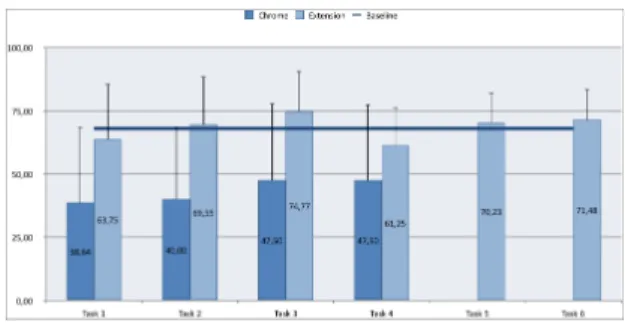
a single variable scaled from 0 to 100 as described in [13]. The overview of the resulting SUS scores for Tasks 1-6 from our participants is provided in Figure 1.
A Wilcoxon signed-rank test shows significant differences between the SUS scores of the original Chrome interface and of the extension for all the tasks (p<.001 for Tasks 1-3,
p=.025 for Task 4).
Fig. 1:SUS average score and standard deviation for Tasks 1-6 using either Chrome or extension interface. The baseline of 68 shows the industry average [13]. Note that the Tasks 5 and 6 have not been performed using the Chrome interface.
C. Feedback from Participants
We further summarize the feedback gained from the participants when they were asked what they particularly liked or disliked in the evaluated interfaces. The overview of advantages and disadvantages named by participants is presented in Figures 2a and 2b, with “Other” summarizing all the advantages or disadvantages named by only one participant each. The charts do not include the number of participants that did not answer the question or could not name anything they (dis)liked about the particular interface. We elaborate on the answers in the following sections, where the number in brackets signifies the number of participants mentioning a particular advantage or disadvantage.
1) Chrome Interface: We first provide the advantages and disadvantages that the participants listed when asked what they liked or disliked regarding the Chrome interface.
a) Advantages: A large number of participant did not name any advantage to the original Chrome interface, either not answering the question (9) or explicitly answering that they did not like anything about the interface (3). Out of the remaining participants, several noted the advantage of having a search function that enabled them to access specific settings (4), or that their experience working with Chrome was helpful to them in finding the settings (2).
b) Disadvantages: A vast majority (19) of the partic-ipants mentioned that the interface made it difficult to find the settings the participants wanted to access, due to confusing a structure of the settings or the lack of the word “cookies” in the naming of the menu items. Several noted that they were only able to find the desired settings with the help of the search function. Only one participant left the question unanswered.
2) Extension: The following advantages and disadvantages were listed by the participants when they were asked what they liked or disliked regarding the extension interface.
(a) Advantages and disadvantages of the extension interface
(b) Advantages and disadvantages of the Chrome interface
c) Advantages: Among the advantages most commonly mentioned by the participants were the explanations of the settings provided by the extension (8). Similarly, the available assistant was mentioned as an advantage several times (4). A significant number of the participants also answered that they liked the functionality introduced by the extension that enabled allowing or blocking third-party cookies for individual websites (7). Three participants did not answer the question.
d) Disadvantages: The most common complaint by the participant was that the extension stored login cookies (8). Some of the specific answers from the participants that named this issue point towards a possible misunderstanding. Namely, some participants mistakenly thought that the exten-sion actually has access to the login data of the participants. Another disadvantage mentioned by the participants was the lack of confirmation feedback that allowed the participants to see that their chosen settings have been saved by the extension (7). Furthermore, several participants did not like that the assistant tab is displayed each time the extension settings page is opened (6), with one of the participants elaborating that it would make more sense to display the tab with general settings first. Five participants did not answer the question.
VI. POTENTIALIMPROVEMENTS OF THEEXTENSION
The findings of our study show that people find the extension more usable and understandable than the original Chrome interface, as evidenced by the significant differences in the SUS scores and the qualitative feedback given by the participants. This suggests that our concept is a promising direction towards usable and privacy-friendly cookie settings. Although much of the feedback to the extension has been positive, certain criticism was also raised by some of the participants, thus indicating a potential for improvement. We discuss the particular criticisms in more detail below.
a) Login cookies: The most commonly mentioned disadvantage of the extension was the option of allowing to store login cookies. This result is surprising to us, as the option of storing login cookies provides privacy advantages (i.e. allowing to block all the cookies from the website while keeping the login cookies so that it is not required to enter
one’s login and password each time one visits the website) and no disadvantages as compared to an option to allow all the cookies from the website. Furthermore, if storing login cookies is still deemed too dangerous by the participant, the option can be easily disabled (which it is by default). As such, in future improvements of the extension we consider explaining the functionality of this option more clearly.
b) No confirmation feedback: The participants com-plained not receiving feedback whether their chosen settings have indeed been applied. This criticism is furthermore supported by the participants’ behaviour during the study: after using the assistant in some of the tasks, several participants then went to the general settings tab in order to check whether their chosen settings have actually been applied. This suggests reconsidering the workflow of the extension in order to integrate feedback that might be necessary to the user at different steps of the process of choosing or applying settings.
c) Starting the assistant by default: Several participants did not like that the assistant is opened by default when they open the extension interface. This feature was included in our concept due to the fact that the concept is aimed at laymen who we assumed to be more likely to benefit from a guided setup than from studying all the available settings themselves. The feedback from the participants, however, suggests that it might be helpful to give the users an option whether they want to start the assistant or go directly to general settings when they start the extension.
VII. RELATEDWORK
A number of studies have considered the mental models of users regarding cookies and web tracking. As such, many of them indicated that the users tend to misunderstand the function of cookies and their effect on privacy [2], [5], [6], [10], [11]. Other findings focused on countermeasures against web tracking via cookies, determining the lack of usability and understandability of tools that enable users to control their cookie settings, including standard browser settings [3], [8], and general lack of awareness among users regarding the existence of such tools [6], [15], [16].
Further research focused on providing tools for more effective cookie management. Shankar et al. propose the
Doppelganger tool [14] that aims to support the user in privacy-preserving cookie-related decisions by comparing the contents of the website either with or without activation of cookies. Using a similar concept, Yue et al. propose the CookiePicker tool [17] that attempts to determine the usefulness of the cookies used by the website. Goeck et al. propose the Acumen tool [4] which relies on the social navigation for choosing cookie settings.
VIII. SUMMARY ANDFUTUREWORK
While the usage of cookies can bring many advantages to web services and end users, improper use of cookies can pose a serious threat to the users’ privacy. Hence, it is important to give the end user the possibility to control the extent to which cookies are stored on their computer. The available tools for cookie management, including cookie settins in commonly used browser, however, are often underutilized by the users, as they are overwhelmed with the complexity of the interfaces. Hence, it is of the essence to provide users with tools for usable and understandable privacy-friendly cookie settings.
In order to provide such a tool, we have proposed a concept for an interface and implemented it as a Chrome browser extension. The extension provides three modes which can be used to adjust cookie settings. The first mode, the assistant, is aimed at the most lay users and guides them to their preferred cookie settings via a series of questions. The second mode, the general settings, enables the user to set their cookie settings manually, providing explanations to each option in the settings and outlining its potential advantages and disadvantages. The third mode, the website-specific settings, enables even more fine-grained cookie settings by enabling the user to add exceptions to their general cookie settings for specific websites.
We evaluated our extension in a user study. The results of the study have shown that the users found the extension sig-nificantly more usable than the standard Chrome interface. Hence, the results of our evaluation show that the concept is a promising direction in designing usable privacy settings interfaces. At the same time, criticism was raised by some users, regarding such issues as lack of confirmation feedback from the interface or misunderstanding of the functionality provided by the interface. This criticism indicates potential for improvement of the extension.
Furthermore, it might be an interesting line of future work to study the impact of our extension on understandability of the cookie settings and on the participants’ ability to make more informed decisions in more detail. For further improvements of the extension, other ways to convey information about different configuration possibilities, in-cluding visualization methods such as proposed in [7] can be included. Finally, as cookies are only one example of technologies that impact the privacy of the end user, the suitability of our concept for supporting users in their privacy configuration in other domains will be studied.
ACKNOWLEDGMENT
This work has been supported by the German Federal Ministry of Education and Research (BMBF) as well as by the Hessen State Ministry for Higher Education, Research and the Arts within CRISP. It was also supported by the German Federal Ministry of Education and Research within the Competence Center for Applied Security Technology (KASTEL). It has also been supported within the project that has received funding from the European Union’s Horizon 2020 research and innovation programme under grant agreement No 740923, project GHOST (Safe-Guarding Home IoT Environments with Personalised Real-time Risk Control).
REFERENCES
[1] John Brooke et al. Sus-a quick and dirty usability scale. Usability evaluation in industry, 189(194):4–7, 1996.
[2] Farah Chanchary and Sonia Chiasson. User perceptions of sharing, advertising, and tracking. InSOUPS, pages 53–67, 2015.
[3] Lorrie Faith Cranor. Can users control online behavioral advertising effectively? IEEE Security & Privacy, 10(2):93–96, 2012.
[4] Jeremy Goecks, W Keith Edwards, and Elizabeth D Mynatt. Challenges in supporting end-user privacy and security management with social navigation. InProceedings of the 5th Symposium on Usable Privacy and Security, page 5. ACM, 2009.
[5] Vicki Ha, Kori Inkpen, Farah Al Shaar, and Lina Hdeib. An examination of user perception and misconception of internet cookies. InCHI’06 extended abstracts on Human factors in computing systems, pages 833–838. ACM, 2006.
[6] Oksana Kulyk, Nina Gerber, Annika Hilt, and Melanie Volkamer. "this website uses cookies": Users’ perceptions and reactions to the cookie disclaimer. InEuropean Workshop on Usable Security (EuroUSEC), 2018.
[7] Oksana Kulyk, Benjamin Maximmilian Reinheimer, Paul Gerber, Florian Volk, Melanie Volkamer, and Max Mühlhäuser. Advancing trust visualisations for wider applicability and user acceptance. In
Trustcom/BigDataSE/ICESS, 2017 IEEE, pages 562–569. IEEE, 2017. [8] Pedro Leon, Blase Ur, Richard Shay, Yang Wang, Rebecca Balebako,
and Lorrie Cranor. Why johnny can’t opt out: a usability evaluation of tools to limit online behavioral advertising. InProceedings of the SIGCHI Conference on Human Factors in Computing Systems, pages 589–598. ACM, 2012.
[9] Martin Maguire. Methods to support human-centred design. Interna-tional journal of human-computer studies, 55(4):587–634, 2001. [10] Aleecia McDonald and Lorrie Faith Cranor. Beliefs and behaviors:
Internet users’ understanding of behavioral advertising. 2010. [11] Aleecia M McDonald and Lorrie Faith Cranor. Americans’ attitudes
about internet behavioral advertising practices. InProceedings of the 9th annual ACM workshop on Privacy in the electronic society, pages 63–72. ACM, 2010.
[12] Benjamin Maximilian Reinheimer, Kristoffer Braun Volkamer, et al. Entwicklung eines interfaces zur privacy-friendly cookie-einstellung.
Mensch und Computer 2016–Workshopband, 2016.
[13] Jeff Sauro. Measuring usability with the system usability scale (SUS). http://www.measuringusability.com/sus.php, 2011. last accessed on 31.08.2017.
[14] Umesh Shankar and Chris Karlof. Doppelganger: Better browser privacy without the bother. InProceedings of the 13th ACM conference on Computer and communications security, pages 154–167. ACM, 2006. [15] Fatemeh Shirazi and Melanie Volkamer. What deters jane from preventing identification and tracking on the web? InProceedings of the 13th Workshop on Privacy in the Electronic Society, pages 107–116. ACM, 2014.
[16] Blase Ur, Pedro Giovanni Leon, Lorrie Faith Cranor, Richard Shay, and Yang Wang. Smart, useful, scary, creepy: perceptions of online behavioral advertising. Inproceedings of the eighth symposium on usable privacy and security, page 4. ACM, 2012.
[17] Chuan Yue, Mengjun Xie, and Haining Wang. An automatic http cookie management system. Computer Networks, 54(13):2182–2198, 2010.