Air Force Institute of Technology
AFIT Scholar
Theses and Dissertations Student Graduate Works
3-14-2014
Detection and Prevention of Android Malware
Attempting to Root the Device
Justin R. Ball
Follow this and additional works at:https://scholar.afit.edu/etd
This Thesis is brought to you for free and open access by the Student Graduate Works at AFIT Scholar. It has been accepted for inclusion in Theses and Dissertations by an authorized administrator of AFIT Scholar. For more information, please [email protected].
Recommended Citation
Ball, Justin R., "Detection and Prevention of Android Malware Attempting to Root the Device" (2014).Theses and Dissertations. 734.
DETECTION AND PREVENTION OF ANDROID MALWARE ATTEMPTING TO ROOT THE DEVICE
THESIS
Justin R. Ball, Captain, USAF AFIT-ENG-14-M-08
DEPARTMENT OF THE AIR FORCE AIR UNIVERSITY
AIR FORCE INSTITUTE OF TECHNOLOGY
Wright-Patterson Air Force Base, OhioDISTRIBUTION STATEMENT A:
The views expressed in this thesis are those of the author and do not reflect the official policy or position of the United States Air Force, the Department of Defense, or the United States Government.
This material is declared a work of the U.S. Government and is not subject to copyright protection in the United States.
AFIT-ENG-14-M-08
DETECTION AND PREVENTION OF ANDROID MALWARE ATTEMPTING TO ROOT THE DEVICE
THESIS
Presented to the Faculty
Department of Electrical and Computer Engineering Graduate School of Engineering and Management
Air Force Institute of Technology Air University
Air Education and Training Command in Partial Fulfillment of the Requirements for the Degree of Master of Science in Cyberspace Operations
Justin R. Ball, B.S.C.S. Captain, USAF
March 2014
DISTRIBUTION STATEMENT A:
AFIT-ENG-14-M-08
DETECTION AND PREVENTION OF ANDROID MALWARE ATTEMPTING TO ROOT THE DEVICE
Justin R. Ball, B.S.C.S. Captain, USAF
Approved:
//signed//
Maj Thomas E. Dube, PhD (Chairman)
//signed// Barry E. Mullins, PhD (Member)
//signed//
COL Grant A. Jacoby, PhD (Member)
14 Feb 2014 Date 14 Feb 2014 Date 14 Feb 2014 Date
AFIT-ENG-14-M-08
Abstract
Every year, malefactors continue to target the Android operating system. Malware which root the device pose the greatest threat to users. The attacker could steal stored passwords and contact lists or gain remote control of the phone. Android users require a system to detect the operation of malware trying to root the phone.
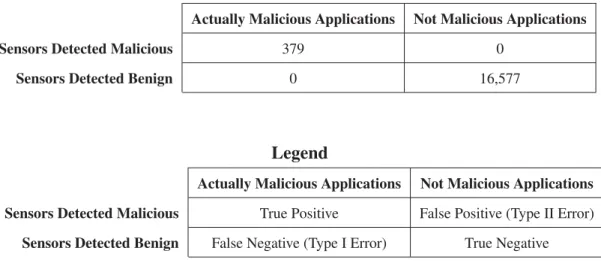
This research aims to detect the Exploid, RageAgainstTheCage, and Gingerbreak exploits on Android operating systems. Reverse-engineering 21 malware samples lead to the discovery of two critical paths in the Android Linux kernel, wherein attackers can use malware to root the system. By placing sensors inside the critical paths, the research detected all 379 malware samples trying the root the system. Moreover, the experiment tested 16,577 benign applications from the Official Android Market and third party Chinese markets which triggered zero false positive results.
Unlike static signature detection at the application level, this research provides dynamic detection at the kernel level. The sensors reside in-line with the kernel’s source code, monitoring network sockets and process creation. Additionally, the research demonstrates the steps required to reverse engineer Android malware in order to discover future critical paths. Using the kernel resources, the two sensors demonstrate efficient asymptotic time and space real-world monitoring. Furthermore, the sensors are immune to obfuscation techniques such as repackaging.
Table of Contents
Page
Abstract . . . iv
Table of Contents . . . v
List of Figures . . . viii
List of Tables . . . ix I. Introduction . . . 1 1.1 Background . . . 1 1.2 Research Contributions . . . 2 1.3 Assumptions/Limitations . . . 3 1.4 Preview . . . 3 II. Background . . . 4 2.1 Introduction . . . 4
2.2 Offensive Techniques (Rootkits) . . . 4
2.2.1 Enhancing Stealthiness And Efficiency of Android Trojans and Defense Possibilities (EnSEAD) . . . 4
2.2.2 Android platform Based Linux Kernel Rootkit . . . 5
2.3 Defensive Techniques . . . 6
2.3.1 Static Analysis . . . 7
2.3.1.1 Extending Android Security Enforcement with a Secu-rity Distance Model . . . 7
2.3.1.2 TrustDroid (TM) . . . 8
2.3.1.3 Semantically Rich Application-centric Security in Android 9 2.3.2 Dynamic Analysis . . . 10
2.3.2.1 YAASE: Yet Another Android Security Extension . . . . 11
2.3.2.2 Security controls for Android . . . 12
2.3.2.3 Kernel-based Behavior Analysis for Android Malware Detection . . . 13
2.3.2.4 Detecting covert communication on Android . . . 14
2.3.2.5 A Cloud-Based Intrusion Detection System For Android Smartphones . . . 15
2.3.2.6 A Cloud-Based Intrusion Detection And Response Sys-tem For Mobile Phones . . . 16
Page 2.3.2.7 Android Malware Detection via a Latent Network
Be-havior Analysis . . . 16
2.4 Surveys . . . 17
2.4.1 Google Android: A Comprehensive Security Assessment . . . 17
2.4.2 Dissecting Android Malware: Characterization and Evolution . . . 18
2.4.3 My smartphone is a safe! The user’s point of view regarding novel authentication methods and gradual security levels on smartphones 20 2.4.4 Smartphone Security Challenges . . . 22
2.4.5 Android botnets on the rise: Trends and characteristics . . . 23
2.5 Summary . . . 24
III. Methodology . . . 26
3.1 Introduction . . . 26
3.2 Contribution . . . 26
3.3 Approach . . . 26
3.3.1 Develop Kernel Sensors Inside Critical Paths . . . 26
3.3.2 Add Sensors Inside Kernel Source Code . . . 27
3.3.3 Android Operating System . . . 28
3.4 Testing . . . 29
3.5 Performance Metrics . . . 30
3.6 Boundaries . . . 32
3.7 Workload . . . 33
3.8 Summary . . . 33
IV. Reverse-Engineering Analysis . . . 34
4.1 Introduction . . . 34
4.2 Research Contribution . . . 34
4.3 Reverse Engineering Malware . . . 34
4.3.1 Android Malware Genome Project . . . 35
4.3.2 Reversing Approach . . . 35
4.4 GingermasterAndroid Malware Family . . . 35
4.4.1 Behavioral Analysis Approach and Findings . . . 36
4.4.2 Static Analysis Approach and Findings . . . 37
4.5 zHashAndroid Malware Family . . . 40
4.6 DroidKungFu3Android Malware Family . . . 43
4.7 Summary of Findings . . . 45
4.8 Malware Detection Set-Up . . . 48
4.8.1 Create Android Emulator Using Android Virtual Device Manager . 48 4.8.2 Installing the Sensors . . . 49
Page 4.8.4 Testing Procedures . . . 51 4.9 Summary . . . 52 V. Detection Analysis . . . 53 5.1 Introduction . . . 53 5.2 Gingerbreak . . . 53 5.3 zHash . . . 54 5.4 DroidKungFu . . . 56 5.5 False Positives . . . 59 5.6 Accuracy . . . 59
5.7 Advantage and Disadvantage of the Proposed Detection Algorithm . . . 60
5.8 Summary . . . 61
VI. Conclusion . . . 62
6.1 Introduction . . . 62
6.2 Summary of Research . . . 62
6.3 Recommendations for Future Research . . . 63
6.4 Research Contributions . . . 63
Appendix: Tools Needed . . . 65
Appendix: Scripts Used . . . 67
Appendix: Sensor code inside the kernel . . . 75
Appendix: Original malware signature paths . . . 80
Appendix: Sequence Diagrams . . . 86
List of Figures
Figure Page
2.1 Policy Tree for Saint [33] . . . 10
3.1 Different Layers of the Android Operating System [2] . . . 27
3.2 Testing Flowchart . . . 31
4.1 Evolution ofDroidKungFuMalware [22] . . . 43
4.2 Summary of the three malware families . . . 46
5.1 Gingerbreakbinary detection . . . 53
5.2 Gingermasterdetection results against the different payloads . . . 54
5.3 2011Gingermasterdetection results from four antivirus software [20] . . . . 54
5.4 zHashbinary detection . . . 55
5.5 2011zHashDetection Results From Four Antivirus Software [20] . . . 55
5.6 zHash detection results against the different payloads . . . 56
5.7 DroidKungFubinary detection . . . 57
5.8 Source code change inside/system/core/adb.c:adb main() . . . 57
5.9 DroidKungFudetection results against the different payloads . . . 58
5.10 2011DroidKungFudetection results from four antivirus software [20] . . . 59
E.1 Sequence Diagram ofExploidexploit . . . 86
E.2 Sequence Diagram ofGingerbreakexploit . . . 87
List of Tables
Table Page
2.1 Summary of Research . . . 24 5.1 Accuracy of the experiment . . . 60
DETECTION AND PREVENTION OF ANDROID MALWARE ATTEMPTING TO ROOT THE DEVICE
I. Introduction
1.1 Background
In the last seven months of 2011, malware on Android tripled [23]. The popularity of phone hacks grows every year largely in part of the successful profiteering of phone hacks. Of the 1,260 Android malware samples collected from the Android malware genome project [56], over 45.3% supported autonomous sending of short message service (SMS) texts to hacker-controlled, premium-rate numbers. The victim could then pay $1-$2 dollars for each text. Over 51% collected user information which possibly includes visited bank websites. In addition, 90% turned the phone into a bot. The malware writers sell the botnet on the black market.
Around 36.7% of malware samples try to leverageroot(full) privileges to the phone. Malware withrootprivileges pose the highest threat to users’ security and privacy [56]. From the sample, the malware leverages at least one of the followingrootexploits. The
rootexploits are known as:
• Exploid,
• RageAgainstTheCage(RATC)
• Gingerbreak, and
The exploits KillingInTheNameOf and zergRush all root the phone, but no malware family currently uses the exploits [56]. In addition, some researchers refer to
RATC as Zimperlich [41]. To narrow the scope of this thesis, the research objects will only includeExploid,RATC, andGingerbreak.
Today, customers rely on the Android operating system to store their private and privileged information. The device knows their location via global positioning system (GPS) and wireless local area network (WLAN) tracking. The device can collect conversations and even watch the victim via the webcam. Customers need a solution to detect malware trying toroottheir phones.
1.2 Research Contributions
1. Develop an accurate method to detect malware on Android devices which leverage
Exploid,RATCorGingerbreakprivilege escalation.
2. Ensure the method detects the malware over 95% of the time with less than 0.5% false positive rate.
3. Provide a repeatable method to reverse-engineer Android malware in order to find signature paths inside the malware.
4. Demonstrate where to find the critical paths in the kernel to block the malware while not hindering legitimate application usability.
The goal of this research is to develop an accurate method to detect rooting
of Android devices. Rooting the phone results in a loss of countermeasures against malware. Android’s built-in malware prevention assumes the malware runs as a user-land process. Furthermore, this research will detect the malware running local rootexploits. The research must accurately determine Exploid, RageAgainstTheCage (RATC), and
must detect any variation to the three exploits. To ensure this goal, the research must rely on behavior analysis rather than signature detection.
In addition, the research must provide a repeatable method that future researchers may perform to defend against future exploits. The research must demonstrate how to reverse-engineer Android malware in order to find critical paths inside the code. Next, the research must explain where to find the correct place in the kernel to block the critical path while not hindering legitimate application usage.
1.3 Assumptions/Limitations
The research defines testable malware as any program attempting to jailbreak the phone using Exploid, RageAgainstTheCage, or Gingerbreak. The research only examines malware that attempt torootthe device. Therefore, any malware which chooses not to root the phone is not testable. This research only concerns itself with malware trying to leverage rootpermissions. For future rootexploits, the research provides the methodology researchers may follow to detect the attack.
1.4 Preview
Chapter II introduces other techniques invented by the community to detect Android malware. Chapter III presents the design of the experiment and explains how the study determines successful detection. Next, Chapter IV describes the design and development of the kernel detection algorithm tested in the experiments. Chapter V shows the experimental results and their significance. Finally, Chapter VI concludes the thesis, recaps the pertinent highlights, and provides guidance on future research.
II. Background
2.1 Introduction
Mobile malware protection requires understanding how malware currently works on Android and the current countermeasures against malware. This chapter looks at current malware and anti-malware detection techniques.
In the academic community, researchers focus on offensive (for example, new vulnerabilities for future researchers to mitigate) [1, 54] and defensive [16, 19, 20, 25, 33, 39, 47, 49, 52, 55] techniques for Android security. This thesis will focus on defensive techniques, but will need to defend against new malware techniques. For the defensive studies, researchers perform static [33, 47, 55] or dynamic [16, 19, 20, 25, 39, 49, 52] analysis. This thesis focuses on dynamic analysis to detect rooting of the phone.
2.2 Offensive Techniques (Rootkits)
The following sections show the current malware research for Android devices in a academic community. They introduce new vulnerabilities in mobile security for future researchers to consider. For this thesis, they also provide insight on rootkit behavior on Android devices.
2.2.1 Enhancing Stealthiness And Efficiency of Android Trojans and Defense Possibilities (EnSEAD).
Ali et al. discuss stealth techniques in rootkits that could defeat the Dalvik Virtual Machine (DVM), proposed behavioral based detection of malware, and proposed security policies to mediate interaction between applications [1]. They extended the Android Trojan Soundcomber to utilize covert channels to send data to the master malicious server. Soundcomber already handles persistence. This new Trojan, Contact Archiver, utilizes four different covert channels including:
1. vibration settings, 2. volume settings,
3. screen brightness settings, and 4. file locks.
The writers of this Trojan must ensure minimal user interaction during transmission to prevent the user from interfering with the message by creating noise on that covert channel. These covert channels assume that two applications exist. One application sends secret information and another collects the information. For collecting sensitive information, the Trojan listens to phone conversations and pulls out data such as credit card numbers and key-pressed PINs.
The paper includes the experiment results from using the covert channel. To increase throughput, the Trojan sends compressed data based on credit card numbers, PINs and contact list formats [1]. To further increase the covert channel’s stealthiness, the authors could also encrypt the data. They included numerical data showing that compression improves as number of contacts increase. As future work, the team desires to implement techniques to mitigate the effectiveness of covert channels in Android devices.
2.2.2 Android platform Based Linux Kernel Rootkit.
Dong-Hoon You and Bong-Nam Noh demonstrate different Android rootkits that take advantage of the loadable kernel module (LKM) and /dev/kmem (device access technology) [54]. The paper looks at kernel hooking techniques for Android devices using an advanced reduced instruction set computing (RISC) machine (ARM) architecture. The paper includes three different techniques to install a rootkit in Android. The authors discuss these techniques to encourage more studies to protect against Android rootkits [54].
First, the paper discusses modifying the sys call table contents via /dev/kmem. This requiresrootuser authorization. The paper provides sample code from the Android
operating system (OS) to explain where the vulnerabilities exist. Since rootkit detection tools will track this exploit to the sys call table file, the authors discuss techniques to modify the sys call table in heap memory without touching the actual file. The attacker modifies thevector swihandler routine to place a copy of thesys call table
in memory. Surprisingly, only one line in vector swirequires modification to point the OS to the rootkit’s sys call table. Because the later only modifies heap memory, the rootkit does not persist across reboots.
Second, the paper discusses modifying thevector swiexception handler to point to the attacker’s copy of sys call table. With three more steps, the authors demonstrate how to perform this technique without physically modifying thevector swifile. Instead the attacker changes the offset of a four byte branch instruction code called automatically when the softwareinterrupt occurs [54]. This helps to evade malware detection since the attacker avoids modifying system files.
Next, the authors provide links showing the sophistication of rootkits using these exploits. At this point, the authors infer that smartphone rootkits contain the same danger as traditional personal computer (PC) architecture rootkits. In fact, hackers ported some PC rootkits over to Android [54].
This paper drew most of its knowledge from Phrack Magazines to explain different techniques for creating rootkits. The paper included no experimentation results. The authors’ contribution was to acknowledge the work already done in Android rootkits.
2.3 Defensive Techniques
Android malware defense falls into static and dynamic analysis. Static analysis tries to detect malware before the application attempts to run. Dynamic tries to detect malware after the application executes.
2.3.1 Static Analysis.
The following researchers proposed new static techniques to detect malware before the malware runs on the device. The techniques include new security policy syntax and application byte-code examination. The new detection techniques do not rely on traditional signature-based antivirus.
2.3.1.1 Extending Android Security Enforcement with a Security Distance Model.
Tang et al. focus on a distance model to protect Android users [47]. The Android security enforcement with a security distance (ASESD) model looks at the relationship of permission sets that Trojan applications typically require. The model calculates the threat point of an application with Equation 2.1.
R= dc+
di j×djk
×G (2.1)
Thedc in the equation stands for the closed security distance (SD) of the application.
Variables di j and djk, stand for the related unclosed SD. Subscripts i and k represent the
different permissions of the two pairs. Subscript j represents the same permission of the two pairs. VariableGstands for the number of classifications the application requires. The overall threat point of the application is denoted inR.
To determine values for safe and unsafe combination of permission pairs, the researchers tested 100 applications from the Android market, but excluded how they selected those sample applications. The paper focuses on pairs only, but triples or fours could also be dangerous.
The conclusion states that threat pointsRfrom Equation 2.1 smaller than 20 are safe [47]. Having a larger test sample would help validate the authors’ conclusion. Because ASESD only focuses on one application at a time, the security distance model would have difficulty detecting covert channels using more than one application. For example, suppose
two (or more) covert channel applications divide the offending permission sets between each other. Therefore, each application achieves a threat point lower than 20, but together, they represent a threat to the device.
2.3.1.2 TrustDroid (TM).
Zhibo Zhao and Fernando Osorio developed static analysis tracking for companies trying to prevent information leakage [55]. Their contribution includes creating a portable static analysis system. By being portable, the authors state that the application works on multiple platforms without modification of the TrustDroid’s source code.
TrustDroid works by examining the byte code of Android applications in search of signatures. These signatures represent code which tries to manipulate sensitive information. TrustDroid marks the manipulated data as tainted. The program watches the data propagate in the byte code. If the tainted data flows out through a pre-defined taint “sink”, TrustDroid flags the operation [55]. TrustDroid performs the above operation via static analysis of the byte code. The authors chose static analysis over run-time analysis to reduce battery and resource consumption.
Next, the authors discuss the methodology of creating TrustDroid. The methodology includes creating signature detection and taint propagation rules. The authors discuss the user’s responsibility to configure and protect TrustDroid [55]. Configuring the application requires the user to choose the correct rule sets for their security requirements. Based on Saltzer and Schroeder’s psychological acceptability principle [51], choosing rule sets may overburden most users and therefore limit the effectiveness of TrustDroid.
The authors do not discuss the success of covert channels and rootkits to bypass the security mechanisms. Furthermore, the authors state that pre-infected devices are outside the scope of their assessment. Polymorphic code could circumvent static analysis [55].
Further experimentation using actual malware samples on TrustDroid will help validate the authors’ contribution. The authors already stated they started modifying
TrustDroid to work with user-imported libraries [55]. The additional user contributed work will help expand the project to reach different security requirements.
2.3.1.3 Semantically Rich Application-centric Security in Android.
In the paper, Ongtang et al. consider the security requirements of smartphone applications and augment the existing Android operating system with a framework to protect applications from abuse [33]. Saint© governs install-time permissions and their run-time use by the application provider’s policy. The Android security model is system-centric. The Android OS tries to protect the phone from malicious applications, but provides limited means for applications to protect themselves. Saint helps applications to protect themselves from abuse. The Saint policies provide three main contributions.
1. permission assignment policy: Applications may white-list or black-list the other applications that access their interfaces.
2. interface exposure policy: Applications have finer control over how other applica-tions may utilize their interfaces. For example, Application A may send remote procedure calls (RPCs) to Application B and visa versa, but Application C may only send RPCs to Application B.
3. interface use policy: Applications decide at run-time which interfaces it will use [33].
The Saint security model taxonomy breaks into permission granting system (install-time) and interaction policy (run-time) subcomponents. The permission granting system (install-time) divides into protection-level based, signature-based and application configuration policies. For interaction policy (run-time), the taxonomy breaks into permission-based access control, signature-permission-based, application configuration permission-based, and context-permission-based policies. The interaction policies modify the Android operating system to monitor input and output to the Davlik virtual machine (DVM). Figure 2.1 shows the different policies.
Security Policy Permission Granting Policy (Install-time) Protection-level Based Policy Signature-based Policy Application Configuration-based Policy Interaction Policy (Run-time) Permission-based Access Control Policy Signature-based Policy Application Configuration-based Policy Context-based Policy
Figure 2.1: Policy Tree for Saint [33]
Saint utilizes extensible markup language (XML) for policy format. The policies look similar to stateful, network-level firewalls [33]. Saint’s runtime enforcement regulates starting new activities, binding components to services, receiving broadcast intents and accessing content providers.
The project is at the starting phase. The authors wish to perform more tests to validate the usability of this method. Likewise, the authors want to pursue a public key infrastructure (PKI) for Android developers to distribute their Saint policies. This technique will protect applications from other applications, but will not prevent users from installing Trojans. Because Saint is still in the early phases of testing, there were no results describing the added security Saint provides for applications subscribing to Saint policies.
2.3.2 Dynamic Analysis.
Dynamic analysis tries to discover malware by searching for malicious activity. The researchers approach the subject by installing sensors on either the device or network
associated with the phone. With dynamic analysis, the researchers must also consider the limited battery power and resources of the phone.
2.3.2.1 YAASE: Yet Another Android Security Extension.
A privilege spreading attack is a technique where malware writers mask their privileges by spreading the permissions through several colluding applications. A confused deputy is a privileged program that a malicious program fools into misusing its authority. Rusello et al. proposed a new security model for Android that helps thwart the leakage of sensitive information by privilege spreading attacks and confused deputy attack [39]. The YAASE extension works on top of the Android application sandbox to prevent privilege spreading attacks. The framework specifies where a phone may send private information (based on Internet Protocol addresses), and prevents confused deputy attacks.
Several other researchers came up with security extensions as well. TrustDroid© proposes dynamic taint analysis that defends against runtime attacks and data leakage [39]. Likewise, QUIRE thwarts the confused deputy attack by tracing remote procedure call (RPC) chains to ensure only applications with the correct privileges execute the call [39]. In addition, AppFence extends TrustDroid to include shadowing [39]. Shadowing simply anonymizes the data sent over the network.
The YAASE architecture also extends the TrustDroid architecture to improve privacy [39]. The YAASE architecture injects itself into the Dalvik Virtual Machine (DVM) and its boundary points. To govern the boundary points, YAASE modifies thesocket.open(),
sendStream(),CursorWindow, andLibBindermodules. These functions flow through the YAASE’s Policy Enforcement Point (PEP) to ensure the validity of the action. The policy language looks similar to security enhanced Linux (SELinux). The rule sets contain an operation and requester application that may execute on a resource. Like SELinux, the Android OS will require constant policy updates to handle the many rule sets. For this purpose, YAASE includes a user setting interface (USI). Every time the
user installs a new application, the USI pre-generates rules based on the new application’s manifest file. The conference paper did not include any evaluations on Android user’s acceptance to using USI for YAASE policy management.
The paper included a performance evaluation of YAASE security compared to a stock Android phone. The performance looked at YAASE with 0 to 80 policies running on the machine at once. They also tested 50 applications regarding side effects to the security enhancements. Two-thirds do not present visible side effects, but the paper did not provide a description of these side effects. To improve the validity of this security enhancement, larger test sizes of applications would buttress the effectiveness of YAASE. Also, a user acceptance test would demonstrate the adoption of the product. For further testing, instead of having the user create policies, perhaps the user could download pre-built policies for each application automatically similar to SELinux on Fedora Core distributions.
2.3.2.2 Security controls for Android.
Vargas et al. introduce new security controls for the Android OS to harden the system for business needs [49]. They identify several vulnerabilities for cell phones, for example:
1. an attacker can sniffthe data transmitted through the network, 2. the user ultimately decides the permissions an application may have, 3. no encryption for data at rest, and
4. no firewall by default.
Next, the authors discuss different applications to install on Android to harden the system against these attacks. The recommendation calls for installing Android from the source [49]. In the paper, they show how to implement a firewall at compile time. The paper shows the minimum packages required to install Android (reduce attack footprint), but the paper does not elaborate how they decided which packages to keep. Next, the
paper suggests adding the National Security Agency’s (NSA) SELinux for Android. After installing SELinux, the authors suggest addingcryptsetupfor data encryption as well as obfuscating banners and system messages.
After explaining how to harden Android, the authors provide no testing data to prove the hardening techniques meet the security requirements for businesses. It also did not include a comparison of the hardened Android device against a typical Android device. A possible research area includes testing that the hardened device protects a user better from Trojans. The recommended suggestions need documentation that the techniques provide increased security for users.
2.3.2.3 Kernel-based Behavior Analysis for Android Malware Detection.
Isohara et al. propose the current Android audit framework,logcat, fails to provide the needed information to investigate system compromises from Trojans [20]. This program, designed for debugging software, will not generate the reports necessary to detect Trojans. The team proposes a kernel-based behavior analysis program. The program automatically looks for signatures of information leakage (such as credit card numbers, subscriber identity module (SIM) serial numbers, and Gmail accounts). The detections automatically generate reports.
After testing the kernel-based behavior analysis program on 230 applications, the system detected 37 applications which leaked some kind of personal information, 14 applications executed exploit code, and 13 applications launched destructive code. The paper did not explain how the authors chose the 37 sample applications. However, most came from the Android market.
To provide meaningful results, the researchers logged events based on system calls and signatures of private information (such as credit card numbers). The collection of system calls with private information became signatures for malware detection. The paper provides 16 basic signatures for malware detection.
The paper discusses application level Trojans that meet those 16 signatures, but not Trojans that obfuscate their communication. The authors left Trojans that hide communication via covert channels as outside the scope of this research. In addition, the authors did not include the number of false positives, but they state the logs generate a high volume of noise [20].
2.3.2.4 Detecting covert communication on Android.
Hansen et al. created an application layer covert channel communication detector for Android [16]. The application requires no special permissions from the user. To the authors’ knowledge, this is the first application-level detector for covert channels that runs on behavioral patterns to identify communication between two channels [16].
The program monitors the vibration, volume, and wake-lock channels on Android devices. The authors claim 100% detection accuracy in simulations that communicated via the proposed channels [16]. The authors do not supply the number of simulations performed. For detecting covert channels, the researchers looks for applications breaking a calculated threshold. The researchers based the threshold number on covert channel activity during the execution of legitimate software (with room for noise).
The threshold number discovered proved lower than most covert channels can eff ec-tively communicate. If Trojans discover the threshold number and drops communication below the threshold, they face challenges with noise. In addition, the threshold number changes based on user activity. For example, if the user locks the device, the threshold number for volume shrinks by half. During the highest threshold (active user) counts, only 4 bits per second (bps) could be sent through the vibration medium. The theoretical 4bps requires no noise on the covert channel. The authors adjusted the threshold count when:
1. the phone is locked, or 2. the phone’s screens is off.
With these low thresholds that dynamically change to lower thresholds based on user activity, none of the covert channels escaped detection. However, the authors did not list the number of actual malware samples tested. The authors left covert channels via other means as future work.
2.3.2.5 A Cloud-Based Intrusion Detection System For Android Smartphones.
Khune and Thangakumar provide a solution for Android intrusion detection using the cloud with security as a service (SECaaS) [25]. Utilizing cloud-based services, the smartphone saves battery life since the servers perform the major calculations. The smartphone only need to upload data and wait for a response.
The authors demonstrate the usefulness of cloud-based antivirus (Mobile Agent) versus Kaspersky Mobile and ClamAV based on number of signatures. The cloud-based solution contained over 20 times more signatures plus behavior detection. The cloud-based detection also contained a higher level of coverage based on the other two antivirus software products.
Next, the authors provide a system design for the cloud-based intrusion detection system (IDS) and the mobile agent. Each Android device contains the mobile agent which sends and communicates with the cloud server. The IDS in this paper includes:
1. antivirus,
2. emulator for runtime analysis of replicated applications, 3. memory scanner,
4. system call anomaly detection, and 5. Internet proxy [25].
While the cloud could protect the devices, the paper neglects to discuss the security needed to protect the cloud server. This server will also contain the collected data of all Android
devices which could result in privacy concerns. Spies and hackers alike would target the cloud service. In addition, how would the cloud protect a device with no service? Likewise, companies need to estimate the cost to implement such an IDS on a network. They should also consider the confidentiality, integrity and availability concerns associated with the Android device’s dependence on the cloud network.
In addition to new security concerns when moving Android devices to the cloud, researchers may test the performance loss (if any). A performance increase could persuade researchers to further investigate cloud-based security. Privacy critics may require further research to ensure confidentiality inside the cloud.
2.3.2.6 A Cloud-Based Intrusion Detection And Response System For Mobile Phones.
In this paper, Houmansadr et al. propose a cloud-based smartphone specific intrusion detection system (IDS) to detect misbehavior [19]. In addition, the IDS determines the appropriate response to each detection. They seek to provide security transparently to the user with light resource requirements for the actual Android device and real-time IDS [19]. Live testing on actual smartphones could help demonstrate the conclusions and goals. For example, testing the IDS against actual malware could further the research’s contributions. In addition, latency tests could demonstrate the research’s feasibility.
2.3.2.7 Android Malware Detection via a Latent Network Behavior Analysis.
In this paper, Wei et al. propose latent network behavior to detect malware using independent component analysis (ICA) [52]. They stated the proposed mechanism provides:
1. tolerance of polymorphic code,
2. an approach to detect malicious network behavior, and 3. automatic detection of malicious Android applications.
To test the validity of their concept, they collected 310 types of Android malware in 2012. From their tests, they detected malicious applications with nearly 100 percent accuracy, precision, and recall rate. However, the authors did not report the number of false positives from their analysis tool, Droid Box.
Next, the paper demonstrates the mathematical formulas utilized to determine malware behavior. From the test results, the team presents charts showing their findings. The results have a greater than 95% detection rate when using 10 independent components (IC) [52].
2.4 Surveys
Some researchers chose to survey the current situation for Android security. They provide a better understanding of the battlefield, and offer some new insight into the subject. In addition, they provide suggestions for areas of improvement.
2.4.1 Google Android: A Comprehensive Security Assessment.
This paper includes a list of security assessments one could apply to Android operating systems. The paper looks at attack vectors such as Bluetooth, IEEE 802.11 networks, third generation (3G) networks, and universal serial bus (USB). To start, Shabtai et al. discuss the security mechanisms incorporated into the Android operating system. They provide defense in depth for the device and include:
1. Linux security mechanisms,
2. environmental security mechanisms, and 3. Android specific security mechanisms.
The paper describes the security mechanisms inside each category. While describing the Linux mechanisms, the authors quickly talk about the root user, but no root security protections. Further studies to protect this coveted and privileged account would benefit the community.
For the security assessment, the team looked at code review, application’s permission-granting mechanisms, and application installation process [42]. The paper only looked at one phone (HTC G1 smartphone). Since each vendor implements the Android OS differently, testing several different phones is necessary. The paper acknowledges the threats caused by web-based attacks, such as cross site scripting (XSS) and standard query language (SQL) injection, but decided not to include them in their threat cluster diagram.
The assessment results are qualitative with likelihood of attack ranges fromunlikely,
possible, andlikely, and impact ranges fromminor,moderateandsevere. Because of the broad scope of the assessment, a quantitative assessment would not work. Future researchers may narrow the scope of the project to provide quantitative values such as time and money. The mitigation level and effort for each countermeasure were also qualitative. The paper did not include tests or numbers to demonstrate the qualitative results.
2.4.2 Dissecting Android Malware: Characterization and Evolution.
In this paper, Zhoue and Jiang aim to systematize existing Android malware by categorizing the different malware families [56]. They collected 1,260 malware samples from August 2010 to October 2011. Their one year study resulted in the discovery of 49 different malware families. Roughly 36.7 percent of the malware contained local privilege escalation attacks. Of the four antivirus programs downloaded (AVG antivirus free, Lookout Security & antivirus, Norton Mobile Security Lite, and Trend Micro Mobile Security Personal Edition), the best antivirus only detected 79.6 percent of the malware, and the worst case found 20.2 percent [56].
Next, the team discussed the methods Android malware drops itself into the filesystem, activates and carries malicious payloads to the victim. Roughly 80 percent repackage themselves in legitimate applications. The malware developers download popular Android applications and inject their malicious payload into the code. Next, the developers post the repackage software to the Android market or alternative application stores.
The second type of installation method is an update attack. With this attack, hackers better mask the malware from antivirus. Instead of piggybacking the entire payload into the Trojan, update attacks only include a web-update component in the Trojan application. The web-update component will download the malware payload at runtime. Four malware families adopted this attack [56]. The malware developers increased the sophistication of the attack by upgrading only certain components in the host applications. This avoids the requirement for the user to approve the update.
Third, drive-by downloads trick the victim to download interesting software while surfing the Internet. Four malware families exploited this technique. Other means to entice the user include in-app advertisements and quick response (QR) codes. Both means cause the victim to visit a targeted website to download the malicious payload [56].
Next, the authors transition to various payload types. From their malware sample, they distributed the payload types into privilege escalation, remote control, financial charges, and personal information stealing. Privilege escalation attempts to escalate the malware to
rootpermissions. From the 1,260 malware samples, the authors came across six methods used by malware to gain rootpermissions. At least 36.7 percent of the malware tried to gainrootpermissions. Of the malware samples vying forrootpermissions, 81.6 percent utilized more than onerootexploit [56].
The next type of payload is remote control. Ninety-three percent of the malware infected phones and turned them into bots. At least three malware families encrypted their communication and the unified resource locators (URL) of their command and control (C2) servers [56].
Besides remote control, 45.3 percent of the malware utilized financial charge payloads. The malware subscribes to attacker-controlled and premium-rate short message system (SMS) services. In Android, the function,sendTextMessage(), will send a text message
in the background without user awareness. Some malware will also make phone calls in the background to incur charges on the victim [56].
Finally, 51.1 percent of the malware harvested user information. Thirteen families collected simple message system (SMS) messages, 15 families collected contact informa-tion, and 3 families gathered user account information. For SMS stealing, two families looked specifically for SMS verification messages for uploading to the command and con-trol server. The attacker could later generate fraudulent transactions on behalf of the in-fected users [56].
This paper provided detailed information about the current status of malware. With 1,260 samples, the journal discovered 49 malware families. Likewise, the 58 references and one-year research time helped buttress the value of the research.
2.4.3 My smartphone is a safe! The user’s point of view regarding novel authentication methods and gradual security levels on smartphones.
Dorflinger et al. describe the user’s perception of and the need for a graded security systems [12]. Using four focus groups with nineteen respondents, the authors evaluate different authentication methods for smartphones. Due to the nature of focus groups, the team provided qualitative results for the paper. However, this methodology allowed participants to discuss their point of view and develop assumptions from other participants [12].
Of note, all participants in the exercise were between 25 to 34 years old. Half were students and the other half were working full time. The opinions of 25-34 year olds on security may differ from older and younger users in regards to security. The focus groups looked at eight authentication methods which included:
1. fingerprint authentication, 2. 3D gesture recognition,
3. retina scan,
4. activity based verification, 5. 2D gesture recognition,
6. recognition based authentication, 7. speaker recognition, and
8. face recognition [12].
For each method, the testers ask the participants their opinion if they think the method is
secure, and good. In addition, the testers ask the participants if they would personally use the authentication method [12]. Of note, most users showed a strong preference for fingerprint authentication. Ninety-five percent of participants claim fingerprint authentication is secure, 89 percent state fingerprint authentication is good, and 95 percent state they would use fingerprint authentication. One hundred percent of participants discuss retina scan as secure, but only 26 percent claimed they would want to use retina scan for authentication [12].
Finally, the users discuss their opinion on security for smartphones. The participants mention different people have different security needs [12]. They suggested that Android come with security levels (similar to Internet Explorer) for users to configure. However, the security should not require constant pestering of the user. In regards to authentication via biometrics, the device should contain a PIN backdoor. To better explain, this backdoor will make the device still usable if the user developed a sore throat or blister that fails the biometric scan [12].
Overall, this paper summarizes usability for mobile security for users between the ages of 25 to 34 years old. For further study, a researcher could test participants of different
age groups. The authors admitted budget constraints limited the number of surveyors for this paper and may require future research [12].
2.4.4 Smartphone Security Challenges.
Wang et al. discuss the new security challenges for mobile phones [50]. They mention the need for new security by citing the rapid growth of mobile malware. The authors also describe the smartphone threat model. The threat model divides the smart phone into three layers which are:
• application layer(includes all the smart phone’s applications),
• communication layer(includes the carrier network, Wi-Fi, Bluetooth, universal serial bus (USB) and secure digital (SD) cards), and
• resource layer(includes flash memory, camera, microphone and sensors) [50]. Next, the paper looks at viruses, Trojans and spyware. First, viruses typically embed themselves inside desirable applications (mostly games) [50]. They can also spread through Bluetooth. Bluejacking and bluesnarfing both attack smartphone devices with Bluetooth enabled [50]. Trojans also hide themselves as legitimate and desirable applications. They typically send background calls and instant messages to (attacker-controlled) premium-rate services. Spyware tries to steal a victim’s personal information. Sixty-three percent of all Android malware performs spyware operations [50].
Second, the authors present the threats and attacks on smartphones. Smartphone threats include data leakage, phishing, web-traffic redirection (pharming), voice phishing (vishing), airwave sniffing, spam, and attacker spoofing. The WebKit engine utilized by most smartphones include a buffer overflow that allows an attacker to execute malicious code [50].
For security challenges, no single security tool fits all users. Most users only expect to keep their phones for a short time. Therefore, security solutions need to transfer from one
device to another [50]. Smartphone devices also increase security challenges, because they contain limited resources (battery life, memory and processing power) compared to their personal computer (PC) counterparts. Due to their size, users easily misplace smartphones. In addition, the embedded sensors make tracking a victim simpler for the malware [50].
Finally, the paper provides advice for securing smartphones. The suggestions include cloud-based security, encryption, increased user awareness, and limiting Bluetooth and Wi-Fi use. The authors provide the readers subtle signs to detect potential compromises. They include warm battery during off times, the phone lights up at unexpected times, and the phone unexpectedly beeps or clicks during phone conversations [50].
2.4.5 Android botnets on the rise: Trends and characteristics.
Pieterse and Oliver evaluate Android malware with the purpose of identifying specific trends and characteristics relating to botnet behavior [36]. The paper reviews literature regarding Android malware. From the review, the paper identifies that most botnets come from repackaged applications. The botnets receive commands, steal user information, and infect the Android manifest file (AndroidManifest.xml) [36].
According to the study, the success of the Android OS has led to an increase in botnets. On 29 December 2010, researchers discovered the Trojan Geinimi. Geinimi displayed the first traditional botnet functionality on Android [36].
Looking at the Android malware history, the authors note the use of command and control (C2 or C&C) servers that control the Android botnets. The authors also noticed that repackaged Trojans started in third party application stores, but have landed in the official Android market. DroidDream became the first discovered malware to reach the official Android Market [36].
Since the authors wrote a survey, the paper did not include experiments. They relied on literature reviews to validate their findings. Further experiments with actual malware samples would help validate the malware characteristics discovered.
2.5 Summary
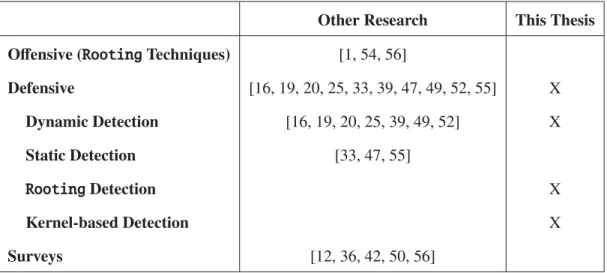
For every countermeasure against malware proposed, malware writers discover a new means to circumvent the protection. This seemingly endless cycle requires a look at current weaknesses in countermeasures and malware to provide stronger security for Android devices. By detecting malware thatrootsthe phone, the thesis furthers Android defense against the latest malware threats. Table 2.1 compares this thesis to other research.
Other Research This Thesis
Offensive (RootingTechniques) [1, 54, 56]
Defensive [16, 19, 20, 25, 33, 39, 47, 49, 52, 55] X Dynamic Detection [16, 19, 20, 25, 39, 49, 52] X Static Detection [33, 47, 55] RootingDetection X Kernel-based Detection X Surveys [12, 36, 42, 50, 56]
Table 2.1: Summary of Research
This thesis will dynamically search for malware trying torootthe phone. By writing sensors directly into the kernel, the methodology avoids the cloud-based solutions some other research requires. In addition, the sensors utilize existing kernel data structures and operate inside the same functions which create new processes and sockets. Therefore, the solution executes in real-time with little additional power. The other dynamic solutions require more system resources. Unlike static analysis, malware obfuscation inside the filesystem will not deter the sensors. If the malware tries to root the phone, they must make system calls to the kernel. Those system calls run through the sensors. For the
rootingtechniques discussed in other research, this thesis will provide a means to prevent the initial infection. After infection, the researchers demonstrate the difficulty in removing the rootkit.
III. Methodology
3.1 Introduction
This chapter explains the methodology of the research and will discuss the approach, testing, boundaries, performance metrics and workload. The chapter begins with the thesis contribution which is to discover a new method to detect malware attempting to root
the phone. Chapter 5 explains how the new algorithm run asymptotically faster and less memory consumption than static detection algorithms.
3.2 Contribution
This thesis contributes to the body of knowledge by proposing a new algorithm to detect and prevent malware trying the leveragerootprivileges byGingerbreak,Exploid
orRageAgainstTheCage. In addition, the research will demonstrate how to find signature paths inside malware. Then, the research explains where in the Linux kernel to place sensors by identifying critical paths.
3.3 Approach
The following section describes the approach developed to detect rooting of the phone. They include developing kernel sensors inside critical paths and where those critical paths exists. Then, the section describes the different Android operating systems where the critical paths apply.
3.3.1 Develop Kernel Sensors Inside Critical Paths.
Figure 3.1 shows the different layers of the Android operating system [2]. At the lowest level is the Linux kernel. The Linux kernel provides oversight to the above layers. By installing the sensors inside the lowest layer, the sensors can watch the above layers in real-time. The sensor can monitor applications, frameworks, libraries and the Dalvik virtual machine forroot-seeking malware.
In addition, operating at the lowest layer increases the success of detection, because the sensors can follow the malware’s flow of execution inside the kernel. If the malware desires torootitself, it must make system calls that the sensors monitor. For the malware’s system call to complete successfully, the malware cannot obfuscate the parameters. Therefore, the kernel can see the malware’s intentions for that system call. By discovering critical paths that only malware enter inside the kernel, the user may detect or block local privilege exploits.
Home
Contacts
Phone
Browser
Your App
APPLICATIONS
Activity Manager
Window Mngr
Telephony Mngr
Resource Mngr
Location Mngr
Package Mngr
APPLICATION FRAMEWORK
LIBRARIES
RUNTIME
OpenGL
SQLite
FreeType
OpenGL
WebKit
SGL
Dalvik Virtual
Machine
LINUX KERNEL
WiFi Driver Keypad Driver Camera Driver Audio Driver
Figure 3.1: Different Layers of the Android Operating System [2]
3.3.2 Add Sensors Inside Kernel Source Code.
The algorithm located inside the Linux kernel module requires sensors inside the abused system calls that the malware exploits. The RageAgainstTheCage exploit generates threads until the device reaches RLIMIT NPROC resource limit. The command
maximum number of processes allowed on the device. For the HTC Incredible [18],RATC
only needs to spawn at the most 3,304 threads. The emulator requires 6,656 processes. Therefore, a sensor inkernel/fork.cwill inform the malware detection algorithm when user-level processes generate new threads. When a process reaches a threshold of over 700 threads, the detection algorithm can log the event and prevent the process from spawning more processes.
Both Exploid and Gingerbreak send messages using the NETLINK_KOBJECT_ UEVENT protocol. The developers designed the protocol for processes to listen to kernel events, but not to send messages over the protocol. Only the kernel should send messages over this link, because other processes assume all the messages come from inside the kernel. The two exploits send messages over the protocol tricking other (root) processes to run their malicious code as root. As Google already patched Android 2.4+ from NETLINK_KOBJECT_UEVENT exploits, the malware detection algorithm will log any processes attempting to send messages using the described protocol. Inside
net/socket.c#sendmsg(), a sensor will inform the detection algorithm of the attempted intrusion.
3.3.3 Android Operating System.
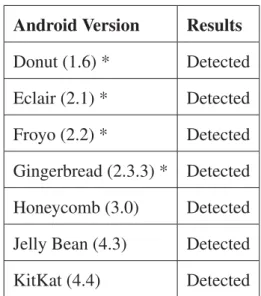
In this experiment, the detection algorithm runs under the Android 1.6, 2.1, 2.2, 2.3.3, 3.0, 4.3 and 4.4 operating systems. The sensors operate successfully under Linux version 2.x and 3.x. However, the Android emulator expects Linux 2.x. Of note, the latest operating systems patched themselves from the exploits. The Android versions vulnerable to the three exploits include:
• Gingerbreak(Android versions≤2.3.3)
• Exploid(Android versions≤2.2), and
To determine if an application is malicious, the scripts send the sha1 hash of the application to VirusTotal [38]. If more than 50% of the sources claim the application as malware, the research will assume malware. If the sample is malware, The malware report summaries explain if the application tries torootthe phone.
3.4 Testing
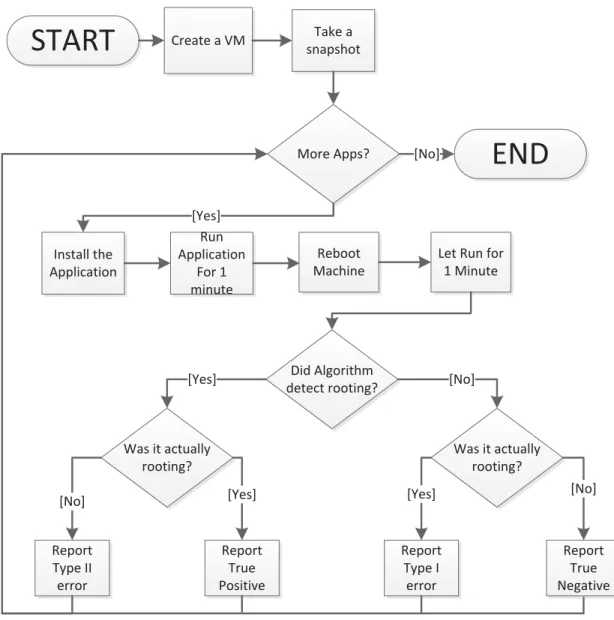
To test the accuracy of the sensors, the research proposes the following methodology (see also Figure 3.2).
1. Create clean Android virtual devices (AVD) for versions 1.6, 2.1, 2.2, 2.3.3, 3.0, 4.3 and 4.4 of the operating system with the detection algorithm running in the kernel. The AVDs acts as the baseline image for the tests.
2. To ensure a clean baseline, the experiment takes a snapshot at this point for each AVD. A snapshot preserves the memory and data at the given time of the snapshot. The test will revert to this snapshot after each experiment.
3. The experiment installs one Android application sample onto the device. The test knows in advance if the application is root-leveraging via VirusTotal [38]. Therefore, the testing is a single-blind experiment.
4. The experiment executes the application in the AVD. This will allow the detection algorithm to perform behavior analysis on the application.
5. The application runs for 1 minute. This will ensure each experiment finishes in a timely manner. It also opens a vulnerability for timing attacks. In the real-world, the detection runs as long as the machine is on. If a malicious application chooses to wait, the detection algorithm will wait as well.
6. The experiment sends theBOOT_COMPLETEDmessage to machine. This simulates a reboot. Some malware will only run after a reboot.
7. The experiment waits another minute.
8. At this point, the algorithm reports its findings. No output means the algorithm overlooked any attemptedrootexploits. An entry describes a possiblerootexploit and which type of exploit. The experiment compares the result to the true answer. 9. The experiment reverts the snapshot and repeats steps 3-8 until they test all the
samples.
Figure 3.2 shows the above procedures in a flowchart. The flowchart assumes the test already checked if the application is malicious by sending theSHA1hash to VirusTotal [38]. Of the applications deemed malicious, the test only inspects malware that tries to gainroot
permissions.
Some malware came with anti-forensics techniques. In particular, the malware can discover the emulator by turning the WiFi component on and off. As of the testing in 2013, the emulator runs a broken WiFi component. By WiFi failing, the malware can detect forensics. Therefore, in order to test the known malware samples, the extracted payload from the application runs in the emulator. In addition, a dissembler provides information on the resources the payload requires to run correctly. Chapter 4 describes the process for reverse-engineering malware to find the local privilege escalation code in the different malware families. The chapter also includes how to extract the code and counter additional anti-forensic techniques employed by the malware.
3.5 Performance Metrics
For the experiment, the null hypothesis is as follows:
H0 =The algorithm does not detect 95% of root-leveraging malware Ha =The algorithm detects 95% of root-leveraging malware
Create a VM snapshotTake a Install the Application More Apps? Run Application For 1 minute Reboot Machine
Let Run for 1 Minute [Yes] Did Algorithm detect rooting? Was it actually rooting? Was it actually rooting? Report Type II error Report True Positive Report Type I error Report True Negative [Yes] [No]
[No] [Yes] [Yes] [No]
[No]
START
END
Figure 3.2: Testing Flowchart
To reject the null hypothesis and accept the alternative hypothesis, the research calculates the following metrics which include:
• the algorithm detectsrootingapplications regardless of the Android OS version,
• probability the algorithm will detect non-rootingapss asrooting(false positive/ -type II error),
• probability the algorithm will detect non-rootingapps correctly (true negative),
• probability the algorithm will detectrootingapps as non-rooting(false negative/ -type I error), and
• the algorithm’s detection compared to traditional antivirus.
3.6 Boundaries
For this experiment, all tests run in the Android 1.6, 2.1, 2.2, 2.3.3, 3.0, 4.3 and 4.4 emulators provided by the Android standard development kit (SDK) [5]. The emulator allows the enterprise servers to run the Android virtual devices via scripts. All three exploits worked for Android 2.2 (Froyo). The research tests multiple Android operating systems to ensure the detection works even if the exploit does not. The virtual machines will not have access to network resources or short message service (SMS). By default, the emulator enables network communication and SMS.
Because of no access to the Internet, some malware may not run. Indeed, some malware may detect they are “caged” and refuse to run. If the malware refuses to run, the algorithm will not detect malicious behavior. To overcome anti-forensic malware, the
adb program runs extracted payload (see Chapter 4). The disassembler (IDA Pro 5) will provide insight for the payload’s requirements to run independently from the application. All 379 malware samples collected incorporated their payload as a standalone executable and linkable format (ELF) 32-bit ARMv5 application.
Inputs to the test include Android applications (non-rootingandrooting) sent one at a time. Between each application sample, the virtual machine reverts back to baseline. The application installs and opens. After one minute, the machine reboots. The algorithm
reports if it detected arootingexploit. VirusTotal [38] and Malware Genome Project [56] report in advanced if the application sample shouldrootthe virtual machine.
3.7 Workload
For this experiment, the Malware Genome Project [56] provided 1,260 malware samples. Of those, 379 contained root-level exploits to fully compromise the system. In conjunction, the experiment tests over 16,000 legitimate applications. The Android applications will act as the workload. Each emulator runs with the detection algorithm installed.
The Android emulators run with 1907 megabytes (MB) of random access memory (RAM), 200 megabytes of storage and one central processing unit (CPU). For Android versions 3.0 and lower, the CPU emulates ARM version 5 (32-bit). For Android versions 4.3 and later, the CPU emulates ARM version 7 (32-bit). This ensures the CPU will run the baseline Android emulator for each version. At this time, the Android standard development tool kit (SDK) emulators have issues with RAM above 778 MB for Windows. In addition, lower resources simulates an actual phone device and allows for more emulators to run on the testing servers.
3.8 Summary
As the cost of malware reaches $100 billion a year [44] and Android becomes the fastest growing area for malware [9], consumers need malware detection. As a result, this research aims to detect malware trying to leverage root permissions through behavior-based detection. The detection runs inside the Linux kernel for persistence.
IV. Reverse-Engineering Analysis
4.1 Introduction
This chapter presents findings and observations from the manual reverse engineering process of this experiment. The experiment requires the execution of known malicious software. Therefore, caution will ensure the experiment keeps the malware inside the virtual machine.
4.2 Research Contribution
The research discovered two critical paths capable of detecting 100% of the 379 malware samples running Exploid, Gingerbreak orRageAgainstTheCage (RATC). In addition, the algorithm generated 0% false positive for the 16,577 benign applications. The next chapter discusses the testing of the malware samples.
As the Android kernel and malware continues to change, new critical paths emerge. Therefore, this chapter demonstrates how to discover future critical paths from reverse-engineering malware and how to add sensors to the Android kernel. The design pattern to detect Exploid, Gingerbreakand RageAgainstTheCage work for other exploits as well.
4.3 Reverse Engineering Malware
For this research, the experiment requires reverse-engineering three malware families:
Gingermaster, zhash and DroidKungFu3. These malware families utilize the only (known) jailbreak exploits that malware writers incorporate [56]. As the research community discovers new jailbreaking techniques, future researchers may follow the below design procedure to incorporate the capability into the Android’s Linux kernel.
4.3.1 Android Malware Genome Project.
The Android Malware Genome Project [56] provided 21 malware samples for reverse engineering. Four of the samples belonged to Gingermaster, six belonged to
DroidKungFu3 and eleven belonged to zHash. Their collections includes over 1,200 malware samples.
4.3.2 Reversing Approach.
Each family of malware analyzed follows a similar reverse-engineering approach. The first step required harvesting. The second step required setting-up a controlled environment to prevent the malware from propagating. The malware runs inside a virtual machine operating system with an Android emulator. Before running the Android emulator, the virtual machine turns offits network access to blocked network traffic to the emulator.
Each instance of malware underwent behavioral analysis inside the Android emulator [3]. The emulator runs Android 2.2. Certain malware activities generate logs which are viewable using the Davlik debug monitor service (DDMS). Dex2Jar [11] converted the malware application to a Java archive (JAR) file.JD-GUI[13] converted the Java bytecode to source code. The source code provided static analysis. Malware with local privilege exploits include ELF files. IDA-Pro [17] converts machine code to assembly. Running the malware in the emulator provided dynamic analysis. With online research, behavioral, static and dynamic analysis running, the malware samples exposed how it copies itself into the filesystem, activates its malicious payload and the functionality of the payload. The following sections explain in further detail the reversing approach for each malware family.
4.4 GingermasterAndroid Malware Family
Shortly after Android developers added an additional boundary check to their volume daemon (vold) in April 2011, malware writers developed arootexploit to take advantage of a new vulnerability that the boundary check introduced [43]. The new volddaemon
handles external storage devices attached to the Android device. Cyber defense teams discovered Gingermaster for Android in Chinese third-party application markets in August 2011. Researchers namedGingermastermalware family after theGingerbreak
exploit which takes advantage of the new vold boundary checking vulnerability. The vulnerability affects Android version 2.2 (Froyo) and versions 2.3 - 2.3.7 (Gingerbread). Malware writers repackageGingermastermalware into popular, legitimate applica-tions previously available in the official Android application market. The actual exploit resides in the application in the form of a regular image file named gbfm.png found in the assets folder of the .apkfile. Gbfm stands for ‘ginger break for me’, and the .png
extension protects the file from immediate antivirus (AV) software detection [43].
The Gingermaster family of malware performs a variety of functions, not just obtaining root-level access to the device. The malware collects information from the device such as the device’s ID and telephone number. The malware attempts to send it to a remote web server. Once the malware obtains root access, it then remounts the
/system partition as writeable allowing the command and control (C2) servers to install future utilities on the device. The C2 application can silently re-install Gingermasterif the user tries to purge the application [21].
4.4.1 Behavioral Analysis Approach and Findings.
The baseline Android virtual device (AVD) to execute Gingermaster applications should run Android 2.2 (Froyo). Android 2.2 contains the vulnerability Gingermaster
exploits. When installing Gingermaster, the com.igamepower.appmaster package appears in the installed packages list on the device [53].
With DDMS debugging the Android emulator, the Gingermaster-infected applica-tion tries to contact its command and control server. The website that the malware tries to contact no longer exists.
Despite the malware’s inability to make contact with the command and control server, DDMS records the activity in the debugger’s log files. When the application launches,
GameSvc.classcreates a new database and attempts to post the database’s information to the attacker’s website. The application acquires the user identification (UID), international mobile station equipment identity (IMEI), international mobile subscriber identity (IMSI), SIM Card Number, Device Telephone Number, Network Type and other information from the device. Then the malware attempts to send that information to its server. The application attempts multiple times to send the information to its remote server. Since the server not longer exists, the attempts fail and the malware continues to execute on the device.
4.4.2 Static Analysis Approach and Findings.
Next, dex2jar [11] converts the Dalvik bytecode to Java bytecode. Then the free Java Decompiler programjd-guiconverts the Java archive to source code. When opening theGingermaster.jar file in the Java Decompiler, the program contained 105 .class
files. The.class files which perform most of the application’s functionality are the first 12 files. The malware writers did not obfuscate the names of important files.
According the the National Cyber Awareness System (CVE-2011-1823), the applica-tion gains root privileges by exploiting the Gingerbreak privilege escalation vulnera-bility [32]. This vulneravulnera-bility takes advantage of the voldvolume manager daemon on Android 2.x. This daemon inherently trusts all messages it receives from a PF NETLINK
socket. This allows local users to execute arbitrary code and gain root privileges via a negative index that bypasses a max-only signed integer check in the DirectVolume:: handlePartitionAdded method, which triggers memory corruption [32]. The GamerS ervice.class executes gbfm.png which contained the memory corruption trigger and payload activation.
![Figure 2.1: Policy Tree for Saint [33]](https://thumb-us.123doks.com/thumbv2/123dok_us/970763.2627300/21.918.135.783.106.451/figure-policy-tree-for-saint.webp)
![Figure 3.1: Different Layers of the Android Operating System [2]](https://thumb-us.123doks.com/thumbv2/123dok_us/970763.2627300/38.918.133.787.396.759/figure-different-layers-android-operating.webp)



![Figure 5.10: 2011 DroidKungFu detection results from four antivirus software [20]](https://thumb-us.123doks.com/thumbv2/123dok_us/970763.2627300/70.918.140.769.109.283/figure-droidkungfu-detection-results-from-four-antivirus-software.webp)