Shell LubeAnalyst
USER GUIDE
Shell Lubricants1 Contents
2 Introduction 3
3 Registering as a new Shell LubeAnalyst Customer 5
4 Registering a New Shell LubeAnalyst Site 6
5 Registering new Equipment or Vehicles 8
6 Registering a new Shell LubeAnalyst Component 10
7 Registering a new Shell LubeAnalyst Subscriber 12
7.1 Registering a subscriber at site level 13
7.2 Registering a subscriber at Equipment/Component level 15
8 Ordering Shell LubeAnalyst Test Kits 18
9 Choosing a Shell LubeAnalyst Test Kit/Suite 19
9.1 LubeAnalyst K1 Test Suites (Pre-Paid) 19
9.2 LubeAnalyst K2 Test Suites (Pre-Paid) 20
9.3 LubeAnalyst K3 Test Suites (Pre-Paid) 21
9.4 LubeAnalyst Advanced Turbines Test Suites (Post-Paid) 22
9.5 LubeAnalyst Advanced Test Suites (Post-Paid) 23
10 Sample Techniques and Registration 24
10.1 Best Practice Sampling Techniques 24
10.2 Drawing a sample with a sample pump 25
10.3 Completing a Shell LubeAnalyst Sample Label 26
10.4 Registering a new sample with Shell LubeAnalyst 27
11 Shell LubeAnalyst Sample Analysis Reports 30
11.1 Shell LubeAnalyst K1, K2 and K3 Test Suite Reports 30
11.2 Shell LubeAnalyst Advanced Test Suite Reports 31
11.3 Shell LubeAnalyst Failure Analysis Feature 32
2 Introduction
Welcome to Shell LubeAnalyst, Shell’s leading oil and equipment condition monitoring service. Shell LubeAnalyst is a powerful online global database that leverages our technical expertise in lubricants and lubrication.
Shell LubeAnalyst is like a health check for your oil and equipment. It is a condition monitoring service which helps to keep your equipment running smoothly.
How can Shell LubeAnalyst help me improve equipment reliability and save money on maintenance?
The Shell LubeAnalyst service has been designed as an early warning system that identifies signs of increased wear and evidence of unwanted contaminants or lubricant degradation. This condition monitoring service helps to provide preventive and predictive maintenance. Lubricants are designed to perform many functions, such as to reduce friction and wear, transfer power, and remove and control contaminants. The physical and chemical analysis of used lubricants can reveal important information about the condition of machinery and the ongoing serviceability of the lubricant. In many applications, an aged lubricant can begin to cause damage to machinery rather than protect it. Whether this is due to excessive contamination or chemical degradation, oil analysis can be an effective means of detecting this common problem and optimising service intervals.
Oil analysis is also one of the most effective ways of trending wear and identifying wear behaviour, whether this is via time based trending of wear, or the morphological study of individual wear particles.
There are five simple steps to the Shell LubeAnalyst equipment condition monitoring service: 1. Register your customer details and equipment with Shell LubeAnalyst
2. Collect the oil sample 3. Label the oil sample 4. Mail the oil sample
5. Receive the lab report with diagnosis and recommendations.
How do I get the most out of Shell LubeAnalyst?
Define your goals clearly, so that the tests performed are appropriate for the application. Complete the sample registration process to determine true conditions and help ensure accurate testing.
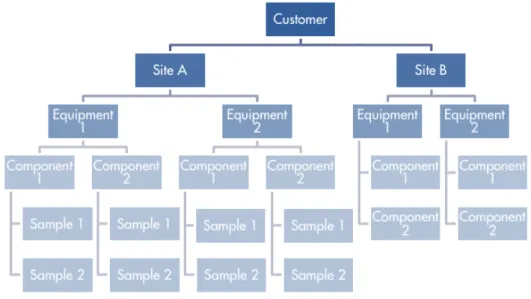
Figure 1 Shell LubeAnalyst Database Hierarchy
Subscribers
A subscriber to the Shell LubeAnalyst system may be linked to any of these levels. A subscriber is the person who will receive all the Shell LubeAnalyst sample reports for the equipment or components at or below the level to which they are registered. The subscriber can select to receive all reports for samples processed, or choose to receive only certain reports (for example, with the status “Action”). There is no limit to the number of subscribers that can be linked to a level. The component level is the lowest level to which a subscriber can be linked. Subscribers can be removed or added at anytime.
The Shell LubeAnalyst system is a powerful database. Figure 1 shows the hierarchy of the database and illustrates the relationship between each level. There is no limit to the number of elements that can be registered to each level.
3
Registering as a new Shell LubeAnalyst Customer
Current Shell CustomerIf you have an account with Shell, please contact your Shell Account Manager, Shell Lubricants Technical Advisor or the Shell Technical Helpdesk on 1300 134 205.
We will need the following information for your LubeAnalyst registration:
■ Shell Customer “Sold to” number ■ Site name – Shell “Ship to” number ■ Invoice Address
■ Contact Name ■ Contact Phone
■ Contact Email address
Current Shell Distributor Customer
For customers that purchase Shell LubeAnalyst kits through our network of Shell Lubricants distributors and re-sellers, please contact the Shell Technical Helpdesk for assistance in setting up your access.
You’ll need to provide us with the following information for registration:
■ Company Name ■ Company Address ■ Contact Name ■ Contact Phone ■ Contact Email
Once you have been registered as a Shell LubeAnalyst Customer, you will receive a
Welcome to Shell LubeAnalyst email. This message will include your User ID and
password, together with the Shell LubeAnalyst database web address, to enable you to login to and begin your Shell LubeAnalyst oil condition monitoring program.
4
Registering a New Shell LubeAnalyst Site
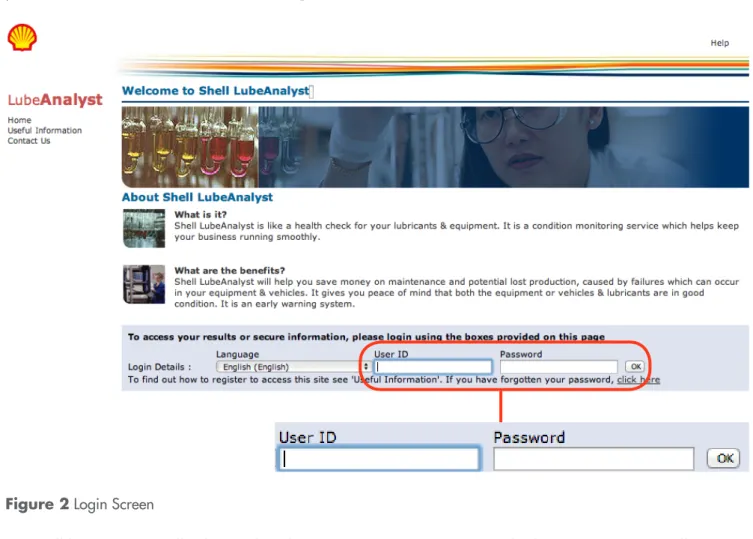
Now that you have your login details, you will be able to register your site(s) with Shell LubeAnalyst. First you will need to log in to the Shell LubeAnalyst database and enter your User ID and password. You can also reach the login screen by clicking on the web address in your Welcome to Shell LubeAnalyst email.
Figure 2 Login Screen
You will be automatically directed to the Sample Results page, the home page. You will see any new results since your last login.
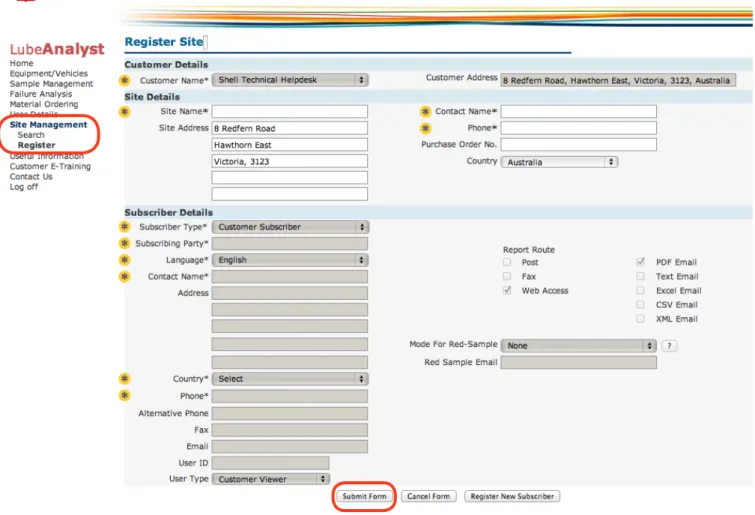
Now you can register your new site. Choose Site Management, then Register, from the LubeAnalyst menu, and complete all the required fields. Required fields in LubeAnalyst are marked with an asterisk (*), they are highlighted below with a . Once you’re satisfied with the details, click .
Figure 4 Site Registration
You’ll see a green message indicating your Site details saved successfully and you’ll receive a confirmation email from Shell LubeAnalyst. You are now ready to register your new site’s equipment.
* *
*
* *
* * * *
* *
5
Registering new Equipment or Vehicles
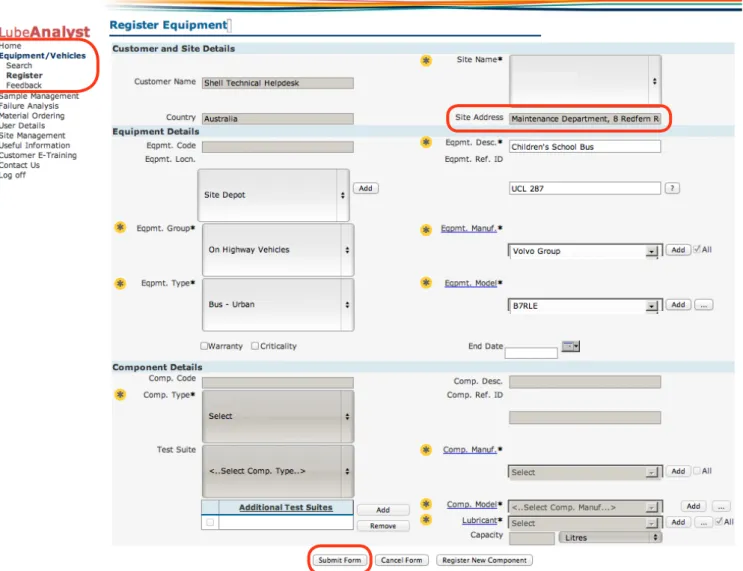
With your site details completed, you can begin registering equipment. Choose
Equipment/Vehicles, then Register from the LubeAnalyst menu. Select the site from the
Site Name field. Complete the remaining fields, those fields marked with an asterisk (*) are compulsory, they are highlighted below with . You can use the button to add new data.
Figure 5 Register Eqiupment
*
* *
*
*
*
* * * *
Figure 6 Modify Equipment – Register
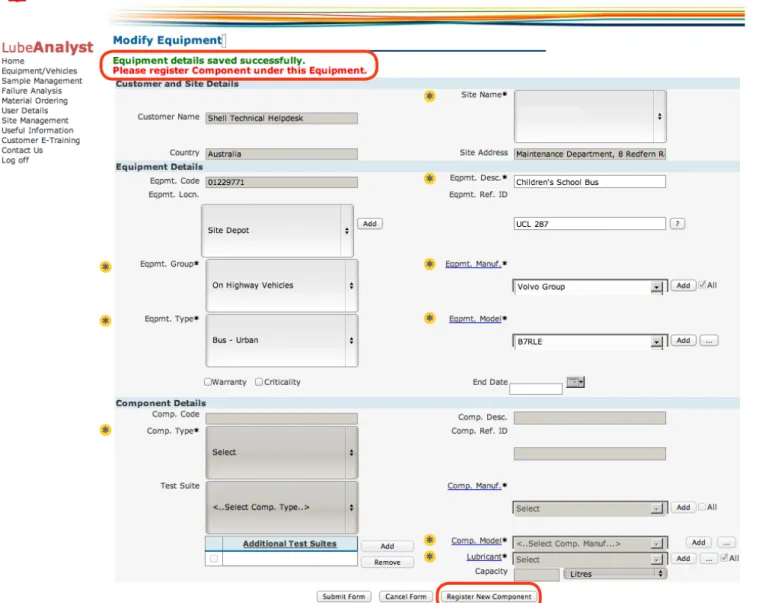
Once all details have been completed, click to save the new equipment.
A message will appear in green confirming Equipment details saved successfully. Now you can register the components of the equipment by clicking the button.
*
*
*
* *
* * *
6
Registering a new Shell LubeAnalyst Component
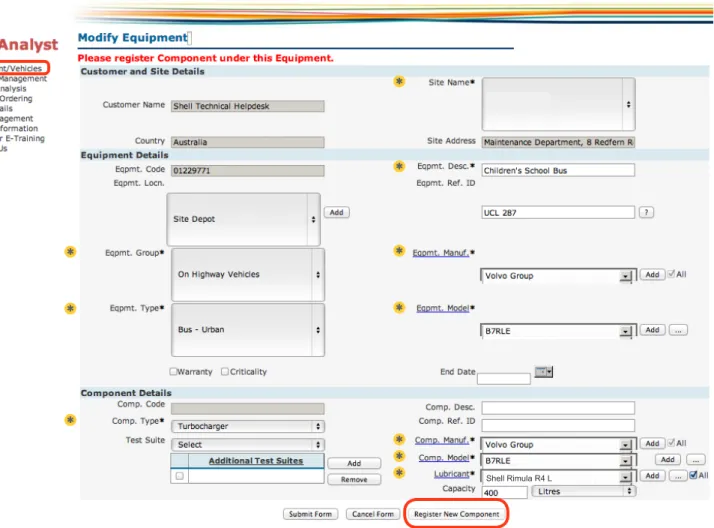
A component must be registered to a piece of equipment as illustrated in the hierachy depicted in Figure 1. Select Equipment/Vehicles, then Search in the LubeAnalyst menu (or if you have just successfully registered a new piece of equipment, click ). In the search screen you can choose filters required and select Search, which will return a list of equipment registered to your site. Select the correct equipment. This will take you to the view
Equipment/Vehicle screen. Then select button.
Complete the data fields, those marked with an asterisk (*) are compulsory, highlighted below with . You can use the button to add new data. To help select the test suite required for this Component, please refer to Section 9.0 Choosing a Shell LubeAnalyst Test Kit/Suite. The Test Suite you choose for this component must match the kit type that you have purchased. For example, if you select a K2 test suite, you must send the sample with a K2 label.
* *
*
*
*
* *
* * * *
Figure 7 Modify Equipment – Component Details
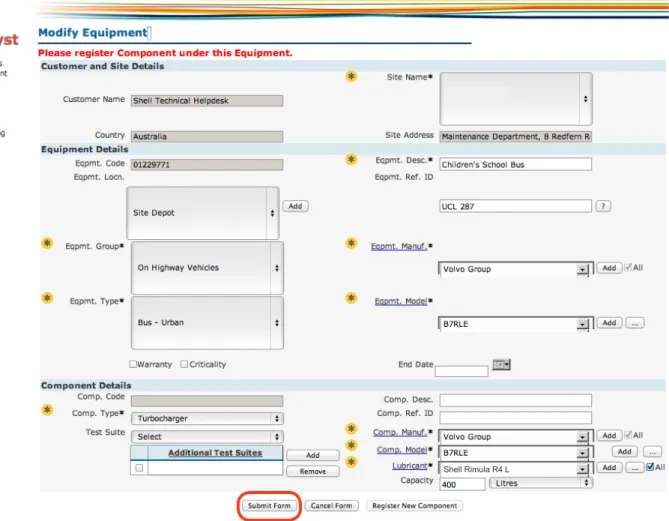
Additional tests can also be added to the test suite, at additional cost. Please contact the Shell Technical Helpdesk on 1300 134 205 prior to selecting additional test suites. Once all details have been completed, click the button to save these details.
Figure 8 Modify Equipment – Details Saved
A green message will appear Equipment Details Saved and Component Details Registered Successfully.
*
*
*
* *
* * * *
*
* *
7
Registering a new Shell LubeAnalyst Subscriber
Subscribers to the Shell LubeAnalyst system are the people who will receive the LubeAnalyst reports. Subscribers can be registered at any level of the hierarchy, customer, site, equipment or component. For example, a subscriber registered at the customer level will receive reports for all sites, and a subscriber registered to a piece of equipment will receive reports for that piece of equipment and related components only.
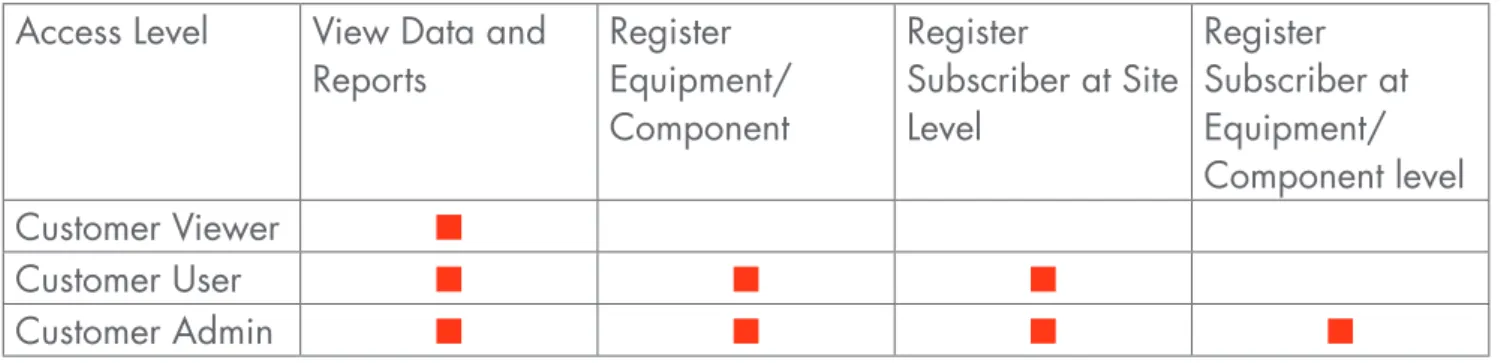
You can add a subscriber using the Shell LubeAnalyst website, allowing the subscriber to receive analysis reports via email as they are generated from the LubeAnalyst system. There are three active user settings for registering a subscriber: Customer Viewer, Customer User and Customer Admin. See Table 1 for details.
Access Level View Data and Reports
Register Equipment/ Component
Register
Subscriber at Site Level
Register Subscriber at Equipment/ Component level Customer Viewer ■
Customer User ■ ■ ■
Customer Admin ■ ■ ■ ■
7.1 Registering a subscriber at site level
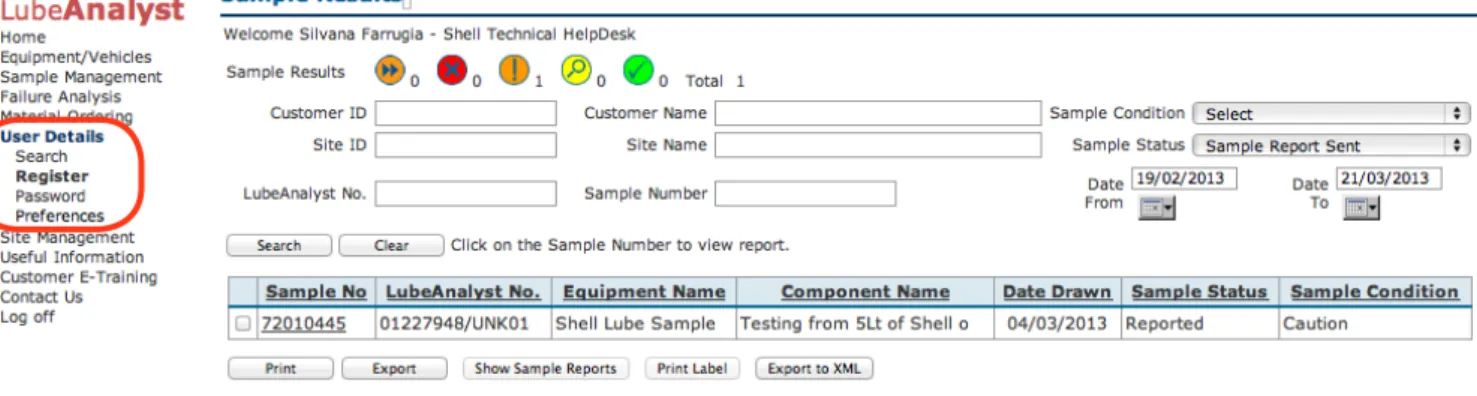
Once logged on, select User Details, then Register from the Lube Analyst menu.
Figure 9 Sample Results
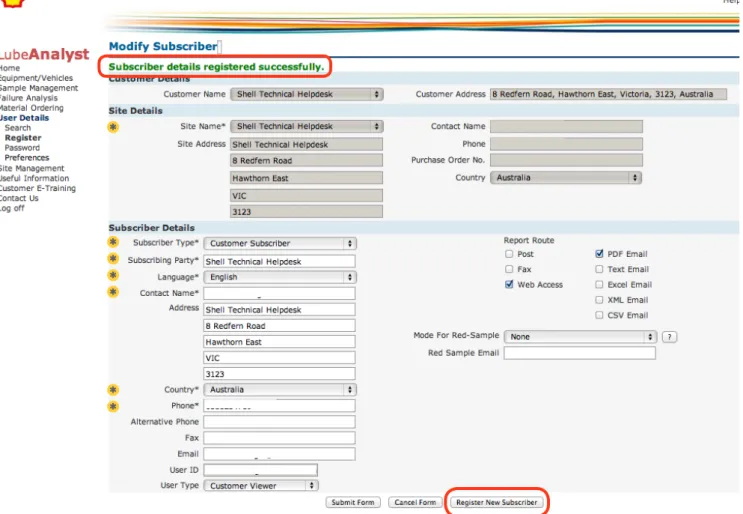
Select the site you wish to register from the Site Name drop down box located under the Site Details section. Once selected, enter details under the Subscriber Details section. Note that
Mode For Red-Sample (Figure 10) should be set to None unless the subscriber would
like all Action (Red) sample reports to be sent to additional persons.
* *
* * *
* *
Once you have completed all the new subscribers’ details, click the button. A green message will appear confirming Subscriber details registered successfully. The entry will then be validated by the LubeAnalyst administrator, and a welcome email will be sent to the subscriber, containing login and password details.
Figure 11 Modify Subscriber
Click if you would like to add another subscriber at this stage.
*
* * * *
* *
7.2 Registering a subscriber at Equipment/Component level
This section describes the process for registering a subscriber to a component or piece of equipment. As shown in Table 1, customer user or customer admin access is required to register a subscriber to a level lower than a site.
The first step to registering a subscriber to a piece of equipment or component is to locate the equipment or component. Select Equipment/Vehicles then Search, enter the selection criteria and click the button.
Figure 12 Search Equipment/Component – Search
A list of all registered equipment applicable to the criteria entered will be shown, from which you then need to select the specific piece of equipment or component. Note that if you wish to register the subscriber to multiple pieces of equipment or components you must repeat the process for each. Alternatively, you can register the subscriber to the site, which would result in the subscriber receiving Shell LubeAnalyst results for all the equipment and components registered to that site.
Shell Technical Helpdesk Shell Technical Helpdesk
Select if you wish to register the subscriber to the piece of equipment, or select to register the subscriber at the component level.
Figure 14 View Equipment/Component
From the Modify Component or Modify Equipment window select the button under the Subscriber(s) section.
* * * *
560
The Associated Subscribers page will open in a new window, showing all the subscribers registered to that item. To add the new subscriber, select the button. This will take you to the Register Subscriber screen.
Figure 16.1 Associated Subscribers
In the Register Subscriber screen, enter all the new subscriber’s details, as described in
Section 7.1 Registering a subscriber at site level, and then click the button. A green
message will appear confirming the Successful registration of the subscriber.
* * *
* *
8
Ordering Shell LubeAnalyst Test Kits
Shell LubeAnalyst orders are processed by the Shell Technical Helpdesk. Purchase orders can be emailed to [email protected] or faxed to 1300 134 205. Please include the following information on your purchase order:
■ Company Name ■ Delivery Address ■ Invoice Address
■ Purchase Order Number
■ Contact Name and Contact Details
■ Type of kit required (refer to Section 9.0 Choosing a Shell LubeAnalyst Test Kit/Suite) ■ Quantity of kits required
Shell LubeAnalyst materials are supplied as:
■ Pre-paid test kits: LubeAnalyst “K1”, “K2” and “K3” contain sampling materials for 10
samples. We send an invoice to you at the time the pre-paid kit is dispatched.
■ Post-paid test kits: LubeAnalyst “Advanced”, are ordered as individual samples. We send
an invoice to you after the sample has been tested.
Your Shell LubeAnalyst samples are invoiced separately to lubricants and fuels orders.
For any issues relating to your LubeAnalyst invoice please contact the Shell Technical Helpdesk on 1300 134 205.
9
Choosing a Shell LubeAnalyst Test Kit/Suite
Shell LubeAnalyst offers two types of test suites: pre-paid test kits (LubeAnalyst K1, K2 and K3) and post-paid test kits (LubeAnalyst Advanced). The pre-paid test kits include a standard set of tests according to the sample source. Please review the following tables to help determine the correct test kit for your needs.
9.1 LubeAnalyst K1 Test Suites (Pre-Paid)
TEST SUITE
Air Compressor—
ISO Grades ■ ■ ■ ■
Air Compressor—
SAE Grades ■ ■ ■ ■
Automotive Transmission ■ ■ ■ ■
Aviation Engine—Diesel ■ ■ ■ ■ ■ ■ ■
Aviation Petrol Engine ■ ■ ■ ■ ■ ■
Diesel Engines ■ ■ ■ ■ ■ ■
Diff/Final Drive/PTO—
ISO Grades ■ ■ ■ ■
Diff/Final Drive/PTO—
SAE Grades ■ ■ ■ ■
Hydraulic Systems—
ISO Grades ■ ■ ■ ■
Hydraulic Systems—
SAE Grades ■ ■ ■ ■
Industry Gears—ISO Grades ■ ■ ■ ■ ■
Industry Gears—SAE Grades ■ ■ ■ ■ ■
Industry—General—
ISO Grades ■ ■ ■ ■ ■
Locomotive Engine ■ ■ ■ ■ ■ ■
LPG/Natural Gas Engine ■ ■ ■ ■ ■ ■
Marine Engines ■ ■ ■ ■ ■ ■
Viscosity @ 40°C (ASTM D445) Viscosity @ 100°C (ASTM D445) Flash Point (ASTM D3828) Oxidation Index (FTIR JOAP) Nitration Index (FTIR JOAP) Moisture (%) (FTIR JOAP) Soot Index (FTIR JOAP) Spectrometr
y
9.2 LubeAnalyst K2 Test Suites (Pre-Paid)
TEST SUITE
Air Compressor—
ISO Grades ■ ■ ■ ■ ■ ■
Air Compressor—
SAE Grades ■ ■ ■ ■ ■ ■
Automotive Transmission ■ ■ ■ ■ ■
Aviation Engine—Diesel ■ ■ ■ ■ ■ ■ ■ ■ ■
Aviation Petrol Engine ■ ■ ■ ■ ■ ■ ■
Diesel Engines ■ ■ ■ ■ ■ ■ ■
Diff/Final Drive/PTO—
ISO Grades ■ ■ ■ ■ ■ ■
Diff/Final Drive/PTO—
SAE Grades ■ ■ ■ ■ ■
Hydraulic Systems—
ISO Grades ■ ■ ■ ■ ■
Hydraulic Systems—
SAE Grades ■ ■ ■ ■ ■
Industry Gears—
ISO Grades ■ ■ ■ ■ ■ ■
Industry Gears—
SAE Grades ■ ■ ■ ■ ■ ■
Industry—General—
ISO Grades ■ ■ ■ ■ ■ ■
Locomotive Engine ■ ■ ■ ■ ■ ■ ■ ■
LPG/Natural Gas Engine ■ ■ ■ ■ ■ ■ ■ ■
Marine Engines ■ ■ ■ ■ ■ ■ ■ ■
Petrol Engines ■ ■ ■ ■ ■ ■ ■
Refrigerator Compressor ■ ■ ■ ■ ■
Transport—General—
Viscosity @ 40°C Viscosity @ 100°C Flash Point TAN (ASTM D664) TBN (ASTMD2896) Water Content (KF) ear Index (PQ Index)W Oxidation Index (FTIR JOAP) Nitration Index (FTIR JOAP) Moisture (%) (FTIR JOAP) Soot Index (FTIR JOAP) Spectrometr
y (
9.3 LubeAnalyst K3 Test Suites (Pre-Paid)
TEST SUITE
Air Compressor—
ISO Grades ■ ■ ■ ■ ■ ■ ■
Air Compressor—
SAE Grades ■ ■ ■ ■ ■ ■ ■
Diff/Final Drive/PTO—
ISO Grades ■ ■ ■ ■ ■ ■
Diff/Final Drive/PTO—
SAE Grades ■ ■ ■ ■ ■ ■
Hydraulic Systems—
ISO Grades ■ ■ ■ ■ ■ ■ ■
Hydraulic Systems—
SAE Grades ■ ■ ■ ■ ■ ■ ■
Industry Gears—ISO Grades ■ ■ ■ ■ ■ ■ ■ ■
Industry Gears—SAE Grades ■ ■ ■ ■ ■ ■ ■ ■
Industry—General—
ISO Grades ■ ■ ■ ■ ■ ■ ■ ■
Refrigerator Compressor ■ ■ ■ ■ ■ ■
Transport—General—
SAE Grades ■ ■ ■ ■ ■ ■ ■ ■ ■
Turbines—ISO Grades ■ ■ ■ ■ ■ ■
Turbines—Aviation Grades ■ ■ ■ ■ ■ ■ ■
Viscosity @ 40°C (ASTM D445) Viscosity @ 100°C (ASTM D445) Par
ticle Count
(ISO 4406:1999 New) TAN (ASTMD664) TBN (ASTMD2896) Water Content (KF) Wear Index (PQ Index) Oxidation Index (FTIR JOAP) Nitration Index
(FTIR JOAP) Soot Index (FTIR JOAP) Spectrometr
y
(ASTM D5185) Lithium (Li)
9.4 LubeAnalyst Advanced Turbines Test Suites (Post-Paid)
TEST SUITE
Advanced Turbine Systems 1
■ ■ ■ ■ ■ ■ ■ ■
Advanced Turbine Systems 2
■ ■ ■ ■ ■ ■ ■ ■ ■
Advanced Turbine Systems 3
■ ■ ■ ■ ■ ■ ■ ■ ■ ■ ■ ■
Advanced Turbine Systems 4
■ ■ ■ ■ ■ ■ ■ ■ ■ ■ ■ ■ ■ ■
Air Release Characteristics Analytical Ferrography Anti Rusting (Fresh W
ater)
Appearance Foam Seq
1, 2 & 3 (T
end/Stab)
Laser Net Fines Millipore Sludges (0.8µ) Par
ticle Count (ISO 4406)
TAN (ASTM D664) Viscosity 40°C Water Content (KF) Water Separability Wear Index (PQ Index) Oxidation Stability (RPVOT) Spectrometr
y (ASTM D5185)
Par
9.5 LubeAnalyst Advanced Test Suites (Post-Paid)
TEST SUITE
Advanced Heat Transfer
and Seal Systems ■ ■ ■ ■ ■ ■ ■
Advanced Air
Compressor Systems ■ ■ ■ ■ ■ ■ ■ ■ ■
Advanced Bearing and
Circulating Systems ■ ■ ■ ■ ■ ■ ■ ■ ■
Advanced Coolant Systems ■ ■ ■ ■ ■ ■ ■
Advanced Diesel Fuel ■ ■ ■ ■ ■ ■
Advanced Ferrography ■
Advanced Fire Resist
Hydraulic Fluid (HFD) ■ ■ ■ ■ ■
Advanced Gas
Compressor Systems ■ ■ ■ ■ ■ ■ ■ ■ ■
Advanced Grease
Lubricated Bearings ■ ■ ■
Advanced Particle
Shape Classifier ■ ■
Advanced Refrigeration
Compressor Systems ■ ■ ■ ■ ■ ■ ■ ■
Advanced Transformer
Oil Quality ■ ■ ■ ■ ■
Advanced Transformer Oil
Quality+DGA ■ ■ ■ ■ ■ ■
Advanced Turbo
Compressor Systems ■ ■ ■ ■ ■ ■ ■ ■ ■
Analytical Ferrography Appearance Breakdown V
oltage
Buchholz Gas Analysis Conductivity Flash Point Par
ticle Count
Oxidation Index Glycol Inter
facial T
ension
Laser Net Fines Micro Organisms Millipore Sludges pH value Reser
ve Alkalinity
Sulphur Total Acid Number (T
AN)
Viscosity 40°C Water Content (KF) Wear Index (PQ Index) Nitrite Spectrometr
10 Sample Techniques and Registration
Once you have purchased and received your test kits, you will be ready to take samples and send them to the Shell LubeAnalyst laboratory for analysis.
10.1 Best Practice Sampling Techniques
Most lubricant condition monitoring services use an oil sample of only 100mL to represent a system that may hold hundreds or thousands of litres of oil, so it is very important to take a representative sample. From the very first sample, you begin investing in a valuable condition monitoring programme. Every sample contributes to building a history from which trends in wear, contamination, and degradation can be determined. When sampling from systems, always observe environment, health and safety requirements. Take care with high-pressure piping and thermal systems and sampling close to electrical equipment or when sampling from a drain line. If in doubt, please contact your Lubricants Technical Advisor or Shell Technical Helpdesk.
We recommend a consistent method of taking a sample. Always take the sample at the same point, in the same way and after the same amount of time. For example, if you previously took the sample half an hour after the machine has been started, please make sure that the next sample is taken half an hour after the start of the machine as well. We recommend that you sample a component while it is running (if it is safe to do so) or within 30 minutes after shutdown. Refrain from sampling right after a large volume of lubricant has been added. Always be sure to draw sufficient sample to fill the bottle. 80% full is a good level to aim for, as this will help ensure that there is adequate sample to complete all tests, and will ensure adequate ullage to allow sample agitation by the laboratory.
Areas where lubricant flow is restricted or where contaminants and wear products tend to settle and collect should be avoided as sampling points. Always try to take the sample in the most hygienic of conditions. This will help to minimise contaminants in the sample, which could lead to an incorrect analysis and diagnosis. Use the correct sampling equipment and the bottles supplied by Shell. Make sure that they are unopened, unused and clean before you use them. Always clean the sampling gun immediately after use. After taking the samples, check to make sure that the bottle lids are tightly closed.
The optimum location to sample a circulating system is a live zone upstream of filters where contaminants and wear debris are the most concentrated. Usually, this means sampling from fluid return lines or drain lines. For systems where oil drains back to a sump without being directed through a line (such as engines), draw from the pressure line down-stream of the pump (before the filter). Permanent sampling points should be at elbows in pipe runs in preference to straight sections. This will help to ensure that the flow regime at the sample point is turbulent and that wear and contaminant particles do not ‘drop out’ of suspension.
10.2 Drawing a sample with a sample pump
1. Use a Shell LubeAnalyst sample bottle, remove the cap and screw into the pump body. 2. Using a new length of tube for each sample, push the tube through the top of the
pump until it appears half way down the sample bottle. Please make sure to tighten the thumbscrew to secure the tube.
3. Place the end of the tube into the sampling point.
4. Make sure that the sample bottle is vertical throughout the sampling operation and that it is not overfilled. It is also important that the gun and bottle assembly is kept upright while in use to prevent oil entering the gun. Should this occur, disassemble it immediately and flush thoroughly with a solvent such as white spirit, Shellite or X55. Dry before reassembling. DO NOT FLUSH GUN WITH PETROL OR DEGREASING FLUID.
5. Complete the sample label and attach to the bottle. Place the bottle inside the plastic bag provided and close the ziploc then slip the bottle into the mailing canister. Send the sample to the laboratory by affixing the mailing label to the canister and dropping in the post, or use a pre-paid courier bag (available to purchase when you order your LubeAnalyst kits).
1. First time samples (without registering online with Shell LubeAnalyst):
For a first time sample, complete all sections with the required information. As it is the first sample, a Shell LubeAnalyst Number will not yet be assigned to the component. This Shell LubeAnalyst Number is unique to each component and is left blank for first-time samples. It will be assigned once the first sample has been registered in Shell LubeAnalyst and will appear on the LubeAnalyst sample report. You can then record on future samples.
2. Registering the sample online:
Registering the sample online is the most efficient way of recording the required data. The next section, Section 10.4, describes the process of registering a sample online. Once you’ve registered online, just record the Shell LubeAnalyst number in Section C.
3. Ongoing samples:
Complete Sections A, B and C. In Section C, fill in the Shell LubeAnalyst Number, Equipment Life, Lubricant Life, Top-Up Volume and tick if the oil was changed.
If you have any questions about the information required, please contact your Shell Account Manager, Lubricants Technical Advisor or the Shell Technical Helpdesk.
10.3 Completing a Shell LubeAnalyst Sample Label
The LubeAnalyst label is divided into four sections:
A) Customer record stub – complete and keep this for your records B) Sample identification tabs – stick these onto the sample bottle and lid C) Sample specific information – complete this to identify your sample
D) Site, Equipment and Component information – complete this if not already registered in LubeAnalyst (or register online)
SAMPLE NUMBER FO R YO U R RE CO RDS ST IC K TO LID O F SA M PL E BO TT LE SA M PL E N U M BE R SA M PL E N U M BER
If the Equipment/Component is not registered, complete all the fields below or register online.
Date sample drawn:
K2
K2
/ Equipment ref ID Equipment/Component
Date sample drawn:
Customer Name:
Engine Hydraulics
and Brakes Power Steering Right Red. Gear Left Red. Gear Gearboxes andTransmissions TransferGearbox
Email address: Customer Name/Site:
Phone: Fax:
AD HOC Equipment Ref ID: Component Ref ID: Equipment/Component Description: Equipment Manufacturer: Model:
Oil Capacity: Litres:
NOTE: Without this number the sample can not be processed
www.shell.com.au/lubeanalyst Valid to: 31/12/2011
Please quote the units of measure for above numbers, i.e. 250 hours
Site:
Lubricant in Use: Oil Changed: Yes No
Equipment Life:
FOR TRANSPORT/ CONSTRUCTION EQUIPMENT
Lubricant Life: Top Up Volume:
Axle, Differentials and Final Drives
F R
Diesel
Engine Gearboxes Hydraulics Turbine GasEngine Bearings, CirculatingSystems and EDM Compressors andVacuum Pumps
FOR INDUSTRIAL
EQUIPMENT Aviation Piston Engine
M M D D Y Y
M M
D D Y Y /
SAMPLE NUMBER
To stick on the bottle
Shell LubeAnalyst Number:
Shell LubeAnalyst Number:0 0 0 7
Section A Section B Section C Section D
Figure 19 Register Sample
10.4 Registering a new sample with Shell LubeAnalyst
Now that the sample label has been filled in with all the required information, the sample can be registered on the LubeAnalyst system. Select Sample Management, then Register from the LubeAnalyst menu.
Complete the fields on the Register Sample page. If registering a sample for a component that has previously been sampled, you can input the LubeAnalyst number that appears on the top of the historical analysis report. This will automatically complete all standard fields, requiring only Equipment Life, Lubricant Life and Top-Up Volume to be completed.
If it is the first sample to be taken from the component being sampled, then the registered
equipment and component can be located by either inputting the Site ID and selecting it from the drop down Eqpmt./Comp. box, or by searching for it by clicking the button.
Figure 20 Locating Registered Equipment/Component
Figure 21 Save Sample Registration
Once all fields have been completed click the button. A green message will appear confirming the sample Data Saved Successfully.
11 Shell LubeAnalyst Sample Analysis Reports
The sample reports will detail a diagnosis, the sample status Action (Red), Caution (Amber), Monitor (Yellow) and Normal (Green), as well as test results. Reports include graphical output showing key diagnosis areas such as wear metals and viscosity (note that two or more samples per component are required for trending).
11.1 Shell LubeAnalyst K1, K2 and K3 Test Suite Reports
The report is contained on one page and shows the last three sample results for oil properties, wear metals and contamination. It also includes comments and recommendations from
the diagnostician.
TAS 7310 Australia
Maintenance Department 81-85 Devonport Road Quoiba
Simplot Australia - Quoiba TAS
LubeAnalyst Number : 00713198/ECO
Component Description : REFRIGERATION COMPRESSOR Component Ref ID :
Lubricant Name : Sunoil Suniso 4SA Manuf./Model : Unspecified/ Unspecified Site Name : Simplot Australia - Quoiba TAS Sample Number : 72018311
Equipment Description : MYCOM #23 250 Compressor Equipment Ref ID : #23
No No
No
-50 Litres 26979 Hours 28187 Hours 25984 Hours 47366 Hours 46158 Hours 45163 Hours 18/02/2013 30/05/2012
07/02/2012Normal Normal Action 72018311 72013242 72013260 Oil Drain Top-up Volume Lubricant Life Equipment Life Sample Date Sample Condition
Sample Number 2091157 2192320 2424264
Potassium (K) ppm <1 1 <1 Vanadium (V) ppm <1 <1 <1 Silicon (Si) ppm 17 5 <1 Sodium (Na) ppm 2 1 <1 Nickel (Ni) ppm <1 <1 <1 Chromium (Cr) ppm <1 <1 <1 Iron (Fe) ppm 5 6 5
Aluminium (Al) ppm <1 <1 <1
Tin (Sn) ppm <1 <1 <1 Lead (Pb) ppm <1 <1 <1 Copper (Cu) ppm <1 <1 <1 Spectrometry (Oils)
Water Content (KF) ppm 59 57 168 Water Content (KF)
TAN (D 664) mg KOH/g 0.15 0.17 0.13 TAN (D 664)
Visc 40°C cSt 71.9 75.4 77.3 Viscosity 40°C
RESULTS
Results are unsatisfactory. Negligible wear is occurring. Moisture levels are high. Change oil or carry out water purification to clean up oil. Inspect for source of moisture ingress and rectify. Advise evaluating sampling procedures as a precaution. Resample at a reduced service interval after corrective action to further monitor.
COMMENTS SHELL CONTACTS
Focal point 1 : Technical Helpdesk Focal point 1 phone : 1300 134 205 Shell Website : http://www.shell-lubeanalyst.shell.com/
8 Redfern Road Hawthorn East VIC 3123
Shell Technical Helpdesk Shell Technical Helpdesk
Refrigeration Oil S2 FR-A 68
Lube
Analyst
Analysis results for the last three samples Shell LubeAnalyst registration numberfor the component Enrolment and component registration information Diagnosis with possible causes and actions
Customer contact information Sample status
indicator for equipment/oil
condition
GRAPHS Component Description : B1 TURBINE MAIN OIL TANK Component Ref ID :
Lubricant Name : Unspecified Unspecified Manuf./Model : Siemens AG/ Unspecified
Site Name : Stanwell Corp Swanbank Power Station Sample Number : 74000056
Equipment Description : SB1MVA10BB001 Equipment Ref ID :
QLD 4305 Australia Maintenance Dept Swanbank Road Swanbank
Stanwell Corp Swanbank Power Station LubeAnalyst Number : 00708494/ZTU
Results are generally satisfactory. Laser Net Fines results indicate the compartment is in good condition. Shell Website : http://www.shell-lubeanalyst.shell.com/
DIAGNOSIS AND RECOMMENDED ACTIONS SHELL CONTACTS
GRAPHS Component Description : B1 TURBINE MAIN OIL TANK Component Ref ID :
Lubricant Name : Unspecified Unspecified Manuf./Model : Siemens AG/ Unspecified
Site Name : Stanwell Corp Swanbank Power Station Sample Number : 74000056
Equipment Description : SB1MVA10BB001 Equipment Ref ID :
QLD 4305 Australia Maintenance Dept Swanbank Road Swanbank
Stanwell Corp Swanbank Power Station LubeAnalyst Number : 00708494/ZTU
Results are generally satisfactory. Laser Net Fines results indicate the compartment is in good condition. Shell Website : http://www.shell-lubeanalyst.shell.com/
DIAGNOSIS AND RECOMMENDED ACTIONS SHELL CONTACTS
Focal point 1 : Technical Helpdesk Focal point 1 phone : 1300 134 205
8 Redfern Road Hawthorn East VIC 3123
Shell Technical Helpdesk Shell Technical Helpdesk
Lube
Analyst
GRAPHS Component Description : B1 TURBINE MAIN OIL TANK Component Ref ID :
Lubricant Name : Unspecified Unspecified Manuf./Model : Siemens AG/ Unspecified
Site Name : Stanwell Corp Swanbank Power Station Sample Number : 74000056
Equipment Description : SB1MVA10BB001 Equipment Ref ID :
QLD 4305 Australia Maintenance Dept Swanbank Road Swanbank
Stanwell Corp Swanbank Power Station LubeAnalyst Number : 00708494/ZTU
Results are generally satisfactory. Laser Net Fines results indicate the compartment is in good condition. Shell Website : http://www.shell-lubeanalyst.shell.com/
DIAGNOSIS AND RECOMMENDED ACTIONS SHELL CONTACTS
Focal point 1 : Technical Helpdesk Focal point 1 phone : 1300 134 205
11.2 Shell LubeAnalyst Advanced Test Suite Reports
The Advanced Report is detailed over two pages. The first page shows comments and recommendations from the diagnostician, plus graphs on oil properties, wear metals, contamination and additives. The second page includes test results for the last six samples.
Enrolment and component registration information Diagnosis with possible causes and actions Shell LubeAnalyst registration number
for the component Customer contact information
Sample status indicator for equipment/oil
condition
Trend graphs showing critical diagnosis areas for lubricant and component failures and properties Analysis
results for the last
three samples
Figure 23 LubeAnalyst Advanced Test Suite Report
12/08/2011 12/12/2011 22/06/2012 16/09/2012 16/09/2012 01/12/2012
12/08/2011 12/12/2011 22/06/2012 16/09/2012 16/09/2012 01/12/2012
12/08/2011 12/12/2011 22/06/2012 16/09/2012 16/09/2012 01/12/2012 12/08/2011 12/12/2011 22/06/2012 16/09/2012 16/09/2012 01/12/2012
11.3 Shell LubeAnalyst Failure Analysis Feature
Shell LubeAnalyst’s unique failure analysis tool allows for an overview of your equipment
condition monitoring programme, indicating the number of samples and percentage categorised as Action (Red), Caution (Amber), Monitor (Yellow) and Normal (Green). Further analysis can also categorise all the Action (Red), Caution (Amber), Monitor (Yellow) by failure type. These failure types can indicate the underlying reasons why the sample was diagnosed with that condition. This helps the user to identify the areas for greatest improvement, and can also be used to monitor reliability of site equipment.
Select Failure Analysis from the LubeAnalyst menu and manipulate the filters.
There are three options for reports: Statistics, Tables and Graphs. Select your
desired type and click the button to show the report in the LubeAnalyst
website or the button to generate a PDF report.
Figure 25 Failure Analysis
Shell Technical Helpdesk
Shell Technical Helpdesk Shell Technical Helpdesk
Shell Technical Helpdesk Hawthorn
Hawthorn Compressor Room
Compressor Room MYCOM #23 250 Compressor
MYCOM #23 250 Compressor
07/02/2012 18/02/2013
12 Key Contacts and More Information
For more information, please contact your Shell Account Manager, Shell Lubricants Distributor or Reseller, Shell Lubricants Technical Advisor or the Shell Technical Helpdesk on 1300 134 209.