Your Organisation’s Website
2. Ensuring that back-office systems are positioned to
effectively support your website
This concluding article in a two-part series examines how best to ensure that you make most effective use of your website by linking it to your back-office systems and processes..
Why websites and back-office systems are becoming increasingly interrelated
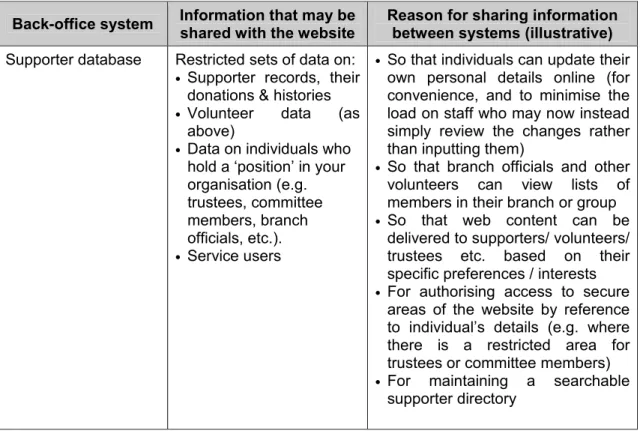
In the previous article in this series, we examined the benefits of a ‘customer-facing’ website and briefly looked at the range and type of services that your supporters and service users now expect to be able to access online. We saw that the provision of many of these services requires that information that is normally stored in back-office IT systems (i.e. those that are used by staff for internal operations and are not accessible or visible to the general public) is made available to the website, either to facilitate intelligent online delivery of services, or so that this information can be accessed directly by those outside the organisation’s offices, such as supporters, potential supporters, volunteers (e.g. branch secretaries), committee members and, possibly, the public via a website interface. Examples of the types of systems that might be integrated with the website, the type of information that might be shared, and the reason for sharing this information, are given in table 1 below.
Table 1 – Examples of back-office systems that a not for profit organisation may choose to link to its website
Back-office system Information that may be
shared with the website
Reason for sharing information between systems (illustrative)
Supporter database Restricted sets of data on: • Supporter records, their
donations & histories • Volunteer data (as
above)
• Data on individuals who hold a ‘position’ in your organisation (e.g. trustees, committee members, branch officials, etc.). • Service users
• So that individuals can update their own personal details online (for convenience, and to minimise the load on staff who may now instead simply review the changes rather than inputting them)
• So that branch officials and other volunteers can view lists of members in their branch or group • So that web content can be
delivered to supporters/ volunteers/ trustees etc. based on their specific preferences / interests • For authorising access to secure
areas of the website by reference to individual’s details (e.g. where there is a restricted area for trustees or committee members) • For maintaining a searchable
Back-office system Information that may be shared with the website
Reason for sharing information between systems (illustrative)
Finance or supporter system
• Subscription records • So that supporters can renew and track their subscriptions online Finance system • Financial transactions
(e.g. purchases of books, course/events bookings, etc)
• So that individuals can make payments for goods and services online
Inventory system • Stock levels (e.g. of books)
• To ensure that the website does not take orders for items that are out of stock
Course administration • Details of courses, locations, areas of specialisation etc.
• To manage the bookings for educational and training courses Event management
system (may be part of supporter database system)
• Details of events and conferences (venue, cost, type of event, etc)
• So that individuals can search and register for events online
• To minimise manual copying of details from booking forms into the events system by staff
• To avoid over-booking of courses (i.e. by checking number of places remaining prior to allowing the booking)
Library system • Details of books on loan; details of library catalogue
• To allow supporters and service users to search the library catalogue online
• To allow individuals to keep track of their own bookings and reservations
E-mail system • Staff e-mail accounts • For secure remote access to e-mail facilities
Implications for the organisation
Opening new channels of service delivery via the website will not only affect the IT and communications infrastructure but also inevitably have significant implications for the following areas:
• Business processes – as new ways of managing the service areas of the website, and the associated data changes and actions/requests become necessary
• Staff and organisational structure – because new service channels and automation of certain activities are likely to require new activities to be carried out, or existing ones to be carried out differently
• Controls
There will need to be a greater reliance on systems-based controls (e.g. to ensure that data changes are applied in the order in which they are made, ensuring that values entered via the website are properly validated, etc.) because fewer data updates and transactions will be initiated in-house – this may require a culture change in the more traditional departments
• Security
Because you are allowing access to data from outside the organisation, security procedures will need to be tightened
• Hardware and systems hosting – because existing equipment may not be sufficiently scaleable to accommodate increased usage or sudden ‘peaks’ in service demand (e.g. following a campaign)
• Budgets and financial resourcing – because a professional approach to implementing and (arguably more importantly) maintaining each of the above needs to be taken, else the organisation is risking its reputation of quality.
Linking the website to back-office systems
Using the example of a website / supporter or donor database interface, there are three main approaches to referencing an individual’s data within a website and processing changes to that person’s data made via the website, as follows:
1) Maintaining separate databases on the website and supporter / donor system and instituting some form of regular or on-line data interchange to allow for additions/changes made via either system.
2) Maintaining a cut-down form of the supporter / donor database on the website for access security purposes (e.g. to allow entry to a supporter-only area), which is updated regularly from the supporter / donor system, whilst allowing specific functions to be carried out directly within this back-office system via a web front-end (e.g. where a supporter may look at course availability and book a place on a course, where a supporter / donor may update specific data, such as their postal address or e-mail address, etc).
3) As (2), but where the supporter / donor database is accessed directly from both security access and data enquiry/update purposes.
There is no single ‘right’ answer. The approach that best suits an organisation will depend on a combination of at least the following aspects:
♦ The volume of daily transactions and updates to supporter / donor / service-user records
♦ Cost (web access licenses for some supporter / donor software may be more expensive than setting up a batch transfer interface)
♦ The supporter / donor system supplier’s experience, preferences and systems architecture
♦ The age of the software – it may not be possible, or it may be expensive, to ‘retro fit’ web front-end software to older systems and the safer approach would then be to commission some form of regular electronic batch transfer between the website and the system concerned, or replace the system in question
♦ Whether you need up-to-the-minute data to be available via the website (in many cases, organisations have not found this necessary, since even with, say, a popular course, a ‘buffer stock’ of places can be maintained)
♦ Security issues; for example, opening up access to the supporter / donor database to external parties is inherently less secure than where the database is accessed solely from within the organisation
♦ Control issues; for example, making sure that data being updated from different sources is properly sequenced (the later change overwriting the earlier and not vice versa)
♦ The functionality and robustness of back-office systems and related support issues – if you have a 24x7 website and you directly connect the website to the
back-office systems, what happens if a fault occurs overnight in, say, the supporter / donor system?
The availability of software
Over the past two years, there has been considerable progress made when considering the availability of both website and back-office software to support on-line processing and controlled access to ‘secure’ areas of the website (e.g. an area solely for trustees, committee members or branch officials). In the case of the website, there is now less reliance on bespoke website development as packaged software becomes available for such functionality as content management systems, ‘shopping trolley’ ordering processes, secure payment processing, discussion fora, etc. In the case of back office systems, many of the leading supporter / donor and finance system suppliers now have hands-on experience of on-line processing (until recently, some were still experimenting on their customers) and the ‘front-end’ software to support this. This has had the effect of making the whole process easier, less risky and, in some cases, cheaper for not for profit organisations going this route.
Positioning back-office systems and processes to effectively support your website
It is more difficult to regulate the impact of data updates, booking events or courses, buying books, etc. on both systems and the supporting business processes when these are made directly by third-parties compared to when these were all made in-house. Therefore, before initiating a new on-line service on your website, you will need to ensure that the back-office systems and associated processes can cope with these changes. As a salutary lesson, consider what happened in this real-life example of where a ‘push’ for a new on-line service caused disarray in the office and a dislocation in the service provided to supporters. A professional institute decided to initiate a service whereby not only could members order goods and services on-line, but they could do so by a single payment. In the ‘pre-website’ era, when ordering and paying for books and services, such as courses, a separate payment was required for each transaction. In part, this was because order processing and payment for books was handled by a separate system from other payments and also because different departments were involved. Additionally, much of the interaction with the member was made via post or telephone, so staff could better regulate the processing of orders. The institute then initiated the new web-based service and initially this was hailed as a success, since one effect was that the overall sales of books grew rapidly. However, soon cracks appeared in the structure, as follows:
♦ because no changes had been made to the back-office systems (and those who could access them), the single payment approach caused problems, since additional internal manual processes had to be set up to split and apportion payments
♦ often, part of an ‘order’ got stuck in the back-office paper system – whilst, say, payment was received and processed for a book, there was a delay in the paperwork being passed to another department involved (e.g. for administering places on an event)
♦ the systems handling the sales of books and places on courses/events only had simple mechanisms for stock/delegate control and did not warn a person using the website that, for example, a book was out of stock or the course was full
♦ because of the above, the number of members’ complaints grew when they had to wait longer than they should have for their ‘order’ to be fulfilled
♦ internally, there was an increase in the amount of financial adjustments being put through the accounting system as mistakes were made manually splitting
payments; this led to delays in the ability of the finance department to finalise the monthly accounts.
The lessons to be learnt from this situation are:
♦ The website shouldn’t be considered in isolation to other IT systems and an organisation’s business processes
♦ When considering new on-line services, it is imperative that you investigate the potential impact on back-office systems and processes before you commission changes to the website:
– it may be that new electronic interfaces will need to be built between different IT systems, or indeed systems that cannot cope may need to be replaced (e.g. in the above example, a new membership system that can support all types of transactions would have cut out the internal manual processes)
– staff may need to be reallocated to different jobs and new training schemes implemented
– consideration need to be paid to the internal financial and systems controls. ♦ The timetable for introducing new on-line services must consider ‘the big picture’
and not just the ability of the web developers to develop and deliver new functionality
♦ The business case for the new initiative should compare the benefits and constraints of the IT and communications systems as a whole and include the costs and resource needs for both the website and the back-office.
Conclusion
Not for profit organisations should not baulk at bringing new on-line services to their supporters and other stakeholders, since the market for systems to support this objective are now widely available and relatively mature. However, organisations (if they haven’t already done so) should stop considering website systems and other IT systems, together with associated business processes, as separate entities and start thinking in a ‘joined up’ manner.
About the author: Paul Sypko is a consultant with BlueSpark Consulting and specialises
in assisting organisations with the strategic use of IT and web systems. He can be contacted on 020 7520 9343 or by e-mail at [email protected]