The following paper was originally published in the
Proceedings of the USENIX Windows NT Workshop
Seattle, Washington, August 1997
For more information about USENIX Association contact:
1. Phone:
510 528-8649
2. FAX:
510 548-5738
3. Email:
[email protected]
4. WWW URL: http://www.usenix.org
DIGITAL FX!32
Running 32-Bit x86 Applications on Alpha NT
Anton Chernoff, Ray Hookway
Digital Equipment Corporation
DIGITAL FX!32
Running 32-Bit x86 Applications on Alpha NT
Anton Chernoff, Ray Hookway
Digital Equipment Corporation
Abstract
DIGITAL FX!32 is a unique combination of emulation and binary translation which makes it so that any 32-bit program that runs on an x86 system running Windows NT 4.0 will install and run on an Alpha Windows NT 4.0 system. After translation, x86 applications run as fast under DIGITAL FX!32 on a 500Mz Alpha system as on a 200Mz Pentium-Pro. The emulator and its associated runtime provide for transparent execution of x86 applications. The emulator uses translation results when they are available and produces profile data for use by the translator. The translator provides native Alpha code for the portions of an x86 application which have been previously executed. A server manages the translation process for the user, making the overall process completely transparent.
This paper focuses on the ways in which DIGITAL FX!32 achieves its transparency when running on an unmodified NT system.
1. Introduction
Three factors contribute to the success of a microprocessor: price, performance, and software availability. DIGITAL FX!32 addresses the last of these factors, software availability, by making hundreds of new applications available on Alpha-based platforms running Windows NT. DIGITAL FX!32 combines emulation and binary translation to provide fast, transparent execution of x86 programs on Alpha.
Since it was introduced, the Digital Alpha microprocessor has been the fastest microprocessor available. A large number of applications, particularly those that require a high performance processor, are available on Alpha. DIGITAL FX!32, makes it so that any 32-bit program which runs on an x86 system running Windows NT 4.0 will install and run on an Alpha Windows NT 4.0 system. The performance of an x86 application running on a high end Alpha is similar
to the performance of the same application running on a high end x86 platform.
Many different systems have successfully used emulators to run applications on platforms for which they were not initially targeted[4, 7]. The major drawback has been poor performance[7]. Several emulators have used “dynamic translation” to achieve better performance than that which a straight interpreter can obtain[2, 3, 7]. This approach translates small segments of the program while it is being executed. These systems must make a tradeoff between the amount of time spent translating and the resulting benefit of the translation. Too much time spent on the translation and related processing makes the program unresponsive. This limits the optimizations that emulators can perform using dynamic translation.
DIGITAL FX!32 makes a different tradeoff. No translation is done while the application is executing. Rather, the emulator captures an execution profile. Later, a binary translator[1] uses the profile to translate the parts of the application that have been executed into native Alpha code. Since the translator runs in the background, it can use computationally intensive algorithms to improve the quality of the generated code. To our knowledge, DIGITAL FX!32 is the first system to explore this mix of emulation and binary translation.
One of the important features of DIGITAL FX!32 is the transparent execution of x86 programs. Digital has provided several static binary translators. These were targeted at developers and sophisticated end-users. They required the user to manually use the translation tool to convert code from one computer architecture to another. This scheme was difficult to use when confronted with a distribution kit containing many images. With the ascension of the point-and-click user interface, a static translator is not feasible -- users expect programs to “just work." DIGITAL FX!32 achieves this transparency in a number of ways. Other than specifying that an application is an x86 application when it is being installed, the process of installing and running the application is the same on an Alpha as it is on an x86.
2. Overview
Windows NT has used an emulator to run 16-bit x86 applications since it was first released. Applications which run on this emulator install and run just like they do on an x86, but they run much slower. The emulator built into DIGITAL FX!32 provides a similar capability for 32-bit applications.
Unlike the 16-bit environment, DIGITAL FX!32 also provides a binary translator which translates 32-bit x86 applications into native Alpha code. The translation is done in the background and requires no interaction with the user. Operating in the background allows the DIGITAL FX!32 translator to perform optimizations that are too expensive to perform while the application is running. The resulting translated application runs up to ten times faster than the same application running under the emulator.
DIGITAL FX!32 consists of seven major components. Along with the emulator and translator mentioned above, the other major components are the agent, the runtime, the database, the server and the manager. The agent provides for transparent launching of 32-bit x86 applications. The runtime loads x86 images and sets up the runtime environment to execute them. As part of loading an image, the runtime “jackets” imported API routines. These jackets allow the x86 code to call the native Windows API. The database stores execution profiles produced by the emulator and used by the translator. It also stores translated images. The server maintains the database and runs the translator as appropriate. The manager allows the user to control resources used by DIGITAL FX!32. Each of the major components is discussed in more detail below.
This paper will focus on the agent and the runtime, since those components are primarily responsible for achieving the run-time transparency.
3. The DIGITAL FX!32 Agent
The DIGITAL FX!32 agent provides for transparent launching of 32-bit x86 applications. It is a DLL that is inserted into the address space of a process and hooks calls on CreateProcess and related APIs. If a call to CreateProcess specifies an x86 image to be executed, the Agent invokes the DIGITAL FX!32 runtime to execute the image instead. A process which contains the Agent is said to be enabled.
3.1 Enabling a Process
DIGITAL FX!32 enables processes using a technique described by Jeffrey Richter in chapter 16 of his book Advanced Windows NT[8] to inject a copy of the agent into the process’ address space.
The process doing the enabling (the enabler) must have a handle on the process being enabled (the subject). For a process created by the enabler, this is the value returned by the CreateProcess call. Other enablers must get a handle with OpenProcess. This frequently requires administrator privileges.
The enabler allocates a small area of virtual memory in the address space of the subject by starting a suspended thread (CreateRemoteThread) and using its stack. It changes the protection of that memory to executable, readable, and writable (WriteProcessMemory). It then copies a small piece of code and data into the subject (WriteProcessMemory). The code that it copies simply calls LoadLibrary to load the DIGITAL FX!32 agent DLL and then returns. Note that the code built by the enabler must know the location of the LoadLibrary routine in the subject’s virtual address space. Fortunately, NT arranges for the system DLLs (including KERNEL32.DLL, which contains LoadLibrary) to be at the same virtual address in all processes on the system. Hence, the enabler can just use the address of LoadLibrary in its own address space. The data written to the subject’s memory contains the pointer to LoadLibrary and the full path name of the agent DLL. The enabler then creates a thread of execution in the subject and passes it the address of that data (CreateRemoteThread), raises its priority (SetThreadPriority), and waits for the thread to finish. If all goes well, the subject thread runs and loads the agent DLL into its address space. The agent’s main routine is called automatically, and it goes about its work of enabling the subject process.
Inside the subject process, the agent DLL proceeds to hook a number of system functions. It does this by changing the addresses in the image import tables of all loaded modules to point to routines in the agent which replace the system routines. The hooked routines include LoadLibrary, FreeLibrary, CreateProcess, WinExec, LoadModule, and GetProcAddress. Other routines are also hooked to provide an execution environment that makes the system appear to be an x86.
3.2 Running in an Enabled Process
Once a process is enabled, any attempt to execute an image or load a DLL enters the DIGITAL FX!32 agent instead. If the image is an x86 executable, the agent arranges for the DIGITAL FX!32 runtime to take control of execution.
A program executes a new image by calling CreateProcess. Any such call enters the agent’s hook for CreateProcess. If the image is a native Alpha executable, the agent passes the request to the system’s CreateProcess, enables the new process, and then just lets it run. If the image is an x86 image, the agent adds the name of the runtime to the front of the command line and then creates the process. The DIGITAL FX!32 runtime runs and arranges to load and execute the x86 code. (This has the unfortunate side effect of listing all x86 processes as “fx32” in the processes list of the task manager. We are still looking for ways around this for NT Version 4.0.) Note that since the new process starts in the runtime, it is automatically enabled.
A request to load an x86 library is handled differently. If the current process’ main image is an x86 image, the runtime is already present. The hooked LoadLibrary loads the library (“as data” as far as the Alpha NT system is concerned) and starts execution of its main code using either the emulator or translated code. If the current process’ main image is a native Alpha image, the runtime is first brought into memory. Note that DIGITAL FX!32 will only load an Alpha DLL into an x86 image if it has enough information to allow it to jacket the calling sequences of all the exported entry points. This is discussed in section 4.1.
3.3 The Root of all Enabling
Any enabled process will ensure that all processes that it creates are enabled. How does this cascade of enabled processes start? By the time a user logs in, all the top-level processes must be enabled somehow, so that any attempt to execute a 32-bit x86 application invokes DIGITAL FX!32.
The processes which must be initially enabled are the Shell (explorer.exe), the Service Control Manager (services.exe) and RPCSS (rpcss.exe). The DIGITAL FX!32 server enables the Service Control Manager and RPCSS when it starts up, usually when the system boots. These two are system processes, and are running even before a user can log in. There is currently a short time window in which the Service Control Manager can attempt to start an x86 service before it is enabled. This
causes the x86 service to fail to start. The current work-around is to make the x86 service dependent on the DIGITAL FX!32 server.
Enabling the processes for a logged-in user is trickier. When DIGITAL FX!32 is installed, it stores fx32strt.exe in the registry as the Windows Shell, replacing the real Windows Shell (explorer.exe). When a user logs on, fx32strt runs and creates an enabled version of the Explorer. Thus, by the time the user is logged on, all the top level processes have been enabled. There is one catch to this process. The Explorer checks the registry to see if it is the user’s default shell. If so, it runs in a reduced mode, and does not create a task bar or run any programs in the startup group. To get around this, the server temporarily changes the registry’s Shell value to point to the Explorer, long enough to fool it into believing (quite rightly) that it is the user’s default shell.
4. The DIGITAL FX!32 Runtime
The DIGITAL FX!32 runtime is invoked whenever an enabled process attempts to execute an x86 image. The runtime loads the image into memory, sets up the runtime environment required by the emulator, and then calls the emulator to execute the image.
The runtime duplicates the functionality of the NT loader. This is necessary since the Alpha NT loader will return an error indicating that the image is of the wrong architecture if it is invoked to load an x86 image. Duplicating the functionality of the NT loader requires that the runtime relocate images which are not loaded at their preferred base address, set up shared sections, and process static TLS (Thread Local Storage) sections.
The runtime registers each image it processes with NT by inserting pointers to the image into various lists used internally by the operating system. Maintaining these lists allows the native Windows NT code to correctly implement routines like LoadResource that require access to loaded images. It also means that the DllMain functions of the loaded DLLs are called as appropriate. (The runtime jackets the entry points of x86 DLLs.)
Fortunately, these image lists are in the user’s address space and no modification of NT was required to register images with the system. Unfortunately, the structure of these lists is not part of the documented Win32 interface and using them creates a dependency on the version of NT that is being run. This is one of a number of places where FX!32 has dependencies on undocumented features of NT, making it more
dependent on a particular version of the operating system than a typical layered application. On the other hand, it is remarkable that the implementation of FX!32 required no changes to NT.
In addition to being registered with NT, the image is also registered in the DIGITAL FX!32 database. The database maintains the association between the image and the application which uses it. It also returns the name of the translated image to be used with a given x86 image. The database is accessed using an image id obtained by hashing the image’s header. The image id uniquely identifies the image by its contents, and is independent of the image name or location in the file system. Both the runtime and the server use the image id to access information about the image which is stored in the DIGITAL FX!32 database.
If there is a translated image in the database, the runtime loads it along with the original x86 image. Translated images are normal NT DLLs, and are loaded by the native LoadLibrary. They contain additional sections holding information required by the runtime to map x86 routines to the corresponding Alpha code.
4.1 Jackets
When the NT loader loads an image, it “snaps” the image’s imports using symbolic information in the image to locate the address of the imported routine or data. The DIGITAL FX!32 runtime duplicates this process. However it treats imports which refer to entries in Alpha images specially by redirecting them to refer to the correct jacket entry in the DIGITAL FX!32 DLL jacket.dll.
The “jackets” in jacket.dll are small code fragments which manage the transition between the x86 and Alpha environment. These jackets enable the x86 program to call the native Alpha implementation of the Windows API.
Each jacket contains an illegal x86 instruction that serves as a signal to the interpreter to switch into the Alpha environment. The interpreter calls an Alpha jacket routine at a fixed offset from the illegal x86 instruction. The basic operation of most jacket routines is to move arguments from the x86 stack to the appropriate Alpha registers, as dictated by the Alpha calling standard. Some jacket routines provide special semantics for the native routine being called, as required by FX!32. For example, the jacket for GetSystemDirectory returns the path to the FX!32 directory, rather than the path to the true system
directory, so that x86 applications do not overwrite native Alpha DLLs.
More complicated jackets are required in many cases. For instance, many Windows routines are passed the addresses of routines to call back when some event occurs. If these values were to be passed blindly, the Alpha Windows code would make a call to a location containing x86 code, and would certainly crash. A jacket for such a routine is a hand-crafted special jacket which dynamically creates incoming jackets for the procedure-pointer arguments, and passes those to the native Alpha code. When that code calls back to its argument, the incoming jacket enters the runtime to execute x86 code.
The most complicated jacketing problem is associated with OLE. An OLE interface is represented by a table of function pointers. DIGITAL FX!32 jackets these objects’ functions in such a way as to allow them to be used from either native Alpha code or from x86 code.
FX!32 provides jackets for entries to over 50 native Alpha DLLs, including jacketing many undocumented routines whose argument lists were determined from the header files in the SDKs.
In order for native Alpha code to interoperate with the x86 environment, it must be possible to jacket the calling sequences for every function call that can cross architecture boundaries. This is possible for system DLLs because their interfaces are (usually) documented. It can be done for DLLs that contain OLE objects because there are strict rules on how those objects publish their interfaces. However, consider the case of an application that is running a native Alpha version, but which accepts in extensions. A plug-in provided as an x86 DLL may have any callplug-ing sequence agreed to by the application vendor. DIGITAL FX!32 cannot load such a plug-in unless it is taught how to jacket the interfaces. The current version of DIGITAL FX!32 jackets a few common plug-in interfaces, and we are working on ways to describe arbitrary plug-in interfaces for a future release.
5. The DIGITAL FX!32 Emulator
The emulator has a fundamentally important role in DIGITAL FX!32. It allows x86 applications to run prior to their translation. The first time any x86 image executes under DIGITAL FX!32, it is executed by the emulator.
The emulator also plays an important role as a backup for translated code. In general it is impossible to statically determine all the code that can ever be executed by an application, especially for applications which generate code “on the fly." The emulator provides a mechanism to execute x86 application code which has not been translated. Previous binary translators built by Digital have always depended on the presence of an emulator in this role[1]. A fundamental difference between DIGITAL FX!32 and the earlier binary translators is that large amounts of code are interpreted by the DIGITAL FX!32 emulator the first time an application is run. The performance of the emulator is therefore more of an issue for DIGITAL FX!32 than for the earlier translators.
The DIGITAL FX!32 emulator is an Alpha assembly language program which interprets the subset of x86 instructions that a Win32 application can execute. While an x86 application is running, the state of the x86 processor is kept partially in Alpha registers and partially in a per-thread data structure called the CONTEXT. While in the emulator, a dedicated register always points to the CONTEXT. x86 integer registers are permanently mapped to Alpha registers and the state of the x86 condition codes is maintained in Alpha registers during execution of x86 code. Any part of the x86 state which must be maintained across calls to other parts of the system (for example on calls to Alpha APIs) is stored in the CONTEXT.
The emulator generates profile data for use by the translator while it is interpreting an x86 program. The profile data includes the following information:
• addresses which are the targets of CALL instructions,
• source address, target address pairs for indirect jumps, and
• addresses of instructions which make unaligned references to memory.
The translator uses this information to generate “routines," units of translation which approximate a source code routine. The emulator generates profile data by inserting values in a hash table whenever a relevant instruction is interpreted. For example, when interpreting the CALL instruction, the emulator records the target of the call. When an image is unloaded, either as a result of a call on FreeLibrary or when the application exits, the loader processes the hash table to produce a profile file for the image. The server will
process this profile and may invoke the translator to create a new translation of the image.
The emulator uses the same hash table to detect when there translated code is available. When the DIGITAL FX!32 loader brings in a translated image, it builds entries in the hash table that associate the addresses of x86 routines which were translated with the addresses of the corresponding translated code. The loader extracts this information from the translated image. When the emulator interprets a CALL instruction, it looks for the target address in the hash table. If a corresponding translated address exists, the emulator transfers to the translated code.
6. The DIGITAL FX!32 Translator
The translator is invoked by the server to translate x86 images which have been executed by the emulator. As a result of executing the image, a profile for the image will exist in the DIGITAL FX!32 database. The translator uses the profile to produce a translated image. On subsequent executions of the image, the translated code will be used, substantially speeding up the application.
The front end of the translator contains a component called the “regionizer” which divides the x86 image into “routines." Routines are units of translation which approximate real routines in source programs. Each routine is then processed by the other components of the translator to produce Alpha code.
The regionizer uses data in the profile to divide the code in the source image into routines. Each call target in the profile is used to generate an entry to a routine. The regionizer represents routines as a collection of regions. Each region is a contiguous range of addresses which contains instructions that can be reached from the entry address of the routine. Unlike basic blocks, regions can have multiple entry points. The smallest collection of regions which contain all the instructions which can be reached from the routine entry is used to represent the routine. Many routines have a single region. This representation efficiently describes the division of the source image into units of translation.
The regionizer builds routines by following the control flow of the source image. When an indirect jump is encountered while following the control flow, the profile provides a list of possible targets. Without this information from the profile, it would be very difficult to reliably identify the targets of indirect jumps, and they would have to be treated as returns from the
routine. The profile information makes it possible to reliably generate a more complete representation of routines with correct control flow.
The remaining components of the translator process the source image one routine at a time. They build an internal representation of the routine, perform several transformations which produce code more suited to the Alpha architecture, generate Alpha code, and write the resulting translated image.
7. The DIGITAL FX!32 Database
The DIGITAL FX!32 database consists of two parts. The first is a directory tree which contains profile files, translator log files, and translated images. The second part is in the registry and provides information about the x86 applications and images which DIGITAL FX!32 has run on the system.
DIGITAL FX!32 also keeps configuration information in the registry. This information includes things like the maximum amount of disk space to use, the maximum number of images to store in the database, and default translation options (which can be overridden at the application or image level). The registry also holds the work list, which the server uses to schedule translations.
One important piece of configuration information kept in the registry is the DatabaseDirectoryList. This is a list of paths to additional databases which the server can search for image profiles and translation results. Directories on this list are searched the first time an image is executed and can provide information about the image from other machines on the network. This allows DIGITAL FX!32 to use the results of translations performed on other, possibly more powerful machines.
8. The Server
The DIGITAL FX!32 server is an NT Service which normally starts whenever the system is rebooted. The primary role of the server is to automatically run the translator “when appropriate." This makes the overall translation process completely transparent to the user. The server also maintains the database to control DIGITAL FX!32 resource usage.
9. The User Interface
Most of the time, the operation of DIGITAL FX!32 is completely transparent to the user. However, DIGITAL FX!32 consumes system resources and there must be
some way for a knowledgeable user to control this resource usage. This is the role of the DIGITAL FX!32 manager. The manager provides a user interface to the configuration information kept in the database.
By interacting with the manager, the user can control various aspects of the operation of FX!32, such as the maximum amount of disk space to use, which information to retain in the database, and when the translator should run.
10. Results
DIGITAL FX!32 had two primary goals: transparent execution of 32-bit x86 applications, and performance that was roughly equal to a high-end x86 platform when running the same applications on a high-performance Alpha system. Both objectives have been meet.
Transparency is provided by the DIGITAL FX!32 agent and a runtime environment which will load and execute an x86 application without a translation step. Applications launch and execute on an Alpha running DIGITAL FX!32 just like they do on an x86.
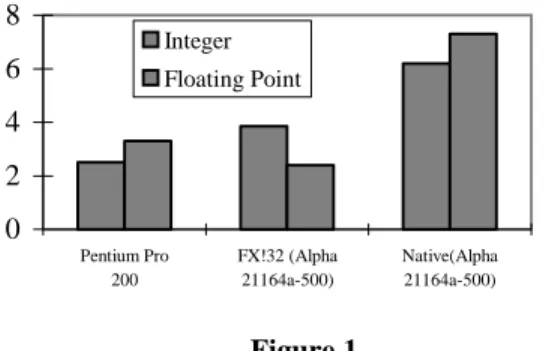
DIGITAL FX!32 also meet its performance objectives. Figure 1 shows the relative performance on the Byte Benchmark of a 200Mz Pentium Pro and a 500 Mz Alpha running DIGITAL FX!32. For this benchmark, the Alpha running DIGITAL FX!32 provides about the same performance as a 200Mz Pentium Pro. Figure 1 also shows that the Alpha native version of the benchmark runs twice as fast as the Pentium Pro.
Of course, no single benchmark characterizes the performance of a system. However, we have consistently measured performance between a 200Mz Pentium and a 200Mz Pentium Pro for applications running under DIGITAL FX!32 on a 500Mz Alpha.
0 2 4 6 8 Pentium Pro 200 FX!32 (Alpha 21164a-500) Native(Alpha 21164a-500) Integer Floating Point Figure 1
There are some things that the initial version of DIGITAL FX!32 was not designed to do. DIGITAL FX!32 only executes application code. It does not execute drivers, so native drivers are still required for any peripheral installed on an Alpha system. It also fails to provide complete support for x86 services, as discussed in Section 3.3. Another limitation of DIGITAL FX!32 is that it does not support the NT Debug API. Supporting this interface would require that the x86 state could be re-materialized after every x86 instruction, severely limiting optimizations which could be performed by the translator. This limitation is similar to the tradeoff in optimizing compilers where debugging is restricted when optimizations are turned on. Since DIGITAL FX!32 does not support the Debug interface, applications which require it do not run under DIGITAL FX!32. These applications are mostly x86 development environments, and it probably makes sense to run them on an x86 anyway.
Despite these limitations most x86 applications which run on an x86 Windows NT system will run on an Alpha system running FX!32 under Windows NT.
11. Conclusion
DIGITAL FX!32 provides for fast transparent execution of 32-bit x86 applications on Alpha systems running Windows NT. This is accomplished using a unique combination of emulation and binary translation.
12. Acknowledgments
Building a product like DIGITAL FX!32 required a lot of hard work by some extremely talented people. Many of these people contributed the ideas described in this paper. The following engineers were part of the DIGITAL FX!32 development team: Jim Cambell, Anton Chernoff, George Darcy, Tom Evans, Mark Herdeg, Ray Hookway, Maurice Marks, Srinivasan Murari, Brian Nelson, Scott Robinson, Norm Rubin, Joyce Spencer, Tony Tye and John Yates. Charlie Greenman wrote the documentation.
13. Availability
DIGITAL FX!32 is available electronically from
http://www.service.digital.com/fx32
This web site contains more information on DIGITAL FX!32 along with the software itself.
14. References
1. Richard L. Sites, Anton Chernoff, Matthew B. Kirk, Maurice P. Marks, and Scott G. Robinson, “Binary Translation”, Digital Technical Journal, Vol. 4, No. 4, 1992 2. Robert Bedichek, “Some Efficient Architecture Simulation Techniques”, USENIX - Winter ’90
3. L. Peter Deutsch and Allan M. Schiffman, “Efficient Implementation of the Smalltalk-80 System”, Record of the Eleventh Annual ACM Symposium on Principles of Programming Languages, 1983
4. Brian Case, “Rehosting Binary Code For Software Portability”, Microprocessor Report, January 1989
5. Robert F. Cmelik and David Keppel, “Shade: A Fast Instruction-Set Simulator for Execution Profiling”, Technical Report UWCSE 93-06-06, University of Washington, 1993 6. Richard Hank and B. Ramakrishna Rau, “Region-Based Compilation: An Introduction and Motivation”, Proceedings of MICRO-28, 1995 IEEE
7. Tom R. Halfhill, “Emulation: RISC’s Secret Weapon”, BYTE, April 1994
8. Jeffery Richter, Advanced Windows NT, Microsoft Press, 1994
9. Alfred V. Aho, Mahadevan Ganapathi and Steven W. K. Tjiang, “Code Generation Using Tree Matching and Dynamic Programming”, ACM Transactions on Programming Languages and Systems, Vol. 11, No. 4, October 1989