BLUEPRINT OF THE GRAPHICAL GALAXY OF SOLAR
SYSTEM SEGMENT: AN ALGORITHMIC APPROACH
USING CSS3.0
Arpita Basu
Department of MCA Dr. B. C. Roy Engineering College
Durgapur, India
Arpita Mandal
Department of MCA Dr. B. C. Roy Engineering College
Durgapur, India
Anirban Das
Assistant Professor
Department of MCA Dr. B. C. Roy Engineering
College, Durgapur, India
ABSTRACT
Theorizing from the literature of galaxy it has come out that a galaxy is a gravitationally bound system having collection of stars, stellar remnants, an interstellar medium of gas, dust, dark matter etc. [1]. In this paper the central theme is to design graphically a blue print of a tiny segment of galaxy i.e. solar system. With this objective to frame the solar system in computer graphics novel technologies were brought into play. Here Sun will be as cynosure and nine planets will be traversing the Sun following their own orbits. Along with the satellites will be rounding positioning the planets as centre. An optimized algorithm approach is employed to design the planetary system centering the sun as pivot.
General Terms
Computer Graphics, User Interface Design, Algorithms
Keywords:
E-solar system, Graphics, CSS, User Interface Design.1.
INTRODUCTION
To be introduced with solar system, literary it can be referred to that the Solar system comprised of the Sun and nine planets surround it following their own orbits. The solar system was formed around 4.6 billion years back from the gravitational explosion of a giant molecular cloud. The entire mass of the cloud was broken into pieces what in turn formed the Sun with the maximum mass and also other objects like all other planets in the solar system. The remaining mass except the Sun was shared into Jupitar, Saturn, Urenus, Neptune, Venus, Earth, Mars and Mercury. In this context the Pluto is excluded as a non planet. Graphically designing the e-Solar system as a small segment of the entire galaxy is the key motto using the technologies like CSS3, JAVASCRIPT in terms of scripting and C# as programming language and ASP.NET as GUI (Graphical User Interface) of web applications.
2.
PRILIMINARIES
applications or mobile applications to make them graphically lucrative [7]. The styles can be included within the markup language itself as hard code and can be just hyperlinked into folder structure where it resides as well. Best practice while developing a web application is to separate the markups that is the content of the application and the styles that is the presentation [8][9].
CSS3 contains the novel modules like selectors, box model, backgrounds and borders, image values and replaced content, text effects, 2D/3D transformations, animations, multiple column layout and user interface[10][11][12].
Javascript, developed by Brendan Eich while working for Netscape Communications Corporation, is used in server side network programming as a part of web browsers. Through the implementation of Javascript, users can be interacted via client side code [13].
ASP.NET Web pages are the main building blocks for application development. The web server IIS (Internet Information Service) is used to host the web pages [14].
3.
METHODOLOGIES
Microsoft Visual Studio DOT NET 2014 is used here to make this web application to be supported with JAVASCRIPT and CSS. Of the various installed templates, ASP.NET Web Form is created to facilitate the environment to CSS3 and JAVASCRIPT to work out. The web form is designed through CSS3 programming. The CSS code is kept in a separate folder within the application itself. From the solution explorer this folder is referenced. Using server controls of ASP.NET in build toolbox required controls are dragged into the web form though recommendation is to write the appropriate ASP.NET scripts to design the specific web page. Ultimately the appropriate CSS is tagged with the scripts to make the design as desired.
1.1
Algorithm
The algorithm to design the e-solar system using the aforesaid technologies is as follows:
Step 1: start
Step 2: Specify star and define the star class
2.1 Specify the width in pixel
2.2 Specify the height in pixel
2.3 Specify the margin with 4 co-ordinates in pixel
2.4 Specify the border radius in percentage
2.5 Specify the box shadow with color code
2.6 Specify the background with color code
Step 3: Definition of the planet with the specification of the transformation in terms of skew in degree.
3.1 Two-dimensional linear transformation applied to an element with skew degrees in x and y both
coordinates.
3.3 Microsoft extension property i.e. -ms-transform is the property to provide implementation of the CSS 2D Transforms in skew degrees in X & Y coordinates.
3.4 Two-dimensional transformation is to be applied to an element through the -o-transform property. 3.5 The transform property is to be applied to skew in degrees.
Step 4: for the planet orbit trace define the height, width and margin of the orbit.
4.1 Height and width is to be assigned with pixels.
4.2 Margin is to be assigned with coordinates.
Step 5: for planet motion apply animations and the time in sec for the speed.
5.1 motion of the planet is to be added with seconds for animation
5.2 To combine common animation properties into a single property of the planet -webkit-animation property is added in seconds.
5.3 To combine six of the animation properties into a single property, applied for planets in terms of seconds.
5.4 Set animation property in seconds
Step 6: To define the planet itself, define the height, width, margin, box shadow and transformation of the respective planets by applying step1.
Step 7: Apply step 2, 3,4,5,6 to define the eight other planets of the planetary system.
Step 8: Finish.
4.
RESULTS AND DISCUSSION
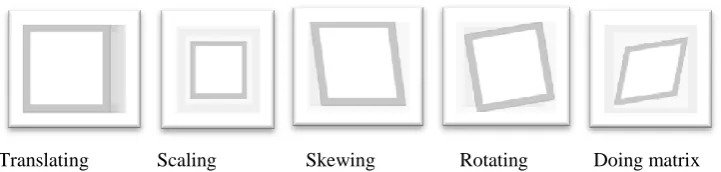
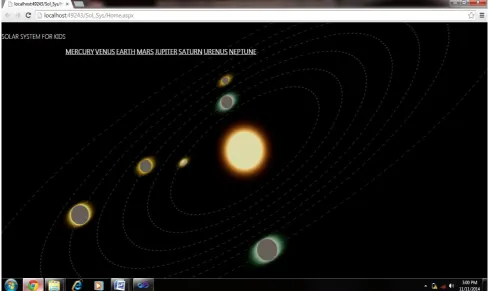
Based on the algorithm the page of graphical planetary system surrounding the Sun is designed. Literally the activities made to make the graphical looks are translating, scaling, skewing, rotating, making matrix etc. The pictorial view of the said activities is shown in Fig 1.
Translating Scaling Skewing Rotating Doing matrix
Fig 1: Graphical appearances using the activities like translating, scaling, skewing, rotating and doing matrix
Fig 2: Output of the graphical solar system as a segment of galaxy
5.
CONCLUSION AND FUTURE SCOPE
In this paper it is concluded that using recently developed designing tools like CSS3, graphical galaxy can be designed using its out of box features. Some limitations are there too such as, the movements of the planets are to be optimized, planets are to ornamented with their actual looks, have glimpse on other parts of the galaxy excluding the solar system, make available restructuring of planets individually with their own satellites. The limitations are the motivation to grow with this work as a part of future scope.
6.
REFERENCES
[1] Sparke, L. S. Gallagher III, J. S. Galaxies in the Universe: An Introduction. Cambridge University Press, 2000, ISBN 0-521-59740-4
[2] Hupp, E. Roy, S., Watzke, M. "NASA Finds Direct Proof of Dark Matter" NASA 2007
[3] "Unveiling the Secret of a Virgo Dwarf Galaxy", ESO 2000-05-03. Retrieved 2007-01-03
[4] Uson, J. M.; Boughn, S. P.; Kuhn, J. R. (1990). "The central galaxy in Abell 2029 – An old supergiant". Science 250 (4980), 539–540
[5] Finley, D.; Aguilar, D. (2005-11-02). "Astronomers Get Closest Look Yet At Milky Way's Mysterious Core".
National Radio Astronomy Observatory
[8] "What is CSS?", World Wide Web Consortium. Retrieved December 2010, (http://www.w3.org/standards/webdesign/htmlcss#whatcss)
[9] "W3C CSS validation service" available in http://jigsaw.w3.org/css-validator/
[10]Lie, Hakon W (10 Oct 1994). "Cascading HTML style sheets - a proposal" (Proposal) (0.92). CERN. Retrieved 25 May 2014.
[11]Lie, Håkon Wium; Bos, Bert (1999). Cascading Style Sheets, designing for the Web. Addison Wesley. ISBN
0-201-59625-3. Retrieved 23 June 2010
[12]https://developer.mozilla.org/en-US/docs/Web/CSS/CSS3
[13]http://en.wikipedia.org/wiki/JavaScript#CITEREFFlanaganFerguson2006