CHAPTER
21 3
Exception:
An
exception
is an abnormal condition that arises in a code sequence at run time. run- time error.
Exception-Handling Fundamentals
A Java exception is an object that describes an exceptional (that is, error) condition.
An object representing that exception is created and
thrown
in the method that caused the error.
The exception is
caught
and processed.
Exceptions thrown by Java relate to fundamental errors that violate the rules of the Java language or the
constraints of the Java execution environment.
Manually generated exceptions are typically used to report some error condition to the caller of a method.
Java exception handling :
try
,
catch
,
throw
,
throws
, and
finally
.
If an exception occurs within the
try
block, it is thrown.
Your code can catch this exception (using
catch
) and handle it in some rational manner.
System-generated exceptions are automatically thrown by the Java run- time system.
11.1 Introduction
•
ArrayIndexOutOfBoundsException
occurs when an attempt
is made to access an element past either end of an array.
•
ClassCastException
occurs when an attempt is made to cast an
object that does not have an
is-a
relationship with the type specified in
the cast operator.
•
A
NullPointerException
occurs when a
null
reference is
used where an object is expected.
•
Only classes that extend
Throwable
(package
java.lang
)
directly or indirectly can be used with exception handling.
11.2 Example: Divide by Zero without Exception
Handling
•
Exceptions are
thrown
(i.e., the exception occurs) when a method
detects a problem and is unable to handle it.
•
Stack trace
—information displayed when an exception occurs and is
not handled.
•
Information includes:
The name of the exception in a descriptive message that indicates the problem
that occurred
The method-call stack (i.e., the call chain) at the time it occurred. Represents
the path of execution that led to the exception method by method.
•
This information helps you debug the program.
This is the general form of an exception-handling block: try {
// block of code to monitor for errors }
catch (ExceptionType1 exOb) {
// exception handler for ExceptionType1
}
catch (ExceptionType2 exOb) {
// exception handler for ExceptionType2
}
// ... finally {
// block of code to be executed after try block ends }
Here, ExceptionType is the type of exception that has occurred. The remainder of this chapter describes how to apply this framework.
Exception Types
All exception types are subclasses of the built-in class Throwable.
partition exceptions into two distinct branches.
1.Exception. This class is used for exceptional conditions that user programs should catch.
2. RuntimeException. Exceptions of this type are automatically defined for the programs that you write and include things such as
division by zero and invalid array indexing.
P
ar
t
I
The top-level exception hierarchy is shown here:
Uncaught Exceptions
This small program includes an expression that intentionally causes a divide-by-zero error:
class Exc0 {
public static void main(String args[]) {
int d = 0;
int a = 42 / d;
}
}
When the Java run-time system detects the attempt to divide by zero, it constructs a new exception object and then
throws
this exception. This causes the execution of
Exc0
to stop, because once an exception has been thrown, it must
be
caught
by an exception handler and dealt with immediately. The default handler displays a string describing the
exception, prints a stack trace from the point at which the exception occurred, and terminates the program.
Here is the exception generated when this example is executed:
Using try and catch
Handle an exception yourself. Doing so provides two benefits.
First, it allows you to fix the error.
Second, it prevents the program from automatically terminating.
class Exc2 {
public static void main(String args[]) {
int d, a;
try {
// monitor a block of code.
d = 0;
a = 42 / d;
System.out.println("This will not be printed.");
}
catch (ArithmeticException e) {
// catch divide-by-zero error
System.out.println("Division by zero.");
}
System.out.println("After catch statement.");
}
}
This program generates the following output:
P
ar
t
I
The goal of most well-constructed
catch
clauses should be to resolve the exceptional condition and then
continue on as if the error had never happened.
For example, in the next program each iteration of the
for
loop obtains two random integers.
Those two integers are divided by each other, and the result is used to divide the value 12345.
The final result is put into
a
. If either division operation causes a divide-by-zero error, it is caught,
the value of
a
is set to zero, and the program continues.
// Handle an exception and move on. import java.util.Random;
class HandleError {
public static void main(String args[]) {
int a=0, b=0, c=0;
Random r = new Random();
for(int i=0; i<32000; i++) {
try {
b = r.nextInt();
c = r.nextInt();
a = 12345 / (b/c);
}
catch (ArithmeticException e) { System.out.println("Division by zero.");
a = 0; // set a to zero and continue
}
System.out.println("a: " + a);
}
Displaying a Description of an Exception
Throwable overrides the toString( ) method (defined by Object) so that it returns a string containing a description of the exception.
catch (ArithmeticException e) {
System.out.println("Exception: " + e); a = 0; // set a to zero and continue }
Out put: Exception: java.lang.ArithmeticException: / by zero
Multiple catch Clauses
You can specify two or more catch clauses, each catching a different type of exception.
When an exception is thrown, each catch statement is inspected in order, and the first one whose type matches that of the exception is executed. After one catch statement executes.
// Demonstrate multiple catch statements. class MultipleCatches {
public static void main(String args[]) { try {
int a = args.length;
System.out.println("a = " + a); int b = 42 / a;
int c[] = { 1 }; c[42] = 99;
} catch(ArithmeticException e) { System.out.println("Divide by 0: " + e);
} catch(ArrayIndexOutOfBoundsException e) { System.out.println("Array index oob: " + e); }
System.out.println("After try/catch blocks."); }
}
command-P
ar
t
I
C:\>java MultipleCatches a = 0
Divide by 0: java.lang.ArithmeticException: / by zero After try/catch blocks.
C:\>java MultipleCatches TestArg a = 1
Array index oob: java.lang.ArrayIndexOutOfBoundsException:42 After try/catch
blocks.
When you use multiple
catch
statements, it is important to remember that exception subclasses must come
before any of their superclasses. For example, consider the following program:
/* This program contains an error.
A subclass must come before its superclass in a series of catch
statements. If not,
unreachable code will be created and a compile-time error will result.*/
class SuperSubCatch {
public static void main(String args[]) {
try {
int a = 0;
int b = 42 / a;
} catch(Exception e) {
System.out.println("Generic Exception catch.");
}
/* This catch is never reached because ArithmeticException is a subclass of
Exception. */
catch(ArithmeticException e) { // ERROR – unreachable System.out.println("This
is never
reached.");
}
Nested try Statements
The
try
statement can be nested.
That is, a
try
statement can be inside the block of another
try
.
Each time a
try
statement is entered, the context of that exception
is pushed on the stack. If an inner
try
statement does not have a
catch
handler for a particular exception, the stack is unwound and
the next
try
statement’s
catch
handlers are inspected for a match.
This continues until one of the
catch
statements succeeds, or until
all of the nested
try
statements are exhausted.
If no
catch
statement matches, then the Java run-time system will
handle the exception. Here is an example that uses nested
try
Nested try Statements
// An example of nested try statements.
class NestTry {
public static void main(String args[]) { try {
int a = args.length;
/* If no command-line args are present, the following statement will generate a
divide-by-zero exception. */
int b = 42 / a;
System.out.println("a = " + a); try { // nested try block
/* If one command-line arg is used, then a divide-by-zero exception
will be generated by the following code. */
if(a==1) a = a/(a-a); // division by zero
/* If two command-line args are used, then generate an out-of-bounds exception. */
if(a==2) {
int c[] = { 1 };
c[42] = 99; // generate an out-of-bounds exception
}
}
catch(ArrayIndexOutOfBoundsException e) {
System.out.println("Array index out-of- bounds: " + e);
}
} catch(ArithmeticException e) {
System.out.println("Divide by 0: " + e);
}
}
}
Execution of the program with one command-line argument generates a divide-by-zero exception from within the nested try block. Since the inner block does not catch this exception, it is passed on to the outer try block, where it is handled. If you execute the program with
P
ar
t
I
an array boundary exception is generated from within the inner
try
block. Here
are sample runs that illustrate each case:
C:\>java NestTry
Divide by 0: java.lang.ArithmeticException: / by zero
C:\>java NestTry One a = 1
Divide by 0: java.lang.ArithmeticException: / by
zero
C:\>java NestTry One Two a = 2
Array index out-of-bounds:
java.lang.ArrayIndexOutOfBoundsException:42
Nesting of
try
statements can occur in less obvious ways when method
calls are involved.
For example, you can enclose a call to a method within a
try
block. Inside that
method is another
try
statement. In this case, the
try
within the method is still
nested inside the outer
try
block, which calls the method. Here is the previous
throw
So far, you have only been catching exceptions that are thrown by the Java run-time system. However, it is possible for your
program to throw an exception explicitly, using the
throw
statement. The general form of
throw
is shown here:
throw
ThrowableInstance
;
Throwable
. Primitive types, such as
int
or
char
, as well as non-
Throwable
classes, such as
String
and
Object
,
cannot be used as exceptions.
Here is a sample program that creates and throws an exception. The handler that catches the exception rethrows it to
the outer handler.
// Demonstrate throw. class ThrowDemo {
static void demoproc() { try {
throw new NullPointerException("demo");
}
catch(NullPointerException e) { System.out.println("Caught inside demoproc.");
throw e; //
rethrow the exception
}
}
public static void main(String args[]) { try {
demoproc();
}
catch(NullPointerException e) { System.out.println("Recaught: " + e);
}
}
}
P
ar
t
I
another exception-handling context and immediately throws a new instance of
NullPointerException
,
which is caught on the next line. The exception is then rethrown. Here is the resulting output:
Caught inside demoproc.
Recaught: java.lang.NullPointerException: demo
The program also illustrates how to create one of Java’s standard exception objects. Pay close attention to
this line:
throw new NullPointerException("demo");
Here,
new
is used to construct an instance of
NullPointerException
. Many of Java’s built-in run-time
exceptions have at least two constructors: one with no parameter and one that takes a string parameter.
When the second form is used, the argument specifies a string that describes the exception. This string is
displayed when the object is used as an argument to
print( )
or
println( )
. It can also be obtained by a call
to
getMessage( )
, which is defined by
Throwable
.
throws
If a method is capable of causing an exception that it does not handle, it must specify this behavior so that
callers of the method can guard themselves against that exception. You do this by including a
throws
clause
in the method’s declaration.
A
throws
clause lists the types of exceptions that a method might throw.
This is necessary for all exceptions, except those of type
Error
or
RuntimeException
, or any of their
subclasses.
All other exceptions that a method can throw must be declared in the
throws
clause. If they are not, a
P
ar
t
I
This is the general form of a method declaration that includes a
throws
clause:
type method-name
(
parameter-list
) throws
exception-list
{
// body of method
}
Here,
exception-list
is a comma-separated list of the exceptions that a method can throw.
Following is an example of an incorrect program that tries to throw an exception that it does not
catch. Because the program does not specify a
throws
clause to declare this fact, the program
will not compile.
// This program contains an error and will not compile.
class ThrowsDemo {
static void throwOne() {
System.out.println("Inside throwOne.");
throw new IllegalAccessException("demo");
}
public static void main(String args[]) { throwOne();
}
To make this example compile, you need to make two changes.
First, you need to declare that
throwOne( )
throws
IllegalAccessException
.
Second,
main( )
must define a
try / catch
statement that catches this exception.
The corrected example is shown here:
// This is now correct.
class ThrowsDemo {
static void throwOne() throws IllegalAccessException {
System.out.println("Inside throwOne.");
throw new IllegalAccessException("demo");
}
public static void main(String args[]) {
try {
throwOne();
}
catch (IllegalAccessException e) {
System.out.println("Caught " + e);
}
}
}
Here is the output generated by running this example program:
finally
When exceptions are thrown, execution in a method takes a rather abrupt, nonlinear path that alters the
normal flow through the method.
Depending upon how the method is coded, it is even possible for an exception to cause the method to return
prematurely. This could be a problem in some methods. For example, if a method opens a file upon entry
and closes it upon exit, then you will not want the code that closes the file to be bypassed by the
exception-handling mechanism. The
finally
keyword is designed to address this contingency.
finally
creates a block of code that will be executed after a
try /catch
block has completed and before the
code following the
try/catch
block.
The
finally
block will execute whether or not an exception is thrown. If an exception is thrown, the
finally
block will execute even if no
catch
statement matches the exception.
Any time a method is about to return to the caller from inside a
try/catch
block, via an uncaught
exception or an explicit return statement, the
finally
clause is also executed just before the method returns.
This can be useful for closing file handles and freeing up any other resources that might have been
allocated at the beginning of a method with the intent of disposing of them before returning.
P
ar
t
I
Here is an example program that shows three methods that exit in various ways, none without executing their finally clauses:
// Demonstrate finally.
class FinallyDemo {
// Throw an exception out of the method.
static void procA() {
try {
System.out.println("inside procA");
throw new RuntimeException("demo");
}
finally {
System.out.println("procA's finally");
}
}
// Return from within a try block.
static void procB() {
try {
System.out.println("inside procB"); return;
}
finally {
System.out.println("procB's finally");
}
P
ar
t
I
// Execute a try block normally.
static void procC() {
try {
System.out.println("inside procC");
}
finally {
System.out.println("procC's finally");
}
}
public static void main(String args[]) {
try {
procA();
}
catch (Exception e) { System.out.println("Exception caught");
}
procB();
procC();
}
}
In this example,
procA( )
prematurely breaks out of the
try
by throwing an exception. The
finally
clause is
executed on the way out.
procB( )
’s
try
statement is exited via a
return
statement. The
finally
clause is
executed before
procB( )
returns. In
procC( )
, the
try
statement executes normally, without error. However,
the
finally
block is still executed.
Here is the output generated by the preceding program:
inside procA procA's finally Exception caught inside procB procB's finally inside procC procC's finally
Java’s Built-in Exceptions
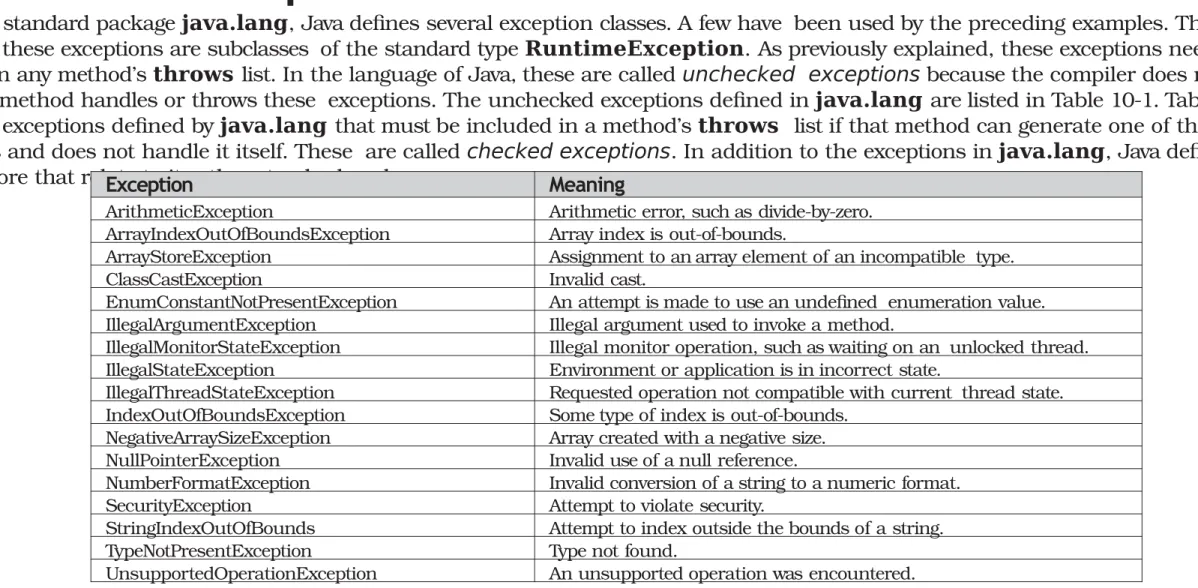
Inside the standard package java.lang, Java defines several exception classes. A few have been used by the preceding examples. The most
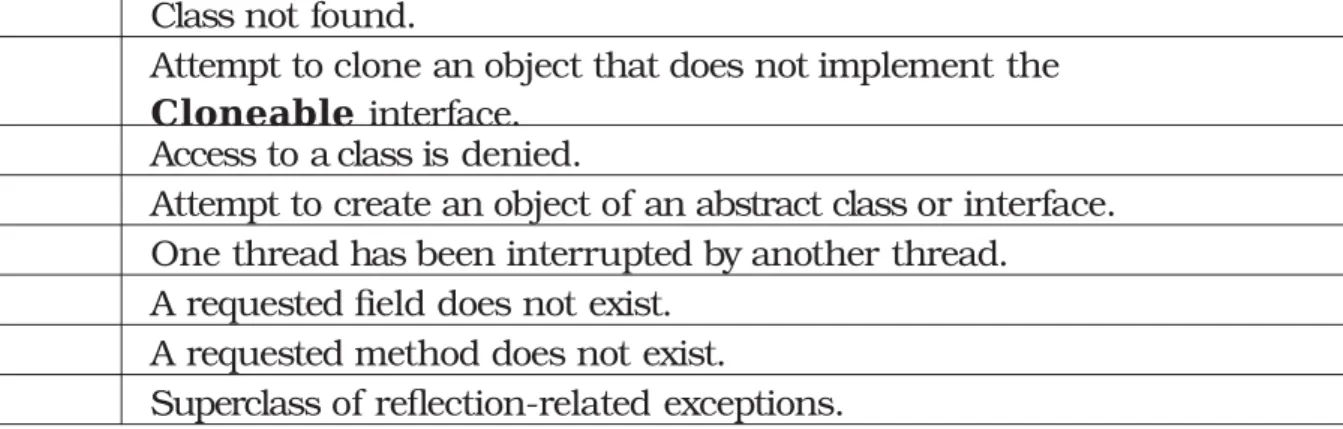
general of these exceptions are subclasses of the standard type RuntimeException. As previously explained, these exceptions need not be included in any method’s throws list. In the language of Java, these are called unchecked exceptions because the compiler does not check to see if a method handles or throws these exceptions. The unchecked exceptions defined in java.lang are listed in Table 10-1. Table 10-2
lists those exceptions defined by java.lang that must be included in a method’s throws list if that method can generate one of these exceptions and does not handle it itself. These are called checked exceptions. In addition to the exceptions in java.lang, Java defines several more that relate to its other standard packages.Exception Meaning
ArithmeticException Arithmetic error, such as divide-by-zero. ArrayIndexOutOfBoundsException Array index is out-of-bounds.
ArrayStoreException Assignment to an array element of an incompatible type. ClassCastException Invalid cast.
EnumConstantNotPresentException An attempt is made to use an undefined enumeration value. IllegalArgumentException Illegal argument used to invoke a method.
IllegalMonitorStateException Illegal monitor operation, such as waiting on an unlocked thread. IllegalStateException Environment or application is in incorrect state.
IllegalThreadStateException Requested operation not compatible with current thread state. IndexOutOfBoundsException Some type of index is out-of-bounds.
NegativeArraySizeException Array created with a negative size. NullPointerException Invalid use of a null reference.
NumberFormatException Invalid conversion of a string to a numeric format. SecurityException Attempt to violate security.
StringIndexOutOfBounds Attempt to index outside the bounds of a string. TypeNotPresentException Type not found.
UnsupportedOperationException An unsupported operation was encountered.
P
ar
t
I
Table 10-2 Java’s Checked Exceptions Defined in java.lang
Creating Your Own Exception Subclasses
Although Java’s built-in exceptions handle most common errors, you will probably want to create your own exception types to handle situations specific to your applications. This is quite easy to do: just define a subclass of Exception (which is, of course, a subclass of Throwable). Your subclasses don’t need to actually implement anything—it is their existence in the type system that allows you to use them as exceptions.
The Exception class does not define any methods of its own. It does, of course, inherit those methods provided by Throwable. Thus, all exceptions, including those that you create, have the methods defined by Throwable available to them. They are shown in Table 10-3. You may also wish to override one or more of these methods in exception classes that you create.
Exception defines four public constructors. Two support chained exceptions, described in the next section. The other two are shown here:
Exception( ) Exception(String msg)
The first form creates an exception that has no description. The second form lets you specify a description of the exception.
Although specifying a description when an exception is created is often useful, sometimes it is better to override toString( ). Here’s why: The version of toString( ) defined by Throwable (and inherited by Exception) first displays the name of the exception
followed by a colon, which is then followed by your description. By overriding toString( ), you can prevent the exception name and colon from being displayed. This makes for a cleaner output, which is desirable in some cases.
Exception Meaning
ClassNotFoundException Class not found.
CloneNotSupportedException Attempt to clone an object that does not implement the
Cloneable interface. IllegalAccessException Access to a class is denied.
InstantiationException Attempt to create an object of an abstract class or interface. InterruptedException One thread has been interrupted by another thread.
NoSuchFieldException A requested field does not exist. NoSuchMethodException A requested method does not exist.
Method
Description
final void
addSuppressed(Throwable exc) Adds
exc to the list of suppressed exceptions associated with the invoking exception. Primarily for use by the try-with-resources statement.
Throwable fillInStackTrace( ) Returns a Throwable object that contains a completed stack
trace. This object can be rethrown.
Throwable getCause( ) Returns the exception that underlies the current exception. If there is
no underlying exception, null is returned.
String getLocalizedMessage( ) Returns a localized description of the exception.
String getMessage( ) Returns a description of the exception.
StackTraceElement[ ] getStackTrace( ) Returns an array that contains the stack trace, one element at a
time, as an array of StackTraceElement. The method at the top of the stack is the last method called before the exception was
thrown. This method is found in the first element of the array. The
StackTraceElement class gives your program
access to information about each element in the trace, such as its method name.
final Throwable[ ] getSuppressed( ) Obtains the suppressed exceptions associated with the invoking
exception and returns an array that contains the result. Suppressed exceptions are primarily generated by the try-with-resources
statement.
Throwable initCause(Throwable causeExc) Associates causeExc with the invoking exception as a cause of the
invoking exception. Returns a reference to the exception.
void printStackTrace( ) Displays the stack trace.
void printStackTrace(PrintStream stream) Sends the stack trace to the specified stream.
void printStackTrace(PrintWriter stream) Sends the stack trace to the specified stream.
void setStackTrace(StackTraceElement
elements[ ])
Sets the stack trace to the elements passed in elements. This
method is for specialized applications, not normal use.
String toString( ) Returns a String object containing a description of the exception.
This method is called by println( ) when outputting a Throwable
object.
The following example declares a new subclass of
Exception
and then uses that subclass to signal an error condition in a
method. It overrides the
toString( )
method, allowing a carefully tailored description of the exception to be displayed.
// This program creates a custom exception type. class MyException extends Exception
{
private int detail;
MyException(int a) { detail = a;
}
public String toString() {
return "MyException[" + detail + "]";
}
}
class ExceptionDemo {
static void compute(int a) throws MyException { System.out.println("Called compute(" +
a + ")");
if(a > 10)
throw new MyException(a); System.out.println("Normal exit");
}
public static void main(String args[]) { try {
compute(1); compute(20);
}
catch (MyException e) { System.out.println("Caught " + e);
}
}
}
This example defines a subclass of
Exception
called
MyException
. This subclass is quite simple: It has only a constructor
plus an overridden
toString( )
method that displays the value of the exception. The
ExceptionDemo
class defines a
method named
compute( )
that throws a
MyException
object. The exception is thrown when
compute( )
’s integer
parameter is greater than 10. The
main( )
method sets up an exception handler for
MyException
, then calls
compute( )
with a legal value (less than 10) and an illegal one
to show both paths through the code. Here is the result:
Called compute(1) Normal exit
P
ar
t
I
Three Recently Added Exception Features
Beginning with JDK 7, three interesting and useful features have been added to the exception system. The first automates the process of releasing a resource, such as a file, when it is no longer needed. It is based on an expanded form of the try statement called try-with-resources, and is described in Chapter 13 when files are
introduced. The second feature is called multi-catch, and the third is sometimes referred to as final rethrow or more precise rethrow. These two features are described here.
The multi-catch feature allows two or more exceptions to be caught by the same catch clause. It is not uncommon for two or more exception handlers to use the same code sequence even though they respond to different exceptions. Instead of having to catch each exception type individually, you can use a single catch clause to handle all of the exceptions without code duplication.
Here is a catch statement that uses the multi-catch feature to catch both
ArithmeticException and ArrayIndexOutOfBoundsException:
catch(ArithmeticException | ArrayIndexOutOfBoundsException e) {
The following program shows the multi-catch feature in action:
// Demonstrate the multi-catch feature. class MultiCatch
{public static void main(String args[]) { int a=10, b=0;
int vals[] = { 1, 2, 3 };
try {int result = a / b; // generate an ArithmeticException
vals[10] = 19; // generate an ArrayIndexOutOfBoundsException // This catch clause catches both exceptions.
} catch(ArithmeticException | ArrayIndexOutOfBoundsException e) { System.out.println("Exception caught: " + e); }
System.out.println("After multi-catch."); }
}
The program will generate an ArithmeticException when the division by zero is attempted. If you comment out the division statement and remove the comment symbol from the next line, an ArrayIndexOutOfBoundsException is generated. Both exceptions are caught by the single catch statement.
The more precise rethrow feature restricts the type of exceptions that can be rethrown to only those checked exceptions that the associated try block
throws, that are not handled by a preceding catch clause, and that are a subtype or supertype of the parameter. Although this capability might not be needed often, it is now available for use. For the more precise rethrow feature to be in force, the catch parameter must be either effectively final, which means that it must not be assigned a new value inside the catch block, or explicitly declared final.
Using Exceptions
Exception handling provides a powerful mechanism for controlling complex programs that have many dynamic run-time characteristics. It is important to think of try, throw, and catch as clean ways to handle errors and unusual boundary conditions in your program’s logic.
Unlike some other languages in which error return codes are used to indicate failure, Java uses exceptions. Thus, when a method can fail, have it throw an exception. This is a cleaner way to handle failure modes.