Wavecrest
TechBrief
®Managing Web Application
Authentication Problems
Introduction
General. This paper is written for you–Wavecrest Computing’s proxy product customers and prospects.
It has two interrelated purposes. The first is to help you understand a relatively rare and obscure type of Web application problem, one that is associated with proxy authentication. The second is to introduce
you to a proxy product feature–the Authentication Manager–that will help you successfully manage the
problem.
The Problem. So what is the problem? Detailed later, it can be summarized as follows: With the product’s authentication feature enabled, a network user notes that a Web application is not launching or responding. Then, if the product administrator disables authentication or removes the product altogether, the Web application will work but user names will not be available for reporting or filtering.
As discussed later, the cause of the problem lies in the design of certain Web client software programs,
not in the proxy product or its authentication feature.
Content and Structure. This document has four Parts:
• Part A: Background Information. Written at a basic level, this Part is primarily “educational” and
focuses on how proxy authentication normally functions. Its purpose is to provide a foundation for
subsequent discussions in Parts B and C. Readers familiar with proxy authentication can skip this Part if they like.
• Part B: The Proxy/Authentication Problem. In some detail, this Part explains the problem, its cause, and its effects.
• Part C: The Authentication Manager. Part C summarizes the product’s Authentication Manager and briefly discusses some of its functionality and how it attempts to solve the problem.
Note: Part C is written at a summary level. For detailed step-by-step instructions on how to use the Authentication Manager, see your product user guide.
• Part D: The Benefits. This Part summarizes the benefits provided by the Authentication Manager.
Let’s start with Part A.
Part A: Background Information
A.1 General
This Part focuses primarily on normal, trouble-free proxy/authentication operations. Before starting though, please note the following: Most customers who use proxy authentication do so because their approach to Web-use management depends on the availability of user names, not just IP addresses. This paper assumes the reader is one of these customers. It is also important to note that user names can
only be made available when proxy authentication is enabled.
Now, before delving deeper, let us define some terms and make some assumptions.
A.2 Definitions
computer’s request for Web service is valid and “authorized.” If it gets the proper response, it relays the request to the destination URL. If not, the proxy denies the request. (From a technical perspective,
Wavecrest proxy products use NTLM authentication and Captive Portal standard technologies for authentication.)
When enabled, proxy authentication can be set to employ user names (login names) as well as IP addresses as part of the authentication process. Customers can configure Web-use reporting and filtering policies that employ–or are based on–user names. Without authentication, user names are not available
for these purposes.
Note: When a Wavecrest proxy product is in use and proxy authentication is enabled, every Web client request for Web application service(s) is subjected to the authentication process. This is true regardless of the type or design of the Web client. As you read on, the importance of this point will become clear.
Client-Server Technology. For our purposes, this term refers to technology that enables multiple users (clients) to work with information and/or programs located on a single Web server. (Think many-to-one.) Put another way, client-server technology is a distributed application architecture that partitions tasks or workloads between service providers (servers) and service requesters, called clients. The clients and servers communicate with each other via HTTP. A Web application is a good example of the use of
client-server technology.
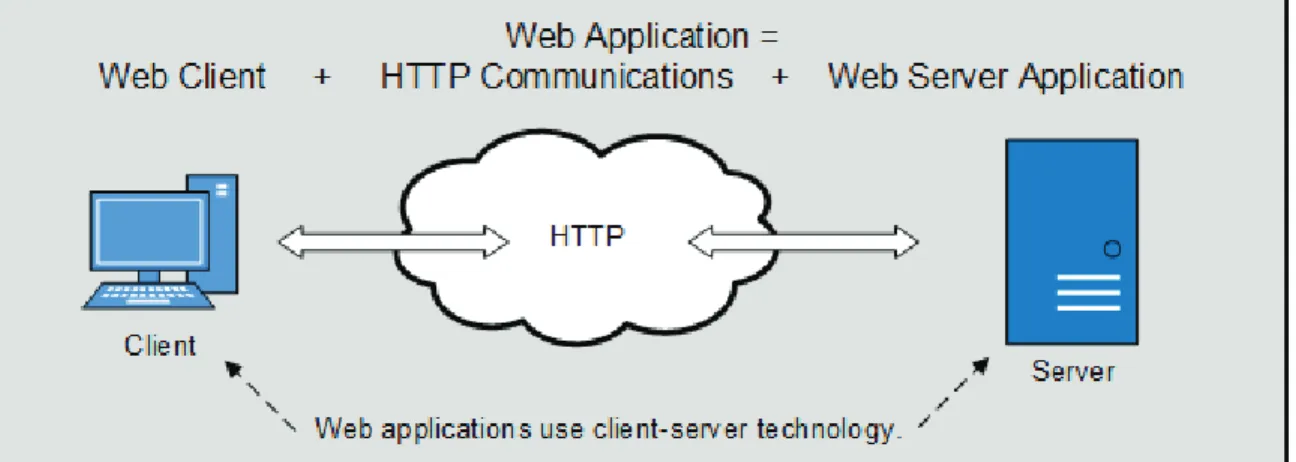
Web Application. Web applications typically consist of two elements: (1) a client-side program
referred to as a Web client and (2) a server-side program referred to as a Web server application. (See subsequent definitions.) As indicated above, many Web clients can use one Web server application– simultaneously if necessary. The client(s) and the server communicate with each other via HTTP and work together interactively to accomplish a particular function.
Web Client. For purposes of our discussion, a Web client can be any of the following:
• A general-purpose browser, e.g., Internet Explorer, Firefox, and Chrome.
• A mobile device such as a smartphone.
• A special-purpose program that is downloaded to a browser in real time and used during a Web application session. When the session is complete, the program is removed from the computer. Examples include Amazon.com and TurboTax Online.
• A locally installed “thin client” program that works with a Web application but does not require a browser. Unlike the previous item, these programs remain installed on the client computer indefinitely. Examples include McAfee Virus Scanner and TurboTax CD Version.
Note: A Web client can be “generic,” i.e., it can work with many different applications, or it can be specific to one application only. Note also that Web clients are sometimes referred to as “user agents.”
Web Server Application. Hosted on a Web server, a Web server application is a server-side program that contains much of the information and code that the client and the overall Web application need to work properly.
Figure 1 - Simplified Depiction of a Web Application
A.3 Assumptions
For purposes of this paper, let us make some basic assumptions and state some relevant facts:
• Outbound Internet traffic is routed through the proxy product, i.e., CyBlock Software or CyBlock
Appliance.
• Customers have an Acceptable Use Policy (AUP) that the product is configured to enforce.
• Enforcement, i.e., effective Web-use management, relies on user names.
• IP addresses are not suitable for AUP enforcement.
• Proxy authentication is enabled in Moderate mode (more on modes later).
• Some Web clients are not designed to support proxy authentication.
A.4 Normal Web Access and Proxy Authentication
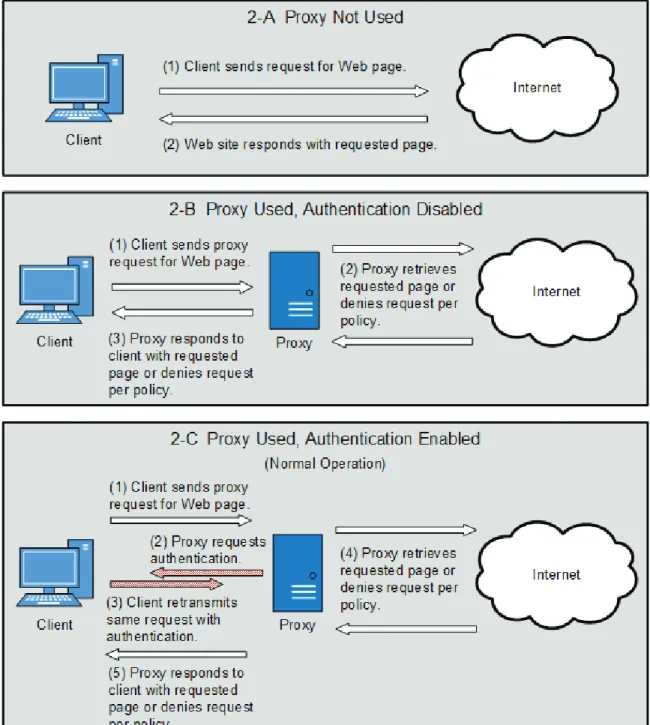
To aid the discussion, see Figure 2 which has three parts: 2-A, 2-B, and 2-C. It illustrates how Web pages and Web server applications are normally reached by the Web client:
1. Without a proxy.
2. With a proxy installed and authentication disabled.
3. With a proxy installed and authentication enabled. Figure 2 is presented on the next page.
Figure 2 - Normal Proxy Authentication Scenarios
Now let us look a little closer at the three scenarios.
2-A Proxy Not Used. In this scenario, authentication is obviously not possible. In this case, under normal conditions, the user can easily access and use Web pages of all types, including all Web applications. (Note: This scenario is not directly relevant to the problem, but it is presented as a foundation for explaining the problem and its solution.)
2-B Proxy Used, Authentication Disabled. In this depiction, a proxy is used, and authentication is not enabled. If a user or a client program requests a Web page or Web application, the proxy will accommodate the request, but user names will not appear in Web-use reports and cannot be used for
filtering. Instead, IP addresses will be shown in reports, and filtering actions will be governed by “Default” policies (more on this later).
2-C Proxy Used, Authentication Enabled. Here is what happens in this scenario:
• If the user requests a Web page that is not a Web application, authentication works fine, and the proxy retrieves the requested page or denies it according to the organization’s policy. There is no problem.
• If the user attempts to launch a Web application, the proxy will request the Web client to authenticate. If the Web client is designed to authenticate, everything works fine. If not, the application will not work. THIS IS THE PROBLEM THAT THIS PAPER ADDRESSES.
Note: At this point you may be wondering, “Why aren’t all Web applications designed to support authentication?” The answer is that it’s an industry problem. That is, there is no universal or mandated standard that requires it. And why is that? History. When Web applications were first introduced, proxy servers and proxy authentication were not widely employed. Consequently, there was little, if any, incentive for developers to incorporate a feature that they thought would probably never (or very seldom) be used. Today, however proxy servers are widely used, but an authentication standard has not yet
emerged.
With this background in mind, let’s go to Part B to analyze the problem a bit deeper and see how it comes about.
Part B: The Proxy/Authentication Problem
B.1 Overview of the Problem
General. This Part discusses the proxy authentication problem itself.
Background. Many proxy product customers make extensive use of Web applications. As discussed in Part A, if these customers do not require or use proxy authentication, their users’ Web traffic flows smoothly back and forth through the proxy. In this case, there is no problem with the Web application. However, if they choose to employ user names for Web-use reporting and filtering, they must enable proxy authentication. When they do, this can cause certain Web applications to fail. Why? Some Web clients are simply not designed to support proxy authentication. This happens fairly often but is not well known.
Impact of the Problem. When the problem occurs, it typically impacts customers as follows:
1. Authentication is Enabled. Assume that users initiate a request to launch a Web application whose Web client does not support authentication. In this case, the proxy will not forward the request to the Web server application. As a result, users cannot work with the application. For some organizations, this can represent a serious loss of worker productivity.
2. Authentication is Disabled. If the product administrator responds to the problem by disabling authentication, the Web application will work, and users are not held up. However, user names are not displayed in reports, and “filtering by user name” will not work. While not necessarily catastrophic,
B.2 The Problem Scenario
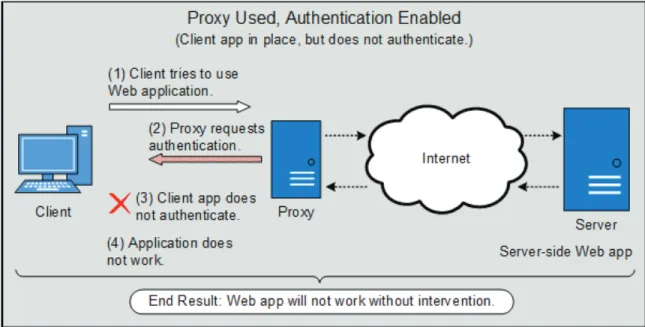
The Web application authentication problem typically unfolds as follows:
1. The user needs to work with a Web application. The Web client is presumably “ready for use,” having been previously installed locally or just now downloaded from the Web application’s server.
2. Employing the application’s Web client, the user attempts to launch the Web server application.
3. The proxy requests the Web client program to authenticate (this step is not visible to the user).
4. The Web client program is unable to comply because it is not designed to support authentication.
5. The user cannot work with the Web application. It typically freezes up. This sequence is illustrated in Figure 3.
Figure 3 - Proxy Authentication Problem When Proxy Authentication is Enabled
Unfortunately, Wavecrest cannot correct the underlying problem itself. That requires enabling the Web client to support authentication. Only the application vendor can do that. However, our proxy products include a feature that can manage the problem satisfactorily in real time so that mission-critical Web application operations can be sustained.
Part C: The Authentication Manager
Overview of the Authentication Manager
In Wavecrest proxy products, the Authentication Manager includes an Authentication Bypass feature. Operational when authentication is enabled, its basic function is to help prevent Web client authentication issues from disrupting customers’ Web application operations. In most cases, the Authentication Manager does this by automatically detecting the disruptions, identifying the failed applications, and employing automatic authentication-bypass techniques. Supplementing the automatic processes, a Bypass screen lets product administrators view the status of problem situations and take a number of manual actions to augment or override the automatic actions discussed above.
While “detection-and-bypass” is a top priority function, the Authentication Manager also attempts–and usually succeeds–in recovering user names for reporting and filtering purposes. These are user names that otherwise would be lost when authentication is bypassed.
The following paragraphs describe the authentication bypass and user name recovery processes at a summary level. (Note: The product user guide provides detailed information and instructions on how product administrators can use the Authentication Manager and get the most out of it.)
Summary of the Authentication Bypass Process
The bypass process can be explained in terms of the following modes of operation.
Disabled. When authentication is disabled, the Authentication Manager is not in play. User names are not available (perhaps not even required or used by customers). IP addresses are automatically used for reporting and filtering.
Moderate. This is the default mode. In this mode, authentication is enabled, and the Authentication Manager can sense a Web client authentication problem that causes a Web application failure. It can also identify the application. When it does, it monitors that application– but takes no action–until it has failed a configurable number of times (the default is 5). If that number is reached, the Authentication Manager automatically allows subsequent attempts to bypass the authentication process, thus enabling the application to function properly. In addition, the product administrator can take manual action to bypass authentication in specific instances.
Strict. This mode, when chosen, will automatically monitor, identify, and track Web application failures, just as in Moderate mode. However, it disables automatic bypass actions. On the other hand, manual bypass capability is still available. This mode gives the administrator more control
over the authentication management process.
Overview of the User Name Recovery Process
As mentioned above, when a bypass action takes place, the application will function. As soon as the bypass occurs, the Authentication Manager automatically checks the product’s cache feature to see if the associated IP address and user name are recorded there. Because cache is a very short-term storage function, the IP address and user name may or may not be there at that time (it depends on failure frequency and the configurable “threshold”). If they exist, the Authentication Manager “recovers” the user name from cache so it can be used for reporting and (if required) filtering purposes. If the IP and
Wavecrest Computing
904 East New Haven Avenue Melbourne, FL 32901 toll-free: 877-442-9346 voice: 321-953-5351 fax: 321-953-5350
Part D: The Benefits
When in use, the Authentication Manager offers the following benefits.
• Prevents Productivity Loss. It automatically precludes any loss in user productivity that might be caused by a Web application failing to respond to authentication requests. This is the Authentication Bypass feature’s top priority.
• Enables Rapid Problem Identification/Definition. It can be used by the product administrator to quickly identify any Web application related to authentication issues. The administrator can then investigate and take appropriate action.
• Enables Manual Authentication Bypass. It enables the product administrator to selectively bypass authentication for known troublesome Web applications.
• Recovers User Names. During authentication failures, if the ID cache storage period has not expired, the Authentication Manager automatically “recovers” the involved user names and makes them available for reporting and filtering.
About Wavecrest Computing
Wavecrest Computing has provided business and government clients with reliable, accurate Web-use management products since 1996. IT specialists, HR professionals, and business managers trust Wavecrest’s Cyfin® and CyBlock® products to manage employee Internet usage – reducing liability risks, improving productivity, saving bandwidth, and controlling costs.
Wavecrest has over 3,000 clients worldwide, including Edward Jones, General Electric, IBM, MillerCoors, New York City Dept. of Transportation, Rolex, Siemens, and a growing list of global enterprises and government agencies. For more information on our company, products, and partners, visit