Natural Engineer
Application Restructuring for Unix
Version 8.4
October 2017
Copyright © 1997-2017, Generation Systems Ltd., East Grinstead, UK.
This document applies to Natural Engineer version 8.4 and to all subsequent releases.
Specifications contained herein are subject to change, and these changes will be reported in subsequent revisions or editions.
Readers’ comments are welcomed. Comments may be addressed to the Documentation Department at the address on the back cover. Internet users may send comments to the following e-mail address:
Acknowledgements
The name Software AG and all Software AG product names are either trademarks or registered trademarks of Software AG and/or Software AG USA Inc. and/or its subsidiaries and/or its affiliates and/or their licensors. Other company and product names mentioned herein may be trademarks of their respective owners.
Detailed information on trademarks and patents owned by Software AG and/or its subsidiaries is located at
http://softwareag.com/licenses.
This software may include portions of third-party products. For third-party copyright notices, license terms, additional rights or restrictions, please refer to "License Texts, Copyright Notices and Disclaimers of Third Party Products". For certain specific third-party license restrictions, please refer to section E of the Legal Notices available under "License Terms and Conditions for Use of Software AG Products / Copyright and Trademark Notices of Software AG Products". These documents are part of the product documentation, located at
TABLE OF CONTENTS
TABLE OF CONTENTS ... I
ABOUT THIS MANUAL ...1
Purpose of this manual ... 1
Target Audience ... 1
Typographical Conventions used in this manual ... 2
How this manual is organized ... 3
Terminology ... 4
Related Literature ... 7
APPLICATION RESTRUCTURING USING OBJECT BUILDER...9
Chapter Overview ... 9
Object Builder Overview ... 10
Object Names used for the Generated Objects ... 12
Object Builder Line Range Process ... 14
Objects generated by the Object Builder Line Range Process ... 15
How to specify Line Ranges ... 17
Example of Object Builder Line Ranges ... 24
Object Builder Line Range replacing REINPUT Statements ... 33
ABOUT THIS MANUAL
Purpose of this manual
This manual contains the Application Restructuring for Natural Engineer.
It describes the use of Object Builder to restructure Natural applications within Natural Engineer.
The topics covered are:
How Object Builder works.
Restructuring an individual Natural object to separate selected lines of source code into new Object Builder generated subprograms.Target Audience
The target audience for this manual is intended to be any User of Natural Engineer at any level of experience.
Note: This manual should be read in conjunction with the Natural Engineer Application Analysis & Modification manual, which explains the Impact and Modification processes in more detail.
Typographical Conventions used in this manual
The following conventions are used throughout this manual:
UPPERCASE TIMES
Commands, statements, names of programs and utilities referred to in text paragraphs appear in normal (Times) uppercase.
UPPERCASE BOLD
COURIER In illustrations or examples of commands, items in uppercase bold courier must be typed in as they appear.
< > Items in angled brackets are placeholders for user-supplied information. For example, if asked to enter <file number>, you must type the number of the required file.
Underlined Underlined parts of text are hyperlinks to other parts within the online source manual. This manual was written in MS-Word 97 using the "hyperlink" feature.
The following symbols are used for instructions:
Marks the beginning of an instruction set. Indicates that the instruction set consists of a single step. 1. Indicates the first of a number of steps.
About this manual
How this manual is organized
This manual is organized to reflect all the Application Restructuring options of Natural Engineer in the following chapters:
Chapter Contents
1 Describes the Object Builder options, which provide the facility to restructure Natural applications by selecting individual lines of source.
Terminology
This section offers some of the terms that are specific to the Natural Engineer product. Note: Familiarity is assumed with the general terminology of Natural, Adabas, Microsoft and Mainframe operating systems.
Analysis
The Analysis process of Natural Engineer searches application data within the Natural Engineer Repository, according to specified Search Criteria and generates reports on the search results.
Application
An Application is a library or group of related libraries, which define a complete Application. In Natural Engineer, the Application can have a one-to-one relationship with a single library of the same name, or a library of a different name, as well as related steplibs. The Application refers to all the source code from these libraries, which Natural Engineer loads into the Repository.
Browser
An Internet Browser such as Microsoft Internet Explorer or Netscape.
Category
Categories in Natural Engineer specify whether and how a Modification is applied to the Natural code. Valid categories are: Automatic change, Manual change, Reject the default Modification, No change to the data item, and the data item is in Generated Code.
A category is further broken down according to type of change (for example: Keyword, Literal, Data Item, Database Access, Definition).
About this manual
Data Item
A collective term used for any data fields within a programming object. These can be user-defined variables, DDM fields or System Variables. It is inter-changeable with the term ‘variable’.
Environment
The Environment process is the means by which Natural Engineer generates a structured view of the application code in the Natural Engineer Repository. This provides application analysis reports and inventory information on the application and is used as the basis for Impact Analysis.
Exception
An Exception is an Item identified as impacted that does not require a Modification. Where there are a few similar Exception Items, they can be treated as Exceptions, and rejected in the Modification review process. Where there are many similar (therefore not Exceptions), consideration should be given to changing the Search Criteria so they are not identified as impacted in the first place.
Generated Code
This is code which has been generated by a Natural code generator, such as Construct, and which is not normally modified directly in the Natural editor.
Impact
An Impact is an instance of a Natural code Item; e.g., data item or statement (a “hit” scored by the Analysis process) that matches the defined Search Criteria used in the Analysis process.
Iteration
An Iteration is one examination cycle of a field identified according to the specified Search Criteria. For example, one Iteration is reading the field right to left. Multiple Iterations are performed when the option of ‘Consistency’ or Multi Search is requested for Analysis, and Natural Engineer performs as many Iterations as necessary to exhaust all possibilities of expressing and tracing the field, and can be limited by a setting in the NATENG.INI file.
JCL
Job Control Language.
JCL object
A JCL object is a collection of Job Control statements in the order which they are to be executed in a mainframe batch environment. Commonly referred to as JCL.
Library
A single library of source code, which exists in the Natural system file.
Modification
A Modification is a change suggested or made to an object or data item resulting in the required compliance of that object or data item. Modifications in Natural Engineer are classified according to Category and Type.
Refactoring
Improving a computer program by reorganizing its internal structure without altering its external behavior.
Soft Link
A Soft Link is where a link between two objects has been defined using an alphanumeric variable rather than a literal constant.
TLM
Text Logic Members are used to contain the code required to support inclusion of common code into the application. An example of this is the code to include into an application before updating a database.
Type
The Type of Modification available, for example: Data Item, Keyword and Literal.
Variable
A collective term used for any data fields within a programming object. These can be user-defined variables, DDM fields or System Variables. It is inter-changeable with the term ‘data item’.
About this manual
Related Literature
The complete set of Natural Engineer manuals consists of:
1 Natural Engineer Concepts and Facilities (NEE84-006ALL)
The Concepts and Facilities manual describes the many application systems problems and solutions offered by Natural Engineer, providing some guidelines and usage that can be applied to Natural applications.
2 Natural Engineer Release Notes (NEE84-008ALL)
The Release Notes describe all the information relating to the new features, upgrades to existing functions and documentation updates that have been applied to Natural Engineer.
3 Natural Engineer Installation Guide for Windows (NEE84-010WIN) Natural Engineer Installation Guide for Mainframes(NEE84-010MFR) Natural Engineer Installation Guide for Unix (NEE84-010UNX)
The Installation Guide provides information on how to install Natural Engineer on PC, Unix and mainframe platforms.
4 Natural Engineer Administration Guide (NEE84-040WIN) Natural Engineer Administration Guide (NEE84-040MFR)
The Administration Guide provides information on all the various control settings available to control the usage of the different functions within Natural Engineer.
5 Natural Engineer Application Management (NEE84-020WIN) Natural Engineer Application Management (NEE84-020MFR)
The Application Management manual describes all the functions required to add Natural applications into the Repository.
6 Natural Engineer Application Documentation (NEE84-022WIN) Natural Engineer Application Documentation (NEE84-022MFR)
The Application Documentation manual describes all the available functions to document a Natural application within the Repository. These functions will help enhance / supplement any existing systems documentation such as BSD / CSD / Specifications etc.
7 Natural Engineer Application Analysis and Modification (NEE84-023WIN) Natural Engineer Application Analysis and Modification (NEE84-023MFR)
The Application Analysis and Modification manual describes all the available functions to carry out analysis of Natural applications; including basic keyword searches. The modification process is described and detailed to show how it can be applied to modify single selected objects within a Natural application, or the entire Natural application in one single execution.
8 Natural Engineer Application Restructuring (NEE84-024WIN) Natural Engineer Application Restructuring (NEE84-024MFR)
The Application Restructuring manual describes the analysis and modification functionality required to carry out some of the more sophisticated functions such as Object Builder.
9 Natural Engineer Utilities (NEE84-080WIN) Natural Engineer Utilities (NEE84-080MFR)
The Utilities manual describes all the available utilities found within Natural Engineer and, when and how they should be used.
10 Natural Engineer Reporting (NEE84-025ALL)
The Reporting manual describes each of the reports available in detail, providing report layouts, how to trigger the report and when the report data becomes available. The various report-producing mediums within Natural Engineer are also described.
11 Natural Engineer Batch Processing [Mainframes] (NEE84-026MFR)
The Batch Processing manual describes the various batch jobs (JCL) and their functionality.
12 Natural Engineer Messages and Codes (NEE84-060ALL)
The Messages and Codes manual describes the various messages and codes produced by Natural Engineer.
13 Natural Engineer Web Interface Installation and Configuration Guide(NEA84-010ALL)
The Web Interface Installation and Configuration Guide provides information on how to install and configure the Natural Engineer Web Interface.
14 Natural Engineer Advanced Services (NEE84-017WIN)
The Advanced Services manual describes various advanced options such as the Refactoring of Natural application source code with Natural Engineer, conversion of applications for Natural for Ajax and Business Rule processing.
APPLICATION RESTRUCTURING USING OBJECT
BUILDER
Chapter Overview
Application Restructuring using Object Builder provides the facilities to restructure an existing Natural application to enable the essential business processing logic to be used in different ways. Examples of restructuring include:
Creating new objects to execute common processes that are unnecessarily repeated many times over within individual objects.
Creating new objects from existing monolithic applications to enhance the applications maintainability.The Object Builder processes encompasses the use of the Impact Analysis process to identify the source code to be restructured and prepares the necessary triggers to action this.
The Modification process is used to review the Impact results and Modification criteria prior to creating the necessary components. Once the Modification criteria have been reviewed, Modification can be applied and will generate the necessary components. The topics covered are:
1. Object Builder Overview
Object Builder Overview
The Object Builder process is triggered by using the Impact search keyword ‘OBJECT BUILDER’. The variants of Object Builder available are:
1. Object Builder Line Range.
This can be applied for individual objects within an application selecting the source code to be restructured by specifying start and end line ranges.
After the criteria have been specified, Impact Analysis is executed to generate the modification criteria and then Modification is applied to the object(s).
The Object Builder modification will generate new subprogram and Parameter Data Area objects for each individual specification, and modify the original object being restructured with the necessary linkage code (CALLNAT).
About this manual
The following Figure 1-1 illustrates the basic object generation for a simple Object Builder Line Range selection for object XX001P01 from the sample application HOSPITAL.
Object Names used for the Generated Objects
For each object generated by the Object Builder process, the names used for the new objects are based on the template masks defined in the COMPONENT_OBJECT_NAME and COMPONENT_OVERFLOW_NAME parameters in the ###CINI text member. The COMPONENT_OBJECT_NAME parameter is set to a default value of #####*% where each mask character is positional in respect of the original object name.
Mask Description
# The same character found in the original object name is used. A maximum of 6 are permitted per template mask
* The object type will be inserted. For a subprogram this will be ‘N’ and for a
Parameter Data Area this will be ‘A’.
At least 1 must be present within the template mask.
% A sequential number for the new object name. The range used is 1-9 and then A-Z. At least 1 must be present within the template mask and it cannot be placed at the start of the mask, i.e., %#####* is not permitted.
The following examples illustrate the object names applied for various masks based on the original object name XX021P01:
For mask ######*%,
About this manual
The sequential number assigned to the mask character ‘%’ is determined by the following rules:
1. Check to see if the new object name exists on the base Natural application library. 2. Check to see if the new object name exists on the Modification library.
If either of these two conditions is true, then the next sequence number is assigned. This prevents any duplication of object names by ensuring the new object names are unique within the selected application.
The COMPONENT_OVERFLOW_NAME parameter follows the same rules and definitions. It is used when Object Builder modification is being executed in unattended operation mode using the Task Scheduler. As the parameter name implies, it is used as an overflow when the primary mask provided by COMPONENT_OBJECT_NAME is exhausted.
Note: For more information on the ###CINI text member parameters COMPONENT_OBJECT_NAME and COMPONENT_OVERFLOW_NAME refer to Chapter 2 in the Natural Engineer Administration Guide for Unix manual.
Note: For more information on the Task Scheduler refer to Chapter 1 in the Natural Engineer Utilities for Unix manual.
Object Builder Line Range Process
The Object Builder Line Range Process requires a range of source code lines within an object to be selected by specifying the start and end line numbers. Once all the required line ranges have been specified the Impact process is executed to create the necessary impact and modification data. Once the Impact results have been reviewed, the Modification process can be applied.
The Object Builder Line Range process identifies all the source code instances of the line ranges specified, each line range is placed into Object Builder generated subprograms. Any data items associated with the line ranges are placed into Object Builder generated Parameter Data Areas, to support the data transfer between the calling object and the new subprograms.
About this manual
Objects generated by the Object Builder Line Range Process
The Object Builder Line Range process will generate the following objects during the Modification execution:
1. Generate a subprogram object.
A new subprogram object is created on the Modification library with the source code for the selected line ranges from the original object copied into it. If any parameters are required, then they will be placed into a new Parameter Data Area object and this will be referenced within the subprogram data definitions.
2. Generate a Parameter Data Area (PDA) object.
A PDA object is only generated if the Impact process has identified any data that needs to be passed between the calling object and the new subprogram. This will contain all the required data items as defined in the original object.
3. Modify the original object to reference the new subprogram object.
The original object will be modified to comment out the source code for the line range specified. This is replaced with a CALLNAT statement to call the new subprogram and pass any required parameters.
The following statements demonstrate the complexity of the object builder process: 1. If a data item is used in the original object outside of the object builder range THEN it
must be added to the generated PDA.
2. If a data item is not used outside of the object builder range THEN don’t create a PDA data item.
3. If a data item used inside the object builder range has a value set previously THEN move the value to a new PDA data item.
4. If a system variable from the object builder range is used outside of the range THEN create a new PDA data item and move the system value to it in the new object and then change all references in the initial program.
5. If the program has an environment setting outside of the object builder range THEN copy all environment settings to the new sub program.
6. If the code in the object builder range uses back references THEN change references based on the position of the code in the new sub program.
7. If a data item is only used inside the object builder line range THEN create a local data area inside the object and add the data item.
About this manual
How to specify Line Ranges
The Line Ranges of the source code can be specified in one of two ways:
1. Using search keyword OBJECT BUILDER using the Impact Criteria screen and specifying the line range in the Modification Parameters section.
2. Using the Object Builder Processing option from the Impact Data Preparation sub menu.
Line Ranges specified using the Impact Criteria Screen
The Object Builder Line Ranges can be specified using the Impact Criteria screen and selecting the search keyword OBJECT BUILDER.
A keyword value is mandatory for this search keyword and must be the object name that contains the source code that the line range applies to.
The line ranges are input using the Modification parameter. This must use the following convention: nnnnnnnn-mmmmmmmm,pppppppp,oooooooo, where:
nnnnnnnn Specifies the start of line range value
All 8 characters must be used, for example 10 must be input as 00000010.
- A hyphen (-) is used to separate the start and end line ranges.
mmmmmmmm Specifies the end of line range value
All 8 characters must be used, for example 10 must be input as 00000010. The value must be equal to or greater than the start of line value.
pppppppp Specifies an override name for the generated PDA object.
For example if object XX021P01 is having Line Range modification applied and the template mask is ######*%, then the default name for the PDA would be XX021PA1. If an override name were input, for example PDA01, then the name of the generated PDA would be PDA01.
Note: If a PDA override name is used, then a place delimiter comma (,) needs to be inserted prior to the PDA override name.
oooooooo Specifies an override name for the generated subprogram object.
For example if object XX021P01 is having Line Range modification applied and the template mask is ######*%, then the default name for the subprogram object would be XX021PN1. If an override name were input, for example SUBPGM01, then the name of the generated subprogram would be SUBPGM01.
Note: If a PDA override name is not present, then two place delimiter commas (,,) need to be inserted prior to the Subprogram override name. If PDA override name is present then a single place delimiter comma (,) needs to be inserted.
The following examples illustrate some valid Modification parameters based on applying Object Builder line ranges to object XX021P01, with template mask ######*%:
Modification parameter = 00000180-00000230 new subprogram name = XX021PN1
new PDA name = XX021PA1
Modification parameter = 00000180-00000230,, new subprogram name = XX021PN1
new PDA name = XX021PA1
Modification parameter = 00000180-00000230,SUBPGM01 new subprogram name = SUBPGM01
new PDA name = XX021PA1
Modification parameter = 00000180-00000230,PDA01, new subprogram name = XX021PN1
About this manual
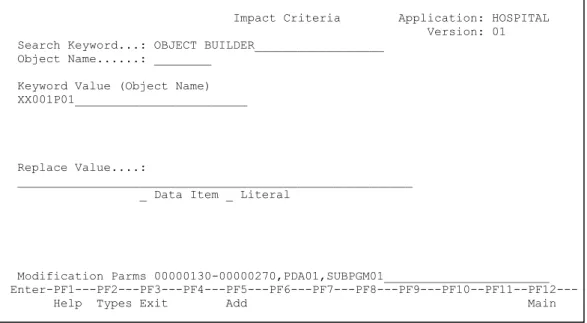
The following Figure 1-3 illustrates the Impact Criteria screen showing an Object Builder line range criteria specified.
Impact Criteria Application: HOSPITAL Version: 01 Search Keyword...: OBJECT BUILDER__________________ Object Name...: ________ Keyword Value (Object Name) XX001P01________________________ Replace Value....: _______________________________________________________ _ Data Item _ Literal Modification Parms 00000130-00000270,PDA01,SUBPGM01_______________________ Enter-PF1---PF2---PF3---PF4---PF5---PF6---PF7---PF8---PF9---PF10--PF11--PF12--- Help Types Exit Add Main
Figure 1-3 Impact Criteria screen with Object Builder line range criteria specified
Note: For more information on the Impact Criteria screen refer to Chapter 1 in the Natural Engineer Application Analysis & Modification for Unix manual.
Line Ranges specified using the Object Builder Processing Screen
Specifying Object Builder Line Ranges using the search keyword OBJECT BUILDER requires prior knowledge of the line ranges required, either using a hard copy of an object listing or viewing the object in the Natural editor.
A more interactive way of specifying Object Builder Line Ranges is to use the Object Builder Processing screen, which provides the object source code for you to select the line ranges.
The same functionality provided by the Modification parameters on the Impact Criteria screen is available from the Object Builder Processing screen.
The Object Builder Processing screen is accessed by selecting option ‘P’ (Impact Data Preparation) from the Analysis Menu screen, and then by selecting option ‘O’ (Object Builder Processing) from the Impact Data Preparation Sub-menu screen.
For each line range specified, an Impact criteria record is still generated and can be viewed in the Impact Search Criteria Summary screen, and can be identified by option set to ‘OEM’ in the Opt column.
Note: For more information on the Impact Search Criteria Summary screen refer to Chapter 1 in the Natural Engineer Application Analysis & Modification for Unix manual.
About this manual
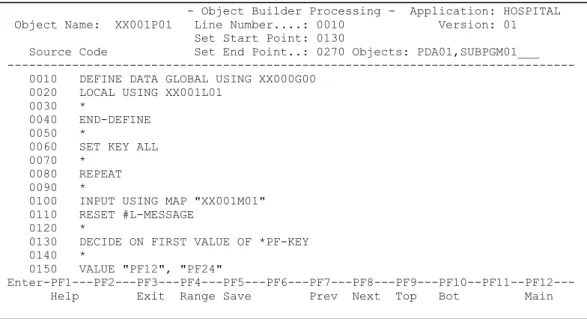
The following Figure 1-4 illustrates the Object Builder Processing screen showing an Object Builder line range criteria specified.
- Object Builder Processing - Application: HOSPITAL Object Name: XX001P01 Line Number....: 0010 Version: 01 Set Start Point: 0130 Source Code Set End Point..: 0270 Objects: PDA01,SUBPGM01___ --- 0010 DEFINE DATA GLOBAL USING XX000G00 0020 LOCAL USING XX001L01 0030 * 0040 END-DEFINE 0050 * 0060 SET KEY ALL 0070 * 0080 REPEAT 0090 * 0100 INPUT USING MAP "XX001M01" 0110 RESET #L-MESSAGE 0120 * 0130 DECIDE ON FIRST VALUE OF *PF-KEY 0140 * 0150 VALUE "PF12", "PF24" Enter-PF1---PF2---PF3---PF4---PF5---PF6---PF7---PF8---PF9---PF10--PF11--PF12--- Help Exit Range Save Prev Next Top Bot Main
Figure 1-4 Object Builder Processing screen with Object Builder line range criteria specified Note: For more information on the Object Builder Processing screen refer to Chapter 1, section Impact Data Preparation in the Natural Engineer Application Analysis & Modification for Unix manual.
The following Figure 1-5 illustrates the Impact Criteria Summary screen showing an Object Builder line range ‘OEM’ criteria (normal view).
- Impact Criteria Summary - Application: HOSPITAL Version: 01 Search Keyword Search Replace Replace Keyword Value Value Value TLM _ N OBJECT BUILDER XX001P01 Enter-PF1---PF2---PF3---PF4---PF5---PF6---PF7---PF8---PF9---PF10--PF11--PF12--- Help DeleC Exit GetSa SaveA Add Prev Next W< W> Main
About this manual The following Figure 1-6 illustrates the Impact Criteria Summary screen showing an Object Builder line range ‘OEM’ criteria (scrolled to the right via ‘PF11’ (W>)).
- Impact Criteria Summary - Application: HOSPITAL Version: 01 Search Replace Replace Cons Opt Modification Keyword Defn. Position Parameters _ N OBJECT BUILDER OEM 0130-0270,PDA01,SUBPGM01 Enter-PF1---PF2---PF3---PF4---PF5---PF6---PF7---PF8---PF9---PF10--PF11--PF12--- Help DeleC Exit GetSa SaveA Add Prev Next W< W> Main
Figure 1-6 Impact Criteria Summary screen with Object Builder line range ‘OEM’ criteria Note: For more information on the Impact Criteria Summary screen refer to Chapter 1 in the Natural Engineer Application Analysis & Modification for Unix manual.
Example of Object Builder Line Ranges
The following example illustrates a simple Object Builder Line Range being applied to object XX001P01 from the sample application HOSPITAL. The start and end line ranges will be specified using the Impact search criteria option.
An application called HOSPITAL has been created with all the objects from the sample application HOSPITAL extracted and loaded into the Repository. The Application Properties have been specified with the Modification library set to HOSPITAX. The library HOSPITAX is empty. The example begins from the Impact search criteria stage.
Step 1 Identify the start and end line ranges to be restructured from program object
XX001P01. The line ranges to be used will start at line number 0180 and end at line 0230. These are marked in bold in the following source code listing for object XX001P01.
About this manual
0010 DEFINE DATA GLOBAL USING XX000G00 0020 LOCAL USING XX001L01
0030 *
0040 END-DEFINE 0050 *
0060 SET KEY ALL 0070 *
0080 REPEAT 0090 *
0100 INPUT USING MAP "XX001M01" 0110 RESET #L-MESSAGE
0120 *
0130 DECIDE ON FIRST VALUE OF *PF-KEY 0140 * 0150 VALUE "PF12", "PF24" 0160 PERFORM XXEXIT 0170 VALUE 'ENTR' 0180 IF #M-OPTION = "P" 0190 FETCH "XX002P01" 0200 END-IF 0210 IF #M-OPTION = "S" 0220 FETCH "XX003P01" 0230 END-IF
0240 MOVE "INVALID OPTION SELECTED" TO #L-MESSAGE 0250 NONE VALUE
0260 MOVE "INVALID PF KEY PRESSED" TO #L-MESSAGE 0270 END-DECIDE
0280 *
0290 END-REPEAT 0300 END
Step 2 Having identified the start and end line ranges, the Impact search criteria is specified using the Impact Criteria screen. The specification includes; a search keyword of OBJECT BUILDER, a keyword value of XX001P01 (i.e., the object containing the required line range) and Modification parameters of 00000180-00000230.
Note: the Modification parameters do not include any PDA or Subprogram object name overrides. These object names will be based on the template masks defined in the COMPONENT_OBJECT_NAME parameter, which is set to ‘######*%’.
The following Figure 1-7 illustrates the Impact Criteria screen after all the details have been specified.
Impact Criteria Application: HOSPITAL Version: 01 Search Keyword...: OBJECT BUILDER__________________ Object Name...: ________ Keyword Value (Object Name) XX001P01________________________ Replace Value....: _______________________________________________________ _ Data Item _ Literal
About this manual
Step 3 With the Impact search criteria specification complete, the Impact Analysis
process is invoked by selecting option Impact Execution from the Analysis menu.
Step 4 When Impact execution has completed, the Impact results are reviewed using
the Impact Element Maintenance option, accessed from the Analysis menu.
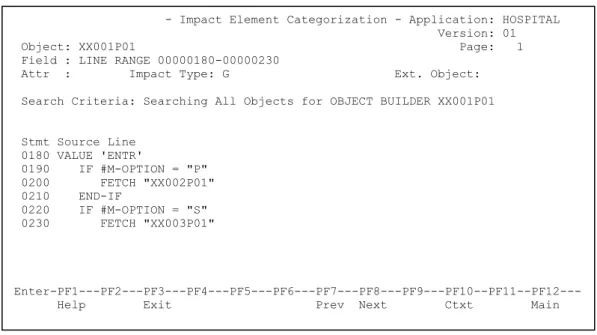
The following Figure 1-8 illustrates the Impact Element Categorization screen displaying the Impact results for object XX001P01.
- Impact Element Categorization - Application: HOSPITAL Version: 01 Object: XX001P01 Page: 1 Field : LINE RANGE 00000180-00000230 Attr : Impact Type: G Ext. Object: Search Criteria: Searching All Objects for OBJECT BUILDER XX001P01 Stmt Source Line 0180 VALUE 'ENTR' 0190 IF #M-OPTION = "P" 0200 FETCH "XX002P01" 0210 END-IF 0220 IF #M-OPTION = "S" 0230 FETCH "XX003P01" Enter-PF1---PF2---PF3---PF4---PF5---PF6---PF7---PF8---PF9---PF10--PF11--PF12--- Help Exit Prev Next Ctxt Main Figure 1-8 Impact Element Categorization screen displaying the Impact results for object XX001P01
Step 5 Having reviewed that the Impact results are correct, the Modification criteria are reviewed using the Modification Element Maintenance option, accessed from the Modification menu.
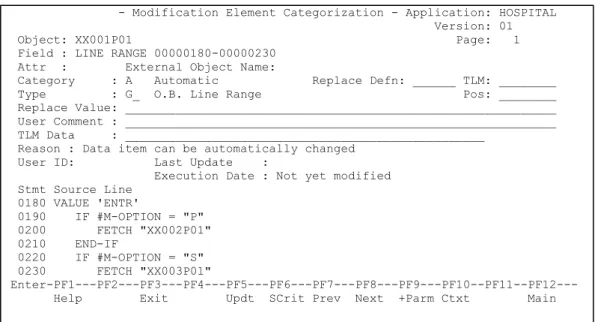
The following Figure 1-9 illustrates the Modification Element Categorization screen displaying the Modification criteria for object XX001P01.
- Modification Element Categorization - Application: HOSPITAL Version: 01 Object: XX001P01 Page: 1 Field : LINE RANGE 00000180-00000230 Attr : External Object Name: Category : A Automatic Replace Defn: ______ TLM: ________ Type : G_ O.B. Line Range Pos: ________ Replace Value: ____________________________________________________________ User Comment : ____________________________________________________________ TLM Data : __________________________________________________ Reason : Data item can be automatically changed User ID: Last Update : Execution Date : Not yet modified Stmt Source Line 0180 VALUE 'ENTR' 0190 IF #M-OPTION = "P" 0200 FETCH "XX002P01" 0210 END-IF 0220 IF #M-OPTION = "S" 0230 FETCH "XX003P01" Enter-PF1---PF2---PF3---PF4---PF5---PF6---PF7---PF8---PF9---PF10--PF11--PF12--- Help Exit Updt SCrit Prev Next +Parm Ctxt Main
Figure 1-9 Modification Element Categorization screen displaying the Modification criteria for object XX001P01
About this manual
Step 6 The Modification will be applied by using ‘PF5’ (Mod) from the Modification
Object Categorization screen. When the Modification has completed an information window is displayed, detailing that object XX001P01 has been modified to library HOSPITAX.
The following Figure 1-10 illustrates the Modification information window.
Object XX001P01 has been modified to library HOSPITAX
Step 7 Reviewing the Modification results. To do this we will logon to the Natural library HOSPITAX. This library was empty at the start of this example. It now contains 3 objects:
1. A modified program object: XX001P01.
2. An Object Builder generated Parameter Data Area: XX001PA1. 3. An Object Builder generated Subprogram: XX001PN1
The following Figure 1-11 illustrates the object list for Modification library HOSPITAX. User XGSLXX - LIST Objects in a Library - Library HOSPITAX Cmd Name Type S/C SM Version User ID Date Time --- *________ *__________ *__ * *______ *________ *__________ *________ __ XX001PA1 Parameter S S 2.2.08 XGSLXX 2004-06-08 17:04:00 __ XX001PN1 Subprogram S S 2.2.08 XGSLXX 2004-06-08 17:04:00 __ XX001P01 Program S S 3.1.04 XGSLXX 2004-06-08 17:04:00 3 Objects found Top of List. Command ===>
About this manual
Step 8 Review the modified object XX001P01. It can be seen that the source code for
the line range selected, has been commented out and replaced by a CALLNAT to the Object Builder generated subprogram XX001PN1. The modified code is shown in bold in the following listing.
0010 DEFINE DATA GLOBAL USING XX000G00 0020 LOCAL USING XX001L01
0030 *
0040 END-DEFINE 0050 *
0060 SET KEY ALL 0070 *
0080 REPEAT 0090 *
0100 INPUT USING MAP "XX001M01" 0110 RESET #L-MESSAGE
0120 *
0130 DECIDE ON FIRST VALUE OF *PF-KEY 0140 *
0150 VALUE "PF12", "PF24" 0160 PERFORM XXEXIT 0170 VALUE 'ENTR'
0180 /* IF #M-OPTION = "P" /* NEE OLD CODE 0190 /* FETCH "XX002P01" /* NEE OLD CODE 0200 /* END-IF /* NEE OLD CODE
0210 /* IF #M-OPTION = "S" /* NEE OLD CODE 0220 /* FETCH "XX003P01" /* NEE OLD CODE 0230 /* END-IF /* NEE OLD CODE
0240 CALLNAT 'XX001PN1' /* NEE MODIFIED 0250 #M-OPTION /* NEE MODIFIED
0260 MOVE "INVALID OPTION SELECTED" TO #L-MESSAGE 0270 NONE VALUE
0280 MOVE "INVALID PF KEY PRESSED" TO #L-MESSAGE 0290 END-DECIDE
0300 *
0310 END-REPEAT 0320 END
0010 * Subprogram: XX001PN1
0020 **************************************** 0030 * Created by NEE on 2004-06-08 at 17:04:00.0
0040 * Created from XX001P01 from line range 00000180-00000230 0050 ****************************************
0060 DEFINE DATA
0070 PARAMETER USING XX001PA1 0080 * 0090 END-DEFINE 0100 IF #M-OPTION = "P" 0110 FETCH "XX002P01" 0120 END-IF 0130 IF #M-OPTION = "S" 0140 FETCH "XX003P01" 0150 END-IF 0160 END
Step 10 Review the Object Builder generated PDA XX001PA1. A PDA has been
generated because the line range selected for the source code in object XX001P01 contains variables which need to be passed between the calling (XX001P01) and called (XX001PN1) objects. The PDA is used by the Object Builder generated subprogram XX001PN1.
0010 DEFINE DATA PARAMETER 0020 1 #M-OPTION(A1) 0030 END-DEFINE
About this manual
Object Builder Line Range replacing REINPUT Statements
If an application is being restructured to make use of alternate user interfaces, i.e., all INPUT statement logic is to be separated to make use of client-server type architecture, consideration must be given to the usage of REINPUT statements within the application. In a client-server environment, such as EntireX, the REINPUT statement will not work. Using the Object Builder Line Range option, a range of lines can be specified that include REINPUT statements, during modification the REINPUT logic is replaced with response code handling. The response code will be returned to the calling object, which can then take the appropriate action.
Note: The Object Builder Line Range replacing REINPUT statement can only be applied to individual objects.
Example of Object Builder Line Range replacing REINPUT Statement
The following example illustrates a simple object containing REINPUT statements. The example shows the object before applying the Object Builder Line Range replacing REINPUT modification, the object after modification has been applied and the generated objects created by the Object Builder process.
Sample object before modification with intended line ranges marked in bold: 0010 DEFINE DATA LOCAL
0020 /*
0030 01 #A (A10) 0040 /*
0050 END-DEFINE 0060 /*
0070 INPUT USING MAP 'REINPMAP' 0080 /*
0090 IF #A EQ ' '
0100 REINPUT 'INVALID VALUE DETECTED' MARK #A 0110 END-IF 0120 /* 0130 IF #A NE 'B' 0140 REINPUT *1212 0150 END-IF 0160 /* 0170 END
About this manual
Sample object after modification has been applied (all modifications are in bold): 0010 DEFINE DATA LOCAL
0020 /*
0030 01 #A (A10) 0040 /*
0050 01 #NEE@REINPUT-MSG (A79) /* NEE MODIFIED 0060 01 #NEE@REINPUT-MARK (I4) /* NEE MODIFIED 0070 01 #NEE@REINPUT-REPLY (I4) /* NEE MODIFIED 0080 01 #NEE@REINPUT-MSG# (I4) /* NEE MODIFIED 0090 01 #NEE@REINPUT-GROUP /* NEE MODIFIED
0100 02 #NEE@REINPUT-FIELD (A65/1:50) /* NEE MODIFIED 0110 02 #NEE@REINPUT-FIELD-POS (I04/1:50) /* NEE MODIFIED
0120 END-DEFINE 0130 /*
0140 INPUT USING MAP 'REINPMAP' 0150 /*
0160 /* IF #A EQ ' ' /* NEE OLD CODE
0170 /* REINPUT 'INVALID VALUE DETECTED' MARK #A /* NEE OLD CODE 0180 /* END-IF /* NEE OLD CODE
0190 /* /* /* NEE OLD CODE
0200 /* IF #A NE 'B' /* NEE OLD CODE 0210 /* REINPUT *1212 /* NEE OLD CODE 0220 /* END-IF /* NEE OLD CODE
0230 RESET #NEE@REINPUT-REPLY /* NEE MODIFIED
0240 MOVE '#A' TO #NEE@REINPUT-FIELD(1) /* NEE MODIFIED
0250 ASSIGN #NEE@REINPUT-FIELD-POS(1) = POS(#A) /* NEE MODIFIED 0260 CALLNAT 'REINPPN1' /* NEE MODIFIED
0270 #NEE@REINPUT-MSG /* NEE MODIFIED 0280 #NEE@REINPUT-MARK /* NEE MODIFIED 0290 #NEE@REINPUT-REPLY /* NEE MODIFIED 0300 #NEE@REINPUT-MSG# /* NEE MODIFIED 0310 #NEE@REINPUT-GROUP /* NEE MODIFIED 0320 #A /* NEE MODIFIED
0330 DECIDE ON FIRST VALUE OF #NEE@REINPUT-REPLY /* NEE MODIFIED 0340 VALUE 0 /* NEE MODIFIED
0350 IGNORE /* NEE MODIFIED 0360 VALUE 9999 /* NEE MODIFIED
0380 VALUE 9998,9997 /* NEE MODIFIED
0390 REINPUT *#NEE@REINPUT-MSG# MARK #NEE@REINPUT-MARK /* NEE MODIFIED 0400 NONE VALUE /* NEE MODIFIED
0410 COMPRESS 'UNKNOWN RESPONSE FROM VALIDATION ROUTINE' /* NEE MODIFIED 0420 #NEE@REINPUT-REPLY INTO #NEE@REINPUT-MSG /* NEE MODIFIED
0430 REINPUT #NEE@REINPUT-MSG /* NEE MODIFIED 0440 END-DECIDE /* NEE MODIFIED
0450 /* 0460 END
The sample object has been modified to include a series of parameter data items which will be used to communicate the response codes data between the modified sample object and the Object Builder generated subprogram.
A DECIDE statement has been inserted to determine what action is required for the returned response codes.
The Object Builder process will generate the following PDA and Subprogram objects to support this modification:
1. Parameter Data Area object. 0010 DEFINE DATA PARAMETER 0020 1 #NEE@REINPUT-MSG(A79) 0030 1 #NEE@REINPUT-MARK(I4) 0040 1 #NEE@REINPUT-REPLY(I4) 0050 1 #NEE@REINPUT-MSG#(I4) 0060 1 #NEE@REINPUT-GROUP(1:50)
About this manual
2. Subprogram object.
0010 * Subprogram: REINPPN1
0020 **************************************** 0030 * Created by NEE on 2004-06-08 at 17:29:37.0
0040 * Created from REINPPGM from line range 00000090-00000150 0050 ****************************************
0060 DEFINE DATA
0070 PARAMETER USING REINPPA1 0080 * 0090 LOCAL 0100 01 #NEE@REINPUT-INDEX (I04) 0110 * 0120 END-DEFINE 0130 IF #A EQ ' '
0140 MOVE 'INVALID VALUE DETECTED' TO #NEE@REINPUT-MSG 0150 FOR #NEE@REINPUT-INDEX = 1 TO 50 0160 IF #NEE@REINPUT-FIELD(#NEE@REINPUT-INDEX) EQ '#A' 0170 MOVE #NEE@REINPUT-FIELD-POS(#NEE@REINPUT-INDEX) TO 0180 #NEE@REINPUT-MARK 0190 ESCAPE BOTTOM 0200 END-IF 0210 END-FOR 0220 MOVE 9999 TO #NEE@REINPUT-REPLY 0230 ESCAPE ROUTINE
0240 /* REINPUT 'INVALID VALUE DETECTED' MARK #A 0250 END-IF 0260 /* 0270 IF #A NE 'B' 0280 MOVE 1212 TO #NEE@REINPUT-MSG# 0290 MOVE 9998 TO #NEE@REINPUT-REPLY 0300 ESCAPE ROUTINE 0310 /* REINPUT *1212 0320 END-IF 0330 END
This contains the processing logic for each of the conditions that were being applied for the old REINPUT statements.
INDEX
O
Object Builder Line Range Process, 14 Example, 24
How to specify Line Ranges, 17 Objects generated, 15
replacing REINPUT statements, 33 Object Builder Overview, 10