INSTALLATION INSTRUCTIONS
Programmable Thermostat
APPLICATION
The T8000, T8001 Thermostats provide single-stage, programmable temperature control for 24 Vac heating-cooling systems with manual changeover from heat to cool. Heating cycle rate is selectable at 1, 3, 4, 5, 6, 9, or 12 cph. Cooling cycle rate is fixed at 3 cph. Temperature indication can be set for °F or °C.
The T8001 Thermostat is powered directly from the system transformer. The T8000 Thermostat is powered through the heating/cooling system controls. Batteries are not required because setpoints are held permanently by non-volatile memory.
The T8000 and T8001 include a thermostat, wallplate and owner’s guide. A 7 3/8 in. (188 mm) x 5 3/4 in. (146 mm) decorator cover plate (for covering wall marks) is available separately. Order Honeywell part no. 209649A (taupe) or part no. 209649B (white).
MERCURY NOTICE
If this control is replacing a control that contains mercury in a sealed tube, do not place your old control in the trash. Dispose of it properly. Contact your local waste management authority for instructions regarding recycling and the proper disposal of a control.
INSTALLATION
When Installing this Product…
1. Read these instructions carefully. Failure to follow them could damage the product or cause a hazard-ous condition.
2. Check the ratings given in the instructions and on the product to make sure the product is suitable for your application.
3. Installer must be a trained, experienced service technician.
4. After installation is complete, check out product operation as provided in these instructions.
CAUTION
Hazardous Voltage.
Can damage heating/cooling system. Disconnect power at furnace or main breaker/ fuse box.
Location
Install the thermostat about 5 ft (1.5m) above the floor in an area with good air circulation at average temperature. See Fig. 1. Do not install the thermostat where it can be affected by:
— drafts or dead spots behind doors and in corners. — hot or cold air from ducts.
— radiant heat from the sun or appliances. — concealed pipes and chimneys.
— unheated (uncooled) areas such as an outside wall behind the thermostat.
Mounting Wallplate to Wall
IMPORTANT
Level only for appearance. The thermostat functions normally even when not level.
Mount wallplate and the thermostat with the screws provided (see Fig. 2) as follows:
1. Place the wallplate at the desired location on the wall.
2. Pull the thermostat wire through the wallplate entrance hole.
3. Fasten the wallplate to the wall using the anchors and screws provided.
4. After wiring the wallplate, plug the hole with non-flammable insulation to prevent drafts from affecting the thermostat; see Wiring section.
Table 1. Description of Thermostats.
Model System Changeover System Selection Fan Selection Powering Method T8001 Heat-Cool Manual Cool-Off-Heat Auto-On Hardwired T8000 Heat-Cool Manual Cool-Off-Heat Auto-On Power Stealing
Fig. 1. Typical location of thermostat.
5 FEET [1.5 METERS]
YES
NO
NO
NO
M11338
M12202 WALL
WALL ANCHORS (2)
WALLPLATE MOUNTING
SCREWS (2)
Fig. 2. Mounting wallplate to wall.
Wiring
IMPORTANT
Use an 18-gauge maximum wire for wiring the thermostat.
All wiring must comply with local electrical codes and ordinances. Disconnect the power supply to prevent electrical shock or equipment damage.
The shape of the terminals permits insertion of straight or wraparound wiring connections; either method is accept-able. A letter code is located near each terminal for identification. See Fig. 3.
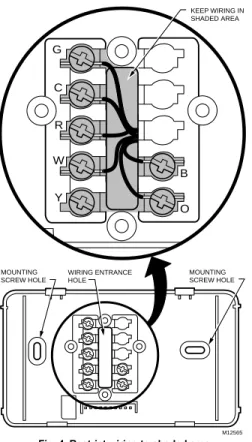
NOTE: To ensure proper mounting of thermostat, restrict all wiring to the shaded area in the center of the terminals. See Fig. 4.
TERMINAL SCREW
M12564 G
R C
Y W
B
O FOR STRAIGHT
INSERTION STRIP 5/16 IN. (8 MM)
FOR WRAPAROUND STRIP 7/16 IN. (11 MM)
KEEP WIRING IN SHADED AREA MOUNTING SCREW HOLE MOUNTING SCREW HOLE WIRING ENTRANCE HOLE M12565 G R C Y W B O
Fig. 4. Restrict wiring to shaded area. The T8001 Thermostat is powered directly from the system transformer and is adaptable to most 18 to 30 Vac heating-cooling systems. All T8001 Thermostats require a common wire to supply power. Refer to Fig. 5 - 8 for typical wiring hookups.
L1 (HOT) L2 FAN RELAY HEAT RELAY COMPRESSOR CONTACTOR TRANSFORMER HEAT DAMPER COOL DAMPER
1 POWER SUPPLY. PROVIDE DISCONNECT MEANS AND OVERLOAD PROTECTION AS REQUIRED.
2 2 1 Y G C W 2 R B O T8001 THERMOSTAT
Fig. 6. Typical wiring diagram for T8001 on a zone 1 MABS II or Masterol™ control panel.
Fig. 7. Typical wiring diagram for T8000 in heat-cool system with one transformers.
Y G Rc W 2 4 R B O L1 (HOT) L2 FAN RELAY HEAT RELAY L1 (HOT) L2 COMPRESSOR CONTACTOR HEATING TRANSFORMER COOLING TRANSFORMER HEAT DAMPER COOL DAMPER
1 POWER SUPPLY. PROVIDE DISCONNECT MEANS AND OVERLOAD PROTECTION AS REQUIRED.
REMOVE RC TO R JUMPER WHEN INSTALLED ON A TWO TRANSFORMER SYSTEM.
CAN BE USED FOR CHANGEOVER VALVE ON SINGLE-STAGE HEAT PUMP SYSTEMS. 2 3 3 1 1 3 L1 (HOT) L2 M12561 FAN RELAY T8000C THERMOSTAT COMPRESSOR CONTACTOR TRANSFORMER COOL DAMPER
1 POWER SUPPLY. PROVIDE DISCONNECT MEANS AND OVERLOAD PROTECTION AS REQUIRED.
CAN BE USED FOR CHANGEOVER VALVE ON SINGLE-STAGE HEAT PUMP SYSTEMS.
JUMPER R TO Rc. 2 2 2 1 Y G Rc W 3 R B O HEAT RELAY HEAT DAMPER 3 T8 T7 T6 T5 O1 G1 B1 E1 T4 M1 ZONE 1 CHANGEOVER CONTROL M12567 Y G C W R B O
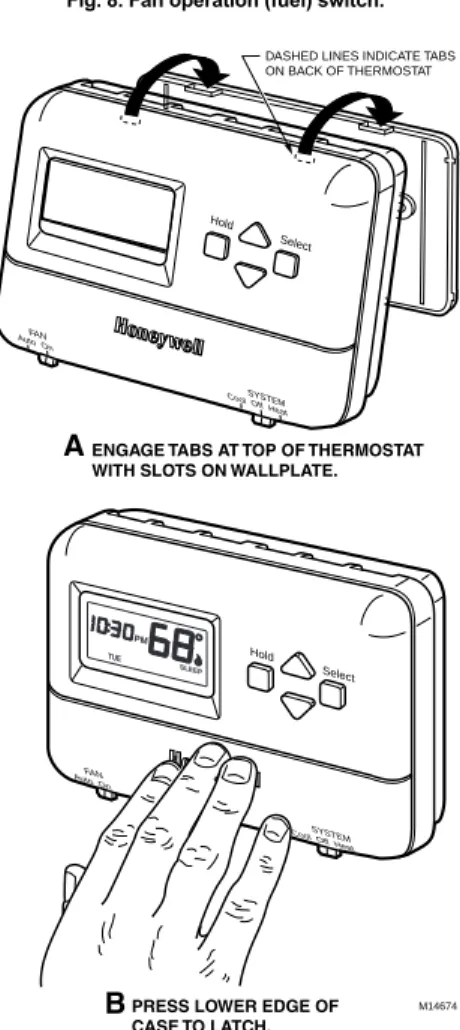
Fig. 9. Mounting thermostat to wallplate.
Mounting Thermostat to Wallplate
1. Slide SYSTEM switch to the Off position. 2. Engage the tabs at the top of the thermostat and
wallplate.
3. Swing down the thermostat and press the lower edge of the thermostat onto the wallplate to latch. See Fig. 9.
INSTALLER SETUP
Setting
°
F/
°
C Indication and
Heat Cycle Rate
The following instructions provide the information neces-sary to change the heating cycle rate to match the heating equipment and to choose either Fahrenheit (°F) or Celsius (°C) display.
NOTE: All four steps must be completed to save changes to the °F/°C indication and the heat cycle rate.
1. Enter Installer Setup. a. Use ▲or ▼ keys
to set the tempera-ture setpoint to 52°F (11°C).
b. Press the ▲and ▼ keys simultaneously for more than two seconds to enter installer setup.
c. When released, the three-digit software revision code is displayed. d. Press the ▲ key.
Factory configuration (FC) is displayed (A typical example is shown, but
information displayed varies by model. This information is for factory use only).
Optional System Checkout
When in steps 1c and 1d only, pressing the ▼ key can be used to turn heat or cool outputs on and off. Change the SYSTEM switch setting to test heat or cool outputs. No action takes place If the system switch is in the Off position.
Examples: System setting at HEAT: If heat is on, pressing the ▼ key turns it off; if heat is off, pressing the ▼ key turns it on.
System setting at COOL: If cool is on, pressing the ▼ key turns it off; if cool is off, pressing the ▼ key turns it on. The 5 minute minimum off time is bypassed.
M12582A SET
HT.
M12583A
M12584A
M14674 DASHED LINES INDICATE TABS ON BACK OF THERMOSTAT
ENGAGE TABS AT TOP OF THERMOSTAT WITH SLOTS ON WALLPLATE.
PRESS LOWER EDGE OF CASE TO LATCH.
A
B
SYSTEM
Cool Off Heat Auto OnFAN
Hold Select
SYSTEM
Cool Off Heat Auto OnFAN
Hold Select TUE
PM
M12580 FAN OPERATION (FUEL) SWITCH
F E
Setting Fan Operation (Fuel) Switch
The fan operation (fuel) switch is preset at the factory in the F position. See Fig. 9. This is the correct setting for most systems. If this system is an electric heat system, set the switch to the E position. The E setting allows the fan to turn on immediately with the heating or cooling equipment in a system where the G terminal is connected.NOTE: In installer setup only, each press of the ▲ key momentarily displays 1. Each press of the ▼ key momentarily displays 2. When the keys are released, these one-digit codes are no longer displayed.
2. Setting °C or °F. a. Press the ▲ key
again to display the current setting. b. Press the ▼ key to change the °C or
°F indication.
3. Setting Heat Cycle Rate
(see Table 2 for the cycle rate options and equip-ment).
a. Press the ▲ key to display the current heat cycle rate setting of 1, 3, 4, 5, 6, 9, or 12 cph.
b. If the desired cycle rate is displayed, press the
▲ key to exit the installer setup. c. To change the
heat cycle rate, press the ▼ key until your choice of 1, 3, 4, 5, 6, 9, or 12 is displayed. d. Press the ▲ key to
display cooling algorithm configu-ration default. e. Press the ▲ key
again to change
cooling algorithm to C1 or C3. C1 = Standard cooling algorithm. C3 = Agressive cooling algorithm (can
cause overshooting).
f. Press the ▲ key again. Current configuration (CC) is displayed. A typical example is shown, but CC varies by
model. (This information is for factory use only.) 4. Exit Installer
Setup. a. Press
the ▲
key to save all changes
and return to normal operation.
M12586A M12587A
M12588A
M12589A
M12590A PM
OPERATION
Setting FAN and SYSTEM Switches
Fan and system settings are controlled manually by using the switches located at the bottom of the thermostat case. See Fig. 11.FAN Switch
Fan switch settings are:
On: The fan runs continuously. Use for improved air circulation and air quality.
Auto: Normal setting for most homes. In cooling, the fan starts and stops with the cooling equipment. In heating, the fan is controlled directly by the heating equipment and may start a few minutes after the heating equipment turns on (most systems). When the fan operation (fuel) switch is in the E position, the fan starts and stops with the heating equipment. Slide the FAN switch in the lower left corner of the thermostat to select the desired fan setting.
SYSTEM Switch
System switch settings control thermostat operation as follows:
Cool: The thermostat controls the cooling system. Off: Both heating and cooling are off.
Heat: The thermostat controls the heating system. Slide the SYSTEM switch in the lower right corner of the thermostat to select the desired system setting.
System Cycles Per Hour
Steam, Gravity 1
Hydronic Heat, Condensing
Gas Furnacesa 3
Gas or Oil Forced Air 6
Electric Heat 9
Special Applicationsb 12
aHigh efficiency furnace (90+).
bRefer to the equipment manufacturer’s Instructions.
M14691
M14692
Auto OnFAN
Hold Select
TUE PM
CHECKOUT
Heating
1. Slide the SYSTEM switch to Heat and the FAN switch to Auto.
2. Press and hold the ▲ key to raise the temperature setting several degrees above the room tempera-ture; the heating equipment should start. In conven-tional systems, the system turns on the fan through the use of a time delay relay or through a limit control. When the fan operation (fuel) switch is in the E position, the fan starts immediately.
3. Press the ▼ key to lower the temperature setting below the room temperature. Heating equipment should stop.
Cooling
CAUTION
Damage To compressor possible.
Operating at too low of an outdoor temperature may cause compressor damage.
Do not operate cooling if outdoor temperature is below 50°F (10°C).
Allow compressor to remain off for five minutes before restarting.
Refer to manufacturer’s recommendations. 1. Slide the SYSTEM switch to Cool and the FAN
switch to Auto.
2. Press the ▼ key to lower the temperature setting several degrees below the room temperature; the cooling equipment should start. The fan starts and stops with the cooling equipment.
NOTE: If unit doesn’t start immediately, remember, the thermostat has a built-in minimum off-time of five minutes to protect the compressor.
3. Press the ▲ key to raise the temperature setting above the room temperature. Cooling system should shut down.
Fan
1. Slide the SYSTEM switch to Off and the FAN switch to On. The fan should run continuously.
2. Slide the FAN switch to Auto. In heating, the fan is controlled directly by the heating equipment and may start a few minutes after the heating equipment turns on (on most systems). When the fan operation (fuel) switch is in the E position, the fan starts and stops with the heating equipment. In cooling, the fan starts and stops with the cooling equipment. Make certain all equipment responds correctly to the thermostat.
Period Time Heat Setpoint Cool Setpoint Wake 6:00 AM 70°F (21°C) 78°F (26°C) Leave 8:00 AM 62°F (17°C) 85°F (29°C) Return 6:00 PM 70°F (21°C) 78°F (27°C) Sleep 10:00 PM 62°F (17°C) 82°F (28°C)
Honeywell Limited-Honeywell Limitée 35 Dynamic Drive
Scarborough, Ontario M1V 4Z9 Automation and Control Solutions
Honeywell
1985 Douglas Drive North Golden Valley, MN 55422
M12591A SET
PM
M12592A SET
PM
M12593A
M12594A
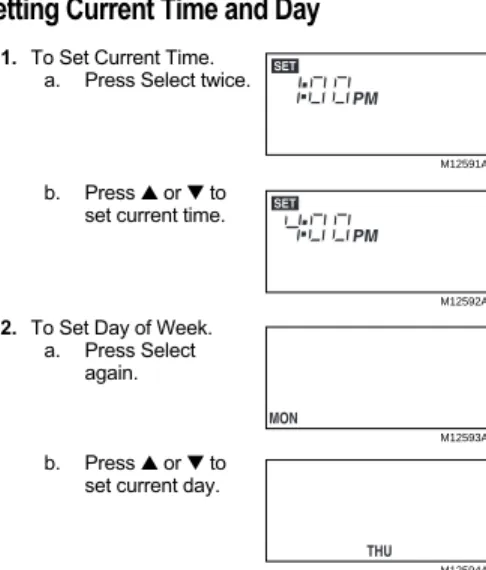
Setting Current Time and Day
1. To Set Current Time. a. Press Select twice.
b. Press ▲ or▼ to set current time.
2. To Set Day of Week. a. Press Select
again.
b. Press ▲ or▼ to set current day.
To use the preprogrammed time and temperature (see Table 3) press Hold to exit the programming mode.
Setting Time and Temperature
The T8001C is preprogrammed with the time and tem-perature settings shown in Table 3. For instructions on programming the thermostat refer to the Owners Guide, Form No. 69-1143.
Table 3. Preprogrammed Time and Temperature Settings.
![Fig. 1. Typical location of thermostat.5 FEET[1.5 METERS]YES NONONO M11338 M12202WALLWALL ANCHORS (2)WALLPLATEMOUNTING SCREWS (2)](https://thumb-us.123doks.com/thumbv2/123dok_us/8496414.2271213/2.594.42.548.72.608/typical-location-thermostat-meters-nonono-wallwall-anchors-wallplatemounting.webp)