Atsuji Ogasa Hiroyuki Maesaka Kiyotaka Sakamoto Sadanori Otagiri
Visualization technology makes images or videos from the results of numerical computations performed by supercomputers. To visualize the results of parallel computation on a super-large scale of a few to a few tens of thousands of parallel processes, processing in which bulky computation result data are rendered at high speeds is required. The conventional method of transferring computation result data to a visualization server may give rise to many challenges that are difficult to meet such as reassembly and transfer of extensive amounts of computation result files. This paper presents technologies for solving these challenges to visualize super-large-scale computations performed by the K computer and the results of applying those technologies.
1. Introduction
The results of numerical computations performed by supercomputers are obtained as a series of digital numerical data on scales that have recently come to exceed one billion. Computer graphics (CG) can be used to render these numerical data as images or videos to help people intuitively understand them, which is a technology called visualization.
This paper presents solutions to challenges for visualizing super-large-scale computation results with the K computernote)i and the
technologies applied.
2. Challenges in visualization
of large-scale parallel
computation
Generally, visualization is achieved by
note)i “K computer” is the English name that RIKEN has been using for the supercomputer of this project since July 2010. “K” comes from the Japanese word “Kei,” which means ten peta or 10 to the 16th power.
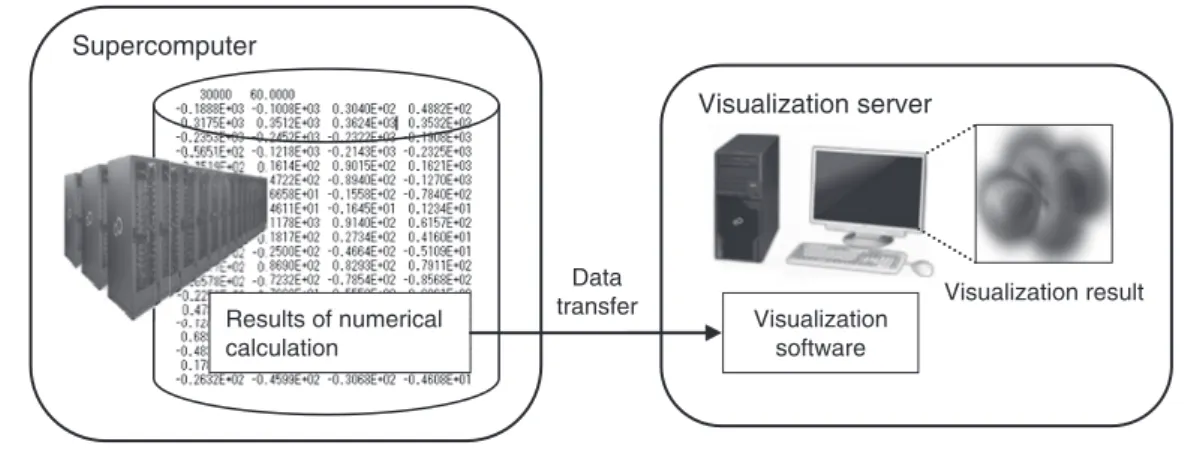
transferring the numerical data computed on numerical computation results obtained by a supercomputer to a visualization server, in which visualization software is used, as shown in Figure 1. The number of parallel processes performed in a server is often one to about a dozen. In the past, numerical computations were usually performed in a supercomputer on scales of a few tens to a few hundreds of parallel processes. And, for visualization, the obtained data on numerical computation results were reassembled into one to about a dozen files depending on the number of parallel processes performed by the visualization server. In the K computer, however, numerical computation takes place on scales of a few to a few tens of thousands of parallel processes. Reassembling the resultant data for visualization takes a tremendous amount of time and trouble, and the extensive size of the reassembled files give rise to challenges:
1) Too much transfer time is required to move the computation result data to the
visualization server. For example, the fi le size of double precision scalar data with computational grid points of the cube of 40963 is about 550 Gbytes, which requires
at least one hour for transfer even with a 1000BASE-T network.
2) Even if the computation result data are successfully transferred, the visualization server has insuffi cient memory to store the computation result data. For example, the memory size of PC workstations, which are often used as visualization servers, is only up to 192 Gbytes and the 550-Gbyte data mentioned above cannot be stored even if they are converted into single-precision data.
3) Thinning grids out from computation result data at regular intervals so as to reduce the fi le size may cause important information to be lost. Appropriate thinning requires the characteristics of each type of data to be taken into consideration, and this cannot be handled in a general manner.
In this way, with large-scale parallel computations such as those performed by the K computer, there is a problem that the conventional visualization technique of reassembling computation result data for transfer to the visualization server cannot be employed.
3. Visualization library of the K
computer
The fundamental cause of the challenges in visualizing the results of computations with the K computer is that computation result data are diffi cult to transfer and reassemble. The cause of these challenges can be removed by the following approaches.
1) Eliminating the need to transfer computation result data by visualizing on a node of the K computer
2) Eliminating the need to reassemble computation result data by visualizing with the same number of parallel processes as the computation
In general, visualization processing is often performed while interactively changing parameters as in the sweeping of a cross-section position or iso-surface value. On a node of the K computer, however, even visualization processing must be performed as a batch job for operational reasons. For that reason, volume rendering,1)
which is suitable for grasping at a glance the physical quantity distribution in the entire 3D computational space without interactive processing such as cross-section sweeping, is employed as a visualization technique for the present development.
Based on these approaches, we have developed visualization software that uses
Figure 1
Concept of visualization.
Data transfer
Visualization server Supercomputer
Results of numerical calculation
Visualization result Visualization
volume rendering, which effi ciently runs on a node of the K computer even with the number of parallel processes on a scale exceeding thousands and a visualization library that includes tools for assisting use of the visualization software.
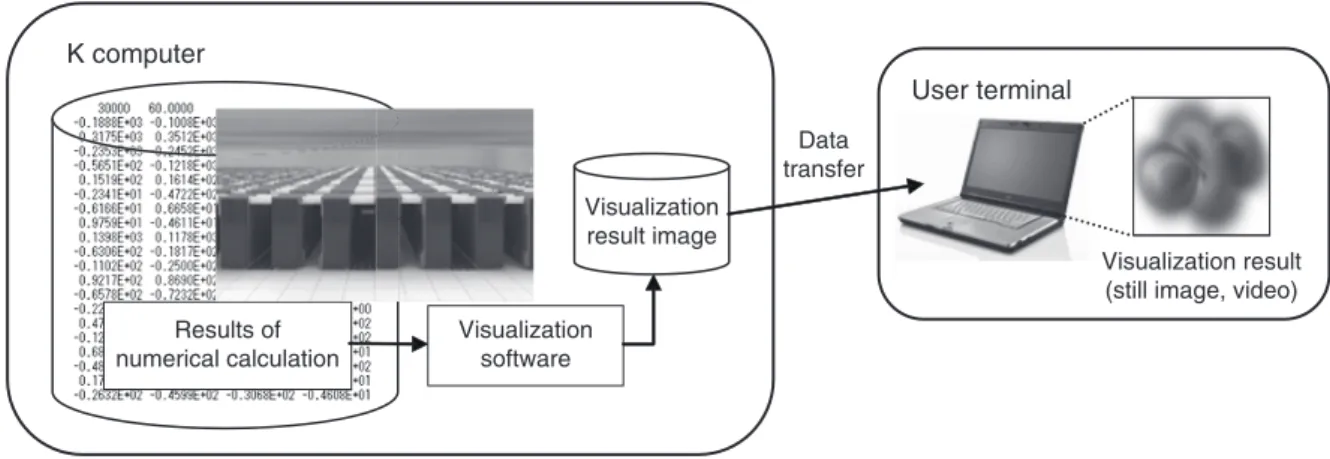
Figure 2 shows the concept of visualization
with the K computer. Data on the results of numerical computations are visualized on a node of the K computer and the result of visualization is output as an image fi le in JPEG or some other format. The size of the image fi le depends on the resolution of the image regardless of the number of computational grid points, and is as small as a few hundred Kbytes to a few Mbytes in many cases, which means that the result of visualization can be easily transferred to the user’s terminal for viewing.
As interfaces for passing the computation result data to the visualization library, we have prepared program and fi le interfaces.
A program interface calls an application programming interface (API) with C or FORTRAN from the user program. Table 1 shows the APIs and data structures of the visualization library. A program interface can be used in two ways:
3.1 Program interface
1) To call an API from the program to read the
computation result data.
2) To call an API from the numerical computation program.
One good point of the former is that visualization can be achieved without modifying the numerical computation program. An example of program coding based on 1) is shown in Figure 3.
The latter is advantageous in that the data in the memory can be directly visualized, which eliminates the data transfer cost from reading fi les and makes it easier to visualize the process of computation.
3.2 File interface
A fi le interface is intended for directly reading the computation result data. File interfaces are already prepared for some fi elds of numerical computation performed by the K computer. Simply by outputting computation result data in a format compatible with the fi le interface, the user can directly read the computation result data to the visualization library for visualization without having to use APIs to create a program.
An image of using the visualization library through program and fi le interfaces is shown in Figure 4.
As tools to help people use visualization
Figure 2
Concept of visualization with the K computer.
Data transfer
User terminal K computer
Results of numerical calculation
Visualization result (still image, video) Visualization
software
Visualization result image
software, we have prepared a command library and file splitter tool. The command library is a tool for creating a visualization parameter file that stores the point of view information and transfer functions for volume rendering. It is implemented as an interpreter by Python and runs on the login node of the K computer. The file splitter tool, which is used when the computation result is output as a single file, is intended for splitting the file into an arbitrary number of files for the purpose of efficient parallel visualization.
4. Visualization software for
massively parallel processes
To provide visualization software that works with massively parallel processes, we haveimplemented volume rendering with a target of achieving a parallelization efficiency of 80% or higher on a scale of 1000 parallel processes. The existing methods of implementing parallelization by volume rendering include parallelization for each pixel to be rendered and parallel volume rendering for split computational domains in order to composite rendered sub-images and Table 1
APIs and data structures of visualization library.
Common API Description
CPBR_Init Initializes PBVR
CPBR_Get_imageinfo Acquires composite image information
CPBR_Run Runs PBVR
CPBR_Finalize Finalizes PBVR
CPBR_OutputJpeg Outputs visualization result as a JPEG file CPBR_OutputPng Outputs visualization result as a PNG file
API for structured
grid data definition Description CPBR_Init_array_info Initializes a structure that stores
structured grid data parameters CPBR_Set_array_info Registers a structure that stores structured grid data parameters with
PBVR
API for unstructured
grid data definition Description CPBR_Init_ucd_info Initializes a structure that stores
unstructured grid data parameters CPBR_Set_ucd_info Registers a structure that stores unstructured grid data parameters
with PBVR
Viewer operation API Description CPBR_Set_view Rotates an object around the specified axis
Structure for structured grid data: s_PBR_array_info
Member name Type Description
extent float[2][3] Specification of existence domain of entire model
datatype int Data type
datasize int[3] Grid size coordtype int Coordinate type coord float * Coordinate data data void * Visualization data Structure for unstructured grid data: s_PBR_cell_info
Member name Type Description
extent float[2][3] Specification of existence domain of entire model
node.n int Number of nodes
node.datatype int Data type
node.data void * Visualization data (node) node.coord float * Coordinate data
cell.datatype int Data type (common to all elements) cell.n_tet int Number of tetrahedral elements cell.c_tet int * Tetrahedral element connection
information
cell.d_tet void * Tetrahedral element data value cell.n_pyr int Number of pyramidal elements cell.c_pyr int * Pyramidal element connection information cell.d_pyr void * Pyramidal element data value cell.n_prism int Number of triangular prism elements cell.c_prism int * Triangular prism element connection information cell.d_prism void * Triangular prism element data value cell.n_hex int Number of hexahedral elements cell.c_hex int * Hexahedral element connection
information
Figure 3
Example of coding with APIs.
Figure 4
Interfaces for using visualization library.
Note: In the original code, the part that follows the double slash “//” is written in Japanese.
API PBVR
Image file
Program interface
Command library for parameter generation
K computer Login node
Computation code
Computation result
Visualization parameters
Image file
PBVR
Login node K computer
Visualization parameters
File interface
Computation result
File read program
File splitter
tool Command library for parameter generation
create an entire image. However, parallelization for each pixel requires inter-node communication between computation nodes to which the cells to be visualized that are sorted along with the line of sight penetrating the pixel are distributed, resulting in lower efficiency with massively parallel processes. In the method of parallelization for each split computation domain, sub-images must be composited by each pixel in order from the point of view toward the far side so as to obtain the penetration effect. This means that inter-node communication may be necessary in some cases to judge the order of images. It also means that, depending on how
the computation domain is split, one of the split domains may have another domain inserted before or after along the direction of the line of sight. These things may make it hard for people to judge the order. In this case, the data on numerical computation results must be further split until it becomes possible to judge the order before visualization can be performed.
Accordingly, we have adopted particle-based volume rendering (PBVR)2) developed by the
Koyamada Laboratory of Kyoto University as a general-purpose volume rendering technique for massively parallel processes. Figure 5 shows a processing block diagram of PBVR. For PBVR,
Compositing Rank 0
Final image Sub-image
Repeat by number of cells
Rank
Data type conversion Vertex coordinates geometric transformation
Data gradien computation Computation of number
of generated particles
Particle generation
Particle projection Data type conversion
Vertex coordinates geometric transformation
Data gradient computation Computation of number
of generated particles
Particle generation
Particle projection
Compositing Sub-image
Repeat by number of cells
n-1
Figure 5
parallelization is performed for each cell enclosed in a computation grid, rather than each pixel or split domain. While the amount of computation required for cell rendering is larger than with the existing techniques, the rendering process for each cell can be carried out independently without inter-node communication, which makes it suitable for massively parallel processes. In addition, compositing in PBVR is performed not for each pixel but for each subpixel resulting from pixel splitting, which eliminates the need to consider the order of rendering to obtain the penetration effect. Consequently, no inter-node communication for judging the order takes place and there is never a case in which the order cannot be judged.
Meanwhile, visualization in a massively parallel environment is known to cause a large amount of inter-node communication due to compositing, which decreases the processing efficiency, even if the cell rendering efficiency is improved.3) As compositing techniques, the
direct send and binary swap methods have widely been used up to now. The former is applicable to an arbitrary number of parallel processes and easy to implement but inter-node communication causes a bottleneck with massively parallel processes, leading to a serious degradation in speed. The latter features a low communication cost but is only applicable to the number of parallel processes that is a power of two. Numerical computation is not necessarily performed by parallel processes in a number that is a power of two and the binary swap method does not suit the purpose of visualizing without reassembling the result data. For the present development, the 2-3 swap method,4) which
is an improvement of binary swap to make it applicable to an arbitrary number of parallel processes, has been adopted and implemented as a compositing technique.
5. Estimation of visualization
library performance
We have estimated the performance of the visualization library with regard to large-scale data on parallel computation results. First, we used scalar data on grid points of a Cartesian grid with a computational space resolution of 1024 × 1024 × 900 (approximately 900 million cells) as inputs and used the K computer to measure the processing performance of generation of a volume-rendered image with a resolution of 1024 × 1024 with 1000 and 2000 parallel processes. Based on the result of this measurement, we estimated the visualization time for large-scale data with a computational space resolution of 4096 × 4096 × 3600 (approximately 60.4 billion pixels) with the number of parallel processes changed from 1000 up to 80 000. The result of the estimation is shown in Figure 6. With data of this scale, the visualization time is estimated to be almost linearly reducible with up to 20 000 parallel processes and, with over 20 000 parallel processes, visualization is estimated to be achievable in an almost constant time. We expect to achieve the purpose of the development as shown below.
• By visualizing large-scale data on the compute nodes it becomes unnecessary to transfer a large amount of data to the visualization server.
• By conducting visualization in a parallel environment it becomes unnecessary to rebuild the data.
• To work efficiently in a massively parallel environment on a scale of several thousands to several tens of thousands of parallel processes in the K computer.
6. Future challenges
We plan to measure the visualization performance with the visualization library on a scale of a few tens of thousands of parallel processes in line with the expansion of the system scale of the K computer to verify the estimation
result. We also intend to select some cases of massively parallel large-scale computation actually performed by the K computer to test the application of the visualization library, thereby developing an environment and tools for making the library even easier to use.
7. Conclusion
We have identified challenges and developed a visualization library to solve them. The K computer has been used to measure the visualization time with the visualization library, and the visualization time in a massively parallel environment has been estimated. In this way, we have verified that the result of massively parallel large-scale computation can be visualized by using the visualization library.
Lastly, we would like to extend our sincerest gratitude to Mr. Motoyoshi Kurokawa of RIKEN, who offered assistance and discussed implementing the visualization library in the K computer.
References
1) R. A. Drebin et al.: Volume Rendering. Computer
Graphics, Vol. 22, No. 4, SIGGRAPH ’88,
pp. 65–74, 1988.
2) N. Sakamoto et al.: Improvement of particle-based volume rendering for visualizing irregular volume data sets. Computers & Graphics, Vol. 34, No. 1, pp. 34–42 (2010).
3) J. Nonaka et al.: Performance Evaluation of Sort-Last Image Compositing in a Massively Parallel System. Proceedings of the Symposium on Computational Fluid Dynamics (CDROM). (in Japanese) No. 22, Research Paper No. B4-1,
2008.
4) H. Yu et al.: Massively Parallel Volume Rendering Using 2-3 Swap Image Compositing,
Proceedings of IEEE/ACM Supercomputing 2008
Conference, 1-11.
Figure 6
Estimated visualization time for 60.4 billion cells.
Processing time (s)
Number of parallel processes
200 180 160 140 120 100 80 60 40 20 0
Atsuji Ogasa
Fujitsu Ltd.
Mr. Ogasa is currently engaged in development of applications for visualization in the field of scientific computation.
Hiroyuki Maesaka
Fujitsu Systems East Ltd.
Mr. Maesaka is currently engaged in development of applications for visualization in the field of scientific computation.
Kiyotaka Sakamoto
Fujitsu Systems East Ltd.
Mr. Sakamoto is currently engaged in development of applications for visualization in the field of scientific computation.
Sadanori Otagiri
Fujitsu Systems East Ltd.
Mr. Otagiri is currently engaged in development of applications for visualization in the field of scientific computation.