Smart Home Automation Using Lab View Lab
Rafiya Begum1, Zakeer Husain2, S.V.Halse3
Lecturer, Dept of EEE, Government Polytechnic, Vijayapur, Karnataka, India1
Lecturer, Dept of EEE, Government Polytechnic, Vijayapur, Karnataka, India2
Professor, Dept. of Electronics Akkamahadevi Woman’s University, Vijayapur, Karnataka, India3
ABSTRACT: The proposed system is to present an automation methodology based on LabVIEW replacing the actual
hardware processing platform which offers flexibility in offering need based services for the user. Home automation gives us the access to control devices in home from a mobile device anywhere in the world. This describes homes in which lights, appliances, electrical outlets, heating and cooling systems are hooked up to a remotely controllable network. This also includes alarm system, and all of the doors, windows, locks, smoke detectors. Thus the sophisticated, remote, secure and authentic management of essentials in home is achieved. Nowadays, a computer and a smart phone is being used in a home, having a considerable source of income. Having included in the flow, these gadgets reduces long term expenses compared to the hardware based systems. We are all busy and home automation may be able to help make things a bit easier for you.
KEYWORDS:Lab View, Home automation, Smart phone.
I. INTRODUCTION
At one point of time, automated central control of building-wide systems was found only in larger commercial buildings and expensive homes. Typically involving only lighting, heating and cooling systems, building automation rarely provided more than basic control, monitoring and scheduling functions and was accessible only from specific control points within the building itself.
The beneficiaries are "smart" devices and appliances that can be connected to a local area network. The electrical systems and even individual points, like light switches and electrical outlets can also be integrated into home automation networks and evolved to the potential of IP-based inventory tracking.
Automation refers to the ability to program and schedule events for the devices on the network. The programming may include time-related commands, such as having the lights turn on or off at specific times each day. It can also include non-scheduled events, such as turning on all the lights in home when the security system alarm is triggered.
We can come up with any number of useful and creative solutions to make our life better.
Is that west-facing window letting in too much light?
- Plug motorized blinds into a "smart" outlet and program it to close at noon each day.
Do you have someone come by at the same time each day to walk the dog?
- Program home automation system to unlock the front door for them, and lock it up again when they're done.
The most important thing in home automation is remote monitoring and access. While a limited amount of one-way remote monitoring has been possible for some time, it's only since the rise in smartphones and tablets that we've had the ability to truly connect to our home networks while we're away.
from severe weather alerts to motion detector warnings to fire alarms. The user can also get notified for more mundane events, such as programming the "smart" front door lock to let us know when the user’s child returns home from school. Ideally, anything that can be connected to a network can be automated and controlled remotely. In the real world (outside of research labs and the homes of the rich and famous), home automation most commonly connects simple binary devices. This includes "on and off" devices such as lights, power outlets and electronic locks, but also devices such as security sensors which have only two states, open and closed.
Where home automation becomes truly "smart" is in the Internet-enabled devices that attach to this network and control it. The classic control unit is the home computer, for which many of the earlier home automation systems were designed. Today's home automation systems are more likely to distribute programming and monitoring control between a dedicated device in the home, like the control panel of a security system, and a user-friendly app interface on a smartphone or tablet. For the time being, the home security providers have focused on the most critical and useful parts of a connected home.
One clear advantage of home automation is the unmatched potential for energy savings, and therefore cost savings. The thermostat is already "smart" in the sense that it uses a temperature threshold to govern the home's heating and cooling system. Thermostats can also be programmed with different target temperatures in order to keep energy usage at a minimum during the hours when there is less benefit from the heating and cooling.
With more flexible home automation systems, electrical outlets or even individual devices can also be automatically powered down during hours of the day when they're not needed.
This paper presents smart house controlled by LabVIEW that controls main system. The main system consists certain modules connected to LabVIEW software as the main controller for these systems. The fire alarm system used in announcing the outbreak of a fire and work to extinguish the fire, and burglar alarm system that signals the occurrence of a burglary. Next subsystem is lighting system that include the control of lighting of the house. Temperature system for air conditioner controlling. Door locking and water level indication is also performed.
II. LITERATURE SURVEY
According to Sleman [1], Smart House is not a new term for science society but is still far more away from people’s vision and audition. This is because although recent various works has been done in designing the general overview of the possible remote access approaches for controlling devices or in cases simulating the Smart House itself [2] by Van Nguyen, and designing the main server by Escoffier [3].
Salvador [4], the design and implementation of an off-the-shelf Smart House remote control application has been limited to simply the computerapplications and just in cases mobile and web applications development [5], Patricio. Jeffrey Travis [6], Smart house can also provide a remote interface to home appliances or the automation system itself, via telephone line, wireless transmission or the internet, to provide control and monitoring via a smart phone or web browser.
LabVIEW is unique because it makes this wide variety of tools available in a single environment, ensuring that compatibility is as simple as drawing wires between functions. LabVIEW itself is a software development environment that contains numerous components [7].
III. PROBLEM STATEMENT
Many home automation systems are based on hardware and offer limited dedicated services and customizing according to customer need is very much impossible. Thus a software based control system is flexible enough to modify the flow as per the current need for the customer.
The hardware platforms needs maintenance and difficult to upgrade to the advanced levels of the requirements. Thus the software based system can be replaced with the upgraded versions to offer advanced services for the user.
The solution is to implement the software processing platform using LabVIEW to get input signals from the sensors to assess the current status of the appliances and to automatically perform the necessary activity as programmed after the user need. Also the flexible control of the connected devices as per the user choice instantly during any point of time.
IV. PROPOSED SYSTEM
The objectives of the proposed system are
To implement software based processing platform using LabVIEW
To integrate the necessary sensors and the appliances to the LabVIEW
To provide secure and authentic approach
Block Diagram
V. METHODOLOGY
controlling signal to house systems and switching output devices. In addition, LabVIEW make the ability to monitor the important operations in the system to the users in order to be informed of the changes in the system. Users can also control the difference systems abilities, and chose the best system that required.
VI. MODULES DESCRIPTION
VI.1. Lighting System
The lighting system consists of Light Dependent Resister (LDR) sensor, a switch and lamp in contact with LabVIEW software program. This system will make light automatically switch ON in the house when the natural light getting dim. LDR also controls brightness of the lamp. The LabVIEW software program user can monitor the system by the LabVIEW front panel monitor screen.
VI.2. Fire Alarm System
The fire detection sensor indicates announcing the outbreak of a smoke or fire in the house. The sensor signal is processed and finally controlled system by LabVIEW. There are many types of sensors which used in fire alarm system. Smoke detector and heat detector are used in the smart house. For fire alarm warning and for control the spread of fire and smoke. We started with using alarm siren to generate a load wailing sound to express the presence of risk.
VI.3. Door Locking
The door locking\unlocking can be performed using a secure password. The locked door can be open only if the set password is input to the system. Only the user will be knowing the secure password which can be used to achieve security.
VI.4. Water level sensor
The automatic monitoring and control of water level in the tank is performed to reduce the risk of tank getting empty or overflow. Avoids manual intervention and reduces efforts for the user.
VI.5. Burglar Alarm System
The design of Burglar alarm system used in smart house system is similar to the design used for fire alarm system. The burglar detection sensor signal exceeding the trigger threshold indicating any danger in the house. The burglar warning is signaled by the LabVIEW by starting the loud sound hooter.
VI.6. Temperature Monitoring
VII. EXPERIMENTAL RESULTS
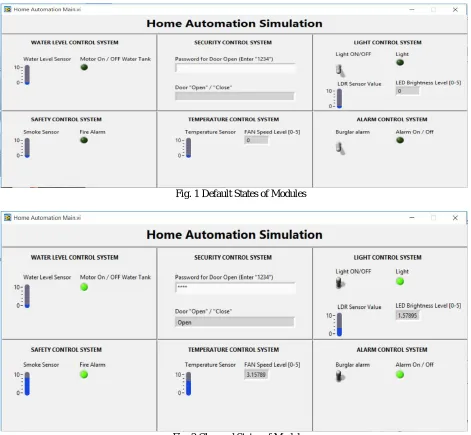
There is a Graphical User Interface developed which gives the control of all the 6 modules mentioned above. It also gives the status of each module to help the user to manage the home effectively in a smart way with less efforts. The GUI is shown in the figure below.
Fig. 1 Default States of Modules
Fig. 2 Changed States of Modules
the LabVIEW on computer which processes the signals and generate the commands to control the necessary devices accordingly. Also the user can offer the commands through the GUI. The changes are then indicated on the GUI accordingly. The future scope is to implement schedulers and notifications to enable more flexible and organized home automation system which makes the user life smarter and easier.
REFERENCES
[1] Sleman, A.; Alafandi, M.; Moeller,”Integration of Wireless Fieldbus and Wired Fieldbus for Health Monitoring”; R.;Consumer Electronics, 2009. ICCE '09. Digest of Technical Papers International Conference on 10-14 Jan. 2009 Page(s):1 - 2
[2] Van Nguyen, T.; Jin Gook Kim; Deokjai Choi, "ISS: The Interactive Smart home Simulator," Advanced Communication Technology, 2009. ICACT 2009. 11th International Conference on , vol.03, no., pp.1828- 1833, 15-18 Feb. 2009
[3] Escoffier, C.; Bourcier, J.; Lalanda, P.; Jianqi Yu, "Towards a Home Application Server," Consumer Communications and Networking Conference, 2008. CCNC 2008.5th IEEE, vol., no., pp.321-325, 10-12 Jan. 2008.
[4] Salvador, Z.; Jimeno, R.; Lafuente, A.; Larrea, M.; Abascal, J.;”Architecture for ubiquitous enviroments” Wireless And Mobile Computing, Networking And Communications, 2005. (WiMob'2005), IEEE International Conference on, Volume 4, 22-24 Aug. 2005 Page(s):90 - 97 Vol. 4.
[5] Patricio, G.; Gomes, L., "Smart house monitoring and actuating system development using automatic code generation," Industrial Informatics, 2009. INDIN2009. 7th IEEE International Conference on, vol., no., pp.256-261, 23-26 June 2009
[6] LabVIEW for Everyone: Graphical Programming Made Easy and Fun, Jeffrey Travis, Jim Kring, Third Edition. Prentice Hall Professional, 2007 ISBN-10: 0131856723.
[7]http://zone.ni.com/devzone/cda/pub/p/id/1141
[8] http://www.ni.com/labview/
[9] Chance Elliott, VipinVijayakumar, Wesley Zink, and Richard Hansen: National Instrument LabVIEW: A programming environment for laboratory automation and measurement, the association for Laboratory Automation, 2007.
[10]Bitter, Rick, TaqiMohiuddin, and Matt Nawrocki “LabVIEW Advanced Programming Techniques “Boca Raton: CRC Press LLC, 2001 [11] LabVIEW User Manual, April 2003 Edition, National Instruments