Volume 4, No. 4, March-April 2013
International Journal of Advanced Research in Computer Science
RESEARCH PAPER
Available Online at www.ijarcs.info
Mining of Different Types of Hidden Knowledge from Log Files
Dr. Hussain k. Al_khafaji Asst. Prof., Software Engineering Dept
Al-Rafidian University College Baghdad, Iraq [email protected]
Wajih Abdul Ghani Abdul Hussain* Computer Science Dept Baghdad University – Science College
Baghdad, Iraq [email protected]
Abstract: Due to the hugeness of information available on the World Wide Web (WWW), extracting novel and useful knowledge from the web has gained significant attention among researchers in web mining. This type of mining has been used in three particular ways, web content mining, web structure mining, web usage mining. This paper is related to web usage mining by using the association rules and suggested algorithms to extract hidden knowledge in the log file.
Extracting these types of knowledge required many of KDD steps such as preprocessing, pattern discovery, and pattern analysis.
After that, the developed Apriori algorithm is adopted to mine the association rules from frequent pages or frequent IPs. The approach discussed in this paper, helps the system administrator and web designers to improve their web site design and helps to improve their website usability and visitor’s browsing experience by determining related link connections in the website.
Keyword: Data mining, web mining, web usage mining, server log file, association rules, developed Apriori algorithm.
I. INTRODUCTION
Web usage mining is the third category in web mining. This type of web mining allows for the collection of Web access information for Web pages. This usage data provides the paths leading to accessed Web pages. This information is often gathered automatically into access logs, referrer logs, agent logs file via the web server. This category is important to the overall use of data mining for companies and their internet based applications and information access. [3]
II. LOG FILE STRUCTURE
Log file is a plain text (ASCII) files which the web server writes information each time a user requests a resource from that particular site[8]. Server log files record the server’s activity, web administrator can use these logs to monitor the server and to help troubleshooting if necessary.[1]
These files are usually not accessible to general Internet users, only to the webmaster or other administrative person [10]. With log file analysis tools, it's possible to get a good idea of where visitors are coming from, how often they return, and how they navigate through a site. Using cookies enables web master to log even more detailed information about how individual users are accessing a site. The user access log has very significant information about a Web server[6]. Figure 1 shows a sample of server log file.
Fig. 1: Sample of Server Log File
A Web server access log contains a complete history of web pages accessed by clients. By analyzing these logs, it is possible to discover various kinds of knowledge, which can be applied to improve the performance of Web services [6].
Log files are containing a record of downloads of web pages and other files. When a web browser requests a page from a web server, such as the web server looking after www.oii.ox.ac.uk, it can add a new line to the end of the log file with information such as the URL of the requested page, the IP address sending the request, and the date and time of the request. Since a web page is typically made up of several files, including the main HTML and embedded images, a request for a web page may result in many lines being added to the web server log file, one for each individual file sent[5]. Traditionally there are four types of server logs:
1. Transfer Log or Access Log. 2. Agent Log.
3. Error Log. 4. Referrer Log.
The first two types of log files are standard. The referrer and agent logs may or may not be “turned on” at the server or may be added to the transfer log file to create an “extended” log file format. Each HTTP protocol transaction, weather completed or not, is recorded in the logs and some transactions are recorded in more than one log.[9]
III. SERVER LOG FILE FORMAT
Web Log File comes in various formats, which vary depending on the configuration of the web server. [9]
A- W3C Extended Log File Format, B- NCSA Common Log File Format, C- IIS Log File Format.
In addition to the three available formats, custom log file format can also be configured. Besides that there are wpbfl2-45.gate.net [29:23:54:15] “GET /default.htm
HTTP/1.0” 200 4889
wpbfl2-45.gate.net [29:23:54:16] “GET /icons/circle logo small.gif HTTP/1.0” 200 2624
two formats which is Common Log File and Extended Common Log File Format, The common log format (CLF or “clog”) is supported by a variety of web server applications and includes the following seven fields:
Remote host field Identification field Authuser field Date/time field HTTP request Status code field Transfer volume field
While the extended common log format (ECLF) is a variation of the common log format, formed by appending two additional fields onto the end of the record, the referrer field, and the user agent field.
Each one of the three formats (state above) has its own fields which it differentiates from other fields, the fields in each format are separated by delimiter character such as space, comma, etc. but all these formats have common fields such as remote host name (IP Address), date and time of request, http request, etc.
A log file in the all format explained above contains a sequence of lines containing ASCII characters. Each line may contain either a directive or an entry. Entries consist of a sequence of fields relating to a single HTTP transaction. Fields are separated by white space or comma or hash. If a field is unused in a particular entry dash "-" marks the omitted field.[7]
IV. DETAILS ON LOG FILE FIELDS
Here we will explain each field in the server log file, depending on the extended log file format which are as follows :- [11]
1) Remote Host Field
This field consists of the Internet IP address of the remote host making the request, such as “141.243.1.172”. If the remote host name is available through a DNS lookup, this name is provided, such as “wpbfl2-45.gate.net.”
2) Identification Field
This field is used to store identity information provided by the client only if the web server is performing an identity check.
3) Authuser Field
This field is used to store the authenticated client user name, if it is required.
4) Date/Time field
This field contains date and time of the request from the user’s browser to the web server.
5) HTTP Request Field
The HTTP request field consists of the information that the client’s browser has requested from the web server. The entire HTTP request field is contained within quotation marks. Essentially, this field may be partitioned into four areas:
the request method,
the uniform resource identifier (URI), the header,
the protocol.
The most common request method is GET, which represents a request to retrieve data that are identified by the URI, Besides GET, other requests include HEAD, PUT, and POST. The uniform resource identifier contains the page or document name and the directory path requested by the client browser. The URI can be used by web usage miners to analyze the frequency of visitor requests for pages and files. For example, the request field “GET /Software.html HTTP/1.0,” representing a request from the client browser for the web server to provide the web page Software.html. The header section contains optional information concerning the browser’s request.
6) Status Code Field
Not all browser requests succeed. The status code field provides a three-digit response from the web server to the client’s browser, indicating the status of the request, whether or not the request was a success, or if there was an error, which type of error occurred. Codes of the form “2xx” indicate a success, and codes of the form “4xx” indicate an error.
7) Transfer Volume (Bytes) Field
The transfer volume field indicates the size of the file (web page, graphics file, etc.), in bytes, sent by the web server to the client’s browser.
8) Referrer Field
The referrer field lists the URL of the previous site visited by the client, which linked to the current page.
9) User Agent Field
The user agent field provides information about the client’s browser, the browser version, and the client’s operating system.
V. DEVELOPED APRIORI ALGORITHM
Developed Apriori algorithm excludes the Apriori’s pruning steps. It does not generate candidate itemsets. It generates an itemset with its tidlist by union and intersection operation respectively. That’s mean any (k+1) itemset can be obtained from the union of any of two its k-itemsets subsets, also its tidlist can be obtained by intersection the tidlists of these two k-itemsets as.
The generated itemset will excluded or regarded as large itemset directly and simply by counting the length of its tidlist. The developed algorithm scans the database only once. It loads the frequent items, i.e., 1-itemsets, and there tidlists and then generates all frequent itemsets from these 1-itemsets without re-scanning the database. It utilizes the concept of vertical database to represent the database. Figure 2 depicts the pseudo code of developed Apriori algorithm.[4]
Fig. 2: pseudo code of developed Apriori algorithm
VI. PROPOSED MINER
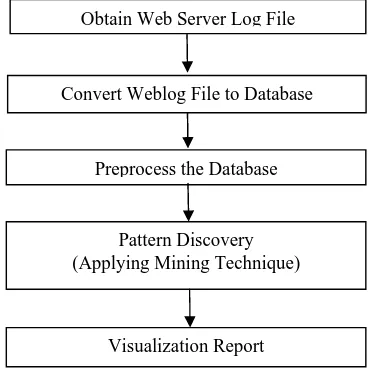
We would like to propose a miner which would discover interesting patterns in the weblog file using developed Apriori algorithm. This miner uses C sharp or C# programming language (which is one of several languages exist in visual studio 2008) as a tool for solving the problems of practical part of the paper, in addition it uses SQL Server 2005 as data repository (database). Figure 3 depicts the phases of this miner.
Fig. 3: operation flow of converting and analysis of log file
1) Obtain Web Server Log File
In this miner, raw log file were collected from the official website of the advanced school of technology in Novi Sad made in November 2009. It exists on the web site http://www.vtsns.edu.rs/maja/insite 2011. The file contains 5989 web requests and it follows extended common log
format for the analysis purposes, this data retrieved from the server needed to be preprocessed. The raw log files consists of 12 attributes such as Client IP,RFC, Auth User, Date & Time, Request Method, URI-Stem, Protocol Version, Status Code, Size in Bytes, Referrer, User Agent. A sample of a single entry log file is displayed in Fig 4.
Fig. 4: Single entry of raw log file follows ECLF
2) Transfer Log File to Database
The selected log file should be converted to database table with designated structure. The conversion process requires knowing of the log file format and the delimiter character which separate among the log file fields. This database contains a table for each format. The algorithm for the converting data from text file to database is given in fig. 5.
Fig. 5: Algorithm for converting text file to database
3) Data Preprocessing
From the technical point of view, Web usage mining is the application of data mining techniques to usage logs of large data repositories. The purpose of it is to produce result that can be used to improve and optimize the content of a site. In this phase, the critical point for successful log mining is data preprocessing which includes:
a) Field Extraction
The log entry, (now exist in database), contains various fields which are not interesting in specified mining operation, for example, the miner will be concern in the fields such as IP address, date and time of request, requested page and referrer fields. According to rule mining, other fields may be important in other mining tasks.
b) Data Cleaning
Data cleaning eliminates irrelevant or unnecessary items in the analyzed data. A web site can be accessed by thousands of users. The records with failed HTTP status codes also may involve in log data. Data cleaning involves extraneous references to embedded objects that may not be important for purpose of analysis, including references to style files(.css), graphics or sound files(.jpg, .gif, .mp3). Therefore some of entries are useless for analysis process that is cleaned from the log files. An 147.91.173.31 - - [16/Nov/2009:00:02:23 +0100] "GET / HTTP/1.0" 200 3669 "-" "Mozilla/5.0 (Windows; U; Windows NT 5.1; sr; rv:1.9.1.5) Gecko/20091102 Firefox/3.5.5"
Obtain Web Server Log File
Pattern Discovery (Applying Mining Technique) Convert Weblog File to Database
Preprocess the Database
Visualization Report Procedure Developed_Apriori ()
1 L1 = {large 1-web page set};
2 k = 2;
3 While Lk-1 do
4 Begin
5 Lk = developed_apriori_gen (Lk--1) 6 k = k + 1
7 End While; 8 End.
Developed_apriori_gen (Lk-1); 9 Ck=
10 For all web pages X Lk-1 and Y Lk-1 do
11 if X1 = Y1 • • • Xk-2 = Yk-2 Xk-1 < Yk-1 then begin 12 C = union(X,Y);
13 CTID =intersect (XTID, YTID); 14 If |CTID|>=minsup Then add C to Lk; 15 Else ignore C;
16 End For;
17 End. Input: Log File Output: Log Table (LT)
Begin
1. Open a DB connection 2. Create a table to store log data 3. Open Log File
4. While not end of log file 5. Read an entry of log file
6. Tokenize the fields depending on delimiter char. 7. Insert all fields into the Log Table (LT)
8. End while
algorithm for cleaning the entries of server logs is presented in figure 6.
Fig. 6: Algorithm for data cleaning
c) User Identification
After all previous steps, now we must recognize and collect each user separately from the others. This recognition will be according to the IP address. The goal of user identification is to reconstruct, from the clickstream data, the actual sequence of actions performed by one user during one visit to the site. We do that to facilitate applying the mining techniques on the log file. d) Session Identification
Session identification splits all the pages accessed by a user into different sessions. Users may have visited the pages for long periods of time. It is necessary to divide the log entries of a user into multiple sessions through a timeout, where if the time between page requests exceeds a certain limit, it is assumed that the user has started a new session. In general, a 30-minute default timeout is considered. Hence the log file, after user identification, may be further divided into sessions for every user. Hence each user’s page visits will be split into one or more sessions.[2]
4) Log File Format to X Format Convertor
In this miner, it is important to note that the different types of log file format will be converted to one log format which we named it (X format), this format contains common and interested fields to mining techniques like IP Address, date, time, URI stem, referrer fields.
5) Applying Association Rules (Pattern Discovery) After all previous steps were explained earlier, the server log file becomes prepare to perform any of mining tasks like classification, clustering, association rules to obtain interested knowledge about user behavior on the web site. In this paper, we will use developed Apriori algorithm as one of association rule methods. In this paper, there are five mining tasks which are:
a- Mine the association rules between IP Address and requested page to find the correlation among these pages where IP Address field will be the TID and the requested page field represents the items.
b- Mine the association rules between requested page and IP Address to find the correlation among these
IPs where requested page field will be the TID and the IP Address field represents the items.
c- Mine the total duration time for each client (IP Address) spent on the website.
d- Mine the most requested page for each visitor. e- Mine the complete path which clarifies the actual
user behavior on the web.
a- Mining Association Rules Between IP and Web page Association rules show relationship among different items. In case of Web usage mining, an example of an association rule is the correlation among accesses to various web pages on a server by a given client.
Association rules are used in order to discover the pages which are visited together even if they are not directly connected, which can reveal associations between groups of users with specific interest. This information can be used for example for restructuring Web sites by adding links between those pages which are visited together. Such association rules are obtained in this step.
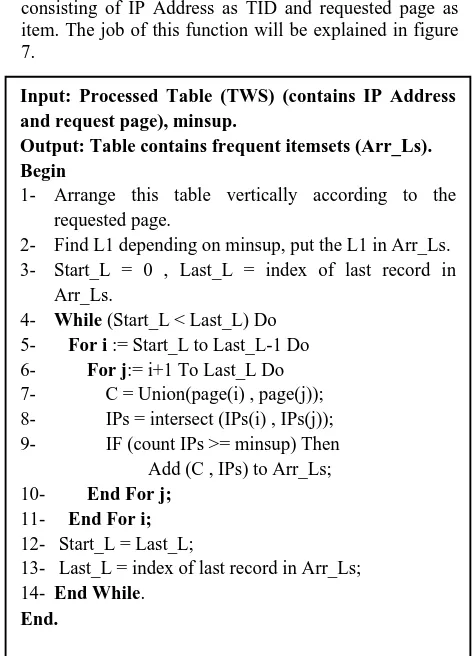
The association rules mining goes by two phases, the first phase is to find the frequent itemsets for the processed database, and the second phase is to find the association rules.
I. Finding Frequent Itemsets
The input of this phase is the minsup and the database consisting of IP Address as TID and requested page as item. The job of this function will be explained in figure 7.
Fig. 7: Algorithm for finding frequent page set in the developed Apriori
In our experimental results, we found that the time required for the finding of frequent itemsets increases whenever the support is low and decreases whenever the support is high. That’s explained in the table 1.
Input: Processed Table (TWS) (contains IP Address and request page), minsup.
Output: Table contains frequent itemsets (Arr_Ls). Begin
1- Arrange this table vertically according to the requested page.
2- Find L1 depending on minsup, put the L1 in Arr_Ls. 3- Start_L = 0 , Last_L = index of last record in
13- Last_L = index of last record in Arr_Ls; 14- End While.
End. Input: Log Table (LT)
Table 1: Time required for multi supports.
Supp (%)
Time Req.
(sec) No. of Lk
No. of Frequent K-web page sets
0.13 552 13 18528
0.19 8 7 1797
0.26 3 6 754
0.33 2 6 437
0.39 2 6 335
0.46 1 6 266
0.53 1 6 215
0.59 1 6 165
0.66 1 5 136
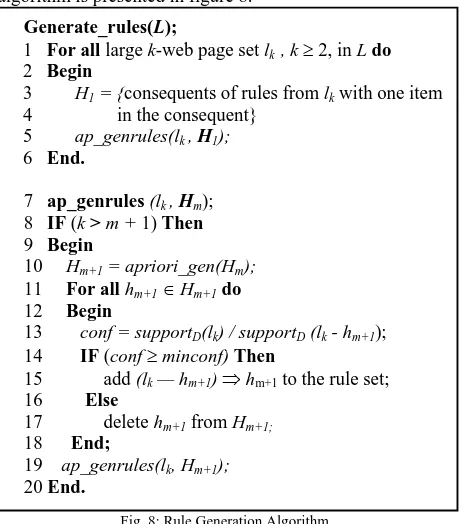
II. Generate Association Rules
The second phase of this task is to find the association rules depending on the frequent itemsets obtaining in the previous phase by developed Apriori algorithm. The input of this phase is the minconf and the database consisting of frequent itemsets (requested page). This phase is accomplished according to Rules generation algorithm; this algorithm is presented in figure 8.
Fig. 8: Rule Generation Algorithm
This rules will be reveal the correlation among pages on the web site http://www.vtsns.edu.rs/maja/insite2011. Table 2 shows part of the association of most frequent web page (/oglasna.php) to other web pages and objects with two interesting measurements support and confidence.
Table 2: Association rules of oglasna.php page with its measures
Rules Supp(%) Conf(%)
/oglasna.php ===> /ispiti.php 3.72 40
/oglasna.php ===> /konsultacije.php 0.99 10.71
/oglasna.php ===> /ispit_rezultati.php 2.79 30
/oglasna.php ===> /vesti.php 1.19 12.85
/oglasna.php ===> /kontakt.php 0.46 5
Table 3 clarifies the number of association rules and time required for generating these rules when the minimum support is 0.19%.
Table 3: Statistics of association rules when minimum support = 0.19%.
Min.
Conf.(%) Time Req.(Sec)
No. of Association Rules
10 11 17622
20 11 14162
30 10 12473
40 9 10290
50 9 9324
60 8 8028
70 8 6953
80 8 5261
90 8 4889
100 7 4775
b- Mining Association Rules Between Web Page and IP This task is exactly in reverse to the previous mining, where this task considers the web page name as TIDs and IP Address as items. The miner will apply the same two phases (finding frequent itemsets and generate association rule) explained in the previous mining. The advantage of this mining is to know the common interests for users (correlation among users).
Table 4 illustrates a sample of association rules for some IP Addresses with their measurements supports and confidences.
Table 4: Association rules of some IP Addresses with itsmeasurements
Rules Occu. Supp
(%) Conf
(%)
147.91.173.31 88.246.63.23 12 0.79 48
188.246.63.230 147.91.173.31 12 0.79 33.33
147.91.173.31 77.239.65.23 8 0.53 32
89.143.229.115 88.246.63.23 8 0.53 80
79.101.144.189 88.246.63.23 8 0.53 66.66 Generate_rules(L);
1 For all large k-web page set lk , k 2, in L do 2 Begin
3 H1 = {consequents of rules from lk with one item 4 in the consequent}
5 ap_genrules(lk , H1); 6 End.
7 ap_genrules (lk , Hm); 8 IF (k > m + 1) Then 9 Begin
10 Hm+1 = apriori_gen(Hm); 11 For all hm+1 Hm+1 do 12 Begin
13 conf = supportD(lk) / supportD (lk - hm+1); 14 IF (conf minconf) Then
15 add (lk — hm+1) hm+1 to the rule set; 16 Else
17 delete hm+1 from Hm+1; 18 End;
79.101.168.25 188.246.63.23 7 0.46 70 88.246.63.230,188.2.177.222
147.91.173.31 7 0.46 53.84
188.2.177.222
147.91.173.31,188.246.63.23 7 0.46 36.84 188.246.63.23,77.105.26.237
188.2.177.222 7 0.46 77.77
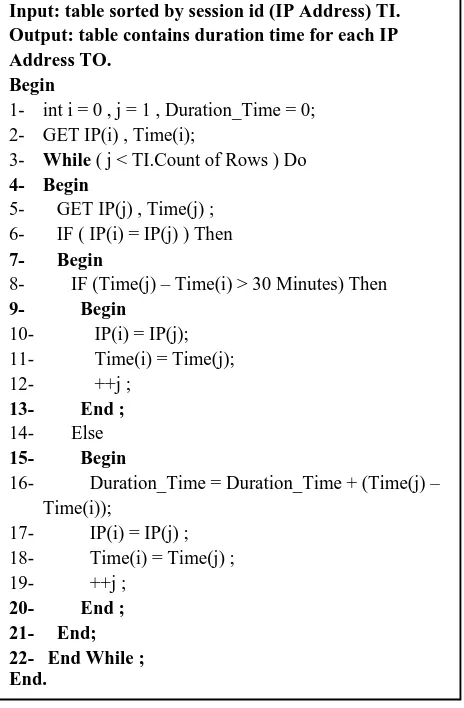
c-Mining the Total Duration Time for Each Visitor Besides applying association rules mining on the server log file, the miner can mine other knowledge from this file. This knowledge represented by mining the total duration time spent by each visitor on the web site. This mining can be obtained by selecting the IP Address and date time fields from processed log table. Figure 9 shows pseudo code of this mining process.
Fig. 9: Algorithm for finding the total duration time for each IP Address.
The duration time which spends on the page is found by calculating the difference between two consecutive times for the same IP address and the same session. If the two consecutive times exceed minimum threshold time gap (30 minutes) then the miner concludes that a new session is created for that IP address. The calculation of duration time for each IP address is done in estimation because the log file don’t record the exit point of the last entry within a session, so the final entry within a session will not considered into calculation.
d- Mining the Most Frequent Page for Each Visitor
Another knowledge obtained from analyzing server log file is finding the interested page for each user (IP Address) where duration time spent on each page will be determined the importance of that page for user but this time must be not exceed the limited time for session (ex.30 min.). To achieve this mining, the miner needs three fields, IP Address, date, time and requested page. Table 5 reveals the most requested page for each user and duration time spent on this page
Table 5: Most requested page for some users in log file
IP Address Most Requested Page
Duration Time on This page
(sec)
147.91.173.31 /smerovi.php 158
77.239.68.36 /VTSINFORMATOR2009.
pdf 584
82.117.202.158 /oglasna.php 4
79.101.52.1 /raspored_predavanja.php 32
94.250.37.167 /ispit_raspored_god.php 4
212.200.210.94 /oglasna.php 27
188.246.63.230 /VTSINFORMATOR2009.
pdf 262
77.105.12.123 /raspored_predavanja.php 337
77.46.204.146 /oglasna.php 146
79.101.207.149 /index.php 548
e- Mining the Complete Path for Each Visitor
One of the most important knowledge in log table is the mining of complete path which the user flows when navigating through web site. This path will clarify the actual user behavior on the web site. To achieve this mining, the miner needs three fields, IP Address, requested page and referrer fields. For example, the access data from an IP address (77.239.68.36) recorded on the log are given in table 6.
Table 6: sample of log database for one IP Address
IP Address URI Stem Referrer
77.239.68.36 /oglasna.php "http://www.vtsns.edu. Input: table sorted by session id (IP Address) TI.
77.239.68.36 /oglasna.php "http://www.vtsns.edu.
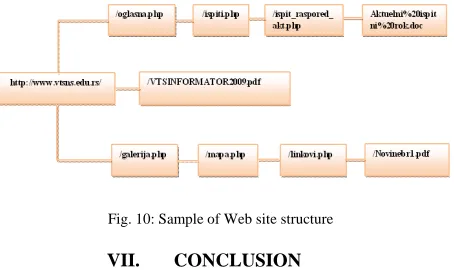
The Complete path For IP Address (77.239.68.36) is
"http://www.vtsns.edu.rs/" ===> /oglasna.php ===> /ispiti.php ===> /ispit_raspored_akt.php ===> /Aktuelni%20ispitni%20rok.doc ===> back ===> "http://www.vtsns.edu.rs/" ===> /oglasna.php ===> /ispiti.php ===> /ispit_raspored_akt.php ===> back ===>
http://www.vtsns.edu.rs/ ===> /VTSINFORMATOR2009.pdf ===> back ===>
"http://www.vtsns.edu.rs/" ===> /galerija.php ===> /mapa.php ===> /linkovi.php ===> /Novinebr1.pdf
From the complete path, the miner can conclude a partial structure for this web site. This structure can be represented as a graph where pages represented as nodes and the hyperlinks are the relations connecting the nodes. The analyst can XORed, ANDed, ORed, etc to find many relationships among the users. Also, graph mathematics and theories can be used to re-engineering the sites. Figure 10 shows a sample of Web site structure.
Fig. 10: Sample of Web site structure
VII. CONCLUSION
This paper used a server log file as a source of data to discover the hidden knowledge by taming the association rules principle to be a technique for web usage mining. Five types of knowledge were extracted from the server log file such as:
1- Applying association rules (between IP Address and page).
2- Applying association rules (between page and IP Address).
3- Mining the total duration time for each visitor. 4- Mining the most frequent page for each visitor. 5- Mining the complete path for each visitor.
This paper produced X-format as a coding step in KDD for the purpose of web usage mining. Also, this paper is concern with the preprocessing which it is the first and critical point of web usage mining, where mining process depending on it enormously. It consumes most of the KDD time. Discovering associations between related pages, most often accessed together. This can help to place the most valuable information (ex. Advertisement objects) on the frequently accessed pages.
The experiment proved that the developed Apriori algorithm is very efficient to mine server log file. This efficiency is proven by assertion of very low value for the minsup such as 0.12%. It is well known that Apriori algorithm failed to reach such minsup value.
After standing the formats of log file, the following fact is concluded that is most of the time, users does not visit the home page of a website, they directly navigate to a particular page by getting the URL from search engines. And this point is regarded as lacking of data related to the server log file.
For the future work, another technique for analyzing server log data can be used like clustering, classification, etc. Also, it is possible to perform several data mining algorithms on log files coming from web servers in order to identify user behavior on a particular web site.
Also, the future will be concerned with the fields in log file that are not concerned in the interest of this work in order to obtain useful knowledge. So according to rule mining, other fields may be important in other mining tasks.
VIII. REFERENCES
[1] Azizul Azhar bin Ramli, “Web Usage Mining For UUM Learning Care Using Association Rules”, M.Sc. thesis, University of Utara Malaysia, 2004.
[2] C.P.Sumathi, R.Padmaja Valli, T.Santhanam , “An Overview of reprocessing of Web Log Files For Web Usage Mining”, Tamil Nadu state, India, Journal of Theoretical and Applied Information Technology. Vol. 34 No.1, 2011.
[3] “Web Usage Mining” topic available on http://www.web-datamining.net web site.
[4] Hussein K. Khafaji, “Pruning Apriori’s pruning steps“, Al-Rafidain University College journal, No. 18, 2004.
[5] Kathryn Eccles, “What are Log Files?” topic, available on Microsoft.oii.ox.ac.uk Web site.
[6] Kiruthika M, Rahul Jadhav, Dipa Dixit, Rashmi J, Anjali Nehete, Trupti Khodkar, “Pattern Discovery Using Association Rules”, Navi Mumbai, India, 2011.
[7] K. Pani, L. Panigrahy, V.H.Sankar, Bikram Keshari Ratha, A.K.Mandal, S.K.Padhi, “Web Usage Mining: A Survey on Pattern Extraction from Web Logs “, India, International Journal of Instrumentation, Control & Automation (IJICA), Volume 1, Issue 1, 2011.
[9] Mohd Helmy Abd Wahab, Mohd Norzali Haji Mohd, Hafizul Fahri Hanafi, Mohamad Farhan Mohamad Mohsin, “Data Pre-processing on Web Server Logs for Generalized Association Rules Mining Algorithm”, World Academy of Science, Engineering and Technology 48, 2008.
[10] Wikipedia the free encyclopedia http://en.wikipedia.org/wiki/HTML