Raspberry Pi- The Innovative Technology
Bhor Ganesh Govind, Mane Kuldip Chandrakant, Prof. Parinita Chate
T.E., Dept. of Computer Engineering Bharati Vidyapeeth Lavale, Pune, India T.E., Dept. of Computer Engineering Bharati Vidyapeeth Lavale, Pune, India Assistant Professor, Dept. of Computer Engineering Bharati Vidyapeeth Lavale, Pune, India
ABSTRACT: Today various papers are publish on the Raspberry Pi. is a basic embedded system and being a low cost
a singleboard computer used to reduce the complexity of systems in real time applications. Raspberry Pi is a credit-card sized computer manufactured and designed in the United Kingdom by Raspberry Pi foundation with intention of teaching basic computer hardware,programming and DIY-Do-it Yourself projects. The Raspberry Pi is a basic embedded system and being a low cost a singleboard computer used to reduce the complexity of systems in real time applications.
KEYWORDS: ARM, SoC , NOOBS, SD, GP, RPi.
I. INTRODUCTION
The Raspberry Pi is a small computer, same as the computers with which you’re already familiar. It uses a many different kinds of processors, so can’t install Microsoft Windows on it. But can install several versions of the Linux operating system that appear and feel very much like Windows. Raspberry Pi is also used to surf the internet, to send an email to write a letter using a word processor, but you can too do so much more. Simple to use but powerful, affordable and in addition difficult to break, Raspberry Pi is the perfect device for aspiring computer scientists [1].
This small computer features amazing HD (high-definition) quality, video playback, also sports high quality audio and has the capability to play 3D games. The device use the ARM processor which does nearly all of the hard work in order to run the Raspberry Pi.
RASPBIAN, PIDORA, OPENELEC, RASPBMC, RISC OS, and ARCH LINUX these are few software’s which are used. All this software’s can be downloaded easily and these are free from the official forum under the NOOBS (new out of the box software) category. It supports Python as the main programming language for functioning and coding. It also supports BASIC, C, C++, JAVA, and Perl and Ruby languages [2].
II. LITURATURE REVIEW
There are a few questions that I constantly ask myself when trying to incorporate game-based and project-based learning. Essentially, how do I create a complex project that mirrors the complexity of the text? How do I incorporate a high level of technology, while making these projects accessible to students? How can I get these students to have fun while learning?These musings, over time, have led me to one place: Raspberry Pi.
This small, single-board computer was invented to aid computer education in the classroom. Its low price makes it instantly accessible to novice users, and its small size lends to extreme portability and modification. Furthermore, the Raspberry Pi often comes preloaded with a variety of Linux distributions, enabling both novice and advanced users to benefit from the device.
By using programs such as Scratch, SonicPi, and Python, and by ordering some LCD screens, we will be able to create our own book-based video games. The students will be able to build an original video game; incorporate text, sounds, student-created graphics, and a unique user interface; create an original housing unit for the system console; and learn in an immersive, collaborative environment.
integrated. Their games will reflect the characters, the story, settings, and evidence found directly within the text. Once the game has been fully developed, the students will mount the LCD screen to the Raspberry Pi, essentially creating a system that is portable and will run the student-created game. Since the Pi is so small, the students then have the ability to build a case around the system. This case will also be directly correlated to the text.
III. HARDWARE SPECIFICATION/SETUP
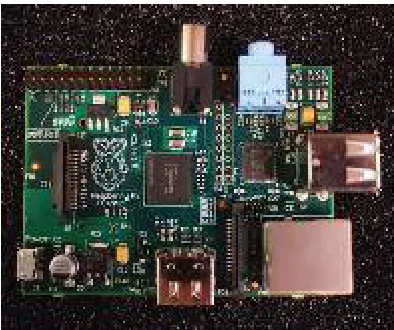
Since the board has been designed by considering curious school children in mind, it’s easy to use. The Raspberry Pi board encompasses a processor and graphics chip, program memory (RAM) and various interfaces, and connectors for external devices. RPi operates in the same way as a standard PC, demanding a keyboard used for command entry, a display unit, a power supply. RPi use a SD Flash memory card generally used in digital cameras, configured in a same as a hard drive used in PC. RPi will ‘load the Operating System into RAM’(boot)from this card in the same way as a PC ‘boots up’ into Windows from its hard disk [5]. The basic
representation is shown in figure 1.
Figure 1: Board representation
Essential components used in RPi hardware are:
SD card having Linux Operating system USB keyboard
TV or monitor having HDMI, DVI, Composite or SCART input Power supply
Video cable suited with the TV or monitor used
Optional components are:
USB mouse
Internet connection, Model A or B: USB Wi-Fi adaptor Internet connection, Model B only: LAN (Ethernet) cable Powered USB hub
Case
IV. INTERFACINGRASPBERRYPI
Following are the steps of connecting RPi given below [5]:
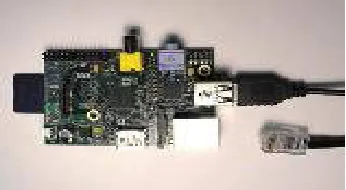
1. Pay attention to the gold connectors on the SD card. These gold connectors must make contact with the gold connectors on the Raspberry Pi.
Figure 2: Making contact of SD card and RPi
2.
Plug in your mouse and keyboard into the USB ports.Figure 3: Connecting mouse and keyboard
3. If you want to connect your Raspberry Pi to the internet or a network you will need to plug in the Ethernet cable.
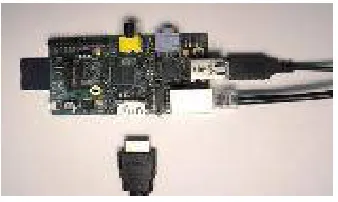
4. If you have a HDMI TV or monitor then you can plug in your HDMI cable into the Raspberry Pi and plug the other end into your TV. If you have a combined video connection on your TV and then goes to step 5. (If your TV/monitor does not have a HDMI port you will need to use an adapter - this will either be a HDMI to DVI or a HDMI to VGA.)
Figure 5: HDMI Cable plugging
5. Insert the merged video connection if you are using a TV that does not support HDMI and plug it into your television.
6. Insert your power cable into the Raspberry Pi power connector.
Figure 6: Connecting Power cable
V. ADVANTAGES AND DISADVANTAGES
A.Advantages
Some of the merits are:
Is an inexpensive device with an easily affordable price, anyone from teenagers to computer enthusiasts can grab a piece of Pi for themselves? Where commercial counterparts of certain applications of Raspberry Pi can costs hundreds of dollars, Pi offers a much cheaper alternative at only a fraction of the price.
Raspberry Pi has the size of a credit card. As we all know with technology, generally the smaller it is, the better. With a small size, Raspberry Pi can be hidden almost anywhere, behind television sets, inside walls or even in your wallet.
Raspberry Pi with low price and small size do not necessarily indicate low performance. Even though you won’t be capable to play the latest hardcore 3D games on your machine, RPi allows for High Definition (HD) video streaming and other basic computer functions like word processing and web browsing. Pi was initially intended as a programming platform for beginners and hence, it is versatile, powerful, an all-rounder.
B. Disadvantages
Although it has merits but it has some demerits also some of them are:
huge loss for not-so computer friendly end users .For professional users; this is not much of a set back as Raspberry Pi supports other popular operating system.
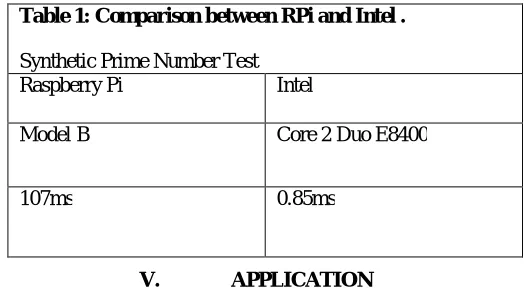
Some applications which necessitate high demands on CPU processing are off-limits. Such as “Model B took 107 ms to complete one calculation of the entirely synthetic prime number test and a mid-range desktop Core 2 Duo E8400 took only 0.85ms.”(By Collins, 2012) shown in Table1. :-
V. APPLICATION
Applications of raspberry pi technology are as follows:
Used in programming concepts and hardware interfacing.
Used for making digital photo frames, tablets etc.
Used in robotics for controlling motions, sensors, etc.
Can be used in creating and handling of small servers.
Used in voice activated coffee machine.
Used in automated system to detect leakage from microwave oven. [6] .
VI. CONCLUSION AND FUTURE SCOPE
Raspberry Pi is an innovative technology. The sheer number of users and fan base support the fact that the device can see an abundant future ahead. The device can certainly help anyone who really needs to learn electronics and computers. Raising the processing power can certainly assist the product in the future. Also supply a case and a appropriate instruction manual will get better the product. Also at present Windows operating systems are not compatible because of the ARM processor. If the processor is enhanced or any workaround is found to run Windows directly on the Raspberry Pi then it can be a great step for the Pi. The Raspberry Pi is a wonderful piece of hardware because of the combination of the features of a traditional computer and an embedded device. It supports computer operating systems like Linux and provides easy input/output lines i.e. the GPIO makes it ideal for controlling almost anything. Programming the GPIO is much simple and perceptive then a traditional FPGA or microprocessor. Lastly it can be said that Raspberry Pi can be efficiently used if its processing power is kept in mind. It can work as a individual computer but cannot swap it.
REFERENCES
[1] Raspberry pi education manual, Version 1.0 December 2012
[2] PritishSachdeva and ShrutikKatchii,“A Review Paper on Raspberry Pi”,Vol.4, No.6,Dec 2014 [3] NEWS BRIEF, Published by the “IEEE Computer Society”, 0018-9162/12 © 2012
[4] EbenUpton,GarethHalfacree, “Raspberry Pi User Guide manual” 2012. [5] Raspberry Pi Start Guide.RS Components,Vsn 1.0 3/2012
[6]Ms.Sejal V. Gawande, Dr.Prashant R. Deshmukh. “A Review Paper On Raspberry Pi technology”, Volume 5, Issue 4, April 2015.
Table 1: Comparison between RPi and Intel .
Synthetic Prime Number Test Raspberry Pi Intel
Model B Core 2 Duo E8400