DDOS Detection and Denial Using Third
Party Application in SDN
Roshni Mary Thomas, Divya James
M.Tech Student, Dept. of I.T., Rajagiri School of Engineering & Technology, Kerala India
Assistant Professor, Dept. of I.T., Rajagiri School of Engineering & Technology, Kerala India
ABSTRACT: Software Defined Networking(SDN) is a developing area where network managers can manage the network behaviour programmatically such as modify, control etc. Using this feature we can empower, facilitate or e network related security applications due to the its capacity to reprogram the data plane at any time. DoS/DDoS attacks are attempt to make controller functions such as online services or web applications unavailable to clients by exhausting computing or memory resources of servers using multiple attackers. A DDoS attacker could produce enormous flooding traffic in a short time to a server so that the services provided by the server get degraded. This cause lose of customer support, brand trust etc.
To detect this DDoS attack we use a traffic monitoring method iftop in the server as third party application and check the traffic for specific amount of time. iftop is a traffic monitoring tool to find the bandwidth of incoming packets along with the address. Get the traffic into a text file and evaluate the bandwidth od incoming packets with conditions of DDoS attack. If the conditions get satisfied forward the attacker address to the SDN firewall in the controller with the type of incoming packets. Firewall will enter the attacker address in the firewall table along with server address as destination. After that firewall look at the incoming requests to the server if the attacker is still sending or flooding packets , firewall will block the attacker according to the type of of packet forwarding to the server.
KEYWORDS: Software Defined Networking(SDN), DoS/DDoS attacks,Firewall
I. INTRODUCTION
In traditional networking network functionality is mainly implemented in a dedicated appliance such one or multiple switches, routers and/or application delivery controllers. Application Specific Integrated Circuit (or: ASIC) is a dedicated appliance hardware is implemented for most of this functionality. But the limitations of this traditional hardware-centric approach is increasing because its time-consuming and error-prone, high level of expertise needed for Multi-vendor environments also traditional architectures complicate network segmentation. To overcome these and other traditional networking limitations, a new networking methodology is introduced i.e,Software Defined Networking (SDN). Software Defined Networking (SDN) is a developing area where it extract the limitations of traditional network which make networking more uncomplicated. In SDN we can develop or change the network functions or behaviour program. To make the decision where the traffic needs to send with the updated feature SDN decouple the network planes into two.
1. Control Plane 2. Data Plane
In control plane we can add update or add new features to improve the network programmatically also we can change the traffic according to our decision and in updated traffic are applied in data plane.
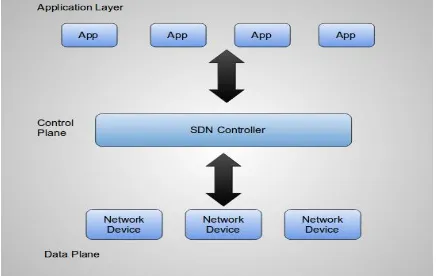
Figure 1:Decoupled Control and Data plane
In SDN architecture new functions are applied in Application Layer in the form of Applications such as IDS, Load Balancing etc which helps for traffic development. This applications will be forwarded to the SDN controller in control plane which takes necessary actions and instructs them to the data plane. After controller instructs network device will start applying it. Using this we can attain configuration accuracy, consistency and flexibility. Using SDN functionalities tracks and reports network activity across the whole enterprise network. This will helps to develop the security of the network.
OpenFlow is the primary standard interchanges interface characterized between the control and sending layers of a SDN design. OpenFlow enables guide access to and control of the sending plane of system gadgets, for example, switches and switches, both physical and virtual (hypervisor-based). It is the non appearance of an open interface to the sending plane that has prompted the portrayal of today’s organizing gadgets as solid, shut, and centralized computer like. No other standard convention does what OpenFlow does, and a convention like OpenFlow is expected to move arrange control out of the systems administration changes to consistently brought together control programming.
Today’s network can be brought down or made ineffective by a number of threat vectors. Forged or faked traffic flows, DoS/DDoS attacks top the list of threats.A distributed denial-of-service (DDoS) attack is an assault in which various traded off PC frameworks assault an objective, for example, a server, site or other system asset, and cause a denial of service for clients of the focused on asset. The surge of approaching messages, association demands or distorted parcels to the objective framework drives it to back off or even crash and closed down, in this manner refusing assistance to normal clients or frameworks. DoS or DDoS is a very common sight wherein the network comes under attack by rouge elements. This situation can suspend network services temporarily or indefinitely to the hosts connected over that network. Services are denied even to the genuine users. Several firewall mechanisms are applied in the traditional network in order to find the attack in the network but they have some challenges like expensive cost, management of access control,establishment of policy, packet-based access mechanism and performance. DDoS attacks work by the aggressor who starts by abusing a weakness in one PC framework.
All the above scenarios make SDN a natural choice for setting up secure networks. SDN architecture may enable, facilitate or enhance network related security applications due to the controller’s central view of the network, and its capacity to reprogram the data plane at any time. All the reasons support the argument that SDN is not a fad and is likely to stay for long.
firewall in each server. Firewall will react faster according to monitoring so set the traffic monitor in less intervals. Also to reduce the false alarm check the incoming traffic for the second sequence if its sending packets consider it as DDoS. So it reduces false alarms.
II. SYSTEM ANALYSIS AND DESIGN
Server is a computer program or a device that provides functionality for other programs or devices. Purpose of different servers are different such as application server used for allowing users in the network to run and use them without having to install a copy on their own computers, Catalog server maintains an index or table of contents of information that can be found across a large distributed network, such as computers, users, files shared on file servers, and web apps etc. The demand for different servers are distinct because their purpose are different.
So setting firewall or Openflow methods outside the server to detect DDoS make degrade the performance of application server because different clients send request frequently for different purpose. Setting a low cost adequate DDoS detector in separate server according to the estimate number of request that can a client send will fulfil the purpose of the server. If any attacker is detected forward their address to the firewall in the controller according with the type of packet. Then the firewall will block the attacker from the controller itself.
1. DDoS Detection Method
Different open source traffic monitoring tools are available to check the client address and the type of packet the used for the attack purpose. Collect the results from the traffic analyzer in synchronized manner and compare total number of incoming packet with the probability of expecting number of packets.
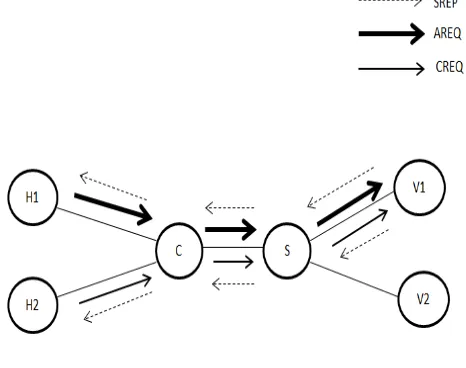
Attacker act as a normal client and send DDoS packets along with the normal client. Server replies to that attacker as normal client is shown in Figure 2.1 Once the connection is established then it flood the server with large number of requests. When the number of requests increased the server cannot able to provide service for that request it also affects to the normal client too. This will degrade the performance of the server. Develop a firewall or install a firewall for normal server is costly. Installing a low cost or open source traffic monitor will help to detect the incoming packets amount and the address of the client. This will help to identify the attacker from the normal clients.
Figure 2.1: Requests to the server
will look up hostnames associated with addresses and counts all IP packets that pass through the filter. Like top, iftop refreshes naturally at regular intervals, and like top, of course, it sorts the yield you see by what’s utilizing the most assets. Where top is worried with procedures and the amount CPU and RAM they utilize, iftop is worried with system associations and what amount transfer and download data transmission they utilize. Run iftop as the root user. iftop will locate the first interface it can use and start listening in on the traffic. Get the traffic in certain amount of time and evaluate the clients. Check each client by comparing the throughput. Throughput means amount of data transmitted from one end to another end in a given amount of time. Its calculated as by taking the value of normal client for fixed amount of time and check the incoming packets to the server for this fixed time. After comparing the throughput check if it’s greater than equal to 1. If it’s greater than 1.5 or 2 as per the interest of the server consider it as an attacker. This method is faster than other detection mechanism and cheaper too. For the reduction of false alarm the traffic will monitor for the next analyse if it’s still sending packet forward the address of the attacker to the firewall so that the firewall can drop the packets from the attacker otherwise the client will consider as normal client. This will reduce the false alarm and increase the accuracy. The firewall will be placed in the controller. So that the attacker will be blocked from the controller itself so that it does not affect the switch too.
2. Firewall
Firewall is placed in POX controller. The detected attacker address will forwarded to the attacker list file of firewall. OpenFlow socket in a state in which it is listening for approaching associations so it runs the firewall when the attacker list file updated. Set the priority of the firewall high so that firewall program needs to be consider more important than others. After waking up addrule in firewall get the address of source H1 and destination
server v1. Place both into the firewall table and add the type of packets needed to be blocked. The comparing will be proceed using the match option.
Type of packets are also explained in the match option. If incoming packets are ICMP then match the network protocol to ICMP PROTOCOL otherwise if it is TCP convert or add the TCP PROTOCOL as network protocol.
After that sendrule in the firewall will check the incoming packets to the destination from every source if both the source and destination are present in firewall table the firewall will take the action for the incoming data. In firewall the action taking for attacker is dropping the incoming packets from the controller.
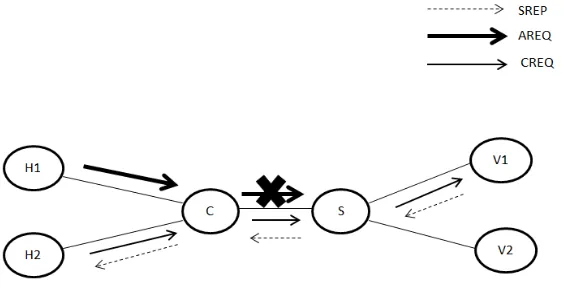
The user can input exactly how the firewall asks in each stage. The functions that are used to create firewall are Add and Match. Using Add function we can add the source and destination from the forwarded file. H1 get blocked in the controller is shown in Figure 2.2.
Steps used in Add are:
•
Get the source and destination from the forwarded file•
Set the duration high in here. To make the conditions always be true•
Enter the source and destination to the firewall table•
Forward them to match section to watch the packets that are coming In Match section look for the incoming packets to the destination i.e,server.•
Firstly controller check which kind of protocol is used then analyse the type of protocol used whether it is ICMP or TCP etc.•
Then get the ip of every clients moving to the destination or server. Check whether the address match•
If they both match set the priority to high so that the action against them to take faster.•
The incoming packets will be drop from the attackers.III.IMPLEMENTATION
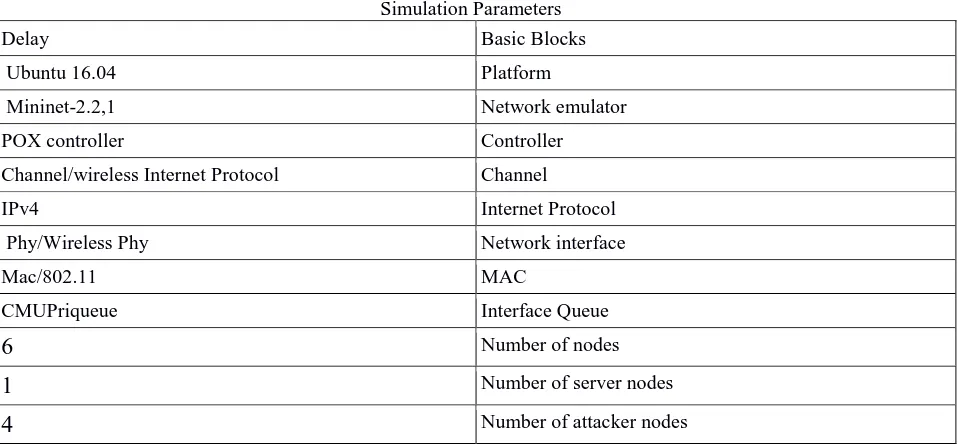
Table 1 Simulation Parameters Basic Blocks Delay Platform Ubuntu 16.04 Network emulator Mininet-2.2,1 Controller POX controller Channel Channel/wireless Internet Protocol
Internet Protocol IPv4 Network interface Phy/Wireless Phy MAC Mac/802.11 Interface Queue CMUPriqueue
Number of nodes
6
Number of server nodes
1
Number of attacker nodes
4
The simulations are done using Mininet network emulator which helps to creates a network of virtual hosts, switches, controllers, and links. Mininet hosts run standard Linux network software, and its switches support Open-Flow for highly flexible custom routing and SDN. Mininet supports research, development, prototyping, testing, debugging, and any other tasks that could benefit from having a complete experimental network. It is also a simple and economical system testbed for creating OpenFlow applications.
Using mininet create 5 normal hosts (h2, h3, h4, h5, h6) and 1 server(v1) connected to two switches (s1 ,s2) controlled by POX controller(c0). The connected setup is shown below:
• h2 h2-eth0:s1-eth2 • h3 h3-eth0:s1-eth3 • h4 h4-eth0:s2-eth1 • h5 h5-eth0:s2-eth2 • h6 h6-eth0:s2-eth3 • v1 v1-eth0:s1-eth1
• s2 lo: s2-eth1:h4-eth0 s2-eth2:h5-eth0 s2-eth3:h6-eth0 s2-eth4:s1-eth4 • c0
Communication between the controller and the switches is conveyed by communication convention, for example, OpenFlow , ForCES . OpenFlow is the most well known standard convention utilized as a part of SDN. OpenFlow switches carry on as idiotic sending gadgets. They can’t play out any activities without customized by the controller. So the firewall is set in pox control projects and call it when they expected to run utilizing pox charge. The incoming packets check the flow table for the destination if the destination is present the packets will be forwarded with the actions that are already executed to take care of the destination, if the destination is not present forward them to the POX controller it will find the destination and forward to the destination b executing actions in the Openflow switch. Firewall then connected to the flow to drop the packets from attackers. Then the firewall will start running. Run the iftop for traffic monitoring by running monitoring.py program in server v1.
IV.RESULTANDANALYSIS
DDoS is an attack where multiple attackers send large packets to one particular server. So we create 4 hosts for attack purpose and send large number of ICMP request to the server continuously using ping command. Repeated ICMP request will degrade the performance of the server. The attack command will forwarded from the host h2, h3, h4, h5 to the server.
Using the iftop command we will monitor the network traffic to the server for certain amount of time and forward the incoming results of traffic in to another file repeat the process till the server is providing the service. At the same time the before the monitoring process repeats the program will the show the result of the analysis i.e, whether the attack is occured or not. If it is the next time it again check whether the traffic is coming from that particular client. This is for reducing the false alarm. This is shown in Fig 4.1
Fig 4.1: DDOS attack detection
Using information from the traffic we can detect the hosts that send DDoS attack. This detected nodes are confirmed in second phase. In confirmation phase, we again run and get the traffic for that particular time and analyse the traffic if the packets are still going we can confirmly consider that the DDoS attack is occured. The repeated process is taken for reducing the false alarm. Forward the ip address of both source and destination to the firewall policy table.
Fig 4.2: Firewall adding the rule
After entering the address into the firewall table the controller will check the clients that are connecting to the server from the controller and if the attacker or source is present in the client section the firewall will alert the controller the first action is taken will be dropping because the priority set for the attacker packet is high.
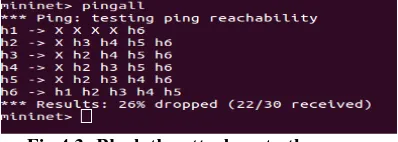
The controller will block the client or attacker by dropping the incoming packets from connecting to the server. Then the attacker is no more able to send any packets to the server. Here more than one server can detect and pass the intruder to the firewall. This is shown in the Fig 4.3. h1 is the server in the network and the others are client. The host that are tried to attack h2, h3, h4, h5 blocked.
Fig 4.3: Block the attackers to the server
Different performance metrics are considered to analyze our proposed algorithm for detecting and preventing DDoS attack. Fig. 4.4 illustrates the variances of the detection rate with respect to server detection thresholds. When packet rate raised more than 7Mb for ICMP attack the threshold value will be 8. After threshold 4 the address will be monitored if it’s still sending packets till 8 consider it as attacker and drop the packets. This is for reducing the false alarm
Figure 4.4: Detection Rate of DDoS Attacks
Performance testing is the procedure of deciding the speed or adequacy of a computer, network, software program or device. This procedure can include quantitative tests done in a lab, for example, measuring the reaction time or the quantity of MIPS (millions of instructions per second) at which a system functions.
Fig 4.5: CPU performance
V. CONCLUSION
Software Defined Network is a developing area where the network can handle more reliable than traditional network the normal users. So a firewall is introduced in the controller which block the address forward by the server by analysing the traffic. DDoS detection method check the incoming traffic and analyse it using normal parameters. If any attacker is found the address will be forwarded to firewall. Firewall will mount and block the packets. So only one centralized firewall is needed for this attack this make the method more cost effective and less CPU usage only needed.
REFERENCES
1. Ankur Rai, Rama Krishna Challa, “Survey on Recent DDoS Mitigation Techniques and comparitive techniques” , Indian Journal of Science and Technology, Vol 9(32), DOI: 10.17485/ijst/2016/v9i32/100214, August 2016.
2. Chaitanya Buragohain, Nabajyoti Medhi, “FlowTrApp: An SDN Based Architecture for DDoS Attack Detection and Mitigation in Data Centers” ,2016 3rd International Conference on Signal Processing and Integrated Networks (SPIN).
3. Adrian Lara, Byrav Ramamurthy, “OpenSec: Policy-Based Security Using Software-Defined Networking,IEEE Transactions on Network and Service Management”, Vol. 13, No. 1, March 2016
4. Yu Chen,Kai Hwang,Wei-Shinn Ku, “Collaborative Detection of DDoS Attacks over Multiple Network Domains” ,IEEE Transactions on
parallel and distributed systems, Vol. 18,No. 12,December 2007.