Dual U-BR1TE Plug-In Option Card
(Part Number 1200107L1#HS)
and Dual U-BR1TE Plug-On Option Card
(Part Number 1200108L1)
USER MANUAL
901 Explorer Boulevard P.O. Box 140000 Huntsville, AL 35814-4000
(256) 963-8000 © 2000 ADTRAN, Inc.
Notes provide additional useful information.
Cautions signify information that could prevent service interrup-tion.
iv
FCC regulations require that the following information be provided in this man-ual:
1. This equipment complies with Part 68 of the FCC rules. The required label is affixed to the bottom of the chassis.
2. If this equipment causes harm to the telephone network, the telephone com-pany may temporarily discontinue service. If possible, advance notification is given; otherwise, notification is given as soon as possible. The telephone company will advise the customer of the right to file a complaint with the FCC.
3. The telephone company may make changes in its facilities, equipment, opera-tions, or procedures that could affect the proper operation of this equipment; advance notification and the opportunity to maintain uninterrupted service is given.
4. If experiencing difficulty with this equipment, please contact ADTRAN for repair and warranty information. The telephone company may require this equipment to be disconnected from the network until the problem is cor-rected or it is certain the equipment is not malfunctioning.
5. This unit contains no user-serviceable parts.
6. An FCC-compliant telephone cord with a modular plug is provided with this equipment. This equipment is designed to be connected to the telephone net-work or premises wiring using an FCC-compatible modular jack, which is Part 68 compliant.
7. The following information may be required when applying to the local tele-phone company for leased line facilities.
Service Type REN/SOC FIC USOC
FEDERAL COMMUNICATIONS COMMISSION RADIO FREQUENCY INTERFERENCE STATEMENT
This equipment has been tested and found to comply with the limits for a Class A digital device, pursuant to Part 15 of the FCC Rules. These limits are designed to provide reasonable protection against harmful interference when the equip-ment is operated in a commercial environequip-ment. This equipequip-ment generates, uses, and can radiate radio frequency energy and, if not installed and used in accor-dance with the instruction manual, may cause harmful interference to radio fre-quencies. Operation of this equipment in a residential area is likely to cause harmful interference in which case the user will be required to correct the inter-ference at his own expense.
Shielded cables must be used with this unit to ensure compliance with Class A FCC limits.
CANADIAN EMISSIONS REQUIREMENTS
This digital apparatus does not exceed the Class A limits for radio noise emis-sions from digital apparatus as set out in the interference-causing equipment standard entitled “Digital Apparatus," ICES-003 of the Department of Commu-nications.
Cet appareil nuerique respecte les limites de bruits radioelectriques applicables aux appareils numeriques de Class A prescrites dans la norme sur le materiel brouilleur: "Appareils Numeriques," NMB-003 edictee par le ministre des Com-munications.
vi
CANADIAN EQUIPMENT LIMITATIONS
Notice: The Canadian Industry and Science Canada label identifies certified equipment. This certification means that the equipment meets certain telecom-munications network protective, operational, and safety requirements. The Department does not guarantee the equipment will operate to the user’s satisfac-tion.
Before installing this equipment, users should ensure that it is permissible to be connected to the facilities of the local telecommunications company. The equip-ment must also be installed using an acceptable methods of connection. In some cases, the company’s inside wiring associated with a single line individual service may be extended by means of a certified connector assembly (telephone extension cord). The customer should be aware that compliance with the above limitations may not prevent degradation of service in some situations.
Repairs to certified equipment should be made by an authorized Canadian main-tenance facility designated by the supplier. Any repairs or alterations made by the user to this equipment, or equipment malfunctions, may give the telecommu-nications company cause to request the user to disconnect the equipment.
Users should ensure for their own protection that the electrical ground connec-tions of the power utility, telephone lines and internal metallic water pipe system, if present, are connected together. This precaution may be particularly important in rural areas.
The Load Number (LN) assigned to each terminal device denotes the percentage of the total load to be connected to a telephone loop which is used by the device, to prevent overloading. The termination on a loop may consist of any combina-tion of devices subject only to the requirement that the total of the Load Numbers of all devices does not exceed 100.
IMPORTANT SAFETY INFORMATION
SAVE THESE INSTRUCTIONS
When using your telephone equipment, please follow these basic safety precautions to reduce the risk of fire, electrical shock, or personal injury:
1. Do not use this product near water, such as near a bathtub, wash bowl, kitchen sink, laundry tub, in a wet basement, or near a swimming pool. 2. Avoid using a telephone (other than a cordless-type) during an electrical
storm. There is a remote risk of shock from lightning.
3. Do not use the telephone to report a gas leak in the vicinity of the leak. 4. Use only the power cord, power supply, and/or batteries indicated in the
manual. Do not dispose of batteries in a fire. They may explode. Check with local codes for special disposal instructions.
WARRANTY AND CUSTOMER SERVICE
ADTRAN will replace or repair this product within five years from the date of shipment if it does not meet its published specifications or fails while in service. For detailed warranty, repair, and return information refer to the ADTRAN Equipment Warranty and Repair and Return Policy Procedure.
Return Material Authorization (RMA) is required prior to returning equipment to ADTRAN.
viii
LIMITED PRODUCT WARRANTY
ADTRAN warrants that for five (5) years from the date of shipment to Customer, all products manufactured by ADTRAN will be free from defects in materials and workmanship. ADTRAN also warrants that products will conform to the applica-ble specifications and drawings for such products, as contained in the Product Manual or in ADTRAN's internal specifications and drawings for such products (which may or may not be reflected in the Product Manual). This warranty only applies if Customer gives ADTRAN written notice of defects during the warranty period. Upon such notice, ADTRAN will, at its option, either repair or replace the defective item. If ADTRAN is unable, in a reasonable time, to repair or replace any equipment to a condition as warranted, Customer is entitled to a full refund of the purchase price upon return of the equipment to ADTRAN. This warranty applies only to the original purchaser and is not transferable without ADTRAN's express written permission. This warranty becomes null and void if Customer modifies or alters the equipment in any way, other than as specifically authorized by ADTRAN.
EXCEPT FOR THE LIMITEDWARRANTY DESCRIBED ABOVE, THE FOREGO-ING CONSTITUTES THE SOLE AND EXCLUSIVE REMEDY OF THE CUS-TOMER AND THE EXCLUSIVE LIABILITY OF ADTRAN AND IS IN LIEU OF ANY AND ALL OTHER WARRANTIES (EXPRESSED OR IMPLIED). ADTRAN SPECIFICALLY DISCLAIMS ALL OTHER WARRANTIES, INCLUDING (WITH-OUT LIMITATION), ALL WARRANTIES OF MERCHANTABILITY AND FIT-NESS FOR A PARTICULAR PURPOSE. SOME STATES DO NOT ALLOW THE EXCLUSION OF IMPLIED WARRANTIES, SO THIS EXCLUSION MAY NOT APPLY TO CUSTOMER.
Table of Contents
List of Figures ...xi
List of Tables ... xiii
Table of Contents
x Dual U-BR1TE Plug-in Option Card User Manual 61200107L1#HS-1
Appendix A. Dual U-BR1TE Option Card Menu Tree ... A-1
List of Figures
Figure 1-1. Dual U-BR1TE Plug-in Option Card ... 1-3 Figure 1-2. Dual U-BR1TE Plug-on Option Card ... 1-4 Figure 2-1. Installing the Option Module ... 2-2 Figure 2-2. Installing Plug-on Board... 2-4 Figure 3-1. TSU 100 Main Menu... 3-2 Figure 3-2. PORTSTATUSSubmenus... 3-3
Figure 3-3. LOOPSTATUSDisplay ... 3-3
Figure 3-4. T1 STATUSDisplay ... 3-4
Figure 3-5. PORTCONFIGURATIONSubmenus ... 3-5
Figure 3-6. Network Locations ... 3-6 Figure 3-7. PORTUTILITYSubmenus ... 3-7
Figure 3-8. PORTTESTSubmenus ... 3-7
List of Figures
List of Tables
List of Tables
Chapter 1
Introduction
DUAL U-BR1TE PLUG-IN AND PLUG-ON OPTION CARDS
The Dual U-BR1TE Plug-in and Plug-on Option Cards are compatible with the TSU/TDU/HSU family of T1 multi-plexers. The Plug-in Dual U-BR1TE is designed to occupy a single slot in a TSU family product and will accept plug-on modules designed for use in this product family. The Dual U-BR1TE Plug-on Module may be plugged on any TSU/TDU plug-in module. The Dual U-BR1TE Option Cards are subject to the host T1 multiplexer's operation and control.
The Dual U-BR1TEs provide two ISDN U-interfaces and allow the transport of Basic Rate ISDN (BRI) information over T1 carriers and unloaded twisted pair wiring.
Functional Description
The Dual U-BR1TEs are configured in the same manner as the host multiplexer. The internal menu for the configu-ration of each U-BR1TE is a part of the Dual U-BR1TE Module and is automatically available when the Dual U-BR1TE is installed into the TSU.
Chapter 1. Introduction
1-2 Dual U-BR1TE Plug-in Option Card User Manual 61200107L1#HS-1
Features
Both Dual U-BR1TE Option Cards have the following features:
• Internal test pattern which allows for testing of indi-vidual B channels without requiring external test equipment
• Transportation of ISDN Basic Rate 2B+D information over T1 facilities in the 3-DS0 format
• Performance monitoring of the layer 1 facility • Firmware configurable to line unit LT or line unit NT
mode of operation
• Loopback capability for full 2B+D as well as individ-ual B channels in both loop and carrier directions • B1 and B2 looopback addressability for the NT1 and
up to six devices in the "downstream" (toward the NT1) direction
• Local performance monitoring without test equip-ment
Dual U-BR1TE Option Card
The Dual U-BR1TE Option Cards conform to the follow-ing specifications:
U-Interface
Line 2-wire (tip and ring)
Rate 160 kbps full duplex
Frequency 40 kHz
Line Code 2B1Q
Max Line Loss 42 dB @ 40 kHz
Max Distance 18000 ft with 1300 ohm resistance design
ISDN Interface Connector
Chapter 1. Introduction
Compatibility
Diagnostics and Tests
Physical Description
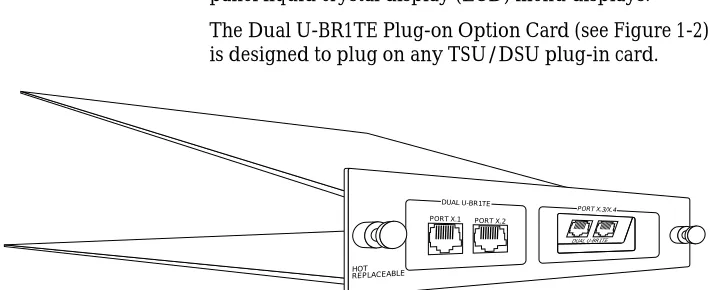
The Dual U-BR1TE Plug-in Option Card (see Figure 1-1) is designed to occupy a single slot in a TSU family prod-uct.
Figure 1-1. Dual U-BR1TE Plug-in Option Card
The Dual U-BR1TE Plug-in Option Card rear panel in-cludes a plastic plug over a cutout for additional connec-tors. This allows a plug-on board to be added to the Dual U-BR1TE Card. The PORT X.Y indication is linked to the port numbering philosophy of the TSU 100 product fam-ily. The X represents the slot number, and the .Y indicates the port number. For the TSU 100 application, there is
ISDN 2B1Q Inter-face
ANSI T1.601-1992
Performance TR-NWT-000397 and TR-TSY-000829
ISDN BR over T1 TR-NWT-000397
Approvals FCC Part 15, FCC Part 68, UL
Loopback B1, B2 loopbacks and 2B+D loopbacks initiated through EOC as specified by TR-NWT-000397 and ANSI T1.601-1992
Selftest RAM test
Slot selection test
EPROM checksum test
Chapter 1. Introduction
1-4 Dual U-BR1TE Plug-in Option Card User Manual 61200107L1#HS-1 are 1.3 and 1.4. These port numbers appear in the front panel liquid crystal display (LCD) menu displays. The Dual U-BR1TE Plug-on Option Card (see Figure 1-2) is designed to plug on any TSU/DSU plug-in card.
Figure 1-2. Dual U-BR1TE Plug-on Option Card PORT X.1
DUAL U-BR1TE
DUAL U-BR1TE PORT X.3/X.4
HOT REPLACEABLE
Chapter 2
Installation
UNPACK, INSPECT, POWER UP
Receipt Inspection
Carefully inspect the option module for any shipping damage. If damage is suspected, file a claim immediately with the carrier and contact ADTRAN Customer and Product Service. If possible, keep the original shipping container for use in shipping the option module for repair or for verification of damage during shipment.
ADTRAN Shipments Include
The following items are included in ADTRAN shipments of the Dual U-BR1TE:
Dual U-BR1TE Plug-in Option Card: • Dual U-BR1TE Plug-in Option Card
• User Manual (to be inserted into main TSU 100/120/ 600 User Manual)
Dual U-BR1TE Plug-on Option Card: • Dual U-BR1TE Plug-on Option Card
• User Manual (to be inserted into main TSU 100/120/ 600 User Manual)
Chapter 2. Installation
2-2 Dual U-BR1TE Plug-in Option Card User Manual 61200107L1#HS-1
Provided by Customer
The customer must provide cables for connection to othe equipment.
DUAL U-BR1TE PLUG-IN OPTION CARD INSTALLATION
Placement of the Option Module
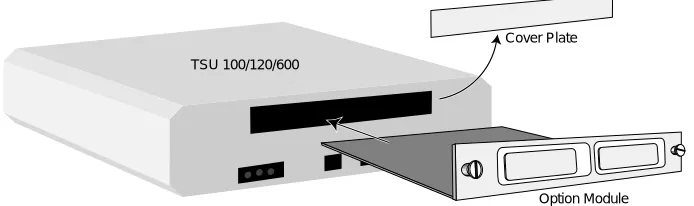
Figure 2-1 represents the action required for proper place-ment of the option module.
1. Remove cover plate from the rear panel.
2. Slide option module into the rear panel until it is positioned firmly against the front of the unit. 3. Fasten thumb-screws at both edges of option
mod-ule.
Figure 2-1. Installing the Option Module
Power Connection
Each option module derives power from the base TSU/ 120/600 unit. Power to the base unit is supplied by a cap-tive eight foot power cord.
Cover Plate
Chapter 2. Installation
Wiring
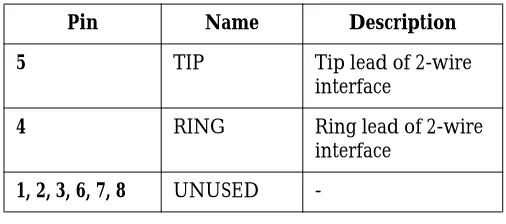
The option module offers two connectors for the U-inter-faces. The connectors are universal and accept either an RJ-45 (8-pin) or an RJ-11 (6-pin modular plug). The pinout is given in Table 2-1.
The required wiring connections are: Connector Type (USOC) = RJ-45 Part number = AMP # 555164-1
Table 2-1. 2-Wire Voice Pinout Connection
Pins used to mate with the Dual U-BR1TE connector are as follows:
Attaching the Plug-on Board to the Option Card
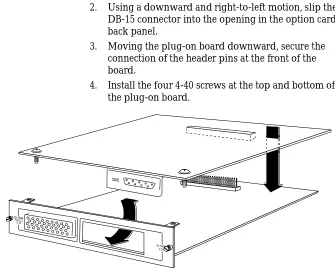
Figure 2-2 represents the action required for proper place-ment of a plug-on board on the option card.
1. Hold the plug-on board above the option card.
Pin Name Description
5 TIP Tip lead of 2-wire
interface
4 RING Ring lead of 2-wire
interface 1, 2, 3, 6, 7, 8 UNUSED
-RJ-11 Tip pin 4
Ring pin 3
RJ-45 Tip pin 5
Chapter 2. Installation
2-4 Dual U-BR1TE Plug-in Option Card User Manual 61200107L1#HS-1 2. Using a downward and right-to-left motion, slip the
DB-15 connector into the opening in the option card back panel.
3. Moving the plug-on board downward, secure the connection of the header pins at the front of the board.
4. Install the four 4-40 screws at the top and bottom of the plug-on board.
Figure 2-2. Installing Plug-on Board Nx 54/64
V.35 Nx 56/64Port X.1
V.35
DXC
Chapter 2. Installation
POWER UP TESTING AND INITIALIZATION
The Dual U-BR1TE Option Card executes a partial self test during the power up sequence, as described in the TSU 100/120/600 manual. A full self test can be activated from the Test menu. No initialization input is required. Any previously configured setting for the Dual U-BR1TE is restored automatically upon power up.
Successful Self Test
The green OK LED, located on the front panel, turns on when a successful self test is completed and the configu-ration is successfully restored. See the chapter Opeconfigu-ration in the main user manual.
Failed Self Test
If the Dual U-BR1TE card fails one or more of the self tests, a message is displayed in the LCD during power up. See the TSU 100/120/600 user manual. Specific failures of the Dual U-BR1TE Card are identified in the appendix Dual U-BR1TE Failure Messages in this manual.
Operation Alarms
Chapter 2. Installation
Chapter 3
Operation
OVERVIEW
The Dual U-BR1TE card is controlled as part of the TSU 100/120/600 using the same methods as described in the TSU 100/120/600 User Manual. See the TSU 100/120/600 User Manual for descriptions of front panel indicators and buttons.
Menu Structure
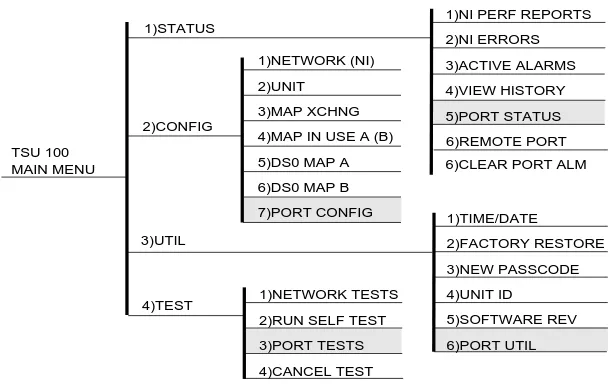
When an option card is installed in the TSU 100/120/600, the unit adds it to the list of selectable options under the Port menu items. These menu items are shaded in the limited overview of the TSU 100 menu shown in Figure 3-1 on page 3-2. (The appendix of the TSU 3-100 User Manual shows a complete menu diagram.)
Menu Operation
An option module must be selected from the listing in one of the Port menu options before any option module menus are applicable. With the cursor on one of the Port menu items, pressEnterto display a list of the currently installed option modules. To activate menus for the Dual U-BR1TE card, scroll through the list to displayX.Y
U-BR1TEand pressEnter. (The X represents the slot number,
Chapter 3. Operation
3-2 Dual U-BR1TE Plug-in Option Card User Manual 61200107L1#HS-1 Once the option module is selected, the Dual U-BR1TE menus appear as a subset of, and operate the same as, menus for the TSU 100/120/600. Use the up and down ar-rows to place the cursor on the desired item, and press En-terto display the first two submenu choices.
Figure 3-1. TSU 100 Main Menu
DUAL U-BR1TE MENU ITEMS
The Dual U-BR1TE menus are accessed from, and operate the same as, menus for the TSU 100/120/600. The Dual U-BR1TE items are submenu choices of those four main menus, as shown in Figure 3-1. For information onFAC
-TORYRESTOREandRUNSELFTEST, see TSU Features used
with Dual U-BR1TE Options on page 3-9.
The Dual U-BR1TE menu items are as follows:
• PORTSTATUS
• PORTCONFIGURATION
• PORTUTILITY
• PORTTEST TSU 100
MAIN MENU
1)STATUS
2)CONFIG
3)UTIL
1)NI PERF REPORTS
2)NI ERRORS 3)ACTIVE ALARMS 4)VIEW HISTORY 5)PORT STATUS 1)TIME/DATE 2)FACTORY RESTORE 3)NEW PASSCODE 4)UNIT ID 5)SOFTWARE REV 6)PORT UTIL 1)NETWORK TESTS
2)RUN SELF TEST
3)PORT TESTS 4)CANCEL TEST 4)TEST 1)NETWORK (NI) 2)UNIT 3)MAP XCHNG
4)MAP IN USE A (B)
5)DS0 MAP A
6)DS0 MAP B
7)PORT CONFIG
6)REMOTE PORT
Chapter 3. Operation
P
ORTS
TATUS PORTSTATUS, a submenu of TSU 100/120/600 main menuitemSTATUS, displays active status information about the
Dual U-BR1TE interface. WhenPORTSTATUSis displayed,
place the cursor on it and pressEnterto display the first available port. Scroll to select1.1 U-BR1TEand pressEnter
to activate either of the submenus shown in Figure 3-2.
Figure 3-2. PORTSTATUSSubmenus
LOOP STATUS
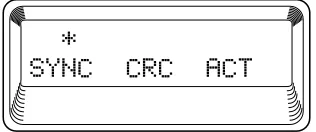
There are three information fields: SYNC, CRC, and ACT. See Figure 3-3. An asterisk indicates an item is active.
Figure 3-3. LOOPSTATUSDisplay
SYNC
An asterisk is present if the U-interface has achieved syn-chronization.
CRC
An asterisk is present when a CRC error has been detected on the U-interface.
ACT
1)NI PERF REPORTS
STATUS 2)NI ERRORS
3)ACTIVE ALARMS
4)VIEW HISTORY 1)LOOP STATUS
5)PORT STATUS 1.1 UBR1TE 2)T1 STATUS
6)REMOTE PORT 3)LOOP MONITOR
Chapter 3. Operation
3-4 Dual U-BR1TE Plug-in Option Card User Manual 61200107L1#HS-1
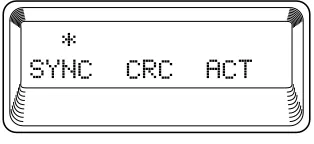
T1 STATUS There are three information fields: SYNC, CRC, and ACT. See Figure 3-4. An asterisk indicates an item is active.
Figure 3-4. T1 STATUSDisplay
SYNC
An asterisk is present if the U-interface has achieved syn-chronization to the T1 carrier.
CRC
An asterisk is present when a CRC error has been detected on the T1 interface. (DS0s carrying U-BR1TE data only.)
ACT
An asterisk is present if an NT1 is communicating with the ISDN switch.
LOOP MONITOR
"ES=XXX"
Reports the maximum number of errored seconds on the U-interface. Errored seconds are considered to be sec-onds in which the U-interface was not synchronized or seconds in which at least one CRC error was detected on the U-interface. This count can be set to zero by pressing
shift-clearwhen the cursor is at this menu item.
P
ORTC
ONFIG PORTCONFIG, a submenu of TSU 100/120/600 mainmenu itemCONFIGURATION, is used to configure the Dual
Chapter 3. Operation
Figure 3-5. PORTCONFIGURATIONSubmenus
The unit displays the first of four submenu items. Table 3-1 identifies the available selections forPORTCONFIGURA
-TION. Continue with standard operating procedures. Table 3-1. PORTCONFIGURATIONParameters
SERVICE SERVICE allows the user to select the ISDN channels to be transmitted over the T1 facility. Each channel requires one DS0 of the T1 in which to transmit and receive data. All switched applications will require the D channel.
ZBS For proper operation, theZBS(zero byte substitution) for two U-BR1TE ports connected by a T1 facility must be the same value. TheENABLEparameter forZBSmust be se-lected if the T1 is using AMI line coding. If the T1 facility
1)SERVICE
2)CONFIG 7)PORT CONFIG 1.2 UBR1TE 2)ZBS
3)MODE
4)WAKE-UP TONE
MENU ITEM PARAMETER CHOICES
SERVICE 2B+D*, 2B, B1+D, B2+D, B1, B2
ZBS DISABLE*, ENABLE
MODE LULT*, LUNT
WAKE-UP TONE OFF*, ON
*Factory Default
Chapter 3. Operation
3-6 Dual U-BR1TE Plug-in Option Card User Manual 61200107L1#HS-1
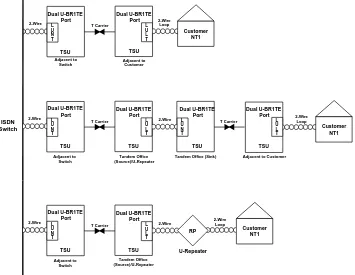
MODE The U-BR1TE port should be configured to operate in the LULTmode if being operated in the Adjacent to Customer or Tandem Office Source positions (see Figure 3-6 on page 3-6). TheMODEshould be set toLUNTif the port is oper-ated in the Adjacent to Switch or Tandem Office Sink po-sitions.
WAKE-UP TONE
Periodic wake-up tones should be turned on when the port is operated in the Tandem Office Sink configuration or when it is adjacent to a device that requires wake-up tones.
Figure 3-6. Network Locations
ISDN Switch Dual U-BR1TE Port TSU Dual U-BR1TE Port TSU Customer NT1 Dual U-BR1TE Port TSU Customer NT1 Customer NT1 Dual U-BR1TE Port TSU
2-Wire T Carrier 2-WireLoop
2-Wire
2-Wire T Carrier T Carrier 2-WireLoop
2-Wire Loop Adjacent to Switch Adjacent to Customer Adjacent to Switch Tandem Office (Source)/U-Repeater
Tandem Office (Sink) Adjacent to Customer
Chapter 3. Operation
P
ORTU
TILITY PORTUTILITY, a submenu of the TSU 100/120/600 mainmenu itemUTILITIES(UTIL), displays the current software
information for each port installed in the unit. This infor-mation is required when requesting assistance from ADTRAN Technical Support or when updates are need-ed.
WhenPORTUTILITYis displayed, place the cursor on it
and pressEnterto display the first available port. See Fig-ure 3-7.
Figure 3-7. PORTUTILITYSubmenus
Display 1.1 UBR1TE (scroll to display if necessary), and pressEnter. The unit displays the option card name and the software version installed. PressCancelto exit or se-lect another port.
P
ORTT
EST PORTTEST, a submenu of the TSU 100/120/600 main menu itemTEST,activates tests of the selected data ports. Selecting the Dual U-BR1TE displays tests available for this option card. See Figure 3-8.1)TIME/DATE
3)UTIL 2)FACTORY RESTORE
3)SET PASSCODE
4)UNIT ID
5)SOFTWARE REV
6)PORT UTILITY 1.1 UBR1TE SW REVISION
1)NETWORK TESTS 1)B1 REMOTE LPBK
4)TEST 2)RUN SELF TEST 2)B2 REMOTE LPBK
3)PORT TEST 1.1 UBR1TE 3)LOCAL LOOPBACK
4)CANCEL TEST 4)B1 2047 PATT
5)B2 2047 PATT
Chapter 3. Operation
3-8 Dual U-BR1TE Plug-in Option Card User Manual 61200107L1#HS-1 Table 3-2 identifes the available selections forPORTTEST. Table 3-2. PORTTESTParameters
B1 REMOTE LPBK
Remote loopbacks of the B1 channel in the network-to-customer direction are initiated by selecting items under this menu. The loopback may be requested for this unit and the five next U-BR1TES toward the NT1. A LOOP-INGmessage is displayed on the LCD once a test has been initiated. The initiating U-BR1TE sends the loopback command and begins transmitting the internally generat-ed 2047 pattern. When the U-BR1TE begins receiving the 2047 pattern, it displays FAR END LOOPED on the LCD. The initiating U-BR1TE transmits the 2047 pattern for the duration of the test. The user can view the pattern results by choosing menu item7)PATT RESULTS, and can inject errors into the transmitted pattern by choosing menu item6)INJECT ERROR. SelectNO LOOPBACKunder theB1 REMOTE LPBKmenu to exit the test.
B2 REMOTE LPBK
TheB2 REMOTE LPBKoperates exactly like theB1 RE-MOTE LPBKTEST, but the B2 channel is looped back rath-er than the B1 channel.
LOCAL LPBK
The local U-BR1TE may be commanded to loop back ei-ther the B1 or B2 channel. When a channel is put inLOCAL
LOOPBACK, it will loop back both the T1 and U-interface
data associated with the channel.
MENU ITEM PARAMETER CHOICES
B1 REMOTE LPBK ADDRESS 1, 2, 3, 4, 5, 6, NT1, NO LOOPBACK
B2 REMOTE LPBK ADDRESS 1, 2, 3, 4, 5, 6, NT1, NO LOOPBACK
LOCAL LOOPBACK B1, B2, NO LOOPBACK
B1 2047 PATT T1_TX, LP_TX, NONE
B2 2047 PATT T1_TX, LP_TX, NONE
INJECT ERROR Inserts error into transmitted pattern
Chapter 3. Operation
B1 2047 PATT
A U-BR1TE port may be commanded to transmit the in-ternally generated 2047 pattern on the B1 channel in ei-ther the T1 (T1_TX) or the U-interface (LP_TX) direction. The pattern may be looped back to the U-BR1TE port and verified with the results viewed by choosing7)PATT RE-SULTS, or the 2047 pattern may be verified using test equipment at accessible points in the network. Errors may be injected into the transmitted pattern by choosing 6)IN-JECT ERROR.
B2 2047 PATT
B2 2047 PATToperates exactly likeB1 2047 PATT, with the pattern transmitted in the B2 channel instead of the B1 channel.
INJECT ERROR
Selecting this menu item while the U-BR1TE is transmit-ting the 2047 pattern (B1 REMOTE LPBK,B2 REMOTE LPBK,B1 2047 PATT,B2 2047 PATT) inserts an error in the transmitted pattern.
PATT RESULTS
Selecting this menu item while the U-BR1TE is transmit-ting the 2047 pattern causes the U-BR1TE to display the maximum number of errored seconds of the test pattern on the bottom line of the LCD (ES=xs). The display con-tinues until this menu item is selected a second time. Pressingshift-clearwhile in this menu resets the errored seconds to zero.
TSU FEATURES USED WITH DUAL U-BR1TE OPTIONS
In addition to the Dual U-BR1TE menu items, two addi-tional menu items of the TSU 100/120/600 may be oper-ated in conjunction with the Dual U-BR1TE option module. These areFACTORYRESTOREandRUNSELF
TEST.
Chapter 3. Operation
3-10 Dual U-BR1TE Plug-in Option Card User Manual 61200107L1#HS-1 stalled default setting for all Dual U-BR1TE option mod-ule parameters.
WhenFACTORYRESTOREis displayed, place the cursor on
it and pressEnter. The unit is restored to preset factory de-faults and returns to the main menu. The factory default for port configuration parameters is shown in Table 3-1 on page 3-5.
R
UNS
ELFT
EST RUNSELFTEST, a submenu of the TSU 100/120/600 main menu itemTEST, executes both the Dual U-BR1TE inter-nal test and the TSU 100/120/600 interinter-nal test. The results of the self test are displayed in the LCD. See the TSU 100/ 120/600 User Manual for additional information onSELFTEST.
Appendix A
Dual U-BR1TE Option
Card Menu Tree
The menu tree for the Dual U-BR1TE Plug-in and Plug-on Option Cards is provided in Figure A-1.
Figure A-1. Dual U-BR1TE Option Cards Menu Tree 1)Port Status 1)LOOP STATUS
2)T1 STATUS
3)LOOP MONITOR
1)SERVICE
2)Port Config 2)ZBS:
3)MODE
4)WAKE-UP TONE:
3)Port Utility 1)SW Revision
1)B1 REMOTE LPBK
2)B2 REMOTE LPBK
4)Port Test 3)LOCAL LOOPBACK
4)B1 2047 PATT
5)B2 2047 PATT
6)INJECT ERROR
Appendix A. Dual U-BR1TE Option Card Menu Tree
Appendix B
Dual U-BR1TE Failure
Messages
FAILURE MESSAGE AT POWER UP
The following messages indicate a probable component failure on the Dual U-BR1TE Card:
E01 - EPROM CS EPROM checksum error
E02 - RAM DATA Data Bus Failure
E03 - RAM ADDR Address Bus Failure
Appendix B. Dual U-BR1TE Failure Messages
Product Support Information
Pre-Sales Inquiries and Applications Support
Please contact your local distributor, ADTRAN Applications Engineering, or ADTRAN Sales:
Post-Sale Support
Please contact your local distributor first. If your local distributor cannot help, please contact ADTRAN Technical Support and have the unit serial number avail-able.
Repair and Return
If ADTRAN Technical Support determines that a repair is needed, Technical Sup-port will coordinate with the Customer and Product Service (CaPS) department to issue an RMA number. For information regarding equipment currently in house or possible fees associated with repair, contact CaPS directly at the following num-ber:
Identify the RMA number clearly on the package (below address), and return to the following address:
ADTRAN, Inc. CaPS Department 6767 Old Madison Pike Progress Center Building #6, Suite 690 Huntsville, AL 35807 RMA # _____________
Applications Engineering (800) 615-1176
Sales (800) 827-0807
Technical Support (888) 4ADTRAN