CLiMB ToolKit: A Case Study of Iterative Evaluation
in a Multidisciplinary Project
Rebecca Passonneau,
†Roberta Blitz,
†David Elson,
†Angela Giral,
†Judith Klavans
‡Columbia University† New York, NY, U.S.A.
(becky|delson)@cs.columbia.edu, (rlb179|giral)@columbia.edu
University of Maryland‡ College Park, MD, U.S.A.
Abstract
Digital image collections in libraries and other curatorial institutions grow too rapidly to create new descriptive metadata for subject matter search or browsing. CLiMB (Computational Linguistics for Metadata Building) was a project designed to address this dilemma that involved computer scientists, linguists, librarians, and art librarians. The CLiMB project followed an iterative evaluation model: each next phase of the project emerged from the results of an evaluation. After assembling a suite of text processing tools to be used in extracting metada, we conducted a formative evaluation with thirteen participants, using a survey in which we varied the order and type of four conditions under which respondents would propose or select image search terms. Results of the formative evaluation led us to conclude that a CLiMB ToolKit would work best if its main function was to propose terms for users to review. After implementing a prototype ToolKit using a browser interface, we conducted an evaluation with ten experts. Users found the ToolKit very habitable, remained consistently satisfied throughout a lengthy evaluation, and selected a large number of terms per image.
1. Introduction
Digital image collections in libraries and other curatorial institutions grow too rapidly to create new descriptive metadata for subject matter search or browsing (Blitz et al., 2004). CLiMB (Computational Linguistics for Metadata Building) was a project designed to address this dilemma that involved computer scientists, linguists, librarians, and art librarians. The goal was to explore the use of computational linguistic techniques to automatically extract descriptive metadata from electronic or scanned texts (Klavans et al., 2004) (Klavans, In submission).
The CLiMB project followed an iterative evaluation model, with each next phase of the project emerging from the results of an evaluation. Here we describe the two phases that immediately preceded and followed the development of a prototype CLiMB ToolKit.
After testing and selecting a suite of computational linguistic tools, such as noun phrase chunkers, and knowledge sources such as external vocabularies, a formative evaluation was conducted to determine how best to present such tools to image professionals with cataloging needs. The evaluation results suggested that the most useful tool would be one that would allow catalogers to interactively process texts so as to select metadata from automatically proposed text elements.
Following the formative evaluation, we developed the CLiMB ToolKit, a browser interface to the text processing tools and knowledge sources, and presented a live demonstration as part of a CLiMB presentation at the March 2004 meeting of the Visual Resources Association. Largely through this presentation, we were able to recruit a balanced group of ten librarians and image professionals to participate in an April evaluation of the ToolKit. On measures of task success and user satisfaction, the ToolKit rated very highly. In addition, there was a high degree of group ratification of proposed metadata. Figure 1 shows the fourteen top ranked terms from a total of 27 completely distinct terms proposed by the ten participants for Jan Jansz den Uyl’s painting, the Banquet Piece. This set of terms provides a good indication of the subject matter of the painting, both explicit (burned down candle, empty glass) and implicit (vanitas, five senses). They also have a high degree of overlap with the Getty Art & Architecture Thesaurus (AAT), 1 a controlled vocabulary that users could get to from the ToolKit.
Our experience in designing, implementing and evaluating the CLiMB ToolKit demonstrates the benefits of conducting evaluations before and during the design process. It also illustrates the richness of metadata that
combines ordinary language phrases (burned down candle, empty glass, white linen tablecloth) with terminology from a controlled vocabulary.
Rank Term Freq
1 vanitas (image) 9 2 (Dutch) still life (painting) 8 3 (burned down) candle 7
4 glass 6
5 pewter 6
6 Dutch 5
7 empty glass 5
8 ((white) linen) tablecloth 5
9 lute 5
10 five senses 4 11 (luxury) tablewares 4
12 owl 4
13 painting 4
14 seventeenth century 4 Figure 1. Top fifty percent of ranked subject terms proposed for Jan Jansz den Uyl’s Banquet Piece.
Section two provides the motivation for addressing the problem of supplying descriptive metadata for images, and for the image collections and texts used in our evaluations. Section three gives a brief overview of the tools and knowledge sources experimented with prior to the formative evaluation, which is described in section four. Section five gives a brief overview of the ToolKit, and we describe the evaluation of the ToolKit in section six. We conclude with a brief summary of results.
2. Motivation
When librarians create descriptive metadata for texts by analyzing the subject matter, they face complex issues from a knowledge representation point of view, and significant expense. Subject matter analysis of cultural artifacts faces similar complexities (Bacca, 2002). Recent estimates in the Columbia Libraries, for example, give a minimum cost for descriptive metadata of $15.00 per volume (Blitz et. al, 2004). Using this as an estimate, adding subject matter metadata to Columbia’s Image Bank of 32,000 images (1/10th the size of ArtStor http://www.artstor.org/info/), would cost about $500,000.
The premise of CLiMB is that descriptive content for certain digital collections exists implicitly in scholarly monographs and other publications that discuss the images or the cultural artifacts they depict. From this premise, the goal emerged of finding a method to make the descriptive content explicit, link it to appropriate images, and allow image librarians and visual resource professionals make use of it in creating metadata. Empirical research (Fawcett, 1979; Mandel, 1985; Taylor, 1995) has shown that even in academic contexts, many
searches for images involve requests for content, such as images of “crowds” or “a balloon frame house.”
Defining what type of image collection would be a good starting point, and determining criteria for texts to associate with an image collection, turned out to be two of the key problems addressed in the earliest phases of the CLiMB project. Catalogers of digital image collections can face quite distinct problems in selecting descriptive metadata, depending on the structure, content and cohesiveness of the collection. Computational linguists similarly face distinct engineering and research challenges, depending on text characteristics such as the size of the vocabulary, the complexity of the sentence structure, and the principles that organize the text(s).
To limit the complexities CLiMB would face, two decisions were made regarding the image collections and texts. Because computational linguistic tools generally need to be tuned to different domains and text types, it was decided that a small number of carefully selected texts with the potential to relate to a large number of images would maximize the opportunity to automatically or semi-automatically identify subject metadata. The second decision was to narrow the subject areas to two: architecture and art.
3. Tools and Knowledge Sources for
Processing CLiMB Texts
To provide an independent method of indexing the images and cultural artifacts that CLiMB would find subject metadata for, the project defined the need for a list of Target Object Identifiers (TOIs), or authoritative names that would be uniquely indexed within the context of the tools. Software written expressly for the project included a tool for automatically generating variants of authoritative names (Davis et al., 2003), referred to as the TOI finder, and a text segmenter based on frequency of hits from the TOI finder. In addition, LTChunk (Finch & Mikheev, 1997) is used to tag noun phrases. External word lists, such as back of book indices from the texts associated with collections, and vocabularies in the art and architectural domain, form part of the CLiMB knowledge sources.
4. Formative Evaluation
The survey included images from the Greene & Greene Collection of Architectural Records and Papers, Avery Architectural and Fine Arts Library (G&G); and the Anne S. Goodrich Collection of Chinese Paper Gods, C.V. Starr East Asian Library (CPG). The survey questions were distributed across four tasks that were presented in different orders to three different groups of respondents. Two of the tasks (free text, checklist) required associated texts. The text associated with (G&G) was Edward R. Bosley’s book Greene & Greene
(London: Phaidon, 2000). The text associated with CPG was Anne S. Goodrich’s book, Peking Paper Gods: A Look at Home Worship (Nettetal: Steyler Verlag, 1991). 1) User Scenario: In this task, the survey item
contained the following hypothetical user scenarios. Respondents were asked to list keywords and phrases that could be used “to search for relevant images in an image database.”
1. I am writing a paper on domestic architecture in Southern California in the early part of the 20th century. I was told that there are homes with exteriors clad in a type of concrete or cement. How can I locate images?
2. I am trying to locate an image of the Buddhist goddess of compassion. I can’t remember the name but I know this deity, widely worshipped by women in China, originated as a male figure in India. She is often portrayed wearing a headdress, attended by other figures, and often some type of plant is depicted. Can you help me find a picture?
2) Image: This survey item contained an image. Respondents were given the following instructions: “Please write keywords and phrases that you would use to find this image in a database. You may write as many as you wish.”
3) Free Text: This task contained a passage from one of the texts associated with G&G or CPG.
Respondents were asked to “Suppose there is a collection of related images that needs metadata keywords and phrases. Please select the words and phrases in this text that you feel would be good metadata for the images.
3. Please circle 10 words or phrases as your top choices.
4. Please underline 10 as your second tier choices.”
4) CLiMB Checklist: Respondents were given a long list of words and phrases (194 G&G entries; 117 CPG entries) that had been extracted by CLiMB tools from the same texts presented in Task 3. Instructions were: “Please check off the words and phrases that you feel would be suitable metadata for the images in the collection.”
Fewer terms were returned for the user scenario survey item than for items two through four. This reflects the relative lack information from which to construct a query. Three of the respondents referred directly or
indirectly to a hypothetical “reference interview” that would be conducted as part of the “user scenario,” which we took as an indication that the scenario alone provided insufficient context to generate image search terms.
For the image condition, respondents were instructed to list words and phrases for a keyword search. The survey layout had seven bulleted lines where respondents could list their responses. To some degree, this predisposes respondents to try to produce something on the order of half a dozen terms. However, the instructions and layout were interpreted differently by different respondents. Some provided a list of individual terms, the implication being that any combination of these could be used in a Boolean search. Some provided lists of strings of terms, occasionally with minor variations within the list, the implication being that other possible combinations of the same terms were deliberately omitted. On average, respondents found 10 terms for G& and 7.6 terms for CPG.
The next two conditions generated many more terms than the user scenario or image conditions, and they were more specific. For the free text and checklist conditions, we found 82 distinct terms used for G&G, and 56 for CPG. Most terms were suggested by at most a single respondent, but there were fourteen suggested by multiple respondents. Importantly, there was a significant overlap of terms selected many humans, and terms with high weights assigned by CLiMB tools.
Examples of terms from the first two conditions are “home”, “exterior,” “brick” and “driveway.” Examples of terms from the text and checklist conditions include “garden pergola,” “dark green tile,” “plaster frieze,” “ridge beams.”
The smaller number and lower specificity of terms provided for the image and free text items showed how difficult users found generation of items de novo. In other words, the value of using text already describing an image was shown. We found that experts selected terms differently from non-experts, which indicated to us that the tools should be used by catalogers and image experts. We concluded that a CLiMB ToolKit would work best if its main function was to propose terms for users to review.
5. ToolKit
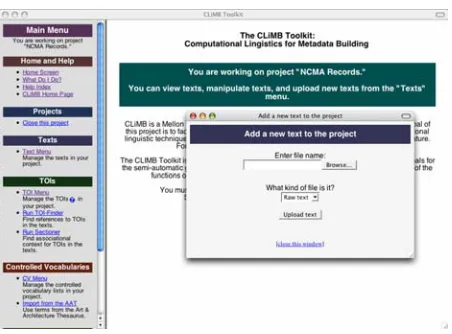
Figure 2. Text loading page of the CLiMB ToolKit
In the evaluation version of the ToolKit (0.9), the following functions had been implemented:
1. Loading and initialization of raw (ASCII) text was available;
2. After initialization, text could be processed by a noun phrase chunker (termed “chunking”) that locates the beginnings and ends of noun phrases (such as the underlined expressions in this sentence from a North Carolina Museum of Art: Handbook of the Collections passage about Jan Jansz den Uyl’s painting entitled Banquet Piece: “At the same time, symbolically charged elements such as the empty glass, burned-down candle, and lute at the far left hint at deeper meanings.”);
3. A TOI list could be loaded, or TOIs could be manually created;
4. The TOI Finder could be run to locate references to TOIs in the loaded texts;
5. Texts that had been processed by the TOI Finder could also be sectioned into associational contexts correlated with specific TOIs;
6. Lists of Controlled Vocabulary could be loaded— included in this feature users were provided access to the Getty Art & Architecture Thesaurus (AAT), and the capability of selecting specific subsets from the AAT;
7. A Noun Phrase detail frame was available, e.g., to illustrate intersections of text phrases with AAT.
In sum, participants in the evaluation could load and process texts and TOIs, could view text in a variety of ways in order to locate relevant sections (for instance, text a specific image or TOI), and isolate noun phrases likely to be good candidates for metadata terms.
# Text of question:
3.2
Finding another access point to the “project” help text was:
1. Completely obvious, . . . , 5. Pretty difficult
6.6
How long did it take you to figure out how to close the project?
1. No time, . . . , 5. Too much time
7.7
I __________ what happens when I click on a table heading.
1. Really like, . . . , 5. Don’t understand
8.8 So far, the concept of a CLiMB TOI is:
1. Very clear, . . . , 5. Pretty confusing
9.9 Entering a new TOI:
1. Was easy, . . . , 5. Was difficult
9.10
So far, my opinion of the look and feel of the CLiMB Toolkit is:
1. Great, . . . , 5. Not so good
11.12 Figuring out how to view the text:
1. Was easy, . . . , 5. Was difficult
11.13 Changing the text display options:
1. Was easy, . . . , 5. Was difficult
11.15
So far, my opinion of the look and feel of the CLiMB Toolkit is:
1. Great, . . . , 5. Not so good
15.18 Understanding the notion of a CLiMB “project” is:
1. Very easy, . . . , 5. Confusing
16.20
I was able to follow the above steps to get my new project to this point:
1. Very easily, . . . , 5. With difficulty
16.21
I find it _________ to understand why the TOI-Finder applies to the whole project, and why the sectioner applies to an individual text in a project.
1. Easy, . . . , 5. Difficult or impossible
17.22
I found these 4 substeps for finding AAT terms in the project texts:
1. Very easy, . . . , 5. Difficult or impossible
20.32
So far, my opinion of the look and feel of the CLiMB Toolkit is:
1. Great, . . . , 5. Not so good
20.33
I was _________ the process of selecting descriptive metadata.
1. very pleased with, . . . , 5. very displeased with
Table 1. Text of the sixteen scaled questions
6. Evaluation of Prototype Toolkit
Ten librarians, image professionals and metadata professionals participated in a ToolKit evaluation using samples of images from two collections, the web version of the North Carolina Museum of Art http://ncartmuseum.org/, and the Greene & Greene Collection of Architectural Images, Avery Archictectural and Fine Arts Library, Columbia University.2 A questionnaire3 directed participants through the same
2
NCMA images were licensed by Columbia from Saskia, Ltd. 3
series of steps that would be required in actual use. These included: loading and processing the texts we provided, browsing images in image galleries we provided, selecting subtrees from the AAT, running the CLiMB tools, and finally, selecting subject terms to associate with sample images.
The questionnaire interleaved user actions with general questions about the user’s satisfaction with the ToolKit, and with specific questions regarding satisfaction with individual steps in the process. There were 41 questions interleaved among 22 task steps; 18 of the questions asked users to select items from a 5-point scale from positive (1) to negative (5) assessments.
Our results include task success on the process of selecting metadata for the images, and user satisfaction measures (cf. Paradise model (Walker et al., 1997)). Regarding task success, all participants found descriptive metadata. For example, 96 distinct terms were selected for an image of a painting by Jan Jansz den Uyl called
Banquet Piece, including half a dozen terms selected by seven or more of the ten participants.
All participants completed Parts I and II of the questionnaire. In Part I, users were given an introductory overview of the Toolkit, exemplified by a preloaded project. In Part II, users were asked to create their own metadata selection project using texts and TOIs for the
North Carolina Museum of Art: Handbook of the Collection (NCMA Handbook). There was an optional Part III pertaining to the Greene & Greene Collection at Avery Architectural and Fine Arts Library, Columbia University; few users completed this part, and it is not discussed further.
Question AVG SD
3.2 1.8 1.09
6.6 1 0.00
7.7 1.9 0.60 8.8 2.1 1.05 9.9 2.2 1.32 9.10 2 0.76 11.12 1.2 0.33 11.13 1.2 0.33 11.15 2 0.78 15.18 1.9 0.60 16.20 3.3 1.07 16.21 2.8 1.56
17.22 2 0.78
20.32 2.1 0.38 20.33 1.4 0.55
Table 2. Sums of responses to scaled questions
6.1. Overview of quantitative results
We give an overview of the quantitative results by examining three specific measures. 1) We present the average score on the 5-point scale questions, which provides a single, summary metric of user satisfaction with the Toolkit. 2) We compare the questions that had
the highest and lowest scores, which gives a view of the range of responses, and also specifics on what features were most and least satisfactory. 3) We compare the responses to a repeated question about overall user satisfaction that was presented at three points during the evaluation (9.10, 11.15, 20.32; in boldface in Table 1 and Table 2).
Analysis of the questions in which responses fall on a 5-point scale, where 1 is the most positive, yields a quantitative view of the respondent’s evaluations. We received answers from all participants on sixteen of these questions; however, respondents treated one of these questions as eliciting multiple responses, so we quantify only the remaining fifteen questions. The average (AVG) for all responses on all scaled questions was 2.0 (the standard deviation, SD, a measure of variability around the average, is 1.8). This indicates that overall, people were satisfied with the experience of using the Toolkit.
Of greater interest than the average of all scaled responses is to compare the questions receiving the lowest and the highest scores. The question receiving the least positive score was 16.20, where the average answer was 3.3 (standard deviation=1.1, median=3), or just below average satisfaction (note that the standard deviation for this question was lower than average, meaning there was more consistency among evaluators on this question). At Step 16, respondents were asked, in essence, to create an entirely new Toolkit project: they were directed to an image gallery, to texts, and to a TOI list. They were told to load the TOI list (Step 16d), and to load, initialize, chunk, and section the text (Step 16e). Prior to Step 16, they had been shown examples of TOIs and texts in a sample project, but had never carried out the procedures in Step 16d. The question following step 16 (16.20) asked evaluators whether they were able to initiate a new project on their own. It thus addressed the most time consuming and the most difficult step in the entire evaluation. As the most difficult question, it should naturally have received the lowest score. We would not have been surprised had the score been between 4 and 5; in sum, it is a very positive sign that respondents found this step close to manageable (3 on the Scaled scale) after so little exposure to the Toolkit.
is arguably the easiest step (Step 6, to close the current project and reopen it), reflects significant overall satisfaction and usability.
As a final means of summarizing the scaled responses, we note that three questions were identical queries about overall user satisfaction with the Toolkit. We repeated this question in order to gauge whether continued exposure to the Toolkit had a negative impact on user satisfaction. Note that there is no change in user satisfaction between items 9.10 and 11.15; the average response is 2 (“Pretty good”). At step 20.32, the average response is only modestly less positive (2.13 on a 5-point scale). In sum, user satisfaction starts out relatively high and remains stable throughout the process of creating a new project, and the subtasks of selecting metadata for three images.
6.2. Metadata Selection Task
Three questions (18.25, 19.28, 20.31) required the ten evaluators to perform a metadata selection task. This task provided the “task success” portion of the evaluation. Participants were directed to an image gallery containing forty-two images from the North Carolina Museum of Art with instructions to view three images in particular—Jan Jansz den Uyl’s Banquet Piece, Jan Brueghel the Elder’s
Harbor Scene with St. Paul’s Departure from Caesarea, and a statue of Neptune attributed to Benvenuto Cellini. Participants were then asked to use the Toolkit to locate relevant passages in the North Carolina Museum of Art Handbook; to choose text display options; finally to select descriptive terms for a catalog record. The passage lengths were 225, 254, and 304 words, respectively.
Because all participants completed question 18.25, we use it to illustrate the richness of terms it elicited. Ninety-six selections were made, yielding a total of twenty seven term or variant terms sets, the top ranked of which are shown in Figure 1. Parentheses are used to indicate terms and term variants, thus “((white) linen) tablecloth”
represents three variants.
7. Conclusion
CLiMB addresses a critical need in the context of a rapidly evolving set of practices. Cataloging standards for images are evolving (e.g.,VRA Core (VRA, 2004) at the same time that new software for managing digital image collections is emerging. It is difficult to design software for applications that are under development, so the high ratings given to the ToolKit speak to the success of our approach. Users found the ToolKit very habitable, remained consistently satisfied throughout a lengthy evaluation (an all day meeting with two evaluation sessions), and selected a large number of terms per image. Two intrinsic indicators point to the high quality of the resulting metadata: a large degree of overlap among the ten participants in terms selected; multiple intersections of terms with AAT terminology. Extrinsic validation awaits a study of the impact of CLiMB metadata on image search. A second phase of CLiMB at the University of Maryland will address this and other issues pertaining to creating a useful and useable cataloger’s tool.
Acknowledgments
This project was supported by the Mellon Foundation. The authors wish to thank each other, the many people who participated in the two evaluations, and an especial thanks to our team member, Stephen Paul Davis, who played a key role in the development of the ToolKit.
References
Bacca, Murtha, Ed. (2002). Art Image Access. Getty Research Institute.
Blitz, Roberta; Giral, Angela; Passonneau, Rebecca. (2004). Project CLiMB: Using Computational Linguistic Techniques to Harvest Image Descriptors. Visual Resources Association Bulletin 31(1):53-68. Davis, P.; Elson, D.; Klavans, J. (2003). Methods for
precise named entity matching in digital collections.
Third ACM/IEEE Joint Conference on Digital Libraries (JCDL)
.
Day, D.; Aberdeen, J.; Hirschman, L.; Kozierok, R.; Robinson, P.; Vilain, M. (1997). Mixed-Initiative Development of Language Processing Systems.
Proceedings of the Fifth Conference on Applied Natural Language Processing (ANLP). Washington, D.C., 1997.
Fawcett, T. (1979). Subject indexing in the visual arts. Art Libraries Journal (Spring 1979):5-30.
Finch, S. and Mikheev, A. (1997). A Workbench for Finding Structure in Texts. Proceedings of the Fifth Conference on Applied Natural Language Processing (ANLP). Washington, D.C., 1997.
Klavans, J. (In submission). CLiMB: Computational Linguistics for Metadata Building.
Klavans, J.; Blitz, R.; Davis, P.; Davis, S.; Elson, D.; Giral, A.; Heinrich, A.; Horvath, V.; Magier, D.; Passonneau, R.; Renfro, P.; Scott, R.; Weber, R.; Wolven, R. (2004). CLiMB. Progress Report, Second Year Cumulative. http://www.columbia.edu/cu/ \ libraries/inside/projects/CLiMB/.
Mandel, C. A. (1985). Enriching the library catalog record for subject access. Library Resources and Technical Services (January/March 1985):5-15.
Taylor, A. (1995). On the subject of subjects. The Journal of Academic Librarianship (November 1995):484-91. Visual Resources Association (VRA). (2004). Chapter 6:
Subject,” in Cataloguing Cultural Objects: a Guide to Describing Cultural Works and Their Images, May 2004 draft version http://www.vraweb.org/CCOweb/. Walker, M. A.; Litman, D.; Kamm, C; Abella, A. (1997).