CSEIT184301 | Published 25 Feb 2018 | January-February-2018 [(4)3:50-57]
International Journal of Scientific Research in Computer Science, Engineering and Information Technology © 2018 IJSRCSEIT | Volume 4 | Issue 3| ISSN : 2456-3307
50
Variety of Cloud Computing and Authentication with Artificial
Intelligence
V. Jeevitha1, G. Pavithra2, R. Valarmathi3
123Research Scholar, Department of Computer Science, Shanmuga Industries Arts and Science College,
Thiruvannamalai, Tamil Nadu, India
ABSTRACT
Cloud made it easy for an organization to increase its capability without actually adding new infrastructure, new software or updating existing technology; as it is Internet based system for providing services to the end users on pay per usage basis. Cloud computing reduces cost of computation & storage to a large extend and also improves productivity. From few days cloud has grown from a promising business application to fastest growing IT industries. Cloud offers services such as storage, computation etc for different types of markets such as health care, net banking, several government organizations and other financial applications. Now many popular educational institutes and enterprises are also getting their applications and data shifted to the cloud. And discussing the Authentication of cloud and Artificial Intelligence integrated. In the last sections major benefits and downsides of cloud computing has been discussed.
Keywords : Cloud Computing, Security, Services, transparency, Private, Public, Community, Hybrid, Multiple Cloud, Cloud Authentication, Artificial Intelligence, Cloud Benefits
I.
INTRODUCTIONA Cloud is a type of distributed and parallel system that consists of a collaboration of inter-connected and virtualized computers that are dynamically presented and provisioned as one or more unified computing resource(s) based on service-level agreements established through the negotiation between the consumers and the cloud service provider.”
Saving your document to the Internet rather than saving it to computer memory is cloud computing. This will facilitate access to it from anywhere and through any device connected to the internet. A paradigm in which information is stored permanently and also replicated in servers on the Internet by the expert cloud providers and cached
Figure 1: Applications & data access from cloud through any network device.
A. Characteristics of Cloud Computing
Cloud computing implies four main characteristics as follows:
The end user has “no-need-to-know” about the internal details of the cloud infrastructure. The application itself interfaces with it through the API (Applications Programming Interface).
The cloud provides “elasticity and flexibility” to the users to scale up and scale down in utilizing resources of all kinds (server capacity, databases, storage, load balancing etc.) according to their requirements.
The cloud offers “Anywhere and always on” type of network based on the computing and the “pay as much as used and needed” type of utility computing to its customers.
II.
CLASSIFICATION OF CLOUD COMPUTINGThe cloud customers can access data, applications, software, servers and heterogeneous platforms.
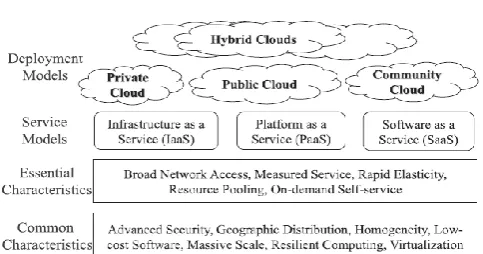
A. Private Cloud:
This type of cloud is rented and owned by an organization. The organization uses cloud resources for its private use only. These types of special clouds are personally built by an enterprise for serving their critical business processing needs.
B. Public Cloud:
In this type of cloud all the resources are owned by cloud provider and they sell the resources to public on demand. End users can rent required resources and pay as per usage. Google, Amazon, Salesforce, Rackspace and Microsoft are some main examples of public clouds.
C. Community Cloud:
It is another type of Private cloud. But here cloud resources are shared among the members of a closed
community having same resource requirements and interest. The Media Cloud is the example of community cloud setup by Siemens IT Solutions and Services. This type of community cloud may be operated by collaborate efforts of all or by a third party alone.
D. Hybrid Cloud:
It is the collaboration of two or more above mentioned cloud infrastructures (private, community, or public). The sole purpose of hybrid cloud is to provide extra services and resources to end users to serve their high demands.
Advantages:
Security , Cost efficiency
Scalability, Flexibility
Preservation of investments
Figure 2: The cloud definition framework by NIST
E. Multi- Cloud
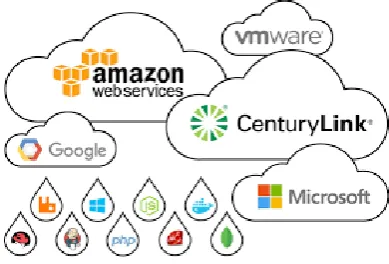
“Multi-cloud” describes an environment that relies on multiple clouds such as OpenStack®,
Microsoft® Azure® or AWS.
For many, it’s about more fully realizing the powerful potential of cloud and giving IT teams increased flexibility with and control over their workloads and data.
i) Types of Multi Cloud Web Services
o OpenStack
o Microsoft Azure
o Amazon
o VM ware
“Multi-cloud strategy allows an organization to meet specific workload or application requirements – both technically and commercially – by consuming cloud services from several cloud providers, “Not every department, team, business function, or application or workload will have similar requirements in terms of performance, privacy, security, or geographic reach for their cloud. Being able to use multiple cloud providers that meet their various application and data needs is critical as cloud computing has become more mature and mainstream.”
Figure: 3 Types of Web Services
"Business units may begin using a cloud provider for a particular project, then IT will need to fold use of that provider into an overall cloud plan."
ii) Work with Multi-cloud
IT may see geographic benefits to using multiple providers, to address app latency concerns, for example. But another reality is that some business units may begin using a cloud provider for a
particular project, then IT will need to fold use of that provider into an overall cloud plan.
Additionally, vendor lock-in concerns and possible cloud provider outages are two issues that pop up frequently when IT leaders advocate for multi-cloud strategy.
“Multi-cloud strategy can be an enabler for preventing vendor lock-in, a means to avoid single points of failure and downtime, or simply a mechanism to consume unique innovations from several providers.
A multi-cloud strategy – which is always means “multi-vendor,” too – as a way of mitigating vendor lock-in risks. But that’s actually a secondary benefit. The real advantage driving multi-cloud strategies is greater flexibility and agility to adapt to the breakneck pace of modern business.
“If your business needs change, your cloud can change with them” with a multi-cloud strategy, It’s not just a business enablement strategy, either. It’s also an IT-forward strategy. “Technology and cloud are changing so rapidly, and [they are changing] a lot. If you are less locked down, you will be able to grow with technology. You will be able to grow with the cloud. You will have a lot more options and flexibility. It’s a really good business case.”
Figure 4: Multiple Cloud
F. Cloud Authentication
Cloud computing is the new way to interact with device, software, data and processes. Needed true things across old and new computing paradigms is “AUTHENTICATION”.
complete in cloud, Sometimes it may cause difficulty due to unauthorized access by Theft or Hacker for a same Resource. Authentication can control all the IT Resources Who can access and When they need to Access .Authentication for a user can provided by 2 Ways.
1) Using Local Credential
2) Using Active Directory Credential
When a User Log in to machine, if a machine is not joined with AD then Username and Password can be Validated by Local Credential. When a User Log in to a machine, if a machine is joined with AD then Username and Password can be Validated only when they match information which is stored in Database by Active Directory Credential.
Whereas AD is a Active Directory is a Directory Service that Microsoft developed for Windows Domain network. AD service consists of Mulitple Directory Services. The Best known Active Directory Domain Services commonly abbreviated as ADDS or simply AD.
i) Two Factor Authentication
Two Factor Authentication is Processed by Two things
1) Something you know (username & password) 2) Something you have(Authentication)
Two Factor Authentication Technology helps to protect user to Login securely in corporate Environment. Two Factor Authentication is also known as Two Factor Security or Two Step Verification. It reduce number of Incidents which is Processed by Unauthorized user.
In Organization /Company, the User can store personal details and sensitive financial Information in the System that can be secured only Two Factor Authentication otherwise it can be easily hacked by unauthorized user. Two Factor Authentication can
enable for Gmail, FaceBook, Apple, Twitter, Outlook, Yahoo Accounts.
In FaceBook we Can use Two Factor Authentication without using phone
o Backup Phone
o Backup Code
o Register Your Device
ii) Example for two factor authentication
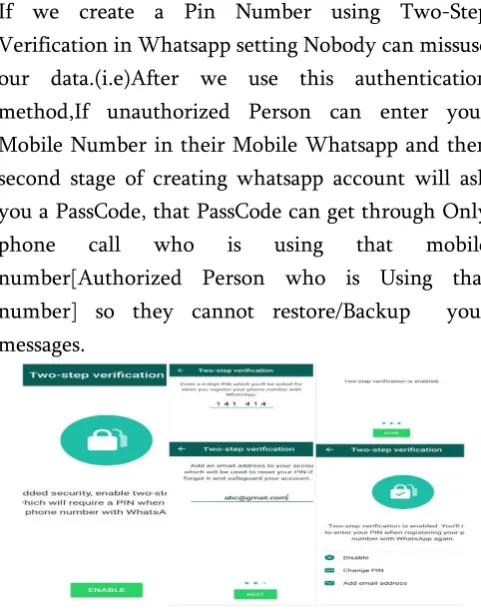
Whatsapp is also One of the Best example in Two Factor Authentication. In Whatsapp when we enable the option of “Two-step Verification” we can secure our data from unauthorized person who known your number,(i.e) unauthorized Person can enter your Mobile Number in their Mobile Whatsapp and they can restore your messages easily.
If we create a Pin Number using Two-Step Verification in Whatsapp setting Nobody can missuse our data.(i.e)After we use this authentication method,If unauthorized Person can enter your Mobile Number in their Mobile Whatsapp and then second stage of creating whatsapp account will ask you a PassCode, that PassCode can get through Only phone call who is using that mobile number[Authorized Person who is Using that number] so they cannot restore/Backup your messages.
Figure 5: Two Factor Authentication
G. Artificial Intelligence
is changing the landscape of corporate world; it is believed to be the future of technology. Artificial Intelligence has the potential to further streamline the immense capabilities of cloud computing. Artificial Intelligence equips cloud computing with tremendous power. It enables machines to learn, think, act, and react like human beings. AI helps machines to analyze and learn from the historical data, identify patterns and make real-time decisions. This will lead to process automation which will eradicate the possibility of human errors.
Figure 6: Artificial Intelligence with cloud
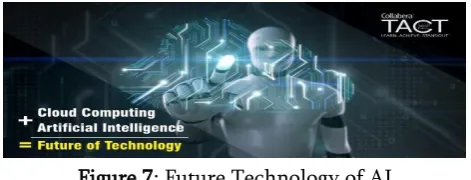
The combination of cloud computing and AI has bought a major change in the world of information technology and various other industries and it is seen as the way forward. It has the potential to change the way data used to get stored and processed across various geographies.
The combination of cloud computing and AI also presents a unique opportunity for cloud and artificial intelligence professionals to explore the endless possibilities for future. Looking at the current trend in the growth of cloud and AI, one thing is for sure that there is going to be a tremendous demand of trained professionals in these fields. It is going to be an amazing opportunity for IT professionals who have just started their careers, if they want to make a career in the technology for the future. They can easily get trained and certified on cloud computing and artificial intelligence.
Figure 7: Future Technology of AI
H. Artificial Intelligence in Future Technology The cloud technology can help AI’s by providing the required information for the learning processes while the AI can help cloud by providing information that can offer more data. AI is capable of streamlining the immense capacities of the cloud. It equips cloud technology with enormous powers. It enables the machines to act, react, think and learn in the manner human beings do. AI assists different machines in learning and analyzing the historical data, making decisions and identifying the patterns. Such a process helps in eradicating the chances of human errors. Therefore, AI enhances the process of decision making of various organizations.
Cloud technology is spread among a number of servers in various languages with huge data storage and across various geographies. Organizations can make use of this data to make up intelligent and automated solutions for customers and clients. Cloud computing is getting more powerful with AI as its applications are extended across multiple diversified sectors in the economy. Thus, even organizations can make use of AI cloud computing to attain long-term goals for their businesses.
III.
CLOUD COMPUTING SERVICE MODELSAll the cloud resources are provided as services to the end users. The service models of cloud computing are mainly Software as a Service (SaaS), Platform as a Service (PaaS), and Infrastructure as a Service (IaaS).
A. Software as a Service (SaaS):
relationship management (CRM). The SaaS cloud’s example includes Salesforce CRM and Google Apps.
B. Platform as a Service (PaaS): This service allows user to built applications using several software tools along with programming languages (e.g. Java, .Net, Python) and also deploy user’s applications onto the cloud infrastructure. The user needs not to manage the cloud infrastructure, operating system and other requirements for them. The PaaS cloud’s example includes Google App Engine and Microsoft Windows Azure
C. Infrastructure as a Service (IaaS):
By this user can use storage, network, servers, processing and other resources on rental basis. The user can run and deploy the applications and guest OS. The user does not control or manage the
infrastructure but has control over applications, OS, storage etc. The PaaS cloud’s example is Amazon EC2.
IV.
HOW CLOUD COMPUTING WORKSAs an organization recruits new employees they also need to purchase computers, software or software licenses for them. They also need to check whether current software license allows another user. But with cloud they only need to install an application for each new hiring. By this application workers can log into the cloud; as the cloud is hosting all the relevant programs for their jobs. Cloud is owned by another company called the cloud service provider. Cloud provides the shifting of workload from the user’s computer to a remote application and also reduces software & hardware demands on user’s side. The user only needs to run the system’s interface software of cloud. The cloud system includes several storage servers and a master control server. Using cloud information is stored at a remotely located database owned by a third party (i.e. cloud provider) instead of your computer’s hard drive. The internet serves as a medium between the user and the cloud.
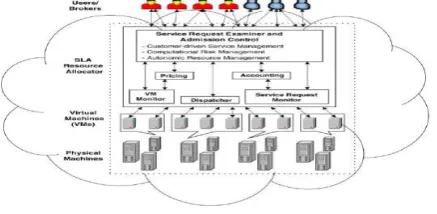
A. General Cloud Computing Architecture:
Cloud provider needs to maintain quality parameters as negotiated in SLA. Many critical QoS parameters are considered for a service request, such as cost, time, trust/security and reliability.
Figure 8: A typical cloud computing system architecture
B. Requirements for Cloud Computing Implementation
Cloud delivers services in an on-demand environment. Several applications supported by the cloud must be secure, fast and always available. For this, they need to build a dynamic and intelligent cloud infrastructure with four core properties in mind.
Transparency
Scalability
Intelligent Monitoring
Security
V.
BENEFITS OF CLOUD Anytime & Anywhere access
Transferring the Risk
Online Editing
Online collaboration
Location and Device independence
Increased pace of innovation & Environmentally Friendly
Recovery & Backups
VI.
DOWNSIDES OF CLOUD Service Availability
Privacy
Cloud offers resources sharing in a cost effective and independent way. Through cloud providers are sharing their resources and capabilities with external users on rental basis. Surely, many organizations are benefitting from Cloud computing, as cloud provides facility to run OS for several servers on Virtual machine. Apart from multinational organizations several small enterprises and educational institute are also using cloud services. There are several risks involved in the cloud. The problems discussed in this paper have made adaptation of hybrid and public cloud difficult. Multi Hybrid Cloud, Authenticate the cloud by two factor method and using cloud in future by artificial Intelligence of all cloud computing major problems are findout and clearing the ideas.
ACKNOWLEDGEMENT
We wish to express our deep sense of indebtedness and sincerest gratitude to all the experts and Mr. U. Udhayakumar for his valuable guidance and appreciation. We also wish to thank our Parents for their encouragement at every step of progress.
VIII.
REFERENCES[1] R. Buyya, et al., Cloud computing and emerging IT platforms: Vision, hype, and reality for delivering computing as the 5th utility, Future Generation Computer Systems (2009), doi:10.1016/j.future.2008.12.001 Song Eun-Ha, Jeong Young-Sik, Efficient server virtualization using grid service infrastructure, J Inform Process Syst 2010;6(4):553–62.
[4] Rong C et al, Beyond lightning: A survey on security challenges in cloud computing, Elsevier, Comput Electr Eng (2012), http://dx.doi.org/10.1016/j.compeleceng.2012.0 4.015
[5] Donlin Chen, Mingming Ma, and Qiuyun Lv, A Federation Model for Education under Hybrid Cloud Computing, Elsevier, 2nd International Conference on Future Computers in Education, Vols.23-24, PP 340-343, 2012
[6] Aida Ghazizadeh, Cloud computing benefits and architecture in e-learning, Seventh IEEE International Conference on Wireless, Mobile and Ubiquitous Technology in Education, pp. 199-201, 2012.
[7] https://en.wikipedia.org/wiki/Cloud_computin g
[8] I. Foster, Y. Zhao, I. Raicu, and S. Lu, Cloud Computing and Grid Computing 360-Degree Compared, IEEE Grid Computing Environments Workshop, pp. 1-10, 2008. [9] LIN Yu- hua , Practice and Innovation of an
experimental teaching mode in universities under environment of cloud computing, Research and exploration in laboratory, vol. 30, pp. 271-274, 2011.
[10] Siemens IT Solutions and Services. Community clouds: supporting business ecosystemswith cloud computing; 2011. <http://www.it-solutions.siemens.com/b2b/it/en/global/Docum ents/-Publications/Community-Clouds- Whitepaper_PDF_e.pdf> [retrieved 18.04.11]. [11] Mell Peter, Grance Tim. Effectively and
<http://csrc.nist.gov/groups/SNS/cloud-computing/cloudcomputing-v26.ppt> [retrieved 18.04.11].
[12] Salesforce. Salesforce CRM applications and software solutions. <http://www.salesforce.com/eu/crm/products.js p>.
[13] Google, Google Apps. <http://www.google.com/apps/>.
[14] Google. Google App Engine. <http://code.google.com/appengine/>.
[15] Microsoft. Microsoft Windows Azure. <http://www.microsoft.com/windowsazure/>. [16] Amazon. Amazon Elastic Compute Cloud
(EC2). <http://aws.amazon.com/ec2/>. [17]
http://www.howstuffworks.com/cloud-computing/cloud-computing.htm
[18] https://devcentral.f5.com/blogs/us/4-things-you-need-in-a-cloud-computing-infrastructure [19] http://knowcloudcomputing.blogspot.in/2012/0
2/grid-and-cloud-computing-technically.html [20] http://www.javacodegeeks.com/2013/04/advant
ages-and-disadvantages-of-cloud-computing-cloud-computing-pros-and-cons.html
[21] http://www.thebeckon.com/pros-and-cons-of-cloud-computing/
[22] Mathias Mujinga, Baldreck Chipangura, Cloud computing concerns in developing economies, 9th Australian Information Security Management Conference, Edith Cowan University, Perth Western,Australia, 5th -7th December, 2011
[23] http://venturebeat.com/2012/01/16/the- downside-of-cloud-computing-4-reasons-to-think-twice/