Addressing Terminal Server Scalability and Performance
Using dynamic optimization to increase server capacity and improve
server and application response
A white paper
by
Published April, 2003 (Rev 1.0)
©2003 RTO Software, Inc. All rights reserved.
The information contained in this document represents the current view of RTO on the issues discussed as of the date of publication. Because RTO must respond to changing market conditions, it should not be interpreted to be a commitment on the part of RTO, and RTO cannot guarantee the accuracy of any information presented after the date of publication.
Note that this paper documents the TScale™ functionality.
This white paper is for informational purposes only. RTO MAKES NO WARRANTIES, EXPRESS OR IMPLIED, IN THIS DOCUMENT. Microsoft Windows, and Windows NT, Windows 2000 are either trademarks or registered trademarks of Microsoft Corporation. Other product or company names mentioned herein may be the trademarks of their respective owners.
Table of Contents
EXECUTIVE SUMMARY ...1
1. TERMINAL SERVER SCALABILITY AND PERFORMANCE OBSTACLES...2
1.1. SCALING OUT, OR ADDING SERVERS TO SUPPORT MORE USERS...3
1.2. THE CONSTRAINT TO SCALING OUT EXISTING SERVERS...3
1.3. SCALING UP, OR INCREASING USERS PER SERVER...4
1.4. THE CONSTRAINT TO SCALING UP ON EXISTING SERVERS...4
2. ELIMINATING RESOURCE CONSTRAINTS – THE KEY TO IMPROVED SCALABILITY...5
3. DYNAMIC VIRTUAL MEMORY OPTIMIZATION WITH TSCALE...5
3.1. TSCALE OPTIMIZATION RESULTS...7
3.2. TSCALE CAPACITY IMPROVEMENTS...7
CONCLUSION ...8
© 2003 RTO Software, Inc. Addressing Terminal Server Scalability and Performance 1
Executive Summary
In an effort to help control IT costs, many shops have adopted the strategy addressed by Citrix® in its market-leading family of MetaFrame® and MetaFrame XP products, and by Microsoft® in the underlying set of Terminal Services (Terminal Servers) for reducing total cost of ownership (TCO). Terminal servers enable conventional server systems to operate in multi-user mode and extend applications to end-users through thin-client interfaces. Among other advantages, the client server model minimizes the complexity of the end-user desktop and centralizes software application management. While this represents cost and administrative savings, the expense associated with supporting and scaling the server side is still a significant cost.
In addition, concurrently running multiple copies of single-user applications in a client server environment introduces a number of unique challenges. Many of these have been addressed by major terminal server product suppliers, but even the best configurations retain fundamental performance and scalability limits.
The fact is that the virtual memory nature of these operating systems and single-user applications forced to run in a multi-user environment imposes significant demands on a server. A great deal of capital can be spent to increase capacity to support incremental users and/or applications by either adding servers or increasing individual server processing power (and thus user capacity), but even this only superficially addresses the problem. In terms of key considerations—
performance, scalability, and cost—the ideal solution must maximize available resources, dynamically and with low impact to personnel and administration.
1. Terminal Server Scalability
and Performance
Obstacles
Let's look at some of the basic concepts involved in scalability:
Throughput refers to the amount of work an application can perform in a measured period of time.
Scalability refers to the amount of change in throughput that occurs when resources are either increased or decreased. When referring to Terminal Services, this is what allows a server (or servers) to support anywhere from a handful to thousands of users, by simply adding or subtracting resources as necessary. When the resources are added inside a server (e.g. extra disk, another CPU, more ram) it is referred to as Scaling Up. When resources are added outside of a single server (e.g. more servers) it is referred to as Scaling Out.
Terminal servers1 represent a highly cost effective architecture for deploying and managing complex mixes of Windows applications to a variety of devices, without incurring the complexity of distributing, installing, and maintaining applications software on the client devices.
The terminal server architecture achieves its benefits by shifting Win32 client application execution from a PC to a server. This allows the client device to be lightweight and simple to manage, it allows applications to
However, the significant benefits of the terminal server architecture come at a price. Reducing the amount of software that runs on each client device increases the amount of software that runs on the terminal servers. In fact, a copy of every application that is run for every user is loaded on the terminal server. Therefore, in order to support 30 users of an application like JD Edwards OneWorld, thirty copies of the OneWorld client must be loaded and running
concurrently on the terminal server (since none of these copies are in fact running on the client devices).
Running multiple copies of a Win32 application concurrently on a server creates a number of fundamental performance and scalability challenges. The very strategy that IT shops use to increase scalability has its own scalability problems!
The single largest challenge comes about because of the way client applications are written. Developers of 32-bit applications have little knowledge of the terminal server environment and of what it takes to write applications that run well in a multi-user Windows environment. Nor is it a high priority; applications are generally produced under tremendous time and feature-driven constraints, and it is simply not feasible for developers to also account for how multiple application instances perform on a terminal server.
© 2003 RTO Software, Inc. Addressing Terminal Server Scalability and Performance 3
1.1. Scaling Out, or Adding
Servers to Support More
Users
Citrix’s MetaFrame and MetaFrame XP products allow organizations to combine servers into large farms, using load balancing to allocate server capacity to the users as they leave and enter the farm. Scaling out is a very effective way to deal with the applications, redundancy, and management issues raised above, but it also introduces hard and soft costs along with additional complexities. This problem is compounded by the fact that organizations have to size their terminal servers to be able to perform well during periods of peak load and utilization, and size the terminal server farm with a certain level of redundancy so that if a server fails, sufficient capacity exists to support the production user population and its work.
1.2. The Constraint to Scaling
out existing servers
The best practices recommendations of many Citrix Certified Engineers is to use dual CPU servers with either 2 GB or 4 GB of RAM, and at least two hard disks (one for the operating system and the page file, and another one for the applications running on the terminal server). Two reasonable configurations from Dell fitting these criteria would be:
1. Dell PowerEdge 2650, dual 2.0 GHz CPU’s, 2 GB RAM, two 36 GB 15K RPM disk drives, Windows 2000 Server with 5 client licenses—$7,236.2
2. Dell PowerEdge 2650, dual 2.8 GHz CPU’s, 4 GB RAM, two 36 GB 15K RPM disk drives, Windows 2000 Server with 5 client licenses—$8,935. 2
2 Costs from Dell web site, April 24, 2003.
The $7,000 to $9,000 in the analysis above represents just the initial capital cost of acquiring a server and the base operating system. The cost shown does not include any of the following:
▪
The costs to install the server, configure the server, install applications, and ensure that the server is operating properly.▪
The cost to acquire server-basedutilities required to manage a server as a component of a medium to large size farm.
▪
The incremental power, network, cooling, and floor space cost required to support a server.▪
The ongoing human administrationcost of managing an incremental server.
▪
The hardware maintenance costs associated with making sure that if something breaks it is fixed in a reasonable period of time.▪
Chargeback fees charged by the IS department to the user department for every managed server.▪
Outsourcing fees charged to IS departments by organizations that maintain server farms on an outsourced basis.So while the cost of scaling out server farms is substantially less than that of deploying and managing fat client desktop
1.3. Scaling Up, or Increasing
Users per Server
An alternative to buying a large number of servers is to increase the amount of work done on each, so that fewer total servers need to be purchased and managed for a given server-based computing deployment. Two approaches exist to scaling up:
1. Purchase very large (either quad- or eight-processor) servers and do more work on each as a result of greater individual server capacity. 2. Increase the ability of existing
servers in the farm to do more work and support more users.
As is well known in the world of Citrix deployments, an increase in server CPUs does not translate to an increased number of concurrent users by the same factor. That is, if a dual CPU server supports 40 concurrent users for a given application, going to a quad-CPU server does not allow 80 concurrent users (nor 160 on an 8-CPU server, for that matter).
This approach is generally also not cost-effective. Server price increases
substantially with additional CPUs: a four-CPU server is more than twice the cost of a two-CPU server, and the cost of an eight-CPU server is more than twice that of a four-CPU system. Thus the cost per
concurrent user is increased by using larger servers (i.e., with more CPUs per server). Therefore scaling up by buying larger servers is not economically and technically
▪
The Windows family of server operating systems (Windows NT, Windows 2000, Windows XP, Windows 2003) is not optimized for multi-user operations. WhileMicrosoft and Citrix have addressed many of the application and
configuration management issues associated with using Windows as a multi-user operating system, core issues within virtual memory management impede scalability.
▪
End user applications (fat clientWin32 applications) are typically not optimized for concurrency within a single machine.
▪
Windows reacts to the notion ofrunning multiple instances of unoptimized Win32 applications concurrently on a server by making extensive use of the page file.
▪
This extensive and frequent use ofthe page file (a component of virtual memory) interjects a large number of page file writes and page faults into the execution performance of the applications.
▪
As the server gets busier and more users load more applications, the use of the page file increasesexponentially, especially as it goes into an “overcommit” state.
▪
When the OS gets into a memory© 2003 RTO Software, Inc. Addressing Terminal Server Scalability and Performance 5
memory) are fundamental constraints to scaling up most terminal servers.
2. Eliminating Resource
Constraints – the Key to
Improved Scalability
The virtual address space of each process is much larger than the total physical memory, or random access memory (RAM), available to all processes. To provide the necessary space, Windows uses a file on disk called the page file. The total amount of space available to all executing programs or
processes is the sum of the physical memory and the free space on disk available to the
page file. Together the sum of this storage is called virtual memory.
As far as programs are concerned, each element of virtual memory conceptually refers to a byte of physical memory. Behind the scenes Windows translates or maps each virtual memory address into a corresponding RAM address. The conventional wisdom is that RAM is plentiful and inexpensive, and that most servers run with significant available “headroom” (or extra capacity) when it comes to memory use. In reality, the typical server deployment does not suffer from lack of RAM, but from the application component swapping and disk I/O
associated with paging in a virtual memory system. The solution lies not in continually adding RAM but in reducing utilization through intelligent management of what is available.
To understand the full significance of virtual memory and why reduced utilization helps server scalability and performance, it is important to first understand that there are many different pools or groups of memory in a Windows server. At the highest level, virtual memory is split between the two physical places in which information resides: RAM and the disk-based page file. However, even information that is mapped to the page file can reside in the cache, a
part of memory for information that might be frequently recalled from the hard disk.
Two kinds of errors can result from attempts to access data from these storage areas: soft and hard page faults. A soft page fault occurs when an application attempts to use the page file to retrieve information that is actually cached (RAM-based). A hard page fault occurs any time the hard disk needs to be accessed in order to resolve a request for a page of information.
Virtual memory matters because, while page faults are a normal part of the operating process, the time the OS takes to write and retrieve information from a page file via page faults directly affects performance. Excessive page faults (particularly hard page faults) significantly degrade system and application response. If the amount of virtual memory used by an application is reduced, the result is fewer page file reads, writes, and faults, including fewer hard faults. By reducing the activity level at the slowest part of the server, applications run faster, and the server is able to support more users.
There is a second and more subtle reason for the importance of virtual memory. Certain pools of virtual memory are reserved for specific uses by the OS. An example of such a pool is the limitation on the amount of virtual memory that can be consumed by page table entries in the Windows 2000 Server OS. Insofar as the page table entries can be made smaller, more of them (and consequently more users and more
applications) can be supported by a terminal server.
3. Dynamic Virtual Memory
Optimization with TScale
The page faults created by constant and unnecessary application swapping lead to considerable server performance
common performance obstacle can be overcome through optimization of virtual memory and of the page file as a component of virtual memory. But to be truly effective, optimization must be transparent and must dynamically adapt to changing system, application, and user demand.
The TScale product from RTO Software dynamically optimizes virtual memory use by watching how applications running on the terminal server use virtual memory, and in particular the page file. When it finds examples of “waste” in the use of virtual memory (waste which almost always starts with a page file write and ends with a page fault), TScale writes an optimization map to the hard disk of the terminal server. The map is read the next time that a user loads an optimized application, resulting in a
reduction in both the amount of page file activity and RAM (or working set) used by the application. These reductions in page file activity and working set utilization on the part of the optimized applications allow TScale-optimized terminal servers to typically support up to 33% or more concurrent users per server.
TScale was developed in response to the following epiphany: Even if RTO Software had access to all of the source code in the world, the changes required to make a set of applications run well on a set of servers are specific to the mix of operating system versions, operating system service packs, utilities and applications that run on a specific server. Therefore the kinds of scalability and performance optimizations
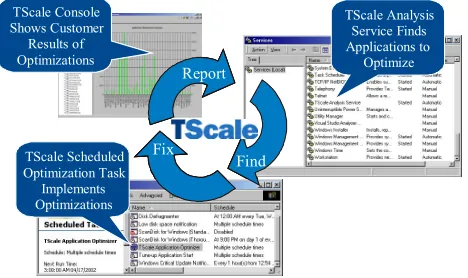
Windows NT and Windows 2000, TScale consists of three major components:
▪
TScale Analysis Service: Runs constantly on the production terminal server and writes a log file of the optimizations that need to be performed. This service is very lightweight in terms of CPU resources and consumes a minimal amount of memory.▪
TScale Scheduled Optimization Task: Runs when applications on the server are lightly used and implements the actual optimizations delivered by TScale.▪
TScale Console: Shows the server farm administrator the amount of virtual memory (primarily page file space) saved for each application that is optimized by TScale.TScale components are designed to install directly onto production servers—without impacting or disrupting system operation.
Figure 3.1: TScale components use an iterative Find, Fix, Report methodology.
© 2003 RTO Software, Inc. Addressing Terminal Server Scalability and Performance 7
▪
change application code or data (i.e., TScale does not in any way modify the functionality or the data of applications running on the terminal server)3.1. TScale Optimization
Results
For every instance of an application running on a terminal server, TScale optimization reduces each of the following:
the working set
the amount of information in the page file
the general level of page file activity the level of page faults attributed to that application
TScale reduces the virtual memory
consumed by each user of a wide variety of applications by varying amounts. Typical results for applications start at 4 MB to 5 MB per user of each application and range up to 150 MB per user. These effects combine to allow the applications on the terminal server to execute more efficiently, which in turn results in two key terminal server benefits:
Concurrent user capacity on the terminal server increases up to 30% or more.
Application performance (end user response time) improves, especially during periods of heavy load and peak server utilization.
3.2. TScale Capacity
Improvements
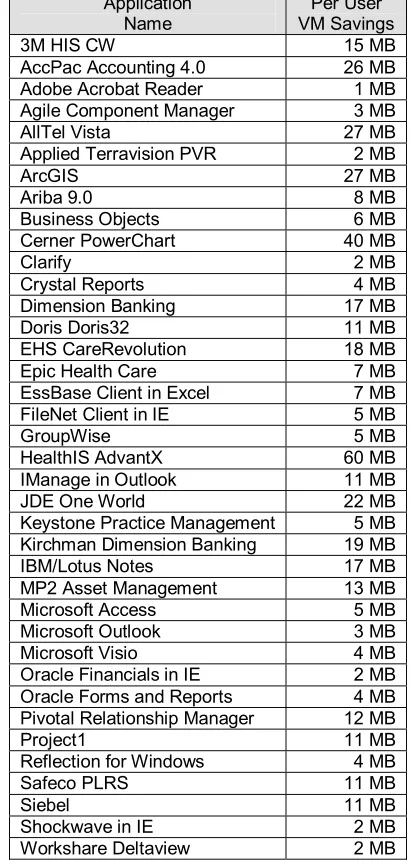
TScale improves the performance of all Win32 applications that are to a greater or lesser degree constructed out of compiled components. The increased performance on the system results in increased capacity on the server. RTO Software has compiled a list of sample virtual memory (VM) savings results for TScale-optimized applications at
actual customer installations, as summarized in Table 3.1.3
Application Name
Per User VM Savings
3M HIS CW 15 MB
AccPac Accounting 4.0 26 MB
Adobe Acrobat Reader 1 MB
Agile Component Manager 3 MB
AllTel Vista 27 MB
Applied Terravision PVR 2 MB
ArcGIS 27 MB
Ariba 9.0 8 MB
Business Objects 6 MB
Cerner PowerChart 40 MB
Clarify 2 MB
Crystal Reports 4 MB
Dimension Banking 17 MB
Doris Doris32 11 MB
EHS CareRevolution 18 MB
Epic Health Care 7 MB
EssBase Client in Excel 7 MB
FileNet Client in IE 5 MB
GroupWise 5 MB
HealthIS AdvantX 60 MB
IManage in Outlook 11 MB
JDE One World 22 MB
Keystone Practice Management 5 MB
Kirchman Dimension Banking 19 MB
IBM/Lotus Notes 17 MB
MP2 Asset Management 13 MB
Microsoft Access 5 MB
Microsoft Outlook 3 MB
Microsoft Visio 4 MB
Oracle Financials in IE 2 MB
Oracle Forms and Reports 4 MB
Pivotal Relationship Manager 12 MB
Project1 11 MB
Reflection for Windows 4 MB
Safeco PLRS 11 MB
Siebel 11 MB
Shockwave in IE 2 MB
Workshare Deltaview 2 MB
Table 3.1: Per-user virtual memory savings field data from TScale-optimized servers.
Application types for which TScale has no effect (positive or negative) include DOS applications, 16-bit Windows applications, and applications which are not compiled (TScale helps the Win32 infrastructure for Java applications, but not the applications themselves).
3 Many variables affect server-based computing
Conclusion
Organizations that launch new implementations of server-based computing or expand the scope of their existing implementations typically do so because the Total Cost of Ownership of an applications deployment around this type of computing architecture is significantly less than the TCO associated with a large scale fat client desktop rollout.
However, the cost of acquiring and maintaining the number of servers required to support a large scale production rollout of one or more major lines of business applications represents both a significant initial outlay of capital—and ongoing maintenance and management costs.
Fortunately, the key to intelligent server resource management is already at hand. TScale directly reduces the number of servers required for new deployments and cost-effectively extends existing server capacity at a fraction (33% to 55%) of the incremental cost required to purchase and implement more servers.
The higher efficiency afforded by TScale allows servers to support more concurrent users and applications. Its find, fix, and report approach continually and transparently optimizes virtual memory use, enabling support for up to up to 30% or more users than on conventional servers, and overcoming long-standing server performance and scalability limits.
About RTO Software
Founded in 2000, RTO Software is pioneering a new category of performance management tools that automatically, continuously and autonomously improve the capacity and scalability of Windows-based applications, servers and desktops. Based in Suwanee, Georgia, RTO's products are used in a wide variety of industries, including financial management, manufacturing,
healthcare, telecommunications, and government.
For more information, or to obtain a free evaluation version of TScale, please visit RTO Software at www.rtosoft.com, or call at +1-678-455-5506.