Abstract—Bag of words provides one way to deal with Model, which truly sustained into a Support Vector Machine classifier. This is to arrange and gathering of document records that are publically accessible datasets through social media. The text results demonstrate the examination between the raw information and the clean information that is viewed on the word cloud.
IndexTerms— Bag-of-Words, Wikipedia, Word Cloud Machine Learning, Text Classification, preprocessing, feature extraction, Matlab, Text Analytics toolbox.
I. INTRODUCTION
Text classification is one of the important concept in machinelearning, there are many application that are associated withthe text classification, they are spam filtering, sentimentanalysis, intention mining etc . This paper concentrates onSentiment Analysis. One of the common approaches for theSentiment analysis is the Bag of Words model (BOW). TheBag of Words model is one of the best ways to represent textdata.Wikipedia, Gmail, or any information that is available in theinternet is in the form of text. Bag of Words model classifiesthis text and extract some feature out of text. This text that isavailable in the internet is an unstructured data which will bein the predefined format. This paper deals with the dataset thatis available in the internet in the form of text i.e. SentimentAnalysis. On a particular dataset people expressed sentimentsthat can be happiness, worry, sadness, enthusiasm etc. through text. One simple example to understand bag of words modelis, which simply counts how many times each word occurs ina sentence (or document).“the cat sat on the mat” → {cat, mat,on,sat, the, the}“the”is repeated twice and all there other words occurs only once. But this paper mainly concentrates the dataset which describes about the emotion text that people expressed their emotion through text. The software used here is the matlab and the toolbox used is the text Analytics toolbox [7].
II. LITERATURE REVIEW
AllaAlahmadi and ArashJoorabchi had two problems for text classification one was text breaks into its constituents
words and other problem was it treats synonyms as an independent features. In order to solve this problem the approach introduced was bag of concepts which tried to reduce the synonyms from the text due to which they had a benefit of capturing and preserving the semantics of word appearing in the document [1].
Soumya George k and Shibily Joseph these were the two authors who mainly worked on the most traditional approach i.e classification of unigram model for categorization of text in order to do so they proposed a method called co_occurance feature extraction for bag of words in a document. Finally they were able to do so by a mechanism called as search indexes or the texts [2].
Hand and Kasun De Zoysa: the problem identified by these authors was based on the sentiments which incorrectly assume that the subject of all sentiments is same with the subject of documents. The approach was based on rule based approach i.e they mainly concentrated on the emotions that was expressed by the people through text [3].
ShahinAmiriparian and Sandra ottal: most of the sentiments concentrated on the text data but these two authors worked on speech and visuals. The approach that they used was using a tool called openSmile which helped in recognition of speech and converting to word. Considered those words and used bag of words model through with they obtained system based speech recognition approach for text classification [4].
The text classification and the bag of words model remains same in all the above survey, but the feature extraction is different for all the survey. This paper concentrates on what kind of words that are most frequently used. In order to do so we have considered the dataset where people expressed their sentiment through text worked on it. The next concept includes a data preprocessing concept that converts text to lower case, tokenization, removing stop words. Once data pre processing is the next step is feature extraction using bag of words model..
III. DESCRIPTION OF DATASET
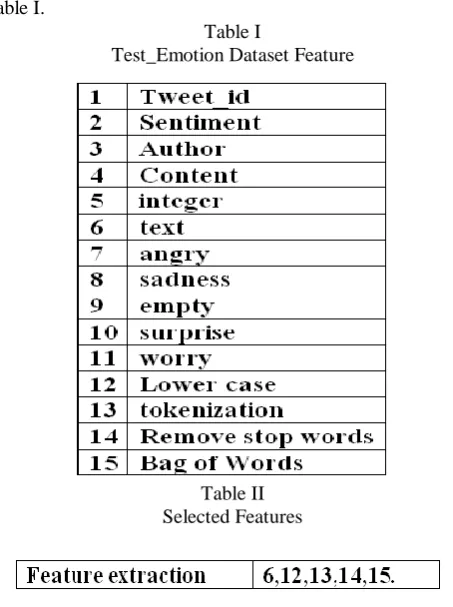
The dataset describes about the sentiments that the people have expressed through social media. It consists of tweeter_id, sentiment, author and content. In order to work on bag of words model we mainly worked on the content (i.e text part) that available in the dataset. The ―content‖ column contain large amount of text that people have expressed in different sentiments through social media. This sentiments can be happiness, worry, sadness, surprised, enthusiasm etc. This model is worked on these types of text data for processing. Table I describes about the features included in the datasets. Table II shows the feature selected from the
Implementation on Text Classification Using Bag of
Words Model
table I.
Table I
Test_Emotion Dataset Feature
Table II Selected Features
IV. TEXT ANALYTICS TOOLBOX
Text Analytics toolbox in Matlab is used for (1) representation and (2) visualization of text data. (1) For representation of text in text analytics toolbox preprocessing, feature extraction can be done. This toolbox also supports for sentiment analysis, prediction methods etc. Some of the function that are associated with this toolbox are Bag of words, context that searches the documents from the words occurrences in context, erase i.e. removes punctuations and tags, Word Embedding, ismember i.e. tests weather the word is a member of word embedding. (2) For visualization of text there are many ways of representing text that is in the form of word cloud, histogram representation, 2D-3D scatter plots, Pi charts and graphs. This paper visualizes the results in the form of word cloud and histogram.
For large text data around 30,000 to 50,000 data, even for this kind data we can work on this text analytics toolbox using machine learning techniques such as LSA(Latent Semitic Analysis) and LDA (Linear Discriminate Analysis). These are the techniques in machine learning that works on large datasets. The following steps are followed for working with this text Analytics toolbox.
Step1: Data Preprocessing.
Step2: Feature extraction using Bag of Words model.
Step3: Results represented through word cloud
Figure1: screenshot of dataset imported on to the matlab
Figure2: Generating Script of the dataset on the Matlab Editor
Fig1 describes about the dataset that is imported on to the matlab. Figure1 describes the table that includes tweet_id, sentiment, author and the content. The tweet_idcolumn is the unique number for each text. The sentiment (column) is of different category i.e. the sadness, worry, happiness etc. The author (column) is in the form of text which is given randomly for the representation of text data. The content (column) is in the form of text that represented depending on the sentiment expressed by the authors. The file is in .csv format. This data is imported on the matlab. The visualization can be viewed in Figure1.
Once the data is imported in the matlab [12] the scripts has to be generated. In the import section there are three options import data, generate script and generate function Figure2. The input Generate Script is selected for the processing
V. EXPERIMENTS
The datasets that is considered includes the tweets information based on the sentiment that the people have expressed in the form of text. From this text the following set of operation is performed.
Data Preprocessing:
In data preprocessing the following functions are performed.
The text from the column content of the dataset is considered which contains lots of text information. The text had to be converted to the lowercase because there will be many words which contains same meaning, like for example ―The‖ and―the‖ means the same the system does not understands same with ―Is‖ and ―is‖. In order to avoid this conflict the text had to be converted to the lower case.
% Convert text to lower case cleanTextData = lower (textData); cleanTextData (1:10)
Creating an array of tokenization
In order to identify exactly how many words are available in one particular text, the tokenization is used. The array representation is also used which helps to identify exactly which row and which column the text is tokenized % Create an array of tokenization documents
cleanDocument = tokenization (cleanTextData); cleanDocument (1:10)
Erase punctuation from the document:
In one particular text there will be punctuation in the text suchas ―@‖, ―[]‖,‖=‖,‖...‖,‖?‖Etc. This type of punctuation that is not required in the text has to be removed/erased. This helps further processing of text data.
% Erase Punctuation
cleanDocument = erasePunctuation(cleanDocuments); cleanDocuments(1:10)
Removing the Stop Words from the text:
The stop words such as ―is‖, ―and‖, ―or‖, ―is‖ these word will be more in the text. Removing these words from the text can reduces the content of the text and further processing becomes easier.
% Removing Stop Words
cleanDocument = removewords(cleandocuments); cleanDocuments(1:10).
Feature extraction:
For the feature extraction bag of words model is considered. The bag-of-words demonstrates on how the text can be classified depending on the set word that is associated with the text. The below syntax shows the bag of word model along with properties (figure8), that includes number of words ,number of documents, vocabulary and counts.
BagofWords with Properties: Count: [40000*58714 double] Vocabulary: [1*58714 strings] NumWords: 58714
NumDocuments: 40000
This [40000*58714] count is the product of the number of documents and the number of words associated with the text data. So there are totally 40000 documents and 58714 words in the data set. The vocabulary count specifies that [1*58714] in one particular row there are 58714 strings available. All these words are enclosed in the bag of words.
Results
In the results the comparison is made between the raw data and the clean data. The output is in the form of word cloud.The raw data mainly includes the text data before undergoing the preprocessing of the text data, whereas the clean data is the text data which shows the text data after preprocessing. The reduction of the text data is also calculated for which the reduction results which is 0.1626 i.e. approximately result 16.26% of reduction of text data. The reduction percentage is calculated using formula,
Reduction = 1 –numWordsclean/numWordsRaw cleanBag = BagofWords with Properties:
Count: [40000*49165 double] Vocabulary: [1*49165strings] NumWords: 49165
NumDocuments: 40000 Reduction = 0.6126
Figure3 describes the comparisons made between the raw data and the clean data. It can be clearly viewed that the more frequently used words in the text. The data preprocessing is done which can be views in the clean data. The most highlighted words are more frequently used words in the text.
Figure4: Word Cloud representation of text data
The figure4 describes the information about the text data which consist of most frequently used word in the data set. The most highlighted words such as sweet, shall, which, their, beauty should etc are more frequently used in the dataset.
Figure5 describe the histogram representation which has class frequency and distribution. The class mainly consists of the sentiments i.e angry, bored, enthusiasm, fun, happiness, hate, neutral etc. the class distribution for ―neutral” has highest frequency around 8500 which means that the highest percentage of sentiment expressed by the authors (people) in data set for neutral is more. The second highest is the ―worry”, next is ―happiness” and so on. The lowest percentage of distribution for class distribution is for angry i.e the sentiment expressed by the people on ―worry” is less.
Figure5: Histogram representation of text data
Figure6 describes about the sentiment expressed by the people when they were sad, happy and neutral. In the fig6 it can be clearly observed the most frequently used words are based on the sentiments.
VI. CONCLUSION
Bag of words is one approach that helped to classify the text data by comparing the raw data and the clean data which gave the result up to 16.26% reduction of the text data. The histogram representation of text data gave the information related to the sentiments, from the histogram graph it can be clearly viewed the neutral sentiment were more. The word cloud classification for sentiments like neutral, happiness and sadness is done separately from which we can view the most frequent used words in each of these sentiment.
VII. FUTURE WORK
The automated model can be designed using machine learning model that can automatically divide the text from raw data to clean data. An algorithm can also be designed that can automatically increase the reduction percentage of the text data.
REFERENCES
[1] (Sebastiani, F. (2002). Machine learning in automated text categorization. ACM Computing Surveys, 34(1):1-47.
[2]. McCallum, A. and Nigam, K. (1997). A comparison of event models for Naive Bayes text classification. AAAI-98 Workshop on Learning for Text Categorization, pages 41-48.
[3]. A. khan, B. Baharudin, and K. khan, "Sentence based sentiment classification from online customer reviews," in Proceedings of the 8th International Conference on Frontiersof Information Technology, ser. FIT '10. New York, NY, USA: ACM, 2010, pp. 25:1-25:6.
[4]. T. Wilson, J. Wiebe, and P. Hoffmann, "Recognizing contextual polarity: An exploration of features for phrase-level sentiment analysis," Comput. Linguist.,vol. 35, no. 3, pp. 399-433, Sep. 2009. [5]. Gabrilovich, S. Markovitch, Feature generation for text categorization
using world knowledge. In: Int. Joint Conference on A.I IJCAI, pp. 1048-498, 2005.
[6] .FabrizioSebastiani, Machine learning in automated text categorization, ACM computing surveys (CSUR) 34 (2002), no. 1, 1–47.
[7]. MaciejJanik and Krys J Kochut, Wikipedia in action: Ontological knowledge in text categorization, Semantic Computing, 2008 IEEE International Conference on, IEEE, 2008.
[8] http://www.wikipedia.org/
[9] https://en.wikipedia.org/wiki/Bag-of-words_model [10] https://www.kaggle.com/datasets