Available Online atwww.ijcsmc.com
International Journal of Computer Science and Mobile Computing
A Monthly Journal of Computer Science and Information Technology
ISSN 2320–088X
IMPACT FACTOR: 6.017IJCSMC, Vol. 7, Issue. 11, November 2018, pg.121 – 135
Modelling and Simulation of Spine in Sitting
Posture in a Computer-Related Workplace
Jheanel E. Estrada
1, Larry A. Vea
2¹College of Information Technology Education, Technological Institute of the Philippines, Philippines
²School of Information Technology, Philippines
1
[email protected]; 2 [email protected]
Abstract— Work-related Musculoskeletal Disorder has been the top non-fatal occupational injury in the world. Despite being the leading non-fatal injury, preventive measures addressing this issue was not the top priority. This study aims to address issues in Occupational Safety and Health such as the recognition of proper and improper sitting postures, the effect of workplace element such as table, the recognition of discomfort in some areas of the body, the simulation of the acceptable torso angle in sitting posture and the relationship between body frames and sitting postures. During modelling, Decision Tree Classifier shows an acceptable accuracy of 90% and a kappa of 0.7. For the simulation, it has found out that every human body frames, the height of the office table found significant in assessing his/her comfort leading in Musculoskeletal Disorder. The study also found out that using a standard table approximately 75-80 cm in height affects the comfort of different body parts such as torso, arm and wrist. This study also found out that reclining the torso in an acceptable degree might reduce the discomfort experienced in most areas of the body in sitting posture.
Keywords— Ergonomics, Jack Siemens Tool, Human Modelling and Simulation, 3D, Comfort Assessment Tool, Dreyfuss, OWAS, accelerometer
I. INTRODUCTION
In the recent years, efforts have exerted that show the significant negative impact of Musculoskeletal Disorders (MSDs). These MSDs are very visible in occupational areas all over the world. As a support to this, Work-related Musculoskeletal Disorders (WMSDs) are leading non-fatal occupational injuries. In 2015, WMSDs accounted for 31% (356,910 cases) of the total nonfatal occupational injury cases in U.S. [1].
WMSDs are identified as injuries or dysfunctions of the muscles, nerves, tendons, bones, ligaments, joints, cartilage, blood vessels or spinal discs that caused by a single event or accumulative traumas during work [1], [4]. Sprains and strains are common types of WMSDs, which accounted for 39% of all allowed lost time claims [5]. Back, neck, shoulder, elbow, and wrist are the most common parts of body affected by WMSDs [5].
working days (full-day equivalent) were lost in in the same year through MSDs that mainly affected the upper limbs or neck that were cause or made worse by work. On average, each person suffering took an estimated 17.8 days off in that 12-month period. Aside from these estimates, the economic costs to individuals, industries and society are also excessive. The HSE estimate the cost to the economy to be £5.7 billion per year [3].
Meanwhile, in the Philippines, a study in 2013 shows that establishments employing 20 or more workers produced a total of 171,787 cases of occupational diseases from 85,483 in 2011. Back pain is the most common type of occupational diseases in 2011 and 2013, which reached for about 35.5% (30,374) and 31.6% (54,244), respectively. Other types of diseases had shares of more than 10% of the total cases. These included the following: essential hypertension (13.1%) and neck-shoulder pain (10.2%) in 2011; and essential hypertension and peptic ulcer (11.3% each), and neck-shoulder pain (10.6%) in 2013.
It is also noticeable that Call Center companies produce high cases of occupational diseases were as follows: (1) back pain (23.8% or 7,428); (2) occupational lung disease (16.8% or 5,266); (3) occupational asthma (13.8% or 4,305); (4) other work-related musculoskeletal diseases (12.0% or 3,745); (5) neck-shoulder pain (10.9% or 3,410); and (6) essential hypertension.
Last June 2018, LABSTAT Updates, highlights the results of the module on Occupational Safety and Health (OSH) Practices from the 2015/2016ISLE. This issue specifically presents the various preventive and control measures/activities implemented in establishments; types of safety and health policies and programs adopted; OSH-related trainings/seminars availed by employees; and designated health and safety personnel in establishments. This particular module on OSH Practices is a rider questionnaire from the Occupational Safety and Health Center (OSHC) of the Department of Labor and Employment (DOLE) [19].
As a summary, 99% of establishments’ implements prevention and control measures against work safety and health hazards. Of the total 30,682 establishments employing 20 or more workers in 2015, almost all (98.7%) carried out various preventive and control measures during the year. Establishments implemented these to promote and ensure health and safety environment for its employees. The top 5 preventive and control measures adopted by establishments include the following: appointment of safety/health officers and/or first-aiders (87.2%); posting of safety signages or warnings (84.2%); imposed a smokefree workplace (83.2%); provided emergency response preparedness activities for earthquake, fire, etc. (79.8%); and conducted regular inspection and maintenance of equipment (79.7%) in their establishments.
Despite the factual evidences presented above, back pain has the highest number of occupational diseases which most of the companies and organizations do not put much effort in giving preventive measurements on the area of WMSDs. With these studies stated above, it is visible that WMSDs are significant problem to the individual and to the society. The identification of the possible cause of WMSDs and the identification of the body parts that suffer discomfort during a given task is necessary.
With these, the study aims to answer the following research questions: 1. What are the effects of using a standard table in each body frame?
2. In a computer-related workplace, what are the possible areas of the body that suffer in discomfort that could lead to WMSDs?
3. What are the acceptable torso angles that might reduce the discomfort experienced in most areas of the
body in sitting posture?
II. RELATED LITERATURE
Ergonomics aims to provide easily, effectively and safe working environment for people [6]. This also includes the design of furniture, equipment, goods and other necessary devices for the increase of overall performance of people [7]. One way to ensure productivity is to check whether the environment is suitable to the anthropometric measurements. This condition is also applicable in school set up wherein students are using chairs and desk during classes and they acquire permanent sitting habits for an estimate of six (6) hours per day [8]. These sitting habits may lead to bad sitting postures, musculoskeletal disorder or psychological dissatisfaction [9].
table height used in a computer-related workplace in properly assessing the sitting postures. It also did not consider the effects of these elements in other parts of the body such as arm, wrist and torso. With these limitations, the researchers tried to re-investigate on these areas.
In the study conducted in Malaysia [10], stated that classroom furniture, backrest shape and desk height were significantly associated with the lifetime prevalence of MSD (33%) and neck pain (20.2%) among the primary school children. Therefore, public health concerns over the effects of bad posture need to focus on the design of classroom furniture.
As an additional on the previous study, in the study of Azfan [11], they took considerations of the seven (7) anthropometric measurements such as height, weight, popliteal height, buttock-popliteal length, hip breadth, shoulder height and elbow height in sitting position. Five (5) furniture dimensions were consider such as seat height, seat depth, seat width, backrest height and seat to desk height. The study found out that school’s furniture did not match with the selected anthropometric measurements of the children since they are of different grade levels may mean an increase in their height as well. It also shows the increased in the percentage of match for backrest height, seat height, seat depth and seat to desk height. The study recommended to ergonomically re-designing the school furniture.
As presented in the studies above, the study of ergonomics is significant and important because it affects the performance and the whole state being of our human workforce. The identification of the possible cause of WMSDs, the investigation of the effects of workplace design elements and the identification of possible risks of relevant body parts are necessarily and significant.
III.METHODOLOGY
A. Data Gathering Procedures
It is important to note that during the conduct of data gathering, knowledgeable experts were present. There was two (2) Licensed Physical Therapists (PT) from a well-known university in the Philippines who guided the conduct of the study specially in the measurements of the participant’s height, weight, BMI (Body Mass Index), wrist size (categories were stated in the study of [15] and the three (3) important points in the spine.
To measure the three (3) points in the spine namely, thoracic, Thoraco-lumbar and lumbar, accelerometer sensor of our smartphones utilized. Three (3) smartphones place inside a customized girdle and sends the captured inclination degrees in a server (laptop). The capturing of the inclination degrees in recognizing proper sitting posture will only happen on a go signal of the two (2) PTs considering the lateral and frontal view. On the other hand, capturing the improper sitting postures requires the participant to sit in his/her normal sitting posture. There were nine (9) captures of proper and nine (9) captures of improper sitting postures as well. To minimize bias, the PT let the participant rests in between takes.
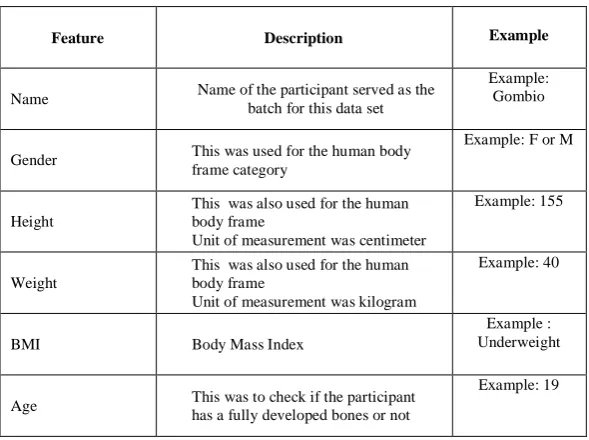
TABLEI LIST OF FEATURES
Feature Description Example
Name Name of the participant served as the batch for this data set
Example: Gombio
Gender This was used for the human body frame category
Example: F or M
Height
This was also used for the human body frame
Unit of measurement was centimeter
Example: 155
Weight
This was also used for the human body frame
Unit of measurement was kilogram
Example: 40
BMI Body Mass Index
Example : Underweight
Age This was to check if the participant has a fully developed bones or not
Thoracic
This was the upper part of the spinal cord
Unit of measurement was degree in terms of horizontal axis
Example: 75
Thoraco-lumbar
This was the middle part of the spinal cord
Unit of measurement was degree in terms of horizontal axis
Example: 95
Lumbar
This was the lower part of the spinal cord
Unit of measurement was degree in terms of horizontal axis
Example: 95
Wrist size Necessary for the Body Frame (category)
Example: HU_Small
The table above shows the extracted features during the data gathering. Features such as name, gender, age, height, weight, BMI and wrist size were part of the survey forms filled up by the participants. Meanwhile, a java application installed on the smartphones was use to capture some other features.
Rpart package was use during the model development. Rpart is a Classification and Regression Trees (CART)which employed using necessary step:
Grow the tree:
rpart(formula, data=, method=,control=) where:
formula = outcome ~ predictor1+predictor2+predictor3+ect. data= specifies the data frame
method= "class" for a classification tree ; "anova" for a regression tree
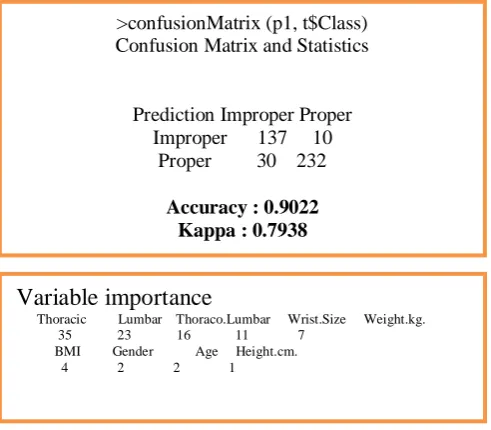
Fig. 1 Accuracy of the Classifier and Variable Importance
Figure 1 shows the variable importance of each feature. As stated, the three (3) key points were significant in the study however, it has been show that body frames (wrist size) has an effect on the recognition of proper and improper sitting posture as well. It has been evident that using the CART rpart function gives the data set an acceptable model. The model gave an accuracy rate of 90.22% and a kappa of 0.7938. As seen on the confusion matrix above, the classifier was able to recognize 232 instances of proper and 137 improper sitting postures. This gives a precision of 95.86% and 82.03% for proper and improper, respectively. The recall also gives an acceptable result of 88.54% and 93.19% respectively.
>confusionMatrix (p1, t$Class) Confusion Matrix and Statistics
Prediction Improper Proper Improper 137 10
Proper 30 232
Accuracy : 0.9022 Kappa : 0.7938
Variable importance
Thoracic Lumbar Thoraco.Lumbar Wrist.Size Weight.kg. 35 23 16 11 7
The rules were stated as follows: > model
n= 409
node), split, n, loss, yval, (yprob) * denotes terminal node
1) root 409 167 Proper (0.40831296 0.59168704)
2) Thoracic< 75.5 52 4 Improper (0.92307692 0.07692308) * 3) Thoracic>=75.5 357 119 Proper (0.33333333 0.66666667) 6) Thoracic>=88.5 85 22 Improper (0.74117647 0.25882353) 12) Lumbar>=93 58 2 Improper (0.96551724 0.03448276) * 13) Lumbar< 93 27 7 Proper (0.25925926 0.74074074) * 7) Thoracic< 88.5 272 56 Proper (0.20588235 0.79411765)
14) Wrist.Size=H52To55_Medium,Hover_Medium,Hover_Small,HU_Large,HU_Medium,HU_Small
167 56 Proper (0.33532934 0.66467066)
28) Thoraco.Lumbar< 90.5 34 10 Improper (0.70588235 0.29411765) 56) Lumbar< 85 20 0 Improper (1.00000000 0.00000000) *
57) Lumbar>=85 14 4 Proper (0.28571429 0.71428571) *
29) Thoraco.Lumbar>=90.5 133 32 Proper (0.24060150 0.75939850) 58) Lumbar>=94.5 24 9 Improper (0.62500000 0.37500000)
116) Thoraco.Lumbar>=101.5 17 4 Improper (0.76470588 0.23529412) * 117) Thoraco.Lumbar< 101.5 7 2 Proper (0.28571429 0.71428571) * 59) Lumbar< 94.5 109 17 Proper (0.15596330 0.84403670) *
15)
Wrist.Size=H52To55_Large,H52To55_Small,H55LessLarge,H55LessMedium,H55LessSmall,Hover_Large 105 0 Proper (0.00000000 1.00000000) *
Each parameter or variable was given an importance level that was defined on Figure 1. The most significant features were the three (3) key points namely: thoracic, Thoraco-lumbar and lumbar. Wrist Size and weight were also given consideration during the model development. These features (wrist size and weight) represent the body frame of the participant. Line 14 and 15 of the rules presented above shows that wrist size was necessary in identifying proper sitting posture.
After the model development, the researchers found out that body frames has a significant relationship on the sitting posture of a person.
B. Simulation
For simulation purposes, Jack Siemens Software utilized. Siemens Jack™ software is a premier human simulation tool for populating designs with virtual people and performing human factors and ergonomic analysis [20]. It follows the steps defined below:
B.1. Create Human Model
Fig. 2 Human Model
B.2. Adding Necessary Objects
To properly simulate the sitting posture of employees in computer-related workplace, the next thing to do is to add objects. The objects that were added in the canvas were as follow:
1. Short Office Table - 65 cm (height) 2. Keyboard
3. Standard Office Table – 73.5 cm (height) 4. Standard Office Chair
B.3. Assessment Tools
For the experiments of this study, tools such as Henry Dreyfuss Comfort Assessment Tool and OWAS (Ovako Working Posture Analysis System) were utilized. These assessment tools were embedded in the system.
The comfort values presented in Henry Dreyfuss associates the Measure of Man and Woman. It represents a compilation of comfort values from a variety of sources. These sources include Grandjean (1987), Pheasant (1986), and NASA (1978). These data are more general than either Rebiffé or Grandjean, applicable to most sitting tasks. As shown on the figure below, different parts of the body as a low and high values. These were the accepted values for the level of comfort of the users.
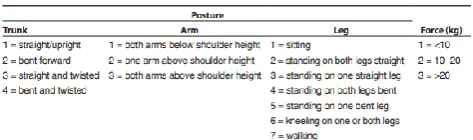
OWAS is based on sampling from typical working postures for the whole body, which covers the most common and easily identifiable working postures for the trunk, arms, and legs, along with an estimate of the worker’s force. OWAS uses a four-digit code to describe various postures and force combinations. The codes include four trunk postures, three arm postures, seven leg postures, and three variants of force (see Table 2). Taking these four (trunk, arms, legs, and force) code levels into account, OWAS has 252 (4 × 3 × 7 × 3) basic combinations of code levels. Furthermore, OWAS classifies the risk of injury based on working posture into the following four action categories (AC):
(a) AC 1: postures are normal and natural with no particular harmful effect on the musculoskeletal system, no action is required;
(b) AC 2: postures have some harmful effect on the musculoskeletal system, corrective actions are required in the near future;
(c) AC 3: postures have a distinctly harmful effect on the musculoskeletal system, corrective actions should be done as soon as possible;
(d) AC 4: postures have an extremely harmful effect on the musculoskeletal system, immediate corrective actions for improvement are required (see Table 2).
TABLE2
B.4. Human and Object Positioning
To simulate sitting posture in computer-related workplace, objects and humans need to interact. There were three (3) sitting postures utilized in the experiments.
The first position is the initial position wherein the model seated in an initial state of his/ her typing positions. At this stage, the model was in an erected and straight position. The second position is the model’s seated typing position. This is where the model was seated in a typing position wherein fingers are touching the keyboard and lastly, the seated relax position. In this position, the model was in his/her most comfortable position while sitting.
IV.RESULTS AND DISCUSSION
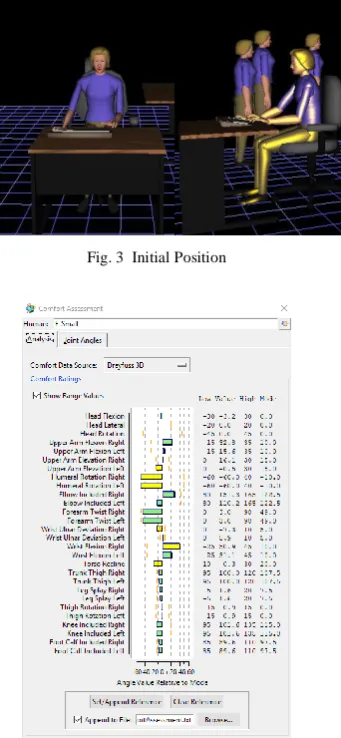
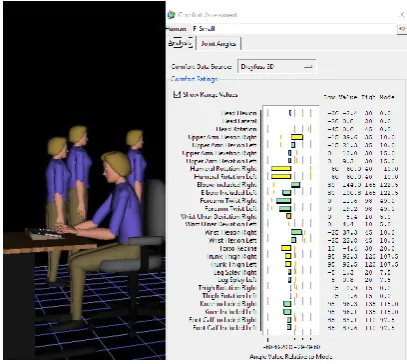
To do the first experiment, an initial setup was shown below. The figure F_Small (height = 155 cm, weight = 43 kg.) was in her seated erect position which is her initial position. The model was using an office table (height = 65 cm) which is relatively small compared to the standard (height = 73.5 cm). Two (2) views were shown (left) frontal view and the other is lateral view (see Figure 3).
Fig. 3 Initial Position
Fig. 4 Comfort Assessment Tool in Initial Position
In reality, the spine has a natural S Shape seen on the lateral view. The cervical and lumbar spines have a lordotic, or a slight inward curve, and the thoracic spine has a kyphotic, or gentle outward curve. Overall, the F_Small model produces a slight discomfort on the areas of humeral, wrist and torso even on this initial position. For example, the torso has acceptable values from 10 to 30 but the torso recline of the model got -0.3 on its initial position. This implies that the model bends forward to reach the keyboard placed in the table. Sitting up straight with a tucked pelvis will cause discomfort and fatigue in lower back, making it impossible to maintain that position for more than a few minutes.
Aside from this Comfort Assessment Tool, Posture Analysis conducted for this model. Using the Posture Analysis module of the Jack software, Ovako Working Posture Analysis System, the initial position produced an OWAS Code 1111 which shows that the work posture seems natural normal. The postural load on the musculoskeletal system is acceptable that there is no need for corrective measures.
After the initial position, the human model turns into her seated and typing position. However, in this position, the figure below shows a change in the values resulting to a more harmful position. As a support on this, OWAS shows a code of 2111 which means that the work posture may have harmful effects on the musculoskeletal system. Based on the OWAS Code, the model bents forward and Musculoskeletal loading is not extreme with this posture, however corrective measures are encouraged.
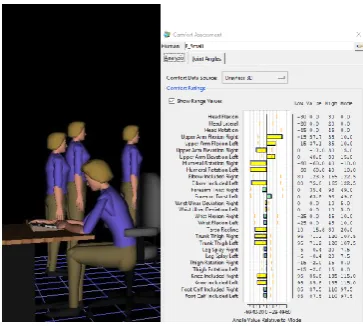
Applying the same assessment tool on the second position: seated typing (ST), the results shows a more harmful posture on the model. As seen on the figure below, in the seated_typing position of the model, the yellow areas denote discomfort that the model experienced in the areas of upper arm, humeral, torso and trunk. Specifically, the torso bends at about -4.4. Thus, compared to the initial position, the seated_typing position shows more harmful effects on this area. The model bent forward to reach the keyboard placed on the table. This leads to a negative effect on these areas (see Figure 6). It is very noticeable that the model bent forward to reach the keyboard placed in the table. This leads to discomfort in upper arm. The upper arm flexion has acceptable values of -15 to 35. During this sitting position, the flexion of the upper arm reached a value of 39.6.
Fig. 5 Comfort Assessment Tool in Seated Typing Position
Finally, on the seated-relax position the OWAS gave the same assessment as the previous position. As the model continue to be relax in its sitting position, most of the values gave a yellow color which means that in this position, most of the areas experienced discomfort. Particularly, the areas of both left and right upper arm flexion and elevation, humeral, elbow, torso, trunk and knee.
Fig. 6 Comfort Assessment Tool in the Seated Relax Position
Initially, the researchers would try to determine if using a smaller table is necessary for a small body frame. However, as based on this experiment, it found out that smaller table could lead to possible MSDs in a smaller body frame. Though the model has a smaller body frame, the use of a smaller table is not recommended.
In connection with this, another experiment was done to check if the standard height of an office table is suitable for women with a small frame (F_Small (height = 155 cm, weight = 43 kg.). It has been found that the use of standard height of office table has an effect in some body points such as Upper Arm Elevation Left, Humeral Rotation Right Humeral Rotation Left, Wrist Flexion Right, Wrist Flexion Left, Torso Recline. Compared to the previous experiment, the study found out that using the standard height of the table does not show an advantage compared to a smaller table. Monitoring the torso on this setup (F_small and the standard table height = 73.5 cm), it gives values such as -0.3, 3.5 and 12 for initial position, seated_typing and seated_relax positions respectively. It is very noticeable that the two sitting positions (initial and seated_typing positions give discomfort on the area of torso. This implies that the use of standard table gave a slight advantage compared to a smaller table.
The same scenarios were applied to a second model named F1_large (height = 166 cm, weight = 84 kg.) using a standard office table which has a height of 73.5 cm. However, the results differ from the first simulation. The same setup applied in this model (see Figure 7). It was very evident that the second model has a larger body frame compared to the previous model.
Fig. 7 F1_large with a Standard Office Table
Fig. 8 Comfort Assessment (left) Seated and typing position and (right) Seated and relax position
The torso in this setup, gave a slight discomfort in seated_typing position however, an acceptable value achieved in the seated_relax position. It results to -0.3 (seated_typing) and 10.3 (seated_relax). Compared to the F_small in the previous experiments, F1_large shows better results in consideration with the discomfort in the area of torso. Since the seated_typing position torso value is -0.3 compared to the seated_typing position of F_small is 3.5.
Finally, a third model was developed using different height and weight (height= 178 cm, weight = 84 kg) referred to as F_VLarge. The sitting posture of this model using a standard height of a table assessed as well. On the figure below, it shows that using the standard table affects the comfort of the upper arm, wrist and torso. These features measured a lower values compared to the minimum requirement (see Figure 9).
Fig. 8 Comfort Assessment for Seated_typing Position of F_VLarge
TABLE3
COMFORT ASSESSMENT FOR INITIAL,SEATED_TYPING AND SEATED_RELAX POSITIONS USING F_SMALL
Features F_Small to Small Table
Low IP ST SR High
Upper Arm Flexion Right -15 32.8 39.6 57.7 35
Upper Arm Flexion Left -15 15.6 21.3 37.1 35
Upper Arm Elevation Right 0 16.1 10 -17 30
Upper Arm Elevation Left 0 -0.5 9.3 40.8 30
Elbow Included left 80 110.2 100 75 165
Wrist Ulnar Deviation
Right 0 -7.3 -5.4 0 10
Wrist Ulnar Deviation Left 0 5.9 4.4 0 10
Wrist Flexion Right -25 50.9 37.3 0 45
Torso Recline 10 -0.3 -4.4 -15.6 30
Trunk Thigh Right 95 100 92.3 71.2 120
Trunk Thigh Left 95 100 92.5 71.2 120
The same assessment was done using F_small and the standard office table (height= 73.5 cm). The figure below shows that using the standard office table for F_small, torso, arms, humeral rotation and wrist should be given attention (Table 4). This does not show that the use of a standard table gives a more comfortable feeling to an F_Small body frame.
TABLE4
COMFORT ASSESSMENT FOR INITIAL,SEATED_TYPING AND SEATED_RELAX POSITIONS USING F_SMALL AND STANDARD OFFICE TABLE
F_Small TO Standard Table
Features Low IP ST High
Upper Arm Elevation Left 0 -0.5 3 30 Humeral Rotation Right -60 -63.4 -63.4 40 Humeral Rotation Left -60 -80.6 -80.6 40 Wrist Ulnar Deviation Right 0 -3.1 -1.9 10 Wrist Flexion Right -25 50.9 42.2 45 Torso Recline 10 -0.3 3.5 30
Same assessment was done using F1_large (height = 166 cm, weight = 84 kg) using the standard office table (height=73.5 cm). As seen on the figure below, it is noticeable that the values in three (3) positions were normal. Thus, it shows that the sitting posture of this object using the standard office table is normal and does not lead into musculoskeletal disorders (Table 5). This implies that the use of standard table for this body frame (F1_Large) is suitable, appropriate, and do not give discomfort on the model.
TABLE5
COMFORT ASSESSMENT FOR INITIAL,SEATED_TYPING AND SEATED_RELAX POSITIONS USING F1_LARGE
F1_Large To Standard Table
Features Low IP ST SR High
Upper Arm Elevation Left 0 -0.5 -0.5 9.3 30
Humeral Rotation Right -60 -60 -60 -60 40
Humeral Rotation Left -60 -60 -60 -60 40
Wrist Ulnar Deviation Right 0 -7.3 -7.3 -1.3 10
Wrist Ulnar Deviation Left 0 5.9 5.9 -2.9 10
Wrist Flexion Right -25 50.9 50.9 26.4 45
Lastly, the F_VLarge model was assessed. The study found out that using the standard height of a table for this height might cause discomfort in other areas of the body such as the upper arm, wrist and torso. Some features scored values lower than the minimum requirement (see Table 6).
TABLE6
COMFORT ASSESSMENT FOR INITIAL AND SEATED_TYPING OF F_VLARGE F1_VLarge To Standard
Features Low IP ST High
Upper Arm Elevation Left 0 -0.5 -0.5 30
Wrist Ulnar Deviation Right 0 -7.3 1.6 10
Wrist Flexion Right -25 50.9 50.9 45
Torso Recline 10 -0.3 -0.3 30
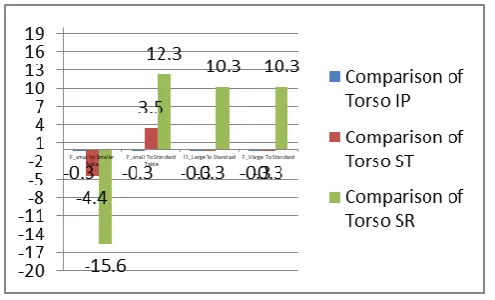
Lastly, with all the common features that experienced discomfort in all sitting positions, torso demonstrates as the most common and most important feature to consider. All body frames experienced discomfort in torso. There is the same set of acceptable values in torso across all body frames. The lowest acceptable value is 10 until 30.
Fig. 9 Comparison of Torso Values of different Body Frames in each Sitting Position
On the figure above, it is very visible that the use of smaller table for smaller body (F_small) is not advisable since all the values in three (3) sitting positions: initial position (IP), seated_typing position (ST) and seated_relax position (SR), are not acceptable. The use of the standard table (73.5cm) is acceptable in all body frames in its seated_relax position not in other two (2) sitting positions. However, the use of standard table leads the other areas of the body such as arm, wrist and torso in risks of having Musculoskeletal Disorders.
As seen in the Fig. 9, both models (F_small and F1_large) shows a straight back, shoulders out, chest out and stomach in in a seated typing position. However, in the figure 6, shows the torso recline position which gives comfort on the models’ torso but gives discomfort on the upper arm. Since the model has been stretch out, other parts of the body was also stretch out which leads to discomfort of the upper arm (Fig.10).
While the torso is in recline position for both models, the only body parts that suffer from discomfort is the upper left arm elevation. Comparing the results of both models in two (2) different sitting positions, it has been noticeable that the results improved.
(a)
(b)
Fig. 10 Torso Recline (a = F_small and b =F1_large )
To achieve this acceptable sitting posture, the values were shown below:
F_small
elevate anterior/posterior humeral
Left Shoulder 33.7 88.7 -10.5
Right Shoulder 31.8 93 -4.5
elbow right flexion : 29.2
elbow left flexion:30.5
wrist right ulnar Y degree: 1.70 flexion X degree: 41.70 pronation Z degree :75.80 wrist
left 9.4
F_large
elevate anterior/posterior humeral
Left Shoulder 26.8 93.8 -26.6
Right Shoulder 34.9 90.3 -33.7
elbow right flexion : 18.3
elbow left Flexion:36.1
wrist right ulnar Y degree: 8.4
flexion X degree:30.5
pronation Z degree:68.8 wrist
left 7.8
16.5
71.6
torso
flexion: 6.9
Axial
rotation: 0 lateral rotation: 1
The figure above shows the acceptable degrees to achieve comfortable sitting postures for both models (F_small and F_large). Shoulder provides three (3) positions such as elevation, anterior/posterior and humeral rotation. Elbow flexion should only reach 29.2 degrees. Wrist provides three (3) measurements for ulnar (Y degree), flexion (X degree) and pronation (Z degree). Torso flexion should be 6.5 degrees. These are the acceptable values to achieve comfortable sitting postures. Based on these experiments through simulation, it is noticeable that both models provide different set of acceptable values which implies that comfortable sitting posture depends on body frame.
Comparing it from the initial seated typing position, it is very noticeable that it lessens the discomfort experienced by the model in other areas such as wrist and torso. This experiment shows that reclining the torso gives impact in the overall comfort of the models. It also been established that different body frames requires different elevation, rotation or flexion which implies that each body frame has different necessity.
As a summary, this study was able to recognize proper and improper sitting posture. This study was able to develop model for identifying factors that could detect proper and improper sitting posture. Thoracic, thoracolumbar, lumbar and body frames of a person were found significant in identifying his/her proper sitting posture. This study also tried to simulate the effect of using standard height of office table to the comfort and posture of a person of different body frame. It is evident on the result that body frame considering the height and weight of the participant has a significant relationship oh his/her sitting posture. A standard height of tables established in many articles, however, as seen on the results, using a standard height might cause discomfort to some significant areas of the body of each body frame. This study suggests taking deeper investigation on setting the proper height of workplace table appropriate to the body frame.
V. CONCLUSION AND RECOMMENDATION
The study was able to found out that the three (3) key points were significant in the study however, it has also been show that body frames (wrist size) has an effect on the recognition of proper and improper sitting posture as well. It has been evident that using the CART rpart function gives the data set an acceptable model. The model gave an accuracy rate of 90.22% and a kappa of 0.7938. As seen on the confusion matrix above, the classifier was able to recognize 232 instances of proper and 137 improper sitting postures. This gives a precision of 95.86% and 82.03% for proper and improper, respectively. The recall also gives an acceptable result of 88.54% and 93.19% respectively.
this study shows that different body frames, in consideration with the subject’s height and weight may use a standard table height but it will lead to discomfort on each participant.
Since this study found out that there is an effect on the usage of a standard height of a table in different body frames, this study suggests a deeper investigation on the appropriate table height for each body frame. Identifying the acceptable workplace design suited for each body frame might lessen the risks of MSDs. Therefore, increase the productivity of our human work force.
R
EFERENCES
[1] The construction chart book the U.S construction industry and its workers, fifth ed. 2013
[2] BLS [1995]. Workplace injuries and ill-nesses in 1994. Washington, DC: U.S. Department of Labor, Bureau of Labor Statistics, USDL 95–508.
[3] JJ . Devereux, L . Rydstedt, V . Kelly, Buckle P.1961. The role of stress and psychosocial work factors upon the development of musculoskeletal disorders. Health & Safety Executive Research Report 273, 2004.Price D J de S. Science since Babylon. New Haven, CT: Yale University Press.
[4] A. Gupta, T. M. Manohar Bhat, N. Bansal, and G. Gupta. 2014. Ergonomics in dentistry. International journal of clinical pediatric dentistry, 7(1):30–34,.
[5] By the numbers: 2015 wsib statistical report-schedule 1. Workplace Safety Insurance Board [online],
[6] S.L ,Delp, F.C ,Anderson, A.S. , L. Arnold, A. Habib, C.T John, E. Guendelman, , D. G. Thelen,. 2007
OpenSim: Open-source software to create and analyze dynamic simulations of movement. IEEE Transactions on Biomedical Engineering, vol. 55, pp. 1940-1950.
[7] A. Mokdad, 1992 .“Secular change in stature of Algerians: the case of Ouled Djellal, Constantine University,” Journal for Human Sciences, vol. 3, pp. 05–08.
[8] H. S. Jung, 2005 .“A prototype of an adjustable table and an adjustable chair for schools,” International Journal of Industrial Ergonomic, vol. 35, pp. 955-969.
[9] M. Azuan., H. Zailina , M.A. Nurul Asyiqin, M.N.Muhamad Azhar, A.I., Syazwan , B.M.T Shamsul.2010
“Neck, shoulder, upper back and lower back pain and associated risk factors among primary school children in Malaysia”. Journal of Applied Sciences, vol 10(5), pp. 431-435.
[10] M.A . Nurul Asyiqin., B.M.T . Shamsul, D. Mohd Sharizal , B. Mohd Rafee , M.N. Muhamad Azhar, P.
Velu , S.Norhisham . 2008 “Development of ergonomics furniture for primary school in Malaysia.” Alam Cipta, vol. 4(1), pp. 17-28, December.
[11] Z. Zarith Afzan , S. Azizan Hadi , B.T. Shamsul , H. Zailina , I. Nada , A. R. Siti Rahmah . 2012 Mismatch between School Furniture and Anthropometric Measures among Primary School Children in Mersing, Johor, Malaysia, 2012 Southeast Asian Network of Ergonomics Societies Conference (SEANES) 978-1-4673-1734-4/12/$31.00 © IEEE
[12] D. Yulan. 2000. Human Engineering, Bei ling institute of technology press, pp. 143-151.
[13] P. Pérez-Gosende. 2017. Anthropometry-based approach for side-mounted desktop chairs design
evaluation for university students in Ecuador: 978-1-5386-3894-1/17/$31.00 © IEE
[14] J. E. Estrada and L. A. Vea, 2016 "Real-time human sitting posture detection using mobile devices," 2016
IEEE Region 10 Symposium (TENSYMP), Bali, pp. 140-144. doi:
10.1109/TENCONSpring.2016.7519393URL:
http://ieeexplore.ieee.org/stamp/stamp.jsp?tp=&arnumber=7519393&isnumber=7519362
[15] L. Vorvick, MD, Medical Director and Director of Didactic Curriculum, MEDEX Northwest Division of Physician Assistant Studies, Department of Family Medicine, UW Medicine, School of Medicine, University of Washington. Also reviewed by David Zieve, MD, MHA, Medical Director, A.D.A.M. Health Solutions, Ebix, Inc.
[16] B. Silverstein, M. Foley, N. Pollisar et al., 2004. Impact of implementing the Washington State ergonomics rule: Final Report 73-1-2004 SHARP Technical Report, Department of Laborand Industries, Washington State, USA.
[17] P. Tittiranonda , D. Rempel , T. Armstrong and S. Burastero (1999) Workplace Use of an Adjustable Keyboard: Adjustment Preferences and Effect on Wrist Posture, American Industrial Hygiene Association Journal, 60:3, 340-348, DOI: 10.1080/00028899908984451
[18] C. S. Savanur, 2007 “Lack of conformity between indian classroom furniture and student dimensions: proposed future seat/table dimensions,” Ergonomic, pp.1612-1625.
[19] Philippine Statistics Office. LABSTAT UPDATES . January 2016. ISSN 0118-8747
[20] C. Kao and M. Wang. 2009. Motion Generation from MTM semantics, Computers in Industry, vol.60, pp.