e-ISSN: 2278-067X, p-ISSN: 2278-800X, www.ijerd.com
Volume 12, Issue
3
(
March
2016), PP.58-63
Multipurpose reminder system
Divij H.Patel
B.tech, computer engineering, Ipcowala institute of engineering & technology, dharmaj, Gujarat, India
Abstract:- This computer software we used as a multipurpose reminder system. It has not only an ability to set a schedule for an application but it has also a mailing interface. Which used to set a schedule to send a mail automatically and also it gives reminder by opening an application on which user wants to work on. Also it has an ability to record voice and generate clip which is used to remind. Once if you set a schedule means you set a time and work than it will automatically starts working on background. So it does not interrupt user's activity.
Keywords:- timer system, audio reminder, application reminder, mail reminder, scheduler.
I.
INTRODUCTION
Now a days due to this technical advancement phase most of human work can be easily done by machine. On the other hand people become lazy and forget things easily to help them there are lot of computer and mobile applications available which can give different types of notes to remind them about the work which they need to remember or do it on time. Moreover few of them working like alarm clock. There is not such a application to provide easy interface to user, as well as help with 40 to 50% workload. Which is not only remind user but also make work easier.
Due to the technological advancement people use mailing services to communicate with each other which have created an important interface. By using this services user can easily send mail. If any important message which has to be send on time it is really hard because of hectic schedule. Even though there is another programme also available in the market. We cannot trust online plugins because of big scams on Computer fraud. But mailing interface work with you on your computer when you use your computer. Once we set schedule than it will send mail automatically on that time and make user's job easy.
Furthermore there are some basic services provided by this multipurpose reminder system.
A. Once we set time on device than user do not need to worry about sending mails this will automatically done by the device and make user's job easy.
B. It can be used to set reminder for time and path of application and its automatically open application note on time in front of user.
C. We can set more than one reminder at a time.
D. To give reminder to user set an audio clip recorder on user's voice. That audio clip plays as a reminder. It reminds user in their own voice.
E. One by one it asks for all input because of that it provides user to easy interface from all of them.
This application work differently than other reminder applications. After start this application user has three options. Is that you can send mail reminder or application reminder or audio reminder.
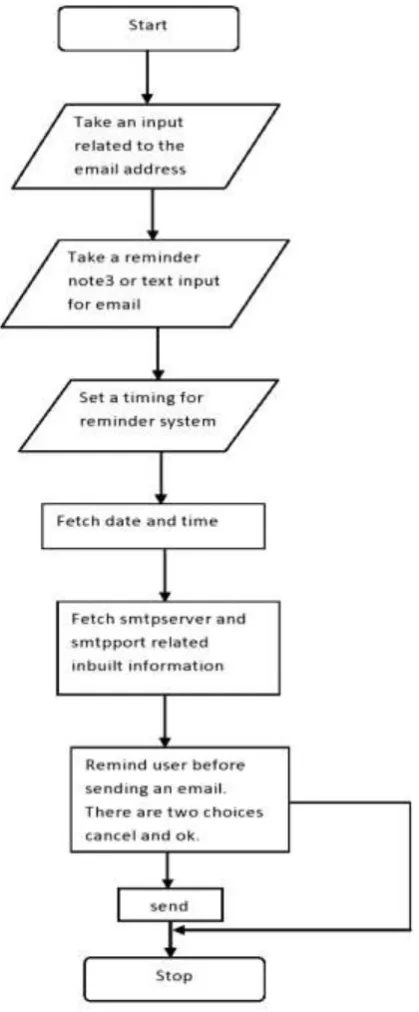
Previously, we already seen mail reminder according to that Detail and content needs to be in Input and same as above we need to set time. After doing this step it will send mail automatically on time. This tool can be use to remind other person about any work through mail.
Multipurpose reminder system
II.
FLOW
CHART
Now from the below flow chart we will discussing about the step by step working process of multipurpose reminder system and briefly understand about the important part of this working model like a different ways to remind. From the described flow chart we can understand how it is working differently than other system.
Fig.1: Main flow chart of reminder system
In the flow chart we first talk about starting process. This defines starting stage when user starts reminder software by double clicking on it. Next step there will be input box comes up to the screen and ask for choosing a one of the given option, for example first one is mail reminder and second one is application reminder and third one is audio reminder. Then after if user will give the appropriate input then it will check for the correct input and if it’s match then it will start appropriate loop. If user chooses a first option then it will start code for the mail reminder. If user chooses second option then it will start code for the application reminder and if user chooses third option then it will start code for the audio reminder.
Fig .2: flow chart of mail reminder option
Multipurpose reminder system
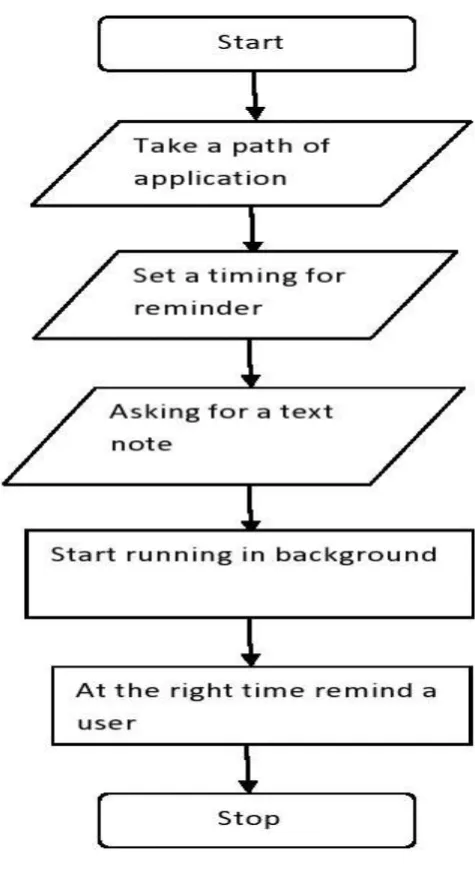
Fig .3: flow chart of application reminder system
Fig. 4: flow chart of audio reminder system
Multipurpose reminder system
III.
USES
AND
APPLICATION
Uses of this reminder application are manifold. Because of that we gave the name is multipurpose reminder system. It has got mailing reminder option on that option user can set mail schedule, on that user needs to give only basic information and also need to set time. All other information related to socket and servers are already been set there we don't need to add it. Such as any office or in business we need to send email to employee on particular time limit or periodically than if once we set reminder than automatically it will send mail on time which we already set for.
Even application reminder we can use one way to other. Such as if we want to work on any application than we can set it’s Time and Path. For example if we want to do work on ms word at 5 O'clock. If we set path and time than it will start automatically ms word on time in front of user.
Wecan also use it on Technical field. Such as if we want to set user limit on computer than we can give shutdown command or shutdown.exe. Set as a path and time than automatically computer will shutdown on that time. It has also got another feature that it can give reminder on user's voice. If user is ready to do than it can make audio clip for limited seconds or minutes. According to set reminder it plays on time and gives user to reminder on his/her own voice.
As we discussed above user can use this device as per requirements and he can use this device more than one purpose on different places. The important aspect of this device is it gives more facilities than normal device. Furthermore, it is user friendly and easy user interface provider.
IV.
CONCLUSION
As per above discussion it can be seen that the usage of this software can be very wide. Normally people know about the reminder system but in this topic we step ahead and talk about different ways to remind. We try to cover here every possible ways to remind by computer or laptop system. By this tool we try to help people by reminding difficult things in their busy schedule. By this above defining tool user get remind by different ways like a by an application or mailing as well as by the audio reminder means that in their own voice.
V.
FUTURE
SCOPE
This application is only for the computer or laptop based application and it gives reminder only by the computer system or using mailing interface, but in near future we can update system which will work on the mobile devices and also it will be able to send reminder messages to the mobile device and it will compatible with the android and windows based operating systems.
REFERENCES
[1]. D. Rind1, R. Davis2 and S. Safran3, "Designing Studies of Computer-Based Alerts and Reminders,"MD Computing, No. 2, 1995, pp. 122-126.
[2]. R. Schank, Dynamic Memory: A Theory of Reminding and Learning in Computers and People,Univ. Cambridge Press, Cambridge, UK, 1982.