Enterprise Content Management
Should Be Academic
Annette Easton, San Diego State University, USA George Easton, San Diego State University, USA
ABSTRACT
The ‘digital divide’ that was formed by a curriculum that affords no direct exposure to any business-oriented enterprise content management system and the surprising ubiquity and dependency on enterprise content management systems in business provided the motivation to class-test SharePoint as a surrogate for a university-supported course management system.
The classroom test became the basis of a proof-of-concept model for a college-wide document repository that was conceived to manage most of the college’s departmental and committee documents, including those related to AACSB maintenance of accreditation. The use of a business-tested, enterprise content management system for academic purposes could narrow an academic/industry ‘digital divide’ and may remove an impediment to the adage “practice what you teach.”
Keywords: Enterprise Content Management; SharePoint; Course Management System
INTRODUCTION
hy don’t we just use Blackboard? whined the noticeably disgruntled student when it was announced that SharePoint would be used as the document repository and as the primary communication portal for the Information Technology Projects class. The ostensibly impertinent question was explicable given none of the twenty-three Management Information Systems (MIS) students in the class had ever used SharePoint; most, in fact, had never heard of it. “We can easily upload our project documents into Blackboard and you can track our weekly project journal entries via Blackboard’s discussion tools,” groaned the student.
These assertions may have been annoying but they were not imprudent. Why would an instructor add to the students’ project burden by requiring them to learn and use a new content management system when their familiar, university-supported course management system, Blackboard, would work just fine for this class? Furthermore, why would an instructor take the time to design a custom SharePoint template and also assume the risk of maintaining what would essentially be a single-use class intranet? The answers to these questions may be best addressed by a simple, Socratic response: “How many businesses use Blackboard?”
As educators, we felt obligated to address a ‘digital divide’ that arguably we helped create. Our particular curriculum affords students no direct exposure to any real enterprise content management system amid a business environment that is increasingly dependent on enterprise content management systems. Feedback from our recent graduates and from our advisory board made it clear that many of the businesses that were recruiting our students expected new hires and interns to have some familiarity with enterprise content management systems such as SharePoint. Some of our recent MIS graduates even reported that one of their first responsibilities in their new positions was designing, implementing, and/or maintaining a company or a departmental intranet using SharePoint. In response, we decided to make Blackboard unavailable to the class and told the MIS students they would be pilot testing a class communications portal and document repository developed specifically for the class using Microsoft’s then-current Enterprise Content Management (ECM) offering, SharePoint 2010.
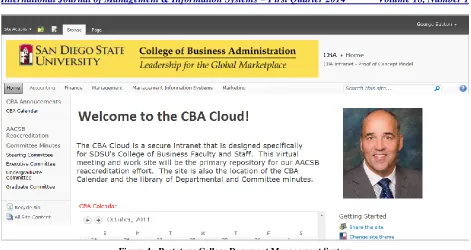
In the sections that follow we describe Enterprise Content Management systems and review the ECM literature that suggests that a rift, or ‘digital divide,’ exists between academics and the ECM vendors/practitioners. This is followed by a brief discussion of similarities between Enterprise Content Management systems and Course Management systems, such as Blackboard, that are prevalent in education. To demonstrate these similarities, we developed a course management tool using the leading business-oriented ECM system, SharePoint. This classroom experience spawned the development of a proof-of-concept model for a college-wide document repository and communication portal that was designed to manage the considerable committee and departmental documents generated by the college’s faculty and staff. It was also envisioned as a central repository for the documents related to our AACSB maintenance of accreditation effort. If implemented, our educational Enterprise Content Management system, entitled the CBA Cloud, would narrow a digital divide and better position us to “practice what we teach.”
ENTERPRISE CONTENT MANAGEMENT
Enterprise Content Management was defined by AIIM (Association of Information and Image Management) as “the technologies, tools, and methods used to capture, manage, store, preserve, and deliver content across an enterprise” (Blair, 2004, p. 65). Gartner, the respected information technology research and advisory firm, views ECMs as both “a strategic approach to managing information and as a software toolset” (Gilbert, Shegda, Chin, Tay, & Koehler-Kruener, 2012) with the following core capabilities and components:
Document management Image-processing applications
Workflow/business process management (BPM) Records management
Web content management
Social content for document sharing, collaboration and knowledge management, and for supporting project teams.
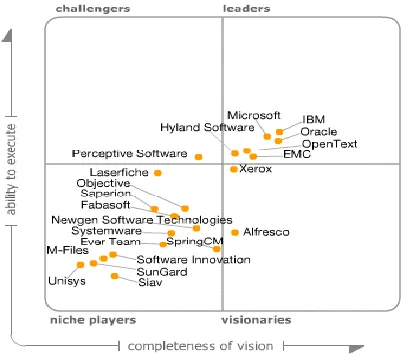
Gartner identified twenty-two ECM vendors in its 2012 Magic Quadrant for Enterprise Content Management, a synopsis of the ECM market’s leaders and visionaries (Figure 1). In Gartner’s analysis, three vendors: IBM, Oracle, and Microsoft, were identified as the ECM market leaders and visionaries (Gilbert et al., 2012).
The ECM market is large, and is anticipated to keep growing. Gartner valued the 2011 ECM market at $4.3 billion (Gilbert et al., 2012). The average annual growth rate of ECM revenue is forecast to be 15% according
to the Radicati Group, Inc., a technology market research firm, who predicts 2016 ECM revenue at $7.5 billion (Radicati & Yamasaki, 2012). According to AIIM, “70% of organizations currently use SharePoint” (“SharePoint at a Crossroads,” 2013) and most ECM vendors “are now supporting and providing integration with Microsoft SharePoint” (Radicati & Yamasaki, 2012). Because many organizations begin their ECM effort with SharePoint (Radicati & Yamasaki, 2012), it was the logical choice for use in our class test of an ECM system.
THE ACADEMIC/ECM DIGITAL DIVIDE
Ironically, the enterprise content management digital divide we hoped to narrow for our students may have been symptomatic of a larger rift between academics and the vendors/practitioners of ECMs. Historically, IS researchers seemed indifferent, at best, to the research value of ECM, ostensibly because most of the development and the dialogue about ECMs came from software product vendors and industry practitioners (Tyrväinen, Päivärinta, Salminen, & Iivari,2006). Information system researchers seem to have only recently considered ECM to be sufficiently interesting to be studied independently (Nordheim & Päivärinta, 2006; Vom Brocke, Simons, & Cleven, 2011; Grahlmann, Helms, Hilhorst, Brinkkemper, & van Amerongen, 2012)although a few IS researchers have studied ECM as a subfield of knowledge management (Nordheim & Päivärinta, 2006). Päivärinta and Munkvold (2005) also alluded to the ECM rift between researchers and vendors/practitioners: “Beyond the current hype, few sources have reported research on actual ECM practices in organizations …” (p. 1). Furthermore, they questioned “whether ECM actually represents anything new compared to the established constructs of information management, such as information resource management (IRM), electronic document management (EDM), and knowledge management (KM). In light of these traditional areas, what has ECM to offer to justify its current standing as a ‘new field’ of its own?” (Päivärinta & Munkvold, 2005, p. 1).
The academic and ECM vendor/practitioner rift may help explain why there is still no universally-accepted definition of ECM (Grahlmann et al., 2012; Alalwan & Weistroffer, 2012). However, the research significance of ECM seems to have followed the trajectory of the strategic significance of ECMs in the enterprise. As businesses began adopting internet technologies they were nearly overwhelmed by the proliferation of information artifacts that they created, captured, categorized and/or needed to convey just to stay competitive and in-compliance. Enterprise content management tools such as SharePoint were deployed to help collect, organize, manage and store the increasing volumes of structured, semi-structured and unstructured information that was important for decision making and regulatory compliance.
Grahlmann et al., (2012) identified and categorized 32 academic papers in their review of the ECM literature. The ECM categories used by Grahlmann were from a research framework that Tyrväinen et al., (2006) proposed to stimulate and guide ECM research. Grahlmann et al.,(2012) aggregated and summarized the relevant ECM research to create the following definition of ECM: “Enterprise Content Management comprises the strategies, processes, methods, systems, and technologies that are necessary for capturing, creating, managing, using, publishing, storing, preserving, and disposing content within and between organizations”(p. 272).
Besides the academic literature, Grahlmann et al., (2012) also used practitioner literature, or the “clinical perspective” (p. 270), to create a ‘Functional ECM Framework’ (FEF). The FEF, they suggest, can be used to compare the functionality of ECMs offered by different vendors.
COURSE MANAGEMENT SYSTEMS
Educational institutions are similarly challenged to capture, store, and deliver increasing amounts of structured, semi-structured, and unstructured content for their stakeholders – students and faculty. Most educational organizations have addressed this challenge by adopting Course Management Systems (CMS) such as Blackboard and Moodle1, which are essentially the educational equivalents of an ECM system. Despite the functional similarities between CMSs and ECMs, it is apparent that our students attain no notable, or marketable, ECM skills
1 Blackboard and Moodle are also considered ‘Learning Management Systems’ (Dunn, 2012) which many consider more comprehensive than a
from their CMS experience. In order to help mitigate this situation and potentially increase the professional relevance of our students’ CMS experience, we decided to replace Blackboard with SharePoint in our MIS Information Technology Projects course. In simple terms, we decided to “practice what we teach.”
MANAGING STUDENT PROJECTS WITH SHAREPOINT
The Information Technology Projects class is a senior-level MIS elective that was designed to give students a hands-on opportunity to learn about technologies and systems that are personally interesting and professionally in-demand, but absent in our required MIS courses. For example, MIS students who are interested in developing mobile apps for iOS or Android devices may take the course to learn the mobile app development tools and the development process and then develop a mobile app as their class project. Essentially, the MIS students have the opportunity to explore, in depth, a technology that excites them and that will, ideally, expand their job opportunities upon graduation.
The course is only offered once a year and enrollment continues to grow each time it is offered. Three years ago there were seven students in the course; last year, fifteen; and in 2012, 23 students enrolled in the course. Since there are no tests in this course, student assessment comes from two class presentations (one individual presentation and one team presentation); from their project documentation; and from weekly updates they make to a project journal that describes their project progress. The class’s growing enrollment creates some administrative challenges that we also hoped to address with the new course management system we designed using the enterprise content management tool SharePoint.
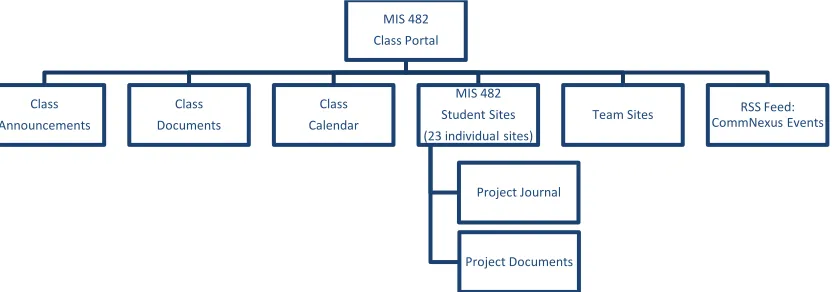
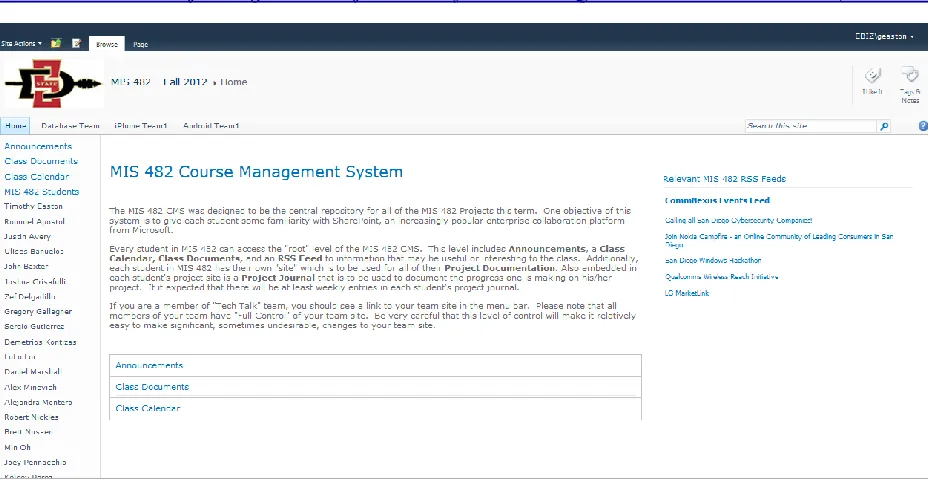
Figure 2 below represents the structure and navigation of the communications portal and document repository we created for the Information Technology Projects class using SharePoint 2010. Figure 3 is the actual MIS 482 Course Management System that was created. Students had read-only access to the Class Announcements, Class Documents, and Class Calendar sections of the site as those sections were simply to inform students of course meetings and to provide them with class-specific documents such as the course syllabus and the rubric that would be used to assess their project presentations. While Figure 2 only shows boxes for one MIS 482 Student Site, we actually created 23 individual student sites so each student could make weekly entries to his/her personal Project Journal and to upload his/her Project Documents.
Figure 2: Structure of MIS 482 Course Management System
MIS 482 Class Portal
Class Announcements
Class Documents
Class Calendar
MIS 482 Student Sites (23 individual sites)
Project Journal
Project Documents
Team Sites RSS Feed:
We created a custom template for the Student Sites to minimize the duplication effort that was required for the twenty-three student sites. Because SharePoint relies on Microsoft’s Active Directory for authentication it was relatively easy to set unique permissions for each individual student site. Students had access to their own site with Read and Update permissions but were prohibited from seeing their classmates’ sites. The Team Sites were configured for the students who wanted to collaborate on the technologies and processes that were common to their projects. Students who were on a Team had complete control of their Team Site so they could create additional sites, create templates, set permissions and configure their site and sub sites as they wished. The Team Sites allowed students to ‘get under the hood’ of SharePoint. The RSS Feed was included to keep students up to date on technology events that were taking place in our area.
To help the students become comfortable with the features and usage of SharePoint, a class lecture/demonstration was provided on how to use the SharePoint site, as well as how to customize it for their team usage. Online resources were also made available if students had questions during the semester. Additionally, one class lecture had a guest speaker from a local Internet security firm speak to the class about the importance and usage of SharePoint in his organization and the value that having SharePoint skills could offer in their job search. We hoped this would provide motivation for the students to gain skills in using and creating SharePoint sites.
OBSERVATIONS
After the introduction to the new MIS 482 Course Management System, the students were very adept users of the new system. They seemed to have no trouble navigating around the site, uploading project documents, or making their weekly project journal entries. From the user perspective, the system performed similarly to Blackboard. We were, however, somewhat disappointed that the students took minimal advantage of the opportunity to ‘look under the hood’ of SharePoint. One of the teams made some minor cosmetic changes to their Team Site but no team really used their site to collaborate and share technology references as we had hoped. One team, in fact, opted to use Google Docs to organize their Team’s presentation content. We should have predicted this behavior as we did not make the use of the Team Site a course requirement.
Generally, there were a number of instructor efficiencies that were recognized using the new course management system. One feature, the Project Journal, yielded considerable time savings over our earlier method for keeping track of students’ project progress. It also provided a very efficient method for providing students with feedback on their progress and standing in the course. This particular feature will easily scale as our class sizes
increase. The MIS 482 CMS also supported functionality that was unavailable in Blackboard. One feature, for example, allowed us to easily create ad hoc team workspaces (sites) where a subset of students in the class could collaborate and share documents.
The MIS 482 Course Management System was an instructive pilot test of a small sampling of the capabilities of Enterprise Content Management software. The effort gave our students hands-on experience with one of the most popular ECM systems used in business. We believe the students gained confidence using SharePoint that they will appreciate and leverage once they begin their careers. For the future, we plan on updating the MIS 482 Course Management System to add additional ECM features, such as database-driven content and web-apps to the mix of capabilities that students will see and use in the course. Ideally, these enhancements will help the students gain a better understanding of how businesses are using ECM systems; help them recognize the potential capabilities and benefits of ECMs; and will make the course administration of MIS 482 more efficient. Additionally, we plan to make the use of the Team Site a class requirement. Since each student in the class is a member of a technology team (e.g., iOS Development Team, Android Development Team, etc.) each team is responsible for explaining the development details and processes for their technology to the rest of the class. We believe the ECM platform provides an effective mechanism for collaboration among team members and this exercise gives students an opportunity to “get under the hood” of their team site. Ideally, the experience will help students realize how easy it is to undertake basic ECM configuration and it will help them gain additional career skills.
FROM SHAREPOINT IN THE CLASSROOM TO SHAREPOINT IN THE COLLEGE
The ECM system we created for MIS 482 also generated some discussion in our college about adopting ECM technology for use as a college-wide document repository and communication portal. The initial discussion focused on using ECM software for the AACSB maintenance of accreditation effort that was underway at the time. Given the importance of AACSB’s stamp of accreditation, maintenance of accreditation has always been given strategic importance and has always been carefully managed. Surprisingly however, the document collection and organization system associated with our maintenance of accreditation process had changed little in decades. In early 2012, our primary AACSB reaccreditation document management system was a well-organized set of notebook binders.
In essence, the CBA Cloud was designed to be a comprehensive, robust, non-proprietary, secure information infrastructure for exclusive use by the faculty and staff of the College of Business that would address a number of issues and workarounds of our existing information infrastructure, (e.g., no common CBA calendar, third-party survey tools, Excel forms for proposals, binders of reaccreditation information, poor organizational memory, etc.) for the everyday business of the College. Additionally, the system was intended to help reduce the departmental and program silos that seem to obscure the organizational transparency. We believed such a system has the potential to transform the way the faculty and staff of College of Business work together.
CONCLUSION
Initially, this project was undertaken with the objective of bridging a digital divide we anticipate our students will face upon graduation. Some of our graduates will undoubtedly be asked to use, or perhaps manage, an enterprise content management system professionally. Because ‘businesses don’t use Blackboard,’ we wanted our MIS students to have some hands-on experience with one of the most popular ECM systems on the market and also to help them understand that their Course Management System experience (Blackboard) is functionally similar to the ECM systems they may encounter in business. Hence, we created the MIS 482 Course Management System from ECM software. This course management concept was the genesis of a more ambitious ECM concept, the CBA Cloud, for use by faculty and staff in the business school.
The enterprise content management system proposed for the College of Business was politely acknowledged, but was ultimately rejected in favor of a home-grown document management system created using PHP and MySQL. The CBA now has a proprietary document repository for maintenance of accreditation that is infinitely more customizable, arguably easier to use, and unquestionably more costly to design, build and maintain than the proposed ECM system developed in SharePoint. The decision to build a custom, proprietary system is certainly an administrative prerogative but given the business tendency today to “buy” rather than “build” these types of systems, one still wonders whether the ‘digital divide’ between academics and ECM practitioners has actually narrowed.
AUTHOR INFORMATION
Dr. Annette Easton is an Associate Professor of Management Information Systems at San Diego State University. She teaches a wide variety of courses encompassing information technology. Most recently she has been focused on
the Principles of Information Systems and Information Systems Design courses. She received a B.S. in Information Systems from California State University, Fresno and a Ph.D. in Management Information Systems from the University of Arizona. Her research interests are in information technology education, skills assessment of entry level information systems students, and integrating new technologies into the information systems curriculum. E-mail: [email protected] (Corresponding author)
Dr. George Easton is an Associate Professor of Management Information Systems at San Diego State University. His Ph.D. is from the University of Arizona in Management Information Systems. He has taught many of the courses in the MIS curriculum at both the undergraduate and graduate level including data communications, systems development and decision support systems. His current research interests include information systems education, collaboration technologies such as SharePoint, and the Web 2.0 technologies. E-mail: [email protected]
REFERENCES
1. Alalwan, J. A., & Weistroffer, H. R. (2012). Enterprise content management research: A comprehensive review. Journal of Enterprise Information Management, 25(5), 441-461.
2. Blair, B. T. (Sep/Oct 2004). An enterprise content management primer. Information Management Journal, 38(5), 64-66.
3. Dunn, J. (2012, October 27). The 20 best learning management systems. Retrieved from http://edudemic.com/2012/10/the-20-best-learning-management-systems
4. Gilbert, M., Shegda, K. M., Chin, K., Tay, G., & Koehler-Kruener, H. (2012, October 18). Magic quadrant for enterprise content management. ID: G00237781. Retrieved from
http://www.gartner.com/technology/reprints.do?id=1-1CK0WK7&ct=121019&st=sb
5. Grahlmann, K. R., Helms, R. W., Hilhorst, C., Brinkkemper, S., & van Amerongen, S. (2012). Reviewing enterprise content management: A functional framework. European Journal of Information Systems, 21(3), 268-286. doi:10.1057/ejis.2011.41
6. Nordheim, S., & Päivärinta, T. (2006). Implementing enterprise content management: From evolution through strategy to contradictions out-of-the-box. European Journal of Information Systems, 15(6), 648-663. doi:10.1057/palgrave.ejis.3000647
7. Päivärinta, T., & Munkvold, B. E. (2005). Enterprise content management: An integrated perspective on information management. Proceedings of the 38th Hawaii InternationalConference on System Sciences (CD-ROM), January 3-6, Computer Society Press, (10 pages).
8. Radicati, S., & Yamasaki, T. (2012). Enterprise Content Management Market, 2012-2016. Retrieved from
http://www.radicati.com/wp/wp-content/uploads/2012/08/ECM-Market-2012-2016-Executive-Summary.pdf
9. SharePoint at a Crossroads: Implications of SharePoint 2013 & Office 365 [Advertisement]. (2013, May). http://www.aiim.org/Events/Seminars/About
10. Tyrväinen, P., Päivärinta, T., Salminen, A., & Iivari, J. (2006). Characterizing the evolving research on enterprise content management. European Journal of Information Systems, 15(6), 627-634.
doi:10.1057/palgrave.ejis.3000648