Abstract: Modern map visualizations are built using data structures for storing tile images, while their main concerns are to maximize efficiency and usability. The core functionality of a web tiled map management system is to provide tile images to the end user; several tiles combined construe the web map. To achieve this, several data structures are showcased and analyzed. Specifically, this paper focuses on the
SimpleFormat, which stores the tiles directly on the file system; the ImageBlock, which divides each tile folder (a folder where the tile images are stored) into subfolders that contain multiple tiles prior to storing the tiles on the file system; the LevelFilesSet, a data structure that creates dedicated Random-Access files, wherein the tile dataset is first stored and then parsed in files to retrieve the tile images; and, finally, the LevelFilesBlock, a hybrid data structure which combines ImageBlock and LevelFilesSet data structures. This work signifies the first time this hybrid approach has been implemented and applied in a web tiled map context. The JDBC API was used for integrating with the PostgreSQL database. This database was then used to conduct cross-testing amongst the data structures. Subsequently, several benchmark tests on local and cloud environments are developed anew and assessed under different system configurations to compare the data structures and provide a thorough analysis of their efficiency. These benchmarks showcased the efficiency of LevelFilesSet, which retrieved tiles up to 3.3 times faster than the other data structures. Peripheral features and principles of implementing scalable web tiled map management systems among different software architectures and system configurations are analyzed and discussed.
Keywords: Web Tiled Map Management System, Mapping, GIS, Data Structure, Benchmarks, Google Cloud
1. Introduction
Web Tiled Map Management Systems have been developed and used for more than a decade. Popular vendors, such as Google, Microsoft, and ESRI, have been developing large scale mapping systems to visualize the world. Despite public knowledge of the scaling of these companies and their user base, very little is known about the architecture underlining these projects. Consequently, researching the efficiency and applicability of storing and retrieving tiles remains open to investigation. Anchoring the work on the most widely used techniques, the three most common solutions for tile management were implemented. These solutions include techniques which store the files directly to the File System or use the databases, as Sample and Ioup (2010) have mentioned. This paper presents the analysis of two file system solutions, the SimpleFormat and the ImageBlock, along with a data structure, named LevelFilesSet, which stores the tiles into Random-Access files.
File systems are complex in nature and have significant differences (e.g., NTFS and ExFAT)
(Microsoft, 2013). In implementing a system using a file system solution, there are decisions that will decrease its scalability. As a prime example, the system will be compatible with a specific operating system and its accompanying file system. This inflexibility denies the freedom of cross-platform applicability when using a single solution. In addition, file system-based solutions are complex, time consuming, and they significantly decrease the system’s maintainability. In contrast, the LevelFilesSet data structure, is not tied to any operating or file system. Instead, the LevelFilesSet improves performance and accessibility for the developer adopting the solution. This study predominantly attempts to determine which data structure provides the best results for accessing and handling a tile dataset. On a second level of analysis, the study investigates whether the data structure is flexible and scalable across several systems as well as easy-to-use for the developers who adopt the solution. The objectives of this study are:
To adopt an existing data structuring for managing a tile dataset, named LevelFilesSet.
Tiled Map Management Systems
Menelaos Kotsollaris
a*, William Liu
b, Emmanuel Stefanakis
c, Yun Zhang
d University of New Brunswick, Canadaa[email protected],b[email protected],c[email protected],d[email protected]
To compare the LevelFilesSet with two file system based solutions, the SimpleFormat and the ImageBlock.
To provide an efficient data structure that can be scaled across different systems.
This paper is organized as follows: Section 2 describes the methodology applied for the design and implementation of the data structures and highlights the use-cases of the web tiled map system; section 3 presents and analyzes the results from the local benchmarks and section 4 analyzes the cloud benchmarks. In the end, section 5 concludes and mentions further topics for future research.
2. Methodology
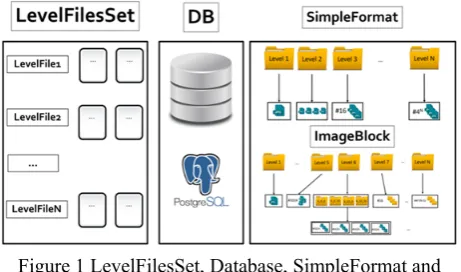
As the Figure 1 shows, there are several ways of storing and retrieving the tile images:
Figure 1 LevelFilesSet, Database, SimpleFormat and ImageBlock
The options for storing and retrieving are SimpleFormat, ImageBlock and LevelFilesSet. This section describes and analyzes the advantages and drawbacks of these data structures.
2.1 Tiling Scheme and Zoom levels
The tiles are stored in folders, referred to as zoom levels. Each zoom level is expected to contain 4k tile images, where k represents the folder number. For instance, the first zoom level will contain 4 images. As the zoom level increases, each tile is divided into 4 sub-tiles. The maximum number of columns and rows for each zoom level is 2n – 1, where n represents the number of zoom levels. For instance, in zoom level 5, the number of columns and rows will range between 0 and 31 (e.g., 5_0_0.jpg to 5_31_31.jpg; Z_X_Y.jpg, where Z represents the zoom level, X the column, and Y the row). In this research, tiles have the size of 256 pixels and are classified by their zoom level, column and row of the 2-dimensional map grid (Figure 2).
Figure 2 Tiling scheme for zoom level 1
The logical tile scheme is the foundational element of a web tiled map management system. In this research, tiles have the size of 256 pixels and are classified by their zoom level, column, and row of the 2-dimensional map grid. The logical scheme consists of mapping the address of the tile images to geospatial coordinates of the geographical area that the image covers. Google, Bing and Yahoo! Maps all use the tiling scheme mentioned in this paper. This tile scheme renders computing the addresses of the tiles a trivial procedure and it is preferred over the others because of its simplicity and easiness to implement. As explained in (MicroImages, 2010), the Google Maps tile dataset structure is stored in each subdirectory as described below. Every tile is aligned on a fixed grid of Spherical Web Mercator projection (Stefanakis, 2014). This way, Google Maps can quickly and efficiently load millions of tiles. This hierarchical tile structure ensures that the tile dataset with the maximum possible resolution will never be able to exceed the maximum number of tiles or directories that the web tiled map management system can store, thus rendering it efficient and scalable across different systems.
2.2 SimpleFormat
proven to be the best performing file system, then this system will not be supported by any operating systems other than Windows. The ideal system would operate optimally regardless of the underlying operating system (Zhang et al, 2008). The main problem with using file system-based solutions is that each file system is operating system-specific. Thus, the very nature of a file system renders it inapplicable in the context of a multi-modal solution scaling across different operating systems.
2.3 ImageBlock
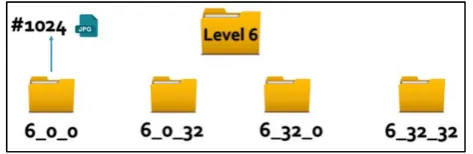
Similarly to the SimpleFormat, ImageBlock structure operates in the File System where the tiles are stored in folders. In this case, however, each folder has an upper limit on the number of tiled images that can be accommodated. The maximum number of tiles that each folder can contain is 1024, so after the 6th zoom level, the folders will contain child-folders. For example, the 6th folder will contain 4 folders as depicted in Figure in Figure 3:
Figure 3 The ImageBlock format
For instance, tile 6_0_34 will be classified into 6_0_32 folder because it contains tiles with columns ranging from 1 and 31 and rows 32 and 63. As in the tile naming, the first number of the folder name represents the level, the second number represents the column, and the third represents the row of the tiles. This solution has the advantage of distributing the tiles in a more elegant way rather than lumping them under 1 folder, like SimpleFormat.
2.4 Databases
In the database solution, all the tiles are stored in tables according to each zoom
level. The structure in which the tiles are stored is similar to either SimpleFormat or ImageBlock. Although databases offer multiple APIs that have been tested and used by several developers, their performance for storing and retrieving tiles is the worst out of all the alternative solutions (Sears et al. 2007). The benefit of using the database solution is that they are very robust and scalable; however, when performance is the core factor of decision making, as in this case, this solution proves to be insufficient.
Figure 4 The database schema following the SimpleFormat structure
The database schema showcased in Figure 4 follows the SimpleFormat structure. Each zoom level is stored as a table and each tile contains several attributes (e.g., tile_id, tile_source and so on). The tiles are saved as BLOB data type.
The databases can inherit different schemas. For instance, the ImageBlock structure could be used for the structure of the tables. In this research, the SimpleFormat’s schema is used for testing purposes. Recently Mapbox, has came up with a format similar to those of the one described above, named MBTile format. The MBTile format (MapBox, 2010) uses a SQLite database to store tiles in one single table (Table Tiles) and has attributes similar to the database described above (column, row, BLOB, and so on). Similarly to the file system based solutions, databases bring a lot of unnecessary features that introduce significant overhead to the system. A tile storage system will not require the rich number of APIs featured in the database; instead only a handful of the APIs are necessary and thus databases are not able to efficiently retrieve tile images. Databases are designed to manipulate a structured volume of data, such as characters and numbers. A tile storage system has little need for queries on structured data. However commercial systems, such as such as MapBox, use databases instead of other solutions. If the tile application required frequent update of tile images (from the user side), then the database would offer straightforward functionalities that would render tile storage and retrieval a lot more straightforward and less time consuming. Hybrid approaches, such as file system with database solutions would also be an option. In this research, Postgres 9.3, an open-source database which provides multiple APIs and further geospatial tools, is chosen for benchmark purposes. The Java framework provides the JDBC API (see following section), which allows data access from any relational database.
2.5 LevelFilesSet
Figure 5 The architecture of LevelFilesSet
The lookup file contains 2 variables:
CursorPointer (8 bytes): Represents a pointer to the Data File.
SizePointer (4 bytes): Represents the size of the tile. Initially, the LevelFilesSet Dataset is generated by copying the bytes of the tile files on the LevelFilesSet per zoom level. The way the tiles are stored is based on the following formula:
2 ∗ ∗
(1) where:
position: the position at the Lookup file
level: the zoom level of the tile
column: the column of the tile
row: the row of the tile
byteLength: the length of the CursorPointer plus the SizePointer.
The Lookup file can be extremely large on the high zoom levels (e.g., zoom level 14 or higher). The maximum size of the TileData file can be 264-1 bytes; this number ensures that the data structure will be able to support higher zoom levels that contain billions of images. For example, the user wants to retrieve the tile on the 3rd zoom level, 2nd column and 1st row, based on equation (1), where position=204. This means that to retrieve the tile, the LookupFile must be parsed on the 204th byte of the LookupFile. The first 8 bytes of that position (bytes 204 until 211) will contain the pointer of the TileData file and the next 4 bytes (bytes 212 until 215) will contain the size of the tile. After retrieving the CursorPointer and SizePointer, the TileData file is parsed, starting at the CursorPointer and reading SizePointer bytes.
Although the implementation of the LevelFilesSet data structure is complex, the benefits are the following: a) the system does not rely on the file system for reading a file
b) retrieval of any tile is achieved in constant time. In other words, a file system on top of the existing file system is created and used for tile retrieval. This data structure offers the feature of tile generation, which is based on the pre-existing tiles structured that depends on the SimpleFormat structure. There are several other
features that could be implemented in the future and could enrich the functionality of the LevelFilesSet to support other use cases and scenarios. For instance, one of these features could be the functionality of adding and deleting tiles dynamically. Tiled map-based management systems usually have to update their tiles within a specific time range. The current state of the data structure allows tile generation, which means that the LevelFiles have to re-generate every time a tile is updated. For supporting this feature, the implementation of the LevelFilesSet should be upgraded to a more sophisticated version, as proposed by Sample and Ioup (2010). By storing an extra file which keeps the pointers of each tile, the LevelFilesSet can modify (i.e., add or delete) each tile separately. However, this feature is expected to increase the memory needs of the systems since additional pointers must be stored apart from the tile dataset. Moreover, the performance is expected to decrease since an additional Seek and Read within the newly added file will be needed. This upgrade can be seen in the Figure 6.
Figure 6 Version of the LevelFilesSet that allows missing tile indexes by using the tile stack which indicates the
existing tiles within the system
Figure 7 An example of computing the pointers within the Lookup File based on the equation (1) to retrieve the
1_1_0.jpg tile
1. The implementation of the LevelFilesSet is complicated and requires careful design patterns while developing. Similarly to all data structures, if the design patterns are not optimal, the results will follow suit.
2. The memory complexity increases since the Lookup file requires space for storing the pointers. The alternative proposed techniques do not require this additional space.
If implemented correctly, the LevelFilesSet will be optimal and, as presented in the previous section, optimal results are expected for its performance.
2.6 The LevelFilesBlock data structure
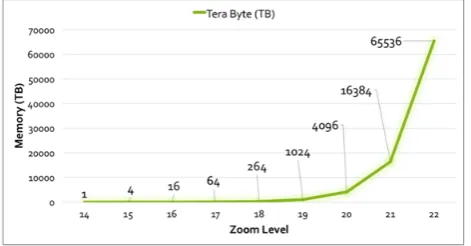
The core ability of storing and retrieving tiles makes LevelFilesSet the most suitable and efficient solution. However, as previously stressed, when faced with large zoom levels an architecture must be designed to support the LevelFilesSet across multiple storage disks. The Figure 8 provide a conservative estimation, if the average tile size is 4KB, of the expected size for each zoom level.
Figure 8 Total expected size of tiles for each zoom level
For instance, for the 22nd zoom level, if the average size of an image is 4KB, then the total size of the tiles is expected to be 65.6 PB; which means that the TileDataset file will have an equal size. Inarguably, storing this large number of information into one single file proves to be impossible and thus non-scalable. The need to distribute tiles across multiple storage systems becomes vital and the LevelFilesSet, in its simple form, does not fulfil that requirement. Instead, a hybrid approach, based on the benchmarking scenarios and scalability concerns, can be created, as illustrated in Figure 9.
Figure 9 The LevelFilesBlock - A hybrid approach based on the LevelFilesSet and the ImageBlock
LevelFilesBlock combines LevelFilesSet with ImageBlock. It takes advantage of the speed superiority of LevelFilesSet and the elegance of ImageBlock, which together can distribute the tiles across different storage systems. For zoom levels 0 to 5, this structure follows SimpleFormat’s (and ImageBlock’s) format. For the zoom levels 6 to 11, the LevelFilesSet format is applied. For the upper zoom levels, ImageBlock’s structure is applied with the major difference being that instead of tile images, LevelFilesSet is used per subdirectory. The logic behind this approach is to take advantage of LevelFilesSet performance superiority and ImageBlock’s sophistication in regard to scalability. A major factor of this approach is limiting the average size of the image. The goal of each LevelFilesSet within each subdirectory is not to surpass 64GB. This number (64GB) is empirically extracted for each application and is depended on the average system storage capacity. The goal of selecting a fair constant is to re-ensure that the system will be able to handle any insertion or deletion within a sub-directory. For instance, if the system has multiple storage systems of 1TB capacity, then the constant can be set on 64GB (16% of the system’s total size). On the other hand, increasing the sub-directories leads to more demands on the system. Based on the latest concern, ImageBlock’s tile-limit number can be increased. For example, if the limit is set to 1 million, then, since the average size of each image is 4KB, the expected size of the total images will be approximately 1GB. The average image size may be larger than 4KB. That is, the image size depends on the category of the tiled map management system and its purpose (e.g., high-resolution tiled map management system, and so on). In the end, the developer must take inconsideration the following the average tile size within each zoom level the number of the tiles within each sub-directory the maximum capacity of the storage system
By using LevelFilesBlock, the tiles can be distributed across different storage systems in an efficient and modifiable way and thus both performance and scalability concerns can be fulfilled. The developer is expected to adjust the maximum number of subdirectories based on the average size of the images.
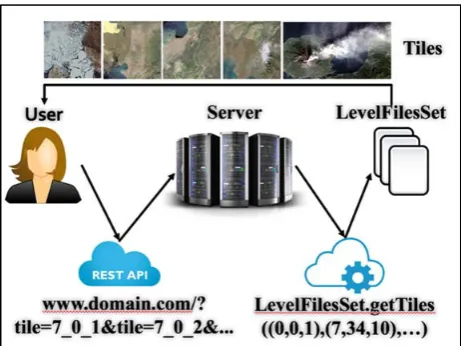
Figure 10 The use case of the system
Initially, the user (developer) requests certain tiles from the server (Figure 10). The message is processed and the server retrieves the tiles by using the LevelFilesSet data structure. Then, the server responds to the user by providing the requested images. An important aspect of this case design is that the library is encapsulated on the backend server and, no matter which of the alternative data structures is used, the user will not have to change actions for each method, as mentioned by Sears et al. (2007). For this reason, no alternation of the frontend code is required. Figure 11 contains an example where the developer requests 2 tiles (7_0_1.jpg and 7_0_2.jpg). The server parses the request and then uses the LevelFilesSet to retrieve the tiles; subsequently, the server responds and the developer can retrieve the tile images. Note that it is the frontend developer’s responsibility to parse each tile accordingly. In this case, as it can be observed from the Figure 6, for the jpg encoding the tiles can be separated by the ASCII prefix “ˇÿˇ‡”.
Figure 11 Tile retrieval via HTTP response
The remaining use-cases present the way the LevelFilesSet is generated and configured to request multiple tiles per HTTP request.
3. Local Benchmarks
3.1 Methodology
There were three core phases during which the data structures were compared. In the first phase, a dataset
with missing tiles was tested to present an initial idea on how the various solutions perform; a comparison between the File System (SimpleFormat and ImageBlock), Databases, and LevelFilesSet. The algorithm’s pseudocode can be seen in Figure 12.
Figure 12 Pseudo-Code for the retrieval algorithm
This algorithm measures the average time of tile retrieval for each zoom level and for each solution (SimpleFormat, ImageBlock and LevelFilesSet). It reads through every tile image within each zoom level. Then, the needed time for reading the tile is added to the variable which holds the total time duration. In the end, the computed time is divided by the total number of the tile images in the zoom level. The output number will indicate how much time, on average, is needed to read a tile image from each zoom level. The resulting number is useful will showcase how the zoom levels (with different tile numbers stored) perform and how this number effects the performance of the system.
The first phase’s benchmark runs under the Macintosh OS with the Database used being Postgres®. The results and can be seen in Figure 13.
Figure 13 Graphical Representation of the first benchmark results
Figure 14 illustrates the total time that is required for all the tiles to be retrieved.
For Each Level:
Total Avg_Time_Duration = 0;
For Each Tile:
Start_Time = Get_Current_Time();
Read Tile;
// SimpleFormat, Database, LevelFilesSet
End_Time += Get_Current_Time()
Start_Time;
End For Each;
Figure 14 Total needed time for each tile to be loaded
The Database, in the 11th zoom level, is 6.2 times slower than the LevelFilesSet, rendering it insufficient to store large volumes of tile datasets. Furthermore, the LevelFilesSet is approximately 33% faster than the SimpleFormat. While this benchmark provides an initial proof of concept regarding each solution’s performance, it does not take in consideration the fact that developers will request certain parts of the web map each time and that there will be multiple HTTP requests made on the server. The second benchmark analyzes the network performance and monitors certain latencies that would not be added while testing locally on the system.
In the third phase, there are 3 individual benchmarks under which the data structures are compared. It is important to mention that the purpose of these benchmarks is to test with all the expected tiles on the system. The pseudo-code for the algorithm used for the benchmark tests can be seen in Figure 15.
Figure 15 Pseudocode for the benchmarking scenarios
The above algorithm selects randomly an area of 10 tiles for each zoom level. Then, an average time variable is used to estimate the required time that every data structure. The number of requested tiles increases sequentially each time (e.g., 1, 2, 3 and so on). In the end, the average time is computed. To simulate a realistic benchmarking scenario, 1 to 10 tiles are requested for each zoom level. The threshold indicates the number of the tiles that are requested each time. Finally, the average
time is computed and reported. It is significant that, in the testing dataset, a tile has an approximate size of 4 Kilobytes (KB). Depending on the network traffic, the developer might want to retrieve more than one tile per request. This algorithm takes that feature into account and represents a fair comparison with the number of the requested tiles varying from 1 to 10. The first test ran on Macintosh under the ExFAT file system and provided the following results Figure 16:
Figure 16 Graphical Representation of the first benchmark results for the zoom levels 5 until 10
(Macintosh, ExFat and SSD)
As observed, for zoom level 10, it takes an average of 11.9 milliseconds (ms) to retrieve the tiles by using LevelFilesSet, 19.5 ms for ImageBlock and 19.8 ms for SimpleFormat. The performance improvement of LevelFilesSet over SimpleFormat and ImageBlock, in zoom level 10, is 66%. SimpleFormat and the ImageBlock have almost identical results.
The second benchmark ran on Windows (NTFS) using a Solid-State Drive (SSD). The Windows SSD memory capacity allowed the test to run until zoom level 11, rather than the 10 levels in the case of the first benchmark that ran on Macintosh. The results are reported in Figure 17.
Figure 17 Graphical Representation of the first benchmark results for the zoom levels 5 until 11
(Windows, NTFS and SSD)
The performance improvement of LevelFilesSet over the SimpleFormat and ImageBlock, in the 11th zoom level, is approximately 323%.
Randomly Select Area (10 tiles);
For Each Level:
For (threshold 1: 10): //threshold = requesting tiles number
Compute LevelFilesSet Performance;
Compute ImageBlock Performance;
Compute SimpleFormat Performance;
End For;
Compute Average Time();
For the third benchmark test, the same Windows machine is used, with the difference being that the files are stored in the Hard Disk Drive (HDD) instead of the SSD. The HDD capacity allowed the test to run until the 13th zoom level. The results are as follows Figure 18:
Figure 18 Graphical Representation Third benchmark for the zoom levels 7 until 13 (Windows, NTFS and SSD)
The performance improvement of LevelFilesSet over the SimpleFormat and ImageBlock, in the 13th zoom level, is approximately 327%.
3.2 Outcome
The LevelFilesSet’s retrieval time is faster than that of SimpleFormat and ImageBlock in all the benchmarking scenarios. It is important to highlight the idea behind the LevelFilesSet methodology. Not only does LevelFilesSet provide better results than the other structures, but it also performs optimally under any operating and file system. However, one significant issue arises as the zoom level increases: the TileData file gets extremely large, rendering it impossible to store tiles using only one disk. For instance, for the 15th zoom level, it is expected to store 1,073,741,824 tiles, and since the average size of a tile is 4KB, the expected size of the entire zoom level is approximately 4 Terabyte (TB). As the file size increases, LevelFilesSet develops problems. LevelFilesBlock, is expected to provide the necessary guidelines that will show the way the tiles should be divided across different storage disks in an efficient and scalable manner.
4. Cloud Benchmarks
With the recent rise of the cloud-based technologies, more and more applications are based entirely on the cloud and thus, it is worth examining the performance of SimpleFormat, ImageBlock, and LevelFilesSet on such platforms. Google Cloud offers a wide variety of APIs which create a suitable solution for tile storage and retrieval. Furthermore, Google Cloud offers a set of easy-to-use tools and documentation that make it easy for developers to implement tile systems. By choosing a cloud-based approach to tile storage and retrieval, developers can simply upload the dataset and retrieve it.
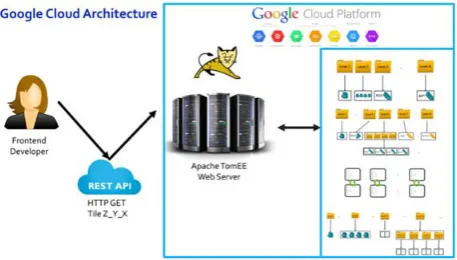
Cloud-based approaches free the user from having to develop and implement from scratch a local data center. Consequently, the company can avoid hiring specialized personnel as well as saving space and funds that would be dedicated to a physical local data center. Lastly, choosing a cloud-based solution eliminates the need for backups, security, maintenance, hardware upgrade, and peripheral running costs. Importantly, however, there are a number of trade-offs when choosing cloud hosting. Namely, the company relies on a single vendor that can control the availability and price of the offered services. Further, this solution is mostly applicable for small to medium sized companies, as scalability will rapidly increase both the price and the reliance on a single external vendor. Beyond expanding on the intricacies of these benefits and drawbacks of using a cloud based solution, this section deals with serving tiles by using the Google Cloud. Figure 19 describes the architecture of the deployed application.
Figure 19 Architecture of Tile Serving in Google Cloud
Figure 20 Google Cloud benchmark within the span of 3 days
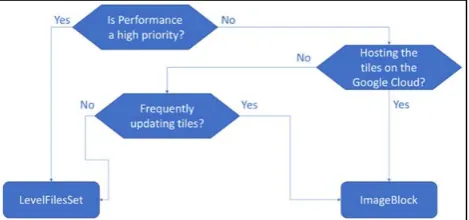
Within the span of three days (Figure 20), LevelFilesSet performed faster than the other approaches with an average 9.33% increased speed (for zoom level 10). ImageBlock performed, on average, 31.9% faster than SimpleFormat. Based on these benchmarks, it is logical to assume that Google’s object based file system favors structured subdirectories which contain limited numbers of tiles (Mesnier et al., 2003); hence the increase of ImageBlock’s performance in comparison with the benchmarks run locally. These results also enhance LevelFilesBlock’s expected efficiency on the cloud since it also follows the ImageBlock’s structure. ImageBlock (and SimpleFormat) supports updating and deleting tile images easily, whereas LevelFilesSet, in its current version, does not. If performance is the main concern for developing the web tiled map management system, then LevelFilesSet would be the right data structure to choose. However, if the tile dataset gets updated frequently, then ImageBlock would be the most suitable solution. Google offers an easy to use deployment platform and the results are very fast. However, the biggest drawback of using Google Cloud is the price of the APIs, and this is discussed in the next section. A flowchart of the decision-making process can be seen in Figure 21.
Figure 21 Flowchart for choosing the data structure
The overall price of the benchmarks described above was about US $300. The price of Google Engine is based on multiple factors, such as the number of users, the dataset, the APIs used and so on. Running costs are a predominant concern for developers that are interested in using the Google Cloud APIs. Google offers a pricing-estimation tool that makes it easy for developers to pre-calculate the expected expense based on their usage. As previously stated, Google offers a rich number of APIs
that developers can embed into their applications and configure easily. However, this does not come for free. It is highly recommended that developers, prior to taking the architectural decision of deploying their applications in the Google Cloud Platform, use the pricing tool to estimate the expected cost of the system.
Another significant factor to consider is the geolocation of the server. Google cloud operates only in specific locations (Stevens, 2016). If the majority of expected users come from a place which is not listed as a location for a potential server, then the latency is expected to be higher than for a place where Google Cloud contains multiple servers (e.g., North Virginia). The developers should consider all the mentioned issues prior to choosing to deploy their applications in Google Cloud and developing web tiled map management systems based on Google Cloud. Overall, cloud based solutions are convenient, but severely restricted by physical practicalities, which might improve in future, but currently pose limitations on usability.
5. Conclusions
The purpose of this research was to determine which data structure provided the most scalable and efficient system under which tile images could be stored and retrieved. In conducting this research, four tile storage solutions (database, SimpleFormat, ImageBlock, and LevelFilesSet) were chosen and implemented from scratch. The database solution offered the slowest results out of the alternative solutions; databases could be scaled across different systems but their performance was slow compared to the other techniques. During the locally performed benchmarks, the file system based solutions (SimpleFormat and ImageBlock) performed better than the database approach. Further, in these local benchmarks, SimpleFormat performed faster than the ImageBlock solution. This performance was explained due to the impact of the exponential growth of the subdirectories within the increasing number of zoom-levels. That is, the more the sub-directories within a zoom level, the greater the latencies on the locally-tested file systems, such as NTFS and ExFAT.
the entire zoom level. Furthermore, in its current version, LevelFilesSet stores the entire tile dataset in two single files which renders tile serving for zoom levels more than 15 not scalable. A hybrid combination of ImageBlock and LevelFilesSet, named LevelFilesBlock, is proposed to take advantage of LevelFilesSet’s performance superiority as well as ImageBlock’s elegance and scalability on distributing the tiles across different storage systems. With the LevelFilesSet logic being applicable to any type of data storage, an ambitious extension could be the implementation of a generic form that supports information storage of any type. Another potential refinement would be examining the delays between the communication of the objects (e.g., TileData file with Lookup file). If these delays are reduced, LevelFilesSet could produce more efficient results. In the long term, adoption of this data structure can transcend the limitations imposed by different environments, while improving upon the speed and efficiency of existing system-specific solutions.
6. References
Barish, G. and Obraczke, K., 2000. World wide web caching: Trends and techniques. IEEE Communications magazine, 38(5), pp.178-184.
Brian Stevens (2016), Google Cloud Platform Blog, Vice President of Google Cloud, URL: https://cloudplatform.googleblog.com/2016/09/Google-Cloud-Platform-sets-a-course-for-new-horizons.html Gupta, A., Ferris, C., Wilson, Y. and Venkatasubramanian, K., 2002. Implementing Java computing: Sun on architecture and applications deployment. IEEE Internet Computing, 2(2), pp.60-64.
Gupta, Priya. "Providing caching abstractions for web applications." PhD diss., Massachusetts Institute of Technology, 2010.
MBTile Format, MapBox, 2010, URL: https://www.mapbox.com/help/an-open-platform/
MS-EFSR: Encrypting File System Remote (EFSRPC) Protocol. Microsoft. 14 November 2013.
Ni, T., Schmidt, G.S., Staadt, O.G., Livingston, M.A., Ball, R. and May, R., 2006, March. A survey of large high-resolution display technologies, techniques, and applications. In Virtual Reality Conference, 2006 (pp. 223-236). IEEE.
Sample, J.T. and Ioup, E., 2010. Tile-based geospatial information systems: principles and practices. Springer Science & Business Media.
Savage, S. J., & Waldman, D. M. (2009). Ability, location and household demand for Internet bandwidth. International Journal of Industrial Organization, 27(2), 166-174.
Systems and Software, 2005. ISPASS 2005. IEEE International Symposium on (pp. 10-20). IEEE.
Sears, R., Van Ingen, C. and Gray, J., 2007. To blob or not to blob: Large object storage in a database or a filesystem?. arXiv preprint cs/0701168.
TNTgis - Advanced Software for Geospatial Analysis,
MicroImages, Inc. 2010, URL: http://www.microimages.com/documentation/TechGuide
s/78googleMapsStruc.pdf