23
CAD/CAM SOFTWARE SELECTION FOR SMALL AND
MEDIUM SCALE MANUFACTURING ORGANIZATIONS IN
KOLKATA
Ananda S Chakraborti SIT Pune 412115
ABSTRACT
In India there are two completely different manufacturing environments in East and West. Western industries are more liberal in their outlook in terms of development, introduction of new technology etc whereas Eastern Industries especially in Kolkata possess a more socialist framework. CAD/CAM techniques are nothing new to Indian market. But small and medium scale manufacturing organizations in Kolkata lacks the knowledge and ability to select and use an adept CAD/CAM environment from which they will benefit. In this paper we tried to demonstrate the current condition of CAD/CAM system selection in small and medium scale industries of Kolkata by performing surveys in a few organizations. We tried to study and improve the technique of selecting their CAD/CAM environment. We start with a survey of their current status of CAD/CAM system usage. We developed a basic questionnaire for this purpose. We analyze their needs and came up with tailor-made solutions.
Keywords—Computer aided design, Computer aided manufacturing, Need prioritization, System selection.
INTRODUCTION
Computer-aided design (CAD) and manufacturing systems have a history in assisting companies in design and high-speed manufacturing. Complex parts can be designed quicker with softwares that enable the user to visually see the part and its dimensions. These software programs can provide the compatibility to assemble parts together, checking for fit while also providing the capability to edit the part at any time. This allows complex designs to be made quicker, and more accurately. Computer-aided manufacturing (CAM) packages allow these complex parts to be brought to life by calculating tool paths and writing the code to manufacture the part on a computer numerical controlled (CNC) machine such as a milling machine or lathe. Human error is reduced and higher accuracy can be attained when manufacturing parts that would be difficult to produce manually. Globally and locally there are companies using obsolete packages to design and manufacture products. Since technology is changing very rapidly and most companies cannot update with the technological advancements. The need to know what CAD/CAM packages are available and how to select one will help companies build for the future. In this paper an approach is made to find the best or suitable packages among the available software packages for a few small and medium scale manufacturing firms.
their production or product will not vary if CAD/CAM software is used. Some people see an expense on CAD/CAM software as illegitimate and un- called for and still prefers conventional hand drawings. This is why there is a huge potential of introducing feature based software in these areas. Hence, Eastern India is a potential market for Introduction of this kind of software and diversifying on it.
ORGANIZATION SELECTION AND SURVEY
A careful selection of manufacturing organizations is done which range from small to medium size organization. In our survey we have considered organization which operates in Kolkata region and have an annual turnover less than € 1 million. Four organizations are selected which covers different part of the design and manufacturing industry. We have selected companies doing metal fabrication work (M/s Betterman Engineering Pvt Ltd), auto component and diesel engine component manufacturer (M/s Simpson and Company Ltd), manufacturer of power plant components such as boiler tubes and Electrostatic precipitator (M/s DesFab India Pvt Ltd) and an educational organization which provides
CAD/CAM software knowledge to young professionals and students (CADD Center, Kolkata).A survey
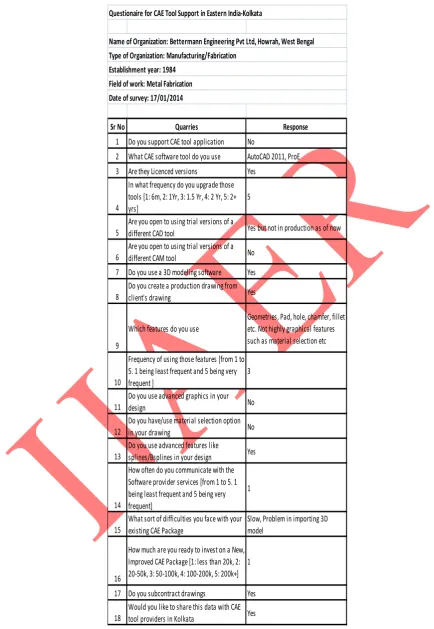
was conducted at their premise which is given in a tabular format. The table of questionnaire is prepared carefully after consulting with the management of the organization and a few experts working in computer aided design and manufacturing. The questionnaire prepared is very standard and is kept simple for the sake of better understanding and interpretation. The organization’s participation in answering questions in this survey will help identify information on important criteria for a CAD/CAM system selection. The responses will be kept confidential and used solely for the purpose of this study (Mercer 2000).
A. Survey at M/s Betterman Engineering Pvt Ltd
They are basically fabricators and metal workers. They work on contract basis for big MNCs who provide them their own drawings. They also accept projects from smaller clients for bought-out items. They use AutoCAD 2011 64 bit licensed version. Table I at the end (Appendix) depicts the survey.
B. Survey at Simpsons and Company Ltd
They are Auto component and Diesel Gen-set manufacturers. They also manufacture diesel engine parts. They use CNCs extensively. They are tier 2 suppliers of Hindustan Motors. A well structured organization with heavily equipped R&D department was developed in 1840. Table II (Appendix) depicts the survey.
C. Survey at DesFAB Engineering Pvt. Ltd
They are Boiler and ESP component manufacturers. Drawings are produced by consultants who use CAD/CAM systems and sometimes the drawings are created by employees for better understanding in the shop floor. They are using AutoCAD 2013 (non licensed version). Main work includes preparation of assembly drawings and part drawings for welding and fit up. Though rarely used, for 3D assembly drawings they are using Autodesk Inventor Professional. Table III (Appendix) depicts the survey.
D. Survey at CADD Center, Kolkata
25 CAD/CAM software courses they offer and which software have greater demand amongst the job seekers in this field. It was noticed that CAM software demand was very less. The only course is NX CAM which CADD Center Kolkata is providing. This has a direct relation with the manufacturing market of Kolkata (overall West Bengal). Table IV (Appendix) depicts the survey.
CAD/CAM SOFTWARE SELECTION
Standard guidelines of selecting business softwares are followed. All the above organizations are advised to upgrade their software usage depending on the business software selection model:
1. Need: To reduce uncertainties at the shop floor, to remove delays in shop floor, better employee governance, and cost management at various levels are most important.
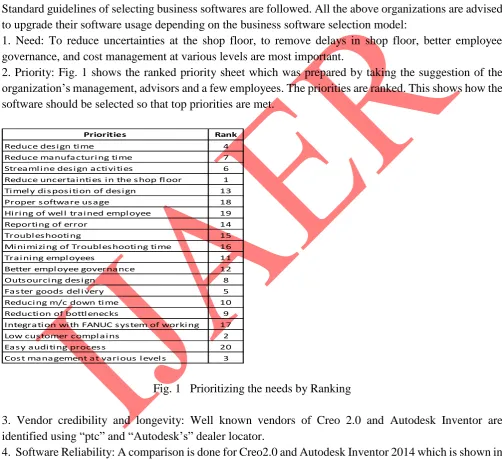
2. Priority: Fig. 1 shows the ranked priority sheet which was prepared by taking the suggestion of the organization’s management, advisors and a few employees. The priorities are ranked. This shows how the software should be selected so that top priorities are met.
Priorities Rank
Reduce des i gn ti me 4
Reduce manufacturi ng ti me 7 Streaml i ne des i gn acti vi ti es 6 Reduce uncertai nti es i n the s hop fl oor 1 Ti mel y di s pos i ti on of des i gn 13
Proper s oftware us age 18
Hi ri ng of wel l trai ned empl oyee 19
Reporti ng of error 14
Troubl es hooti ng 15
Mi ni mi zi ng of Troubl es hooti ng ti me 16
Trai ni ng empl oyees 11
Better empl oyee governance 12
Outs ourci ng des i gn 8
Fas ter goods del i very 5
Reduci ng m/c down ti me 10
Reducti on of bottl enecks 9 Integrati on wi th FANUC s ys tem of worki ng 17
Low cus tomer compl ai ns 2
Eas y audi ti ng proces s 20
Cos t management at vari ous l evel s 3
Fig. 1 Prioritizing the needs by Ranking
3. Vendor credibility and longevity: Well known vendors of Creo 2.0 and Autodesk Inventor are identified using “ptc” and “Autodesk’s” dealer locator.
Software: Creo 2.0
Questions Answers How often is the software unavailable or offline due to technical issues Never On avg how quickly the technical issue is
resolved 48 hours post contacting the IT Help who is the vendor Chabaria Infotech, Kolkata upgradation possibility Yes
Cost
Additional features
Software: Autodesk Inventor 2014
How often is the software unavailable or offline due to technical issues Never On avg how quickly the technical issue is resolved
who is the vendor Chabaria Infotech, Kolkata upgradation possibility Yes
Cost Commercial software pack Rs 1,60,000
Additional features
Complete pack with CAD Mechanical, AutoPipe and Inventor 3D
Fig 2. Software Reliability of Creo 2.0 and Inventor 2014
5. Operation Integration: Possibility of combining few operations by using Autodesk Inventor is noted: a) Better visualization of design hence quick Purchase order generation start at M/s DesFAB
b) Better Inventory control at Simpsons & Co.
c) Better and faster documentation of Design at M/s DesFAB
d) Quick removal of previous revision drawing from shop floor at M/s Betterman.
6. Pricing: This is a tricky part. There are few students version of the software the companies are using free of cost. Due to the non commercial nature many software are incapable of handling the advanced features of the commercial packages. As the investment per licensed version is high some resistance was felt in this section.
Creo 2.0 sketch (with 3D extension) = Rs. 2, 25, 000/- (TRISITA Marketing Ltd, Kolkata) Autodesk CAD (Mechanical) = Rs. 1, 60, 000/-
(Autodesk reseller Chabaria Infotech Ltd, Kolkata) Autodesk CAD (Premium) = Rs. 2, 50, 000/- (Autodesk reseller Chabaria Infotech Ltd, Kolkata)
7. Making sure on ROI: New integrated software tools that are commercially available have been developed which allow design engineers to perform finite element analysis directly, during the early stages of design, thereby ensuring that the best design intent is achieved. (McGuffie, 1999) This in turn reduces final prototype numbers, lowers design costs, and decreases time to market.
27
RESULTS AND RECOMMENDATIONS
Survey results indicate that most organizations use old and outdated systems. A modified CAD/CAM software selection is done on the basis of their work volume and need. A system requirement chart is prepared which helps the organizations to select the hardware. The system requirements are given in Table V. We have tried to integrate the system requirement and the need. A computer program has been developed to simplify the selection process. Borland Turbo C++ is used to write the code. The simple program follows an unambiguous logic accepting the TAG numbers given to the system requirements. The requirements and needs are tagged for the convenience of program writing. The logic is the system requirements are classified in Tags. If all the Tags of the hardware requirements and system requirement of software match, that software is selected. If the concern is already using that software, no change is suggested. If the concern is not using that software an update is recommended. The codes written and output obtained is attached as appendix to this paper in Appendix at the end. The Tags are showed in Fig 5 at the end.
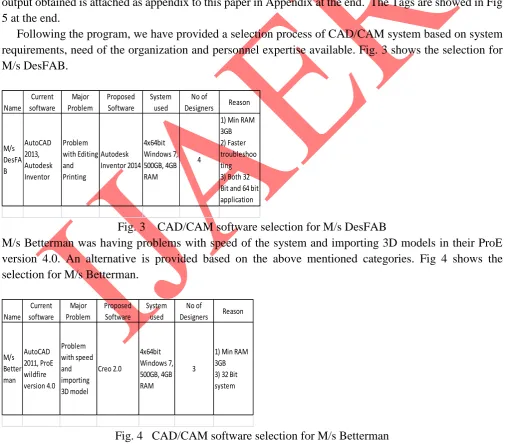
Following the program, we have provided a selection process of CAD/CAM system based on system requirements, need of the organization and personnel expertise available. Fig. 3 shows the selection for M/s DesFAB. Name Current software Major Problem Proposed Software System used No of Designers Reason M/s DesFA B AutoCAD 2013, Autodesk Inventor Problem with Editing and Printing Autodesk Inventor 2014 4x64bit Windows 7, 500GB, 4GB RAM 4
1) Min RAM 3GB 2) Faster troubleshoo ting 3) Both 32 Bit and 64 bit application
Fig. 3 CAD/CAM software selection for M/s DesFAB
M/s Betterman was having problems with speed of the system and importing 3D models in their ProE version 4.0. An alternative is provided based on the above mentioned categories. Fig 4 shows the selection for M/s Betterman.
Name Current software Major Problem Proposed Software System used No of Designers Reason M/s Better man AutoCAD 2011, ProE wildfire version 4.0 Problem with speed and importing 3D model Creo 2.0 4x64bit Windows 7, 500GB, 4GB RAM 3
1) Min RAM 3GB 3) 32 Bit system
M/s Simpson and Co. is using Creo 2.0 for 3D modeling and AutoCAD 2014 for production drawing purpose. When the C program is run it indicated Creo 2.0. They are already using Creo 2.0 so no change is recommended. Hence it forms a benchmark which the others will try to reach. At some point of time someone at Simpson must have understood the need of up-gradation. But now they can have a method of analyzing and upgrading their systems.
Training plays a critical role in the overall CAD/CAM system development. In Kolkata there are very less opportunity to understand and learn CAD/CAM software that is prevalent in the market. Most of the employees land up learning the software by themselves. But in this process they tend to miss out important features of the software which play very important roles in a commercial package. Hence the software remains underutilized. That is why we have considered CADD Center, Kolkata in this survey. A strategic tie up between them and the industry can bolster the understanding and utilization of these softwares.
After the selection of the system is done, satisfaction is to be analyzed. Further studies may be undertaken to find out whether a substantial development has occurred. If not, we find out what was the fault in the earlier selection system.
CONCLUSION
While preparing and selecting a CAD/CAM system many factors are to be considered. Need analysis and prioritization should be given foremost importance along with the various software and hardware requirements. The software selected now will not last for a long time as technology advancement is taking place at a rapid rate. Though small and medium scale industries have limitation on spending, a routine upgradation of the system is necessary. Training and communication also play a very important role in an accurate system selection.
CAM systems are rarely used in Kolkata. If sophisticated machining is required people prefer western Indian manufacturers. Kolkata has got huge potential in manufacturing. With rapidly developing states like Orissa and Jharkhand nearby the manufacturing demand has increased. Many industries are using CAD/CAM system but are unable to exploit the softwares fully. Our target is to solve this problem by improving the communication between the software providers and manufacturers. With the written consent of the organizations we plan to share the survey data with leading design and manufacturing software providers in the country who will provide technical as well as learning guidelines for them.
REFERENCES
[1] T. Mercer, “CADCAM Selection,” University of Wisconsin, May, 2000.
[2] S. S Nudurupati, U. S. Bititci, V. Kumar, FTS Chan, “State of the art literature review on performance measurement”, ”Computer and Industrial Engineering” ,volume 60, issue 2, March. 2011.
29
[4] Jozef VASKÝ, Michal ELIÁŠ, Pavol BEZÁK, Zuzana ČERVEŇANSKÁ1, Ladislav IZAKOVIČ2,
“3D Model generation from Engineering drawing”, “Slovakia Institute of Technology”, March, 2010. [5] Mehta, D. P., Sahani, S. Handbook of Structures and Applications. Boca Raton: Chapman &
Hall/CRC, 2005. 1392 p. ISBN 1-58488-435-5
APPENDIX
The computer program:
#include<stdio.h> #include<conio.h> void main()
{
int pr, hd, os, ram, pro, sp_req; clrscr();
printf("Enter the TAG No for Priority: "); scanf("%d", &pr);
printf("Enter the TAG No for Hard Disk: "); scanf("%d", &hd);
printf("Enter the TAG No for Operating System: "); scanf("%d", &os);
printf("Enter the TAG No for RAM: "); scanf("%d", &ram);
printf("Enter the TAG No for Processor: "); scanf("%d", &pro);
printf("Enter the TAG No for Special Requirement: "); scanf("%d", &sp_req);
if (pr<4) { if (hd<3) { if (os<=3) { if (ram<5) { if (pro<3) { if(sp_req<=3)
printf("CAD/CAM SYS: AUTODESK INVENTOR 2014. IF YOU ARE NOT USING IT, KINDLY UPGRADE");
} else
printf("CAD/CAM SYS: AUTODESK INVENTOR 2014. IF YOU ARE NOT USING IT, KINDLY UPGRADE");
} else
printf("CAD/CAM SYS: CREO 2.0 IF YOU ARE NOT USING IT, KINDLY UPGRADE"); }else
} else
printf("CAD/CAM SYS: NX CAD IF YOU ARE NOT USING IT, KINDLY UPGRADE"); }else
{
printf("TRY NEW SELECTION"); }
getch(); }
Output:
Sr No Quarries Response
1 Do you support CAE tool application No
2 What CAE software tool do you use AutoCAD 2011, ProE 3 Are they Licenced versions Yes
4
In what frequency do you upgrade those tools [1: 6m, 2: 1Yr, 3: 1.5 Yr, 4: 2 Yr, 5: 2+ yrs]
5
5
Are you open to using trial versions of a
different CAD tool Yes but not in production as of now
6
Are you open to using trial versions of a
different CAM tool No
7 Do you use a 3D modeling software Yes
8
Do you create a production drawing from
client's drawing Yes
9
Which features do you use
Geometries, Pad, hole, chamfer, fillet etc. Not highly graphical features such as material selection etc
10
Frequency of using those features [from 1 to 5. 1 being least frequent and 5 being very frequent ]
3
11
Do you use advanced graphics in your
design No
12
Do you have/use material selection option
in your drawing No
13
Do you use advanced features like
splines/Bsplines in your design Yes
14
How often do you communicate with the Software provider services [from 1 to 5. 1 being least frequent and 5 being very frequent]
1
15
What sort of difficulties you face with your existing CAE Package
Slow, Problem in importing 3D model
16
How much are you ready to invest on a New, Improved CAE Package [1: less than 20k, 2: 20-50k, 3: 50-100k, 4: 100-200k, 5: 200k+]
1
17 Do you subcontract drawings Yes
18
Would you like to share this data with CAE tool providers in Kolkata Yes
Date of survey: 17/01/2014
Questionaire for CAE Tool Support in Eastern India-Kolkata
Name of Organization: Bettermann Engineering Pvt Ltd, Howrah, West Bengal Type of Organization: Manufacturing/Fabrication
Establishment year: 1984 Field of work: Metal Fabrication
33
Sr No Quarries Response
1 Do you support CAE tool application Yes
2 What CAE software tool do you use AutoCAD 2013, 2014, ProE, Creo 2.0 3 Are they Licenced versions Yes
4
In what frequency do you upgrade those tools [1: 6m, 2: 1Yr, 3: 1.5 Yr, 4: 2 Yr, 5: 2+ yrs]
5
5
Are you open to using trial versions of a
different CAD tool Yes but not in production as of now
6
Are you open to using trial versions of a different CAM tool No 7 Do you use a 3D modeling software Yes
8
Do you create a production drawing from client's drawing No 9 Which features do you use All
10
Frequency of using those features [from 1 to 5. 1 being least frequent and 5 being very frequent ]
4
11
Do you use advanced graphics in your
design Yes
12
Do you have/use material selection option
in your drawing No
13
Do you use advanced features like
splines/Bsplines in your design Yes
14
How often do you communicate with the Software provider services [from 1 to 5. 1 being least frequent and 5 being very frequent]
3
15
What sort of difficulties you face with your existing CAE Package
Slow, Problem in importing 3D model
16
How much are you ready to invest on a New, Improved CAE Package [1: less than 20k, 2: 20-50k, 3: 50-100k, 4: 100-200k, 5: 200k+]
4
17 Do you subcontract drawings Yes
18
Would you like to share this data with CAE tool providers in Kolkata No
Date of survey: 22/01/2014
Questionaire for CAE Tool Support in Eastern India-Kolkata
Name of Organization: Simpsons and Company Jessore Road, Kolkata Type of Organization: Manufacturing/Service
Establishment year: 1840 Field of work: Manufacturing
Sr No Quarries Response 1 Do you support CAE tool application Yes
2 What CAE software tool do you use AutoCAD 2013, Autodesk Inventor 3 Are they Licenced versions No
4
In what frequency do you upgrade those tools [1: 6m, 2: 1Yr, 3: 1.5 Yr, 4: 2 Yr, 5: 2+ yrs]
5
5
Are you open to using trial versions of a
different CAD tool Yes
6
Are you open to using trial versions of a
different CAM tool Yes
7 Do you use a 3D modeling software Yes
8
Do you create a production drawing from
client's drawing No
9 Which features do you use Modelling, assembly
10
Frequency of using those features [from 1 to 5. 1 being least frequent and 5 being very frequent ]
1
11
Do you use advanced graphics in your
design No
12
Do you have/use material selection option
in your drawing No
13
Do you use advanced features like
splines/Bsplines in your design No
14
How often do you communicate with the Software provider services [from 1 to 5. 1 being least frequent and 5 being very frequent]
2
15
What sort of difficulties you face with your
existing CAE Package Editing and printing
16
How much are you ready to invest on a New, Improved CAE Package [1: less than 20k, 2: 20-50k, 3: 50-100k, 4: 100-200k, 5: 200k+]
1
17 Do you subcontract drawings No
18
Would you like to share this data with CAE tool providers in Kolkata No Date of survey: 02/02/2014
Questionaire for CAE Tool Support in Eastern India-Kolkata
Name of Organization: DesFAB India Ltd. Type of Organization: Manufacturing/Fabrication Establishment year: 1995
Field of work: Manufacturing/Fabrication
35
Sr No Quarries Response
1
Which software trainings do you provide
Creo 2.0, Catia v5, NX CAD, NX CAM, ANSYS 15.0, Primavera 2 What CAE software tool do you use SIMdesigner, XF Flow 3 Are they Licenced versions Yes
4
In what frequency do you upgrade those tools [1: 6mts, 2: 1yr, 3: 1-1.5 yrs, 4: 1.5-2yrs, 5: 2+ yrs]
3
5
Are you open to using trial versions of a different CAD tool Yes
6
Are you open to using trial versions of a different CAM tool Yes 7 Do you use a 3D modeling software Yes
8
What are the back grounds of the students [1: ITI, 2: Diploma, 3: B.Tech, 4: M.Tech, 5: PhD]
2, 3
9
Which software is prefered by students the most [1: Modeling, 2: Analysis, 3: Advanced Analytical, 4: CAM modeling and simulation, 5: CAM Programming]
1
10
Which features are most commonly
used Mass property analysis, FEA
11
Do you use advanced graphics in your design [1: never, 2: sometimes, 3: often, 4: mostly, 5: always]
3
12
Do you have/use material selection option in your drawing [1: never, 2: sometimes, 3: often, 4: mostly, 5: always]
2
13
Do you use advanced features like splines/Bsplines in your design [1: never, 2: sometimes, 3: often, 4: 1
14
How often do you communicate with the Software provider services [1: never, 2: sometimes, 3: often, 4: mostly, 5: always]
2
15
What sort of difficulties you face with your existing CAE Package
16
How much are you ready to invest on a New, Improved CAE Package [1: Less than 20K, 2: 20-50K, 3: 50-100K, 4: 100-200K, 5: 200+K]
2
17
What is the approximate cost of the
courses provided Brochure provided
18
Would you like to share this data with CAE tool providers in Kolkata Yes
Date of survey: 22/01/2014
Questionaire for CAE Tool Support in Eastern India-Kolkata
Name of Organization: CADD Center, Kolkata Type of Organization: CAD/CAM Educational Establishment year:
Field of work: CAD/CAM Education and Placements
Fields
Autodesk
Inventor 2014 Creo 2.0
Windows 7 32 bit min, 64 bit
reco
professional, ultimate, enterprize x64 edition
Windows 8.1
Windows XP or Vista
Y Professional
x64 Edition (Base OS Service Pack 2)
RAM 4GB minimum
for 500 parts assbly
3 GB RAM or higher
Disk Space 15 GB free
space for installation (250GB reco)
3GB+
recommended
Video card 1280x1024
screen resolution
Processor Intel Pentium 4,
AMD Athlon 64 with SSE2 technology, 3 GHz or greater, or AMD
dual-core processor with SSE2, 2 GHz or greater
recommended, or Intel® Xeon® E3 or Core i7 or equivalent with SSE2, 3.0 GHz or greater
32-bit hardware for Creo 2.0 in cases where /3GB switch is utilized
Install Media OpenGL 3.1
37 windows,
UNIX, LINUX networking Virtual
environments and storage devices
64-bit Windows 7 or Windows 8
Supported storage devices