Unit V Page 1
Unit V : Arrays & Strings
5.1 Introduction
An array is a group of contiguous or related data items that share a common name. For instance, we can define an array name salary to represent a set of salaries of a group of employees. A particular value is indicated by writing a number called index number or subscript in brackets after the array name. For example,
Salary [10]
represents the salary of the 10th employee. While the complete set of values is referred to as an array, the individual values are called elements. Arrays can be of any variable type.
The ability to use a single name to represent a collection of items and to refer to an item by specifying the item number enables us to develop concise and efficient programs. For example, a loop with the subscript as the control variable can be used to read the entire army, perform calculations and, print out the results.
5.2 One Dimensional Arrays
A list of items can be given one variable name using only one subscript and such a variable is called a single-subscripted variable or a one-dimensional array. In mathematics, we often deal with variables that are single-subscripted. For instance, we use the equation,
to calculate the average of n values of x. The subscripted variable xl refers to the ith
clement of x. In Java, single-subscripted variable xl can be expressed as
x[1], x[2], x[3],---x[n]
The subscript can also begin with number 0. That is
X [0]
is allowed. For example, if we want to represent a set of five numbers, say (35,40,20,57, 19) by an array variable number, then we may create the variable number as follows
Unit V Page 2
and the computer reserves five storage locations as shown below :
The values to the array elements can be assigned as follows:
number [0] = 35;
number [1] = 40;
number [2] = 20;
number [3] = 57;
number [4] = 19;
This would cause the array number to store the values shown as follows:
These elements may be used in programs just like any other Java variable. For example. the following are valid statements:
aNumber = number[0] + 10;
number[4] = number[0] + number[2];
number[2] = x[5] + y[10];
value[6] = number[i] * 3;
Unit V Page 3
5.3 Creating One Dimensional Array
Like any other variables, arrays must be declared and created in the computer memory before they are used. Creation of an array involves three steps:
1. Declaring the array
2. Creating memory locations
3. Putting values into the memory locations.
Declaration of Arrays
Arrays in Java may be declared in two forms :
Form 1
type arrayname [ ];
Form 2
type [ ] arrayname;
Examples:
int number [ ];
float average [];
int [ ] counter;
float [ ] marks;
Remember, we do not enter the size of the arrays in the declaration.
Creation of Arrays
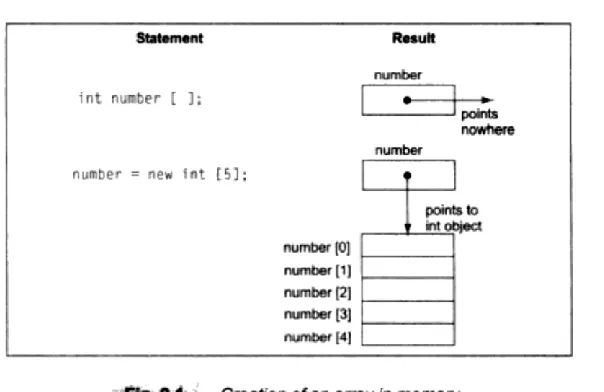
After declaring an array, we need to create it in the memory. Java allows us to create arrays using new operator only, as shown below:
arrayname = new type [size];
Examples:
number = new int [5];
Unit V Page 4
These lines create necessary memory locations for the arrays number and average and designate them as int and float respectively. Now, the variable number refers to an array of 5 integers and average refers to an array of 10 floating point values.
It is also possible to combine the two steps-declaration and creation-into one as shown below:
int number [ ] = new int [5];
Figure 9.1 illustrates creation of an array in memory.
Initialization of Arrays
The final step is to put values into the array created. This process is known as initialization. This is done using the array subscripts as shown below.
arrayname [subscript) = value;
Example:
number [0] = 35;
number [1] = 40;
---
---
number [4] = 19;
Unit V Page 5
Unlike C, Java protects arrays from overruns and underruns. Trying to access an array bound its boundaries will generate an error message.
We can also initialize arrays automatically in the same way as the ordinary variables when they are declared, as shown below:
type arrayname [ ] = {list of values};
The array initializer is a list of values separated by commas and surrounded by curly braces. Note that no size is given. The compiler allocates enough space for all the elements specified in the list.
Example:
int number [ ] = {35,40,20,57,19};
It is possible to assign an array object to another.
Example:
int a[ ] = {1,2,3};
int b[ ];
b = a;
are valid in Java. Both the arrays will have the same values.
Loops may be used to initialize large size arrays.
Example:
for (int i = 0; i < 100; i++)
{
if(i < 50)
sum[i] = 0.0;
else
sum[i] = 1.0;
}
Unit V Page 6 Array Length
In Java. all arrays store the allocated size in a variable named length. We can obtain the length of the array a using a.length.
Example:
int aSize = a.length;
This information will be useful in the manipulation of arrays when their sizes are not known. Program illustrates the use of an array for sorting a list of numbers.
Program in JAVA using one Dimensional Array
5.4 Two Dimensional Arrays
So far we have discussed the array variables that can store a list of values. There will be situations where a table of values will have to be stored. Consider the following data table, which shows the value of sales of three items by four salesgirls:
Iteml Item2 Item3
Salesgirl #1 310 275 365
Salesgirl #2 210 190 325
Salesgirl #3 405 235 240
Salesgirl #4 260 300 380
The table contains a total of 12 values, three in each line. We can think of this table as a matrix consisting of four rows and three columns. Each row represents the values of sales by a particular salesgirl and each column represents the values of sales of a particular item.
In mathematics, we represent a particular value in a matrix by using two subscripts such as vij. Here v denotes the entire matrix and vij refers to the value in the ith row and jth column. For
example, in the above table v23 refers to the value 325. Java allows us to define such tables of
items by using two-dimensional arrays. The table discussed above can be represented in Java as v[4][3]
Unit V Page 7
5.5 Creating a Two Dimensional Array
For creating two-dimensional arrays, we must follow the same steps as that of simple arrays. We may create a two-dimensional array like this:
int myArray[ ] [ ];
myArray = new int [3] [4];
Or
int myArray[ ][ ] = new int [3][4];
This creates a table that can store 12 integer values, four across and three down. Like the one-dimensional arrays, two-one-dimensional arrays may be initialized by following their declaration with a list of initial values enclosed in braces. For example,
int table[2][3] = {0,0,0,1,1,1};
initializes the elements of the first row to zero and the second row to one. The initialization is done row by row. The above statement can be equivalently written as
int table [ ] [ ] = {{0,0,0},{1,1,1}};
by surrounding the elements of each row by braces.
We can also initialize a two-dimensional array in the form of a matrix as shown below:
int table [ ] [ ] = {
{0,0,0},
{1,1,1}
Unit V Page 8
Note the syntax of the above statements. Commas are required after each brace that closes off a row, except in the case of the last row.
We can refer to a value stored in a two-dimensional array by using subscripts for both the column and row of the corresponding element. Example:
int value = table[1][2];
This retrieves the value stored in the second row and third column of table matrix. A quick way to initialize a two-dimensional array is to use nested for loops as shown below:
for (int i = 0; i < 100; i++)
{
for (int j = 0; j < 100; i++)
{
if(i = = j)
table[i][j] = 0.0;
else
table[i][j] = 1.0;
}
}
This will set all the diagonal elements to I and others to zero as given below :
1 0 0 0 0
0 1 0 0 0
0 0 1 0 0
0 0 0 1 0
0 0 0 0 1
Program illustrates the use of two-dimensional arrays in real-life situations.
Unit V Page 9 Variable Size Arrays
Java treats multidimensional array as "arrays of arrays”. It is possible to declare a two-dimensional array as follows:
int x [ ][ ] = newint [3][ ];
x[0] = new int [2];
x[1] = new int[4];
x[2] = new int[3];
These statements create a two-dimensional array as having different lengths for each row as shown in Fig. 9.3.
5.6 Strings & String Arrays
String manipulation is the most common part of many Java programs. Strings represent a sequence of characters. The easiest way to represent a sequence of characters in Java is by using a character array. Example:
char charArray[ ] = new char[4];
charArray[0] = 'J';
charArray[1] = 'a';
charArray[2] = 'v';
charArray[3] = 'a';
Unit V Page 10
In Java, strings are class objects and implemented using two classes, namely, String and StringBuffer. A Java string is an instantiated object of the String class. Java strings, as compared to C strings, are more reliable and predictable. This is basically due to C's lack of bounds-checking. A Java string is not a character array and is not NULL terminated. Strings may be declared and created as follows:
String StringName;
StringName = new String (“string”);
Example:
String firstName;
firstName = new String ("Anil");
These two statements may be combined as follows:
String firstName = new String ("Anil");
Like arrays, it is possible to get the length of string using the length method of the String class.
int m = firstName.length( );
Note the use of parentheses here. Java strings can be concatenated using the + operator. Examples:
String fullName = namel + name2;
String city1 = "New” + “Delhi”;
where name) and name2 are Java strings containing string constants. Another example is:
System.out.println(firstName+"Kumar”);
String Arrays
We can also create and use arrays that contain strings. The statement
String itemArray[ ] = new String[3];
Unit V Page 11
5.7String Methods
The String class defines a number of methods that allow us to accomplish a variety of string manipulation tasks. Table 9.1 lists some of the most commonly used string methods, and their tasks. Program shows the use of the method compareTo( ) to sort an array of strings in alphabetical order.