J2ME:
The Complete Reference
James Keogh
McGraw-Hill/Osborne
McGraw-Hill/Osborne 2600 Tenth Street
Berkeley, California 94710 U.S.A.
To arrange bulk purchase discounts for sales promotions, premiums, or fund-raisers, please contactMcGraw-Hill/Osborne at the above address. For information on translations or book distributors outside the U.S.A., please see the International Contact Information page immediately following the index of this book.
J2ME: The Complete Reference
Copyright © 2003 by The McGraw-Hill Companies. All rights reserved. Printed in the United States of America. Except as permitted under the Copyright Act of 1976, no part of this publication may be reproduced or distributed in any form or by any means, or stored in a database or retrieval system, without the prior written permission of publisher, with the exception that the program listings may be entered, stored, and executed in a computer system, but they may not be reproduced for publication.
1234567890 CUS CUS 019876543
ISBN 0-07-222710-9
Publisher
Brandon A. Nordin
Vice President & Associate Publisher Scott Rogers
Editorial Director Wendy Rinaldi
Project Editor Mark Karmendy
Acquisitions Coordinator Athena Honore
Technical Editor Amar Mehta
Copy Editor Judith Brown
Proofreader Claire Splan
Indexer Jack Lewis
Computer Designers
Apollo Publishing Services, Lucie Ericksen, Tara A. Davis
Illustrators
Michael Mueller, Lyssa Wald, Melinda Moore Lytle
Series Design Peter F. Hancik
This book was composed with Corel VENTURA™Publisher.
This book is dedicated to Anne, Sandy, Joanne, Amber-Leigh Christine, and Graaf,
About the Author
Contents
Introduction . . . xv
Part I J2ME Basics
1
J2ME Overview . . . .
3
Java 2 Micro Edition and the World of Java . . . 4
Enter Java . . . 5
Java Virtual Machine . . . 6
J2EE and J2SE . . . 6
The Birth of J2EE . . . 8
Back to the Future: J2ME . . . 8
Inside J2ME . . . 9
How J2ME Is Organized . . . 12
J2ME and Wireless Devices . . . 14
What J2ME Isn’t . . . 15
2
Small Computing Technology . . . .
17
Wireless Technology . . . 18
Radio Transmission . . . 20
Limitations of Radio Transmissions . . . 20
Radio Data Networks . . . 22
Data Packets . . . 23
Microwave Technology . . . 24
Satellite Networks . . . 24
Mobile Radio Networks . . . 25
Cellular Telephone Networks . . . 26
Digital Wireless Transmissions . . . 28
Cell Phones and Text Input . . . 28
Messaging . . . 29
Personal Digital Assistants . . . 30
Mobile Power . . . 31
Set-Top Boxes . . . 32
Inside Look at a Set-Top Box . . . 33
Smart Cards . . . 34
3
J2ME Architecture and Development Environment . . .
35
J2ME Architecture . . . 36
Small Computing Device Requirements . . . 37
Run-Time Environment . . . 37
Inside the Java Archive File . . . 38
Inside the Java Application Descriptor File . . . 40
MIDlet Programming . . . 42
Event Handling . . . 43
User Interfaces . . . 44
Device Data . . . 44
Java Language for J2ME . . . 45
J2ME Software Development Kits . . . 48
Hello World J2ME Style . . . 50
Compiling Hello World . . . 53
Running Hello World . . . 54
Deploying Hello World . . . 54
What to Do When Your MIDlet Doesn’t Work Properly . . . 56
Multiple MIDlets in a MIDlet Suite . . . 57
J2ME Wireless Toolkit . . . 60
Building and Running a Project . . . 61
Hello World Project . . . 64
4
J2ME Best Practices and Patterns . . . .
71
The Reality of Working in a J2ME World . . . 72
Best Practices . . . 73
Keep Applications Simple . . . 73
Keep Applications Small . . . 74
Limit the Use of Memory . . . 75
Off-Load Computations to the Server . . . 76
Manage Your Application’s Use of a Network Connection . . . 77
Simplify the User Interface . . . 79
Use Local Variables . . . 81
Don’t Concatenate Strings . . . 81
Avoid Synchronization . . . 82
Thread Group Class Workaround . . . 83
Upload Code from the Web Server . . . 83
Reading Settings from JAD Files . . . 84
Populating Drop-down Boxes . . . 85
Minimize Network Traffic . . . 86
Dealing with Time . . . 86
Automatic Data Synchronization . . . 88
Updating Data that Has Changed . . . 89
Be Careful of the Content of the startApp() Method . . . 90
Part II J2ME User Interface
5
Commands, Items, and Event Processing . . . .
95
J2ME User Interfaces . . . 96
Display Class . . . 96
The Palm OS Emulator . . . 102
Command Class . . . 103
CommandListener . . . 105
Item Class . . . 111
Item Listener . . . 114
Exception Handling . . . 118
Throwing a MIDletStateChangeException . . . 120
Quick Reference Guide . . . 125
6
High-Level Display: Screens . . . .
129
Alert Class . . . 131
Alert Sound . . . 138
Form Class . . . 139
Item Class . . . 143
ChoiceGroup Class . . . 144
DateField Class . . . 154
Gauge Class . . . 158
StringItem Class . . . 166
TextField Class . . . 170
ImageItem Class . . . 178
List Class . . . 182
Creating an Instance of a List Class . . . 184
TextBox Class . . . 194
Creating an Instance of a TextBox Class . . . 195
Ticker Class . . . 199
Quick Reference Guide . . . 203
7
Low-Level Display: Canvas . . . .
213
The Canvas . . . 214
The Layout of a Canvas . . . 215
Proportional Coordinates . . . 216
The Pen . . . 217
Painting . . . 217
showNotify() and hideNotify() . . . 219
User Interactions . . . 219
Working with Key Codes . . . 220
Working with Game Actions . . . 227
Working with Pointer Devices . . . 233
Graphics . . . 239
Stroke Style and Color . . . 240
Lines . . . 243
Rectangles . . . 243
Arcs . . . 250
Text . . . 257
Images . . . 266
Repositioning Text and Images . . . 274
Clipping Regions . . . 279
Creating a Clipping Region . . . 280
Animation . . . 284
Part III
J2ME Data Management
8
Record Management System . . . .
295
Record Storage . . . 296
The Record Store . . . 296
Record Store Scope . . . 297
Setting Up a Record Store . . . 298
Writing and Reading Records . . . 302
Creating a New Record and Reading an Existing Record . . . 303
Writing and Reading Mixed Data Types . . . 309
Record Enumeration . . . 316
Reading a Record of a Simple Data Type into a RecordEnumeration . . . 319
Reading a Mixed Data Type Record into a RecordEnumeration . . . 324
Sorting Records . . . 330
Sorting Single Data Type Records in a RecordEnumeration . . . 332
Sorting Mixed Data Type Records in a RecordEnumeration . . . 337
Searching Records . . . 345
Searching Single Data Type Records . . . 345
Searching Mixed Data Type Records . . . 352
RecordListener . . . 359
Quick Reference Guide . . . 360
9
J2ME Database Concepts . . . .
365
Data . . . 366
Databases . . . 367
Tables . . . 367
Database Schema . . . 368
Identifying Information . . . 369
Decomposing Attributes to Data . . . 372
Defining Data . . . 375
Normalizing Data . . . 377
Grouping Data . . . 378
Creating Primary Keys . . . 380
Functional Dependency . . . 382
Foreign Keys . . . 383
Referential Integrity . . . 384
The Art of Indexing . . . 385
An Index in Motion . . . 386
Drawbacks of Using an Index . . . 386
Clustered Keys . . . 387
Derived Keys . . . 388
Selective Rows . . . 388
Exact Matches and Partial Matches . . . 389
Searching for Phonetic Matches . . . 389
10
JDBC Objects . . . .
391
The Concept of JDBC . . . 392
JDBC Driver Types . . . 393
Type 1 JDBC to ODBC Driver . . . 393
Type 2 Java/Native Code Driver . . . 394
Type 3 JDBC Driver . . . 394
Type 4 JDBC Driver . . . 394
JDBC Packages . . . 394
Overview of the JDBC Process . . . 394
Load the JDBC Driver . . . 395
Connect to the DBMS . . . 395
Create and Execute an SQL Statement . . . 395
Process Data Returned by the DBMS . . . 396
Terminate the Connection to the DBMS . . . 397
Database Connection . . . 398
The Connection . . . 398
Timeout . . . 401
Connection Pool . . . 402
Statement Objects . . . 403
The Statement Object . . . 403
PreparedStatement Object . . . 406
CallableStatement . . . 407
ResultSet . . . 409
Reading the ResultSet . . . 410
Scrollable ResultSet . . . 411
Specify Number of Rows to Return . . . 414
Updatable ResultSet . . . 415
Transaction Processing . . . 419
Savepoints . . . 421
Batch Statements . . . 422
RowSet . . . 424
Autogenerated Keys . . . 426
Metadata . . . 426
ResultSet Metadata . . . 426
Data Types . . . 427
Exceptions . . . 428
Quick Reference Guide . . . 429
11
JDBC and Embedded SQL . . . .
453
Model Programs . . . 454
Model A Program . . . 455
Model B Program . . . 457
Tables . . . 460
Create a Table . . . 460
Drop a Table . . . 462
Indexing . . . 463
Create an Index . . . 463
Drop an Index . . . 465
Inserting Data into Tables . . . 465
Insert a Row . . . 466
Insert the System Date into a Column . . . 466
Insert the System Time into a Column . . . 467
Insert a Timestamp into a Column . . . 467
Selecting Data from a Table . . . 468
Select All Data from a Table . . . 469
Request One Column . . . 470
Request Multiple Columns . . . 471
Request Rows . . . 472
Request Rows and Columns . . . 472
AND, OR, and NOT Clauses . . . 473
Join Multiple Compound Expressions . . . 474
Equal and Not Equal Operators . . . 475
Less Than and Greater Than Operators . . . 477
Less Than or Equal to and Greater Than or Equal To . . . . 478
Between Operator . . . 479
LIKE Operator . . . 480
IS NULL Operator . . . 480
DISTINCT Modifier . . . 481
IN Modifier . . . 482
Metadata . . . 483
Number of Columns in ResultSet . . . 483
Name of Column . . . 484
Column Size . . . 484
Updating Tables . . . 485
Update Row and Column . . . 485
Update Multiple Rows . . . 486
Deleting Data from a Table . . . 490
Delete a Row from a Table . . . 490
Joining Tables . . . 491
Join Two Tables . . . 494
Parent-Child Join . . . 495
Multiple Comparison Join . . . 496
Multitable Join . . . 497
Create a Column Name Qualifier . . . 498
Create a Table Alias . . . 499
Inner and Outer Joins . . . 500
Calculating Data . . . 504
SUM() . . . 506
AVG() . . . 507
MIN() . . . 507
MAX() . . . 508
COUNT() . . . 508
Count All Rows in a Table . . . 509
Retrieve Multiple Counts . . . 509
Calculate a Subset of Rows . . . 510
NULLs and Duplicates . . . 511
Calculate Without Using Built-in Functions . . . 511
Grouping and Ordering Data . . . 512
GROUP BY . . . 513
Group Multiple Columns . . . 514
Conditional Grouping . . . 515
Working with NULL Columns . . . 516
Sorting Data . . . 516
Sorting on Derived Data . . . 518
Subqueries . . . 519
Create a Subquery . . . 520
Conditional Testing . . . 521
VIEWs . . . 525
Rules for Using VIEWs . . . 525
Create a VIEW . . . 527
Select Columns to Appear in the VIEW . . . 528
Create a Horizontal VIEW . . . 528
Create a Multitable VIEW . . . 529
Group and Sort VIEWs . . . 529
Part IV
J2ME Personal Information Manager Profile
12
Personal Information Manager . . . .
535
PIM Databases . . . 536
The Contact Database . . . 538
The Event Database . . . 539
The To Do Database . . . 540
Error Handling . . . 541
A Model PIM Application . . . 541
Quick Reference Guide . . . 557
Part V J2ME Networking and Web Services
13
Generic Connection Framework . . . .
575
The Connection . . . 576
Connection and Streams . . . 577
Hypertext Transfer Protocol . . . 580
Creating an HTTP Connection . . . 580
Reading Data from an HTTP Connection . . . 582
The File Protocol . . . 589
Socket . . . 592
Communication Management Using HTTP Commands . . . 597
HttpConnection . . . 598
Session Management . . . 608
Cookies . . . 610
Transmit as a Background Process . . . 610
Quick Reference Guide . . . 614
14
Web Services . . . .
617
Web Services Basics . . . 618
The Tier . . . 618
Clients, Resources, and Components . . . 620
Accessing Services . . . 621
J2EE Multi-Tier Web Services Architecture . . . 621
Client Tier Implementation . . . 624
Classification of Clients . . . 624
Web Tier Implementation . . . 625
Enterprise JavaBeans Tier Implementation . . . 626
Inside WSDL . . . 629
The WSDL Document . . . 629
Types Element . . . 632
Message Element . . . 632
portType Element . . . 633
Binding Element . . . 634
Port Element . . . 635
Service Element . . . 635
J2ME MIDlets and Web Services . . . 636
JAX-RPC . . . 637
Holder Classes . . . 637
Remote Method Invocation Concept . . . 639
Remote Interface . . . 639
SOAP Basics . . . 639
SOAP Functionality . . . 640
The SOAP Message and Delivery Structure . . . 640
WSDL and SOAP . . . 641
SOAP One-Way Transmission Primitive . . . 642
SOAP Request-Response Transmission Primitive . . . 643
SOAP Binding Element . . . 645
SOAP Operation Element . . . 645
SOAP Body Element . . . 646
SOAP Fault Element . . . 646
SOAP Header Element . . . 646
SOAP Address Element . . . 647
WSDL and HTTP Binding . . . 647
Quick Reference Guide . . . 649
Appendix: Quick Reference Guide . . . .
653
Introduction
J
ava technology has evolved from a programming language designed to create machine-independent embedded systems into a robust, vendor-independent, machine-independent, server-side technology, enabling the corporate community to realize the full potential of web-centric applications.Java began with the release of the Java Development Kit (JDK). It was obvious from the start that Java was on a fast track to becoming a solution to the problems of many corporate systems. More interface and libraries were extended in the JDK as the corporate world demanded—and received—application programming interfaces (API) that addressed real-world situations.
JDK API extensions fully integrated into the JDK with the release of the Java 2 Standard Edition (J2SE) of the JDK. J2SE contains all the APIs needed to build industrial strength Java applications. However, the corporate world felt J2SE lacked the strength required for developing enterprise-wide applications and for servicing the needs of developers of mobile and embedded systems.
Java 2 Platform Enterprise Edition, commonly referred to as Java 2 Enterprise Edition (J2EE), and the Java 2 Micro Edition (J2ME).
Enterprise systems traditionally are designed using the client/server model, where client-side systems request processing from service-side systems. However, enterprise systems were undergoing their own evolution. A new model called Web services gradually replaced the client/server model in corporations.
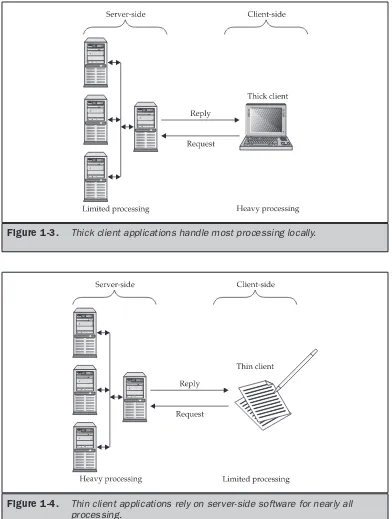
Application programmers assembled applications from an assortment of processing components called Web services. Each Web service was independent from other Web services and independent from applications. A client-side application communicates with a middle-tier, server-side application, which in turns interacts with the necessary Web services that are also located on the server side.
With the adoption of the Web services model in corporations, the JCP realized that J2ME must also go through another evolutionary cycle. With the introduction of new specifications, the Java community has merged J2ME technology with Web services technology.
In addition to the acceptance of Web services, corporations are also seeking to merge mobile technology such as Personal Digital Assistants and cellular phones with corporate mainstream applications. J2ME, with the new PIM API, enables developers to create sophisticated, wireless applications that have direct access to native PDA databases. This enables corporate executives to use corporation’s PDA systems to interact with data mantained by PDA native applications.
What’s Inside
This book covers in detail all aspect of J2ME, Web services, PDA, and cellular phone application development. The book is divided into these five parts:
■ Part I: J2ME Basics
■ Part II: J2ME User Interface ■ Part III: J2ME Data Management
■ Part IV: J2ME Personal Information Manager Profile ■ Part V: J2ME Networking and Web Services
Part I: J2ME Basics
Technologists at Sun Microsystems, Inc. and the Java Community Program rewrote the way developers build large-scale, web-centric distributive systems by using Java 2 Enterprise Edition (J2EE), and Java 2 Micro Edition (J2ME). J2EE addresses complex server-side issues faced by programmers who develop these systems while J2ME addresses the need to create mobile and embedded components that makes these systems accessible from other than the desktop.
Part I of this book introduces you to basic concepts used in J2ME technology and in Web services technology. These concepts focus on four areas of interest, beginning with an overview of J2ME that defines J2ME and illustrates J2ME’s role in the evolutionary process of computer programming.
The next area of interest examines the J2ME architecture. It is here where you roll up your sleeves and get your hands into the guts of J2ME to investigate how J2ME works within the Web services infrastructure.
At first glance, you might feel overwhelmed by the power of J2ME. However, that feeling is short-lived because the third area of interest in Part I discusses J2ME best practices, showing you commonly used design principles used by J2ME programmers to build advanced J2ME Web centric distributive systems.
Part I concludes with a look at J2ME design patterns used to solve common programming problems that crop up during the development of a J2ME application. After reading Part I you’ll have a solid basis for learning how to build your own J2ME applications.
Part II: J2ME User Interface
Nearly every J2ME application that you develop requires a way for a user to interact with it unless the application is an embedded closed system. An embedded closed system such as those that control an automobile’s engine doesn’t require input from the user but instead receives input from electro-mechanical devices.
A user interface for a J2ME application is similar to yet different from a user interface that you find on a desktop application. They are similar in that both display options available to the user and then receive and process the option selected by the user. However, a J2ME user interface is less sophisticated than those found on a desktop application because of the limited resources (i.e., screen size) that are available on a J2ME device (i.e., cellular phone).
In Part II you’ll learn database concepts of the J2ME user interface. You’ll also explore the details of building a J2ME user interface for your application.
Part III: J2ME Data Management
A J2ME application uses Java data objects, JDBC, and other technology that is necessary to interact with a database management system to provide information to the J2ME application.
In Part III you’ll learn database concepts in relation to Java data objects. You’ll also explore the details of JDBC, which is used to connect to and interact with popular— and some not so popular—database management systems. And you’ll also learn how to create and send requests for information and integrate the results of a request into your J2ME application.
Part IV: J2ME Personal Information Manager Profile
Many corporations have practically made PDAs thede factostandard as a mobile communicator, especially since PDA and cell phone technologies have merged, causing a blur between PDAs and cell phones. That is, a PDA can be used as a cell phone and cell phones have incorporated PDA applications.
Until recently, J2ME applications lacked the capability to interact with native PDA databases such as those used to store calendar, to-do list, and address information.
The Java Community Process released a new Personal Information Manager (PIM) API, which is used to develop sophisticated J2ME applications. This enables J2ME applications to interact with the J2ME device’s personal information database, which is used by the device’s address book, notepad, and calendar applications.
In Part IV of this book you’ll explore this API and learn how to implement it in your J2ME application.
Part V: J2ME Networking and Web Services
The glue that enables J2ME applications to interact with external applications, including server-side components, is networking capabilities. In Part V you’ll learn how to implement routines that take advantage of a J2ME device’s network features to open communications with other applications using a hard-wire or wireless network connection.
You’ll also learn how to utilize Web services to expand the horizon of your J2ME application. Web services is a web of services where services are software building blocks that are available on a network from which programmers can efficiently create large-scale distributive systems.
A Book for All Programmers
J2ME: The Complete Referenceis designed for all Java programmers, regardless of their experience level. It does assume, however, that a reader is able to create at least a runtime Java program. If you are just learning Java, this book will make an excellent companion to any Java tutorial and serve as a source of answers to your specific questions. Experienced Java, J2EE, and J2ME pros will find the coverage of the many new Web services features.
Don’t Forget: Code on the Web
Part I
Chapter 1
J2ME Overview
T
he term “computer” conjures many images, such as desktop and laptop computers and servers stored in some highly protected remote location. And while these images accurately portray a computer, there are many more computers that lack the familiar computer shape but contain the same basic components found in desktop and laptop computers. Cell phones, digital set-top boxes for cable television, car navigation systems, pagers, and personal digital assistants are all computers. And computers are also used to control the operation of automobiles, industrial equipment, and household appliances. This new breed of computers, referred to assmall computing devices, is distinguishable from more traditional computers by their reduced resource availability. Resources such as memory, permanent storage, and power are plentiful in traditional computers but are precious in small computing devices.Along with the new breed of computers came a new platform, on which developers can build and implement programs to control small computing devices. The platform is called Java 2 Micro Edition (J2ME). You’ll be introduced to J2ME in this chapter.
Java 2 Micro Edition and the World of Java
The computer revolution of the 1970s increased the demand for sophisticated computer software to take advantage of the ever-increasing capacity of computers to process data. The C programming language became the linchpin that enabled programmers to build software that was just as robust as the computer it ran on.
As the 1980s approached, programmers were witnessing another spurt in the evolution of programming language. Computer technology advanced beyond the capabilities of the C programming language. The problem wasn’t new. It occurred previously and caused the demise of generations of programming languages. The problem was that programs were becoming too complicated to design, write, and manage to keep up with the capabilities of computers. It was around this time that a design concept based on Simula 67 and Smalltalk (from the late 1960s) moved programming to the next evolutionary step. This was the period when object-oriented programming (OOP), and with it a new programming language called C++, took programmers by storm.
In 1979, Bjarne Stroustrup of Bell Laboratories in New Jersey enhanced the C programming language to include object-oriented features. He called the language C++. (The ++ is the incremental operator in the C programming language.) C++ is truly an enhancement of the C programming language, and it began as a preprocessor language that was translated into C syntax before the program was processed by the compiler.
Enter Java
Just as C++ was becoming the language of choice for building industrial-strength applications, another growth spurt in the evolution of programming language was budding, fertilized by the latest disruptive technology—the World Wide Web. The Internet had been a well-kept secret for decades before the National Science Foundation (who oversaw the Internet) removed barriers that prevented commercialization. Until 1991 when it was opened to commerce, the Internet was the almost exclusive domain of government agencies and the academic community. Once the barrier to commercialization was lifted, the World Wide Web—one of several services offered on the Internet— became a virtual community center where visitors could get free information about practically anything and browse through thousands of virtual stores.
Browsers power the World Wide Web. Abrowsertranslates ASCII text files written in HTML into an interactive display that can be interpreted on any machine. As long as the browser is compatible with the correct version of HTML and HTTP implementation, any computer running the browser can use the same HTML document without having to modify it for a particular type of computer, which was something unheard of at the time. Programs written in C or C++ are machine dependent and cannot run on a different machine unless the program is recompiled.
The success of the Internet gave renewed focus to developing a machine-independent programming language. And the same year the Internet was commercialized, five technologists at Sun Microsystems set out to do just that. James Gosling, Patrick Naughton, Chris Warth, Ed Frank, and Mike Sheridan spent 18 months developing the programming language they called Oak, which was renamed Java when this new language made its debut in 1995. Java went through numerous iterations between 1991 and 1995, during which time many other technologists at Sun made substantial contributions to the language. These included Bill Joy, Arthur van Hoff, Jonathan Payne, Frank Yelin, and Tim Lindholm.
Although Java is closely associated with the Internet, it was developed as a language for programming software that could be embedded into electronic devices regardless of the type of CPU used by the device. This is known as the EmbeddedJava platform and is in continuous use today for closed systems.
The Java team from Sun succeeded in creating a portable programming language, something that had eluded programmers since computers were first programmed. Their success, however, was far beyond their wildest dreams. The same concept used to make Java programs portable to electronic devices also could be used to make Java programs run on computers running Microsoft Windows, UNIX, and Macintosh.
Timing was perfect. The Internet/intranet had whetted corporate America’s appetite for cost-effective, portable programs that could replace mission-critical applications within the corporation. And Java had proven itself as a programming language used to successfully develop machine-independent applications.
It was in the mid-1990s when the team from Sun realized that Java could be easily adapted to develop software for the Internet/intranet. And toward the turn of the century,
J2ME
many corporations embraced Java and began replacing legacy applications—many of which were written in C and C++—with Java Internet/intranet-enabled applications. In keeping with the genealogical philosophy that only the dominant genes are passed on to the next generation, the Java development team at Sun incorporated the best of Smalltalk (automatic garbage collection) and C++ into Java and left out features of C++ that were inefficient and not programmer friendly. The team also created new features that gave Java the dynamics necessary for Internet-based programming.
Java Virtual Machine
Writing Java programs is similar to writing C++ programs in that the programmer writes source code that contains instructions into an editor, or in an integrated development environment, and then the source code is compiled. However, that’s where Java and C++ part ways. The compiling and linking process of a C++ program results in an executable that can be run on an appropriate machine. In contrast, the Java compiler converts Java source code into bytecode that is executed by the Java Virtual Machine (JVM).
Machine-specific instructions are not included in bytecode. Instead, they already reside in the JVM, which is machine specific. This means that the bytecode might contain fewer instructions that need to be translated than a comparable C++ program.
Although the Java compiler generates bytecode that must be interpreted by the JVM at run time, the number of instructions that need translation are usually minimal and have already been optimized by the Java compiler.
J2EE and J2SE
Java itself has undergone an evolution that rivals the evolution of programming languages in general. Originally designed for programs that control electronic devices, Java made waves in the Internet development community by providing a means to give intelligence to passive web pages. The Java development team’s design has made Java the programming language of choice for programming enterprise-wide, web-centric applications.
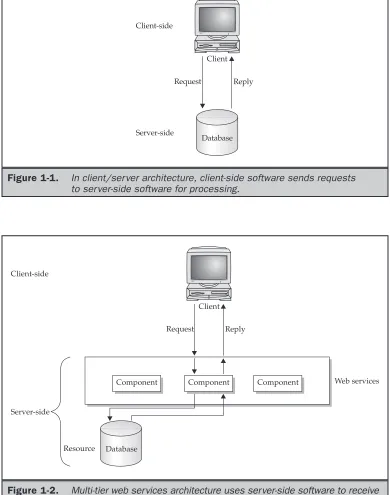
Information technology departments had always sought ways to create cost-effective computer applications. One approach is client/server architecture that uses a two-tier architecture in which client-side software requests services from server-side software. For example, software running on the client captures a request for information from a user and then formats the request into a query that is sent over the network to the database server for processing. The database server then transmits the requested data to the client, where software presents data to the user (Figure 1-1).
J2ME
BASICS
Figure 1-1. In client/ser ver architecture, client-side software sends requests to ser ver-side software for processing.
Although multi-tier architecture provides services efficiently, it also complicates the design, creation, debugging, distribution, and maintenance of an application because a programmer must be assured that all tiers work together. However, the Java development team enhanced the capabilities of Java to dramatically reduce the complexity of developing a multi-tier application.
The team grouped features of Java into three editions, each having a software development kit (SDK). The original edition of Java, called the Java 2 Standard Edition (J2SE), consists of application programming interfaces (APIs) needed to build a Java application or applet. The Java 2 Micro Edition (J2ME) contains the API used to create applications for small computing devices, including wireless Java applications. And the Java 2 Enterprise Edition (J2EE), an embellished version of the J2SE to accommodate n-tier architecture, has the API to build applications for multi-tier architecture.
The Birth of J2EE
Java is an evolving programming language that began with the release of the Java Development Kit (JDK). During this evolutionary process, the Java development team included more interfaces and libraries as programmers demanded new APIs. These new features were calledextensions—APIs that were add-ons to the JDK. Sun Microsystems incorporated these extensions into a new Java development kit called J2SE.
Information technology departments of corporations look toward web-centric applications as a way to economize while offering streamlined services to employees and customers. An increased emphasis was placed on server-side programming and on development of vendor-independent APIs to access server-side systems. Sun responded by creating the Java Community Process Program that invited corporate users, vendors, and technologists to develop a standard for enterprise Java APIs. The Java Community Process Program effort resulted in J2EE.
J2EE is a combination of several technologies that offer a cohesiveness to bond together server-side systems and services to produce an industrial-strength scalable environment within which web-centric applications can thrive. A critical ingredient in the development of J2EE is the collaborative environment fostered by Sun, within which vendors and technologists come together in the Java Community Process Program to create and implement Java-based technologies.
Back to the Future: J2ME
Remember that Java began as a programming language to create programs for embedded systems—microcomputers found in consumer and industrial products such as those used to control automobiles and appliances. The development team at Sun worked on Java in the early 1990s to address the programming needs of the fledgling embedded computer market, but that effort was sidetracked by more compelling opportunities presented by the Internet.
from voice communications devices to voice and text communications devices. Pocket electronic telephone directories evolved into personal digital assistants. Chipmakers were releasing new products at this time that were designed to transfer computing power from a desktop computer into mobile small computers that controlled gas pumps, cable television boxes, and an assortment of other appliances.
The time was right for the next evolution of Java. However, instead of beefing up Java with additional APIs, the team at Sun, along with the Java Community Process Program, dismantled both the Java programming language and the Java Virtual Machine. They stripped down Java APIs and the JVM to the minimum coding required to provide intelligence to embedded systems and microcomputer devices. This was necessary because of resource constraints imposed upon the hardware design of these devices. The result of their efforts is J2ME. J2ME is a reduced version of the Java API and Java Virtual Machine that is designed to operate within the sparse resources available in the new breed of embedded computers and microcomputers.
Inside J2ME
J2ME made its debut at the JavaOne Developers Conference in mid-1999 and is targeted to developers of intelligent wireless devices and small computing devices who need to incorporate cross-platform functionality in their products.
Consumers of mobile and small computing devices have high performance expectations for these devices. They demand quick response time, compatibility with companion services, and full-featured applications in a small computing device. Consumers expect the same software and capabilities found on their desktop and laptop computers to be available on their cell phones and personal digital assistants.
To meet these expectations, developers have to rethink the way they build computer systems. Developers need to harness the power of existing front-end and back-end software found on business computers and transfer this power onto small, mobile, and wireless computing devices. J2ME enables this transformation to occur with minimal modifications, assuming that applications are scalable in design so that an application can be custom-fitted to resources available on a small computing device.
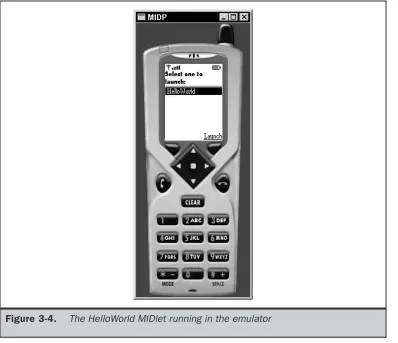
Developers seeking to build applications that run on cell phones, personal digital assistants, and various consumer and industrial appliances must strike a balance between a thick client and a thin client. Athick clientis front-end software that contains the logic to handle a sizable amount of data processing for the system (Figure 1-3). Athin clientis front-end software that depends on back-end software for much of the system processing (Figure 1-4).
Developers must determine the minimum client processing that will meet the end user’s expectations of quick response time that is feasible within the limited resources available on the small computing device. You’ll learn how to make this decision in Chapter 4.
J2ME
Figure 1-3. Thick client applications handle most processing locally.
Let’s say that a wireless small computing device is used to transact orders on the floor of a stock exchange. The wireless device has software to handle user interactions such as displaying an electronic form on the screen, collecting user input, processing the input, and displaying results of the processing on the screen. The order form is displayed on the screen, and the user enters information into the order form using various input conventions commonly found in small wireless devices. The device collects the order information and then processes the order using a combination of software on the wireless device and software running on a back-end system that receives the order through a wireless connection.
Processing on the wireless device might involve two steps: First the software performs a simple validation process to assure that all fields on the form contain information. Next the order is transmitted to the back-end system. The back-end system handles adjusting account balances and other steps involved in processing the order. A confirmation notice is returned by the back-end system to the wireless device, which displays the confirmation notice on the screen (Figure 1-5).
A key benefit of using J2ME is that J2ME is compatible with all Java-enabled devices. A Java-enabled device is any computer that runs the Java Virtual Machine. Ericsson,
J2ME
BASICS
Motorola, Nextel, Nokia, Panasonic, and RIM all have Java-enabled devices. In addition, J2ME maintains the powerful security features found in the Java language and enables wireless and small computing devices to access resources that are within an organization’s firewall.
How J2ME Is Organized
Traditional computing devices use fairly standard hardware configurations such as a display, keyboard, mouse, and large amounts of memory and permanent storage. However, the new breed of computing devices lacks hardware configuration continuity among devices. Some devices don’t have a display, permanent storage, keyboard, or mouse. And memory availability is inconsistent among small computing devices.
The lack of uniform hardware configuration among the small computing devices poses a formidable challenge for the Java Community Process Program, which is charged with developing standards for the JVM and the J2ME for small computing devices.
J2ME must service many different kinds of small computing devices, including screen-phones, digital set-top boxes used for cable television, cell screen-phones, and personal digital assistants. The challenge for the Java Community Process Program is to develop a Java standard that can be implemented on small computing devices that have nonstandard hardware configurations.
The Java Community Process Program has used a twofold approach to addressing the needs of small computing devices. First, they defined the Java run-time environment and core classes that operate on each device. This is referred to as theconfiguration. A configuration defines the Java Virtual Machine for a particular small computing device. There are two configurations, one for handheld devices and the other for plug-in devices. Next, the Java Community Process Program defined a profile for categories of small computing devices. Aprofileconsists of classes that enable developers to implement features found on a related group of small computing devices.
J2ME Configurations
There are two configurations for J2ME as of this writing. These are Connected Limited Device Configuration (CLDC) and the Connected Device Configuration (CDC). The CLDC is designed for 16-bit or 32-bit small computing devices with limited amounts of memory. CLDC devices usually have between 160KB and 512KB of available memory and are battery powered. They also use an inconsistent, small-bandwidth network wireless connection and may not have a user interface. CLDC devices use the KJava Virtual Machine (KVM) implementation, which is a stripped-down version of the JVM. CLDC devices include pagers, personal digital assistants, cell phones, dedicated terminals, and handheld consumer devices with between 128KB and 512KB of memory.
J2ME Profiles
A profile consists of Java classes that enable implementation of features for either a particular small computing device or for a class of small computing devices. Small computing technology continues to evolve, and with that, there is an ongoing process of defining J2ME profiles. Seven profiles have been defined as of this writing. These are the Foundation Profile, Game Profile, Mobile Information Device Profile, PDA Profile, Personal Profile, Personal Basis Profile, and RMI Profile.
■ The Foundation Profile is used with the CDC configuration and is the core for nearly all other profiles used with the CDC configuration because the Foundation Profile contains core Java classes.
■ The Game Profile is also used with the CDC configuration and contains the necessary classes for developing game applications for any small computing device that uses the CDC configuration.
■ The Mobile Information Device Profile (MIDP) is used with the CLDC configuration and contains classes that provide local storage, a user interface, and networking capabilities to an application that runs on a mobile computing device such as Palm OS devices. MIDP is used with wireless Java applications. ■ The PDA Profile (PDAP) is used with the CLDC configuration and contains classes
that utilize sophisticated resources found on personal digital assistants. These features include better displays and larger memory than similar resources found on MIDP mobile devices (such as cell phones).
■ The Personal Profile is used with the CDC configuration and the Foundation Profile and contains classes to implement a complex user interface. The Foundation Profile provides core classes, and the Personal Profiles provide classes to implement a sophisticated user interface, which is a user interface that is capable of displaying multiple windows at a time.
■ The Personal Basis Profile is similar to the Personal Profile in that it is used with the CDC configuration and the Foundation Profile. However, the Personal Basis Profile provides classes to implement a simple user interface, which is a user interface that is capable of displaying one window at a time.
■ The RMI Profile is used with the CDC configuration and the Foundation Profile to provide Remote Method Invocation classes to the core classes contained in the Foundation Profile.
There will likely be many profiles as the proliferation of small computing devices continues. Industry groups within the Java Community Process Program (java.sun.com/ aboutjava/communityprocess) define profiles. Each group establishes the standard profile used by small computing devices manufactured by that industry.
A CDC profile is defined by expanding upon core Java classes found in the Foundation Profile with classes specifically targeted to a class of small computing device. These
J2ME
device-specific classes are contained in a new profile that enables developers to create industrial-strength applications for those devices. However, if the Foundation Profile is specific to CDC, not all profiles are expanded upon the core classes found in the Foundation Profile.
Keep in mind that applications can access a small computing device’s software and hardware features only if the necessary classes to do so are contained in the JVM and in the profile used by the developer.
J2ME and Wireless Devices
With the dramatic increase and sophistication of mobile communications devices such as cell phones came demand for applications that can run on those devices. Consumers and corporations want to expand mobile communications devices from voice communications to applications traditionally found on laptops and PCs. They want to send and receive email, store and retrieve personal information, perform sophisticated calculations, and play games.
Developers, mobile communications device manufacturers, and mobile network providers are anxious to fill this need, but there is a serious hurdle: mobile communications devices utilize a number of different application platforms and operating systems. Without tweaking the code, an application written for one device cannot run on another device. Mobile communications devices lack a standard application platform and operating system, which has made developing applications for mobile communications devices a risky economic venture for developers.
The lack of standards is nothing new to computing or to any developing technology. Traditionally, manufacturers of hardware devices try to corner the market and enforce their own proprietary standard as the de facto standard for the industry. Usually one upstart succeeds, as in the case of Microsoft. Other times, industry leaders form a consortium, such as the Java Community Process Program, to collectively develop a standard.
The Wireless Application Protocol (WAP) forum became the initial industry group that set out to create standards for wireless technology. Ericsson, Motorola, Nokia, and Unwired Planet formed the WAP forum in 1997, and it has since grown to include nearly all mobile device manufacturers, mobile network providers, and developers. The WAP forum created mobile communications device standards referred to as the WAP standard. The WAP standard is an enhancement of HTML, XML, and TCP/IP. One element of this standard is the Wireless Markup Language specification, which consists of a blend of HTML and XML and is used by developers to create documents that can be displayed by a microbrowser. Amicrobrowseris a diminutive web browser that operates on a mobile communications device.
While the WAP forum provided the framework within which developers can build mobile communications device applications, they still had to overcome a common hurdle found in every rapidly developing technology. The sophistication of mobile communications devices, phenomenal growth of the market, and high demand for industrial-strength mobile communications applications out-paced the ability to define and implement new mobile communications device standards.
Many sophisticated applications designed for mobile communications devices require the device to process information beyond the capabilities of the WAP specification. J2ME provided the standard to fill this gap. For example, a sales representative wants to check available flights and hotel accommodations, purchase an airline ticket, book the hotel and car rental, and then send the itinerary to a client, all while sitting in a taxi in traffic. The sales representative also wants the itinerary stored on the mobile communications device and retrieved during the trip.
J2ME applications referred to as aMIDletcan run on practically any mobile communications device that implements a JVM and MIDP. This encourages developers to invest time and money in building applications for mobile communications devices without the risk that the application is device dependent. However, J2ME isn’t seen as a replacement for the WAP specification because both are complementary technologies. Developers whose applications are light-client based continue to use WML and WMLScript. Developers turn to J2ME for heavier clients that require sophisticated processing on the mobile communications device.
What J2ME Isn’t
The hype about any technology can cause misperceptions about the capabilities of an evolving technology, and J2ME isn’t immune to such misunderstandings. Therefore, it is important to understand the limitations of J2ME.
Although J2ME is J2SE without some classes, developers shouldn’t assume that existing Java applications would run in the J2ME environment without requiring modification to the code. The write-once-run-anywhere philosophy of Java is a bit overstated when it comes to J2ME because of resource constraints imposed by small computing devices.
Some J2SE applications require classes that are not available in J2ME. Likewise, resources required by the J2SE application may not be available on the small computing device. This means that developers must expect to test existing J2SE applications in the J2ME environment and probably pare down the application to run using limited resources. Another misconception about J2ME is the Java Virtual Machine implementation on the small computing device. Small computing devices use one of two Java Virtual Machine implementations. Devices that use the CDC configuration use the full Java Virtual Machine implementation, while devices that use the CLDC configuration use the KJava Virtual Machine implementation.
J2ME
A MIDlet is not invoked the same way as a J2SE application is invoked because many small computing devices don’t have a command prompt. MIDlets are controlled by application management software (AMS). The manufacturer of a small computing device provides AMS, although third-party vendors might also create AMS. AMS interacts with native operations of a small computing device and controls the life cycle of a MIDlet. The life cycle consists of installation and upgrades as well as version management and uninstalling the application. Likewise, AMS is responsible for starting, managing execution, and stopping the MIDlet.
Other Java Platforms for
Small Computing Devices
J2ME isn’t the only Java platform designed for small computing devices. Other Java platforms—EmbeddedJava, JavaCard, and PersonalJava—predate J2ME.
EmbeddedJava is the Java platform used for small computing devices that are dedicated to one purpose and have a 32-bit processor and 512KB of ROM and RAM. EmbeddedJava is based on JDK 1.1 and is being replaced by the CDLC configuration. For more information about EmbeddedJava, visit java.sun.com/products/embeddedjava.
JavaCard is the Java platform used for smart cards, the smallest computing device that supports Java. The JavaCard VM runs on small computing devices that have 16KB of nonvolatile memory and 512 bytes of volatile memory. However, unlike the EmbeddedJava platform, there isn’t any movement to replace JavaCard with J2ME because of the resource constraints of the current generation of smart cards. Future smart card generations will probably have great resources available and be compatible with the CDLC configuration. You can find more information about JavaCard in java.sun.com/ products/javacard.
Chapter 2
Small Computing
Technology
“B
eam me up Scotty” is a famous line fromStar Trek. Captain Kirk made this request using a clamshell-shaped communicator. Granted there has yet to be anyone transported on light waves, but clamshell-shaped communicators are used everyday. We call it a cellular telephone.Today we can speak with anyone, anywhere, anytime. And tomorrow we’ll read any book, shop in any store, check up on our kids and our house, pay our bills, and do more by using small computing devices and mobile communications devices. These devices have already changed our lives. A friend of mine is responsible for building alliances among corporate executives and investment bankers. Very few people know where my friend physically works—and no one really cares. Calls are directed to a cellular telephone and roll over to voice mail when there is no answer. Emails are retrieved using a laptop that is sometimes connected to the email server through a traditional telephone line and other times linked using a wireless connection. My friend’s office is where my friend is.
This is all made possible by software developers exploiting features of small computing and mobile computing devices. Before you learn to build those applications, you should become familiar with the technology that makes this possible. In this chapter you’ll explore the technology used in small computing devices and mobile computing devices.
Wireless Technology
Wireless technology that is used in small computing devices and mobile communications devices is the same radio technology Guglielmo Marconi used to provide an alternative communication means to the telegraph and the telephone.
Radio technology is based on the wave phenomenon. A wave is a characteristic of vibrating molecules, which you see whenever you move a knife up and down in the still water of a dishpan (Figure 2-1). The force of the knife against the surface of the water causes water molecules to vibrate and form a wave along the surface of the water.
The force used to propel the knife determines the wave height. The greater the force, the higher the wave and the greater the distance the wave travels across the surface of the water. The number of times the knife is moved up and down in the water determines the frequency of the wave. Each time the knife is plunged into the water another wave is generated, causing a rippling effect across the water’s surface.
Waves are measured in two ways: by the wave height and by the wave frequency. The wave height is referred to as the wave’s amplitude, and the frequency of the wave is simply called frequency, which is measured as the number of waves per second (Figure 2-2).
The frequency of a wave causes the wave to take on specific characteristics. For example, a low-frequency wave called a sound wave produces a frequency that can be heard by humans. Sound waves travel a short distance through air. A higher-frequency wave called a radio wave cannot be heard but can travel long distances in all directions and through solid objects. And even higher frequencies called light waves take on other characteristics. Light waves can be seen, travel a long distance in a limited direction, and cannot penetrate solid objects.
Waves are grouped according to frequencies that have similar characteristics in the electromagnetic spectrum (Figure 2-3). For example, there is an audio spectrum, a radio spectrum, and a light spectrum. There are also subgroups within each spectrum, each of which has a variation of the characteristics of the spectrum. The radio spectrum has divisions for television, microwave, and X-ray frequencies. The light spectrum has divisions for infrared light, visible light, and ultraviolet light.
Many small computing devices and mobile communications devices use radio waves and light waves to transmit and receive information. Radio waves are used by cellular telephones, wireless modems, and wireless personal digital assistants (PDAs) for communication. Infrared light waves are used by PDAs to exchange information between PDAs and laptop/desktop computers and among other PDAs.
J2ME
BASICS
Figure 2-2. Waves are measured by wave height and wave frequency.
Radio signals are transmitted in the frequency range from 10 kilohertz to 300,000 megahertz. A hertz is one wave per second, kilohertz is 1,000 waves per second, and a megahertz is a million waves per second.
Radio Transmission
Radio transmission consists of two components. These are a transmitter and a receiver, both of which must be tuned to the same frequency. A transmitter broadcasts a steady wave called a carrier signal that does not contain any information (Figure 2-4). Conceptually, you can think of a telephone dial tone as a carrier signal.
A carrier signal has two purposes. First, the carrier signal establishes a communications channel with the receiver (Figure 2-5). The receiver knows the channel is open when the carrier signal is detected. The carrier signal also serves as the wave that is encoded with information during transmission.
A radio transmitter encodes patterns of sound waves detected by a microphone by modifying the carrier signal wave (Figure 2-6). The receiver decodes the pattern from the carrier wave and translates the pattern into electrical current that directs a speaker to regenerate the sound waves captured by the microphone attached to the transmitter.
Limitations of Radio Transmissions
The distance a radio signal travels is based on the amount of energy used to transmit the radio wave. This is similar to the energy used to plunge the knife into the dishpan of water. Using a relatively small amount of energy causes the wave to barely reach the side of the dishpan. However, plunging the knife into the dishpan with force causes the wave to overflow the sides of the dishpan.
Radio waves are measured in watts. A radio signal transmitted at 50 megawatts travels twice the distance a 25-megawatt radio signal travels. A radio signal gradually loses power the farther it travels away from the transmitter. Radio engineers extend the range of transmission by using a repeater. Arepeater(Figure 2-7) is both a radio receiver and radio transmitter, also known as atransceiver. A repeater receives a radio signal and then retransmits the signal, thereby increasing the distance the signal travels. Retransmission introduces new energy to power the signal for longer distances.
J2ME
BASICS
Figure 2-5. A carrier signal is used to establish a communications channel.
Radio Data Networks
Radio transmissions are commonly used to broadcast analog voice information on radio waves that travel 360 degrees over the air and through many physical obstructions. However, radio technology is also used to transmit digital information on those same waves.
Information is traditionally encoded as variations of an aspect of the wave. Encoding is achieved by modifying the amplitude of the wave, known asamplitude modulation(AM), or modifying the frequency of the wave, calledfrequency modulation(FM). Encoding uses many values to represent information using AM and FM.
Hundreds of thousands of radio waves are simultaneously and independently transmitted. Sometimes a radio receiver picks up an erroneous radio signal while tuned to its primary frequency. The erroneous radio signal is known asinterferenceand can disrupt the accurate decoding of the transmitted information.
Today information is digitally encoded using binary values to represent information transmitted on radio waves. Digitizing information enables receivers to accurately decode transmitted information because the degree of uncertainty in the encoded information is far less than experienced in analog encoded information.
Both an analog signal and a digital signal are waves. They differ by the way information is encoded into the signal. Information is represented in an analog signal as many values. The receiver must determine whether each value is a component of the signal or is interference. The same information is represented in a digital signal as one of two discrete binary values. The receiver ignores a signal whose value is not a binary value. Furthermore, error-checking software in the receiver determines whether an erroneous digital signal is received.
Radio transmitters, repeaters, and receivers are organized to form a radio network that extends transmissions over great distances. Radio networks are scalable because repeaters are placed in the network to increase the distance that the original transmission
There are three types of wireless radio networks: low-power single frequency, high-power single frequency, and spread spectrum. Low-high-power single frequency covers an area of 30 meters, which is about the area of a small building such as a warehouse or a stock exchange trading floor. A high-power single frequency wireless radio network can cover a metropolitan area.
Both low-power single frequency and high-power single frequency radio networks are exposed to the same security risk. Anyone tuned into the radio frequency receives the transmitted signal. Therefore, all transmissions must be encrypted to hinder eavesdropping on the signal.
A spread-spectrum wireless radio network uses multiple frequencies to transmit a signal using either direct sequence modulation or frequency hopping.Direct sequence modulationbreaks down information into parts and then simultaneously transmits each part over a different frequency. The receiver must tune to each frequency to receive each part, then reassemble parts into the full message.Frequency hoppingtransmits information rotating among a set of frequencies. The receiver must be tuned to each frequency according to the transmission rotation.
Most radio frequencies are controlled by the Federal Communications Commission and require an FCC license before a wireless radio network can be established.
Data Packets
Radio transmitters send one message at a time over a communications channel. This is similar to sending one telephone call at a time over a telephone line. Each telephone call is placed in a queue while waiting for the current telephone call to end. As you can imagine, telephone calls could easily back up whenever there are more calls than there are empty telephone lines.
Digital radio networks use packet switching technology to transmit multiple messages simultaneously over a communications channel. Each message is divided into small pieces and placed in an electronic envelope called apacket(Figure 2-8). A packet contains information that identifies the sender and the receiver, a digitized portion of the message, the sequence number of the packet, and error-checking information. To reassemble
J2ME
BASICS
packets, the receiver uses the packet sequence number. A transmitter continuously sends packets from multiple messages over a communications channel.
Packet switching technology is more efficient than traditional transmission methods because packet switching utilizes pauses in a transmission to send packets. A transmission pause is caused when a message isn’t ready for transmission. This is similar to a pause in a telephone conversation.
Software running on the transmitter manages multiple outgoing messages to assure that each message is divided and placed into packets and the packets are transmitted. Software running on the receiver manages incoming packets, reconstructs packets into original messages, and forwards messages to the appropriate application software for future processing.
Microwave Technology
Microwave is a subspectrum of the radio spectrum and has many characteristics of radio waves discussed previously in this chapter. However, microwaves travel in one unobstructed direction. Any obstruction, such as a mountain or building, disrupts microwave transmission.
There are two kinds of microwave networks: terrestrial and satellites. Terrestrial microwave networks transmit a microwave signal over a terrain, such as buildings in an office complex. Satellite microwave networks transmit a microwave signal between a ground station and orbiting satellites and among orbiting satellites (Figure 2-9).
Earth-to-satellite transmissions are slower than terrestrial microwave transmissions, which causes unnatural pauses to occur in the transmission. This is noticeable during a live international television broadcast when a pause occurs between the time a television news anchor questions a reporter and the reporter’s response. Therefore, satellite microwave transmission may not be suitable for real-time two-way communications where nearly instantaneous transmission is expected.
Satellite Networks
A satellite is an orbiting repeater that receives a microwave transmission from an earth station or from other satellites, then retransmits the signal to a microwave receiver located on the ground or in another satellite. The first generation of satellites used for the military were stationed in geosynchronous orbit at a fixed location 22,300 miles above the surface of the earth. However, the geosynchronous orbit hampers real-time transmission because of the signal delay between earth and the satellite, which makes geosynchronous orbiting satellites unacceptable for commercial two-way real-time communication.
covered by geosynchronous satellites. The other problem is the orbital speed. LEOS travels faster than the earth’s rotation and requires ground stations to locate LEOS before beginning transmission. Geosynchronous satellites always remain in the same position above the ground station.
In an effort to compromise between LEOS and geosynchronous satellites, another breed of satellites called the Middle Earth Orbit (MEO) was developed. MEO orbits between LEOS and geosynchronous satellites—6,000 to 13,000 miles—and thus has less delay than geosynchronous satellites and poses less difficulty than LEOS for ground stations to locate.
Mobile Radio Networks
The infrastructure of cellular telephone technology is the backbone of wireless small computing mobile communications and enables these devices to connect to traditional communications systems. The forerunner of cellular telephone technology is a private radio technology. Service and trucking companies and government agencies use private radio technology to communicate with employees over frequencies isolated from other radio frequencies. For example, package carriers like Federal Express use private radio networks to track packages. Private radio transmitted analog information when first introduced but later expanded into digital communication as the need for paging and messaging services materialized.
J2ME
BASICS
Companies can operate their own private radio network by acquiring broadcast rights to a specified radio frequency from the Federal Communications Commission and purchasing the necessary broadcast equipment. Alternatively, companies can lease broadcast time from organizations that offer Specialized Mobile Radio (SMR) network services.
Cellular Telephone Networks
A cellular telephone network comprises mobile transceivers, called cellular telephones, and a network of fixed transceivers, called base stations, that are strategically positioned along the terrain (Figure 2-10). Base stations are used to connect cellular telephones to the ground-based telephone system.
There are two kinds of cellular networks: analog and digital. Cellular telephones began in the 1970s with the expansion of AT&T into the mobile telephone service market. Cellular telephones used analog technology at that time. This changed in mid-1995 when IBM developed technology that digitized information transmitted over the cellular telephone network. Cellular telephone networks then became capable of transmitting both voice and data.
The transmission range of a cellular telephone is determined by the strength of the battery powering the phone and the location of the nearest base station. Transmission range drops as power is drained from the cellular telephone and the telephone is taken farther from a base station.
Engineers can provide reliable cellular telephone transmissions by strategically positioning many base stations around the country so that a cellular telephone is always within the vicinity of a base station. Cellular transceivers are also designed to minimize the power drain that occurs from transmitting and receiving signals.
A cellular telephone is in continuous communication with base stations as it moves throughout the cellular network. Transmission from a cellular telephone is broadcast 360 degrees and is received by a base station closest to the cellular telephone. Cellular telephone networks are designed so that the signal is automatically transferred to the next closest base station using a technique called ahand-off: the connection between the cellular telephone and the cellular telephone network is dropped for a fraction of a second, the cellular telephone moves between base stations, and the next base station reestablishes the signal.
The area covered by a base station is called acell. The split-second gap during the hand-off goes unnoticed most times, as long as cells are near each other. The hand-off doesn’t have a negative effect on voice communications because persons on the call adjust for the slight break in communication. However, the communications drop has a dramatic effect on data communication over a cellular telephone network. Analog cellular telephone networks lose data during transmissions when a hand-off occurs, which is unacceptable for data communications. Digital cellular telephone networks also lose connection during hand-off, but a digital cellular telephone network uses software to recover lost data by requesting that the transceiver resend the data.
Digital cellular telephone networks trap and correct errors. Analog cellular telephone networks lack error-control capability. Analog networks transmit one long burst of information over a communications channel that can either be used for transmitting or receiving information but not both simultaneously, which is calledhalf-duplex. In contrast, digital cellular telephone networks transmit information in small packets, called frames or cells, as described previously in this chapter. Pauses between transmissions give the receiver an opportunity to notify the transmitter if an error occurred in receiving a packet.
Cellular Digital Packet Data
IBM pioneered digital cellular telephone networks with the introduction of their Cellular Digital Packet Data (CDPD) protocol, commonly known as IP wireless. IP wireless requires that an Internet protocol (IP) address be assigned to each cellular transceiver in the cellular telephone network. An IP address uniquely identifies each device within the cellular telephone network and is used to reestablish a connection if communication is lost during a hand-off.
Base stations have multiple entry points called ports, each of which is identified by a unique port number. A transceiver is assigned to a base station port in the cellular telephone network. A transceiver continues to transmit to the port number until a hand-off occurs, at which time the transceiver is assigned another port number associated with the next base station.
IBM developed a special modem called a CDPD modem for transmitting digital information over an analog cellular telephone network. The CDPD modem transmits small bursts of encrypted data, which frees the communication channel between bursts to transmit error messages.
Speed is the major stumbling block in using a cellular telephone network to transmit data. The standard analog transmission rate of a cellular telephone network is 9,600 bits
J2ME
per second, which is increased to 14,400 bits per second using CDPD. These speeds are sufficient to transmit delivery information, inquire about the status of an order, or provide remote access to email, but are insufficient for full Internet access.
Digital Wireless Transmissions
A digital cellular telephone