An Innovative Remote-Lab Framework for
Educational Experimentation
https://doi.org/10.3991/ijoe.v13i02.6609
Wael Farag
American University of the Middle East (AUM), Kuwait Cairo University, Giza, Egypt
[email protected], [email protected]
Abstract—This paper describes a flexible and scalable architecture of re-mote laboratories developed for students for experimentation in educational institutions, research labs and technology companies. The framework and procedures for multi-remote labs environment are explained. The development of the lab client software as a Rich Internet Application (RIA) is described. The utilization of low-cost hardware and software packages to provide the interface to the labs equipment is shown, and the deployment of Web Services as the communication medium between the Lab Server and the Lab Client is present-ed. A case study for a remote lab, the Microcontroller Kit Remote IDE, was car-ried out. Any student can connect to the remote lab and performs each experi-ment while watching the equipexperi-ment during execution via a webcam feed. The whole lab is accessible from any PC connected to the internet.
Keywords—Remote labs, human-computer interface, distance education, online-learning
1
Introduction
Over the past two decades, eLearning has revolutionized the way both students and instructors engage in the learning process. One of the challenges of eLearning in en-gineering education is the lab courses, which represents a vital component of engi-neering curricula. Students appreciate and learn from using physical equipment and following the trial-and-error experiments of the labs along with the theory taught in lectures. Moving these labs' courses to their new online environment proves to be challenging. Nonetheless, new technologies and hardware equipment, which allow web-based access, are changing this paradigm. Implementing such techniques allow remote students to gain hands-on experience in different areas ranging from streaming sensors data in inaccessible areas to interacting with expensive equipment that cannot be afforded by universities and can only be found in industrial setups.
computers provide a clear advantage for engineering students. On the other hand, certain tasks are not possible in remote labs like manual forming of electric circuits and connecting test probes. Solutions exist and are proposed for such limitations like utilizing remotely controllable switch matrices [1-6].
The perception of the students for the experiment, whether it is a simulation or a remote lab, affects their evaluation. This social framing is reported in [7]; students who were not conscious that they were interfacing with real remote hardware were more likely to describe the remote labs assignments as pointless and tedious. As a result, to build a successful remote lab, it should feel like a real lab. Providing cues (visual and text) to the student and using a webcam to transmit live broadcasting; can be suggested to let the student feel the reality of the lab.
Furthermore, remote labs are not only restricted to remote teaching but also can serve industrial purposes [7]:
1.Complex experimental systems can be directly controlled from the scientist's of-fice.
2.Team members can work on the same problems from different locations. 3.Long-term trials can be supervised from home and at weekends.
On the other hand, there are limitations of remote labs like materials cannot be smelled or touched and direct sensations have to be replaced with information display through the computer screen. Also, it cannot be claimed that it can reproduce the gestalt of being actually in the lab. That is why remote labs are called the "Second Best to Being There" [7]. Furthermore, students cannot experience the additional steps in a typical hands-on lab like setup the experiment before the session and teardown the setup after the session. However, the benefits offered by remote labs may over-weigh those limitations in many scenarios.
It is worthy to note what is reported in [8]; a study is conducted to evaluate remote labs and hands-on labs. This study claims that 90% of students see the remote lab as effective as or even better than the hands-on. Virtual science (or computer-based simulations) has great potential but it focuses on teaching the science facts and princi-ples not the process of scientific inquiry or engineering practice [9]. The main ad-vantage of virtual labs is that they are much cheaper and once they are implemented, no running resources are needed. Virtual labs also provide experiment for any number of students simultaneously while remote labs are restricted to a small group of stu-dents at any given instant.
2
The Proposed Architecture
As remote labs currently enjoy gaining interest from educational institutes and in-ternational research centers. However, a successful architecture needs to be:
1.Scalable: i.e. the addition of new remote labs should not require any modification
to the core modules, or worse, the architecture. As reported in many remote labs, the complexity associated with developing new remote labs or even maintaining existent remote labs is one of the major obstacles to the wide spread of remote labs [1-10].
2.Standard: Utilizing a common set of standard functionalities like authorization,
scheduling, users’ administration, labs’ management, video streaming and commu-nications mediums between users. It’s not feasible to develop these modules for each new remote lab.
3.Secure: Because, all parts of the system are exposed over the internet, securing all
the modules, specially access to lab hardware, is of particular importance.
4.Low-cost hardware and software packages: One of the obstacles for wide
imple-mentation worldwide of remote labs is the relatively high initial cost and the com-plexity involved. We opted for a low-cost microcontroller as our data acquisition system and used software tools, which are free / open-source or have free/open-source alternatives.
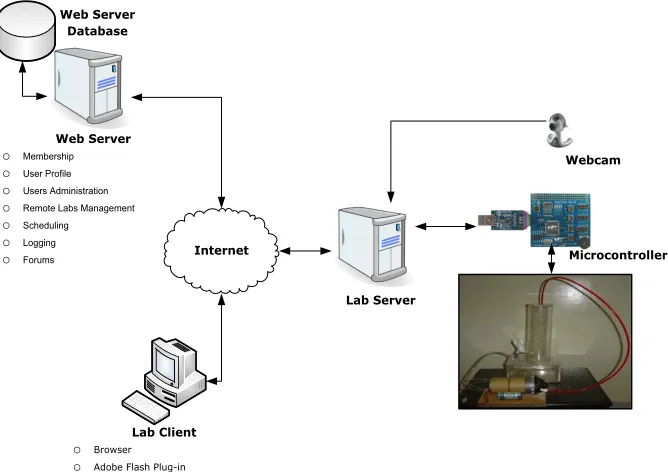
Although a single remote lab will not benefit from all these goals but adding future labs will prove its suitability. The proposed remote lab architecture consists of three computers: the Lab Server, the Web Server and the Lab Client as shown in Figure 1. These three computers interact together to allow the student using the Lab Client computer to access the lab equipment over the internet.
2.1 The Web Server
CURL (Cairo University Remote Labs) is a web application that is hosted on the Web Server and is developed to provide features such as labs registration, users' ad-ministration, scheduling, forums, and logging. Students, instructors, and administra-tors can utilize this online environment to use and manage the different aspects of remote labs. The web application is a series of dynamic ASP.Net pages written in VisualBasic.Net that communicates with an SQL Server database that acts as the central repository of system data.
The following features are currently provided by CURL, and shared among all remote labs:
Authentication and Authorization: Before using the system, the user needs to register first. There are three types of CURL users:
1.Students: Student browses catalogue of all available labs and makes a reservation
for any of these labs in advance. A student can only use the lab during his/her re-served time.
3.Admins: Admin manages all system users' information. All new registrations are locked till being approved by admin.
In a nutshell, students are labs users, instructors are labs administrators, and Ad-mins are the web site administrators. One user can have more than one role. For in-stance, a teaching assistant can be an Instructor for undergraduate experiments, Stu-dent for post-graduate experiments and Admin of the site. Authentication and authori-zation are implemented using ASP.Net Membership Provider and Microsoft Security Application Block [11].
Microcontroller Webcam Web Server
o Membership
o User Profile
o Users Administration
o Remote Labs Management
o Scheduling
o Logging
o Forums
Web Server Database
Lab Client
o Browser
o Adobe Flash Plug-in
Lab Server Internet
Fig. 1. Proposed remote lab architecture.
Users Administration: Admins can edit/delete and search CURL users’ infor-mation. Furthermore, Admins can lock users to prevent them from using the system till being unlocked. Note that the system locks automatically any user who tries more than the specified number of login tries within a specified time window (5 tries in 10 minutes). This is to prevent dictionary attacks on the Web Server.
Labs Administration: Instructors can add/edit/delete remote labs. Additionally, the lab can be disabled to prevent users from accessing it. Besides, the following functionalities are managed as part of the Labs Administration module:
1.Labs Schedule: Each Lab has a schedule that specifies the starting date and end
date, working week days and starting and end daily working hours as shown in Figure 2. For example, the instructor can define that the lab is active only from 01/01/2016 to 01/07/2016 on Saturdays to Thursdays from 08:00 AM to 10:00 PM as shown in Figure 2. Any future reservations outside these ranges will not be ac-cepted. The lab duration is defined by the instructor when creating a new lab through options to select from 15, 30, 45 or 60 minutes. Additionally, each remote lab is accessible to some or all groups as specified by the instructor (Note that eve-ry student belongs to only one group).
2.The Lab Server Connection properties: these are the most important settings that
define how the remote lab operates. The properties are:
(a)Lab Server WSDL Address: This is the URL of the Lab server's Web Service.
WSDL (Web Service Description Language) is an XML-formatted document that formally defines the Web Service.
(b)
Lab Client Application: this is the URL of the SWF file (Adobe Flash File) ofthe Lab Client GUI. This is the interface through which the student can work in the lab as shown in Figure 4.
(c)Lab Camera Address: This is the URL of the image file that the webcam server
will upload video pictures to.
(d)Lab Camera Refresh Rate: This value instructs the Lab Client to fetch a new
picture from the lab camera every certain period of time (in milliseconds). For instance, if the rate is set to 50, the client will try to fetch 20 pictures per se-cond.
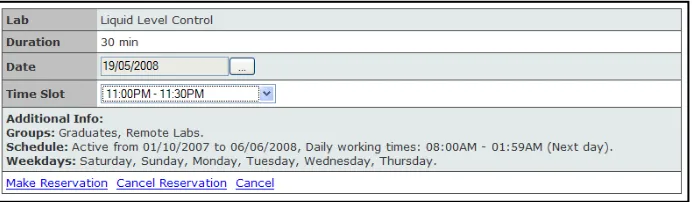
Scheduling: Because only one user at any time can control the experiment, dents should schedule ahead of time before performing the experiment. The first stu-dent to schedule is allowed to choose the time slot he/she prefers. The stustu-dent uses the “Make Reservation” screen to reserve a time slot as shown in Figure 3.
To make a reservation, the student follows the next procedure: 1.The student logs-in to CURL.
2.The student navigates to My Labs screen. A catalogue of available labs is dis-played along with their descriptions.
3.The student selects the lab to reserve, then clicks Make Reservation.
4.In Make Reservation screen (shown in Figure 3), the student selects the date. 5.A drop down list appears with all available time slots in this date. The student
During his/her reservation time, the student can connect to the Lab Server and per-form the experiment. Moreover, during free time slots, the student can immediately perform the experiment and the system will automatically reserve the current slot for him/her.
Logging: All user actions are logged to the database. This log can be used to diag-nose faults or assess web site usage patterns. There are two levels of logging in CURL:
1.Critical Errors and unexpected exceptions: These errors are stored in log files,
which reside on the Web Server. Once a critical error occurs, an email notification is immediately sent to the author to prompt him to fix the issue.
2.Problems with signing-in: All invalid attempts are stored in the database and can
be viewed by Admins. This screen shows the students having problems logging-in or the possibility of malicious users trying to hack in by trying different user name/password combinations.
The library used to implement the logging functionality in CURL is the Microsoft Logging Application Block. This application Block simplifies adding common log-ging functions and can be used to write information to a variety of locations including The event log, an e-mail message, a database, a message queue, a text file and/or a WMI event [11].
Fig. 3. Make Reservation Screen.
Forums: For each experiment, there's a forum where students can discuss, share, collaborate and participate actively. Besides, one general forum exists for general topics that are not related to a specific remote lab. The objective is to allow student-student and student-student-instructor interaction outside the lab. This reduces the social drawbacks of eLearning systems (e.g. loneliness and lack of motivation).
2.2 The Lab Client
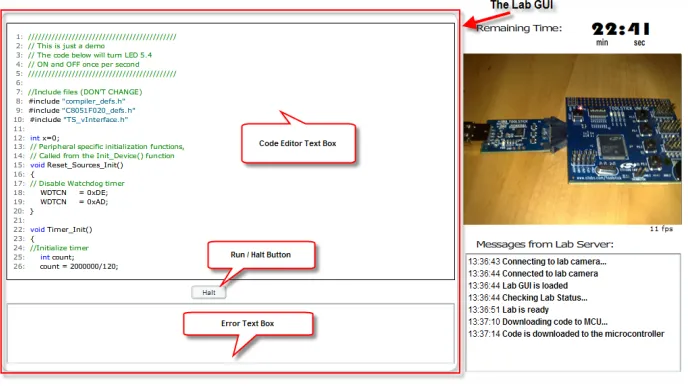
The Lab Client is an adobe flash application that provides an interface to the re-mote lab equipment. The user can access the rere-mote lab from any browser that is equipped with Flash Plug-in, as shown in Figure 4.
Java Applets Approach: Most of the current remote labs utilize Java Applets to implement the Lab Client User Interface. Java Applets are portable in nature and can be accessed from any platform (Mac, Windows or Linux). However, there are several drawbacks to this approach:
1.Awkward plug-in: Java Plug-in from Sun is a 15MB setup file. The plug-in
re-quires 30 seconds to initialize before a Java Applet can start loading [12].
2.Low install-base: Various reports show that the penetration of Java Plug-in is not
ubiquitous. A random sample of internet visitors reported in [12] shows that the Java penetration is 56% and declining. It is worth mentioning that Microsoft dropped support to Java Virtual Machine in their Internet Explorer since 2003. As reported in [12], if the option is given to students, they prefer to work with a simple CGI-based interface for the remote lab rather than using a richer Java interface if they do not already have the Java Runtime installed on their machines.
3.Security restrictions: Unsigned Applets make it inconvenient for the client to store
and present the measurement data, and to transfer them to other applications (ex-cept by "cut-and-paste") because of Java's security structure.
4.Compatibility issues: The functionality of an Applet may vary between different
browsers and operating systems and even graphics hardware and processor [13 -14]. Hence, debugging can be a complicated and lengthy process where the Applet has to be tested on every possible client to ensure compatibility. Some remote labs restrict their users to a specific version of the browser and Java Runtime Engine to work around these problems.
Maybe a radical comment, like: "Java's not worth building in. Nobody uses Java anymore. It is this big heavyweight ball and chain." by Steve Jobs [15] is over exag-gerated but it reflects the current crisis of Java.
LabVIEW Approach: Another widespread technology for Lab Clients is the LabVIEW browser plug-in; nevertheless, this alternative was also dropped because:
1.Huge installation file: the LabVIEW Player's size is 172 MB (The LabVIEW 8.5
Runtime Engine's size is 97 MB) [16].
2.Administrative privileges to install the plug-in: In other words, the remote lab will
not be accessible from many typical places such as internet cafes and university computer laboratories.
3.The LabVIEW can only interface to LabVIEW instruments. Though versatile and
flexible, this will restrict all future remote labs to LabVIEW environment.
The main advantage of LabVIEW is that it eliminates the huge investment required for developing special-purpose software that needs to be written to interface to the different hardware components. Maintaining and upgrading such software is a com-plex process. LabVIEW provides all the basic facilities required to build remote la-boratories: internet communications, hardware connectivity, web serving technology and easy construction of user interfaces. Access to an experiment for a single user at a time is easy to implement and there are several examples available [16]. Moreover, LabVIEW has a graphical programming language that is easy to use and reduces system development time. In LabVIEW, block diagrams or VI (Virtual Instruments) are used to develop a Graphical User Interface (GUI) to monitor and control parame-ters. This programming language contains a very large library of Graphical Instru-ment control tools, such as knobs, dials, charts … etc. which make creating user GUIs easy to achieve [17].
Another advantage of LabVIEW is the popularity of LabVIEW in electrical engi-neering colleges; hence, the development phase for new remote labs can be consider-ably shorter than other alternatives that the electrical engineering students may not be familiar with.
Rich Internet Applications (RIA) Approach:The RIA was first mentioned in a white paper by Adobe in 2002 [18] and is gaining momentum since then. Users con-stantly prefer RIA application over other options including desktop applications and traditional web applications. Users prefer the RIA since it is more natural, more alive, more interactive, and more responsive [18]. RIAs are web applications that have the features and functionality of traditional desktop applications. RIA typically transfer the processing necessary for the user interface to the web client but keep the bulk of the data (i.e. the state of the program, the data, etc.) back on the application server [19]. Adobe Flash [20] was selected as the development environment for remote labs. Adobe Flash has the following advantages:
1.Flash enjoys being the most installed plug-in with a penetration rate of more than 98% (as claimed by Adobe [21]).
3.Flash is a powerful tool for developing rich GUI with video and audio streaming capabilities. Its responsiveness and quick initialization time are appreciated by its users.
4.The huge code-base for new developers and the availability of components more than any similar technology. On the other hand, the main criticisms of Flash are: first, its poor usability due to poor implementation. This is the case when the Flash developer ignores the basic usability and accessibility features in his/her Flash pro-jects. Unnecessary sound and visual effects and ignoring disabled users' needs are examples of poor usability. Second, although Adobe offers FLEX as a cost-free IDE to develop a Flash application, Flash is a proprietary technology of Adobe. Moreover, the author is not aware of any other remote Lab Client implemented in Adobe Flash.
The Lab Client Components: The Client consists of four parts (as shown in Fig-ure 4):
1.The Lab GUI: it is another Flash application (SWF file) that is embedded in the
Lab Client. So, the Lab Client is the same for all different remote labs, while the lab GUI is tailored specifically as per the individual requirements of each remote lab. This componentization allows all remote labs to offer common features that are relevant to all of them, like video streaming, communications with the Lab Server, message logger, and countdown timer. In addition, this implements the necessary security measures that make all the communications between the Lab GUI and the Lab Server routed first through the Lab Client. This kind of security prevents abusing the system through sending unmonitored commands directly from the lab GUI to the Lab server. The Lab GUI is responsible for retrieving experi-ment parameters from the user, passing them to the Lab Server then fetching the results back and finally displaying them to the student. The Lab Client exposes properties, methods and events to the Lab GUI to enable it to interact with the lab. The Lab GUI developer needs to utilize these properties and methods and write handlers for these events to interact with the Lab Server.
2.Countdown timer: notifies the student of his/her remaining time.
3.Video streaming: In order for the student to feel that he/she is actually working
with the remote lab and not just a computer-based simulation, a sufficient feedback is a major requirement. The preferred method of feedback is video streaming. This helps the student to validate the experiment and feel the responsiveness of the lab to their actions.
4.Message Logger: All sent and received messages to and from the Lab Server are
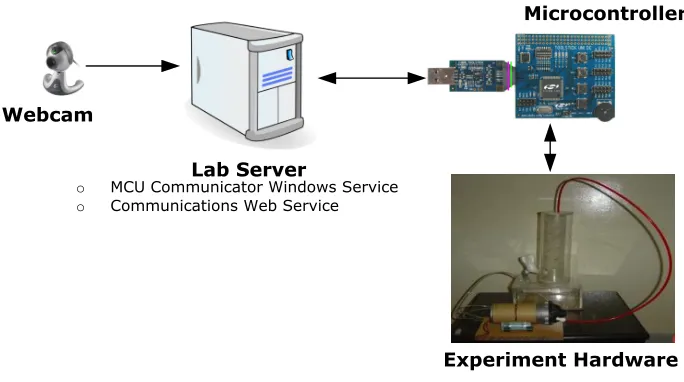
Lab Server
Microcontroller
Webcam
o MCU Communicator Windows Service
o Communications Web Service
Experiment Hardware
Fig. 5. The Lab Server.
2.3 The Lab Server
It is the computer that resides in the lab and acts as the central gateway to the vari-ous hardware components of the remote lab including the web camera and the MCU (Microcontroller Unit). The MCU provides the necessary interface to the other hard-ware components, for example: the pump and its driver circuit and the level sensor in the liquid level control lab. The lab server runs a windows service to communicate with the MCU and a web service to communicate with the lab client through the in-ternet. The Lab Server block diagram is shown in Figure 5.
Communicating with the Lab Client through Web Service: All functions of the Lab Server are accessible from the Lab Client such as getting experiment results and hardware status (Hardware ready/Not ready/ Working/ Idle/ Fault).
For each Lab Server, one web service needs to be deployed. Web services allow applications to access their functionalities in a way that is a platform, operating sys-tem, and programming language independent including Adobe Flash Clients. The clients communicate by transferring messages back and forth in a specific format known as the Simple Object Access Protocol SOAP. Web services can be accessed only over HTTP port 80, so it doesn't have the problems with working over firewalls, which are reported in some early implementations of remote labs worldwide.
Each remote lab connected to the Lab Server, a configuration file formatted in XML [22] is stored in a special folder named LabsConfigurations that resides in the root directory of the Web Service. This XML file contains all information that the Web Service needs to know about the remote lab like: LabPassword (used for decryp-tion), The MCU compiling, linking and debugging arguments, and the Windows ser-vice name that performs the serial communications with the MCU via its UART.
clients via the web. Because the web services are stateless in nature (i.e. they do not track previous requests), two additional parameters are sent with every request: the Lab ID and the Encrypted Expiry Date need to be sent with every call.
Because the same Lab Server can host more than one remote lab, The Lab ID pa-rameter tells the web service which lab that the current student wants to interact with. The Encrypted Expiry Date verifies the rights of the caller and returns error if the caller doesn't have privileges. Table 1 shows the public methods available:
Table 1. Public Web Methods.
Web Method Description
GetStatus () As String* Checks the status of the lab.
DownloadCodeToMCU (Code As String) As
String* Compiles, links, and downloads the code passed in the argument to the MCU. Code
HaltMCU () As String* Halts the execution of the running code on the MCU.
RunMCU () As String* Starts executing the code again on the MCU after it was
halted by a previous call to HaltMCU() method
WriteMessageToMCU (Message As String)
As String*+ Writes the contents of the UART. Message argument to the MCU
ReadMessageFromMCU () As String*+ Reads any pending messages from the MCU UART.
* For simplicity, LabID and EncryptedExpiryDate paramters are not included in this table. However, they should be included in all actual calls to the web service.
+WriteMessageToMCU() and ReadMessageFromMCU() do not interact directly with the MCU. Instead, they interact with the Windows Service responsible for the serial communications.
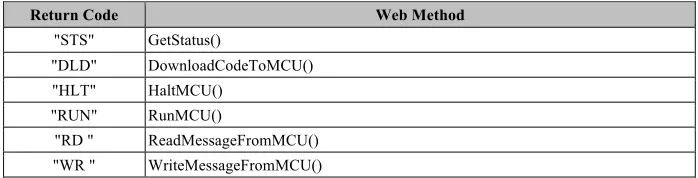
The Lab Client handles the responses from all web methods using the same callback handler, so it needs to know which web method that the Lab Client is pro-cessing its response; hence, the first 3 characters of the return value of all web meth-ods uniquely identify the web method as Table 2.
Since it is a security hazard to allow remote machines to initiate communications with a client machine, it is not possible to initiate communications from the .Net Web Service to the Adobe Flash Lab Client. Therefore, it becomes the responsibility of the Lab Client to continuously poll for new messages on the Lab Server.
Table 2. Return code of each web method.
Return Code Web Method
"STS" GetStatus()
"DLD" DownloadCodeToMCU() "HLT" HaltMCU()
"RUN" RunMCU()
"RD " ReadMessageFromMCU() "WR " WriteMessageFromMCU()
damage. Therefore, the following mechanisms are combined together to secure the Lab Server:
1.An Adobe configuration file crossdomain.xml was put in the root directory of the Lab Server IIS (Internet Information Services) to disallow any Adobe Flash Appli-cation that is not originated from the Lab Client domain URL from consuming the web service. Such method is only possible because all remote labs (current and fu-ture) are sharing the same Lab Client Flash application. In other words, no Lab GUI interface is allowed to communicate directly with the Lab Server except through the standard Lab Client interface.
2.Passing an encrypted token from the Web Server to the Lab Server that only per-mits access for the specified period of time, after this period finishes, this token is expired and the student cannot use the equipment anymore. This works as follows: (a)During configuring a new remote lab in the Web Server, a lab password is de-fined by the instructor. This password also needs to be included in the lab con-figuration file that resides on the Lab Server.
(b)The Web Server encrypts the expiry date of the current session using the lab password as the encryption key.
(c)The Web Server passes the EncryptedExpiry Date to the Lab Client in the em-bedded HTML code that loads the Lab Client Flash application.
(d)All communications with the Lab Server Web Service include the
En-cryptedExpiryDate as one of its arguments. This is because Web Services are
stateless and responds to each request as if it is originating from a new client. (e)The Web Service receives and decrypts the EncryptedExpiryDate using the lab
password stored in the lab configuration file as the decryption key.
(f) If the Web Service fails to parse the expiry date or finds that it already passed, the communication is rejected and an error message is returned to the caller. Communicating with the Microcontroller through Windows Service:A remote lab cannot be successfully implemented unless there is a channel of communications with the hardware. The gateway to the hardware equipment is the MCU. A standard-ized communication interface is provided for all remote labs to interact with the MCU serially via its UART (Universal Asynchronous Receiver Transmitter). This interface provides a layer of abstraction between the Lab Client and the Lab hardware. The remote lab developer does not need to know the intrinsic details of how the communi-cations are established between the Lab Client and the lab hardware as long as he/she follows the specified guide lines.
Because the serial communications with the MCU should be closely monitored all the time, a Windows Service is deployed to run continuously in the background. A Windows Service has its own process space, hence runs very efficiently irrespective of any other running software on the Lab Server. It has no user interface; as a result, it can run even when no user is logged-in to the current machine. This Windows Service is started manually by the Web Service when a new code is downloaded to the MCU and is paused when it receives the HALT command.
ToolStick utility [23], which is a stand-alone utility that exchanges data and configu-ration information with the MCU Toolstick Base Adapter. The ToolStick communi-cates with the PC across USB and with the target device across UART. This source code was modified using Visual C++ 2013 to expose all its functionality to other programs as an MFC DLL called MCUController.dll.
Since MCUController.dll is unmanaged code, the usage of 'Platform Invoke' was necessary to call it from the .Net managed code. 'Platform Invoke' is a service that enables managed code to call unmanaged functions implemented in dynamic link libraries (DLLs), such as those in the Win32 API [24]. It locates and invokes an ex-ported function and marshals its arguments (integers, strings, arrays, structures … etc.) across the interoperation boundary as needed. Platform Invokes requires a com-plete understanding of the functionality of the unmanaged DLL to be able to map the data types correctly to their suitable .Net data types' counterparts.
Instead of going through all the hassle associated with 'Platform Invoke' during de-veloping the Windows Service, a wrapper DLL was developed, the
MCUController-Wrapper.dll, which is a C# based assembly wrapper around the MFC C++
MCUCon-troller DLL. The wrapper assembly allows the Windows Service, which is written in
Visual Basic .Net, to communicate with the MCU from the convenience of the .Net IDE with no need to go through the complexity of using the MFC C++ MCUControl-ler DLL.
The interaction between the Web Service and the Windows Service:This in-teraction is done using basic files I/O operations that both the Web Service and the Windows Service read from and write to. The following commands can be sent from the Web Service to the Windows Service:
1.START: Starts the Windows Service if the Windows Service is not already running.
2.STOP: Stops the Windows Service.
3.PAUSE: Pauses the Windows Service if it is already running. This command is
preferred over the STOP command because it is faster to resume from the Pause state than to start the service again.
4.CONTINUE: If the Windows Service is paused, then this command will cause the
Windows Service to continue working.
5.ACCESS_FILES_NOT_ALLOWED: All data received from the MCU via serial
communications are stored in files. The Web Service should stop the Windows Service from accessing these files whenever it needs to read them. Otherwise, con-flict errors will occur.
6.ACCESS_FILES_ALLOWED: The Windows Service can access the files again.
Finally, the three computers (The Web Server, the Lab Server, and the Lab Client) communicate as follows:
2.During initialization of the Lab Client, the Web Server tells the Lab Client how to connect to the Lab Server by passing the Lab Server's Web Service address (stored by the instructor in step 1 above).
3.The Web Service, which is hosted on the Lab Server, accepts incoming communi-cations from the Lab Client. The Adobe Flash client consumes the Web Service whenever a communication is required.
Note that no direct communications are established between the Lab Server and the Web Server, i.e. the Web Server rule ends at configuring the Lab Client to connect to the Lab Server. All communications are only between the Lab Client and the Lab Server. Currently, there are two deployed remote labs in operation: The Microcontrol-ler Kit Remote IDE and the Liquid Level Control Remote Lab.
3
The Microcontroller KIT Remote IDE Architecture
Because the MCU is the central part of remote labs in our system, it is valuable for remote lab developers to test their code on the MCU remotely. Additionally, students can familiarize themselves with the MCU architecture and instructions using their browsers with no need of actually having an MCU kit.
Fig. 6. The Controller Remote IDE.
The Microcontroller kit: The MCU used is C8051F020 from SiLabs [25], based on 8051 Architecture. It consists of Base Adapter and Daughter Card. The Base Adapter provides a USB debug interface and data communications path between the Lab Server and the C8051F020 microcontroller on the Daughter Card.
switch. Ports P0, P1, and P2 of the C8051F020 MCU are accessible via standard headers. A separate header is available for analog input/output that connects external signals to the ADC, comparator inputs and DAC outputs of the C8051F020 MCU. A small area for prototyping is also provided that allows the user to construct any de-sired additional interface circuitry without the need to build a custom PCB.
The remote IDE is a basic text editor that highlights the syntax of the MCU C++ code. Features of rich IDE like IntelliSense, Debugging, watch windows, Break points, etc. are not currently implemented in this remote IDE.
Once the Lab GUI is loaded, a demo code file is loaded and gets displayed as shown in Figure 6. The user can modify this code or use it as a template for his code.
When the user finishes writing the code in the code editor, the user should press the Run button to send the code for downloading to the MCU. The following sequence of actions takes place:
1.The Remote IDE (which is the Lab GUI for this remote lab), calls the Lab Client
DownloadCodeToMCU function passing the current contents of the code editor as
the Code argument.
2.The Lab Client calls the web method DownloadCodeTo MCU passing Code argu-ment along with the LabID and EncryptedExpiryDate arguments received from the Web Server during Lab Client initialization.
3.The web method downloads the code to the MCU.
4.The Lab Client raises CodeDownloadedToMCU event in the Remote IDE passing the result of the operation as the success argument and error messages if any as the
Description argument.
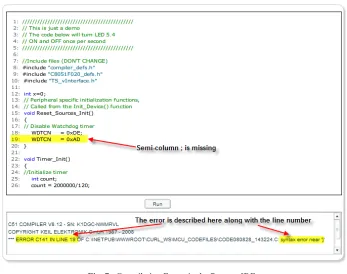
In the event handler of CodeDownloadedToMCU, if the operation is not carried out successfully, the error description is displayed in the Error Text Box as in Figure 7.
Note that pressing the Halt button causes the Remote IDE to send Halt Command to the MCU raising a similar sequence like that of pressing Run button.
Serial Communications: The Lab Client needs a method of data exchange be-tween the MCU and the rest of the experiment hardware. As explained earlier, the Lab Server depends on a Windows Service for the purpose of communicating with the MCU via serial communications.
Fig. 7. Compilation Errors in the Remote IDE.
The API implements a total of 10 functions [26], but for the purpose of our project, only the following three functions are used:
Table 3. MCU Serial Communications Functions.
Function Description
SilabsInit020() Initializes the C8051F020 MCU for use with the Windows Service.
TerminalWrite(SendChar) Writes a byte (SendChar) to the Lab Client
TerminalRead() Reads a byte from the Lab Client
A call to SilabsInit020() function must be made in the Main() procedure of the MCU code to be able to communicate with the Windows Service using the other
TerminalWrite() and TerminalRead() functions.
4
Conclusion and Future Work
This paper describes the implementation of a framework that remote laboratories can be built upon. A unified framework for remote labs development reduces the cost and resources required for developing new remote labs as well as its maintenance. Furthermore, such framework benefits the developer by ensuring that his/her work follows the best patterns and practices. The paper describes the three main compo-nents of such framework: the Lab Server, the Lab Client, and the Web Server. In addition, it describes the benefits of firstly, using RIA (Rich Internet Application) as a Lab Client, secondly, the Web Services as the communications medium between the Lab Client and the Lab Server, and finally the usage of a Microcontroller as versatile and Low-Cost interface to the Lab equipment.
As a proof of concept, a remote laboratory case was carried out: The MCU remote IDE. The utilization of the framework to implement this case proved that adding new remote labs is possible and achievable.
The presented work sheds the light on more directions and features that should be considered as a future work and can be summarized as follows:
1.Collaborate on Remote Labs: Although one student should only be able to control
the remote lab at any given time, it is advantageous if other students can participate in the already-running sessions as watchers. An instructor can also join the lab for remote-assistance. A text-based chat window will act as the necessary communica-tions medium between all simultaneous users. This capability will also enable stu-dents to learn the remote lab by passively watching the current user's actions. An instructor can demonstrate the remote lab in a demo session for all online students.
2.Automatic Assessment: The system should be able to record students' actions and
results and then evaluate the students intelligently to allow the automatic grading of students. This might also include a quick quiz that the student shall take after finishing the subject remote lab and studying its theory. This methodology relieves the instructors from the tedious tasks associated with assessment and allows them to spend more time with their students [27].
3.Developing more remote labs: Many hands-on labs [28-33] can be converted to the
new remote lab environment utilizing the framework offered in this paper. This is not only restricted to Electrical Engineering but can also be exploited in other fields such as chemical, civil, petroleum and industrial engineering applications.
4.M-Learning: Mobile Learning (or M-Learning) is one form of e-Learning that
5
References
[1] Gustavsson (2002), "Remote laboratory experiments in electrical engineering education", Devices, Circuits and Systems, 2002. Proc. of the Fourth IEEE Intern Caracas Conf., ISBN: 0-7803-7380-4.
[2] Philip H. Bailey et al, "The iLabs Shared Architecture and the Future of Web-based
La-boratory Experiments", Proceedings of the IEEE. Vol. 96, No. 6, June 2008, pp. 931.
[3] Maiti, A., & Tripathy, B., “Remote Laboratories: Design of Experiments and Their Web Implementation”, Educational Technology & Society, 16 (3), 220–233, 2013.
[4] James Trevelyan, "Lessons learned from 10 years’ experience with remote laboratories", Intern Conf. on Eng. Education and Research “Progress through Partnership”, Czech Re-public, 27-30 June 2004.
[5] AM Gaouda, A Abd-Rabou, A Dahir, “Developing Educational Smart Grid Laboratory for the UAEU”, Intern J. of Online Eng. 10 (2), 2014.
[6] Gerardo Viedma, "Design and Implementation of the Feedback Systems Web Laboratory", MSc. of Eng. Thesis, Massachusetts Institute of Technology, 2005, http://dspace.mit.edu . [7] Markus Proske, Christian Trodhandl, "Anytime, Everywhere Approaches to Distance Labs
in Embedded Systems Education", Research Report 56/2006, TU Wien, Institut fur
Tech-nische Informatik, April 24, 2006.
[8] James E. Corter et. al., "Remote Versus Hands-On Labs: A Comparative Study", 34th ASEE/IEEE Frontiers in Education Conf., Oct. 20–23, 2004, Savannah, GA, USA. [9] Huda M. Babateen, “The role of Virtual Laboratories in Science Education”, 5th Intern
Conf. on Distance Learning and Education IPCSIT vol.12, IACSIT Press, Singapore, 2011.
[10] Andreas Böhne et. al., "Self-directed Learning and Tutorial Assistance in a Remote Lab", Interactive Computer Aided Learning Conf., Sept. 25-27, 2002, Villach, Austria.
[11] Microsoft Application Blocks <https://msdn.microsoft.com/en-us/library/ff648951.aspx>, Release of April 2013.
[12] Barnaby Dalton, "Techniques for Web Telerobotics", Ph.D. Thesis, Depart. of Mech. and Materials Eng., University of Western Australia, Perth, Australia, 2003.
[13] Jesús A. del Alamo et. al., "An online microelectronics device characterization lab with a
circuit-like user interface", Intern Conf. on Eng. Education July 21–25, 2003, Valencia,
Spain.
[14] James Trevelyan (2002), "Towards Cost Effective On-Line Laboratories", the University of Western Australia. < http://telerobot.mech.uwa.edu.au/ information.html >.
[15] Steve Jobs' interview with Time Magazine on January 2007, < http://pogue.blogs.nytimes.com/2007/01/13/ultimate-iphone-faqs-list-part-2/ >, retrieved on 10 September 2008.
[16] "How large is the LabVIEW Player download?" < http://ni-labview-player.software.informer.com/download/ >, retrieved on 10 Sept. 2016.
[17] Clark K. Colton et al, "A Web-Accessible Heat Exchanger Experiment.", INNOVATIONS 2004: World Innovations in Eng. Education and Research.
[18] James Ward, "What is a Rich Internet Application?" https://www.jamesward.com/2007/10/ 17/what-is-a-rich-internet-application/ , retrieved on 1 Oct 2015.
[19] "Rich Internet application", Retrieved on 10 September 2015, https://en.wikipedia.org/wiki/Rich_Internet_application.
[21] "Flash Player Penetration: Flash content reaches over 98% of Internet view-ers”,http://www.adobe.com/devnet/flashplatform/articles/flashplatform_overview.html, re-trieved on July 2015.
[22] XML http://en.wikipedia.org/wiki/XML, retrieved on 14 August 2015.
[23] USB ToolStick, retrieved on 27 August 2014. http://www.silabs.com/products/mcu/ Pages/ToolStick.aspx.
[24] Consuming Unmanaged DLL Functions, retrieved on 28 August 2015. http://msdn.microsoft.com/en-us/library/26thfadc.aspx.
[25] http://www.silabs.com/products/mcu/Pages/8-bit-microcontroller-software.aspx.
[26] Silicon Labs MCUniversity Program, retrieved on August 2013, https://www.silabs.com/products/mcu/Pages/MCUniversity.aspx.
[27] "The Telelabs Project”, Univ. of Western Australia, retrieved on Dec. 2015. http://telerobot.mech.uwa.edu.au/information.html.
[28] Mina Nagiub, Wael Farag, “Automatic selection of compiler options using genetic tech-niques for embedded software design”, IEEE 14th Inter. Symposium on Comp. Intelli-gence and Informatics (CINTI), Budapest, Hungary, Nov. 19, 2013, ISBN: 978-1-4799-0194-4.
[29] K Mansour, W Farag, “AiroDiag: A Sophisticated Tool that Diagnoses and Updates Vehi-cles Software Over Air”, 2012 IEEE Inter. Elec. Vehicle Conf. (IEVC), Greenville, SC, USA, March 2012, ISBN: 978-1-4673-1562-3. https://doi.org/10.1109/ievc.2012.6183181 [30] W Farag, “Synthesis of intelligent hybrid systems for modeling and control”, University of
Waterloo, 1998.
[31] WA Farag et al., “Neuro-Fuzzy Modeling of Complex Systems Using Genetic Algo-rithms”, IEEE Inter. Conf. on Neural Networks (IEEE ICNN'97) 1, pp. 444-449.
[32] Wael A. Farag, “Digital Filters Design Using Artificial Neural Networks”, 22nd Inter. Conf. on Comp. and Industrial Eng. (ICC & IE ‘97), pp. 68-71, Dec. 20-22, 1997, Ameri-can University, Cairo, Egypt.
[33] Ahmed M. Hemeida, Osama A. Mahgoub, Wael A. Farag, “Design of a Comprehensive 5MW Direct-Driven PMSG wind Turbine Emulator Using FAST nonlinear Wind Turbine Model”, ISSN: 2325-7407, 2(4), International Journal of Automation and Control Engi-neering, November 2013.
6
Author
Wael Farag earned his Ph.D. from the University of Waterloo, Canada in 1998; M.Sc. from the University of Saskatchewan, Canada in 1994; and B.Sc. from Cairo University, Egypt in 1990. His research, teaching and industrial experience focus on embedded systems, mechatronics, autonomous vehicles, renewable energy, and con-trol systems. He has 17 years of industrial and senior management experience in mul-tinational corporations in several domains: Automotive (Valeo: 2006–2015), Oil & Gas (Schneider: 2003–2006) and Construction Machines (Caterpillar: 1998–2003) positioned in several countries including Canada, USA & Egypt. Moreover, he has 13 Years of academic experience at: Wilfrid Laurier University (1995), Cairo University (2003–2015), American University of the Middle East (2015–2016). Spanning several topics of electrical and computer engineering. He is the holder of 2 US patents; ISO9000 Lead Auditor Certified and Scrum Master Certified.