www.learning-journal.com
LeARninG
Journal
Volume 14, Number 8
Effectiveness of Computer Assisted Laboratory
Instructions: Learning Outcomes Analysis
THE INTERNATIONAL JOURNAL OF LEARNING http://www.Learning-Journal.com
First published in 2007 in Melbourne, Australia by Common Ground Publishing Pty Ltd www.CommonGroundPublishing.com.
© 2007 (individual papers), the author(s)
© 2007 (selection and editorial matter) Common Ground
Authors are responsible for the accuracy of citations, quotations, diagrams, tables and maps.
All rights reserved. Apart from fair use for the purposes of study, research, criticism or review as permitted under the Copyright Act (Australia), no part of this work may be reproduced without written permission from the publisher. For permissions and other inquiries, please contact
ISSN: 1447-9494
Publisher Site: http://www.Learning-Journal.com
THE INTERNATIONAL JOURNAL OF LEARNING is a peer refereed journal. Full papers submitted for publication are refereed by Associate Editors through anonymous referee processes.
Salah Mahdi Abdulrasool, University of Huddersfield, UK
Rakesh Mishra, University of Huddersfield, UK
John Fieldhouse, University of Huddersfield, UK
Steve Ward, University of Huddersfield, UK
John McComish, University of Huddersfield, UK
Abstract: This study investigates the impact of computer assisted instructions on learning effectiveness in computer aided design and manufacturing modules which are integral to mechanical engineering related courses. These courses require learners to understand and know the basics of design and manufacturing processes as well as use specialist software and CNC machines. Use of computer assisted instructions enables learner to grasp complex information in an easier way because of the embedded visual element in such instructions. To quantify the effect of integration of computers in traditional teaching three groups of students were exposed to different teaching methodologies as given below.1.Traditional classroom lecturing and laboratory work in classroom.2.Traditional teaching with supervised exposure to available computer simulation. 3.Traditional teaching with un-supervised exposure to available computer simulation. At the end of teaching learning process these students has been evaluated for their proficiency in CAD/CAM/CNC applications. The learning outcomes the students have been measured using blooms taxonomy in knowledge, comprehension, application, analysis, synthesis and evaluation cognition levels. The analysis of the data indicates that groups exposed to computer assisted instructions performed better than the group taught using traditional teaching method. Further supervised exposure to computer simulations gave better results as compared to unsupervised exposure to computers.
Keywords: Computer Technology, Numerical Control Machine, Computer Aided Drawing, Computer Aided Manufacturing (CAD/CAM/CNC)
Introduction
T
HE ADVENT OFcomputers and their in-creased use in industry resulted in computer aided design and manufacturing modules becoming integral to mechanical engineering related courses ( James, 2001-2002; Suresh and Bonnie, 2000; R.C.F. Dye. 2003 ) .These courses came in to prominence in early eighties and resulted in extensive modifications in course contents of tra-ditional design and manufacturing courses( Abbott, Mary, Greenwood, Charles, Buzhardt, Jay, Tapia, and Yolanda.2006 ) .These courses required learners to understand and know the basics of design and manufacturing processes as well as use specialised software and CNC machines. Although learning outcomes for these courses have been developed to suite industrial requirements very little has been done in terms of integrating various learning resources available for optimum benefits. Computer aided learning and computer aided instructional design have been used successfully in human and natural science related courses and a lot of literature is available on the use of computer assisted learning methodologies for such courses(Bourne and Daw.2000; Baillie & Moore. 2004; Jony and Sarti. 1994).
Engineering courses have also begun to use techno-logy for optimum learning benefits (Wang, Paul, Contino, Ramirez, Gustave , and W.Levy. 2000)..
These studies however indicate that the computer assisted instructions need to be integrated with tradi-tional teaching-learning process with care for optim-um benefits( James, 2001-2002; Suresh and Bonnie,
2000; R.C.F. Dye. 2003; Van Dijk L.A, Van Der Berg G.C, Van Keulen H, 2001;A.H. Maslow, 1970;F.T. Lee1997;J.A. Smith, K. Baker & S. Higgins,1993; andR. Zaciewski1994 ).Through this paper it is proposed to examine in detail various issues related to integration of computer assisted teaching method-ologies to traditional teaching methods for optimum benefits.
Experimental Setting
Computer aided learning and computer aided instruc-tional design was implemented for the Engineering Drawing Design and Manufacturing which comprises Computer sketching, Developing the necessary pro-gram for manufacturing the prototype and product manufacture & analysis.
THE INTERNATIONAL JOURNAL OF LEARNING, VOLUME 14, NUMBER 8, 2007
http://www.Learning-Journal.com, ISSN 1447-9494
The Engineering Drawing Design and Manufac-turing is one year course of 2 terms, 12 weeks for each term, with two lectures and a three hour lab every week.
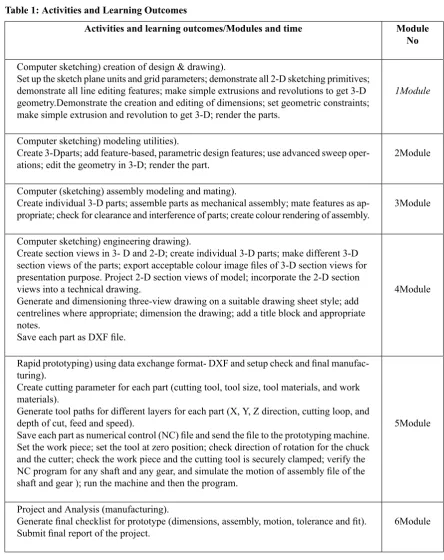
[image:4.595.66.511.138.699.2]The content of the course is outlined Table 1 be-low:
Table 1: Activities and Learning Outcomes
Module No Activities and learning outcomes/Modules and time
1Module
Computer sketching) creation of design & drawing).
Set up the sketch plane units and grid parameters; demonstrate all 2-D sketching primitives; demonstrate all line editing features; make simple extrusions and revolutions to get 3-D geometry.Demonstrate the creation and editing of dimensions; set geometric constraints; make simple extrusion and revolution to get 3-D; render the parts.
2Module Computer sketching) modeling utilities).
Create 3-Dparts; add feature-based, parametric design features; use advanced sweep oper-ations; edit the geometry in 3-D; render the part.
3Module Computer (sketching) assembly modeling and mating).
Create individual 3-D parts; assemble parts as mechanical assembly; mate features as ap-propriate; check for clearance and interference of parts; create colour rendering of assembly.
4Module Computer sketching) engineering drawing).
Create section views in 3- D and 2-D; create individual 3-D parts; make different 3-D section views of the parts; export acceptable colour image files of 3-D section views for presentation purpose. Project 2-D section views of model; incorporate the 2-D section views into a technical drawing.
Generate and dimensioning three-view drawing on a suitable drawing sheet style; add centrelines where appropriate; dimension the drawing; add a title block and appropriate notes.
Save each part as DXF file.
5Module Rapid prototyping) using data exchange format- DXF and setup check and final
manufac-turing).
Create cutting parameter for each part (cutting tool, tool size, tool materials, and work materials).
Generate tool paths for different layers for each part (X, Y, Z direction, cutting loop, and depth of cut, feed and speed).
Save each part as numerical control (NC) file and send the file to the prototyping machine. Set the work piece; set the tool at zero position; check direction of rotation for the chuck and the cutter; check the work piece and the cutting tool is securely clamped; verify the NC program for any shaft and any gear, and simulate the motion of assembly file of the shaft and gear ); run the machine and then the program.
6Module Project and Analysis (manufacturing).
Generate final checklist for prototype (dimensions, assembly, motion, tolerance and fit). Submit final report of the project.
Group 1 students were exposed traditional teaching style, Group 2 students were exposed to computer assisted teaching and Group 3 students were exposed to Unsupervised CAD/Supervised CAM/CNC instruc-tions.
are devoted to CAD/CAM/CNC tasks and activities such as sketching pictorial views, layout of multi view drawings, sectional and solving drawing prob-lems (eg. missing view probprob-lems). The other half of the lab each week is spent working with
CAD/CAM/CNC theoretical concepts. Students must spend an additional 2 to 3 hours per week with these tutorials to improve there skills after they get familiar with both CAD and CAM/CNC.
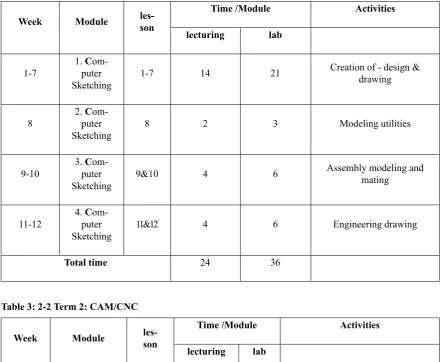
[image:5.595.84.526.170.532.2]The tutorials consist of the following:
Table 2: 2-1 Term 1 CAD
Activities Time /Module les-son Module Week lab lecturing
Creation of - design & drawing 21
14 1-7
1.C om-puter Sketching 1-7 Modeling utilities 3 2 8
2.C om-puter Sketching 8
Assembly modeling and mating
6 4
9&10 3.C
om-puter Sketching 9-10 Engineering drawing 6 4 11&12
4.C om-puter Sketching 11-12 36 24 Total time
Table 3: 2-2 Term 2: CAM/CNC
Activities Time /Module les-son Module Week lab lecturing
Creating prototype (manufactur-ing)
24 16
13-20 5. Rapid
pro-totyping 1-8
Product manufacture and analysis (manufacturing)
12 8
21-24 6. Project and
Analysis 9-12
36 24
Total time
Each of these tasks takes between 2 to 4 hours to complete (thus requiring some time spent out of the regularly scheduled computer lab time). The time required will vary depending on the ability and background of the student. Moreover, additional time would be beneficial for experimentation and explor-ation of the program. Most of the material can be done by the student on their own time; however there are a few "tricky" bits in some of the lessons. Therefore, it is important to have teaching assistants
Control Group and Experiment Group Characteristic
Through this paper it is proposed to investigate how individual learners learn the above operations in a group setting and how computer assisted instructions
affect various learning outcomes as compared to traditional teaching instructions.
[image:6.595.68.514.189.376.2]To investigate the above three student groups were formed each having 15 students with al-most similar average marks in pre class exam-ination as shown in table 2.
Table 4: Pre-Test Ability
Level of student Marks
No of students Teaching methods Group Standard Deviation Average Marks 5.84 67 15 Traditional Classroom Lecturing and
Laboratory work in Classroom
1
13.22 66.13
15 Classroom Teaching with Available
Com-puter Support ( Simulation)
2
12.57 66
15 Supervised/Unsupervised Exposure to
Available Computer Simulation
3
The group 1 students (having low standard deviation in marks indicating an almost homogeneous group) were exposed to traditional teaching where as groups 2 students (having high standard deviation indicating heterogeneous group) were allowed to learn with available of computer simulation and Group 3 stu-dents were exposed to CAD computer simulation without teacher supervision and CAM/CNC com-puter simulation with teacher supervision for safety purpose.
Subject Modules
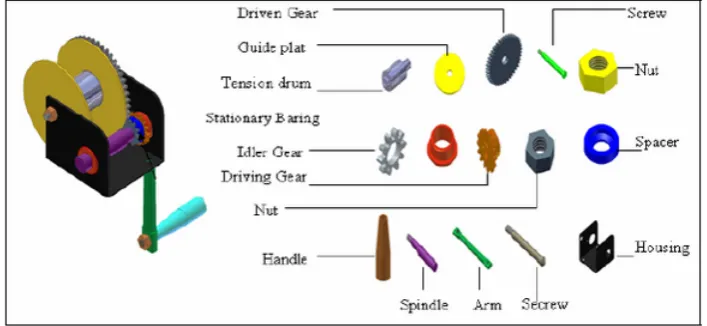
To learn skills required to satisfy outcomes as shown pictorially in figure 1, various learning activities were formulated in a modular pattern. The required learning activities have been categorised under six
modules as explained in Table 1. Students were re-quired to acquire skills in all the learning activities. Out of these six, four sections are for computer sketching which require 10 hours each and one sec-tion is for prototyping which requires 30 hours of lecturing and demonstration. The last section requires 25 hours within which project, analysis, and evalu-ation of student’s skills is carried out.
All the prescribed modules (Table 1) were incor-porated in teaching design and manufacture of a Gear Boxs assembly as shown below (figure 1). This Gear Box assembly consists of different parts and students were taught computer aided design of individual components, assembly and manufacture using three different teaching methodologies described in next section.
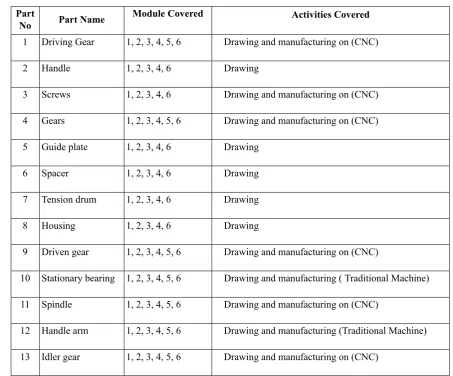
[image:6.595.114.468.591.754.2]Table 5: Activities Covered Activities Covered Module Covered Part Name Part No
Drawing and manufacturing on (CNC) 1, 2, 3, 4, 5, 6
Driving Gear 1
Drawing 1, 2, 3, 4, 6
Handle 2
Drawing and manufacturing on (CNC) 1, 2, 3, 4, 6
Screws 3
Drawing and manufacturing on (CNC) 1, 2, 3, 4, 5, 6
Gears 4
Drawing 1, 2, 3, 4, 6
Guide plate 5
Drawing 1, 2, 3, 4, 6
Spacer 6
Drawing 1, 2, 3, 4, 6
Tension drum 7
Drawing 1, 2, 3, 4, 6
Housing 8
Drawing and manufacturing on (CNC) 1, 2, 3, 4, 5, 6
Driven gear 9
Drawing and manufacturing ( Traditional Machine) 1, 2, 3, 4, 5, 6
Stationary bearing 10
Drawing and manufacturing on (CNC) 1, 2, 3, 4, 5, 6
Spindle 11
Drawing and manufacturing (Traditional Machine) 1, 2, 3, 4, 5, 6
Handle arm 12
Drawing and manufacturing on (CNC) 1, 2, 3, 4, 5, 6
Idler gear 13
Attempted Methods
Traditional Classroom Lecturing and Laboratory Work in Classroom
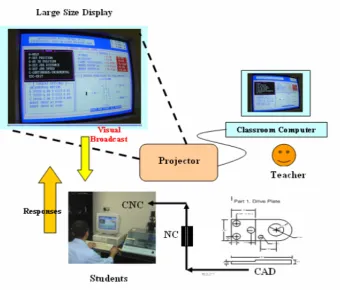
Various features of traditional classroom teaching are shown in the figure 2.The import-ant features of this process are given below.
1. The instructor delivers the lecture with the use of computer interface of spectra light linked with projector.
2. The students were given manual, hand book and access to computers to work with teacher. 3. Teacher helped them in case of any difficulty. 4. The above steps (a) to (c) were used in teaching
Figure 2
Class Room Teaching with Available Computer Support (Simulation)
Various features of computer assisted instructions are shown in figure3. Various important features of this teaching methodology are as given below.
1. The instructor delivers the lecture with the use of computer interface of spectra light linked with projector.
2. The students were given manual, hand book and access to computers to work with teacher. Along with these computers simulation software is provided to students which describe step by step procedure dynamically.
3. Teacher helped them in case of any difficulty. 4. The above steps (a) to (c) were used in teaching
Figure 3
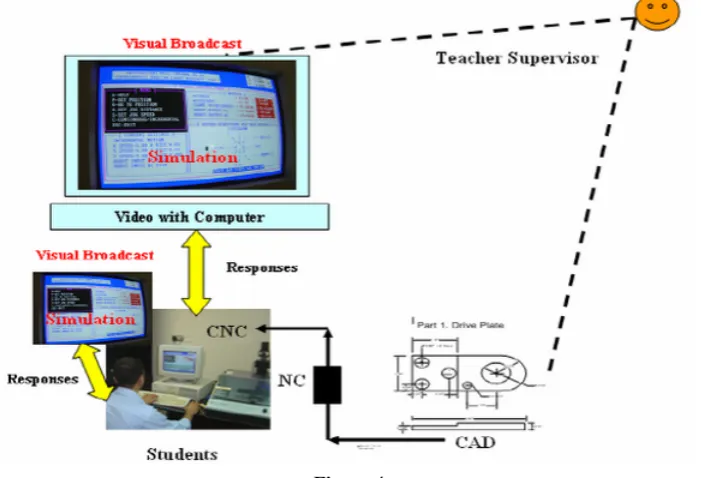
Supervised/Unsupervised Exposure to Available Computer Simulation
In this method students were exposed to com-puter assisted instructions for CAD part of the
syllabus unsupervised and then supervised computer assisted instructions for CAM and CNC sections.
Figure 4
Students Evaluation
At the end of three teaching methods traditional teaching method, computer assisted instruction
[image:9.595.130.481.460.699.2]1. Creation of drawing and design using Computer aided design
2. Using data exchange format (DXF) to create numerical control file
3. Final setup check of computerised numerical control machine.
4. Final manufacturing of the product using CNC. 5. Quality evaluation.
[image:10.595.106.474.156.317.2]After having undergone teaching and learning in the use of CAD/CAM/CNC students were tested for their abilities in this subject area by asking them to draw and manufacturing the following parts.
Figure 5: Parts used for Evaluation
All the results have been analyzed under six categor-ies namely, knowledge, comprehension, application, analysis, synthesis and evaluation. Various skills observed under the six categories are mentioned be-low.
Level 1: Knowledge (Recall Data)
Level 2: Comprehension (Understanding Inform-ation)
Level 3: Application (Applying knowledge to a new situation)
Level 4: Analysis (Separates information into part for better understanding)
Level 5: Synthesis (Builds a pattern from diver’s elements)
Level 6: Evaluations (Judges the value of in-formation)
Description of Various Cognition Levels
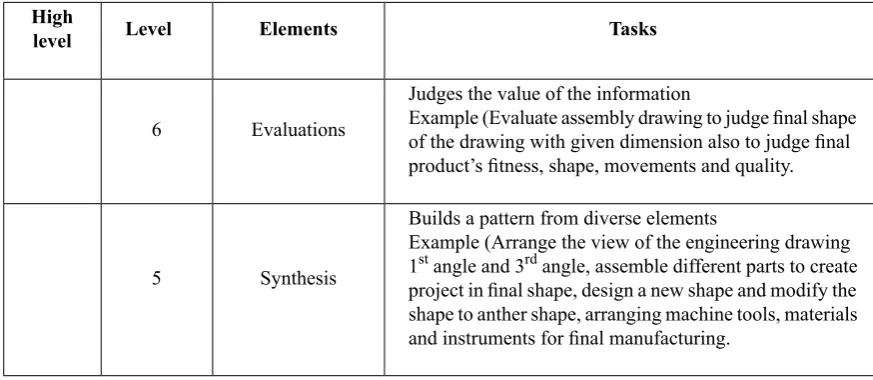
[image:10.595.69.506.488.678.2]Table 6 shows various activities associated with various cognition levels
Table 6: Description of Various Activities Associated with Various Cognition Levels
Tasks Elements
Level High
level
Judges the value of the information
Evaluations
6 Example (Evaluate assembly drawing to judge final shape of the drawing with given dimension also to judge final product’s fitness, shape, movements and quality.
Builds a pattern from diverse elements
Synthesis 5
Separates information into part for better understanding
Analysis 4
Example (Analyzing and drawing parts during assembly drawing and using program facilities to calculate missing dimensions of engineering drawing. Analysing verifying the manufacturing operations.
Applying knowledge to a new situation
Application
3 Example (sketching, applying, demonstrating, modeling, assembly, demonstrating and verifying the manufacturing operations.
Understanding information
Comprehension
2 Example (Select program feature, locate design and drawing geometry, select and locate cutting parameters, setting the tools and the work piece.
Recall of data
Knowledge 1
Low
level Example (Memorizing program operations, feature used in part creation, saving DXF file, creating NC file, set up the machine and run the machine for manufacturing.
The students were than marked out of 100 for each cognition level and performance results of this survey for all the responding students traditional teaching method (G1 N=15), computers assisted instruction
[image:11.595.84.519.86.360.2]teaching method (G2 N=15), and supervised /unsu-pervised teaching method (G3 N=15) are shown in chart 1.
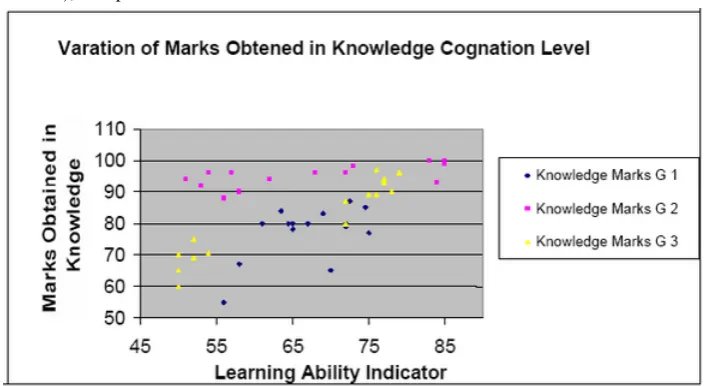
Figure 6: Comparison between Teaching Methods in Knowledge Cognition Level
Figure 6 shows correlation between learning ability indicators with the marks obtained for the three groups in the knowledge cognition level. It can be seen that both groups show considerable improvement in knowledge. The distribution of marks for group2 students indic-ates that the difference between high achievers
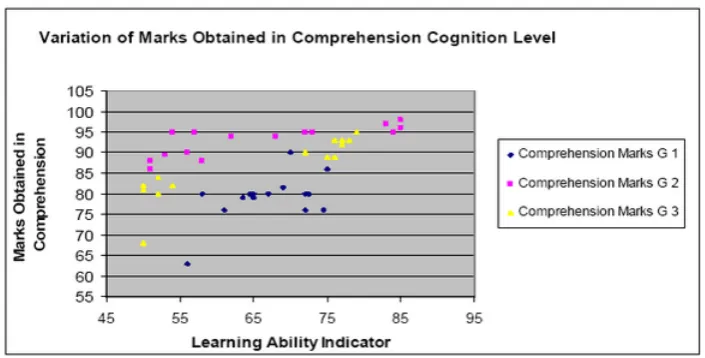
[image:11.595.128.482.402.595.2]Figure 7: Comparison between Teaching Methods in Comprehension Cognition Level
Figure 7 shows variation of marks obtained in comprehension cognition level for the three groups. In the comprehension level students were required to understand the information like drawing geometry, selecting and locating cutting parameters, setting the tools and the
work piece. The figure indicates that the overall trends are similar to that seen in knowledge cognition level although the scatter in the marks has increased for the three groups. But there are big deference in learning ability between low level of group 2 compared with low level of group 1 and group 3.
Figure 8: Comparison between Teaching Methods in Application Cognition Level
Figure 8 shows the variation of marks in applic-ation cognition level. This level evaluates stu-dents’ ability to sketch, apply, demonstrate, model, assemble as well as demonstrate and
Figure 9: Comparison between Teaching Methods in Analysis Cognition Level
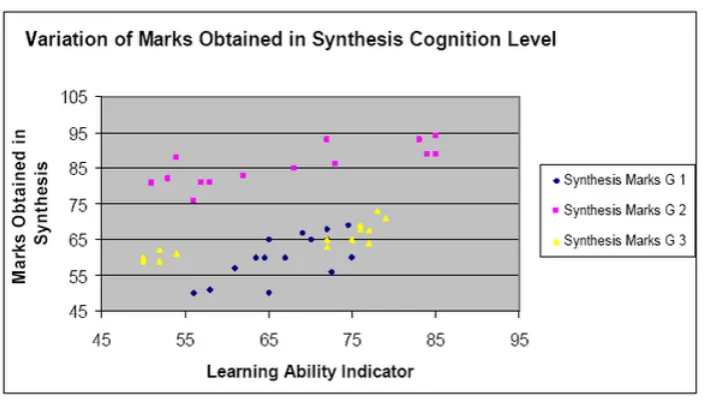
Figure 10: Comparison between Teaching Methods in Synthesis Cognition Level
Figures 9 and 10 show variation of marks obtained in the analysis and synthesis cognition levels for the three groups. These figures again shows effectiveness of computer assisted instruction as compared to the traditional teaching In these cognition levels students were evaluated for their abilities in analyzing draw-ing parts durdraw-ing assembly drawdraw-ing and usdraw-ing program facilities to calculate missing dimensions of engin-eering drawing. This also requires students to be capable in analyzing and verifying the manufacturing operations, assembling different parts to create pro-totype in final shape, designing a new shape and modifying one shape to another shape, arranging
machine tools, materials and instruments for final manufacture.
[image:13.595.130.482.307.507.2]Figure 11: Comparison between Teaching Methods in Synthesis Cognition Level
The performance of the three groups in the evaluation cognition domain has been depicted in figure 11.
This cognition level tests students’ ability tojudge the value of the information with regard final products fitness, shape, movements and quality.
This figure shows that group 2 students have per-formed much better as compared to group 1 students also it can be seen in the figures that the scatter in marks for group 3 students has considerably in-creased. It can be further seen that although group 2 has students with widely varying learning abilities, the computer assisted instruction helped them achieve all the learning outcomes in a satisfactory manner and the difference between high achievers and low achievers is small. This indicates that com-puter assisted instructions are much better in handling a heterogeneous group of students.
Conclusions
This study has clearly demonstrated the effectiveness of computer assisted instructions in a heterogeneous group learning activity. It has been seen that the group exposed to computer assisted instructions performed much better than the group exposed to traditional teaching. Further computer assisted in-struction helped students widely differing
pre-learn-ing abilities to satisfy various learnpre-learn-ing outcomes CAD/CAM subject area.
This study has clearly demonstrated the effective-ness of computer assisted instructions in a heterogen-eous group learning activity. It has been seen that the group exposed to computer assisted instructions performed much better than the group exposed to traditional teaching. Further computer assisted in-struction helped students with widely varying pre-learning abilities to satisfy various pre-learning outcomes in CAD/CAM/CNC subject area.
This study has also indicated that a computer as-sisted teaching methodology works better when stu-dents are closely supervised in all aspects of use of software and other computer resources. It has been noticed that group 2 students has done far better that either of group 1 and group 3 students. It can there-fore be recommended that computer assisted instruc-tion can be used in teaching CAD/CAM/CNC subject area to achieve higher levels of learner satisfaction.
Acknowledgement
The authors wish to acknowledge the support from Ministry of Education Kingdom of Bahrain and School of Computing and Engineering, University of Huddersfield.
References
1. James E.Gall. 2001-2002. Rethinking the computer in education. J, Educational Technology systems, 30(4), 379-388. 2. Suresh K. Bhavnani and Bonnie E. John - Carnegie Mellon University, 2000.The strategic use of complex computer
systems. Human-Computer interaction,15,107-137.
3. R.C.F. Dye. 2003. A computer generated Pseudo-Experiment in fluid mechanics. The international Journal of Mech. Engineering education, 31(2),143-149.
4. Van Dijk L.A ; Van Der Berg G.C ; Van Keulen H. 2001. Interactive lecture in engineering education. European Journal of engineering Education, 26(1),15-28.
5. Marcy J.Wang, M.A , Paul B.Contino,M.A , Edwin S. Ramirez,B.S Gustave L, and Janet W.Levy. 2000. Implementing cognitive learning strategies in computer-based educational technology. New York, New York.
6. Caroline Baillie & Ivan Moore. 2004. Effective learning & teaching in engineering USA, Canada
8. Ton de Jony and Luigi Sarti. 1994. Design and Production of Multimedia and Simulation-Based Learning Material. Netherlands.
9. A.H. Maslow, Motivation and Personality (3rd Edition). New York: Harper Collins Publishers,1970. 10. F.T. Lee, Journal of Institution of Engineers, Malaysia, Vol. 58, No. 4, 1997, pp. 51-57.
11. J.A. Smith, K. Baker & S. Higgins, EOQ '93 World Quality Congress Proceedings, Helsinki, Finland, (1993). 12. R. Zaciewski, Improving the instructional process. Quality Process, April 1994, pp. 75-80.
About the Authors
Salah Mahdi Abdulrasool
This study investigates the impact of computer assisted instructions on learning effectiveness in computer aided design and manufacturing modules which are integral to mechanical engineering related courses. These courses require learners to understand and know the basics of design and manufacturing processes as well as use spe-cialist software and CNC machines. Use of computer assisted instructions enables learner to grasp complex information in an easier way because of the embedded visual element in such instructions. To quantify the effect of integration of computers in traditional teaching three groups of students were exposed to different teaching methodologies as given below. 1.Traditional classroom lecturing and laboratory work in classroom. 2.Traditional teaching with supervised exposure to available computer simulation. 3.Traditional teaching with un-supervised exposure to available computer simulation. At the end of teaching learning process these students has been evaluated for their proficiency in CAD/CAM/CNC applications. The learning outcomes the students have been measured using blooms taxonomy in knowledge, comprehension, application, analysis, synthesis and evaluation cognition levels. The analysis of the data indicates that groups exposed to computer assisted instructions performed better than the group taught using traditional teaching method. Further supervised exposure to computer simu-lations gave better results as compared to unsupervised exposure to computers.
Dr. Rakesh Mishra
University of Huddersfield, UK
Dr. John Fieldhouse
University of Huddersfield, UK
Dr. Steve Ward
University of Huddersfield, UK
John McComish
Mary Kalantzis, University of Illinois, Urbana-Champaign, USA.
Bill Cope, University of Illinois, Urbana-Champaign, USA.
EDITORIAL ADVISORY BOARD
Michael Apple, University of Wisconsin-Madison, USA.
David Barton, Lancaster University, UK.
Mario Bello, University of Science, Technology and Environment, Cuba.
Robert Devillar, Kennesaw State University, USA.
Manuela du Bois-Reymond, Universiteit Leiden, Netherlands.
Ruth Finnegan, Open University, UK.
James Paul Gee, University of Wisconsin-Madison, USA.
Kris Gutierrez, University of California, Los Angeles, USA.
Roz Ivanic, Lancaster University, UK.
Paul James, RMIT University, Melbourne, Australia.
Carey Jewitt, Institute of Education, University of London, UK.
Andeas Kazamias, University of Wisconsin, Madison, USA
Peter Kell, University of Wollongong, Australia.
Michele Knobel, Montclair State University, New Jersey, USA.
Gunther Kress, Institute of Education, University of London.
Colin Lankshear, James Cook University, Australia.
Daniel Madrid Fernandez, University of Granada, Spain.
Sarah Michaels, Clark University, Massachusetts, USA.
Denise Newfield, University of Witwatersrand, South Africa.
Ernest O’Neil, Ministry of Education, Addis Ababa, Ethiopia.
José-Luis Ortega, University of Granada, Spain.
Francisco Fernandez Palomares, University of Granada, Spain.
Ambigapathy Pandian, Universiti Sains Malaysia, Penang, Malaysia.
Miguel A. Pereyra, University of Granada, Spain.
Scott Poynting, University of Western Sydney, Australia.
Angela Samuels, Montego Bay Community College, Montego Bay, Jamaica.
Juana M. Sancho Gil, University of Barcelona, Spain.
Michel Singh, University of Western Sydney, Australia.
Richard Sohmer, Clark University, Massachusetts, USA.
Pippa Stein, University of Witwatersrand, South Africa.
Brian Street, King's College, University of London, UK.
Giorgos Tsiakalos, Aristotle University of Thessaloniki, Greece.
Gella Varnava-Skoura, National and Kapodistrian University of Athens, Greece.
Cecile Walden, Sam Sharpe Teachers College, Montego Bay, Jamaica.
Nicola Yelland, Victoria University, Melbourne, Australia.
Wang Yingjie, School of Education, Beijing Normal University, China.
Zhou Zuoyu, School of Education, Beijing Normal University, China.
Please visit the Journal website at http://www.Learning-Journal.com for further information:
- ABOUT the Journal including Scope and Concerns, Editors, Advisory Board, Associate Editors and Journal Profile
- FOR AUTHORS including Publishing Policy, Submission Guidelines, Peer Review Process and Publishing Agreement
SUBSCRIPTIONS
The Journal offers individual and institutional subscriptions. For further information please visit
http://ijl.cgpublisher.com/subscriptions.html. Inquiries can be directed to
INQUIRIES