The
Computerized Pen Drive
R.Aravind R.Lavanya M.Senthil Kumar
Student lecture assistant professor NSIT college, salem Sona college, salem KVK, Thiruvarur
India India India
ABSTRACT
This paper proposes an extremely innovative and creative pen-drive model which is totally computerized. The Imagination of a pen drive with a display and in-build USB ports has resulted in the development of this paper. The overall idea of this proposal is to build a pen drive which can be used even without a computer system. The challenge in this process is to develop an operating system to the pen drive device which is capable of displaying the contents of the pen-drive and it must have the capacity to share its data through transmissions to other pen drive by means of the USB ports in-build in it. The important thing to be taken in consideration is the cost efficiency of the pen drive device and the prevention of the attack of the virus on the data a device to make it more reliable and secure resource through which we can do all the operation like pen drive but even without the use of the system.
Keywords:
pen-drive, operating system, USB ports, pen drive display.1. INTRODUCTION
The importance of the implementation of this proposal, Computerized Pen Drive lies basically on the usage of the pen drive devices in the present scenario. In-spite of the technology being developed so much and there are lots of resources through which we can transmit data mainly like Internet and there are also lot of mediums being invented for the storage purpose like cloud, but the usage of pen drive is still dominant among the people throughout the world. Mainly the student community and the people working in teaching fields moreover people working in IT sector make use of the Pen Drive very often. This proposal when implemented can help the user to use the pen drive even without the computer system. The various types of designs which are developed and the different additional features add up the impressive models of pen drive being invented presently. It is rare to a person working with in the field of computer without a pen drive. It has become a very essential device for the storage and the transmission process. To use a pen drive the computer system is the necessary medium. The implementation of this proposal can give raise to a pen drive model which can work without the need of the computer system. For this, the important features needed to be added to the normal pen drive are the display screen, an operating system which can support the transmission and then manage the contents of the pen drive
and the inbuilt USB ports which helps in converting a pen drive into a Computerized Pen Drive with amazing features in it. The rate of the pen drives which is implemented with these features can also be cheap as the normal drives being in the market now. The cost mainly depends on the memory capacity and the quality of the display required. This can really create a dynamic storage and transmission device which can be used for both storage and also transmission of data directly even without a computer system which sounds brilliantly and will provide a way to innovate a new gadget.
The important blocks to be implemented in order to enable the design of the Computerized Pen Drive, we need to focus primarily on the creation of an operating system to make the display work and the transmission of the data from other devices or to the other pen drives from this Computerized Pen Drive is possible only with the support of the an operating system. Designing the operation system alone is not enough to process this Computerized Pen Drive, we need a processor which is to be built up inside the pen drive only then the requests from the users can be processed and this Computerized Pen Drive can work perform the operation efficiently. The storage medium is also necessary for the device and the capacity of the storage depends on the cost. Designing the storage medium can be done using the same concepts used in a normal pen drive. Concentration on the measures which are to be taken to prevent the Virus attack is also an important thing to be considered while designing. Because the virus is a major problem when working with the pen drive, it can just corrupt the entire data present in the pen drive. Implementing a pen drive with all the features and with all the functional units as mentioned so far is surely a tedious process but the success lies overcoming all the challenges and creating a innovative gadget Computerized Pen Drive. This device will be handy and compact with an ease to operate anywhere even without the computer system.
2. COMPUTERIZED PEN DRIVE
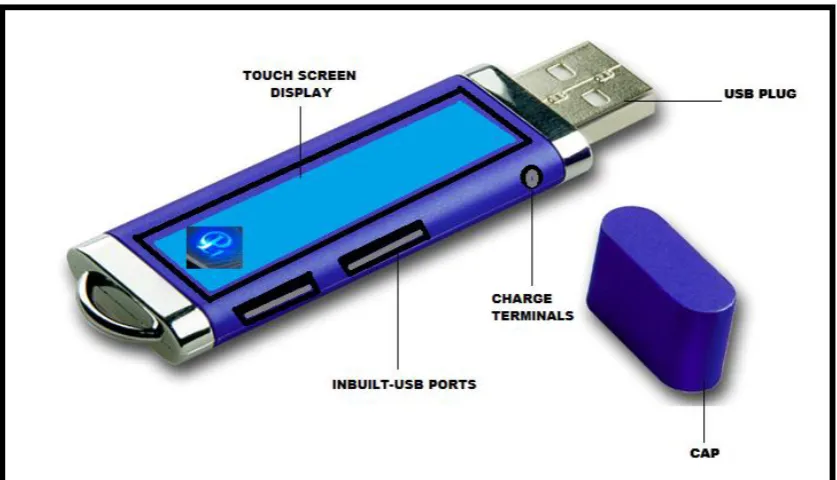
creative model making the pen drive completely computerized. The following snapshot figure 1 shows the Computerized Pen Drive.
The features of this Computerized Pen Drive can be similar to the Flash Drives but this proposal is very unique which is being designed and implemented on the a normal pen drive so
named as the Computerized Pen Drive. This new device can also be considered as a modern gadget with hi-tech features and incomparable potential to the normal pen drive. The storage capacity can be design as required and can be varied in the each model of the Computerized Pen Drive. Any format of the contents can be stored as the user’s desire.
Fig 1: Computerized Pen Drive
The look of this Computerized Pen Drive is quite radiant and forms a creative and very innovative gadget and the amazing features of this devices makes to so smart and gives a new ultimate pen drive. To explain the operations of the various system specifications such as the hardware and the software of this Computerized Pen Drive, the set up is the operating system which is compatible with the display and must be able to store the data and also the main part is supporting the in-built USB ports for the data transmission. The Computerized Pen Drive must be able to work according to the user requirement and the processing must be done very fast so that the working can be very with these Computerized Pen Drive can be very simple. The cost efficiency is also an important factor to be considered while designing this device so that the cost of the device is not the hindrance for the sales and usage of this product with advanced featured of a normal pen drive. The models are based on the different manufacturing companies and the size, shapes and stores depends on the models imposed by them. To understand the working of this Computerized Pen Drive the working and operation of the normal pen drive are explained as follows. The security of the pen drive can be implemented be some techniques which can identify specific drive. We can describe the methods of digital evidence analysis [1] about USB thumb drives or devices such as Computerized Pen Drive. There is a need of behavior
3. NORMAL PEN DRIVE
[image:2.595.71.490.151.391.2]To work with this kind of normal pen drive we surely need a computer system without which we cannot even see the contents inside the pen drive. These types of normal pen drives provide an ease of working and operating. Simply insert the pen drive inside the USB ports in-built in the system, for security against virus just scan the pen drive and view or work pen drive from the my computer options or through short cuts. The advantages of using such USB pen drives and flash drives are mainly because their power consumption and energy overhead features [3]. The one more reason for the popularity is the mobility of the device and the ideal cost is also a main feature. If these normal pen drives have the features of the display and in-built USB port will turn it into a Computerized Pen Drive.
4. DESINGING THE DISPLAY UNIT
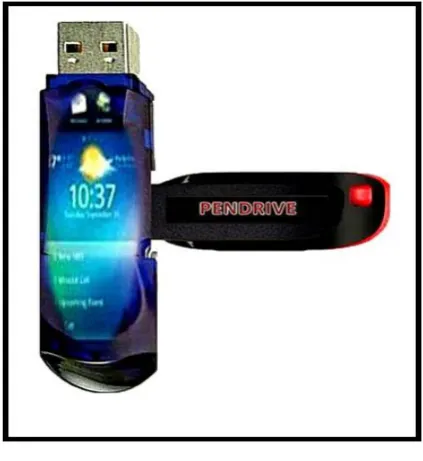
As discussed earlier constructing the display to the normal pen drives adds a striking feature to it and it is possible to design the pen drive with a touch screen display. The options can be done by simple touches on the required options which are being displayed on the screen. This eliminates the space occupied by the button on the pen drive. Usually USB Flash Drives has this kind of the display units and can display its contents. Similarly the USB MP3 iPods also has this display facility. Implementing the display feature can be done on the normal pen drive give an appealing look and help in the seeing of the contents and the processing of the pen drive.
The technology has developed so much that the designing of touch screen is becoming very common and being used everywhere. The support of the operating system and the processor to be built in the pen drive must be compatible with the display unit which is going to be set up. There are many kinds of display technologies starting with the olden storage tube graphic display till the new virtual reality therapy. We can also set up the modes for display such as the which mode which must have been set up with Time DX be- forehand, since DMDX reads the value of the screen, each word being displayed for two refresh cycles [4]. The quality of the display will depend on the technology which is going to be used for the display. Selecting and implementing display technologies must need a clear research on various factors such as the quality and the display the working speed and the cost is also a important factor be the analyzed. Anew embedded touch screen panel (TSP) incorporated with liquid crystalcapacitive (LCC) sensors and a -Si:H TFT amplifiers has been developed [5].
Fig 3: Pen drive with a display.
5. OPERATING SYSTEM
Only when we set up an operating system to this Computerized Pen Drive, the working with it possible because without the support of the operating system we cannot display the contents of the pen drive through the display unit and moreover another important factor for setting up an operating system is to maintain the content formats and the transmission can be done from and to the p Computerized Pen Drive. Creation of the operating system will also help in establishing a user-friendly environment so that the user feels comfortable while operating the device. There new ways to implement an operating such as,virtual organizations management approach taken by XtreemOS, a new grid operating system with native support for VOs that supports a wide range of computing resources [6].
Fig 4: NIDR Processor
6. DATA TRANSMISSION
The data transmission in the Computerized Pen Drive can also be done without the use of the system. This feature is really a new feature which makes the processor of transmission of the data from any other USB devices or transmission to any other USB devices very easy and simple. The need to connect portable electronic devices to each other has accelerated the adoption of USB on-the-go as an industry standard wired interface [9] for interfacing the two devices concepts. The sample snapshot for the data transmission between a USB pen drive and the Computerized Pen Drive in shown in the (figure 5). This works similarly like a computer system with the same options and as the same format.
7. CHARGE TERMINAL
In the Computerized Pen Drive the charge terminals are optional while constructing of the pen drive. The design can be done in two ways one is by setting up a slot for the charge terminal and charging the pen drive through the wires like mobile phone charge adapters or by designing the Computerized Pen Drive without the charge terminal slot, in which the pen drives works by charging the current from the laptop, desktops are other electronic device rather than having a separate charge terminal. The second method is more suitable because it eliminates the process of charging the device through wires. The power required to operate the not much. The charging and the battery performance are a bit similar to USB flash drives or as the USB MP3 players.
8. CONCLUSION
This paper has ultimately focused on the goal of creating a pen drive which is completely computerized. Adding few features like the display screen, an operating system with the processor using the concept Nurture IDR segmentation and multiple instructions queues in superscalar pipelining processor, will support the transmission and also manage the contents of the pen drive and the inbuilt USB ports. We have tried to throw light on the idea of creating a new computerized gadget which is extremely smart and creative. The prime aim of this proposal is to create a new pen drive model which can work even without a computer system. The name Computerized Pen Drive itself says the concept behind the proposal. The cost of the design of this pen drive is focused to cost efficient and the steps for actions against virus attack are also implemented. The design of this concept can be done on different models of pen drives and the memory capacity is also the designed as required by the user. Working with this Computerized Pen Drive will surely create an experience of ease and a comfortable usage.
9. REFERENCE
[1] Keun-Gi Lee, Hye-Won Lee, Chang-Wook Park, Je-Wan Bang, Kwon-youp Kim, Sangjin Lee, 13-15 Dec. 2008, “USB Pass On: Secure USB Thumb Drive Forensic Toolkit”, Future Generation Communication and Networking Second International Conference. Print ISBN: 978-0-7695-3431-2.
[2] Po-Chun Huang, Yuan-Hao Chang, Tei-Wei Kuot, Jen-Wei Hsieh, Miller Lin. May 2008, “The Behavior Analysis of Flash-Memory Storage Systems”, Object Oriented Real-Time Distributed Computing (ISORC), 2008 11th IEEE International Symposium, Print ISBN: 978-0-7695-3132-8
[image:4.595.56.276.74.265.2] [image:4.595.56.268.467.698.2][5] Seiki Takahashi,Byoung Jun Lee, Jai Hyun Koh, Satoru Saito,Bong Hyun You, Nam Deog Kim, and Sang Soo Kim, June 2009 “Embedded Liquid Crystal Capacitive Touch Screen Technology for Large Size LCD Applications”, SID Symposium Digest of Technical Papers.
[6] Coppola, M.; Jegou, Y.; Matthews, B.; Morin, C.; Prieto, L.P.; Sanchez, O.D.; Yang, E.Y.; HaiyanYu; Consiglio Naz. delle Ric, Pisa , March-April 2008, “Virtual Organization Support within a Grid-Wide Operating System”, Internet Computing,
IEEE .
[7] David C. Toll, Paul A. Karger, Elaine R. Palmer, Suzanne K. McIntosh, Sam Weber, 2008 “The Caernarvon secure embedded operating system”, Newsletter ACM SIGOPS Operating System.
[8] J.Nandini Meeraa, N.Indhuja, S.Devi Abirami and K.Rathinakumar, “Nurture IDR Segmentation and Multiple Instruction Queues in Superscalar Pipelining Processor”, IJCSI International Journal of Computer Science Issues, Vol. 8, Issue 6, No 1, November 2011