Datapoint Marketing
No. 46 "Out-thinking our competition to help your customers out-think theirs" June 1982
New Domestic Pricing
Features Reductions
Datapoint has announced new ag-gressive pricing for over 80% of the domestic product line, including lease, purchase, and maintenance pricing. Prices were decreased up to 40% off of some items.
Gerry Cullen, vice president of marketing, said, "A combination of factors precipitated the pricing actions - production economics, some component reductions, but primarily a strong desire by Datapoint to increase market share by making the components of our computer and telephone systems more cost effective."
Large Systems Prices Slashed DATASHARE® and batch systems (4XXX) prices have been slashed an average of $7,200. The cost of 6000 series memory has been cut with an across the board price decrease of almost 44%. ARCTM file processors with RIM, disk con-trollers and disks have taken
un-Datapoint Purchases
Division of TRW Data
Systems, Canada
Datapoint Corporation announced May 21 that, having received approval from the Canadian Foreign Investment Review Agency, it has acquired the Datapoint division of TRW Data Systems Canada for an undisclosed amount of cash. Datapoint Canada Inc. will employ approximately 185 people.
Datapoint Canada will operate as a wholly-owned subsidiary of
DatapointMarketing News
precedented drops in price, ranging from $7,000 to $7,800 off list, quan-tity one pricing. 6000 series pro-cessor pricing has been reduced an average of $4,500.
The 96K 3817 ARC applications processor, previously selling for $6,600, has been repriced at $3,500 - an almost 50% reduction in price.
8XXX systems, our best batch processor and fastest of all disk handlers, have been reduced up to $12,000 each, with favorable quan-tity discount breaks.
Small Systems Offered at Savings Small Systems also have received aggressive new list prices. But the biggest break comes in quantity dis-counts - such as 25% off for quan-tity 26 on some items.
Individual products in the Small Systems product lines have been cut in price up to 34% on quantity one.
The 1552 list price has been re-duced 29% from $8075 to $5750,
continued on page 2 Datapoint Corporation, and assume total responsibility for marketing and servicing Datapoint computer products and advanced telephone equipment throughout Canada. The company, as part of the TRW Inc. International Distributor Network, has successfully sold and serviced Datapoint products in Canada since 1971.
"We see this acquisition as a very positive move for all parties
concerned," said Mike McLagen, newly appointed president of Datapoint Canada. "Datapoint has
continued on page 12 Copyright © 1982 by Datapoint Corporation. AURights Reserved.
RIM Chip
ARCNET
Local
Network Interface Chip
to
be
Sold on
Open Market
The integrated circuits used to in-terface workstations to a Datapoint® ARCNETTM local network will be made available to the public through Standard Microsystems Corporation of Hauppauge, New York.
Datapoint and Standard Microsys-terns have signed an agreement under which Standard Microsystems was granted a non-exclusive license to market Datapoint's RIM (Re-source Interface Module) chip and the associated ARCNET transceiver chip. Together, the two chips pro-vide the electronics necessary for ARCNET interfacing.
Standard Microsystems has been a primary supplier of Datapoint's RIM chip since its introduction in September, 1981, and Standard Microsystems will now additionally offer the ARCNET transceiver chip. The two-chip set will be sold as a
ARCNET CHIP continued from page 1 part of Standard Microsystems's standard product line, at prices to be determined by Standard
Microsystems.
I t was announced in September, 1981, that the interface chips would be used by Tandy Corporation to in-terface Radio Shack TRS-80 Model II computers, creating a Radio Shack implementation of the ARCNET local network.
"Many Inquiries"
"When we initially made the chip set available to Tandy, we decided to
deal with any other interested ven-dors on a one-by-one basis," noted Victor D. Poor, Datapoint's Execu-tive Vice President for Research and
Development. "Since the
announce-ment we have received many in-quiries from vendors who want
infor-mation about the chips.
"This agreement with Standard Microsystems will m~e the chip set publicly available and at" the same time relieve Datapoint of having to deal in the semiconductor business - something we don't want to do," Poor said. :
NEW PRICING continued from page 1
and now comes with 64K instead of 32K.
The 1554 disk system has taken a dive in price from $18,250 to $12,100, a 34% cut. The 1802 went from list price $11,770 to $7,450 (37% off) while the 1818 went from list price $21,400 to $16,300 (24% off). 1800 systems boast a 25% dis-count for quantity 26.
The 8620 system was reduced to $23,950, a 16% drop from the former price of $28,500.
Memory pricing has been
reduced from $650 for 32K to $450, factory or field installed.
Pricing for all products was distributed to the field in late May along with OEM new pricing. This should provide emphasis for a strong fourth quarter and kick off FY83. 0
Product Marketing Ext. 7151 DatapointMarketing News
New ISX
Pricing
Announced
First year maintenance prices are included in the new pricing for the ISXTM Version 1. Adopted March 29, the new pricing for all Version 1 installations has been adjusted to $1000 per port for systems equipped with 250 to 1000 ports.
This new price includes
installa-tion and the first year maintenance
charges: an industry standard that Datapoint has adopted for the Ver-sion 1 system. This new pricing structure will be in effect for Version 1 systems shipped prior to May
1983.
Included in the new price are the
complete Data Management Sub-system (DMS), attendant consoles, INFOSETTM I or conventional single-line analog instruments with interface cards, and the trunk condi-tioning subsystems (TCS).
Below is listed all equipment that is included in the $1000 per port price:
2-wire/4-wire Analog Trunk Interface Card
TCS Equipment Tone Option Card RSUl104
RSU/232 RSU/352
Dual ISL Interface Card Combined CSUl4 and RSUl232 Standard Single Line Instrument
& Interface Card
INFOSET I Station Instrument & Interface Card
Attendant Console Modular Jack Assembly Standard Data Management
Subsystem equipment Battery Backup
Power Failure Transfer Equipment
What Happens If I Want Something Different?
Whenever a customer requires other standard equipment not listed above, such as an additional pro-cessor or an ARC system, then the additional equipment is added to the order at standard Datapoint prices. If the customer requires equipment that is not listed in Datapoint
pric-2
ing guides, such as multi-button key telephone sets, loud extension bell, buzzers, etc., then Customer Service will determine the additional cost, which is then added to the quoted price.
What Does Standard Installation Include?
Standard installation costs are covered by the $1000 per port price.
This includes running the wire from the Remote Switching Units to the Wiring Distribution Frame (WDF) and pulling standard 3-pair station
wiring up to 200 feet per station
from the WDF to the Port Distribu-tion Frame (PDF). Assuming that
the CSU and the RSU cabinets are
located in the same room, this price
also includes the installation and
pre-testing of the cabinets, as well as the testing of the total system.
Any other installation
re-quirements would be considered spe-cial engineering. Spespe-cial engineering costs are determined by Customer Service after surveying the cus-tomer's site and determining exact requirements. These costs would be in addition to the $1000 per port charge. Special engineering typically includes items such as:
- Locating Remote Switching Units or the Data Management Subsystem in areas away from the Central Switching Unit.
-Providing and installing Teflon coated cable
-Channeling or trenching -Pole line construction -Floor or ceiling drilling -Installation of feeder cables -Outside plant work
What Happens When the Customer Upgrades to Version 2?
Upgrades to Version 2 are priced according to the then-current ISX Pricing and Configuration Guide. The $1000 per port charge applies for the customer's initial order. Ad-ditional equipment is added in from the Pricing Guide. The maintenance charge begins after the first year and is $2.60 per equipped port, or $20.80 per user port interface card.
With this change in price, the ISX is now more competitive than ever. The new price gives you an effective
ACD, Mini-ACD Enhanced
in
New Releases
Datapoint's Automatic Call
Distributor has been enhanced with
the release of ACD 4.1. Mini-ACD 1.2, which will be released this
sum-mer, has also undergone a few changes. An examination of ACD 4.1 will show the following:
FORMAT REPORT: The format report command will provide the ability to format and print the con-tents of any DOS compatible text file to the local printer. This capabili-ty will be identical to the format re-port command now available in
SHARETM.
GROUP UTILIZATION RE-PORT: The report group command
will provide information relative to
the reporting group assignments and
will include the period being re-ported, the average number of posi-tions staffed during that period, the number of calls offered to the report-ing group, the number of calls han-dled, abandoned and delayed by an-nouncement, the wrap up time, and the number of calls originated or transferred by agents from this group.
LINE UTILIZATION REPORT MODIFICATION: The line utiliza-tion report will be modified to
clude several additional fields of
in-formation: the length of time each
line was in use, the total number of calls abandoned by line, and the
all-ISX PRICING continued from page 2
sales tool to sell more ISX's. Think of the advantages of the ISX dis-persed architecture, the ability to grow modularly to over 20,000 ports, the capability of adding data switching and sell the ISX at prices that are competitive with voice only PBX's. There are still slots available in FY'83 for Version 1 ISX's. When you find a good home for an ISX, contact the Na-tional Office Communications Marketing Manager to discuss time frames and availability. 0
Datapoint Marketing News
Bill Godfrey Ext. 5219
trunks-busy time for each split. SPOOL: A capability will be pr<r vided to spool any or all system
re-ports to a disk file. This file could be accessed by another processor in an
ARC environment for output to the
system printer. This capability will be identical to the print spooling in SHARE.
LOCAL PRINTER SUPPORT: All report oriented commands will support local printing from a Data-point 8200 terminal if/when a printer is present.
AGENT "AVAILABLE" STATUS COUNT: The system will no longer reflect supervisors in the display
counts at either the host or super-visor consoles.
CONSOLIDATED LINE STATUS:
A console capability will be developed to display line status ac-tivity for all lines in the system to
all consoles in the system. The cur-rent method of assigning lines to
specific consoles for reporting will continue to be supported.
AUTOMATIC RETURN TO "AVAILABLE": An additional
agent attribute will direct the system to place the agent's instru-ment into t'he available state after
the termination of an incoming call. DISPLAY WAITING: This
com-mand will display the line numbers
3
that are waiting for an agent and the length of time waiting for a specified split.
SUPERVISOR TONE TO MONI-TORED AGENT: While a visor is monitoring a call, the super-visor can request to be called by the agent controlling the call.
OUTGOING TRUNK
SELEC-TION: The selection technique used
to mark trunks for outgoing calls will be enhanced by adding the op-tion to specify a top-down method of call connection. This connection will be made available on a line type basis.
EMULATE CONSOLE: A console capability will be developed to allow multiple supervisor consoles the ability to view any screen on any console in the system.
Mini-ACD Version 1.2
Mini-ACD 1.2 will feature the
following:
User's Guide documentation will be enhanced with Mini-ACD 1.2, outlining report package output and description of the supervisor's con-sole display.
Version 1.2 will perform a data-base verification check at system in-itialization time and help identify hardware and database configuration compatibilities before they cause problems. i
Tom Wallace
Ext. 5365
1550 Powerful
with RJE, DASP, RUP
Wouldn't it be nice for a mainframe user to implement a Remote Job Entry network without having to go through all the
headaches of operating system conversions, system programming, and training of personnel?
Likewise, couldn't RJE software and hardware be used to handle all
teleprocessing tasks without inflicting overhead on the mainframe, thus postponing or eliminating costly mainframe upgrades caused by expanded data processing operations?
And wouldn't it be nice for the RJE stations to be configured to
meet the needs of the remote site
rather than having to adapt to the restrictions of the equipment? And for the RJE stations to be used for other applications such as local data and word processing?
President's Qub to be
Held in Palm Springs
For the first time in Datapoint's history the President's Club will be hosted as a separate event, not
con-current with Achievement Club. Scheduled for October 4 through 6, the President's Club will be held at the Canyon Hotel Racquet and Golf Resort in Palm Springs, California.
Achievement Club will immediate-ly follow the President's Club at the same location, October 6 through 10.
Original plans were to hold the clubs in Kauai, Hawaii. In making the change, two factors were
con-sidered: the desire for a location to meet the high standards required for the gathering, and the most econom-ical means for achieving the first factor.
Palm Springs is a highly desirable location offering the finest in recrea-tion and leisure -a most appropriate location for our first President's Club.
We are looking forward to an
ex-citing time in Palm Springs. We
hope to see many of you there. [J
Datapoint Marketing News
Bill Finkel
Ext. 7376
Wouldn't it be nice if the mainframe hardware and software could cost less than $40,000 and the remote site hardware and software could cost less than $6,000?
DASp™ and RUP in conjunction with the Datapoint 1550 can do this and much more.
DASP is a Channel Adapter product that allows a 6600 to attach directly to an IBM byte mutiplexer channel. DASP provides a totally automatic data collection and distribution system without operater intervention. RUP is the
communications software that
allows any of Datapoint's
processors to talk to the DASP
processor.
The 1550 with its extensive software offering makes a very good data collection processor and RUP makes it a very powerful RJE station. With pricing starting at less than $6,000 (for the 1552), the 1550 is a great buy.
These are only some of the features that the combination of DASP and RUP provide:
*No communication overhead on mainframe.
*No ope~ating system changes on mainframe.
*No software revisions. *Complete job flow control.
*Flexible telephone connections to
a remote user.
*Complete system log for billing and system analysis.
Because DASP attaches to the
IBM multiplexor channel, any IBM
system that has this channel (360, 370, 4300, 3300) is a potential candidate. 0
Rafael Maymi Ext. 7151
Datapoint Announces Design-In
Plans for National Semiconductor's
NSI6(XX) Microprocessor
Datapoint Corporation has an-nounced it will design National Semiconductor's new NS16000 mi-croprocessor into a series of data processing and office automation products scheduled for release near the end of 1983.
"We view National Semiconduc-tor's new 16000 as highly desirable for our future product design-ins,"
says Harry Pyle, Vice President-Principal Engineer for Datapoint.
"The architecture of National's new microprocessor family fits hand-in-glove with Datapoint's forward direction between now and 1985.
4
"We like the fact that the memory management unit (MMU) is inte-grated into the architecture of the 16000, rather than being just an after-thought," Pyle added.
"Further-more, we like the large uniform ad-dress space as opposed to other seg-mented schemes because of the ease of programming it affords. And ><the operand encoding seems ideally suited to high-level language code
generation, allowing very efficient
code generation without the need for highly complex optimizing
com-pilers," Pyle observed. 0
lEGS 3.2: The
Benefits and the
Features
The lEOS 3.2 software combines the features of Datapoint's word processing with the power and flex-ibility of the Resource Management System TM(RMSTM) operating system.
Customers will benefit significant-ly in four major areas:
1. Low Cost Workstations
Since 82XX terminals can partici-pate as full-fledged lEOS worksta-tions under RMS, the resulting cost per workstation can decrease signifi-cantly. In addition, use of low cost workstations offers increased flexibil-ity in configuration design. Clustered systems become a more viable solu-tion now, with the capability to at-tach multiple terminals to an 8600 with 20MB on-line disk storage. Thus, three 8200's (or the ergonomic amber-screened 8220's) could partici-pate as full-fledged lEOS worksta-tions, with lEOS also running at the
8600 console. The 8600 might also
be simultaneously functioning as a
data resource processor (performing disk management functions of a file processor for the attached 8200 workstations).
When similiar configurations were
compared, it was found that the cost-per-workstation for RM8-based systems was consistently 20% less than the cost-per-workstation for DOS-based systems.
2. Improved Performance and Throughput
Given the superior overlay loading techniques of lEOS/RMS, and an enhanced I/O support package, throughput and performance are sig-nificantly improved. Benchmarks done in San Antonio, show that lEOS on 82XX's runs 2 to 3 times faster than lEOS 1.4 on a 3800.
In addition to the support of more operators and even if lEOS/DOS is
upgraded to 1.5 with the memory manager, lEOS/RMS on 82XX's is still one and a half times faster. 3. Shared Printers and
Concurrent Print
Because of the resource sharing capabilities of RMS, workstations may direct print tasks to any printer
DatapointMarketing News
on the network for which they have appropriate security access. Further-more, print formatting of the docu-ments is performed as a separate task, so that the workstation is free to perform other functions once the print command has been issued and accepted, whether the job has been designated to print directly or to be spooled. For example, an operator may finish editing a 50-page report, issue the print command, and then immediately proceed to modify the next document. Even the same docu-ment can be modified while it is printing.
This also means that workstations can directly access any printer on the network, or queue jobs to any printer, without the additional ex-pense of a dedicated processor serv-ing as an unspooler.
4. Future Growth
Because Datapoint is committed to moving forward with RMS, future IEOS software enhancements will be concentrated on the RMS Operating System.
Enhancements to IEOS/RMS Several of the enhancements listed
below are unique to version 3.2, while others are additions relative to
versions 3.1 (RMS) and 1.3/1.4/1.5
(DOS).
1. Page Access without Scrolling In IEOS/RMS, pages do not scroll to the screen when the Editor PAGE command is used. For exam-ple, if you are on page 1 and ask for
page 10, the next screen displayed is the text of page 10. Also, when an edit session is terminated, the system now performs the END pr<r
cessing without displaying the pages
to the screen. This effectively simulates direct page access, a highly desirable feature in the WP
marketplace.
2. Associative Index Method™ IEOS/RMS 3.2 now includes AIM™, allowing lookup of text strings within documents via the SEARCH and LOCATE comands. This marks the first appearance of
AIM in RMS. 3. Help Screens
Simplified help screens provide the
most relevant information to the user, in a direct and efficient man-ner. Shortest acceptable abbrevi
a-tions are now highlighted on the
5
screen for quick reference. Also, help screens are menu independent, allow-ing references to commands on other menus.
And because the 'Help' library (COMMON ILIB) is now a standard lEOS library, users may add help explanations which can be accessed with the lEOS HELP command. This allows the easy addition of site-dependent information and notes about frequently-used editing com-mands for quick reference by the users.
4. Error Messages
Error messages and prompts have been modified to be more
under-standable and more user-oriented.
5. Display of Boldfacing and Underlining
U sing a properly-equipped 8600, boldfacing and underlining are displayed on the screen when the DISPLAY and HELP commands are used. On 8200's and 3800's, these attributes are displayed in in-verse video.
6. Enhanced Naming Conventions Library names can be as long as
12 characters, and both library and document names can contain special
characters. Also, four character filename extensions are allowed. 7. More Efficient Packup
Packup now releases unused space at the end of a library, regardless of
whether inactive documents are present, facilitating supervision and management of available storage
space on a system. 8. Workstation Support
lEOS/RMS is available on all large screen processors (including the 3800) and terminals supported by RMS.
9. Simplified User Sign-Ons The user-tailorable Startup
cap-abilities of RMS allow secure yet easily-automated and simple sign-ons for IE OS users. A supervisor, for
ex-ample, can set up the system such that an operator gives only a user
ID and password, and all of the user's environments are inserted au-tomatically. This allows simplified
IEOS access to the casual user, while maintaining stringent security requirements.
10. Enhanced Security Capabilities Using RMS's extensive security conventions, file access (read, write,
continued on page 6
Corporate EMS
Expands to
Serve
More
The corporate EMSTM network has been greatly expanded since it was featured in the August 1981
Data-point Marketing News.
At the heart of the network is a 6600 network controller with a 3800 processor functioning as a master station. This network connects to 13 other ARCs dispersed throughout Datapoint via double-RIMed file pro-cessors connected by nearly seven miles of coaxial cable.
Joining the buildings housing the
ARC systems is a combination of
underground coaxial cable and LightLinkTM. Although the original
configuration used microwave to
connect some of the buildings,
LightLink has been substituted for
the microwave units previously in use.
The EMS network has grown from 110 local stations and six remote locations in August to 250 mails tops servicing a total of 729 users. This includes the following 27 remote locations (as of April 15) serviced via telephone lines.
Traffic and Usage Tallies
The amount of traffic over the net-work has increased substantially. In August, 1,457 messages were sent and 3,188 received. In February, 3,027 messages were sent and 7,732 received. Although many mailstops were added during the past six
IEOS 3.2 continued from page 5
copy, etc.) can be made as flexible or as rigidly secure as the customer requires.
11. Simplified System Management Using RMS utilities and the uni-form IEOS-related file-naming con-ventions, management of IE OS work files and libraries is greatly simplified. For example, a supervisor may use DELETE CUT?/IEOS:W to delete all extraneous operator cut files, in one simple command.
With IEOS now added to the list of Datapoint products available
Datapoint Marketing News
months, the network controller was able to handle the more than 100% increase in traffic without
significantly impacting the network.
TWX and TELEX Interfaces
One of the ports on the network controller has been configured for a 110 baud 'IWX line. Customer Sup-port Logistics in San Antonio is cur-rently using this facility to place orders with a paper vendor. The ven-dor is listed as a mails top on the network controller; when sending messages to it, the network con-troller seizes the 'IWX line and places the call to the vendor's 'IWX system. The procedure used in send-ing messages/information is identical to sending messages to any other
mails top on the network.
Currently, this 'IWX line is used
for one vendor, although other ven-dors are expected to be added to the line in the future. This would allow
us to automate our ordering pro-cedures, cut costs, paperwork and turnaround time, and remain current with vendors.
EMS also facilitates communic a-tion with the people in Europe.
Defined in the network controller is a mails top for a telex room in San Antonio. All messages sent to this room are routed overseas as necessary.
The corporate EMS network has been a success as demonstrated by the number of messages passed through the system and the in-creased dependency by clerical and management staff. No longer are people content to contend with the mail service. EMS has made it possi-ble for everyone participating in the
network to be current with the latest information. ['
Rick McClelland
Ext. 5124 Remote Mailstops
San Antonio Remotes Customer Service-Koger CSD Logistics
Woodcock Bldg.
Customer Service-Borden Bldg. Certification·Console Dr. Sales Education Systems Education Education Planning
Other Non·San Antonio Remotes Sunnyvale
Dallas·ISX Development Waco Plant
Marketing Regions Gulf Coast North Central Northeast Northwest
Federal & Mid-Atlantic New York
East Central Southern Southeast Great Lakes Southwest
Government Relations·Arlington Va. Austin Development
Sites Under Consideration Sacramento
Oakland Inforex
Stamford Branch London (testing)
under RMS, more of your DOS ac-counts should now be prime to con-vert to RMS. The word processing capabilities under RMS are clearly superior to those of DOS. The cost per workstation is much more bene-ficial and performance in some cases is three times what it was under DOS. In other words. the price/
performance of RMS word process-ing over DOS should make the deci-sion to convert to RMS an easy one for word processing customers. 0
Rick McClelland Ext. 5124
6
Portland
Seattle
San Francisco
Slide Shows Updated
In May's Datapoint Marketing
News, we listed changes to two slide shows. but inadvertently got the changes backwards.
This should clear up the confusion:
For the ISX-Information Switch-ing Exchange™ slide presentation (M/C 61124). three new slides are available from Ed Rivera, Corporate Communications, Ext. 7059.
To correct the Color Business Graphics presentation (M/C 61266), remove slide 55-"Script Phase". 0
ACU:A
Glowing Repo
rt
on
ARC
During one very cold week in
Boulder, Colorado, Sal Bruno and I
spent time with the folks from the Association of Computer Users run-ning benchmark tests. These are the people that bring you the systems comparisons found in
Computer-world. (Remember the 1170
com-parison that hung around for 2
years?)
We ran a program that all of the other vendors ran, a simple order entry program that produced a pick-ing slip and invoice while updatpick-ing various master files. Other programs tested the processor and I/O capa-bilities. We chose the 8600, actually the 8630 and an 8601, because it
Software Ordering
Pr
oc
edures
In recent months, a number of sales people have attempted to use the incorrect procedures to place orders for software. Please follow the proper method of ordering software,
as listed in the Software Ordering
Handbook (M/C 61170).
Notice that software orders from customers must be listed on a Sof t-ware Order Schedule (SOS) (M/C 60600) and sent to Order Control;
emergency orders can be phoned in to 512/699-7810. Do not order soft-ware on an EOS.
In-house orders must be submitted on an In House Order Form (M/C 60601) to Software Services.
OEM's and Reps order software for their own use following the same procedures as Datapoint customers;
however, the standard 20%
OEM/Rep discount applies to all charges for media and documenta-tion.o
Software Services Ext. 7323
Datapoint Marketing News
was new in the product line and fit the criteria of the test as follows:
Multi-user system
$25,000 to 50,000 cost
excluding data stations So what actually happened? First the bad news. I had a little trouble connecting the terminal emulator that they were using to the mu lti-port on the 8630. A case of D.A.,
Dumb Analyst. So while I was tink-ering with the cables, Sal was busy with the "This Is Datapoint/This Is ARC" story. They taped the disser-tation but were furiously taking notes at the same time. We came out with what I would call a "glow
-ing" report. Their primary area of in-terest was ARC itself and then the RMS operating system. They com-mented on DATABUS® and DATASHARE as well as lEOS. They also surveyed some of our
users and included their comments in the report.
We will be sending copies of the report to the field within a few weeks. Be looking for it! We are also running the same benchmark pro-grams here in San Antonio with a
terminal emulator that was devel -oped in-house by Kris Linebaugh to
match the capabilities of the one
used by ACU. Next month we will have comparisons featuring all of the product line from the 1550 to the 8800.
Additional copies of the ACU benchmark report can be obtained from Claudia McNutt, ext. 7059, at the cost of $1.00 each. Because of the limited quantity available, maximum order per person is five copies. 0
Ted Rohling
Ext. 7151
The
In
f
ormatio
n
Processor
s
wi
th
t
he
Mo
s
t
Fea
t
ures
Just look what you can get with a1550 System compared to what the competition offers. You can do stand-alone or distributed data pro-cessing, word processing and elec-tronic message service, all from the same multi-function workstation.
New Pricing For 155X
The 155X product family has new prices. A 64K 1MB 1552 system is now priced at $5750 (not including maintenance and installation). The 1979 price of $5950 for a 1500 with 32K and .5MB of diskette storage
(which ran much slower) was $200
more than today's price. The quan-tity 26 discount price of $4315 (e
x-cluding maintenance and installa-tion) reflects a 25% discount.
Well, you wanted more
per-formance, more features, and a lower
price. We listened to you and now
you have it all. If Product Marketing can assist with sales strategies, please call at 7151 and ask for Rafael Maymi or Jim Whitehouse. 0
Jim Whitehouse Ext. 7151
DPT WANG IBM MDS XEROX Feature
Storage basic system Basic price under $6,500 Space savings desktop design Basic language
Unattended network controller (DATAPOLL® like protocol) Word processing
Concurrent operation 3270 emulation
Dual printer capability
7
1552 2000 1MB 2.5MB
x
x x
x x
x
x x
x x
x
5285 21/10 860 246K 243K 184K
x x
x
x x
x x
x x
x x
x
x
Profile:
The Wang Alliance
System
(The following was prepared by Software Products Division Strategic Marketing.)
This analysis was done to help
prepare you to sell against Wang's
office automation products,
particularly their recently announced Alliance System.
Wang has been a leading WP
supplier for many years. The OIS
systems which are the bread and butter of Wang's clustered WP offerings range from 5MB of disk and 4 workstations to a 275MB system that supports up to 24
workstations.
Wang's most significant DP entry is the VS system, a 32 bit
minicomputer. Although Wang's WP
runs on the VS system, most VS appear to be placed in DP-oriented
applications, particularly those
involving front-end work for
mainframes.
Alliance is a set of software
products which was initially
announced for the OIS systems and
appears to be Wang's primary
product entry into the office
Attribute Local Network Shipment
Resource Sharing
DDP
Digital PABX
(Voice & Data)
Intelligent Printing (Laser)
Clustered WP FAX
Color Graphics
Calendar Management File Mgmt. System Financial Modeling Electronic Mail
Communications
(2780,3780,3270,SDLC,etc)
Remote Networking
DBMS
Datapoint Marketing News
automation field. However, Alliance
is primarily a set of enhancements
for WP oriented users; it does
nothing for the user who wishes to
integrate WP and DP at the workstation. For example, an OIS
user who has existing OIS Office BASIC will have to convert his code
to CP/M BASIC when he upgrades
his OIS system for Alliance.
Furthermore, no languages except,
again, BASIC are supported under
CP/M with Alliance.
Alliance software still does not
give Wang users the ability to share
resources outside of the local cluster. The user is, therefore, left with a "brick wall", which he hits in the
form of having to buy another
system once the 24th (or the last feasible, from a performance
standpoint) workstation is added. Wang claims that Wangnet will allow resource sharing for users of various Alliance systems, but the
DP side of the question is not at all resolved. Wang is now supporting three types of BASIC, OIS Office BASIC, Alliance CP/M BASIC, and
Datapoint Wang YES (4000+ First OIS installed) shipment
10/82 VS 1+/83
YES At Local
Node Only YES NO (BASIC
Only) YES NO YES YES
YES YES
YES YES
YES NO
NO YES
YES (AIM) YES
YES NO
YES YES YES YES (NO
SDLC) YES NO NO YES
8
VS BASIC. All of these are basically
source code incompatible with each other. Additionally, once Wangnet is implemented on-Alliance, Wang is going to be left with the interesting problem of having these source code
incompatible programs access each
other's files. Furthermore, Wangnet
and Alliance do nothing for the user
who wants to run VS COBOL and
Alliance WP from the same
workstation. Total, Wang's'DBMS, runs only on the VS operating
system.
Alliance does not address the
office of the future in an integrated
fashion. Users are still left with a
decision of whether to go with a
"DP" product (the VS), or a "WP" product, the Alliance. Only
Datapoint offers the level of
integration which is available at our workstations.
Elements of the Automated Office Both Datapoint and Wang have professed the lEO to be their target markets. The race is on to see who is going to get the pieces in place first, but right now Datapoint is leading. Alliance has been announced, but it will not be available until 10/82 on
OIS systems, and early 1983 on VS systems.
What is Alliance?
The Wang Alliance System is basically a set of new software
products which run on an enhanced
version of the OIS shared logic WP system that Wang has been marketing for several years. The basic Alliance software is $19,000.
Major features of the Alliance software are:
*Improved file management. This means that in addition to having file names for each document there are both "short form" and "long form"
descriptions for each document. In WP the user scrolls through the
directory and places the curser .on
the document which he wants to
modify, print, etc. This feature amounts to nothing more than the "cat longform" option which IEOS has had for a long time.
*Visual memory. This feature is analagous to the search and locate commands. The user can search for
key words in the short and long document descriptions. or search for
keywords in the document text. This is the same capability that AIM provides except that Wang scrolls
through the document sequentially
on the screen until it finds the
keyword. These AIM -like features
will cost the Wang customer $6,000.
*The Audio Workstation. The
Audio Workstation has a telephone interface that allows users to dictate
messages into the phone, which
appear as highlighted squares on the workstation screen for every second of speech. These messages can then be stored on disk, and routed to
various recipients. This product is a
substitute for a pocket dictation
device at the data entry point, and
may be too cumbersome for many executives.
* Alliance also offers a calendar
management package. Wang charges
$2000 for this software.
What Does It Cost?
One of Datapoint's strongest
selling points is the ease with which software can be upgraded to
incorporate new features into a
customer system, without the
customer incurring substantial investment in new hardware or obsolescence of his existing
hardware.
Existing Wang users of OIS
systems will not have this luxury
when they upgrade to an Alliance
system. The OIS Master Processor will have to be upgraded to 128K at
a cost of $83/K. Minimum disk
storage for an Alliance system will
be 80.4MB. Furthermore, the
Alliance system software will set
users back $19,000. Additional
workstations cost $4,900 each, and
the audio option adds another $1,000 per workstation.
Conclusion Co
On a cost per workstation basis, Wang and Datapoint are essentially equal. The key differences remain in the ease with which we integrate DP with WP at the workstation, and the
low cost of expansion afforded in
ARCNET. An Alliance system will
not allow a smooth upgrade with
resource sharing past the 32 port maximum on the master processer.
Wang's Weakness
Wang has a reputation as one of
the better word processor vendors in
DatapointMarketing News
Sample Configuration* Alliance 250 Master Processor
128K, 32 Ports, 80.4 MB Disk Drive Alliance Operating System
Workstations
$19,000
$ 19,000
$ 49,000 Standard* $4,900 x 10
64 KRAM Printers
20 CPS Matrix $2,695 X 4 $ 10,780
Software (Visual Memory, CP/M, BASIC,
2780, 3780, 3270) $ 18,000
$115,780 *This configuration does not include the audio option ($I,OOO/ws).
USvsTHEM
Datapoint*
Wang Alliance
Total Purchase
Workstation Alone
Printer Alone
Price Per Workstation
$113,700 $1,895
$3,495
$11,370
$115,780 $4,900 $2,695
$12,178
*8630 with 20MB extension and 256KB of memory
Three 8602's driving six 8220's, four 9611 printers, and an active HUB.
Note: Both Datapoint and Wang quantity one prices were used in the
above comparison.
the marketplace. However, our
product has many features and strengths that even their best
(Alliance) product does not.
Following is a list of how we
compare in some of those important areas:
AIM: Can't be touched by Wang's
Alliance; Wang doesn't have the flexibility in manipulating output
that AIM has with its ON option.
Ours is free when ordered with a
processor.
Archiving/Electronic Filing: Our
AIM technique along with extensive Library and Document Services solves this problem. The library
structure itself allows documents of common content to be logically grouped. Wang uses a multiple entry point access technique, or an AIM
like method which scrolls through the entire document to find the keyword.
Help: Wang has no on-line 'help'
facility; we have both shortform
« command>?) and longform (HELP
library) versions. Furthermore, the Datapoint user can add items to the help library which are germane to his application.
Autotyping: Wang's version of this requires very structured control
9
information that identifies variables; each time a variable is used in a letter, it must be re-defined in the control list. Our technique of
identifying variables within the form
letter, and of allowing variables to
be in any order in the control file,
provides much more flexibility.
Print "Stop" Override: Wang
operators cannot override imbedded
STOP commands while printing. RMS overrides them automatically unless the interactive option is
chosen.
Page printing: EOS allows any
combination of pages to be printed
by a single PRINT command. Wang permits only one page or one
contiguous string of pages at a time. Printer selection: Not only does IEOS/RMS provide concurrent printing, but it also allows complete
freedom in the selection of any printer on the network for use.
Wang limits the user to the use of locally attached printers.
Copying: IEOS allows copies of entire documents to be made either
inside libraries or as stand alone
files; Wang must create a new
continued on page 10
WANG Profile continued from page 9
document, then "macro" in the document being copied.
Creating "Like" Documents: We have the LIKE option when creating or modifying documents for
duplicating document formats; Wang must go into the source document
and copy out the format lines. What you see is what you get: Wang's justification happens at
output (print) time, not within the
editor. Headers and footers aren't
merged until output time either.
Pagination and scrolling: Wang's system does not provide continuous scrolling, either vertically or
horizontally; the next page is
displayed with a small portion of the previous page at the top of the screen, and horizontal scrolling
beyond column 80 swaps the whole
screen out with a few characters showing at the left. The latter case is an irritation, especially when
keying in text beyond column 80. Also, pagination does not ococur automatically during text keyin; a separate pagination pass must be performed, or the operator must manually insert page breaks during keyin.
Function keys: Better than Wang's Glossary in some ways because of the ability to store commands and cursor movements in addition to text, and because each document can have its own unique function key definitions.
Tabs: Wang has left justified and decimal tabs only, and different keys must be used; we have a single key that activates left, right, center, and decimal aligned tabs, any of which may be dot-filled.
Band Printer Gets
Serial
Interface
The band printers (M/C 9257 and 9258) are now available in serial as well as parallel versions. (The
parallel version is orderable as before. The serial version is ordered
as 9257/0140 [300LPM) and
9258/0140 [600LPM).) The serial in~
terface feature is denoted as model code 0140 and offered as a no-cost factory installed option only.
This option provides compatibility
Datapoint Marketing News
Justification: Center justification can be done in our system by selecting as many lines as desired with one command; Wang must center each line separately.
Cuts: To duplicate our approach to Cuts, Wang users must create a
separate Glossary document, which
is very time consuming and difficult. Up to ten IEOS cuts can be
accessed from within any document.
Wang only allows one cut without
the use of the Glossary document.
Replacing text: Since Wang's editor doesn't automatically repaginate, replacing text (with global Search and Replace) may necessitate additional editing if the new text is significantly larger or smaller than the original.
Alternating headers and footers: Wang can't put different headers or footers on odd and even pages.
The bottom line when competing
with Wang: Stress our strengths.
Don't forget to mention that our
Local Area Network is mature and it
works!
Wang's Strengths
*Wang's WP shows the user what
the document will look like when it is printed. This means that all underlining and boldfacing shows on the screen. An exception to this rule with Wang is that headers and footers do not appear on the screen.
*The Wang keyboard has separate Execute, Cancel, Insert and Delete function keys. Furthermore, any key on the keyboard can be defined as a function key.
*Wang's keyboard looks and feels like an IBM Selectric keyboard.
*The operator interface is very friendly. Error messages tell the user
with the serial printer port on the
8600 and, under RMS, it allows in-terface to an MPCA on an 8600 or 8800 processor.
The serial interface offers the same
degree of IEOS compatibility as the current parallel band printers.
First customer deliveries are June, 1982.
Maintenance charges remain as listed in the price sheets.
All cable hardware is included with the band printer. [J
10
Jim Moore
Ext. 5191
how to correct the error instead of informing him that he has made one and leaving him sitting there
wondering what to do next.
Conclusions
When selling against a Wang
Alliance system, stress the following:
*The minimum configuration for
an Alliance is $38,000 for the master
processor and 80MB of disk. That
may be too much for some installations. Furthermore, no smooth upgrade with resource sharing exists once the first master processor is used up.
*Cost of expansion is high with Wang. Once the first master
processor is saturated, the customer
has to buy a second one. Only
RMS/IEOS and ARCNET allow the
kind of file sharing that avoids data redundancy.
*BASIC is the only language available with Alliance, and it is available only under CP/M. Wang
has not made it clear how CP/M software is going to be able to share resources in a Wangnet environment.
*Wangnet is not going to be a cheap upgrade for existing Wang installations. The interface unit for VS and OIS systems will cost the
customer $3800 per connection. Tandy is selling the ARCNET interface for $400, and it comes for no charge on all 8600 and most 8800 systems.
*Remember to stress the quality of both our hardware and software service organizations. 0
--~-:.:..-..,
Bernd Harzog Ext. 7841
Color Business
Graphics
Fully
Featured
in
Version 1.3
The Color Business Graphics
system is now fully defined as to the
committed features. This is the best
business graphics system on the
market. Initial response has been
ex-cellent and several systems are now
being used for actual business
management.
To re-acquaint you with the full
features of the Datapoint Color
Busi-ness Graphics system, a detailed list
of capabilities is provided.
Also please realize that although
CBG was initially offered as an ad-junct to existing ARC systems, it is
operational in a stand-alone environ
-ment. (Simply configure with a 4634-10/10 MB disk with processor,
and the 9680 CBG with 9850 soft-ware). All capabilities are available
on the stand-alone or ARC system. The following list of features in-cludes DOS version 1.3 which will be released July I, 1982. Requests for
additional features under DOS will
be considered on a Request for
Special Product (RSP) only. We
in-tend to proceed with the RMS im-plementation in FY83 and your in-put for desired standard features will be considered for that product.
If you have generated some
unus-ual or extraordinary pictures on your CBG, we would be interested in
ob-taining copies. Call or send
com-ments to Product Marketing (KlO).
Draw Features
The Draw phase lets you:
-Create a new picture.
-Modify an existing picture. -Create a color palette. CBG can
display any color visible on a color
TV screen. You can use up to 16
colors in one picture, chosen from
over 16 million possible colors. Your
16 choices make up the color
"palette" for the current picture. To
modify the "recipe" for any of the
colors, change the mix of red, green
and blue; hue, saturation, and
brightness. You can copy the color palette from one picture into
DatapointMarketing News
another, and copy an individual color
from the same (or another) picture.
-Draw each of the "elements" (lines or colored areas) of a picture. To draw an element you can select a
pen color and pen width. Draw with straight lines by marking the line's end points. Draw a rectangle by marking two of its diagonal corners. You can also fill an outline with a solid color, giving an object a chosen "style", either solid color or
hollow outline. To draw with curved
lines, draw a circle by marking its center and its radius; draw an arc of
a circle by'either marking its center and two endpoints, or marking its center, start point, and angle.
-Look through a "magnifying
glass". As you draw, you can see the whole picture and a magnified image of the area around the cursor. This
helps you draw with precision -Place text in a picture. Select a
type font and color, and enter the line of text to appear, then select the
position in the picture for the text. While you are doing this, the cursor will be a box outlining the space
your text will require.
-Collect elements of a picture into a group. Then you can do something to a whole group of elements at once.
-Make changes to a picture. Move
an element or a group of elements; copy an element or a group; erase an
element or a group. Change the
at-tributes of an element or group, such
as color.
-Store and retrieve images com-posed of one or more pictures. Select
11
a picture to modify. Copy a picture
(or part of one) into another. Put one or more pictures in the "background"
of the picture you are drawing. This is
like using tracing paper; the
"background" pictures are protected
while you are wroking on the "top" picture, and they help you draw the
top picture.
-Control the display screen. Re-draw the display in the correct se-quence (from the background up to the top layer).
Chart Features
The Chart phase lets you do the
following things: -Create a new chart.
-Modify an existing chart. Select a chart format, such as word, pie, bar
or graph.
-Enter the data to be charted or
tell CBG where to find an existing file with the data. The data for a single chart may come from many files, each file supplying a line on a graph or a set of bars on a chart.
-Specify the chart features, such as title, subtitle, and page number.
-Fill in a "form" on the screen to
tell CBG how to create the chart
you have selected. The form has
"multiple choice" fields. One area of the screen always shows a "menu" of
choices to pick from, depending on
the field being filled in.
For PIE CHARTS, you can:
-Label some or all of the segments with a caption on the segment itself
continued on page 12
Guest Visits
Lead
to
Big Business
How successful were guest visits during FY82? Response to a recent survey shows that home-office guest visits can be a key ingredient in a successful sale.
Guest Services is a valuable sales tool which, like all resources, must be used wisely. Follow these simple guidelines:
1. Qualify the customer before at-tempting to schedule a visit. Do all that can be done locally to close a sale.
2. Call Guest Services far in ad-vance to ascertain that a date is available before setting an exact date with the customer.
3. Make certain that all approvals for the visit (branch, regional,
CBa continued from page 11
or off the segment with or without a pointer to it.
-Label some or all of the segments with the values they represent.
-Label some or all of the segments with the percentages of the total which they represent.
-Have the information for each segment printed in the same color as the segment in a standard fixed color, such as black.
-Position each segment within the pie, or "exploded" (moved out from
the center).
For BAR CHARTS, you can: -Label the vertical and horizontal axes of the chart.
-Set minimum and maximum values for each axis.
(CBG can do this automatically. It
will choose zero as the minimum value unless it finds negative values in the data. It will choose a
max-imum value at least as large as the greatest of the data values.)
-Have axis lines drawn to the left
or right of the bars on the chart. -Have numbers and tick marks drawn with or without axis lines.
-Have rulings (lines) drawn across
the chart.
-Put a thin outline around each bar.
-Label some or all of the bars with the values they represent.
Datapoint Marketing News
futures discussions, use of executive personnel, etc.) are obtained in advance.
4. Provide thorough background information several weeks before the visit. Use EMS - the ideal vehicle for reliable delivery.
5. Contact the presenters when you get a copy of the agenda. Keep them aware of changes and informa-tion that will aid them in giving their presentations.
6. Maintain contact with your
guest services coordinator, who can assist in all aspects of your visit. [J
Bill Finkel Ext. 7376
-Put a caption on each group of bars in a chart.
-Put a legend on a chart for each color bar.
For GRAPHS, you can:
-Label the vertical and horizontal axes of the chart.
-Set minimum and maximum values, just as for bar charts.
-Have axis lines, numbers, and
tick marks drawn, just as for bar charts.
-Have rulings (lines) drawn across the chart horizontally, vertically
or both ways, to produce a grid pattern.
-Choose a line width for each
graph in the chart.
-Put a legend on any graph in the
chart, in a colored rectangle
match-ing the color of the graph.
-Print a value at some or all of the
data points.
Playback Features
The Playback phase lets you:
-Select a script to play. -Reverse to a previous image.
-Play an entire script.
-Playa single picture chosen at random.
Library Features
You can have any number of "libraries" where you keep pictures.
During the other phases of CBG
(draw, create pictures or fetch them)
12
DATAPOINT PURCHASES continued from page 1
made commitments that
I
believewill be of significant benefit to Canada, our customers, and our employees. "
Datapoint's commitments involve employment, research and
development, and investment in capital equipment.
At the end of May, the Datapoint Canada Inc. head office and Toronto sales operation relocated to the Sheppard Centre, 4881 Yonge Street, North York, Ontario. The customer service organization for Datapoint Canada will relocate to a new facility at the end of June.
Datapoint Canada Inc. has six
sales and software support offices and 29 service centers throughout
Canada.o
the pictures are moving to and from
libraries.
Every item in each of your libra-ries has a sort of a "Catalog Card" that shows its name and creation
date and time.
In the Library phase, you can:
-Open or close various libraries. Nothing can be fetched accidentally from a library that is "closed".
-Look at "catalogs" of the items in the libraries that are currently open.
If you have many items, you can look at abbreviated catalogs by re-stricting them - only one library, or a short list of libraries; only items with a particular name, or names which begin the same way; only the short catalog entry, not the full detail; or combinations of these
restrictions.
-Make copies of items.
-Rename items. -Delete items.
Hard Copy Features
To create "hard copy" output from CBG, you can:
-Print paper copies of your images on a color printer.
-Make film images on 35mm film (slides or negatives, B&W or color); instant color prints (8" x 10"); or color overhead projector transparen -cies (8" x 10"). 0
Al Malinger Ext. 5191
SoftYlar~ R~I~as~
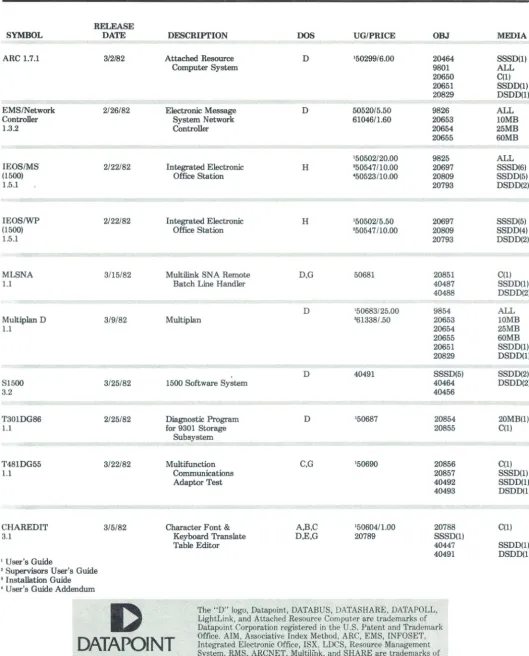
Summary
RELEASE
SYMBOL DATE DESCRIPTION DOS UG/PRICE OBJ MEDIA
ARC 1.7.1 3/2/82 Attached Resource D 150299/6.00 20464 SSSD(1)
Computer System 9801 ALL
20650 C(l)
20651 SSDD(1)
20829 DSDD(1)
EMS/Network 2/26/82 Electronic Message D 50520/5.50 9826 ALL
Controller System Network 61046/1.60 20653 10MB
1.3.2 Controller 20654 25MB
20655 60MB
150502/20.00 9825 ALL
IEOS/MS 2/22/82 Integrated Electronic H '50547/10.00 20697 SSSD(6)
(1500) Office Station '50523/10.00 20809 SSDD(5)
1.5.1 20793 DSDD(2)
IEOS/WP 2/22/82 Integrated Electronic H 150502/5.50 20697 SSSD(5)
(1500) Office Station '50547/10.00 20809 SSDD(4)
1.5.1 20793 DSDD(2)
MLSNA 3/15/82 Multilink SNA Remote D,G 50681 20851 C(l)
1.1 Batch Line Handler 40487 SSDD(l)
40488 DSDD(2)
D 150683/25.00 9854 ALL
Multiplan D 3/9/82 Multiplan '61338/.50 20653 10MB
1.1 20654 25MB
20655 60MB
20651 SSDD(l)
20829 DSDD(1)
D 40491 SSSD(5) SSDD(2)
S1500 3/25/82 1500 Software System 40464 DSDD(2)
3.2 40456
T30lDG86 2/25/82 Diagnostic Program D 150687 20854 20MB(1)
1.1 for 9301 Storage 20855 C(1)
Subsystem
T48lDG55 3/22/82 Multifunction C,G 150690 20856 C(1)
1.1 Communications 20857 SSSD(1)
Adaptor Test 40492 SSDD(l)
40493 DSDD(1)
CHAREDIT 3/5/82 Character Font & A,B,C 150604/1.00 20788 C(l)
3.1 Keyboard Translate D,E,G 20789 SSSD(1)
Table Editor 40447 SSDD(l)
40491 DSDD(1)
1 User's Guide
2 Supervisors User's Guide
• Installation Guide , User's Guide Addendum
D
The "D" logo, Datapoint, DATABUS, DATASHARE, DATAPOLL,LightLink, and Attached Resource Computer are trademarks of Datapoint Corporation registered in the U.S. Patent and Trademark
DATAPOINT
OffiIntegrace. AteId ME, lAectrossocniiatic Offve Iindex ce, ISMXet, LDCS, Resohod, ARC, EurMS, ce ManaINFOSETgement , System, RMS, ARCNET, Multilink, and SHARE are trademarks of Datapoint Corporation. [image:13.618.58.587.85.741.2]Customer Education
Atlanta, GeorgiaJune 21 Introduction to Datapoint Programming
Boston, Massachusetts
June 14 Basic Word Processing Concepts and Operations June 21 Advanced DATASHARE
June 28 Resource Management System
July 12 Basic Word Processing Concepts and Operations July 26 DATASHARE
Chicago, Illinois
June 14 Resource Management System
June 21 Advanced Word Processing Concepts and Operations Advanced DAT ASHARE
June 28 DATASHARE
July 12
July 19
July 26
Basic Word Processing Concepts and Operations Introduction to Datapoint Programming Disk Con-cepts and Operations
Disk Concepts and Operations DATASHARE
Advanced Word Processing Concepts and Operations
New York, New York
June 14 Basic Word Processing Concepts and Operations
June 21 Introduction to Datapoint Programming June 28 DATASHARE
July 12 July 19
July 26
Advanced LDCS
Disk Concepts and Operations DATASHARE
Basic Word Processing Concepts and Operations Introduction to Datapoint Programming Resource Management System
Philadelphia, Pennsylvania
June 28 Advanced DATASHARE July 26 DATASHARE
San Antonio, Texas
June 14 Attached Resource Computer Electronic Messages System Advanced LDCS
June 21 Introduction to Datapoint Programming Basic Word Processing Concepts and Operations Advanced Word Processing Concepts and Operations Automatic Call Distributor
June 28 Disk Operating System Resource Management System DATASHARE
San Antonio, Texas cont.
July 12 Introduction to Datapoint Programming Disk Concepts and Operations
Resource Management System Advanced DATASHARE
Basic Word Processing Concepts and Operations July 19 Resource Management System
Attached Resource Computer JUly 26 Disk Concepts and Operations
Disk Operating System Resorce Mangement System DATASHARE
Basic Word Processing Concepts and Operations Basic LDCS
Automatic Call Distributor
San Mateo, California
June 14 Introduction to Datapoint Programming
June 21 June 28 July 12
July 19 July 26
Attached Resource Computer DATASHARE
Basic Word Processing Concepts and Operations Disk Concepts and Operations
Resource Management System
Advanced LDCS
Introduction to Datapoint Programming Basic Word Processing Concepts and Operations
Seattle, Washington
June 14 Disk Operating System July 19 DATASHARE
Washington, D.C.
June 14 Resource Management System
June 21 Basic Word Processing Concepts and Operations June 28 DATASHARE
July 19 Introduction to Datapoint Programming
Classes are subject to cancellation if minimum enrollment, 6 students, is not met. Notification of cancellation will be no later than 10 calendar days prior to class start date.
If you have a need for a class beyond this schedule please call, state your need, and we will attempt to place it on our next quarter's schedule.
Note: Effective immediately, registrations for all Customer Educatiun classes will be taken by Customer Education in San Antonio at 512·341·3268. Please call San Antonio for information regarding classes or to register.
Marketing Support Materials
Case Histories Document No. 61371.
Multiplan Simplified User's Guide. Document No. 50697.
Quick Reference Guide for Processors and Peripherals. Document No. 60311.
A Capsule Look at Datapoint. Document No. 60313.
Datapoint Marketing News 14
•
•
PlocessorsandPenpf\eflls
• Document No. 60311
QUICK REFERENCE GUIDE
Sales Education
Class Title Dates
Advanced Sales School
R€presentative Product Class-DP
June 12-16 June 15-17 (Pittsburgh)
Sales Orientation-DP Sales Orientation-CMP Presentation Skills Advanced Sales School
June 21-July 2 July 12-23 July 22-23 August 2-6
Ad Schedule
Publication Date Ad
Business Week June 14 ISX-Talk Is Not Cheap
Fortune
Computerworld Datamation Communications
June 14 ISX-Talk Is Not Cheap June 14,23 DATASHARE
June DATASHARE
News June ISX-Talk Is Not Cheap
ISX-Talk Is Not Cheap ISX-Talk Is Not Cheap
The Office June
Telecommunications June
Modern Office
Procedures
Datasources
June
June
ISX-Talk Is Not Cheap
2150
Systems That Work Together Now
'rade ShoYls
June 14-17
June 22-24
Sept. 21-24
Oct. 27-29
National Computer Graphics Association
IWPA/Syntopican X
Telecommunications Association (TCA)
Federal Office Automation Conf.
Upcoming Teleconference
Date
June 18
Topic
Small Business Computers 1550 update
with related product anouncements.
For more information call Ed. Planning & Development ext. 5103
Datapoint Marketing News 15
The following are classes for CMP representatives or for DP salespeople needing CMP cross training:
Representative Product Class-CMP June 15-16
(Chicago)
Representative Product Class-CMP June 21-22 (Minneapolis)
Representative Product Class-CMP July 29-30 (San Mateo)
Representative Product Class-CMP August 2-3 (Los Angeles)
Representative Product Class-CMP August 5-6 (Dallas)
Systems Education
N arne of ClassRMS2-DBIDS/COBOLIComm (5 days)
DOS Assembler 1 (5 days) DOS Assembler 2 (5 days) CMIS (5 days)
ISX Systems CBG (5 days)
Dates June 21-25 June 21-25 June 28-J uly 2 June 28-J uly 2
June 14-18 June 28
Refurb Equipment
Refurb pricing has been updated. A new schedule of prices will be printed in the July issue of Datapoint
Marketing News. In the meantime, the new refurb
prices may be found in the just-released pink sheets.o
Anaheim, Calif.
Kansas City
San Diego, Calif.
Washington, D.C.
Article Reprints Available
"Datapoint's Strategy: Consolidate and Conquer" from Electronic Business March 1982 is available for
35 cents each.
"Local Network Evolvement" by Gerry Cullen, from Telecommunications is available for $1.00 each.
Minimum order for each article is 1 0 copies,
charg-ed to your cost center, from Lamont Wood, Ext.
7059.0
Index to Articles
Features
ARCNET Local Network Interface Chip to be Sold
on Open Market . ...... 1
Datapoint Announces Design-In Plans for NSl6000 . ..... 4
Datapoint Purchases Division of TRW Data Systems, Canada . ... 1
New Domestic Pricing Features Reductions . ...... 1
Profile: The Wang Alliance System .... 8
Software Corporate EMS Expands to Serve More . ..... 6
1550 Powerful with RJE, DASP, RUP . ...... 4
IEOS 3.2: The Benefits and the Features. . ... 5
Software Ordering Procedures . ...... 7
Hardware ACD, Mini-A CD Enhanced in New Releases. . . . . ... 3
Color Business Graphics Fully Featured in Version 1.3. . .. 11
The Information Processors with the Most Features .... 7
New ISX Pricing Announced . ..... 2
D
DATAPOINT
Datapoint Marketing News Mail Station T41 9725 Datapoint Drive San Antonio, Texas 78284 Datapoint Marketing News is the monthly newsletter for Datapoint employees in the fields of marketing, sales, and support. Our goal is to convey vital marketing and product information throughout the organization. Editor: Claudia McNutt DatapointMarketing News Peripherals Band Printer Gets Serial Interface ..... . 10News Briefs ACU: A Glowing Report on ARC .... 7
Guests Visits Lead to Big Business . ..... 12
President's Club to be Held in Palm Springs . ...... 4
Departments Ad Schedule ...................................... 15
Customer Education . ....... 14 Support Materials .................................... 15
Refurb Equipment . .... 14
Sales Education. . . ... 15
Software Release Summary. . . . .. . . .. . ... . ... 13
Systems Education. . . ... 14
Teleconference. . . . . . 15
Trade Shows. . . . . . . . . .... 15