MASTER THESIS
DRUM ASSISTANT
Arnold Zanderink
EWI
HUMAN MEDIA INTERACTION
EXAMINATION COMMITTEE
dr.ir. D. Reidsma (1st supervisor) prof.dr. D.K.J. heylen
prof.dr. W.R. van Joolingen prof.dr.ir. A. Nijholt
Master Thesis: Drum Assistant Page 1
A
BSTRACT
Master Thesis: Drum Assistant Page 2
P
REFACE
The project described in this document is the result of my master thesis of the study Human Media Interaction at the University of Twente. It was not difficult to come up with an interesting research topic, because playing the drums is a hobby of mine. The project was interesting and challenging, it provided me with many opportunities to use my knowledge gained during the studies – Computer Science (CS) and Human Media Interaction (HMI).
I want to thank my mentor Dennis Reidsma for his support and assistance during my project. This also applies for the members of the graduation committee: Anton Nijholt , Dirk Heylen and Wouter van Joolingen.
I want also to thank Hans Roerdink for his co-operation on the user experiment that has been held with his pupils. Finally, I want to thank all the participants of the user experiments that are conducted in this project.
Arnold Zanderink
Master Thesis: Drum Assistant Page 3
L
IST OF CONTENTS
Abstract ... 1
Preface ... 2
List of contents ... 3
1 Introduction ... 5
1.1 Motivation ... 5
1.2 Problem statement ... 5
1.3 Approach ... 6
1.4 Structure report ... 6
2 Background and related work ... 8
2.1 Existing work ... 8
2.1.1 General research in computer-assisted music education ... 8
2.1.2 Specific computer-assisted tutoring ... 9
2.2 Interview drum teacher ... 10
2.2.1 Summary results of the interview ... 10
2.2.2 Conclusion interview ... 11
2.3 Requirements analysis ... 11
2.3.1 User requirements ... 11
2.3.2 System requirements ... 11
3 Design of the application ... 13
3.1 Global design and data flow ... 13
3.1.1 Input ... 13
3.1.2 Central processing ... 14
3.1.3 Output ... 15
3.2 Drum kit module ... 15
3.3 User functionality ... 15
3.4 Exercise creation ... 17
3.5 Analysis of the drum strokes ... 18
4 Feedback methods ... 21
4.1 Feedback in music education ... 21
4.2 Possible feedback methods ... 21
4.2.1 Forms of feedback ... 22
4.2.2 Direct feedback ... 22
4.2.3 Indirect feedback ... 24
Master Thesis: Drum Assistant Page 4
4.3.1 Direct feedback: ticking along ... 25
4.3.2 Indirect feedback: performance score ... 26
4.3.3 Calculating the score ... 27
5 User experiment and evaluation ... 29
5.1 Goal... 29
5.2 Hypothesis ... 29
5.3 First experiment ... 29
5.3.1 Participants and design ... 29
5.3.2 Procedure ... 29
5.3.3 Materials ... 30
5.3.4 Results and discussion ... 30
5.4 Pilot experiment ... 31
5.4.1 Participants and design ... 31
5.4.2 Procedure ... 31
5.4.3 Materials ... 31
5.4.4 Results ... 31
5.4.5 Discussion ... 33
5.5 Second experiment ... 33
5.5.1 Participants and design ... 33
5.5.2 Procedure ... 33
5.5.3 Materials ... 33
5.5.4 Results ... 33
5.5.5 Discussion ... 36
6 Conclusions and recommendations ... 37
References ... 39
Appendix A: Questionnaire drum teacher ... 40
Appendix B: Evaluation form first experiment ... 42
Appendix C: Exercises first experiment ... 43
Appendix D: Exercises pilot test ... 44
Appendix E: Exercises second experiment ... 47
Appendix F: Results second experiment ... 48
Master Thesis: Drum Assistant Page 5
1
I
NTRODUCTION
1.1
M
OTIVATION
A typical music lesson consists of a one-on-one meeting with a teacher that takes about half an hour. In this meeting the teacher teaches the student both the theoretical and technical aspects of playing an instrument. These theoretical aspects consist of the reading of musical notes, the theory of harmony like chords, the dynamics, etc. The technical part of the lessons focuses on how to hold the instrument, the grip of the fingers and other physical aspects that are required to produce tones from the instrument. Besides the weekly lesson given by the teacher, a student also needs to practice some exercises at home. In most cases the student has to practice some exercises from a lesson book or to play a couple of self-made exercises by the teacher. These exercises will then be addressed in the following meeting, so it is important that the student spends some time on it during the week. The disadvantage of this type of home study is that the student gets no feedback during practice.
In this project we look at a way to make the home study of a student more efficient by providing feedback during their practice. We want to achieve this be designing an application that helps the student while they are doing their home study. The application should provide feedback to the user, to compensate the absence of a real teacher. The help of the feedback will hopefully lead to a better and quicker learning of the study material and will motivate the student to practice more often. Feedback can be provided in several ways and with different purposes to the user. It is important that the student will get help from the kind of feedback of which he has the most benefit from. Therefore, a major aspect of the project lies in the research of several feedback methods and selecting the right types to use in the application.
The application can be designed for education in all types of music instruments in mind. However, we choose to focus in the first instance on only one type of instrument, namely playing the drums. The main reason for this is that I have a musical background in drumming, which means that I can use my musical knowledge of this instrument during the development of the application. An advantage of using a drum kit is that the application does not have to recognize things like pitches and chords, making the implementation a bit easier. Another advantage of choosing a drum kit is that there is a small electronic drum set available at the University that can be used to test with.
In order to define the user group for the application, we will need to identify a user group who would benefit most from such an application. The students of music education can be divided in groups based on their current achieved diploma for their instrument. The lowest diploma is A and the highest D, with an average education period of two years for each diploma. However, most students only achieve the first two or three diplomas, because for most orchestras only diploma A and B are required. In this project we focus on starting musicians till diploma B. The students of this group are mostly young children who are still inexperienced in playing an instrument. We think that they have the most trouble in recognizing errors in their performance and therefore would benefit the most from the extra feedback. It is also the largest group of music students, so it would be the easiest group the find participants for a user experiment.
1.2
P
ROBLEM STATEMENT
Master Thesis: Drum Assistant Page 6 application that will be able to provide feedback to the user, to compensate the absence of a real teacher. An important part of the project lies in the selection of feedback methods that will be implemented. There are many possible types of feedback that can be used in the application. The goal is to investigate from which type of feedback method the student benefits the most.
1.3
A
PPROACH
The first task of the project is to have an interview with an actual drum teacher. The goal is to find out how the application can extend the lessons given by a teacher. The teacher will be asked to give his opinion about how he thinks that children should use the application and which features are going to help the user in learning the exercises.
The results of the interview will be helpful in determining the user and system requirements of the application. The user requirements should specify the tasks of the application from the user's perspective. The system requirements describe the most important functions of the system and the required hard- and software.
The next step is the design of the actual system where we separate the parts that are responsible for the input by the user, the processing and analyzing of the input, and the output to the user. A data flow diagram will be created that divides the system into separate modules and models the data that is exchanged between those parts of the application.
An important part of the application is the analysis of the drum strokes. In this analysis the strokes of the user will be compared with the expected timing of the notes. This expected timing of each note is based on the strokes that are hit by a drum teacher. The reason that we compare the drum strokes with those of a teacher is that it gives a more natural representation of the timing than a mechanical timing. The research by Desain and Honing [DH] shows that a note in an exercise cannot be expressed by a fixed mechanical timing value that holds in all cases, but that the expected timing also depends on the context at which it is played, like the meter of the exercise (for example 3/4 or 4/4). See the related work to read more about this research. To make the comparison between the drum strokes of the student and the teacher, every exercise needs to be played in beforehand by the teacher. After every played repeat of the exercise, an analysis is performed to determine which notes are hit or not, and if there are strokes that do not match with a note. The analysis module will also have the functionality to calculate the difference between the stroke of the user and the teacher, to determine the precision of the played note.
The extra value of practicing drum exercises with the application is the feedback that is provided. Therefore, a brief inventory will be made of many different types of feedback. Because it is not feasible to implement all of the feedback methods, we make al selection of the two best methods. These two types of feedback will be implemented in the application.
The last part of the project will consist of setting up a user experiment. The aim of the experiment will be to determine which of the two implemented feedback methods give the best results in progression of the user. The participants will test the application by doing some exercises, while getting help from one of the implemented feedback methods. An evaluation will be performed by comparing the results of both methods.
1.4
S
TRUCTURE REPORT
Master Thesis: Drum Assistant Page 7
Chapter 2: Background and related work, describes how this research relates to existing work and which background information is gathered. This includes the interview with a drum teacher. This chapter also includes a specification of the user and system requirements.
Chapter 3: Design of the application, focuses on the design the different parts of the application. First, we describe which drum kit we use and how it is connected to the application. After that, we give on overview of the graphical interface and its functionality to the user. Next, we describe how we can create exercises for the application and how the system can use it. The last part will focus on the module that is responsible for the analysis of the drum strokes.
Chapter 4: Feedback methods, deals with the design of the feedback part of the application. First, an overview is presented of several feedback methods that are suitable to use in the application. From this list of methods, we describe in more detail the two that are implemented and tested in the user experiment.
Chapter 5: User experiment and evaluation, describes the user experiments that have been conducted. After each experiment we present the results and give an evaluation. For every experiment we will describe how they are set-up, who the participants were and what exercises were used.
Master Thesis: Drum Assistant Page 8
2
B
ACKGROUND AND RELATED WORK
2.1
E
XISTING WORK
This section contains a general overview of the related work that is relevant to this project and some preparation steps of the project, like an interview with a music teacher and the specification of the requirements. The related work is used as a preparation for the project and shows some interesting research in the field of computer-assisted music education. The first part discusses some work that focuses on musical tutoring with the help of a computer in general. The second part shows some example projects that are developed for a specific music instrument.
2.1.1
G
ENERAL RESEARCH IN COMPUTER-
ASSISTED MUSIC EDUCATIONThe research by Percival, Wang and Tzanetakis [PWT] presents a survey of existing work in computer-assisted musical instrumental tutoring. The projects are separated into two categories, namely ones with a specific goal and those that provide a general learning environment for private practice. Possible goals of music education software can be to enhance the lessons given by the teacher, to provide assistance during the private practice or to motivate the student. In our project we want as goal to enhance the home study by providing an application that gives feedback during their practice. They claim that it is better to give feedback after the student has played an exercise than during their practice. Providing real-time feedback may distract the student too much and prevents the student to make a self-analysis of their performance. We will perform a user experiment in which we test a feedback method of both types to see which will lead to the highest progression. We will only test the progress made within a short period, so this may lead to another conclusion whether real-time assistance is more effective than delayed feedback.
Brandão, Wiggins, and Pain [BWP] explain several instructional strategies which can be useful in the field of computer-assisted music education. The five instructional strategies are:
- Programmed Learning: The student is tutored by presenting frames with pre-stored material. The responses of a student are compared with pre-stored answers to get the required feedback response. The next frame is then based on this response.
- Drill & Practice: A sequence of activities is repeated till the student can do them by nature.
- Socratic Dialogue: In this discovery-learning strategy, the tutor interacts with the students in an effort to force recognition of a concept and correct misconceptions.
- Coaching/Monitoring: This strategy focuses on the engagement of the student in a task. The student is monitored by keeping track of the student’s activities and advice is given if needed.
- Exploratory: This discovery-learning strategy encourages the exploration of a domain where the student is tutored indirectly.
The first two strategies are classified as connectionist approaches that treat learning from the point of view of links between stimulus and response. The other three are cognitive approaches that emphasize the functioning of the brain and how cognitive structures modify the learner’s behavior. The learning strategies that we will use in our project are drill & practice and coaching/monitoring. The drill & practice is used because during home study, a student has to repeat the exercises several times till he can play them without making major errors. In our application we make use of the coaching/monitoring strategy. The drum strokes played by the student are monitored and analyzed during practice. The results of the analysis will be used to coach the student by providing feedback.
Master Thesis: Drum Assistant Page 9 practice individually on a piece of music with the help of a metronome. Each group is also divided into three sub-groups who had to practice in different conditions, namely (1) at performance tempo, (2) a slow and then gradually increasing tempo, and (3) an alternating slow and fast tempo. The improvement of a student is measured by an investigator that did a comparison of the correctness in pitch, rhythm, and tempo between the first and last repetition of the music piece. The results showed that the group that used a model made significantly better improvements in performance tempo than in the other two conditions. The other two conditions were not significantly different from each other. The results also revealed that the modeling condition had a significant effect on the improvements in rhythm correctness. In our project we want to conduct an experiment that looks like the one being held in this project. The goal is to investigate which type of feedback provides the highest improvement in the performance of students. We will only use a fixed performance tempo during the practice, which is the one that resulted in the highest improvements in Henley’s experiment. We will not use a human investigator that judges that performance of the student, but we will measure the improvements mathematically which make the results more reliable.
Desain and Honing describes in [DH] how to convert played rhythms in continuous time to discrete categories in symbolic time. A category is a value that represents a symbolic term, for example, a 1 for an eighth note and a 2 for quarter note. By determining the boundaries of the categories, patterns of musical notes are created. The meter of the rhythm that is used in converting the rhythm to notes, for example 2/4 or 3/4 plays an important role in determining the categories. This means that for different meters, the same rhythm can result in a different pattern. In this project we also need to compare the played drum stokes with the musical notes of an exercise. The methods and findings from this research may come in handy when we need to analyze the drum strokes by the user. However, the research is limited to simple note patterns only.
2.1.2
SPECIFIC COMPUTER-ASSISTED TUTORING
There are drum pads on the market, such as the Beatnik Rhythmic Analyzer [Bea] and the Roland Rhythm Coach RMP5 [Rol], which can be used for practicing the rhythmic precision of drumming. This is an electronic device, which can be used to perform drum exercises at a certain speed (beats per minute). The device then constantly measures the drummer in playing at the right tempo and strength. The feedback from the device consists of a beep that indicates the beginning of each bar, some on-screen instructions and a performance score at the end of the exercise. The feedback given by this device is based on the mechanical timing of the notes, which is not a natural way of playing drums. In our application, we use the recorded timing of a teacher as a reference to determine if the student is playing correct or not.
The research in [WD] describes a drumming robot that has the ability to participate in real-time with another drummer. The robot can vary in pitch and intensity. It is possible for the robot to participate in different ways, such as repeating the rhythm, playing a similar rhythm at the same pace or trying to react on the drum strokes of the other drummer. The robot is an interesting idea to use as an assistance method during home practice. However, it is too ambitious to implement such an extensive feedback method in our application. The feedback methods in our project should be implemented within a reasonable time period.
Master Thesis: Drum Assistant Page 10 The research in [KNZ] describes a system that is able to generate automatically a 3D animation of a drummer that plays along with a given piece of music. The input consists of a sound wave that is analyzed to determine which drums are struck at which moments. The notes that are recognized are stored in a standard MIDI file, which is used to generate the animation. The virtual drummer may be a suitable feedback method to use in our application. It can be useful for a student to see a demonstration of how an exercise should be played, especially if a recording of the teacher is used. A disadvantage may be the student focus too much on playing along with the virtual drummer that he does not really learn the notes.
2.2
I
NTERVIEW DRUM TEACHER
An interview has been conducted with a drum teacher. He works for the music school in Losser for some time. The interview serves as a preparation to get more information about how a typical music lesson looks like and what students are expected to do in their home study. The purpose of the interview is also to get insight about what a teacher expect from a home study application and if he thinks it will help the students with their practice. The questions can be summarized as follows:
1. What is the average age of beginning pupils and do they have their own drum?
2. What types of assistance can be given to students during the lessons and when are they used? 3. Does motivating a student play a role in the lessons?
4. How should the home study of a pupil have to look like?
5. Do you think the use of an application will lead to more and efficient home study? 6. What features do you think that are useful to use in the application?
7. What information do you want to retrieve from the application?
8. Will you think a multi-touch table or an electronic drum kit is suitable to use with the application?
The questionnaire can be found (in Dutch) in Appendix A: Questionnaire drum teacher. In the following section we will give a summary of the answers given by the drum teacher.
2.2.1
SUMMARY RESULTS OF THE INTERVIEW
His pupils are mainly children that started with drum lessons at the age of 8-9. Most of them have their own drum kit at home, or have at least a single drum where they practice on. Some of the teaching methods that are used during the lessons are: play and repeat, playing together, play along with some music, specific exercises for the pupil and the use of recordings. It is not really necessary to motive the pupil during the exercises, but you can give a compliment if he performs really well.
Every pupil is expected to spend some time on home study for at least 15 minutes a day on average. The home study consists of exercise scores or music that the pupil has to play along with. The teacher can provide feedback by answering questions or sending additional material by e-mail. A pupil can get demotivated if they do not practice at home often, because then he sticks to the same exercises too long which can get boring.
It is important that pupils get the feeling of playing on a real drum kit, so therefore it is a good idea to use an electronic drum kit for the application instead of using some other device like a multi-touch table. However, playing on a simple electronic drum kit will not give the same feeling as on a real acoustic drum kit.
Master Thesis: Drum Assistant Page 11
2.2.2
CONCLUSION INTERVIEW
The conclusion of the interview is that such an application is a good idea in theory, but the expectation is that the use of it will decrease after a while when the children lose their interest. The application must be seen as an extension of the home study instead of a replacement of the current way of practicing. A teacher can make exercises to serve as extra learning material that will benefit some pupils that need more attention. A simple electronic drum kit will be a suitable device to use with the application.
2.3
R
EQUIREMENTS ANALYSIS
In this section we will describe the requirements that the application must satisfy. The requirements can be divided into two groups, namely the user and the system requirements. The user requirements specify which aspects the user demands of the system. The application should fulfill these demands to make the application suitable for the intended user group. This is important because each group of users may have different needs and expectations about the use of the application. The system requirements consist of the two parts: the functional and the non-functional requirements. The functional requirements specify the most important tasks of the application. Not all the functionality will be described, but only the basic tasks that the user can do with the application. The non-functional requirements contain the other conditions that are needed, including the used hard- and software and the environment in which the system will be used.
The requirements are set up early in the project and with the final version of the application in mind. Because the implementation is very time consuming, not all the requirements can be fulfilled in the prototype that is tested at the end of the project.
2.3.1
U
SER REQUIREMENTS1. The application is suitable for children from approximately 8 years. The use of the interface must therefore be accessible and attractive to children.
2. The application is suitable for novice students till they have diploma B, which means an average teaching period of ≤ 4 years.
2.3.2
SYSTEM REQUIREMENTS
Functional requirements
1. While practicing, the system checks if the user plays the exercise correctly. Depending on the performance, the user will get help and support during practice. This can include verbal or textual feedback, such as giving instructions and motivating the student. It is also possible to assist in other ways, such as playing along with the user or adjusting the exercise.
2. It checks the usage of the drumsticks by the pupil, whereby a distinction is made between the left and the right strokes. In case of improper strokes, the student will be attended on his mistake. A couple of hands with sticks on the screen will demonstrate the correct stokes.
3. The strength of the strokes can be measured. This makes it possible to use exercises that focus on this, like playing accents.
4. An exercise can be demonstrated on screen. This is done by showing virtual hands and sticks that are playing the notes.
5. The application is able to detect errors immediately and shows this to the student. This should prevent that the pupil does not teach himself the wrong things.
6. A teacher can create custom drum exercises with a special editor quickly and easily. The drum kit can be used here, so limited computer skills are needed to create new exercises.
7. A teacher can make recordings (with or without video), which can be used as an exercise where a student can play along with.
Master Thesis: Drum Assistant Page 12 9. A teacher is able to request information about how much time a student spent on the exercises and
how well he/she plays the exercises.
10. A teacher has control over the exercises that a student can do. This disallows a student to skip parts and to practice exercises that are not treated yet by the teacher.
Non-functional requirements
1. The application is written in Java, so that it is easy to make use of existing Java libraries.
2. The application uses the drum kit available for the Wii version of Guitar Hero World Tour. This drum set consists of five drum pads and a foot pedal. There must also be a Wii remote placed within the drum kit. A simple set-up of the drum kit in combination with a monitor can be seen in figure 1. 3. The computer on which the application runs must have a Bluetooth adapter. This is needed to connect
with the Wii Remote of the drum kit.
[image:13.595.206.364.296.558.2]4. An internet connection is needed to send messages to a teacher. The teacher can send exercises over the internet or give the student a memory stick.
Master Thesis: Drum Assistant Page 13
3
D
ESIGN OF THE APPLICATION
This chapter describes the design of the most important parts of the application. The first section gives a global overview of the application. A data flow diagram is presented that shows all the interaction between the modules within the application. The next section describes the part of the application that is responsible for the communication between the drum kit and the application. This module makes sure that all drum hits are correctly detected. The following section describes the user functionality of the application. Some functions are only accessible by a teacher, like preparing new exercises so that the pupils can use them. The creation of new exercises by the teacher is described in the following section. The last section focusses on the analysis of the drum hits that are played by the user and how they are compared with the drum strokes of the prepared exercise by the teacher
3.1
G
LOBAL DESIGN AND DATA FLOW
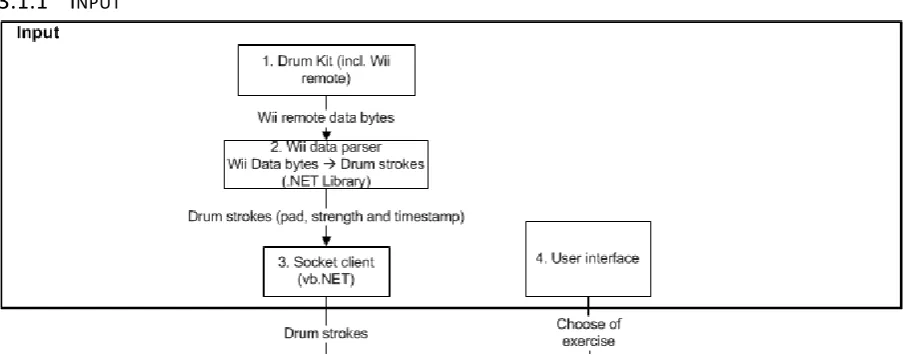
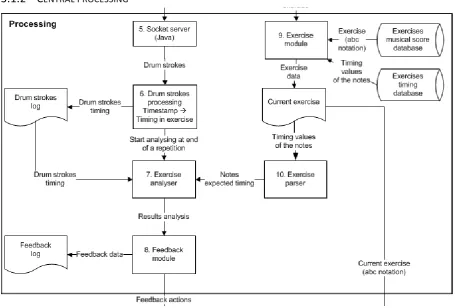
In this section a global overview is presented using a data flow diagram which is shown entirely in Appendix G: Dataflow diagram. The application is split up into three parts, namely the input (figure 2), central processing (figure 3) and output part (figure 4). The various parts of the application are numbered in the diagram and are discussed briefly in the following sections.
[image:14.595.72.524.362.544.2]3.1.1
INPUT
Figure 2, the input part of the system
1. The Wii remote of the drum kit sends data to the computer using a Bluetooth connection.
2. The Wii data parser takes care that received data is translated into drum strokes. A drum stroke consists of the following information: the type of drum pad, the strength and a timestamp at which it was hit.
3. Each drum stroke is sent to the processing module over a socket connection. This connection is necessary because the Wii data parser module is implemented in Visual Basic .NET and the rest of the application in Java. See section 3.2 for further details.
Master Thesis: Drum Assistant Page 14
3.1.2
CENTRAL PROCESSING
Figure 3, the central processing part of the system
5. The processing module receives the data of the drum strokes over the socket connection from the input module.
6. The drum strokes processing module takes care that each drum stroke gets a timing value based on its timestamp. This timing value indicates at which point in the repetition of the exercise the drum stroke was hit. So for example, a timestamp like “11:04:23.122” will be converted to a timing value of “1645ms”. This means a drum stroke played at that particular moment is actually 1645 milliseconds after the first count in the exercise. All processed drum strokes are stored in a log file. It starts the analysis of all the newly received drum strokes when the end of the repetition is reached.
7. The timing of the drum strokes are compared with the expected timing values of the notes. A report is generated with the timing of all the notes and their corresponding drum strokes. This report includes also information about the drum strokes that are hit too many and the notes that are not hit at all. This timing information is stored in a file, so that it can be used later too see the results of a user experiment. A more detailed description of this method is described in section 3.5.
8. The results of the analysis are used by the feedback methods to provide support to the user. The score feedback method will use the information to determine the score of the performance by the user (see chapter 4).
9. The exercises are stored in separate files and are specified in the so-called ABC notation (see section 3.4). The exercise module takes care that all the necessary information of the exercise, like the timing of the notes, the tempo, etc., is read from file and loaded into the application. The reading of the exercise information from file is only executed once before the user starts the exercise.
Master Thesis: Drum Assistant Page 15
3.1.3
OUTPUT
Figure 4, the output part of the system
11. The output module takes care of the actions send by the feedback module. Depending on the type of feedback method it can show text on the screen, give an animation or play midi sound. For example, the score feedback displays a score and a diagram, and the ticking feedback plays midi output (see chapter 4).
3.2
D
RUM KIT MODULE
A good functionality of the application depends on a reliable detection of the drum strokes. The drum kit module is a separate part of the application that is responsible for detecting the drum strokes played by the user. It takes care of the communication between the drum kit and the main application. The module makes use of some hardware and external software, which will be described below.
The drum kit used in this project was a simple drum set that is designed for the Nintendo Wii console. There are of course other more professional electronic drum kits on the market, but this one was available at the University. There was also already external software available on the web that can be used to create a connection between the drum kit and the PC. The disadvantage of this drum kit is that it does not feel like a real drum kit, because it is smaller and lighter than a professional one. It also appeared from the early tests that this type of drum kit is not able to detect soft hits very well, especially with the bass drum pedal. This is a small limitation that must take into account during the user experiment later in the project.
The communication between the drum kit and the application takes place through a Bluetooth connection between the Wii remote and the adapter within the PC. There are several software libraries available that are designed to read the data that is sent by the Wii remote, and a few of them supports the drum kit extension. Unfortunately, there was no library available written in the programming language Java that worked with the drum kit, so we used a .NET library called WiimoteLib [WR]. By using the API of this library we created a small application that reads the data of the Wii remote and indicates if any drum pad had been hit. The output displays the drum pads and the time on which they were hit. To use this data of the drum strokes, we had to make a socket connection between this program written in VB.NET and the application written in Java. The connection between the two parts is established when the application is started.
3.3
U
SER FUNCTIONALITY
Master Thesis: Drum Assistant Page 16
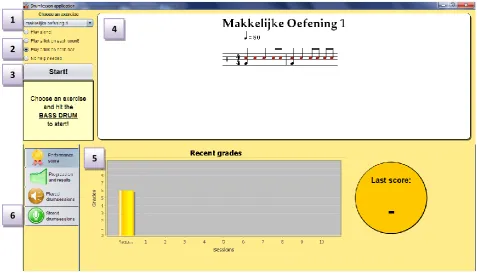
Figure 5, screen shot of the application in 'teacher-mode' with the score feedback shown. The ‘student-mode’ looks the same, but does not have the three bottom tabs, that are only accessible by a teacher.
1. The user can select an exercise from the menu. These are the exercises that are created by the teacher and are ready to be used by a pupil.
2. There is the option to select the type of direct feedback. There are four different options where the user can choose from, ranked by the amount of help that it provides. The available options are:
a. The notes of the exercise are played on the expected timing. The user can play along with the exercise.
b. A tick is played on every beat.
c. A tick is played on the first count of every bar.
d. There is no direct feedback given at all. This means that the user have to count by himself. The following chapter will explain the different types of feedback in more detail.
3. The user can start (or stop) the exercise by pressing this button. This is of course not practical when you are having two drum sticks in your hands, so it is also possible to start by hitting the bass drum. The exercise is always preceded by two ticks to indicate the tempo and the starting moment of the exercise. The exercise automatically stops when no new drum strokes are detected within a period of two bars.
4. The musical score of the exercise is showed in this panel. The colors of the notes correspond with those of the drum pads. This extra indication will be useful to the user to get familiar with the drum kit, because it looks and plays different than a real drum set.
5. In this panel there is room for visual output by feedback methods, like the score method described in the following chapter. If there is more than one visual feedback method implemented, the user can view one of them by selecting the required tab.
6. In this screen shot, there are four tabs visible. However, the last three tabs are not visible when the application is started in the so-called user-mode. The second tab shows a table of all notes with an indication if they are played correct or not and the last two tabs are used by a teacher to store the timing values of their played sessions. This timing information will be used later to analyze the drum strokes of the pupil. The following sections 3.4 and 3.5 will discuss the creation of new exercises and the analysis of the drum stroke in more detail.
1
2
4
3
5
Master Thesis: Drum Assistant Page 17
3.4
E
XERCISE CREATION
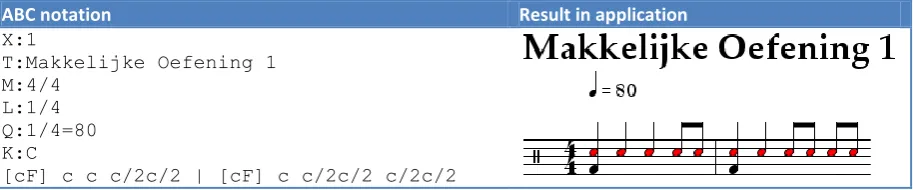
[image:18.595.70.527.182.277.2]The teacher has the opportunity to add new exercises to the application. This cannot be done directly within the application, but with the help of a simple text editor. The exercises have to be specified in a text-based music notation, the so called ABC-notation [Abc]. An example of an exercise in this notation, including the musical score in the application, is in table 1.
Table 1, an example of an exercise specified in ABC notation
ABC notation Result in application X:1
T:Makkelijke Oefening 1 M:4/4
L:1/4 Q:1/4=80 K:C
[cF] c c c/2c/2 | [cF] c c/2c/2 c/2c/2
The first six lines of the notation are called the header, and contain various information fields about the exercise, namely from top to bottom: the exercise ID, title, meter, default note length, tempo and the key signature. In this case the key signature for a drum score is specified with ‘C’. The last line of the notation specifies the notes and bars, where each bar is separated by the character ‘|’ and every note by a space. Because a drum score does not have actual tones, here the ‘c’ note stands for the snare drum and the ‘F’ note for the bass drum. The default note length is set as a quarter note (see ‘L:1/4’), so every single ‘c’ or ‘F’ indicates a quarter note. To reduce the length a note, a slash ‘/’ character can be used along with the reducing factor. For example to get an eight note, we have to reduce a quarter note by a factor of 2, so the notation is ‘c/2’. Finally, to specify more than one note at the same time, we can put them between brackets, like ‘[cF]’. Of course, there are a lot more options to specify an exercise, but for the exercises used in this project the above notation contains all the necessary elements.
To show an exercise written in ABC notation, we make use of the Java library abc4j [A4J]. It provides a parser to parse tunes written in ABC notation and supports midi playback and music score display. It is possible to modify the source code of the library to extend it with own features. There are few features added to the code that were necessary to make it suitable for using it in the application. These features are:
There are colors added to the notes in the musical score. These colors correspond with the ones used by the drum kit. This feature helps the user to learn which drum pad has to be used for which notes in the exercises.
The midi output is changed so that it plays drum sounds instead of piano tones. The drum sounds are heard when the play along feedback option is selected and when a drum session is replayed. There is also a percussion sound played when the ticking feedback is used.
Some small moderations are made to the musical score. The size of the notes is increased and the key signature, shown at the beginning of the bar, is changed to the one that is used for drum notation.
Master Thesis: Drum Assistant Page 18 have timing information yet will use the mechanical timing values. These timing values are calculated according to the pace of the exercise, the type of note and the location of the note. This gives a precise timing of the note, but is not a natural representation of the expected timing.
3.5
A
NALYSIS OF THE DRUM STROKES
This section explains how the drum strokes by the user are analyzed and compared with the musical notes in the exercise. This is a necessary step to determine which drum strokes corresponds with which note in the exercise. This information will be used by the score feedback method that compares the timing values of the teacher with those of the user. The analysis should also detect if there are notes not played or if there are any drum strokes that are played too many. We will give a brief overview of the algorithm that is used to analyze each drum stroke.
The first step of the analysis of a drum stroke is to search for possible corresponding notes. This is done by looking at the timing range of each note in the exercise. The range of a note is determined by the type of note, the tempo of the exercise, the mean and standard deviation of the timing values. There is also some standard margin percentage used that determines the possible minimum and maximum timing of a corresponding drum stroke. The margin depends on the type of note and the tempo of the exercise. This means that a quarter note will have a greater margin than an eight note within the same tempo, and that the same note will have a smaller margin in a faster than in a slower tempo. This margin is tested and adjusted according to the findings during various pre-tests and the first experiment described in chapter 5. For the second experiment it was set at 30% of the note length. We will explain how the range of a note is determined by giving an example.
E
XAMPLE DETERMINING THE TIMING RANGE OF A NOTESuppose that a teacher plays an exercise ten times, where his timing values of the first note are as follows:
Timing values note = [25, 5, 0, -5, 10, -10, 10, 5, 0, -5]
The mean value µ =
= 1/10 * (25 + 5 + 0 – 5 + 10 – 10 + 10 + 5 + 0 – 5) = 3.5
The standard deviation σ =
= √ (1/ (10 – 1) * (21.52 + 1.52 + (-3.5)2 + (-8.5)2 + 6.52 + (-13.5)2 + 6.52 + 1.52 + (-3.5)2 + (-8.52)) = √90.25 = 10.0139
Master Thesis: Drum Assistant Page 19
Figure 6, the standard normal distribution of the timing values, both with and without a margin of 50 milliseconds. The diagram also includes a histogram that shows the distribution of the timing values for the first note.
If more than one note corresponds with the timing of a drum stroke, it will choose the one of which the timing is the closest to the mean of the note. So if drum stroke is hit at 25ms and it is in the range of two notes with a mean timing of 0ms and 20ms, it will select the second one at 25ms. There is however an exception being made when the first one does not have a corresponsive drum stroke. Then, it could be the case that the user is playing the exercise too slow and that the drum stroke should correspond with the first note instead of the second one. The first note will then be the corresponsive note for this drum stroke for now. This will be corrected later if needed, when the next drum stroke does not correspond with the note on 20ms but with a note later on.
It can also occur that the note found by this algorithm already has a corresponding drum stroke. In this case, the drum stroke that is closest to the mean timing of the note will be the corresponding one. The other one will be temporarily marked as too many. After each repetition of the exercise all drum strokes that are marked as too many will be checked again to find a note without a corresponding drum stroke. Finally, when no corresponding note can be found, the drum stroke will stay marked as too many. We will explain this method with an example.
E
XAMPLE FINDING THE CORRESPONDING NOTE OF A DRUM STROKESuppose there is an exercise that consists of three notes with an excepted timing of 0ms, 250ms and 350ms. All three the notes are quarter notes that have a deviation of 75ms that includes the margin value. The user plays four drum strokes on timing 20ms, 50ms, 290ms and 320ms. The following steps are taken, starting with analyzing the first drum stroke on 20ms.
1. The notes in the exercise are checked to find the ones where the timing of the drum stroke is within the range of the note. There is only one possible note found, namely the one on 0ms. So, the first note corresponds with the drum stroke on 20ms.
Master Thesis: Drum Assistant Page 20 3. Then the third drum stroke on 290ms is analyzed. There are now two notes of which the drum stroke is in the range of the timing, namely the second note on 250ms and the third note on 350ms. The second note on 250ms is the closest to the timing of the drum stroke. This means that the second note corresponds with the drum stroke on 250ms.
4. Finally the last drum stroke is analyzed. As with the previous drum stroke, also the second and third notes are found. The expected timing of the third note is the closest to the drum stroke, so this note is selected as the best match. The algorithm also checks if its previous note (the second note) already has a corresponding note. If this is not the case, it will select this note as the corresponding note, because then it could be the case that the exercise is played too slowly. This will be corrected later if this was not the case and the note is just not played at all. In this example the second note already has a matching drum stroke, so the third note will correspond with the drum stroke on 320ms.
Master Thesis: Drum Assistant Page 21
4
F
EEDBACK METHODS
The added value of practicing exercises with the help of an application is the possibility to receive feedback. There are numerous types of feedback possible to use in a music education application. The related work described in chapter 2 already presented a couple of possible feedback methods, but there are of course many more that can be used. In our application, we want to implement two different kinds of feedback methods that will be tested in a user experiment. The goal is to determine which method leads to the highest progression after a short period of practicing.
4.1
F
EEDBACK IN MUSIC EDUCATION
Providing feedback is an approved method for all kind of education. Feedback can serve the purpose as reinforcement or as information [May]. A reinforcement feedback serves to strengthen the association between a stimulus and a response. A positive reinforcement can be a gift that is given to the person when he behaved well or did some fine work. Although this type of feedback can immediately lead to positive behavior, the result will not last in the long term. Feedback can also serve as information that the user needs to interpret to get the desired learning outcome. This can be achieved by providing hints or general guidelines to solve a particular question or task. The advantage of this type of feedback is that the learned principle or strategy can also be applied to new situations. Two different forms of education are response learning and skill learning. In response learning, the purpose is to change a single aspect in the behavior of the person, like throwing a ball into the net or raising a hand before you speak in class. In skill learning, a person is learned to carry out a procedure, like solving a complex calculation or playing a music instrument. Music education can be defined as skill learning, of which a person needs to practice it continually to master. This type of learning needs extensive practice with increasing challenges. A way to practice and to get provided with increasing challenges is the use of computer-based tutors. Previous studies described in the research by Mayer have proved that providing immediate and high-quality feedback with these tutors resulted in better performances by the students.
In a typical music session given by a teacher, the teacher mostly stimulates the student to learn the exercise on his own. A teacher let the student play an exercise several times and will only provide feedback when the student actually needs it. He mostly provides feedback as information, like asking the student what mistake he had made. The results of the interview that has been held earlier in chapter 2 says that it is important that mistakes are recognized early by the student, so that he does not learn the wrong things. By letting the student recognize his mistake on his own, he will learn to recognize them in other situations as well during his home study.
In our project we want to provide a computer-assisted learning environment that provides feedback to the student during their practice. The feedback provided by the application most be informative, so that the learning effect will last and that the learned principle can be applied to other situations as well. In the next section we will discuss various forms of feedback that could be a candidate to use in our application.
4.2
P
OSSIBLE FEEDBACK METHODS
Master Thesis: Drum Assistant Page 22
4.2.1
FORMS OF FEEDBACK
The different types of feedback can be grouped by their form or content. The form is the way in which the feedback is provided to the user. This can be done on-screen within the application, using sound or with the use of external equipment. The content of the feedback determines the type of assistance that is provided to the user. This content can be specific related to the exercise or performance of the user, but the purpose can also be to motivate or entertain the user. Typical feedback content in music education is:
1. An indication of the timing of the notes.
2. An indication when the user has played something wrong. 3. A guidance to keep the user playing in the right tempo.
4. More detailed instructions about how the user can improve his performance. 5. An attempt to motivate the user to improve his morale.
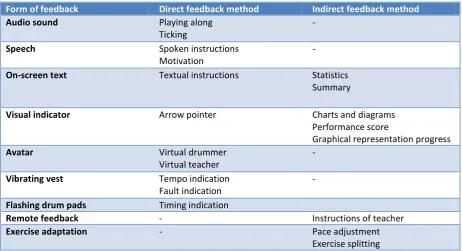
[image:23.595.65.528.390.641.2]These feedback contents can be provided to the user in several forms. Some content can be expressed better with a particular form than with others. For example, it is more useful to indicate the tempo using sound than with text on the screen, meaning that the user can keep his focus on the exercise. In the next section we will give an overview of a couple of feedback forms, by which we suggest possible content that can be provided with it. Most of the suggestions are based on other research projects or derived from the feedback methods provided by a real music teacher. The rest of the feedback methods listed are imagined after a brainstorm session. The table below gives a summary of the direct and indirect feedback methods that are described in the following sections.
Table 2, a summary of several forms of feedback with possible direct and indirect methods that can be used in our application.
Form of feedback Direct feedback method Indirect feedback method
Audio sound Playing along Ticking
-
Speech Spoken instructions Motivation
-
On-screen text Textual instructions Statistics Summary
Visual indicator Arrow pointer Charts and diagrams Performance score
Graphical representation progress
Avatar Virtual drummer Virtual teacher
-
Vibrating vest Tempo indication Fault indication
-
Flashing drum pads Timing indication
Remote feedback - Instructions of teacher
Exercise adaptation - Pace adjustment Exercise splitting
4.2.2
DIRECT FEEDBACK
This section provides an overview of several forms of direct feedback with one or more suggested content that can be provided to the user. Direct feedback is a type of feedback where assistance is provided constantly to the user during the practice of an exercise.
A
UDIO SOUNDMaster Thesis: Drum Assistant Page 23 notes or rhythm that is treated in the exercise. This is a feedback method that is actually used by the drum teacher that was interviewed (see chapter 2).
Ticking: While practicing an exercise, a tap is played on each count. This gives a student a guiding while playing the exercise, especially when he has trouble playing at the right pace. A disadvantage may be that a student will not count by himself. Alternatively, there could be counted on the bar, possibly in combination with the ticking on the beat (for example: one! - tap - tap - tap, two! - tap - tap - tap). This method almost similar to the use of a metronome, which is used a lot in music education. The criticism of musicians about the use of a metronome in music education is mixed [Met]. The positive view is that because the beat of a metronome is steady, it is very useful to learn rhythmic precision in both slow and fast tempo. A negative view is that a metronome is too strict and mechanical, while music has more expression and flexibility. The music played along with a metronome does not feel natural in hearing and practicing with a metronome can even lead to a loss of the musicality.
S
PEECHSpoken instructions: Guidance is given during practice. These instructions are provided to the user as spoken sentences. The advantage of spoken sentences in contract to textual instructions is that the student can continue to concentrate on playing without having to read the instructions. The instructions given must be similar like to ones an actual teacher will provide, so that the student will not have much trouble in interpret them.
Motivation: Attempts are made to motivate the user while playing the exercise. This can be done by saying things that encourage the student to continue, when he does not master an exercise. It should also give a compliment when the exercise is played well. The teacher that we interviewed said that it was not really necessary to motivate the students during their practice.
O
N-
SCREEN TEXTTextual instructions: The instructions are the same or with speech, but are now showed on-screen. The disadvantage in relation to audio instructions is that the student cannot read them during practice, because he has to keep his focus on the exercise.
V
ISUAL INDICATORArrow pointer: During practice, an arrow or other indicator appears that moves along with the exercise. Because of this, it is always clear where in the exercise the user is located. A pointer can be a useful addition to the ticking along feedback, but is probably not accurate enough to serve as a separate feedback. The principle is used in many music games, like Guitar hero [GH] and Rock Band [RB] to indicate the expected timing of the drum strokes.
A
VATARVirtual drummer: A virtual drummer is displayed on the screen that plays along with the user. The user can look at the drummer to see how the exercise is played. It will probably give a better feel of playing along than when only the exercise is heard. A disadvantage is that a student can be distracted. An example of a virtual drummer can be found in [KNZ]. This virtual drummer can recognize music and plays along with the drum part.
Master Thesis: Drum Assistant Page 24
V
IBRATING VESTTempo indication: The application can make use of a vibrating vest [FTM], where a student is wearing a special vest with vibrating elements that can be controlled. This vibration can be used to develop various types of feedback. One possibility is to use the vibration to indicate the tempo of the exercise. A disadvantage may be that vibrating wearing a vest is not comfortable during practice.
Fault indication: Another option is to give a vibration when a student forgets a note or plays it too early or too late. The vibration must be interpreted by the user to recognize the mistake he has made.
F
LASHING DRUM PADSTiming indication: During the exercise the drum pads lights up when a drum stroke is expected. This can give a nice effect when the drums are hit simultaneously. It can therefore motivate students to master the exercise as quickly as possible. The lighting effects can also provide too much help, so that the user not actually learns the notes.
4.2.3
INDIRECT FEEDBACK
This section provides an overview of several forms of indirect feedback with one or more suggested content that can be provided to the user. Indirect feedback is a type of feedback where assistance is provided to the user periodically, like after each repetition of an exercise. Most of the suggestions are based on other research projects or derived from the feedback methods provided by a real music teacher.
O
N-
SCREEN TEXTStatistics: The feedback consists of statistics based on the performance of the student. This information will be updated after each repetition of the exercise. All kinds of information can be displayed, such as the percentage of correctly played notes, the number of notes that were played too early or late, etc. These data may be interesting for the teacher to monitor the progress, but it provides little information to the student about which parts of the exercise goes well and which not.
Summary: After each played repetition a summary is displayed with information about which parts of the exercise the student does and does not master. A short message is given that indicates where the error is located and how the user can improve it. A possible summary can be:
- In the second bar, the 16th notes on the snare drum must be played a little faster. - You play the bass drum very well on the beat.
The disadvantage is that after each played repetition, the student must stop playing to read the text.
V
ISUAL INDICATORCharts and diagrams: The statistical information can also be displayed in graphs and charts. The advantage is that it is faster to see how much progress a student is making as opposed to just numerical information. A disadvantage of the use of graphs is that it is difficult to provide direct assistance on the parts that the student does not master. A student must interpret the information from the charts by himself to help him improving the exercise.
Master Thesis: Drum Assistant Page 25 Graphical representation of the progress: The progress of the user is displayed in graphical form. This shape changes during the exercise, depending on the progress of the student. This could be a red circle that slowly changed to a green square, or a smiley face that will look happier. The disadvantage is that only a figure cannot give precise information on what a student is doing wrong. However, it is possible to indicate some general information in a figure. For example, if a pupil is often too early or too late, it can be indicated by a figure that is leaning to the left or right.
E
XTERNAL FEEDBACK TEACHERThe teacher has the ability to remotely monitor the performance of the student, like the statistical information that is described earlier. The teacher can use this data to return feedback containing instructions or additional exercises. It is best when this form of communication is integrated in the application, so that the instructions will be displayed immediately when the student begins to practice. The teacher that was interviewed liked the option to monitor the progress of his students and to see how much time is spent on each exercise.
E
XERCISE ADAPTATIONThe exercise will be adjusted during practice according to the performance of the student. If it appears that the student plays many notes too late, the application may decide to slow down the pace. Another adjustment that can be done is to divide the exercise into multiple parts. The first part treats only the snare drum, the second one the bass drum and the last one both drums together. If it appears that the student plays an exercise good enough, it can suggest him to go to the next exercise. These adjustments are similar to the ones that a real teacher will apply during the lesson.
4.3
S
ELECTION OF FEEDBACK IN OUR APPLICATION
There will be two user feedback methods implemented that are tested in the user experiment. The goal is to investigate what type of feedback will give the most progression to the user. A choice will be made between one of the direct and one of the indirect methods. The choice will also depend on the feasibility of the implementation.
4.3.1
DIRECT FEEDBACK: TICKING ALONG
The choice for the direct feedback fell on the ticking along method. From the beginning of the project there was already the plan to implement some feedback to help the user to play in the right tempo. This default feedback should consist of a tick played on the first beat of every bar. The tempo indication is necessary to analyze the drum strokes by the user, because then the timing can be compared with the drum strokes hit by a teacher in the same tempo (see section 3.5). It is much harder to analyze drum strokes if the user is allowed to play in their own tempo, because then we need to detect automatically if the tempo has decreased or increased. To make the implementation feasible, we have chosen to use a fixed tempo during the practice.
Master Thesis: Drum Assistant Page 26 As described earlier, there are several other variations possible, especially if it is combined with verbal counting. The following variations are listed below, with the one that gives the most help on top:
- Counting on the beat (One – Two – Three - Four).
- Counting on the beat en ticking on the beat (One – Tap – Tap – Tap, Two – Tap – Tap – Tap).
- Ticking on the beat.
- Counting on the bar.
- Ticking on the bar.
A student does not always need the same kind of help during the exercise. At the beginning of an exercise, a lot of students need the help of the count on the beat. But after a while the student will no longer need it, because he masters the exercise better. Also, it is not very handy that a student must change the level of aid by himself. It is better that it automatically adjusts to the level of the student. For this purpose, the application should keep track of the performances of each exercise of the student, so that at the start of an exercise the appropriate amount of feedback is used. In the prototype that is tested in the user experiment, only two of the variations will be implemented, namely ticking on the beat and on the bar. The ticking on the bar will be used as the standard feedback, and the ticking on the beat as the one that will be tested.
4.3.2
INDIRECT FEEDBACK: PERFORMANCE SCORE
As indirect feedback method the choice fell on the performance score at the end of a played repetition of the exercise. This is a form of informative feedback (see 4.1) by which the student has to interpret the score to find out which mistakes he has made. He learns how to recognize mistakes and will be able to correct them. The advantage is that the learning effect will last and the student will be able to use this knowledge in new situations as well. Another positive effect of this feedback is that it can motivate the student to improve his score, especially if he can see his progress of the past few days. A final reason to choose a score feedback is that because only a simple number is shown on screen, the student can easily look at his score during practice without being too much distracted.
There is a choice to give an overall score or a report with some sub-scores in various categories. The overall score is a weighted average of the sub-scores, depending on how important each part must be judged in a particular exercise. Below we will briefly discuss some possible sub-scores. Initially, one of these will be chosen to implement and test by users.
T
IMING PRECISIONThe student receives a score for his precision of the drum strokes. A high score will be given when the timing of the notes are close to those of the teacher. For every note, the mean and average deviation must be calculated based on the timing values of the teacher. The timing of the drum stroke from the user will then be compared with these values. There should be some kind of reference table specified, that can be used to determine the score of a note, based on the type of note, the timing of the drum stroke and the timing values by the teacher. The average score of all notes will be the score that is shown to the student.
C
ONSISTENCYA score is calculated which relates to the consistency of the drum strokes. A note is not played constant if there is a lot of difference between the timing values. If this holds for most of the notes in the exercise, the student gets a low score for consistency. It is possible that a student often plays the notes too early, but rarely too late. He will get a high mark for consistency, even though he is not accurate in the timing of the notes. Therefore it is possible to get a high mark for consistency, but still a low one for timing precision.
D
YNAMICSMaster Thesis: Drum Assistant Page 27 recognize the strength of the notes that are played, although it has trouble to detect notes that are played very soft.
C
ORRECTNESS BY DRUMIt is also possible to split the scores for each played drum in the exercise. Now the student can see on which drums he makes the most mistakes.
C
ORRECTNESS BY THE TYPE OF NOTEFinally, a score can be calculated for each type of note, like the quarter notes, eighth notes, etc.
As mentioned before, an experiment will be held with users to test which of the two feedback methods gives the most progression. Because it is not feasible to implement all of the score variations describes above, we only choose one to implement. The choice fell on the score for the timing precision, because it gives in our opinion the best picture of the performance of the student. The intention is that after each repetition a new score appears on the screen. The old scores are shown in a graph, so that the student can monitor his progress. The scores must be stored so that a graph over several days can be displayed. The following section will explain how the scores are measured based on the performance of the user.
4.3.3
CALCULATING THE SCORE
The score feedback gives a score of the performance after each played repetition. This score is calculated based on the precision of the drum strokes. Every drum stroke is compared with the timing values of the teacher. Therefore, a teacher has to play an exercise a few times to create a good comparative model. Then after each repetition, the expected timing of each note is compared with the timing of the corresponding drum stroke. When all notes are compared, a score is calculated which consists of the following components:
- A score of each note compared with the corresponding drum stroke. - Possible minus points for notes that are not hit at all.
- Possible minus points for drum strokes that are hit too many.
4.3.3.1
E
VALUATION OF THE DRUM STROKESAfter a repetition is played, each played note is evaluated on the timing precision. Each note will get a separate score, based on the difference between the timing of the drum stroke and the mean value of the timing played by the teacher. This difference is calculated as follows:
Difference =|timing drum stroke – mean timing teacher|
[image:28.595.66.529.616.657.2]This value gives an indication of the precision of the drum stroke. The smaller the difference, the higher the score for this note will be. Table 3 shows which score will be given to which difference value.
Table 3, the scores given to each note based on the difference between the expected timing and the corresponding drum stroke.
Difference in timing (ms)
0 – 25
25 – 50
50 -75
75 - 100
100 -125
125 - 150
150 -200
200 - 250
250 - 300
> 300
Score 10 9 8 7 6 5 4 3 2 1
Master Thesis: Drum Assistant Page 28
4.3.3.2
M
INUS POINTS ON THE SCOREA user gets minus points on the score when certain notes have not been hit and when he plays too many drum strokes. The sum of minus points depends on the total number of notes in the exercise. For every note that has not been hit or drum stroke that is played too many, a percentage will be deducted from the score depending on the number of notes in the exercise. For example, if an exercise has 10 notes, and there are two faults played, this gives a fault rate of 2 / 10 or 20%. The percentage that is deducted from the score is not linear with the fault rate. This is because then a single fault would not affect the score enough. A user, who plays all the notes right, but plays one drum stroke too much, will not get a high score because he does not play the exercise correctly. This mistake should be noticeable in de score. An overview of the fault rates and corresponding score reduction is listed in table 4. As with the scores of the correct drum strokes, the values in the table were determined during various user tests. The fault percentage is calculated as follows:
[image:29.595.64.532.281.335.2]Fault percentage = (Drum strokes too many + Notes not hit) / Total of notes * 100%.
Table 4, an overview of the overall score reduction based on the fault percentage achieved by the user.
Fault-percentage
0% 1% - 10% 10% - 20% 20% - 30% 30% - 40% 40% - 50% 50% - 60% 60% - 70% 70% - 80% 80% - 90%
90 % - 100%
> 100%
Score reduction
1,00 0,75 0,60 0,50 0,42 0,36 0,32 0,30 0,28 0,27 0,26 0,25
4.3.3.3
E
XAMPLE OF AN EVALUATION [image:29.595.63.535.419.458.2]Suppose we have an exercise with a total of 10 notes. In table 5 we have for every note the expected timing based on the timing values played by the teacher.
Table 5, the expected timing for each note in the exercise.
Note 1 2 3 4 5 6 7 8 9 10
Expected timing
0 1000 1250 1500 2000 2500 2750 3000 3250 3750
A student plays the exercise one time after which a score is calculated. The application determines which drum strokes correspond to which notes and whether any notes have not been hit or drum strokes are played too many. It appears that the student has played 9 of the 10 notes correct, one note is not played (note 4) and that there are 2 drum strokes hit too many. Table 6 shows for each note in the exercise: the timing of the drum stroke played and the score of the note.
Example, the differen