No. 47
May-June
1989THE
CRO
Robotics
Here we go folks, rug rats that scatter spare (and not so spare) parts on the floor.
The LIMBO Project
page 8This is the first of a series that'll help you build your own maze-running robot.
Starting A Robotics
Company
page 64
Growing custom robots may not be the easiest way to make a living but it's not dull.
How To Write And Use
page 16A System Profiler
Problem Solving
page 22And Creativity
Running away from your problems may be the best way to solve them.
Turn Your XT Into A
Controller
page 26Bruce writes a controller routine in C++.
And More ...
Writing Code For Two
Opera
ting Systems
Four Grea
t SaGs (So Far)
And Much, Much
,
More
04
o
74470 19388 3• I~ .'
••
$3.95
T
ECHNICA
L
J
0
URN A L
V{!!)[?[Jf) J'f@{!!)[?
fJJ©lE[fl5Ju
O[Jf)(1@ (J] [j)@r:'J'0[?(/{!!)O
!10@@[?0(1@/lJ'f (J][Jf)@ @[Jf)@O[Jf)00[?O[Jf)@ (1@@ODDD
Digital
1/0
and
Counter Card
• 32 Digital Input Channels
- TTL compatible
- Low loading: 0.2 rnA at O.4V input
• 32 Digital Output Channels
- TTL compatible
- Driving capacity: Sink 24 mA, source 15 rnA
• Intel 8253 TimerlCounter
- 3 channels of timerlcounter
- Breadboard area for flexible user configuration
it, : \
~,:~":r~\
\.\ \'.
Introducing ...
The PC-LabCard
Family
Only from
HSC Electronic Supply
IBM PC/XT/AT and it's
compatible models are moving into Industrial/Laboratory applications at an increasing rate. The reasons for this include their price/performance ratio and short user learning curve. PC-based data acquisition boards are now taking the place of the traditional data loggers or recorders which cost several times more. "PC-LabCard" is a family of add-on cards to turn your PC into a high performance data acquisition/ testing system at an attractive price. It includes not only the hardware cards, but also the software, accessories and application support packages which come together to make a thoughtful solution to your PC-based automation needs.
Prototype Development
Card
• Large breadboard area (3290 holes) • Independent memory and 1/0 address
decoders built-in
• Memory and I/O ports are jumper selectable
---.---Quality
&
Price You
Can't
Pass
Up!
2 MB EMS
MEMORY BOARDS
»
XT SYSTEM ..
$49
(fJK
installed)
$(fJ)((J)
AT SYSTEM...
]1]1
(fJK
installed)
XT SYSTEMS
Include: 640K RAM, serial/parallel/ game ports, clock/calendar, 101 key keyboard, turbo switch able, slide cabi-net, power supply, mono graphics with amber/green monitor. 1 yearwananty. FREE assembly and testing. 4.77/10 with 2 Floppy ••••••••• 790 1 FD and 1 Miniscribe HD:
4.77/10 with 20 MB HD •••••••• 995 4.77/10 with 30 MB HD ••••••• 1010
AT
SYSTEMS
Includes: 640K RAM, 1.2 MBFD, 1 360K FD, 40 MB Miniscribe 3650HD serial/parallel/game ports, clock/cal-endar, 101 key turbo switchable key-board, slide cabinet, power supply, monographics with amber or green monitor. Full one year warranty. FREE assembly and testing.
6/10 mhz •••••••••••••••••• 1450 12 mhz •••••••••••••••••••• 1495 . Color options for any kit (includes
video card and monitor)
CGA Color •••••••••••••.••• 175 CGA/EGA Color ••••••••••••• 380 VGA (analo~) with
Mitsubishl monitor •••••••••• 650 CGA/EGA/EGA 480
(Multisync) ... 450
PCXT&AT
Clock ••••••••••••••••••••••• 19 Game ••••••••••••••••••••••• 14 Parallel (LPT 1, 2 or 3) ••••••••• 18 Serial Port Card - 1 installed
Switch able Com 1, 2, 3 or 4 •••• 18 Kit for 2nd Serial Port •••••••••• 18 Multi I/O
Serial/Par/Game •••••••••••. 32 2nd Serial Kit •••.••••••••••• 20 Multi Drive Controller •••••••••• 39 Supports 1.44, 720K, 1.2, 360K drives
SUPER 80386 SYSTEM
8/20 mhz features an 80386-20 CPU on a full size DTK motherboard with 28MB 32 bit memory slots. Accepts 80387-20. This machine runs an incredible Norton SI test of 24! Runs a fully optimized 1 wait state. For quality and reliability we've included a 40 MB Miniscribe
3650 HD, 1.2MB & 360K Toshiba or Teac floppy drives, monographics with green or amber
PC/XT
Floppy Controller ••••••••••••• 19 Multi-function-1 ser/par/
clk/game/2 floppy ••••••••••• 47 640K RAM (0K) ••••••••••••••• 25 150 Watt Power Supply .••.••••• 50 Slide case lock, LED ••••••••••• 38
AT
200 Watt Power Supply ••••••••• 75 AT/386, Lock, LED ... 65 Tower AT/386, Lock,
LED & 200 Watt ps •••••••••• 239
M01HERBOARDS
XT/Turbo 4.77/10 ... 79 AT 6/10 Award/Phoenix!
DTK Bios ... 249 AT 6/12 Award/Phoenix!
DTK Bios •••••••••• ; •••••• 299 Baby AT 6/12 AMI/DTK ••••••• 279 803868/20 DTK Bios •••••••••• 937 XT/AT Memory ... $CALL
SOFIWARE
MS DOS 3.21 w/GW Basic •••••• 49 DR DOS 3.3 w/GEM ••••••••••• 49 MS DOS 3.3 w/GW Basic ••••.•• 95
DISK DRIVES
Teac/Toshiba 360K •.•••••••••• 69 Teac/Toshiba 1.2 MB ••••••••••• 85
Teac/Toshiba 3W' 720K •••••••• 79
Teac/Toshiba 3W' 1.44 MB kit •••• 90
XT 20 MB Miniscribe
8425 (65ms) ... 279 8425 w/controller ••••••••.•• 319 XT 30 MB Miniscribe
8438 (65ms) •••••••.••••••• 299 8438 w/controller •.•••••.••• 349
monitor, 101 keybo;ud, 1 MB of
80 ns DRAM, DTK Bios, slide case, 2 serial ports, 1 parallel port, power supply, clock, calen-dar. FREE assembly and testing. One year warranty.
Now!
$~39,~
Other configurations:
tower case, color, etc ... $Call
DTK 8 MB RAM Card ...•...• 99
(32 BIT. Cl\)
DISK DRIVES (Continued)
AT 40 MB MiniScribe
3650 (61 ms) ... 339 AT 40 MB MiniScribe
3053 (25ms) ••••••••••••••• 489 AT 71MB MiniScribe
6085 (28ms) ... 649 AT (MFM) HD & FD
Controller card DTK •••••••• 110· WD ... 127' AT RLLHD & FD
Controller ••.•••••••••••••• 189
MONITORS
EGA/CGA
(Autoswitch .31 dot) •••••.•• 385 CGA/EGA/VGA
MultiSync (.31 dot) •••••.••• 495 CGA Color ••••••••••••••••• 249 Amber 12" TTL •••••.••..••••• 89 Green 12" TTL ••••••••••.•••• 89 VGAAnalog
(Mitsubishi .28 dot) ••••••••• 549 Color/Graphics/Par •••••••••••• 49 Mono/Graphics/Par ••••••••••• 49 CGA/EGA ... 175 VGA Analog/Digital •••••••••.• 249
KEYBOARDS
Enhanced 101 .••••••.•••••••• 54 Keytronic KB101 ••••••••.••••• 67 Focus 101 Tactile,
Switch able. Control Caps Lock, Dust Cover •.••••••••••••.•• 89 (#1 find by MicroC Staff)
*
All keyboards, XT/AT switchable)*
Prices are subject to change without notice.
fMJfu'f1~f!.~~§~ER
BUILDING YOUR OWN CLONE Shipping CHARGES will be added. ¥l.1····FREE BOOKLET*··· *90-day warranty/3()'day money back
(subject to restrictions)
Orders Only:
1-800-234-808()
855 N.W. WALL • BEND, OREGON 97701
Reader Service Number 2
Tech Calls: (503) 388-1194
Hours: Monday-Friday 9:00-5:30
§E~IIOlU§
]]J)ElElUGGJING
at a
~EA§ONAlElLE IP'~JICE
All the speed and power of a
hardware-assisted debugger
at a software price
50'1-
LII
11. _ _ _ _Hardware-level break points
REAL-TIME break points on memory locations, memory ranges, execution, I/O ports, hardware and software interrupts. More powerful break points than ANY software-only debugger on the market. Soft-ICE gives you the power of an in-circuit emulator on your desk.
Break out of hung programs
With a keystroke - no external switch necessary. Even with interrupts disabled.
Breaks the 640K barrier
Soft-ICE uses ZERO bytes of memory in the first 1MB of address space. This is especially useful for those subtle bugs that change when the starting address of your code changes. With Soft-ICE your code executes at the same address whether the debugger is loaded or not.
Works with your favorite debugger
Soft-ICE can be used as a stand-alone debugger or it can add its powerful break points to the software debugger you already use. You can continue to use your favorite debugger until you require Soft-ICE. Simply pop up the Soft-ICE window to set powerful real-time break points. When a break point is reached, your debugger will be activated.
Solve tough systems problems too
Soft-ICE is ideal for debugging TSRs, interrupthandlers, self booting programs, DOS loadable device drivers, non-DOS operating systems, and debugging within DOS & BIOS. Soft-ICE is also great for firmware development because Soft-ICE's break points work in ROM.
How Soft-ICE Works
RUN CODEVIEW
IN~~LY8K!
-1~~ ... 1IIe.."
Code View is a great integrated debugger, but it uses over 200K of conventional memory. MagicCV uses advanced features of the 80386 microprocessor to load Code View and symbols in extended memory. This allows MagicCV to run Code View using less than 8K of conventional memory on your 80386 PC.
Don't let 640K be your limit!
If you are closing in on the 640K limit and would like the power of Code View, MagicCV is for you.
Don't let the debugger hide the bug!
Even if you're not closing in on the 640K limit, running Code View with MagicCV makes your debugging environment much closer to the end user's program environment. You can use Code View to locate subtle bugs that only occur when there is plenty of free memory, or those difficult bugs that only occur when your program is running with a couple of TSRs loaded.
How MagicCV works
MagicCV uses the 80386 to create a separate virtual machine for Code View. MagicCV uses between 4K & 8K of conventional memory as a bridge between the DOS environment and CodeView.
MagicCV is easy to use
If you area Code View user, you already know how to use MagicCV too. Just type MCV instead of CV; everything else is automatic.
Save $36
Soft-ICE uses the power of the 80386 to surround your program in a virtual machine. This gives you complete control of the DOS environment, while Soft-ICE runs safely in protected mode. Soft-ICE uses 80386 protected mode features, such as paging, I/O privilege level, and break point registers, to provide real-time hardware-level break points.
MagicCV
$199
MagicCV
with Soft-ICE
"Soft-ICE is a product any MS-DOS developer serious enough to own a 386 machine should have."
Dr. Dobb's Journal -May 1988
Soft-ICE
$386
Buy Both and Save $86/
CALL TODAY
(603) 888 - 2386
or FAX (603) 888 - 2465
30 day money-back guarantee Visa, Master Card and AmEx accepted
l{U - r.1EGl\ TECel"OLOGIES
•
P.O. BOX 7607· NASHUA, NH 03060-7607
Both require 80386 AT compatible or IBM PS/2 Model 80. MagicCV requires at ~ _ _ . . Reiialiildeiilr,seiilrv,iciieilNiiuiimibeirillliio _ _ . . . least 384K of extended memory. CodeView is a trademark of Microsoft Corporation.
2 MICRO CORNUCOPIA, #47, May-June 1989
THE M I C R 0 TECHNICAL JOURNAL
MICRO CORNUCOPIA
8
16
22
26
38
42
44
Bob Nansel
The LIMBO Proj ect
Part 1 of the great robot project. Bob begins his series on the maze runner. Gentlemen, man your PROM burners.
G. Kent Cobb
How To Build
&Use A System Pro filer
Not sure where your system is spending its time? Great description of the art of profiling, plus, you get a great profiler.
Larry Fogg
Problem Solving And Creativity
If staring at the screen isn't solving those knotty problems, maybe it's time to let your mind run. (Or your whole body.)
Bruce Eckel
Turn Your XT Into A Controller
Bruce tackles the software side of the control problem. A solid look at process control in c++.
Dale Olds
Writing Code For Two Operating Systems
Want your programs to run under DOS and OS/2? They can.
Dave Thompson
Ghosts Of Comdex Past
The guest list of the missing.
Karl Lunt
Designing A ROM Monitor
Karl describes how he designed the custom ROM monitor for his surplus 68000 system.
MAY/JUNE 1989 - ISSUE NO. 47
50
C'ing Clearly56
86World62
ShareWare64
On Your Own75
SOG VIII78
Units And Modules84
CP/M Notes90
Tech Tips86
Tidbits96
Last PageCover Illustration by Rob Sanford.
THE MICRO TECHNICAL JOURNAL
MICRO CORNUCOPIA
Editor and Publisher
David J. Thompson
Associate Editors
Gary Entsminger Larry Fogg Cary Gatton
Contributing Writers
Anthony Barcellos Bruce Eckel Michael S. Hunt
Scott Ladd Laine Stump
Director of Advertising & Distribution
Jackie Ringsage
Accounting
Sandy Thompson
Order Department
Tammy Westfall
Graphic Design
Carol Steffy
MICRO CORNUCOPIA (ISSN 0747-587X) is published bi-monthly for $18 per year by Micro Cornucopia, Inc. 155 NW Hawthorne, Bend, OR
97701. Second-class postage paid at Bend, OR and additional mailing offices. POSTMASTER: Send address changes to MICRO CORNUCOPIA, PO Box 223, Bend, OR 977rf).
SUBSCRIPTION RATES:
1 yr. (6 issues) $18.00 2 yr. (12 issues) $34.00 3 yr. (18 issues) $48.00 1 yr. Canada & Mexico $26.00 1 yr. Other foreign (surface) $36.00 1 yr. Foreign (airmail) $50.00
Make all orders payable in U.S. funds on a U.S. bank, please. CHANGE OF ADDRESS: Please send your old label and new address to:
MICRO CORNUCOPIA
P.O. Box 223 Bend, Oregon 97709
CUSTOMER SERVICE: For orders and subscription problems call 503-382-8048, 9 am to 5 pm, Pacific time, M-F.
TECHNICAL ASSISTANCE For help ca1l503-382-8048, 9 am to noon Pacific time, M-F
BBS - 24 hrs. 300-1200-2400 baud 8 Bits, No Parity, 1 Stop Bit 503-382-7643
Copyright 1989 by Micro Cornucopia, Inc. All rights reserved
ISSN 0747-587X
Audit Bureau of Circulations
4
MICRO CORNUCOPIA, #47, May-June 1989AROUND
THE BEND
By
David
J.
Thompson
Over The Edge
I
've gotten into some strange research lately. Unlike most of my tangents, this isn't something new. As usual, I've had my face stuck to some pretty serious books, many of them hot off the presses. But the ideas, let me tell you about the ideas ... Galileo could have brought them over on the Mayflower.I've also begun trying things. Yesterday I attended my first Yoga class and I came out walking on air. Wow, the old body gets heavy after six months parked in front of a terminal. An hour and a half of class had me hearing from parts of my body I'd ignored for years. "Hello up there, it's me, I feel great." (Obviously, the very best body language.)
Part of Yoga instruction is physical, that's the human pretzel thing. (They don't force you to bend anything that no longer moves, so I'm doing fine.) Another part of Yoga deals with the psyche, with letting go of all the "stuff" we class members have ferreted away (boy, do I have a collection) and with finding our bliss.
Unloading the heavy mental is enlightening, but what about bliss?
Your bliss is what you'd do, given a free choice to do anything. By coincidence, it's also the thing you'd do best. If you follow your bliss, things are supposed to work out, no matter how off the wall it might be. (I don't, however, think they're including the ultimate
UserSoft/C Means Business
UserSoft's Business Development Tool Package is a flexible, high produdivity-oriented grouping of run-time libraries and sub-routine fundions.
THE THREE MAJOR COMPONENTS OF THE
BUSINESS DEVELOPMENT TOOLS ARE:
1. SIAM
A low level truly Distributed Relational Database Management System.
• May be the most user-friendly run-time library for a truly relational database product.
• No limitations on the number of alternate or secondary keys, with automatic management of alternate keyfiles (virtual
tables). '
• Mainframe-type data~base security and hierarchy, encryption for files, records, data fields, down to byte level.
• High-language access for non-image data, and mixed (fixed and variable) data field/key length for storage compression. • No limitations on types and size of data, and the size of the
database can exceed the physical limitations of hardware by many times.
2. SIUPERIOR
The first real productivity breakthrough in development of "C" language for the writing of business application software.
The more than 300 routines and extensive run-time libraries in Superior include fundions for:
• Complex matrix operations, which are easy to use, while being very advanced.
• Basic statistical routines - regression
- standard deviation as well as functions for conversion and data manipulation.
• Implementation and simplification of best sub-routines. • Over 100 functions in the format of Basic, Fortran, PUl and
Cobol, alone.
• Numerous powerful conventions for data and image conver-sion, and string manipulation, with easy manipulation of screen and window.
• For first time in
"c"
language, the easy usage and manipula-tion of financial notamanipula-tions in most currencies.3. SICREEN
A screen and window manipulation tool which bridges DOS and UNIX.
• More than 200 screen and window manipulation functions providing capabilities for beyond UNIX curses.
• Software has multiple windows and such windows direct screen read/write and auto CGA/Monochrome capabilities. • Allows multiple window buffers with size exceeding physical
screen size, thus programmers can display the view port for development spreadsheets, editors and word processing programs.
UserSoft's S/ AM, S/UPERIOR and S/CREEN products are totally integrated and compatible with each other.
PRICE AND AVAILABILITY
The BUSINESS C DEVELOPMENT TOOLS is available
immediately from UserSoft by calling the company's toll-free number: 1-800-663-0322.
BUSINESS C DEVELOPMENT TOOLS (for DOS computers, con-sisting of SUPERIOR, S/ AM and SCREEN) retails for $299.99.
SYSTEM REQUIREMENTS
For the IBM PS/2™ and the IBM® family of personal computers and all 100 percent compatibles PC DOS (MS-DOS) 2.0 or later
384KRAM.
. ...
...
.
.
.
.
.
.
.
...
.
.
.
.
.
.
•••••••
<;, ... ~ ~
... .
•
••••••
UserSoft Systems Corporation
Reader Service Number 148
Suite 1512, 409 Granville Street, Vancouver, BC, Canada V6C lT2 Telephone 604/681-8872 Fax 604/682-5450
Sales Order Desk 1-800-663-0322
If within 60 days of purchose. this product does not perform in accordance with our claims. call our customer service deportment and we will arrange a refund.
~h~~e~:l~upc::J~ '::;:~: :d=:~r':~~=~ :~~~ ~~~~s;==~~iders.
@
Edit Advanced
d(ile .
11;
66r}1V)lnCJTh
~
editco
r99
By SEMWARE
QEdit is one of the smallest, fastest, most easy to' use multi-file editors available for IBM Compatible Computers with many features to enhance your productivity.
o
Extremely Fast
o
Completely
Configur-able (Including
Key-boardl)
o
Easy to Use Macro
Facility
o
Optional "Pop Down"
Menu System
o
Recover Deleted Text
o
Edit Dozens of Files
Simultaneously
o
Utilize up to
8Windows
to View Files
Q Edit Advanced requires an IBM PC/XT/AT or
Compati-ble, IBM PS/2 30-80, 128KB of available memory. Please specify 5.25" or 3.5" diskette.
$
5
4
9 5
MASTERCARD &.VISA ACCEPTED
Add $3.00 Shipping &
Handling. Georgia Residents Include 4% Sales lax.
To Order:
SEMWARE, 730 Elk Cove Court Kennesaw, Georgia 30144
Phone Orders: (404) 428-6416
Reader Service Number 127
6
MICRO CORNUCOPIA, #47, May-June 1989---Letters
A Rabid SOG Supporter
Sweat dogs from the planet Boron will surely rule if there is no SaG this year. Darkness and chaos, liver flukes, the King's evil, and worse, no doubt. What if we actually paid for the seminar like they do in uptown otherplaces?
Jack Pedersen
Sweet Home Chiropractic P.O. Box 65
Sweet Home, OR 97386
FOG?
I am appalled that you would even consider letting SaG fade away. I have yet to get to one, but to me SaG has been a marvelous vision of magic and sharing. It does my soul good to know that it exists. Do what you must to keep it afloat.
You might consider the example of science fiction conventions which are run with volunteer labor much in the spirit of SaG. They charge $15-$25 typi-cally. I wouldn't mind a charge for SaG, considering what I'd have to spend to get out there.
Maybe it's time to move from SaG to FOG (Fully Official Get-together)?
John Prenis 5339 Knox St.
Philadelphia, P A 19144
Editor's note: Thanks for the letter. We'll be having four regional SaGs; one's practi-cally in your back yard. See the end of the editorial in this issue for the rundown. We'll also be keeping the latest details of all the re-gionals in the file SOG.TXT on the Micro C
BBS - (503) 382-7643, 24 hrs, 2400-1200-. 300, N, 8, 1. Feel free to download the file, post it at work, and pass it on to other boards.
Former Employee Rebutted
This regards the editorial in Micro C Issue #45 in which a now ex-employee of Rotating Memory Service commented on Seagate disk drives. In his last state-ment he said, "Under no circumstances buy Seagates." I am the owner and was not aware that this interview took place. I believe the technician should have used better judgement.
Maybe say that Seagate makes more drives and that's why we see more of them. They aren't all bad; after all, a disk drive is an electromechanical dev-ice. They all seek and spin and all have problems from time to time.
I've spoken to many people at Sea-gate, but no one seems to want to help; it's not their department or they don't want to make waves. But they refer a lot of potential customers to us, which we welcome.
My personal feeling about Seagate and a few other manufacturers is that they should help support the third party companies. After all, we deal with the end user. The manufacturers should help supply the small guys with factory parts so we wouldn't have to use cross reference parts. They should offer classes that certify technicians for differ-ent models. They should provide sche-matics and tech support (some compa-nies do this already).
This is my only complaint against Seagate.
Thomas A. Lusi
Rotating Memory Service 473 Sapena Ct. #26 Santa Clara, CA 95054
Individually Wrapped For Your Protection
Perhaps it was just that I finally had time to look at what I was doing, but Continued on page 68
---Enter the world of ED and experience limitless editing power and amazing speed.
ED is an object-oriented open architecture system for editing programs, manuscripts, and data files; and creating sophisticated sorts and filters, customized applications, and snazzy demos.
With ED's Libraries and Source Code, a programmer can manipulate objects such as editors, windows, data entry windows, macros, menus, browsers, popup directories, dynamic arrays, regular expressions, and finite state automata through normal C function calls.
ED· EDIT UNLIMITED NUMBER OF FILES IN MULTIPLE WINDOWS· POPUP DIRECTORY FACILITY· VIEW FILESPEC/SUBDIRECTORIES· FIND FILE ON DISK· SEARCH DISK FILES FOR TEXT· BROWSE· FILE STATUS· EDIT • EXECUTE. SORT· SEARCH AND REPLACE· FORW ARD/BACKWARD • CASE SENSITIVITY· REGULAR EXPRES-SIONS • WITHIN BLOCK • ACROSS ALL BUFFERS· BLOCKS· COLUMN/LINE/STREAM BLOCKS· SAVE· CUT· DELETE· BLANK· SEARCH-FOR· FORMAT· JUSTIFY LEFT/RIGHT/CENTER/BOTH· UPPER/LOWER CASE· REMOVE • OVERLAY· REACTIVATE· TAB • DRAG· SORT· EXECUTE· SPREADSHEET STYLE MATH· ADD/SUB/MULT/DIVD/A VG • MACROS· MENU DRIVEN· AUTO-EXECUTE· TIME-DELAY· NESTED· RECURSIVE • INTERACTIVE· MULTIPLE KEYSTROKE· SCREEN DISPLAY CONTROL • AUTOMATIC MENU GENERATION • MORE FUNCTIONS • PULLDOWN USER MENU SYSTEM· SELECTIVE UNDO· RECONFIGURE COLOR AND WIN-DOW STYLE • ETCHA-SKETCH STYLE DlAGRAM/BOX DRAW· TEMPLATE EDITING • COMPILE WITHIN ED • TIME/DATE STAMp· BRACKET MATCHING· GRAPHICS CHARACTERS· DOS SHELL· POPUP ASCII TABLE· USER DEFINED POPUP FILES· KEYBOARD CONFIGURATION· PRINT BUFFER WITH PAGINATION· ON-LINE MANUAL, TUTORIAL, AND HELp· SUPPORTS· DOS· PC/XT/AT, PS/2, 386· CGA, MDA, EGA, HERCULES, VGA, MDS GENIUS, WYSE 700/AMDEK 1280· RUNS IN ALL VIDEO MODES, NO FLAGS OR DRIVERS· 256K· TURBO AND MICROSOFT C·
ED
IS
A
FULL-feA\0R~D
EDIToR
THA-r
1)O~SA
LOr
MoRE ,HAN
AL.LOW
you
( 0 W~IIEMUL-rIPL€ -
SouRCE-fl LE
PRoC:lf<AM
S.
rr
ALLOWS
'Iou
'-0
WR,
T€
)'o\J~MANUAL,
PLAN
'IooR
SALES
SfRATEG'I, AND
F1NALL~,CALC\JLAf~
'louR
P~OFl'-S.
'" AND I F
You
N~6D
10
EM13E.D A
WoRLD-
Ct,A~~ED''-O~
IN
YouR
A?PUCAfl ON,
NO
P~oBt.EN\",THE
P~OGRAMM~~'SED1'-loN
Of
ED
COMES
W\'-H
L\B~A~(ES
At--lD
SOU~CE
CODE,
AND
CAN
B~
USED
Ro'lAL-ry- FRE6.
--CALL
tHE
AMERICAN
COSMOT~ONAT 1-201-450-
4545
foR
l..\r€~l\\\J~t
AND
A
FReE
DEMO
1)'
SK!
_ Version 1.1 • $265.00 • THE PROGRAMMER'S EDITION (W/LIBRARIES AND SOURCE CODE) $365.00 • ...-
~
MASTER CARD, VISA, C.O.D. and P.O. 'sTHE AMERICAN
COSMOTRON 80 HOLMES ST • PO BOX 128 • BELLEVILLE, NJ 07109
Reader Service Number 107
Jl' \ , '
\
\
'\ .,
,
"
The LIMBO Project, Pa(t ...
I
Move Therefore
I
Am
This is Part 1 of the great robot project. You can build the robot yourself or, even better, do it as part of a group. Then you can write software to help this undiapered rug rat run a maze (and freak the house cat).
Bob begins with a history on his me-chanical friends and then gives us a peek at his project. 1'd hoped he'd be able to give us a complete schematic and mechanical dia-gram this issue, but parts problems (Mur-phy) delayed final development beyond the magazine'S deadline.
T
ry to remember the last time you really got excited about a network or the announcement of Desktop Spin Doctor (v1.2). Where did the excitement go? Has the acceptance of the micro in the Fortune 500 destroyed all our fun? I don't think so, because I've found a technology that, while it may become useful in a few years, will never be controlled by a DP manager.I'm talking about Robots, and I feel confident that these autonomous crea-tures will supply boundless hacker manna for decades. You can't hook a network to a robot; they move around too much. Because they can't be net-worked, the marketing types aren't in-terested. IBM will not call the tune on this one, my comrades.
In The Beginning
The dream of building autonomous mechanical creatures has lived fondly in the hearts of tinkerers for centuries, cer-tainly since the dawn of clockbuilding in Europe during the 14th century. We've been building wonderfully curious electromechanical toys for over 200 years, and we've called them Robots since practically the· day after
Karel Capek, the Czech playwright, coined the term in 1923.
The desire to build Real Robots has been with us much longer than any of our other technical aspirations, except for controlled human flight, and that one was solved 86 years ago.
Though inventors had loads of fun, progress didn't really begin until this century. The biggest advances in the first half of the century included the development of cheap permanent mag-net motors and radio control.
Most early robots were nothing more than radio controlled puppets, such as "Mr. Elektro and his dog Sparky." It
was popular in the fifties to refer to any
automatic electronically controlled dev-ice as a robot. Guided missiles were in-variably known in the popular press as "Robot Rockets."
These days we, distinguish between mere servomechanical devices (slave machines) and real robots. Anyhow, during the 1960s and 70s hackers got valuable experience (fun) playing with
By Bob
Nansel
816 North lOSth St. Seattle, W A 98133
servomechanisms and control systems. Solid state RC gear for model airplanes was the big breakthrough during that period.
Solid state was the theme of the six-ties in more than just RC. We got in-frared emitting diodes along with pho-totransistors and photodiodes sensitive to infrared.
In The Sixties
Back in the days when women wore dresses and men wore trousers, it be-came possible to build a robot which could distinguish the sex of a nearby person by measuring the IR energy emitted at shin height; women's
un-covered legs emitted more infrared (things are a bit more complicated today).
The March 1962 issue of Popular Elec-tronics contained an article detailing construction of a simple solid state robot called Emily (Electro-Mechanical Inebriated Ladybug). Emily used two photocells, two motors, a transistor, and
a relay to track a white line on the floor; she could also track flashlights. Subtitle of the article: "The Robot With a One Track Mind." However, during this pe-riod, there was a real &hortage of practi-cal articles and books.
Then The Seventies
The seventies changed that. There were two triggers for the ensuing steady stream of robotic books and arti-cles. First, Hollywood produced two very influential movies: Silent Running (1972?) and Star Wars (1976).
Silent Running inspired me to build my first robot in 1974 for a science fair project. I patterned it after the movie's wedge-shaped "Drones." I controlled it via audio tones from a cassette tape player. I also used a crude card reader in combination with a reed tone
de-Mike Thyng's Robot "MYRT".
coder salvaged from a garage door opener. The beast rode on two toy bulldozers and sported a hinged arm with a sheetmetal scoop for an end ef-fector.
The movies started it, but the micro computer revolution made it possible. Now we had the computational power to rule the world. Enthusiasm bubbled forth.
Early Articles
We finally began seeing a ground-swell of information on homebrew robots and robot components. Popular Electronics began the surge when it pub-lished an all-solid-state TV camera pro-ject.
10
MICRO CORNUCOPIA, #47, May-June 1989They called that project Cyclops (published in February '75). They fol-lowed up in July '76 with Lou Garner's description of a one chip sonar project.
BYTE ran several robotic articles in their early (better) years: "Designing a Robot from Nature," Feb & Mar '79; "NEWT: A Mobile Cognitive Robot," that same year; Ciarcia'scolumns "I've Got You in My Scanner!" Nov '78, "Home In on the Range!" Nov '80, "DC Motor Controls: Build a Motorized Plat-form," May '81. To name a few.
Interface Age (remember?) used to devote its entire August issue to robot-ics. Radio Electronics printed a few too: "Design Your Own Android," Jan &
Feb '80; "Build the Unicorn 1 Robot," eleven installments from Aug '80 to June '81; "Build the R-E Robot," thirteen installments from Dec '86 to Jan '88.
• How to Build Your Own Working Robot: The Second Generation, by Heiserman, 1987.
• The Robot Builder's Bonanza, by Gordon McComb, 1987.
(This is by no means a complete list, and I'd be delighted to hear about others).
The Eighties
The eighties were the boom years. Heathkit introduced its educational robot, the Hero-I, in '83, the Hero Junior in '85, and the superb Hero-2000 in '86. Robots even had their own ma-gazines - for a while anyway.
Robotics Age carried ads for: The Arc-tec Systems Gemini robot, Rhino Robots, Robot-a-Grams, and Cybot. Robotics Age was the flagship of per-sonal robotics and articles ranged from
Mike Thyng (seated on right) and MYRT.
MYRT isn't feeling well after the first attempt at the maze.
And Books!
• Build Your Own Working Robot, by David Heiserman, 1976.
• Build Your Own Working Robot Pet, by Frank DaCosta, 1979 .. • How to Build your own
Self-Pro-gramming Robot, by Heiserman, 1979.
• Android Design: Practical Ap-proaches for Robot Builders, by Mar-tin Weinstein, 1981.
Robot Intelligence, with Experiments, by Heiserman, 1981.
• How to Design and Build Your Own Custom Robot, by Heiserman, 1981. • Apple II/IIe Robotic Arm Projects, by
John Blankenship, 1985.
how to do your own metal casting to building a remote controlled blimp.
This 36-page, slick mag was a cornu-copia of robotics. I started reading the magazine with volume 4 in 1982, but I eventually lost track of it at volume 8 in 1986. Alas, the mag tried to turn pro-fessional that year, changing its name to Robotics Engineering. They folded soon after.
as-
---sumed that robots would come rolling in, hot on the heals of the micro revolu-tion.
A computer in every home? Why not a robot in every home? The slogan of '85 was, "Robots are where micros were ten years ago."
In 1986, Dr. John Billingsley of Eng-land's Portsmouth Polytechnic held a Robot Ping-Pong contest. With one-armed robots playing passable ping-pong, what couldn't we accomplish?
The naive comparison between robots and micros created high expecta-tions. Of course, robots proved to be fundamentally unlike microcomputers. It turned out that silicon was a lot cheaper than iron; and unlike micros, the hard problems in robotics wouldn't go away with a wave of the software wand. The shakeout began in '84, and now, in 1989, only Heathkit markets a personal robot, the Hero-2000.
But it's still a fun technology! In fact, I find it more fun now that the hype has died down.
The question I dreaded most used to be, "What does your machine do?" Or, 'What is it good for?" Now I have an answer: "It's entertaining and it has a future."
.
naive
companson
between robots and
micros created high
expectations. Of
course, robots
,proved to be
fundamentally unlike
microcomputers.
The first wave of robots was limited by:
Insufficient processing horse-power and memory;
• Inadequate sensors;
• Lack of high level languages and development tools;
• No operating systems (many used cassette tape "mass" storage); • No support for realtime
multi-tasking.
We're working on these problems as the second wave begins. Recent im-provements in crucial areas fuel the re-newed personal robotics movement: in-tegrated silicon sensors, cheap CCD im-aging chips, smart power semiconduc-tors, more powerful processors, ad-vanced AI techniques and development systems, vastly cheaper optical shaft en-coders and tachometers, high efficiency direct drive motors, and new ap-proaches such as neural network archi-tectures.
Robots are fun and they will stay that way for many years. You can't net-work a robot nohow, so enjoy.
Editor's note: Maybe they haven't net-worked a mobile 'bot. Yet. But with a little radio equipment ...
"Alii can say about the Gibson Research people is that they did their homework. Spi/IRite is what the word MUST was invented for . ..
- Richard Grehan, BYTE MAGAZINE
~pinQite
"SpinRile dacribes itself as • a truly new generation of hard-disk utilities,' which
is a marvel of understatement/"
- Stephen M. Leon, MICRO/SVsrEMS
Our users' experiences has shown: If you use SpinRite""every two or three
monlhs, you'/I never "ave ANY PROBLEMS with your liard disk.
The low-level format of your hard disk drive is probably the last thing you want to think about, let alone worry about. But like the foundation of your home, you depend upon it every day without ever giving it a second thought. .. until something goes wrong.
Every byte of data stored in your hard disk rests upon the drive's low-level format foundation. When that foundation weakens, OOS begins reporting errors:
BOOT FAILURE SECTOR NOT FOUND BAD SECTOR ERROR GENERAL FAILURE READING DRIVE
ABORT, RETRY, IGNORE
That's how your vital data becomes hard to recover or lost forever. Thls problem makes our persona I
computer hard disk drives the least reliable components in our computers.
Today you have two choices: Sit around worrying about the safety of your data, backing up the drive continually to minimize the extent of the loss wI,en
it occurs ...
Or cure the problem at its source by preventing your drive's low-level foundation from ever weakening
and crumbling.
SpinRite completely eliminates the problem of gradual low-level format deterioration by quickly low-level reformatting any OOS hard disk while leaving all its data in place ...
But SpinRile goes FAR BEYOND JUST THAT!
SpinRite's Main Features:
SpinRite is an all-in-one, total low-level, format maintenance, repair optimization utility.
• Non-destructively low-level refOfmats any DOS hard disk drive in minutes. Backup & restore are not required!
• Fully automatic surface defect management utilizing 1he industry's most extensive worst· case data pattern analysis.
• "On-the-fly" Instant sector interleave optimization establishes the maximum possible drive data transfer rate.
_ Recovery and repair of correctable and completely lIlcOfrectabie (unreadable) datal
- Identification, diagnosis and repair of every form of data and format damage.
- MFM. All, AALL and EALL compatible.
Reader Service Number 138
• In a matter of minutes it gives any OOS drive a completely new, clean, stable and solid low-level format WITHOUT requiring a tedious bad.-up &
restore operation.
• It detects and eliminates all data-threatening hard disk errors (which DOS can'l see) long before they
become data-damaging.
.It illstalltly optimizes and resets the drive's sector
interleave, guaranteeing maximum possible data transfer rates.
-It locates and isolates all data-threatening surface defects. (Two to three times more than ANY other surface testillg software!)
Spin Rite is offered with a 3O-day money-back satisfaction guarantee. It is extremely easy 10 use with
a simple user-interface, on-line help, on-line index and a short 40-page owner's guide. SpinRite is immediately available from:
Gibson Research Corporation 22991 LaCadena, Dept-MC
Laguna Hills, CA 92653
(714) 830-2200
Credit card orders, personal checks and COD
orders welcome. Send: $59 plus $2 shipping and handling. California residents please include 6% state sales tax.
The Seattle Robotics Society
I
tered. I had been a member of the kept it hidden from all who mat-Seattle Robotics Society (SRS) for more than four years, but none ofmy
friends suspected my secret shame - or so I thought.It all came out of the closet shortly after I became president of the Society last June. Imagine, president of the very club that someday will overrun the world with robot vacuum cleaners and android begonia trimmers. A well edu-cated man (B.S. Robotics Engineering, University of Washington, 1987), an in-spiration to tens of budding robot nuts, and rouser of robotic rabble! And now I've been exposed.
Unknown robot. Typical of homebrew robot.
I had never built a robot mouse to run through the club's Robots-Thru-the-Maze contest. Sure, I had more than my share of advice for those who did enter the maze, but I had an awkward lack of, er ... Hardware .. , of my own. So, now it's time to put my servos where my mouth is and build a maze runner.
The Contest
A maze contest is a spectacle: pad circus, part Grand Prix. Those Amazing Young Men and their Mechanical Ma-chines battle it out to see which will find its way through the maze in the shortest time. Sometimes it's more a matter of which robot survives longest.
12
MICRO CORNUCOPIA, #47, May-June 1989A
maze contest is
'
a spectacle: part
circus, part Grand
Prix. Sometimes it's
more a matter of
which robot survives
longest.
Smart V s. Dedicated
For one thing, the "smart" mazebots tended to lose their bearings (directional and ball) too easily; Murphy didn't care. Some of the smart mazebots used in-frared proximity sensors so they could follow walls without touching them; Murphy detected walls by running headlong into them.
Keizer built Murphy to take this punishment, but Murphy's smarter cousins (who crashed when they lost direction) couldn't. Even robots equipped with sonar-type sensors were easily fooled because smooth walls acted as acoustic mirrors. Moral: non-contact sensing is fine, but bumper
con-Commercial "showbots" inside the Pacific Science Center. Exhibit of these non-functional sculptures, or "art" robots, coincided with the SRS maze
contest. .
For several years the only machine that regularly made its jerking way through the SRS maze was a mazebot called Murphy. Lance Keizer, Murphy's builder, disdained the use of micro-processors, or even transistors, in his early robots. Two relays wired up to some microswitch bumper contact sen-sors were all that controlled Murphy.
Murphy would scallop his drunken way through the maze, blissfully un-aware of how dimwitted he actually was, while more intelligent micro-processor-based mazebots lost their way and disconsolately spun their wheels. It was embarrassing. I decided to find out why the micros kept losing.
tact sensors make a wonderful backup. I began to compile a list of features a winning smart mazebot should have. I wanted to build a robust robot whose success or failure would depend on the strength of its software, not the infirmi-ties of its hardware.
If we learned anything from Mur-phy, it was that directness is best, so I resolved that I would take direct ap-proaches to everything. That meant using highly reliable sensors and a simple drive mechanism.
NEW! NEW! Updated! NEW! NEW! NEW! NEW! NEW! NEW! fJ"pdated! Updated! NEW! Updated! NEW! NEW!
C CODE FOR THE PC
source code, of course
MS-DOS File Compatibility Package (create, read, & write MS-DOS file systems on non-MS-DOS computers) Bluestreak Plus Communications (two ports, programmer's interrace, terminal emulation) . . . . CQL Query System (SQL retrievals plus windows) . . . . GraphiC 4.1 (high-resolution, DISSPLA-style scientific plots in color & hardcopy) . . . . PC Olrses (Aspen, Software, System V compatible, extensive documentation) . . . . Greenleaf Data Windows (windows, menus, data entry, interactive form design; specify compiler) . . . Assembler Kit (by John Zarrella; includes listing generator & loader; requires signed license agreement) Greenleaf Communi~tions Library (inte~pt mode, modem control, XON-XOFF; specify compiler) . ThrboTJ3X (TRIP certified; HP, PS, dot dnvers; CM fonts; LaTJ3X) . . . . Sherlock (C debugging aid) . . . . AT BIOS kit (roll your own BIOS with this complete set of basic in{'ut/output functions for ATs) . . Greenleaf Functions (296 useful C functions, all DOS services; specify compiler) . . . . WKS Library Version 2.0 (C program interface to Lotus 1-2-3, dBase, Supercalc 4, Quatro, & Clipper) OS/88 (U .. x-like operating system, many tools, cross-development from MS-DOS) . . . . ME Version 2.1 (programmer's editor with C-like macro language by Magma Software; Version 1.31 still $75) Vmem/C (virtual memory manager, least-recently used pager; dynamic expansion of , swap file) . . , . . . Thrbo G Graphics Library (all popular adapters, hidden line removal) . . . . ThrboGeometry (library of routines for computational geometry) . . . • . Install 2.0 (automatic installation program; user-selected partial installation; CRC checking; Version 1.0 still $25) CB'free (B+tree ISAM driver, multiple variable-length keys) . . . .
T~ l?ditor Deyeloper's Kit (full ~creen edit~r, undo co?1mand, multiple windows) . . . . MinIX Operatmg System (U .. x-like operatmg system, Includes manual) . . . . HyperText Viewer (simple hypertext system; multi-file documents; includes Tiny Curses)
PC/lP (CMU/MITTCP/lP implementation forPCs) . . . . B-1tee'Library & ISAM Driver (file system utilities by Softfocus) . . . . Tele Operating System (ThleKernel, ThleWindows, TeleFile, & TeleB1tee by Ken Berry) . . . The Profiler (program execution profile tool) . . . . QC88 C compiler (ASM output, small model, no longs, floats or bit fields, 80+ function library) Wendin Operatin~ System Construction Kit or PCNX, PCVMS O/S Shells . . . . C Windows Toolkit (pOP-UP, pull-down, spreadsheet, CGA/EGA/Hercules) . . . .
JAW Async Terminal Emulator (includes file transfer and menu subsystem) . . . . Polyglot Lisp-to-C 'franslator (includes Lisp interpreter, Prolog, and simple calculus prover) MultiDOS Plus (DOS-based multitasking, mtertask messaging, semaphores) . . . . Kinetic Ima~e Synthesizer (3-D animation system ... Saturday morning on your PC!) . . . . XT BIOS Kit (roll your own BIOS with this complete set of basic input/output functions for XTh) Professional C Windows (lean & mean window and keyboard handler). . . . Heap Expander (use LIM-standard expanded memory as an extension of the heap) . . . . Ip (flexible printer driver, most popular printers supported) . . . . Qumcy (interactive C interpreter) . . . . Symtab (general-purpose symbol table construction and management package) . . . . P'free (general-purpose parse tree construction and management package) . . . . SuperGrep (exceptlOn~lly fast, revolutionary tex~ searching algorit~m; also searches sub-directories) OBJASM (convert .0bJ fil.es to .~sm files; outp~t IS MASM compatible) . . . . Icon-Thols (full-featured Icon display and editing system) . . . . POlyglot TSR Package (includes reminder, bookmark, virus catcher, cache manager, & speech generator) HELP! (pop-up help system builder) . . . . Multi-User BBS (chat, mail, meI?-us! sysop displays; uses Galacticomm modem card) . . . . Make (macros, all languages, bUilt-m rules) . . . . Coder's Prolog (inference engine for use with C programs) . . .
Virtual Memory System (least recently used swapping) . . . . .
C-Notes (pop-up help for Crrogrammers ... add your own notes) . . . . H.eap I/O (!reat all or part 0 a d.isk fil~ as ~eap storage) . '. . . . Biggerstaff s System Tools (mulh-tasking willdow manager kit) . . . . OOPS (collection of handy C++ classes by Keith Gorlen of NIH; Version 2.2) . . . . Bison & PREP (Y ACC workalike parser genera tor & attribute grammar preprocessor; now includes documentation) PC-XINU (Comer's XINU operatlllg system for PC) . . . .
CLIPS (rule-based expert system generator, Version 4.2) . . . . Tiny Curses (Berkeley curses package) . . . . Polyglot RAM Disk (change disk size on the fly; includes utilities) . SP (spelling checker with dictionary and maintenance tools) . . . . Clisp (Lisp interpreter with extensive internals documentatIOn) . . . . 'franslate Rules to C (YACC-Eke function generator for rule-based systems) 6-Pack of Editors (six public domain editors for use, study & hacking) . . .
Crunch Pack (14 file compression & expansion programs) . . . . Pascal P-Code Compiler & Interpreter or Pascal-to-C 'franslator (Wirth standard Pascal) . ICON (string and list processing language, Version 7.5) . . . .
FLEX (fast lexical analyzer generator; new, improved LEX; Version 1.1) . . . . . LEX (lexical analyzer generator, an oldie but a goodie) . . . . Auto'frace (program tracer and memory trasher catcher) . . . . . . . Data Handllllg Utilities in C (data entry, validation & display; specify Thrbo C or Microsoft) Arrays for C (macro package to ease handling of arrays). . . .
ANSI Forms (forms manager based on ANSI codes) . . . . C Compiler Thrture Test or Benchmark Package (checks a C com piler against K & R or measures speed) A68 (68000 cross-assembler) . . . . List-Pac (C functions for lists, stacks, and queues) . . . . . . XLT Macro Processor (general purpose text translator) . . . . C/reativity (Eliza-based notetaker) . . . .
Data
GenBank DNA Sequences (GenBank 57.0; includes demo disk of Pearson FAST/A programs) . . . Protein Sequences (over 10,000 sequences; includes demo disk of Pearson FAST/A programs) . . . . Smithsonian Astronomical Observatory Subset (right ascension, declination, & magnitude of 258,997 stars) Dictionary Words (234,932 words in alphabetical order, no definitions) . . . . U. S. Cities (names & longitude/latitude of 32,000 U.S. cities and 6,000 state boundary points) .
The World Oigitized (100,000 longitude/latitude of world country boundaries) . . . . . . . KST Fonts (13,200 characters in 139 mixed fonts: specify 'lEX or bitmap format) . . . . . . King James 'Bible (Old and New Thstaments) . . . . USNO Floppy Almanac (high-precision moon, sun, planet & star positions)
NBS Hershey Fonts (1,317 stroke characters in 14 fonts). . . . U. S. Map (15,701 points of state boundaries) . . . .
The Austin Code Works
11100 Leafwood Lane [email protected] Austin, Texas 78750-3409 USA
Free surface shipping for cash in advance For delivery in Texas add 7%
Reader Service Number 4
$500 $400 $325 $325 $290 $220 $175 $175 $170 $170 $160 $160 $155 $150 $140 $140 $135 $125 $120 $115 $105 $105 $100 $100 $100 $100 $100 $90 $80 $80 $80 $80 $80 $75 $75 $70 $65 $65 $60 $60 $60 $50 $50 $60 $50 $50 $50 $50 $45 $40 $40 $40 $40 $35 $25 $35 $35 $35 $30 $30 $30 $30 $30 $30 $25 $25 $25 $25 $25 $25 $25 $20 $20 $20 $20 $20 $15 $150 $60 $60 $60 $35 $30 $30 $25 $20 $15 . . . $15
Voice: (512) 258-0785 BBS: (512) 258-8831
FAX: (512) 258-1342
MasterCard/VISA
Most important - I decided to endow my maze runner with an internal sense of direction via a solid state compass. Finally, I thought this mazebot should support easy software changes, so I would include a ZIF socket to allow anyone to pop in a new brain (EPROM).
(Editor's note: Everyone should have a ZIF socket.)
This mazebot would be a boon for those too busy to build hardware; soft-ware would be written, burned into EPROM, and raced on my machine. With a level electromechanical field, the race would be won or lost by software.
Software In Limbo
The result of all this cogitation is a design in progress called LIMBO. LIMBO stands for Lost In Maze But Op-timistic, and will be cheap enough for almost anyone to duplicate (under $400), but you need only to invest in an EPROM.
LIMBO will include both infrared range detectors and bumper contact switches, so if the IR sensors get con-fused, the bumpers will save the walls. I'm improving the reliability of the IR sensors, too, using low noise PIN photo-diodes with built-in IR daylight filters.
When I've completed LIMBO, we'll hold a competition open to all who want to participate.
Check out the upcoming LIMBO arti-cles, build a LIMBO, write ROMabie software, mail in the EPROM, and late summer or early fall the Seattle Robotics Society will conduct a maze contest with all the entries. To make this work, I'll have to present very detailed sche-matics, drawings and listings. Unfor-tunately, none of these are ready yet, so this time I'll talk about theory, and next time we'll build machines.
Home, Home On The Range
One of our biggest hurdles is range detection.
The problem with IR proximity de-tectors, as currently used by fellow robot builders, is that changes in surface reflectivity can be interpreted as changes in distance from the surface.
I've come up with a new twist in IR proximity sensing so I can read the ab-solute distance to the maze wall, re-gardless of surface reflectivity.
To understand how I'll do this, con-sider the way light propagates. As the beam spreads out, the power inter-cepted in a unit area goes down by the inverse square of the distance from the source. If the beam is reflected back to
14
MICRO CORNUCOPIA, #47, May-June 1989Commercial Showbot.
the source by some target (the maze wall), then the beam traverses twice the distance from the source to the wall.
The return trip is also subject to this same inverse square fading law. The re-sult is that the radiant intensity received back at a sensor placed next to the origi-nal source is the product of these two inverse squares.
The radiant intensity received then is proportional to the inverse fourth power of the distance. I say propor-tional because other factors - such as surface reflectivity - also affect the re-flected light.
Now, if I aim two identical emit-ter / detector pairs at roughly the same point on the' maze wall, the surface re-flectivities, transmitted powers, optical cross sections, beam divergences, and overall optical transmission efficiencies are the same for both pairs.
All those factors cancel out (near enough, anyway). This means that if I place the two pairs at a known distance apart aimed in the same direction, then take the readings of reflected power at these two different distances from the wall, I can use the following equation to final the range to the wall measured from the closer of the two sensors:
Where:
Rl
=
range to wall from sensor IRo
=
distance between sensors I and 2Pl
=
IR power received at sensor IP2
=
IR power received at sensor 2I haven't tried this out yet, but I see no reason that it shouldn't work over distances of a few feet, which is all I need. The greater the range or the lower the target reflectivity, the lower the sig-nal to noise ratio will be, especially for the farther sensor.
This just means that accuracy goes down the farther away both sensors are from the target. The important thing, tho,ugh, is the ratio between the two re-ceived signals.
The two sensors give more than the minimum information needed to find the range, so I could also calculate the surface reflectivity that the sensors "see." I am not aware of literature de-scribing this method of ranging. If you know of similar techniques being used elsewhere, I'd like to hear :lbout it, as well as any comments on IR ranging in general.
Editor's note: It seems to me you could also factor in the change in signal based on distance moved. For instance, if a small movement creates a significant increase or decrease in signal strength, you can prob-ably assume you're relatively close to the surface and moving reasonably perpendicu-lar to it. Obviously, the program that does the best job of interpreting range data has a significant advantage.
Summarizing, LIMBO will use a ver-sion of the Hitachi HD64180 CPU that can address up to 1 MByte of memory so there will be plenty of room for growth. And the highly integrated pro-cessor includes MMU, serial ports, DMA controller, timer/counters, and interrupt controller.
A monitor program has already been written in C by another SRS member,
J
on Mandrell. I will extend this monitor with device driver routines for thestep-per motors, IR rangers, bumper
switches, and solid-state compass. So it will be possible to write maze software without hassling with the low-level details.
Next time we'll get down to the whys, wherefores, and wirewrapping of the LIMBO 1 design.
You
Asked
for
It
All ...
And Tele™ Appeared
Berry Computers presents The TeleToolkit -
a complete Operating Systems Kernel
Tired of playing games with DOS? Want to get at the in-ternals to make it do what you want, efficiently? Then you need the Tele Operating System toolkit. Tele is a
complete operating system for computers based on any member of the 8086 family of processors. It contains its
own file system which is compatible with MS-DOS media. Tele contains a preemptive task scheduler with real-time support. Tasks may be scheduled to execute at specific times in the future. The precision is determined by the system clock frequency, which may be tailored to each application.
Tele also contains an overlayed window manager to map console display output from several tasks to the system monitor. All display adapters are supported. The window system updates the physical display during the vertical blanking period. This provides flicker-free images on older display adapters. On newer adapters, the amount of time devoted to display update can be precisely limited.
The file system is modular and hierarchal. Device d rivers written for MS-DOS may be used .. If you write your own drivers, they need only read and write varia-ble blocks at specific addresses. In Tele, all of the intelli-gence is in the operating system, not the firmware. Tele comes with support for MS-DOS media, but other media may easily be included.
Other features include a low level keyboard driver for XT and AT clones. This may be used to define key
com-binations not supported by the standard BIOS. Tele also contains a basic run time library to support the demonstration/diagnostic programs. There is no need for any other software - although you are free to include object modules from your compiler's run time library.
All source code is included and was developed using Microsoft's version 5.1 C compiler. The C code con-forms to the ANSI standard for portability. The assembly code uses an extensive system of macros to hide the details of the specific compiler used. The macros may be used to write assem bly code that can be used with any high level language.
A manual with over 450 printed pages comes with the software. The manual gives examples for using all exter-nal functions, describes the theory underlying all algorithms, and contains narratives of every subroutine.
Tele is an ideal vehicle for learning about the internals of
modern opera,ting system kernels.
Telephone support is freely available.
The Tele Toolkit is available for $130 from: Crosby Associates
48 Main Street
Sutter Creek, California 95685
CAll NOW TO ORDER:
(209)
267~0362Visa, Mastercard, American Express accepted.
MS-DOS is a trademark of Microsoft Corporation,
Reader Service Number 147
How To Build And Use
A System Profiler
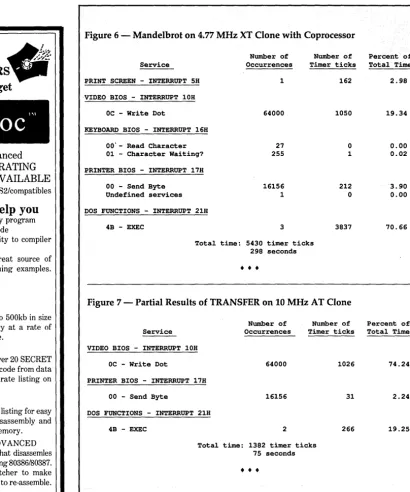
Profiles have always had a bad reputa-tion - long noses and poor eye contact -but taking a sideways look at your software might show a lot more than dirty ears. Herein Kent shows you how to use his pro-filer to walk through a Mandelbrot. (And Mandelbrot code does walk.)
L
urking in the dark regions of every programmer's mind has to be the question, "Now that it runs, how do I make it faster?"You can make a good first step in op-timizing your program by running it under the control of an execution profiler. The profiler will show you where your masterpiece spends its time, and let you (in theory, at least) focus on the routines that need more work. In practice, however, the information may not help much.
My first attempt at profiling an
MS-DOS program suggests what can go wrong. The profiler I used reported only three categories:
strcpy 3% System 3% Other 94%
The "Other" category, as defined by this particular utility, consisted of any-thing in the upper regions of the 8086' s address space (mostly video output). Further experimentation made me realize it's common for a program to spend most of its time waiting for DOS or the BIOS.
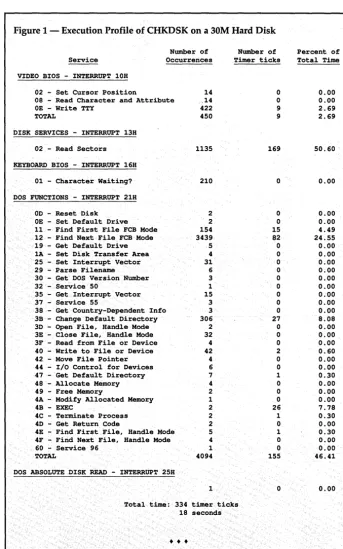
I decided to look at profiling from a different perspective. Instead of class-ifying timer ticks relative to the location of the code being executed, I chose to measure the time spent in each interrupt service routine. With this information, I was able to produce a picture (such as the one in Figure 1) showing the ways in which an application program uses the operating system.
[image:18.602.226.569.177.726.2]16
MICRO CORNUCOPIA, #47, May-June 1989Figure 1 - Execution Profile of CHKDSK on a 30M Hard Disk
Service
Number of Occurrences VIDEO BIOS - INTERRUPT 10H
02 - Set Cursor Position 14 08 - Read Character and Attribute ,14 OE - Write TTY 422
TOTAL 450
DISK SERVICES - INTERRUPT 13H
02 - Read Sectors 1135 KEYBOARD BIOS - INTERRUPT 16H
01 - Character Waiting? 210 DOS FUNCTIONS - INTERRUPT 21H
OD - Reset Disk 2 OE - Set Default Drive 2 11 - Find First File FCB Mode 154 12 - Find Next File FCB Mode 3439 19 - Get Default Drive 5 1A - Set Disk Transfer Area 4 25 - Set Interrupt Vector 31 29 - Parse Filename 6 30 - Get DOS Version Number 3 32 - Service 50 1 35 - Get Interrupt Vector 15 37 - Service 55 3 38 - Get Country-Dependent Info 3 3B - Change Default Directory 306 3D - Open File, Handle Mode 2 3E - Close File, Handle Mode 32 3F - Read from File or Device 4 40 - Write to File or Device 42 42 - Move File Pointer 4 44 - I/O Control for Devices 6 47 - Get Default Directory 7 48 - Allocate Memory 4 49 - Free Memory 2 4A - Modify Allocated Memory 1
4B - EXEC 2
4C - Terminate Process 2 4D - Get Return Code 2 4E - Find First File, Handle Mode 5 4F - Find Next File, Handle Mode 4 60 - Service 96 1
TOTAL 4094
DOS ABSOLUTE DISK READ - INTERRUPT 25H
1
Number of Timer ticks
0 0 9 9 169 0 0 0 15 82 0 0 0 0 0 0 0 0 0 27 0 0 0 2 0 0 1 0 0 0 26 1 0 1 0 0 155 0 Total time: 334 timer ticks
18 seconds
•
•
•
Percent of Total Time
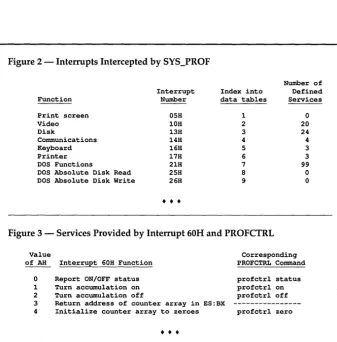
Figure 2 - Interrupts Intercepted by SYS_PROF
Function
Interrupt Number
Index into data tables
Number of Defined Services Print screen
Video Disk
Communications Keyboard Printer DOS Functions
DOS Absolute Disk Read DOS Absolute Disk Write
OSH 10H 13H 14H 16H 17H 21H 2SH 26H
•
•
•
1 2 3
4
S
6 7
8
9
o
20 24 4
3 3
99
o o
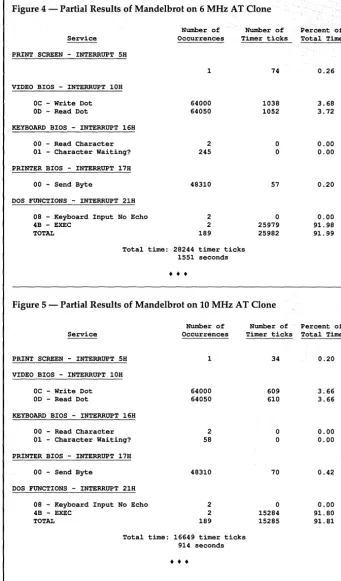
Figure 3 - Services Provided by Interrupt 60H and PROFCTRL
Value
of AH Interrupt 60H Function
o Report ON/OFF status 1 Turn accumulation on 2 Turn accumulation off
Corresponding PROFCTRL Command profctrl status profctrl on profctrl off 3 Return address of counter array in ES:BX
4 Initialize counter array to zeroes profctrl zero
In this article, I'll describe my profiler and suggest some ways that you can use it to optimize performance. I've uploaded the source of the profiler (with detailed documentation) to the Micro C BBS so you can see how I did it.
Editor's note: The package is also available on the Issue #47 disk for $6. Call us at 800-888-8087.
How A System Profiler Works
I used a TSR to intercept MS-DOS and BIOS interrupts. (See the complete list of intercepted interrupts in Figure 2.) For each of these interrupts, the system pro-filer (SYS_PROF) adds an extra layer of code to the interrupt handler. This lets SYS_PROF:
1. Tabulate the number of occurrences of each interrupt/service combination;
2. Determine at each timer tick which
•
•
•
incomplete interrupt/service combina-tion was most recently requested.
The sequence of operations in this added layer varies little from interrupt to interrupt. In general, it:
1. Saves the previous interrupti serv-ice combination on the stack.
2. Filters out any services within this interrupt that we aren't specifically watching. This keeps the data tables small, ensures the integrity of the data, and provides an easy way to handle in-terrupts with no distinct services (like print-screen, which only does one thing).
3. Changes the values of the variables INTERRUPT and SERVICE.
4. Increments the appropriate counter in the table of occurrences.
5. Executes the real ISR.
6. Restores the previous values of IN-TERRUPT and SERVICE from the stack.
~---By G. Kent Cobb
8233 Lullwater Dr. Dallas, Texas 75218
Since many of the DOS and BIOS in-terrupts pass information to and from the application program in the 8086 registers and flags, it's important that the extra layer not alter the values of either.
These interrupt handlers are similar, so all nine can be implemented with a single macro, PERFORM_INTERRUPT. The only ones which require special handling are 25H and 26H, which per-form absolute disk read and write func-tions.
For reasons I've never understood, the service routines for interrupts 25H and 26H terminate with a RET instruction (in-stead of an IRET or RET 2), leaving the flags on the stack.
SYS_PROF also installs a service routine for interrupt 60H, which pro-vides a means of control after SYS_PROF becomes resident. Figure 3 lists the avail-able services, and PROFCTRL (on the Micro C BBS and issue disk) contains the source code for a control program that implements these services.
You can also use SYS_PROF to profile an entire day's activities. Install and acti-vate SYS_PROF in the moming, go through your daily routine, and generate an activity report at the end of the day. (