ISSN: 1816-949X
© Medwell Journals, 2019
Study of Elderly Interaction with Smartphone Interface-Rate of
Interaction and Error
1
Naim Che Pee,
1Azir Rezha Norizan,
1Zulisman Maksom,
1Hamzah Asyrani Sulaiman,
1Mohd Fairuz Iskandar Othman,
1Yahaya Abd Rahim and
2Mohd Azlishah Othman
1
Faculty of Information and Communication Technology,
2Faculty of Electronic and Computer Engineering,
Universiti Teknikal Malaysia Melaka, 76100 Melaka, Malaysia
Abstract: Smartphones and Tablet devices have been rapidly proliferating and multi-touch interaction, powerful processors and rich array of sensors make these devices an attractive service platform for older users. While there is an increasing number of work investigating the issues that elderly users experience through their interaction with mobile devices. The study tried to look at how the interaction and error rates faced by elderly users in carrying out daily tasks using smart phones. The methods used in this study are task evaluation, observation and interview where 60 elderly volunteers age 60’s were given current smart phone technology. Each participant was observed while instructed to do sets of daily tasks. Number of interaction and rate of error for each task were recorded and interviews conducted to identify any kind of difficulties encountered while performing tasks. Based on our results, we summarize the types of issues observed and data analyzed, present design considerations for the applications studied and future research directions.
Key words: Elderly, Smartphone, interaction, behavior, touch screen, experience
INTRODUCTION
Over the past several years, mobile multi-touch devices such as Smartphones and Tablets have been rapidly proliferating. While the primary growth has been among younger users, there are a growing number of elderly people who are beginning to adopt such technology. The direct manipulation interaction afforded by their multi-touch displays, their ability to run numerous applications both on the device as well as over the network, combined with powerful processors and a rich array of sensors, make these devices an attractive platform for making a wide range of services available to benefit older users. However, previous studies indicate these people have several factors to be the constraints acceptance of new technology (Naji, 2012).
The use of touch screen-based input has been proven to increase the usability of computer technology, therefore, a lot of research carried out to adapt the touch screen technology to computer technology regardless of device size. Increasing age causes a decline of cognitive, perceptual and psychomotor function and the decline is capable of affecting the usability of a technology (Leitao and Silva, 2012). Younger users may be able to quickly learn to navigate around such challenges through trial-and-error and relying on their mental models of recent technologies but the hurdle may be bigger for older users. Previous studies indicates that generational
difference in exposure levels to various technology during one’s formative years (before the age of 25) has a significant effect on the performance on and the level of understanding of new technologies. A research by Leung et al. (2012) suggests that significantly fewer older people choose trial-and-error as a method for learning new technology compared to younger people, opting for more traditional methods such as instruction manuals despite citing difficulties using them.
Smartphone use can facilitate everyday communication use, users can access email messages in public places and interactive maps can help localization. Mobile devices could also be used for e-health applications, supporting older people with chronic diseases such as diabetes and providing outpatient care (Piper et al., 2010). Learning how to use technologies and using them, to keep social networks for example are a challenging mental activity. Games can be designed to stimulate memory and attention abilities of older adults. Study by Peter et al. (2010) indicates touch screen technology can facilitate engagement by the elderly but should be supported by interface design that appropriate for the type of device and user.
There have been many works seeking to better capture the needs and characteristics of older users and their interaction with mobile devices (Leung et al., 2012; Kurniawan, 2008; Renaud and Biljon, 2010). Some works
sought to capture more concretely the patterns and tendencies of elderly users’ interaction with mobile touch-screen devices through measurement and analysis of low-level interaction metrics such as task speed and accuracy (Kobayashi et al., 2011; Leitao and Silva, 2012). Most of these works involved experiments in which the participants performed primitive actions such as tap or swipe gestures in isolation within their custom test applications. While these studies provide concrete data, the data may not be representative of what users experience in actual usage of mobile devices, since, real tasks require not only primitive gesture skills but also skills to develop strategy to complete tasks by effectively selecting a series of gestures in real-time, in-situ within the context of full application user interfaces.
In order to uncover issues that elderly users may encounter during their typical usage of Smartphones such as errors, standstills, ineffective operational strategy, unexpected results and so on and delve deeper into each issue by analyzing the instrumented log data, we attempt to combining an observational study approach with an experimental approach that include detailed instrumentation of elderly users’ interaction with Smartphone as they perform tasks within realistic application contexts. We conducted a user study with 60 elderly participants with diverse experience levels, from first time users to active intermediate level users, to observe and analyze specific issues and challenges that they experience when using Smartphone. Our focus, however, was less on statistically analyzing aggregate results but more on carefully observing interaction characteristics such as errors, unexpected results, operational strategies and so on of each individual participant. We also conducted interviews with each participant to solicit their comments and better understand their perceptions and past experiences with mobile devices.
MATERIALS AND METHODS
We conducted study sessions with a total of 60 elderly (30 males and 30 females) participants to investigate their perceptions of Smartphones as well as specific usage characteristics as they performed tasks on the devices. Samples were selected from population living in urban and sub-urban areas. Our main objective in this study were to identify “realistic issues” encountered by elderly users as they interacted with real and “realistic” apps, to qualitatively analyze issues based on number of interaction and rate of error for tasks given and to uncover design considerations that could inform design of more senior-friendly Smartphones. Each session was conducted within the respondent house or work place and each participant was given the task and interviewed individually. The sessions were audio recorded for later analysis and with participant’s permission.
The respondents were initially tested using a Mini Mental State Evaluation (MMSE). The MMSE is a brief 30-point questionnaire test that is used to screen cognitive impairment. The MMSE test includes simple questions and problems, for example, the time, location of the experiment, repeating lists of words, simple arithmetic, such as serial sevens, language use and comprehension, and basic motor skills. A score of greater than or equal to 25 points (out of 30) is deemed to be effectively normal.
After undergoing MMSE, respondents were asked to fill out a form for collecting demographic information regarding their background information as well as their experience in the use of Smartphones. The session continued where respondents were asked to perform a number of operations for certain tasks. Assignments given by the instructor verbally and respondents observed to obtain the total number of interactions and the rate of errors made during the interaction. All respondent were asked to do some tasks as follows:
C Unlock the home screen
C Specify the time and date shown on the Smartphone C Make a voice call
C Dial the following numbers [010 2790688] C Dial your favorite number
C See the recent call list C Add new numbers to contacts C See the list of messages received C Read latest message
C See the list of applications C Open internet application C Open settings application C Turn on Bluetooth C Answer incoming call
information related to the interaction of the elderly on the Smartphone interface design. Therefore, task assignments listed are available on every Smartphone in general.
For any given task, the interactions of the respondents were observed carefully to not miss any of their reactions, emotions and behaviors. In-depth interviews conducted immediately after the respondents completed the tasks given to identify the level of difficulty or challenge experienced or felt during task.
RESULTS AND DISCUSSION
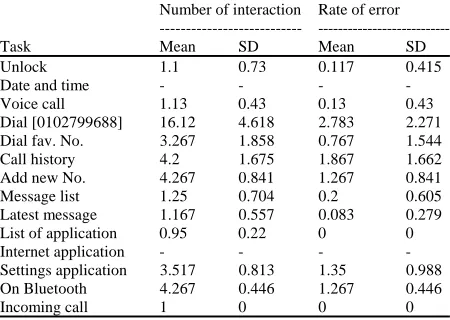
Generally, the assignment is very easy for younger and more experience Smartphone user. They can perform these tasks with a minimal number of interactions. However, the same tasks assigned to the elderly user with varying levels of experience are likely to have different results. Table 1 shows the mean value for number of interaction taken and rate of error for each task given to the respondents. Experiments were conducted in an environment where they live or work and it helps the respondent to not feel awkward when being tested. Unlock interface: The first task requires the respondent to unlock the phone interface. Each respondent were asked to put their Smartphone in standby mode. Next they must press the power button to turn the screen on and display the unlock interface (if any). The number of interactions to unlock rely on the type of unlock system used. There are several popular methods such as swipe to unlock, pin number or password, pattern, face detection and the latest technology is fingerprint recognition. But there are also users who do not lock their Smartphone.
The number of interactions for this task only counted right after they press the power button or in other words after screen was switch on. Majority of users simply take one interaction without error to unlock the screen. The majority of elderly users only use existing unlocking method, since, acquiring smartphone which is ‘swipe to unlock’ because not interested in switching to other methods. Few respondents used the pattern method and a handful of others are not using any locks for their interface.
Today smartphone systems have too many variations and each variation has a different design to some extent affect user interaction. However, each user has experience with their devices. A small number of respondents made an error in the unlock interaction and errors that occur are due to a number of users who have problems in using the swipe method and the factor of memory weakness on passwords and user patterns.
[image:3.612.315.540.115.275.2]State the time and date: This task does not require any physical interaction but just need to see and state information required. Majority smart phone system put
Table 1: Mean value and standard deviation for both number of interaction and rate of error for given tasks
Number of interaction Rate of error ---
---Task Mean SD Mean SD
Unlock 1.1 0.73 0.117 0.415
Date and time - - -
-Voice call 1.13 0.43 0.13 0.43
Dial [0102799688] 16.12 4.618 2.783 2.271
Dial fav. No. 3.267 1.858 0.767 1.544
Call history 4.2 1.675 1.867 1.662
Add new No. 4.267 0.841 1.267 0.841
Message list 1.25 0.704 0.2 0.605
Latest message 1.167 0.557 0.083 0.279
List of application 0.95 0.22 0 0
Internet application - - -
-Settings application 3.517 0.813 1.35 0.988
On Bluetooth 4.267 0.446 1.267 0.446
Incoming call 1 0 0 0
the time and date on a small section on top of the interface. Some interfaces display time and date using a large widget on home interface. Each respondent was asked about the suitability of the time and date display positioned at the top and majority of respondents said they were familiar with the position, yet, a larger display is better.
Nowadays, a lot of Smartphone users indirectly make their devices as a portable watch rather than wear a real watch. Therefore, most of the smartphones have place the date and time information on the unlock interface and even on the standby mode. However, when asked to the elderly whether they use their device as a portable watch, all of them say no because they were not frequently with their phones as the younger consumers who constantly with their device.
Make a voice call: This task requires the respondent to prepare to make voice calls, in other words to access the dialer icon. Most of the latest smart phone provides shortcuts for the user to call certain numbers. Even, so, to dial a number that is not in the phone book list, users still need to reach the dialer interface as usual.
Dial specific number: All respondents were given the same number before being asked to make a voice call. The observations found that when users were asked to dial the number, the time taken is quite slow to enter the entire number. However, consumers who carefully entering numbers have minimal error rate. The numbers of interactions taken by all respondents differ in the range of 11-29 with a maximum of nine interaction errors and a majority of just one mistake.
Minimal interaction taken to enter the number on the dialer interface is based on the number of digits entered. Ten digits number were given. Excessive number of interactions is a mistake made by the user including interaction with the delete button for each mistake made. Respondents stated mistakes made due to the relatively small size of the device (4 inches). The majority of the elderly say they may be more comfortable with a screen size of 5 inches to 5.5 inches. The small screen size makes the size of the buttons on the interface are also getting smaller and the difficulty of interactivity by the elderly increased. Error found does not have any relation to any problems of cognitive function.
Dial favorite number and receiving incoming call: This assignment is different from previous assignments as favorite’s numbers are usually frequently dialed. There are different methods to make voice calls to a favorite number as compared to new number. Of course, the favorite number is different for each respondent. The majority of respondents chose to contact family members. These tasks seem easy for them with their experience and their frequency of contact with family members. There are users who only use the ‘fast dial’ to make voice calls. They stated that method was taught by their son in order to make calls to favorite numbers. Most users go to a list of numbers in the phonebook to make a call. There is also handful of respondents uses list in ‘Call History’ to make the call. The majority of respondents only take two interactions without any error to dial their favorite number. Errors committed by a small number of respondents were due to confusion on which method should be used and interaction increases when respondents had to find the name of the contact in the contacts list.
Most devices owned by the respondents have voice command functionality and this function allows the user to make a voice call to a particular name by using certain ‘hot words’. However, all respondents were not aware of this technology, hence do not use this function in everyday use.
The final task given to each respondent was answering incoming voice call that given spontaneously. The majority had no problem receiving the call, just some respondents seem hesitant to answer the call.
Call history: Call history is nothing new either but has existed even in the conventional mobile phone. Both modern and conventional technology differs significantly through interface design. Through the last task, some respondent already access the call history page, therefore, the respondents was prompted to re-access it from home page. Some users experience confusion regarding the terms of call history and a small number of respondents admitted never access previously.
Some of the latest smart phone model has several shortcuts to enable users to access “call history” from the dialer interface. Few respondents took only two interactions to access call history from the main page. This is a result of the user experience, making quick dial from the page. Majority respondents are using three interactions, and maximum interactions obtained from a handful of respondents are 8 interactions. The high numbers of interaction are due to user confusion of call history’s icon.
Add new number: This next task the user was asked to enter a new number to their Smartphone contact list. No specific numbers are given and the numbers of interactions counted are not including the new number input interaction. Data obtained state 50% of respondents use five interactions with two errors to solve the task and the remaining respondents take three or four interactions with an error.
Most respondents confessed they never add new numbers themselves into Smartphones and this causes an increase in the rate of errors. However, these elderly respondents have shown curiosity to learn and this is good for future development. Experiment instructor gave them verbal instructions in form of navigational aid and respondents were asked to perform as described. Different device or system has several methods of adding new numbers and this affects the number of interactions. High number of interactions is solely due to user experience for try out new tasks.
Message list and latest message: Messaging application is the most basic applications for mobile phone technology, also the second most frequently used applications by the elderly after the voice call. However, only a small number of elderly users often use smart phones as a messaging tool. We need to distinguish between SMS application and internet-based messenger applications (Whatsapp, Telegram, etc.). Almost every house today are connected to the internet, the use of internet messaging application has overtaken the use of SMS. However, most of the elderly users are not aware of this difference and think that both services are the same thing.
messenger. Their experiences also facilitate them to know the top message is the latest message received. List of applications: Different smart phone system has a different icon designs for specific applications. The way the application display may also vary according to the version of the operating system. Generally, Android system interface has a specific button on the main interface to view the entire application installed as well as Window’s. In contrast to the IPhone interface, they display all the applications on the main interface.
Majority respondents have a Smartphone with the Android environment and a few of them own an IPhone. The number of interactions for this task is not taken into account for IPhone owner. Almost all respondents experienced enough with their respective Smartphone in order to access applications that are frequently used. Some respondents stated that they were assisted by family members to put shortcuts for the most commonly used applications on the main page.
Next, all respondents are required to access internet applications. Interestingly, the majority of elderly users understand the internet is an internet browser. All respondents did not know that all latest Smartphone has internet search functionality directly from the main page. Besides, majority of respondent are aware that their device always connected to the internet but do not know how to disable or enable internet access.
Smartphone settings application actually is one of the user needs, especially, the elderly users as accessibility settings contained therein. As expected, majority of respondents had never known the settings applications on their devices. When asked whether they recognize the application icon settings, almost all claimed to recognize the icon but no experience using it. Almost all respondents also claimed not to know Bluetooth functionality, indirectly expressed not knowing how to access the Bluetooth. Most smartphone have shortcuts to enable consumers to quickly access the Bluetooth settings. As described functions or things that can be done with Bluetooth technology, respondents admitted they use Bluetooth function but the task is handled by younger members of the family.
CONCLUSION
This study was conducted with 60 elderly Smartphone user participants with diverse experience levels, from first time users to active intermediate level users, to observe and analyze specific issues and challenges that they experience when using Smartphone and successfully collected information by using several methods such as observation and interview. Generally, our observation shows that the elderly has potential to handle Smartphones to do various tasks rather than just basic usage as long as there is someone to teach them properly. Technological education is critical to improving the use of technology including smart phones.
All respondent manage to do most tasks given with minor error rate due to their small screen size Smartphone and despite having a difficulty from the declining of perception, motor skills and cognitive functionalities. However, we believe that there should be some modification in term of whole Smartphone interface design especially for these elderly users. Changes need to be made in respect to the rising issues such as minimal number of interaction and to reduce the rate of interaction error. A few suggestions can be made based on this study such as improvement in term of interface layout, button and spacing sizes for the touch targets and effectively apply the accessibility function.
ACKNOWLEDGEMENTS
We would please to give our acknowledgement to the Faculty of Information and Communication Technology, Universiti Teknikal Malaysia Melaka (UTeM) their support in this study.
REFERENCES
Kobayashi, M., A. Hiyama, T. Miura, C. Asakawa, M. Hirose and T. Ifukube, 2011. Elderly user evaluation of mobile touchscreen interactions. Proceeding of the 13th International Conference on Human-Computer Interaction, September 5-9, 2011, Springer, Berlin, Germany, 978-3-642-23774-4, pp: 83-99.
Kurniawan, S., 2008. Older people and mobile phones: A multi-method investigation. Int. J. Hum. Comput. Stud., 66: 889-901.
Leitao, R. and P.A. Silva, 2012. Target and spacing sizes for smartphone user interfaces for older adults: Design patterns based on an evaluation with users. Proceedings of the 19th International Conference on Pattern Languages of Programs, October 19-21, 2012, ACM, Tucson, Arizona, ISBN:978-1-4503-2786-2, pp: 1-5.
Leung, R., C. Tang, S. Haddad, J. Mcgrenere and P. Graf et al., 2012. How older adults learn to use mobile devices: Survey and field investigations. ACM. Trans. Accessible Comput. TACCESS., 4: 11-33. Naji, S.A.A., 2012. The importance of understanding
user preferences and satisfactions in software and web application design and development: Multidisciplinary approaches. Ph.D Thesis, Dongseo University, Busan, South Korea.
Piper, A.M., R. Campbell and J.D. Hollan, 2010. Exploring the accessibility and appeal of surface computing for older adult health care support. Proceedings of the Sigchi Conference on Human Factors in Computing Systems, April 10-15, 2010, ACM, New York, USA., ISBN:0978-1-60558-929-9, pp: 907-916.