18
An Android-based Order Placement System for
Restaurants
Tanya Gatitu Munene
Faculty of Information Technology,
Strathmore University
Nairobi, Kenya
Bernard Shibwabo Kasamani
Lecturer, Faculty of Information Technology
Strathmore University
Nairobi, Kenya
ABSTRACT
Mobile based transactions are among some of the fastest growing areas in Information Technology today. The growth introduces diverse opportunities more particularly in supply and distribution of goods and services under the wider umbrella of m-commerce since many consumers would benefit by having a means of making orders using their mobile devices. A major common problem facing typical ordering systems in restaurants is that customers queue for long hours in restaurants or wait for a long time so that their food can be prepared. In order to solve this problem, a solution that is used for food ordering has been developed and it makes the process of placing orders more efficient for customers, restaurant managers and chefs. The development applied an Object-Oriented Analysis and Design. Through using this solution, it has been found that customers and restaurant operators can benefit from a seamless ecosystem concerning the processing of orders to restaurants. The time taken to place and process orders has been significantly reduced.
Keywords
Mobile Transactions, Order Processing, Restaurant orders, m-commerce.
1.
INTRODUCTION
In the past five years, there have been tremendous influxes of customers/guests disparaging fast-food eateries worldwide especially in the developed countries. This has posed huge challenges on the restaurant management since, customer service providers are finding it difficult to cope with the influx of customer orders using the existing Point-of-Sale System. On the other hand, customers are tired of waiting on the queue for long hours before being served [1].
A research conducted in Nairobi, Kenya, to help understand consumers and vendors distribution habits and to identify the opportunities in supply and distribution in the field of m-commerce. The research found out that 82% of consumers place their orders manually and similarly, 85.7% of sellers‟ process data „manually‟ by writing on a physical piece of paper and then they later transfer this data to their respective applications or systems [2].
90.4% of the payments made are cash transactions despite the new methods of payments that have come up such as m-pesa and other mobile transactions that would be more convenient for customers country-wide. Statistics also show that 71.4% of customers either queue or wait for long hours for theirs orders to be prepared which is a big in-convenience for most customers who are probably in a rush to go somewhere else [2].
It was also proven that 50% of the consumers interviewed would prefer if their orders were delivered to them while 32% would prefer to pick their orders when they are ready instead of queuing for long, indefinite hours. This would minimize time wastage in restaurants and help to eliminate the issue of mistaking orders. The problems faced in restaurants in Nairobi should be addressed urgently to enable customer convenience while placing orders in restaurants [3].
Due to ignorance in the field no one has developed an application that would help to improve the ordering system in restaurants found in Nairobi by automating processes that would previously be done manually, and this is a major opportunity since it addresses an issue that has not been tackled yet [2].
2.
LITERATURE REVIEW
2.1. Mobile Technology Usage in the World
The increase in the number of mobile cell phones in the world has been impressive. The graph below shows subscriber growth between 2005 and early 2013, according to ITU figures. The 6.8 billion subscribers are approaching the 7.1 billion world population. The average world penetration stands at 96.2%, according to the ITU [4]. Figure 1 and Figure 2 present the mobile phone penetration statistics.
[image:1.595.314.549.494.753.2]Fig 1: Cell Phone Users in the World [4]
19
2.2. Existing
Solutions
for
Ordering
Commodities
Paper based ordering systems are widely used in restaurants today. Papers are used in restaurants for displaying the traditional food menus, taking down the customer‟s order and storing the customer‟s orders. The disadvantages of paper based system are that papers can get easily damaged by stain marks, they can be destroyed during fires or accidents, are cumbersome to handle and update changes or can generally get lost. Hence, time and money are wasted. As traditional menu cards are paper based, any changes that need to be made in the menu require reprinting of the entire menu card, leading to wastage of paper, time and money [6].
On top of that, Point of Sales systems are also used in restaurants where a network of cashiers and server terminals typically handle food orders, transmission of orders to the kitchen and interactive charge posting to guest profiles. Point of Sales information can be imported to accounting and food cost/inventory software packages and the systems can also generate hundreds of management reports. The biggest disadvantage of this system is that once there is an internet outage an individual can‟t access the system making them result to the manual system [7].
Customers find it tiring and time consuming to queue in restaurants for long hours as they wait for their orders to be prepared. It is also a major issue for customers who order online to find confusing interfaces that they can barely use or understand.
Finally, accessibility is also a challenge facing many restaurants since with the sharp increase of customers ordering online having an ordering system that is not mobile friendly could have a negative impact on the general sales.
In order to overcome these challenges, the way forward is to develop a mobile application that allows customers to place orders from the comfort of their own homes, set the time they want to pick the order and for those who want to eat from the restaurant, it gives them an opportunity to reserve a table.
3.
METHOD
3.1.
System Development Methodology
This research adopted an Agile System Development methodology. Agile methodology is a framework which has broad applicability for managing and controlling iterative and incremental projects of all types [8]. It is the most suitable method to be used for the development of this project because working software is delivered frequently allowing rectifications at early stages of development rather than waiting until the final stage.
It allows regular adaptation to changing circumstances, by using this method late changes in requirements are welcomed and due to fixed schedules (sprints) there is predictability of delivery and this even gives the opportunity of release of beta test of the software when development is finished earlier than scheduled.
Every iteration in the agile method involves cross-functional teams working simultaneously on various areas like: planning, requirements analysis, design, coding, unit testing and acceptance testing.
4.
SYSTEM DESIGN AND
ARCHITECTURE
4.1.
Requirement Analysis
A requirement is any function, constraint, or property that the system must provide, meet, or satisfy in order to fulfill its purpose. The goal of analysis is to produce essential requirements.
The functional requirements are as follows:
i. The system should have administrative functions where the system administrator is able to update, delete and add new items into the electronic food menu.
ii. The system should have authorisation functions where the system is able to draw a line between customers and the administrator of the system by creating user profiles with passwords.
iii. The system should have an external interface for customers to place their orders and at the same time book a table.
iv. The system should have a basket that can hold all food items selected by the customer for purchase. v. The system should automatically calculate the total
for order made.
The Non-functional Requirements of the solution are as follows:
i. Usability Prioritizes the important functions of the system based on the systems usage patterns ii. Reliability The system should be able to
retain data created in the system for a long time without the data being changed by the system. iii. Performance The system should have
specified response times for example the order placed should be sent immediately to the kitchen and a response should be sent to the customer in a maximum of 3 minutes
iv. Supportability The system should be cost-effective when it comes to maintenance.
4.2.
Use Case Diagram
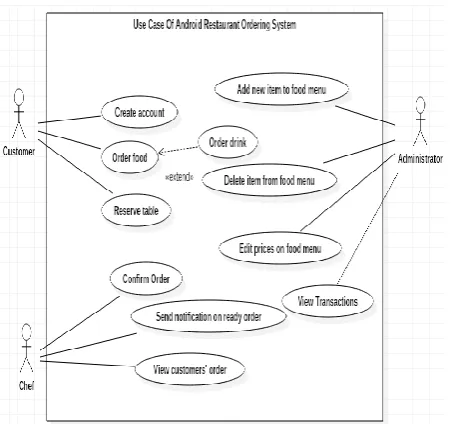
Figure 3 shows a use case diagram describing the actors and the activities involved in the proposed solution.
[image:2.595.318.544.532.744.2]20
Flow Of Events
i. The use case begins once the user starts the application.
ii. The system will diplay a login screen.
iii. The users enter their credentials by inputing their email and password.
iv. The system will verify the information and lead to the ordering platform.
v. The customer places the food /drink order and the system automatically calculates the total amount. vi. The customer chooses whether they want to eat
from the restaurant or takeaway the meal.
vii. The system automatically displays an invoice with the unique transaction id. The invoice is used to make the payments.
viii. The system is then terminated.
4.3. Database Design
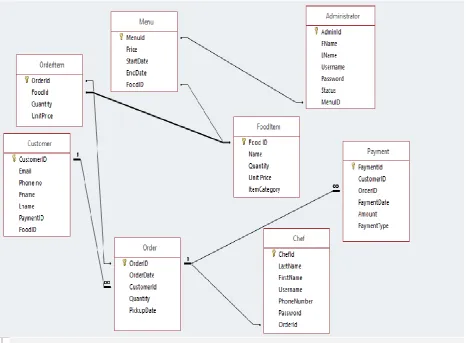
[image:3.595.65.532.199.542.2]Figure 4 shows the database schema, the different application tables and their relationships. It defines how the data is organized and how the relations among them are associated and formulates all the constraints that are applied on the software.
Fig 4: Database Schema for the Restaurant Ordering System
5.
SYSTEM IMPLEMENTATION AND
TESTING
5.1.System Development Tools
This system architecture is split into two main categories namely the client side and the server side. The solution was implemented on a phase basis providing a different functionality in each phase as stipulated in the project plan. The project was implemented using Windows 10 operating system, Firebase and Android Studio. By the time all the phases were complete, all the functionalities required in the solution were met.
5.2.Application Frontend
21
Fig 5: Login Window
Figure 6 presents the registration activity where customers create a profile that will allow them to be able to place their orders by logging in using the credentials they set.
Fig 6: Customer Registration
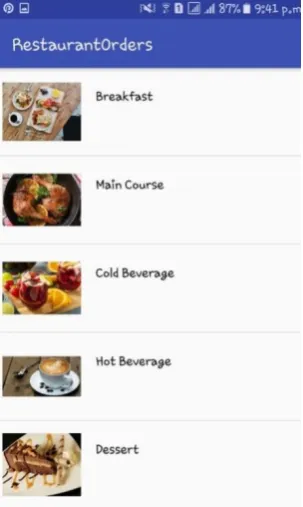
[image:4.595.353.505.73.327.2]Figure 7 shows the food category activity which allows the user to pick the food category they would want by clicking on the item, which then directs the user to the food menu for that category.
Fig 7: Select Food Category Window
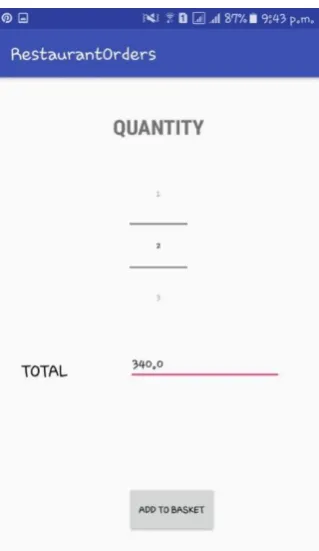
Figure 8 presents the food menu which displays the food name and food price of each food item. Figure 9 presents the quantity activity which allows the customer to select the number of food items the customer would want and the total is automatically calculated and displayed by the system. When the „add to basket‟ button is clicked the item they chose, and the quantity is automatically sent to the basket.
[image:4.595.85.248.355.611.2] [image:4.595.357.499.429.628.2]
22
[image:5.595.87.247.68.344.2]Fig 9: Quantity Specification Window
Figure 10 presents the basket activity where the food items selected, quantity and price are displayed, and the accumulated total is computed. The customer can also add another item to the basket by clicking on the „add more items‟ button and can complete the task by clicking on the „proceed to checkout button‟. Figure 11 presents the setup activity which allows the customers to choose whether they want to make a table reservation or to pick up their food order by clicking on the buttons provided.
Fig 10: Order Summary
Fig 11: Choose Reservation or Pickup
[image:5.595.327.528.68.326.2]Figure 12 presents the table reservation activity which allows the customer to enter the details that are required for the management to be able to reserve a table for the individual. Figure 13 presents the pickup activity which allows the user to enter the details that will be used by the restaurant management to ensure that the customer‟s order is ready by the time the customer arrives to collect their food order.
[image:5.595.328.528.425.705.2] [image:5.595.86.247.472.730.2]23
Fig 13: Food Item(S) Pickup Window
5.3.Application Backend
The application back end is implemented on firebase, which is easy to use, has simple application hosting, ability to set user authentication, availability of data analytics and eases process of manipulating, deleting, and re-ordering data in the database.
[image:6.595.97.235.71.311.2]The back end is for monitoring, reporting and administration of the application. Figure 14 shows a section of the backend.
Fig 14: Backend Setup Page
5.4.System Testing
[image:6.595.310.552.71.384.2]Testing is the process of evaluating a program to identify differences between the given input and the expected output. It is also important in assessing the features of a program and assessing the quality of the product. Table 1 is an excerpt of the systems test cases.
Table 1. Test Cases
Inspection Check
Pre-condition Test Data
Prior ity
Does the system have administrative functions that allow the user to make changes to the food menu and view the
The user should be registered as the admin in the database Email:tanyaga [email protected] m Password:123 456 High
day to day transactions?
Does the system allow creation of profiles that differentiates users according to the user
type?
The user should select
whether he/sh3 is a chef, admin or customer as they register Email:tanyaga [email protected] m Password:123 456 Email:rwawir [email protected] Password:123 456 Email:wanjau brian@gmail. com Password:123 456 High
Does the system have an external interface for customers to place their orders and at the same time reserve a table?
The customer must have already registered in the system as a customer. Email:tanyaga [email protected] m Password:123 456 Medi um
Table 2 presents the test results for the system
Table 2. Test Results for the System Expected
Result Actual Result Status Remarks
The system should validate users input during registration. The system validates user‟s credentials during registration and login. Pass There was need to add
interactive process to show feedback after validation. The system should display a customer‟s order on the
database
The database displays customer‟s orders on the
database. Pass Display of orders works as expected.
6.
CONCLUSION
The developed system was and is targeted at improving the current restaurant ordering system that is prone to human error due to its high dependence on paper-based processes. The solution enables customers to be able to make their food orders from the comfort of their homes reducing the paperwork, transaction errors and queues in restaurants while at the same time introducing excellent benefits including reporting/analytics capabilities.
[image:6.595.57.279.440.580.2] [image:6.595.47.289.673.765.2]24 solution on time.
By this, all the objectives were met because the factors regarding the food ordering systems in restaurants were analysed, investigated, a design to be used in the development was created and the system was developed meeting all the functional requirements that were stated.
The system has been able to introduce a mobile restaurant order placement platform that allows customers to place their food orders at the comfort of their homes or offices without having to be physically present in the restaurant to place their food order.
In future, there can be a version that runs on USSD. Additionally, we could incorporate more payment processing channels use in various countries so that a wider range of options are available for restaurant customers. The solution can also be configured and opened up as a marketplace for all restaurants who do not intend to incur heavy investment on infrastructure so that they use it to reach their clients.
7.
ACKNOWLEDGEMENTS
Thank you Strathmore University for the support in this study, especially thanks to the Faculty of Information Technology.
8.
REFERENCES
[1] Edje, A. and Ekabua, O. 2017. “Restaurant Customer Self-Ordering System: A Solution to Reduce Customer/Guest Waiting Time at the Point of Sale”, International Journal of Computer Applications.
[2] Anon (2017). An Exploratory Study on Kenyan Consumer Ordering Habits. Retrieved October 27, 2017,
from iHub web site:
https://files.ihub.co.ke/ihubresearch/uploads/2012/july/1 342763134_819_139.pdf
[3] Hong, L. (2016). Retrieved October 27, 2017, from Utar web site: http://eprints.utar.edu.my/1943/1/IA-2016-1203135-1.pdf
[4] Internet World Stats. 2013. Mobile Internet - Mobile Phones. Retrieved July 18, 2013, from Internet World Stats Web Site: http://www.internetworldstats.com [5] T. Phillips, P. L. (2011). Driving Economic and Social
Development through Mobile Services. London: GSM Association.
[6] Raut, K. and Dhonde, M. 2017. “Android Based Intelligent E-Restaurant Ordering System” International Education and Research Journal.
[7] DeMicco, F., Cobanoglu, C., Dunbar, J., Grimes, R. and Keiser, J. (2015). Restaurant Management: A Best Practices Approach. Retrieved October 27, 2017, from
kendallhunt web site:
https://he.kendallhunt.com/product/restaurant-management-best-practices-approach
[8] Ambier, S. (2014). The Agile System Development Life Cycle (SDLC). [online] Ambysoft.com. Retrieved October 27, 2017, from ambysoft web site: http://www.ambysoft.com/essays/agileLifecycle.html#C ycle0
![Fig 2: Mobile Phone Penetration in Africa [5]](https://thumb-us.123doks.com/thumbv2/123dok_us/9296730.427343/1.595.314.549.494.753/fig-mobile-phone-penetration-in-africa.webp)