Managing Projects with GNU Make, Third Edition
by Robert Mecklenburg
Copyright © 2005, 1991, 1986 O’Reilly Media, Inc. All rights reserved. Printed in the United States of America.
Published by O’Reilly Media, Inc., 1005 Gravenstein Highway North, Sebastopol, CA 95472.
O’Reilly books may be purchased for educational, business, or sales promotional use. Online editions are also available for most titles (safari.oreilly.com). For more information, contact our corporate/insti-tutional sales department: (800) 998-9938 or[email protected].
Editor: Andy Oram
Production Editor: Matt Hutchinson Production Services: Octal Publishing, Inc. Cover Designer: Edie Freedman Interior Designer: David Futato
Printing History:
1986: First Edition.
October 1991: Second Edition.
November 2004: Third Edition.
Nutshell Handbook, the Nutshell Handbook logo, and the O’Reilly logo are registered trademarks of O’Reilly Media, Inc.Managing Projects with GNU Make, the image of a potto, and related trade dress are trademarks of O’Reilly Media, Inc.
Many of the designations used by manufacturers and sellers to distinguish their products are claimed as trademarks. Where those designations appear in this book, and O’Reilly Media, Inc. was aware of a trademark claim, the designations have been printed in caps or initial caps.
Permission is granted to copy, distribute, and/or modify this document under the terms of the GNU Free Documentation License, Version 1.1 or any later version published by the Free Software Foundation. A copy of this license is included in Appendix C.
While every precaution has been taken in the preparation of this book, the publisher and author assume no responsibility for errors or omissions, or for damages resulting from the use of the information contained herein.
This book uses RepKover™, a durable and flexible lay-flat binding.
vii
Table of Contents
Foreword
. . . .xi
Preface
. . . .xiii
Part I.
Basic Concepts
1. How to Write a Simple Makefile
. . .3
Targets and Prerequisites 4
Dependency Checking 6
Minimizing Rebuilds 7
Invoking make 7
Basic Makefile Syntax 8
2. Rules
. . .10
Explicit Rules 10
Variables 16
Finding Files with VPATH and vpath 17
Pattern Rules 21
The Implicit Rules Database 25
Special Targets 30
Automatic Dependency Generation 31
Managing Libraries 34
3. Variables and Macros
. . .41
What Variables Are Used For 42
Variable Types 43
When Variables Are Expanded 47 Target- and Pattern-Specific Variables 50
Where Variables Come From 51
Conditional and include Processing 54
Standard make Variables 57
4. Functions
. . .61
User-Defined Functions 61
Built-in Functions 64
Advanced User-Defined Functions 80
5. Commands
. . .88
Parsing Commands 88
Which Shell to Use 96
Empty Commands 97
Command Environment 98
Evaluating Commands 99
Command-Line Limits 100
Part II.
Advanced and Specialized Topics
6. Managing Large Projects
. . .107
Recursive make 108
Nonrecursive make 117
Components of Large Systems 124
Filesystem Layout 126
Automating Builds and Testing 128
7. Portable Makefiles
. . .129
Portability Issues 130
Cygwin 131
Managing Programs and Files 134
Working with Nonportable Tools 137
Automake 139
8. C and C++
. . .141
Separating Source and Binary 141
Read-Only Source 149
Table of Contents | ix
Supporting Multiple Binary Trees 154
Partial Source Trees 156
Reference Builds, Libraries, and Installers 157
9. Java
. . .159
Alternatives to make 160
A Generic Java Makefile 164
Compiling Java 168
Managing Jars 175
Reference Trees and Third-Party Jars 177
Enterprise JavaBeans 178
10. Improving the Performance of make
. . .182
Benchmarking 182
Identifying and Handling Bottlenecks 186
Parallel make 190
Distributed make 194
11. Example Makefiles
. . .196
The Book Makefile 196
The Linux Kernel Makefile 218
12. Debugging Makefiles
. . .229
Debugging Features of make 229
Writing Code for Debugging 236
Common Error Messages 241
Part III. Appendixes
A. Running make
. . .249
B. The Outer Limits
. . .252
C. GNU Free Documentation License—GNU Project—Free Software
Foundation (FSF)
. . .263
Foreword
Themakeutility is an enticing servant, always there and always accommodating. Like the indispensable sidekicks found in many novels and movies,makestarts out as the underappreciated supplicant to whom you throw a few odd jobs, and then gradually takes over the entire enterprise.
I had reached the terminal stage of putting make at the center of every project I touched when Steve Talbott, my supervisor and the author of the original O’Reilly classicManaging Projects with make, noticed my obsession and asked me to write the second edition. It proved to be a key growth experience for me (as well as a pretty wild ride) and my entry into the wonderful world of O’Reilly, but we didn’t really think about how long the result would stay on the market. Thirteen years for one edition?
Enthralled in the memories of those days long ago when I was a professional techni-cal writer, I’ll indulge myself with a bulleted list to summarize the evolution ofmake
since the second edition ofManaging Projects with make hit the stands:
• The GNU version ofmake, already the choice of most serious coders when the second edition of the book came out, overran the industry and turned into the de facto standard.
• The rise of GNU/Linux made the GNU compiler tool chain even more com-mon, and that includes the GNU version ofmake. As just one example, the Linux kernel itself relies heavily on extensions provided by GNUmake, as documented in Chapter 11 of this book.
• The adoption of a variant of BSD (Darwin) as the core of Mac OS X continues the trend toward the dominance of the GNU tool chain and GNUmake.
xii | Foreword
• In particular, new practices are required to adaptmaketo the C++ and Java™ languages, which did not exist whenmakewas invented. To illustrate the shifting sands of time, the originalmakecontained special features to support two vari-ants of FORTRAN—of which vestiges remain!—and rather ineffective integra-tion with SCCS.)
• Against all odds,makehas remained a critical tool for nearly all computer devel-opment projects. None of make’s many (and insightful) critics would have pre-dicted this 13 years ago. Over these years, replacements sprang up repeatedly, as if dragon’s teeth had been sown. Each new tool was supposed to bypass the limi-tations inmake’s design, and most were indeed ingenious and admirable. Yet the simplicity ofmake has kept it supreme.
As I watched these trends, it had been in the back of my mind for about a decade to write a new edition ofManaging Projects with make. But I sensed that someone with a broader range of professional experience than mine was required. Finally, Robert Mecklenburg came along and wowed us all at O’Reilly with his expertise. I was happy to let him take over the book and to retire to the role of kibitzer, which earns me a mention on the copyright page of this book. (Incidentally, we put the book under the GNU Free Documentation License to mirror the GPL status of GNUmake.) Robert is too modest to tout his Ph.D., but the depth and precision of thinking he must have applied to that endeavor comes through clearly in this book. Perhaps more important to the book is his focus on practicality. He’s committed to making
makework for you, and this commitment ranges from being alert about efficiency to being clever about making even typographical errors inmakefiles self-documenting. This is a great moment: the creation of a new edition of one of O’Reilly’s earliest and most enduring books. Sit back and read about how an unassuming little tool at the background of almost every project embodies powers you never imagined. Don’t set-tle for creaky and unsatisfyingmakefiles—expand your potential today.
PART I
I.
Basic Concepts
In Part I, we focus on the features ofmake, what they do, and how to use them prop-erly. We begin with a brief introduction and overview that should be enough to get you started on your firstmakefile. The chapters then covermakerules, variables, func-tions, and finally command scripts.
3
Chapter 1
CHAPTER 1
How to Write a Simple Makefile
The mechanics of programming usually follow a fairly simple routine of editing source files, compiling the source into an executable form, and debugging the result. Although transforming the source into an executable is considered routine, if done incorrectly a programmer can waste immense amounts of time tracking down the problem. Most developers have experienced the frustration of modifying a function and running the new code only to find that their change did not fix the bug. Later they discover that they were never executing their modified function because of some procedural error such as failing to recompile the source, relink the executable, or rebuild a jar. Moreover, as the program’s complexity grows these mundane tasks can become increasingly error-prone as different versions of the program are developed, perhaps for other platforms or other versions of support libraries, etc.
The make program is intended to automate the mundane aspects of transforming source code into an executable. The advantages ofmakeover scripts is that you can specify the relationships between the elements of your program tomake, and it knows through these relationships and timestamps exactly what steps need to be redone to produce the desired program each time. Using this information,makecan also opti-mize the build process avoiding unnecessary steps.
GNUmake(and other variants ofmake) do precisely this.makedefines a language for describing the relationships between source code, intermediate files, and executa-bles. It also provides features to manage alternate configurations, implement reus-able libraries of specifications, and parameterize processes with user-defined macros. In short,makecan be considered the center of the development process by providing a roadmap of an application’s components and how they fit together.
The specification thatmakeuses is generally saved in a file namedmakefile. Here is a
makefile to build the traditional “Hello, World” program:
hello: hello.c
gcc hello.c -o hello
To build the program executemake by typing:
at the command prompt of your favorite shell. This will cause themakeprogram to read themakefile and build the first target it finds there:
$ make
gcc hello.c -o hello
If a target is included as a command-line argument, that target is updated. If no com-mand-line targets are given, then the first target in the file is used, called thedefault goal.
Typically the default goal in most makefiles is to build a program. This usually involves many steps. Often the source code for the program is incomplete and the source must be generated using utilities such as flex orbison. Next the source is compiled into binary object files (.ofiles for C/C++,.classfiles for Java, etc.). Then, for C/C++, the object files are bound together by a linker (usually invoked through the compiler,gcc) to form an executable program.
Modifying any of the source files and reinvokingmakewill cause some, but usually not all, of these commands to be repeated so the source code changes are properly incorporated into the executable. The specification file, or makefile, describes the relationship between the source, intermediate, and executable program files so that
make can perform the minimum amount of work necessary to update the executable. So the principle value ofmakecomes from its ability to perform the complex series of commands necessary to build an application and to optimize these operations when possible to reduce the time taken by the edit-compile-debug cycle. Furthermore,make
is flexible enough to be used anywhere one kind of file depends on another from tra-ditional programming in C/C++ to Java, TEX, database management, and more.
Targets and Prerequisites
Essentially amakefilecontains a set of rules used to build an application. The first rule seen bymakeis used as thedefault rule. Aruleconsists of three parts: the target, its prerequisites, and the command(s) to perform:
target: prereq1 prereq2 commands
Thetargetis the file or thing that must be made. Theprerequisitesordependentsare
those files that must exist before the target can be successfully created. And the
com-mands are those shell commands that will create the target from the prerequisites.
Here is a rule for compiling a C file,foo.c, into an object file,foo.o:
foo.o: foo.c foo.h gcc -c foo.c
The target file foo.o appears before the colon. The prerequisites foo.c and foo.h
Targets and Prerequisites | 5
Whenmakeis asked to evaluate a rule, it begins by finding the files indicated by the prerequisites and target. If any of the prerequisites has an associated rule, make
attempts to update those first. Next, the target file is considered. If any prerequisite is newer than the target, the target is remade by executing the commands. Each com-mand line is passed to the shell and is executed in its own subshell. If any of the commands generates an error, the building of the target is terminated andmakeexits. One file is considered newer than another if it has been modified more recently. Here is a program to count the number of occurrences of the words “fee,” “fie,” “foe,” and “fum” in its input. It uses aflex scanner driven by a simple main:
#include <stdio.h>
extern int fee_count, fie_count, foe_count, fum_count; extern int yylex( void );
int main( int argc, char ** argv ) {
yylex();
printf( "%d %d %d %d\n", fee_count, fie_count, foe_count, fum_count ); exit( 0 );
}
The scanner is very simple:
int fee_count = 0; int fie_count = 0; int foe_count = 0; int fum_count = 0; %%
fee fee_count++; fie fie_count++; foe foe_count++; fum fum_count++;
Themakefile for this program is also quite simple:
count_words: count_words.o lexer.o -lfl
gcc count_words.o lexer.o -lfl -ocount_words count_words.o: count_words.c
gcc -c count_words.c lexer.o: lexer.c
gcc -c lexer.c lexer.c: lexer.l
flex -t lexer.l > lexer.c
When thismakefile is executed for the first time, we see:
$ make
gcc -c count_words.c flex -t lexer.l > lexer.c gcc -c lexer.c
We now have an executable program. Of course, real programs typically consist of more modules than this. Also, as you will see later, thismakefiledoes not use most of the features ofmakeso it’s more verbose than necessary. Nevertheless, this is a func-tional and useful makefile. For instance, during the writing of this example, I exe-cuted themakefile several dozen times while experimenting with the program. As you look at themakefileand sample execution, you may notice that the order in which commands are executed by make are nearly the opposite to the order they occur in themakefile. Thistop-downstyle is common inmakefiles. Usually the most general form of target is specified first in themakefileand the details are left for later. Themakeprogram supports this style in many ways. Chief among these ismake’s two-phase execution model and recursive variables. We will discuss these in great detail in later chapters.
Dependency Checking
How didmakedecide what to do? Let’s go over the previous execution in more detail to find out.
Firstmakenotices that the command line contains no targets so it decides to make the default goal,count_words. It checks for prerequisites and sees three:count_words.o,
lexer.o, and-lfl.makenow considers how to buildcount_words.oand sees a rule for
it. Again, it checks the prerequisites, notices thatcount_words.chas no rules but that the file exists, so make executes the commands to transform count_words.c into
count_words.o by executing the command:
gcc -c count_words.c
This “chaining” of targets to prerequisites to targets to prerequisites is typical of how
make analyzes amakefile to decide the commands to be performed.
The next prerequisitemakeconsiders islexer.o. Again the chain of rules leads tolexer. cbut this time the file does not exist.makefinds the rule for generatinglexer.cfrom
lexer.l so it runs the flex program. Now that lexer.c exists it can run the gcc
command.
Invoking make | 7
Minimizing Rebuilds
When we run our program, we discover that aside from printing fees, fies, foes, and fums, it also prints text from the input file. This is not what we want. The problem is that we have forgotten some rules in our lexical analyzer and flexis passing this unrecognized text to its output. To solve this problem we simply add an “any charac-ter” rule and a newline rule:
int fee_count = 0; int fie_count = 0; int foe_count = 0; int fum_count = 0; %%
fee fee_count++; fie fie_count++; foe foe_count++; fum fum_count++; .
\n
After editing this file we need to rebuild the application to test our fix:
$ make
flex -t lexer.l > lexer.c gcc -c lexer.c
gcc count_words.o lexer.o -lfl -ocount_words
Notice this time the filecount_words.cwas not recompiled. Whenmakeanalyzed the rule, it discovered that count_words.o existed and was newer than its prerequisite
count_words.cso no action was necessary to bring the file up to date. While
analyz-inglexer.c, however,makesaw that the prerequisitelexer.lwas newer than its target
lexer.csomakemust update lexer.c. This, in turn, caused the update oflexer.oand
thencount_words. Now our word counting program is fixed:
$ count_words < lexer.l
3 3 3 3
Invoking make
The previous examples assume that:
• All the project source code and themakedescription file are stored in a single directory.
• Themake description file is calledmakefile,Makefile, orGNUMakefile.
• The makefile resides in the user’s current directory when executing the make
Whenmakeis invoked under these conditions, it automatically creates the first target it sees. To update a different target (or to update more than one target) include the target name on the command line:
$ make lexer.c
Whenmakeis executed, it will read the description file and identify the target to be updated. If the target or any of its prerequisite files are out of date (or missing) the shell commands in the rule’s command script will be executed one at a time. After the commands are run makeassumes the target is up to date and moves on to the next target or exits.
If the target you specify is already up to date,makewill say so and immediately exit, doing nothing else:
$ make lexer.c
make: `lexer.c' is up to date.
If you specify a target that is not in themakefileand for which there is no implicit rule (discussed in Chapter 2),make will respond with:
$ make non-existent-target
make: *** No rule to make target `non-existent-target'. Stop.
makehas many command-line options. One of the most useful is--just-print(or-n) which tells maketo display the commands it would execute for a particular target without actually executing them. This is particularly valuable while writing
makefiles. It is also possible to set almost anymakefilevariable on the command line
to override the default value or the value set in themakefile.
Basic Makefile Syntax
Now that you have a basic understanding of makeyou can almost write your own
makefiles. Here we’ll cover enough of the syntax and structure of amakefilefor you
to start usingmake.
Makefiles are usually structured top-down so that the most general target, often
calledall, is updated by default. More and more detailed targets follow with targets for program maintenance, such as acleantarget to delete unwanted temporary files, coming last. As you can guess from these target names, targets do not have to be actual files, any name will do.
In the example above we saw a simplified form of a rule. The more complete (but still not quite complete) form of a rule is:
target1 target2 target3 : prerequisite1 prerequisite2
Basic Makefile Syntax | 9
One or more targets appear to the left of the colon and zero or more prerequisites can appear to the right of the colon. If no prerequisites are listed to the right, then only the target(s) that do not exist are updated. The set of commands executed to update a target are sometimes called the command script, but most often just the
commands.
Each commandmustbegin with a tab character. This (obscure) syntax tellsmakethat the characters that follow the tab are to be passed to a subshell for execution. If you accidentally insert a tab as the first character of a noncommand line,makewill inter-pret the following text as a command under most circumstances. If you’re lucky and your errant tab character is recognized as a syntax error you will receive the message:
$ make
Makefile:6: *** commands commence before first target. Stop.
We’ll discuss the complexities of the tab character in Chapter 2.
The comment character for make is the hash or pound sign, #. All text from the pound sign to the end of line is ignored. Comments can be indented and leading whitespace is ignored. The comment character#does not introduce amakecomment in the text of commands. The entire line, including the#and subsequent characters, is passed to the shell for execution. How it is handled there depends on your shell. Long lines can be continued using the standard Unix escape character backslash (\). It is common for commands to be continued in this way. It is also common for lists of prerequisites to be continued with backslash. Later we’ll cover other ways of handling long prerequisite lists.
Chapter 2
CHAPTER 2
Rules
In the last chapter, we wrote some rules to compile and link our word-counting pro-gram. Each of those rules defines a target, that is, a file to be updated. Each target file depends on a set of prerequisites, which are also files. When asked to update a tar-get,makewill execute the command script of the rule if any of the prerequisite files has been modified more recently than the target. Since the target of one rule can be referenced as a prerequisite in another rule, the set of targets and prerequisites form a chain or graph of dependencies (short for “dependency graph”). Building and pro-cessing this dependency graph to update the requested target is what make is all about.
Since rules are so important in make, there are a number of different kinds of rules.
Explicit rules, like the ones in the previous chapter, indicate a specific target to be updated if it is out of date with respect to any of its prerequisites. This is the most common type of rule you will be writing. Pattern rules use wildcards instead of explicit filenames. This allowsmaketo apply the rule any time a target file matching the pattern needs to updated. Implicit rules are either pattern rules or suffix rules found in the rules database built-in tomake. Having a built-in database of rules makes writing makefiles easier since for many common tasks make already knows the file types, suffixes, and programs for updating targets.Static pattern rulesare like regular pattern rules except they apply only to a specific list of target files.
GNUmakecan be used as a “drop in” replacement for many other versions ofmake
and includes several features specifically for compatibility. Suffix rules were make’s original means for writing general rules. GNUmakeincludes support for suffix rules, but they are considered obsolete having been replaced by pattern rules that are clearer and more general.
Explicit Rules
Explicit Rules | 11
the same set of prerequisites as the others. If the targets are out of date, the same set of actions will be performed to update each one. For instance:
vpath.o variable.o: make.h config.h getopt.h gettext.h dep.h
This indicates that bothvpath.oandvariable.odepend on the same set of C header files. This line has the same effect as:
vpath.o: make.h config.h getopt.h gettext.h dep.h variable.o: make.h config.h getopt.h gettext.h dep.h
The two targets are handled independently. If either object file is out of date with respect to any of its prerequisites (that is, any header file has a newer modification time than the object file), make will update the object file by executing the com-mands associated with the rule.
A rule does not have to be defined “all at once.” Each timemakesees a target file it adds the target and prerequisites to the dependency graph. If a target has already been seen and exists in the graph, any additional prerequisites are appended to the target file entry in make’s dependency graph. In the simple case, this is useful for breaking long lines naturally to improve the readability of themakefile:
vpath.o: vpath.c make.h config.h getopt.h gettext.h dep.h vpath.o: filedef.h hash.h job.h commands.h variable.h vpath.h
In more complex cases, the prerequisite list can be composed of files that are man-aged very differently:
# Make sure lexer.c is created before vpath.c is compiled. vpath.o: lexer.c
...
# Compile vpath.c with special flags. vpath.o: vpath.c
$(COMPILE.c) $(RULE_FLAGS) $(OUTPUT_OPTION) $< ...
# Include dependencies generated by a program. include auto-generated-dependencies.d
The first rule says that the vpath.o target must be updated whenever lexer.c is updated (perhaps because generating lexer.c has other side effects). The rule also works to ensure that a prerequisite is always updated before the target is updated. (Notice the bidirectional nature of rules. In the “forward” direction the rule says that if thelexer.chas been updated, perform the action to updatevpath.o. In the “back-ward” direction, the rule says that if we need to make or use vpath.o ensure that
lexer.c is up to date first.) This rule might be placed near the rules for managing
lexer.cso developers are reminded of this subtle relationship. Later, the compilation
a lot more in Chapter 3.) Finally, the.o/.hdependencies are included in themakefile
from a separate file managed by an external program.
Wildcards
A makefileoften contains long lists of files. To simplify this processmakesupports
wildcards (also known as globbing). make’s wildcards are identical to the Bourne shell’s:~,*,?,[...], and[^...]. For instance,*.*expands to all the files containing a period. A question mark represents any single character, and [...] represents a
character class. To select the “opposite” (negated) character class use[^...].
In addition, the tilde (~) character can be used to represent the current user’s home directory. A tilde followed by a user name represents that user’s home directory. Wildcards are automatically expanded bymakewhenever a wildcard appears in a tar-get, prerequisite, or command script context. In other contexts, wildcards can be expanded explicitly by calling a function. Wildcards can be very useful for creating more adaptablemakefiles. For instance, instead of listing all the files in a program explicitly, you can use wildcards:*
prog: *.c
$(CC) -o $@ $^
It is important to be careful with wildcards, however. It is easy to misuse them as the following example shows:
*.o: constants.h
The intent is clear: all object files depend on the header fileconstants.h, but consider how this expands on a clean directory without any object files:
: constants.h
This is a legalmakeexpression and will not produce an error by itself, but it will also not provide the dependency the user wants. The proper way to implement this rule is to perform a wildcard on the source files (since they are always present) and trans-form that into a list of object files. We will cover this technique when we discussmake
functions in Chapter 4.
Finally, it is worth noting that wildcard expansion is performed by makewhen the pattern appears as a target or prerequisite. However, when the pattern appears in a command, the expansion is performed by the subshell. This can occasionally be important because make will expand the wildcards immediately upon reading the
makefile, but the shell will expand the wildcards in commands much later when
the command is executed. When a lot of complex file manipulation is being done, the two wildcard expansions can be quite different.
Explicit Rules | 13
Phony Targets
Until now all targets and prerequisites have been files to be created or updated. This is typically the case, but it is often useful for a target to be just a label representing a command script. For instance, earlier we noted that a standard first target in many
makefiles is calledall. Targets that do not represent files are known asphony
tar-gets. Another standard phony target isclean:
clean:
rm -f *.o lexer.c
Normally, phony targets will always be executed because the commands associated with the rule do not create the target name.
It is important to note thatmakecannot distinguish between a file target and phony target. If by chance the name of a phony target exists as a file,makewill associate the file with the phony target name in its dependency graph. If, for example, the file
clean happened to be created runningmake clean would yield the confusing message:
$ make clean
make: `clean' is up to date.
Since most phony targets do not have prerequisites, thecleantarget would always be considered up to date and would never execute.
To avoid this problem, GNUmakeincludes a special target,.PHONY, to tellmakethat a target is not a real file. Any target can be declared phony by including it as a prereq-uisite of.PHONY:
.PHONY: clean clean:
rm -f *.o lexer.c
Now make will always execute the commands associated with clean even if a file namedcleanexists. In addition to marking a target as always out of date, specifying that a target is phony tells make that this file does not follow the normal rules for making a target file from a source file. Therefore,makecan optimize its normal rule search to improve performance.
It rarely makes sense to use a phony target as a prerequisite of a real file since the phony is always out of date and will always cause the target file to be remade. How-ever, it is often useful to give phony targets prerequisites. For instance, thealltarget is usually given the list of programs to be built:
.PHONY: all all: bash bashbug
Here the alltarget creates thebash shell program and thebashbug error reporting tool.
before making the actual target. Suppose we are tight on disk space and before exe-cuting a disk-intensive task we want to display available disk space. We could write:
.PHONY: make-documentation make-documentation:
df -k . | awk 'NR = = 2 { printf( "%d available\n", $$4 ) }' javadoc ...
The problem here is that we may end up specifying thedfandawkcommands many times under different targets, which is a maintenance problem since we’ll have to change every instance if we encounter adf on another system with a different for-mat. Instead, we can place thedf line in its own phony target:
.PHONY: make-documentation make-documentation: df javadoc ... .PHONY: df
df:
df -k . | awk 'NR = = 2 { printf( "%d available\n", $$4 ) }'
We can causemaketo invoke ourdftarget before generating the documentation by making df a prerequisite of make-documentation. This works well because make-documentation is also a phony target. Now I can easily reusedf in other targets. There are a number of other good uses for phony targets.
The output ofmakecan be confusing to read and debug. There are several reasons for this: makefiles are written top-down but the commands are executed bymake bot-tom-up; also, there is no indication which rule is currently being evaluated. The out-put ofmakecan be made much easier to read if major targets are commented in the
makeoutput. Phony targets are a useful way to accomplish this. Here is an example taken from thebashmakefile:
$(Program): build_msg $(OBJECTS) $(BUILTINS_DEP) $(LIBDEP) $(RM) $@
$(CC) $(LDFLAGS) -o $(Program) $(OBJECTS) $(LIBS) ls -l $(Program)
size $(Program) .PHONY: build_msg build_msg:
@printf "#\n# Building $(Program)\n#\n"
Explicit Rules | 15
Phony targets can also be used to improve the “user interface” of amakefile. Often targets are complex strings containing directory path elements, additional filename components (such as version numbers) and standard suffixes. This can make specify-ing a target filename on the command line a challenge. The problem can be avoided by adding a simple phony target whose prerequisite is the actual target file.
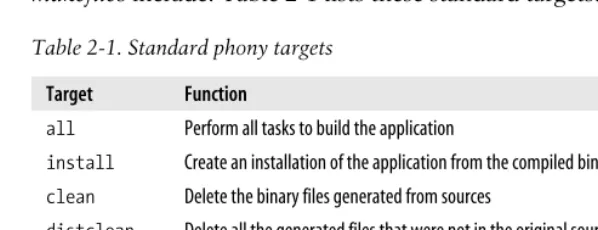
By convention there are a set of more or less standard phony targets that many
makefiles include. Table 2-1 lists these standard targets.
The target TAGSis not really a phony since the output of the ctags andetags pro-grams is a file namedTAGS. It is included here because it is the only standard non-phony target we know of.
Empty Targets
Empty targets are similar to phony targets in that the target itself is used as a device to leverage the capabilities of make. Phony targets are always out of date, so they always execute and they always cause theirdependent(the target associated with the prerequisite) to be remade. But suppose we have some command, with no output file, that needs to be performed only occasionally and we don’t want our dependents updated? For this, we can make a rule whose target is an empty file (sometimes referred to as a cookie):
prog: size prog.o
$(CC) $(LDFLAGS) -o $@ $^ size: prog.o
size $^ touch size
[image:21.612.72.371.170.285.2]Notice that thesizerule usestouchto create an empty file namedsizeafter it com-pletes. This empty file is used for its timestamp so thatmakewill execute thesizerule only whenprog.ohas been updated. Furthermore, thesizeprerequisite toprogwill not force an update ofprog unless its object file is also newer.
Table 2-1. Standard phony targets
Target Function
all Perform all tasks to build the application
install Create an installation of the application from the compiled binaries
clean Delete the binary files generated from sources
distclean Delete all the generated files that were not in the original source distribution
TAGS Create a tags table for use by editors
info Create GNU info files from their Texinfo sources
Empty files are particularly useful when combined with the automatic variable $?. We discuss automatic variables in the section “Automatic Variables,” but a preview of this variable won’t hurt. Within the command script part of a rule,makedefines the variable$?to be the set of prerequisites that are newer than the target. Here is a rule to print all the files that have changed since the last time make print was executed:
print: *.[hc] lpr $? touch $@
Generally, empty files can be used to mark the last time a particular event has taken place.
Variables
Let’s look at some of the variables we have been using in our examples. The simplest ones have the syntax:
$(variable-name)
This indicates that we want to expand the variable whose name is variable-name. Variables can contain almost any text, and variable names can contain most charac-ters including punctuation. The variable containing the C compile command is
COMPILE.c, for example. In general, a variable name must be surrounded by$( )to be recognized by make. As a special case, a single character variable name does not require the parentheses.
Amakefilewill typically define many variables, but there are also many special
vari-ables defined automatically by make. Some can be set by the user to controlmake’s behavior while others are set bymake to communicate with the user’smakefile.
Automatic Variables
Automatic variables are set bymake after a rule is matched. They provide access to
elements from the target and prerequisite lists so you don’t have to explicitly specify any filenames. They are very useful for avoiding code duplication, but are critical when defining more general pattern rules (discussed later).
There are six “core” automatic variables:
$@ The filename representing the target.
$% The filename element of an archive member specification.
$< The filename of the first prerequisite.
Finding Files with VPATH and vpath | 17 $^ The filenames of all the prerequisites, separated by spaces. This list has dupli-cate filenames removed since for most uses, such as compiling, copying, etc., duplicates are not wanted.
$+ Similar to $^, this is the names of all the prerequisites separated by spaces, except that $+includes duplicates. This variable was created for specific situa-tions such as arguments to linkers where duplicate values have meaning.
$* The stem of the target filename. A stem is typically a filename without its suffix. (We’ll discuss how stems are computed later in the section “Pattern Rules.”) Its use outside of pattern rules is discouraged.
In addition, each of the above variables has two variants for compatibility with other
makes. One variant returns only the directory portion of the value. This is indicated by appending a “D” to the symbol,$(@D),$(<D), etc. The other variant returns only the file portion of the value. This is indicated by appending an F to the symbol,
$(@F), $(<F), etc. Note that these variant names are more than one character long and so must be enclosed in parentheses. GNUmakeprovides a more readable alterna-tive with thedir andnotdir functions. We will discuss functions in Chapter 4. Automatic variables are set bymakeafter a rule has been matched with its target and prerequisites so the variables are only available in the command script of a rule. Here is our makefilewith explicit filenames replaced by the appropriate automatic variable.
count_words: count_words.o counter.o lexer.o -lfl gcc $^ -o $@
count_words.o: count_words.c gcc -c $<
counter.o: counter.c gcc -c $< lexer.o: lexer.c gcc -c $< lexer.c: lexer.l flex -t $< > $@
Finding Files with VPATH and vpath
Our examples so far have been simple enough that themakefileand sources all lived in a single directory. Real world programs are more complex (when’s the last time you worked on a single directory project?). Let’s refactor our example and create a more realistic file layout. We can modify our word counting program by refactoring
main into a function calledcounter.
void counter( int counts[4] ) {
while ( yylex( ) ) ;
counts[0] = fee_count; counts[1] = fie_count; counts[2] = foe_count; counts[3] = fum_count; }
A reusable library function should have a declaration in a header file, so let’s create
counter.h containing our declaration:
#ifdef COUNTER_H_ #define COUNTER_H_ extern void
counter( int counts[4] ); #endif
We can also place the declarations for ourlexer.l symbols inlexer.h:
#ifndef LEXER_H_ #define LEXER_H_
extern int fee_count, fie_count, foe_count, fum_count; extern int yylex( void );
#endif
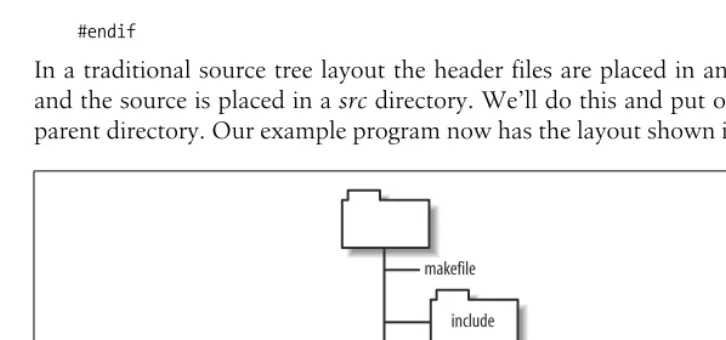
[image:24.612.71.434.402.572.2]In a traditional source tree layout the header files are placed in anincludedirectory and the source is placed in asrcdirectory. We’ll do this and put ourmakefilein the parent directory. Our example program now has the layout shown in Figure 2-1.
Figure 2-1. Example source tree layout
makefile
include
counter.h lexer.h
src
Finding Files with VPATH and vpath | 19
Since our source files now include header files, these new dependencies should be recorded in our makefileso that when a header file is modified, the corresponding object file will be updated.
count_words: count_words.o counter.o lexer.o -lfl gcc $^ -o $@
count_words.o: count_words.c include/counter.h gcc -c $<
counter.o: counter.c include/counter.h include/lexer.h gcc -c $<
lexer.o: lexer.c include/lexer.h gcc -c $<
lexer.c: lexer.l flex -t $< > $@
Now when we run ourmakefile, we get:
$ make
make: *** No rule to make target `count_words.c', needed by `count_words.o'. Stop.
Oops, what happened? Themakefileis trying to updatecount_words.c, but that’s a source file! Let’s “playmake.” Our first prerequisite iscount_words.o. We see the file is missing and look for a rule to create it. The explicit rule for creatingcount_words.o
referencescount_words.c. But why can’tmakefind the source file? Because the source file is in the srcdirectory not the current directory. Unless you direct it otherwise,
makewill look in the current directory for its targets and prerequisites. How do we getmaketo look in thesrcdirectory for source files? Or, more generally, how do we tellmake where our source code is?
You can tellmaketo look in different directories for its source files using the VPATH
andvpathfeatures. To fix our immediate problem, we can add aVPATHassignment to themakefile:
VPATH = src
This indicates thatmakeshould look in the directorysrcif the files it wants are not in the current directory. Now when we run ourmakefile, we get:
$ make
gcc -c src/count_words.c -o count_words.o
src/count_words.c:2:21: counter.h: No such file or directory make: *** [count_words.o] Error 1
Notice thatmakenow successfully tries to compile the first file, filling in correctly the relative path to the source. This is another reason to use automatic variables:make
latest problem by “customizing” the implicit compilation rule with the appropriate-I
option:
CPPFLAGS = -I include
Now the build succeeds:
$ make
gcc -I include -c src/count_words.c -o count_words.o gcc -I include -c src/counter.c -o counter.o flex -t src/lexer.l > lexer.c
gcc -I include -c lexer.c -o lexer.o
gcc count_words.o counter.o lexer.o /lib/libfl.a -o count_words
TheVPATH variable consists of a list of directories to search when makeneeds a file. The list will be searched for targets as well as prerequisites, but not for files men-tioned in command scripts. The list of directories can be separated by spaces or colons on Unix and separated by spaces or semicolons on Windows. I prefer to use spaces since that works on all systems and we can avoid the whole colon/semicolon imbroglio. Also, the directories are easier to read when separated by spaces.
TheVPATHvariable is good because it solved our searching problem above, but it is a rather large hammer.makewill search each directory foranyfile it needs. If a file of the same name exists in multiple places in the VPATH list, make grabs the first one. Sometimes this can be a problem.
The vpath directive is a more precise way to achieve our goals. The syntax of this directive is:
vpath pattern directory-list
So our previousVPATH use can be rewritten as:
vpath %.c src vpath %.h include
Now we’ve toldmakethat it should search for.cfiles in thesrcdirectory and we’ve also added a line to search for.hfiles in theincludedirectory (so we can remove the
include/from our header file prerequisites). In more complex applications, this
con-trol can save a lot of headache and debugging time.
Pattern Rules | 21
Pattern Rules
Themakefileexamples we’ve been looking at are a bit verbose. For a small program
of a dozen files or less we may not care, but for programs with hundreds or thou-sands of files, specifying each target, prerequisite, and command script becomes unworkable. Furthermore, the commands themselves represent duplicate code in our
makefile. If the commands contain a bug or ever change, we would have to update all
these rules. This can be a major maintenance problem and source of bugs.
Many programs that read one file type and output another conform to standard con-ventions. For instance, all C compilers assume that files that have a.csuffix contain C source code and that the object filename can be derived by replacing the.csuffix with.o(or.objfor some Windows compilers). In the previous chapter, we noticed thatflex input files use the.l suffix and thatflex generates.c files.
These conventions allowmaketo simplify rule creation by recognizing common file-name patterns and providing built-in rules for processing them. For example, by using these built-in rules our 17-linemakefile can be reduced to:
VPATH = src include CPPFLAGS = -I include
count_words: counter.o lexer.o -lfl count_words.o: counter.h
counter.o: counter.h lexer.h lexer.o: lexer.h
The built-in rules are all instances of pattern rules. Apattern rulelooks like the nor-mal rules you have already seen except thestemof the file (the portion before the suf-fix) is represented by a % character. This makefileworks because of three built-in rules. The first specifies how to compile a.o file from a.c file:
%.o: %.c
$(COMPILE.c) $(OUTPUT_OPTION) $<
The second specifies how to make a.c file from a.l file:
%.c: %.l
@$(RM) $@ $(LEX.l) $< > $@
Finally, there is a special rule to generate a file with no suffix (always an executable) from a.c file:
%: %.c
$(LINK.c) $^ $(LOADLIBES) $(LDLIBS) -o $@
We’ll go into the details of this syntax in a bit, but first let’s go overmake’s output carefully and see howmake applies these built-in rules.
When we runmake on our two-linemakefile, the output is:
$ make
gcc -I include -c -o counter.o src/counter.c flex -t src/lexer.l > lexer.c
gcc -I include -c -o lexer.o lexer.c
gcc count_words.o counter.o lexer.o /lib/libfl.a -o count_words rm lexer.c
First,makereads themakefileand sets the default goal tocount_wordssince there are no command-line targets specified. Looking at the default goal, makeidentifies four prerequisites: count_words.o (this prerequisite is missing from the makefile, but is provided by the implicit rule), counter.o, lexer.o, and -lfl. It then tries to update each prerequisite in turn.
Whenmakeexamines the first prerequisite,count_words.o,makefinds no explicit rule for it but discovers the implicit rule. Looking in the local directory,makecannot find the source, so it begins searching theVPATH and finds a matching source file insrc. Sincesrc/count_words.chas no prerequisites,makeis free to updatecount_words.oso it runs the commands for the implicit rule.counter.ois similar. Whenmakeconsiders
lexer.o, it cannot find a corresponding source file (even in src) so it assumes this
(nonexistent source) is an intermediate file and looks for a way to makelexer.cfrom some other source file. It discovers a rule to create a.cfile from a.lfile and notices thatlexer.lexists. There is no action required to updatelexer.l, so it moves on to the command for updating lexer.c, which yields the flex command line. Next make
updates the object file from the C source. Using sequences of rules like this to update a target is calledrule chaining.
Next, makeexamines the library specification -lfl. It searches the standard library directories for the system and discovers/lib/libfl.a.
Nowmakehas all the prerequisites for updatingcount_words, so it executes the final
gcccommand. Lastly,makerealizes it created an intermediate file that is not neces-sary to keep so it cleans it up.
As you can see, using rules inmakefiles allows you to omit a lot of detail. Rules can have complex interactions that yield very powerful behaviors. In particular, having a built-in database of common rules makes many types ofmakefilespecifications very simple.
The built-in rules can be customized by changing the values of the variables in the command scripts. A typical rule has a host of variables, beginning with the program to execute, and including variables to set major groupings of command-line options, such as the output file, optimization, debugging, etc. You can look atmake’s default set of rules (and variables) by runningmake --print-data-base.
The Patterns
Pattern Rules | 23
anywhere within the pattern but can occur only once. Here are some valid uses of percent:
%,v s%.o wrapper_%
Characters other than percent match literally within a filename. A pattern can con-tain a prefix or a suffix or both. Whenmakesearches for a pattern rule to apply, it first looks for a matching pattern rule target. The pattern rule target must start with the prefix and end with the suffix (if they exist). If a match is found, the characters between the prefix and suffix are taken as the stem of the name. Nextmakelooks at the prerequisites of the pattern rule by substituting the stem into the prerequisite pattern. If the resulting filename exists or can be made by applying another rule, a match is made and the rule is applied. The stem word must contain at least one character.
It is also possible to have a pattern containing only a percent character. The most common use of this pattern is to build a Unix executable program. For instance, here are several pattern rules GNUmake includes for building programs:
%: %.mod
$(COMPILE.mod) -o $@ -e $@ $^ %: %.cpp
$(LINK.cpp) $^ $(LOADLIBES) $(LDLIBS) -o $@ %: %.sh
cat $< >$@ chmod a+x $@
These patterns will be used to generate an executable from a Modula source file, a preprocessed C source file, and a Bourne shell script, respectively. We will see many more implicit rules in the section “The Implicit Rules Database.”
Static Pattern Rules
A static pattern rule is one that applies only to a specific list of targets.
$(OBJECTS): %.o: %c
$(CC) -c $(CFLAGS) $< -o $@
The only difference between this rule and an ordinary pattern rule is the initial
$(OBJECTS):specification. This limits the rule to the files listed in the$(OBJECTS) vari-able.
This is very similar to a pattern rule. Each object file in$(OBJECTS)is matched against the pattern%.oand its stem is extracted. The stem is then substituted into the pat-tern%.c to yield the target’s prerequisite. If the target pattern does not exist,make
Use static pattern rules whenever it is easier to list the target files explicitly than to identify them by a suffix or other pattern.
Suffix Rules
Suffix rules are the original (and obsolete) way of defining implicit rules. Because other versions ofmakemay not support GNUmake’s pattern rule syntax, you will still see suffix rules inmakefiles intended for a wide distribution so it is important to be able to read and understand the syntax. So, although compiling GNUmakefor the target system is the preferred method formakefileportability, you may still need to write suffix rules in rare circumstances.
Suffix rules consist of one or two suffixes concatenated and used as a target:
.c.o:
$(COMPILE.c) $(OUTPUT_OPTION) $<
This is a little confusing because the prerequisite suffix comes first and the target suf-fix second. This rule matches the same set of targets and prerequisites as:
%.o: %.c
$(COMPILE.c) $(OUTPUT_OPTION) $<
The suffix rule forms the stem of the file by removing the target suffix. It forms the prerequisite by replacing the target suffix with the prerequisite suffix. The suffix rule is recognized bymake only if the two suffixes are in a list of known suffixes.
The above suffix rule is known as a double-suffix rule since it contains two suffixes. There are also single-suffix rules. As you might imagine a single-suffix rule contains only one suffix, the suffix of the source file. These rules are used to create executa-bles since Unix executaexecuta-bles do not have a suffix:
.p:
$(LINK.p) $^ $(LOADLIBES) $(LDLIBS) -o $@
This rule produces an executable image from a Pascal source file. This is completely analogous to the pattern rule:
%: %.p
$(LINK.p) $^ $(LOADLIBES) $(LDLIBS) -o $@
The known suffix list is the strangest part of the syntax. A special target,.SUFFIXES, is used to set the list of known suffixes. Here is the first part of the default.SUFFIXES
definition:
.SUFFIXES: .out .a .ln .o .c .cc .C .cpp .p .f .F .r .y .l
You can add your own suffixes by simply adding a.SUFFIXES rule to yourmakefile:
.SUFFIXES: .pdf .fo .html .xml
If you want to delete all the known suffixes (because they are interfering with your special suffixes) simply specify no prerequisites:
The Implicit Rules Database | 25
You can also use the command-line option--no-builtin-rules (or-r).
We will not use this old syntax in the rest of this book because GNUmake’s pattern rules are clearer and more general.
The Implicit Rules Database
GNUmake3.80 has about 90 built-in implicit rules. An implicit rule is either a tern rule or a suffix rule (which we will discuss briefly later). There are built-in pat-tern rules for C, C++, Pascal, FORTRAN, ratfor, Modula, Texinfo, TEX (including Tangle and Weave), Emacs Lisp, RCS, and SCCS. In addition, there are rules for sup-porting programs for these languages, such ascpp, as, yacc,lex,tangle,weave and dvi tools.
If you are using any of these tools, you’ll probably find most of what you need in the built-in rules. If you’re using some unsupported languages such as Java or XML, you will have to write rules of your own. But don’t worry, you typically need only a few rules to support a language and they are quite easy to write.
To examine the rules database built intomake, use the--print-data-base command-line option (-pfor short). This will generate about a thousand lines of output. After version and copyright information,makeprints its variable definitions each one pre-ceded by a comment indicating the “origin” of the definition. For instance, variables can be environment variables, default values, automatic variables, etc. After the vari-ables, come the rules. The actual format used by GNUmake is:
%: %.C
# commands to execute (built-in):
$(LINK.C) $^ $(LOADLIBES) $(LDLIBS) -o $@
For rules defined by themakefile, the comment will include the file and line where the rule was defined:
%.html: %.xml
# commands to execute (from `Makefile', line 168): $(XMLTO) $(XMLTO_FLAGS) html-nochunks $<
Working with Implicit Rules
of theflex command. Ifeditor.o is a target andeditor.lis newer thaneditor.c, make
will attempt to “update” the C file with the output offlex overwriting your source code. Gack.
To work around this particular problem you can delete the two rules concerning
flex from the built-in rule base like this:
%.o: %.l %.c: %.l
A pattern with no command script will remove the rule from make’s database. In practice, situations such as this are very rare. However, it is important to remember the built-in rules database contains rules that will interact with your ownmakefiles in ways you may not have anticipated.
We have seen several examples of howmake will “chain” rules together while trying to update a target. This can lead to some complexity, which we’ll examine here. Whenmakeconsiders how to update a target, it searches the implicit rules for a tar-get pattern that matches the tartar-get in hand. For each tartar-get pattern that matches the target file,make will look for an existing matching prerequisite. That is, after match-ing the target pattern, make immediately looks for the prerequisite “source” file. If the prerequisite is found, the rule is used. For some target patterns, there are many possible source files. For instance, a.ofile can be made from.c,.cc,.cpp,.p,.f,.r,.s, and.modfiles. But what if the source is not found after searching all possible rules? In this case, make will search the rules again, this time assuming that the matching source file should be considered as a new target for updating. By performing this search recursively,makecan find a “chain” of rules that allows updating a target. We saw this in ourlexer.oexample.makewas able to update thelexer.otarget fromlexer.l
even though the intermediate.cfile was missing by invoking the.lto.crule, then the
.c to.o rule.
One of the more impressive sequences thatmakecan produce automatically from its database is shown here. First, we setup our experiment by creating an emptyyacc
source file and registering with RCSusingci(that is, we want a version-controlled
yacc source file):
$ touch foo.y
$ ci foo.y
foo.y,v <-- foo.y .
initial revision: 1.1 done
Now, we askmakehow it would create the executablefoo. The--just-print(or-n) option tells maketo report what actions it would perform without actually running them. Notice that we have nomakefile and no “source” code, only an RCS file:
$ make -n foo
The Implicit Rules Database | 27
revision 1.1 done
bison -y foo.y mv -f y.tab.c foo.c gcc -c -o foo.o foo.c gcc foo.o -o foo rm foo.c foo.o foo.y
Following the chain of implicit rules and prerequisites,makedetermined it could cre-ate the executable,foo, if it had the object filefoo.o. It could createfoo.oif it had the C source filefoo.c. It could createfoo.cif it had the yacc source filefoo.y. Finally, it realized it could createfoo.yby checking out the file from the RCSfilefoo.y,v, which it actually has. Oncemakehas formulated this plan, it executes it by checking outfoo.y
withco, transforming it intofoo.cwithbison, compiling it intofoo.owithgcc, and linking it to formfooagain withgcc. All this from the implicit rules database. Pretty cool.
The files generated by chaining rules are calledintermediatefiles and are treated spe-cially bymake. First, since intermediate files do not occur in targets (otherwise they would not be intermediate),makewill never simply update an intermediate file. Sec-ond, becausemakecreates intermediate files itself as a side effect of updating a target,
makewill delete the intermediates before exiting. You can see this in the last line of the example.
Rule Structure
The built-in rules have a standard structure intended to make them easily customiz-able. Let’s go over the structure briefly then talk about customization. Here is the (by now familiar) rule for updating an object file from its C source:
%.o: %.c
$(COMPILE.c) $(OUTPUT_OPTION) $<
The customization of this rule is controlled entirely by the set of variables it uses. We see two variables here, butCOMPILE.cin particular is defined in terms of several other variables:
COMPILE.c = $(CC) $(CFLAGS) $(CPPFLAGS) $(TARGET_ARCH) -c CC = gcc
OUTPUT_OPTION = -o $@
The C compiler itself can be changed by altering the value of the CCvariable. The other variables are used for setting compilation options (CFLAGS), preprocessor options (CPPFLAGS), and architecture-specific options (TARGET_ARCH).
The variables in a built-in rule are intended to make customizing the rule as easy as possible. For that reason, it is important to be very careful when setting these vari-ables in yourmakefile. If you set these variables in a naive way, you destroy the end user’s ability to customize them. For instance, given this assignment in amakefile:
If the user wanted to add a CPP define to the command line, they would normally invokemake like:
$ make CPPFLAGS=-DDEBUG
But in so doing they would accidentally remove the-Ioption that is (presumably) required for compiling. Variables set on the command line override all other assign-ments to the variable. (See the section “Where Variables Come From” in Chapter 3 for more details on command-line assignments). So, settingCPPFLAGSinappropriately in the makefile “broke” a customization feature that most users would expect to work. Instead of using simple assignment, consider redefining the compilation vari-able to include your own varivari-ables:
COMPILE.c = $(CC) $(CFLAGS) $(INCLUDES) $(CPPFLAGS) $(TARGET_ARCH) -c INCLUDES = -I project/include
Or you can use append-style assignment, which is discussed in the section “Other Types of Assignment” in Chapter 3.
Implicit Rules for Source Control
makeknows about two source code control systems, RCS and SCCS, and supports their use with built-in implicit rules. Unfortunately, it seems the state of the art in source code control and modern software engineering have left make behind. I’ve never found a use for the source control support inmake, nor have I seen it used in other production software. I do not recommend the use of this feature. There are a number of reasons for this.
First, the source control tools supported bymake, RCS and SCCS, although valuable and venerable tools in their day, have largely been supplanted by CVS, the Concur-rent Version System, or proprietary tools. In fact, CVS uses RCS to manage individ-ual files internally. However, using RCSdirectly proved to be a considerable problem when a project spanned more than one directory or more than one developer. CVS, in particular, was implemented to fill the gaps in RCS’s functionality in precisely these areas. Support for CVS has never been added tomake, which is probably a good thing.*
It is now well recognized that the life cycle of software becomes complex. Applica-tions rarely move smoothly from one release to the next. More typically, one or more distinct releases of an application are being used in the field (and require bug fix sup-port), while one or more versions are in active development. CVSprovides powerful features to help manage these parallel versions of the software. But it also means that a developer must be very aware of the specific version of the code she is working on. Having themakefileautomatically check out source during a compilation begs the
The Implicit Rules Database | 29
question of what source is being checked out and whether the newly checked out source is compatible with the source already existing in the developer’s working directories. In many production environments, developers are working on three or more distinct versions of the same application in a single day. Keeping this complex-ity in check is hard enough without having software quietly updating your source tree for you.
Also, one of the more powerful features of CVSis that it allows access to remote repositories. In most production environments, the CVSrepository (the database of controlled files) is not located on the developer’s own machine, but on a server. Although network access is now quite fast (particularly on a local area network) it is not a good idea to havemakeprobing the network server in search of source files. The performance impact would be disastrous.
So, although it is possible to use the built-in implicit rules to interface more or less cleanly with RCS and SCCS, there are no rules to access CVS for gathering source files ormakefile. Nor do I think it makes much sense to do so. On the other hand, it is quite reasonable to use CVSinmakefiles. For instance, to ensure that the current source is properly checked in, that the release number information is managed prop-erly, or that test results are correct. These are uses of CVSbymakefileauthors rather than issues of CVS integration withmake.
A Simple Help Command
Largemakefiles can have many targets that are difficult for users to remember. One way to reduce this problem is to make the default target a brief help command. However, maintaining the help text by hand is always a problem. To avoid this, you can gather the available commands directly frommake’s rules database. The follow-ing target will present a sorted four column listfollow-ing of the availablemake targets:
# help - The default goal .PHONY: help
help:
$(MAKE) --print-data-base --question | \ $(AWK) '/^[^.%][-A-Za-z0-9_]*:/ \ { print substr($$1, 1, length($$1)-1) }' | \ $(SORT) | \ $(PR) --omit-pagination --width=80 --columns=4
The command script consists of a single pipeline. Themakerule database is dumped using the --print-data-basecommand. Using the --questionoption prevents make
from running any actual commands. The database is then passed through a simple
Another approach to the same command (my first attempt), used theawkcommand on themakefileitself. This required special handling for includedmakefiles (covered in the section “The include Directive” in Chapter 3) and could not handle generated rules at all. The version presented here handles all that automatically by allowing
make to process these elements and report the resulting rule set.
Special Targets
Aspecial targetis a built-in phony target used to changemake’s default behavior. For instance,.PHONY, a special target, which we’ve already seen, declares that its prereq-uisite does not refer to an actual file and should always be considered out of date. The.PHONYtarget is the most common special target you will see, but there are oth-ers as well.
These special targets follow the syntax of normal targets, that is target:
prerequisite, but the target is not a file or even a normal phony. They are really more like directives for modifyingmake’s internal algorithms.
There are twelve special targets. They fall into three categories: as we’ve just said many are used to alter the behavior ofmakewhen updating a target, another set act simply as global flags to makeand ignore their targets, finally the .SUFFIXESspecial target is used when specifying old-fashioned suffix rules (discussed in the section “Suffix Rules” earlier in this chapter).
The most useful target modifiers (aside from.PHONY) are:
.INTERMEDIATE
Prerequisites of this special target are treated as intermediate files. Ifmakecreates the file while updating another target, the file will be deleted automatically when
makeexits. If the file already exists whenmakeconsiders updating the file, the file will not be deleted.
This can be very useful when building custom rule chains. For instance, most Java tools accept Windows-like file lists. Creating rules to build the file lists and marking their output files as intermediate allowsmaketo clean up many tempo-rary files.
.SECONDARY
Prerequisites of this special target are treated as intermediate files but are never automatically deleted. The most common use of .SECONDARY is to mark object files stored in libraries. Normally these object files will be deleted as soon as they are added to an archive. Sometimes it is more convenient during development to keep these object files, but still use themake support for updating archives.
.PRECIOUS
Automatic Dependency Generation | 31
a partially constructed (possibly corrupt) file laying around in the build tree. There are times when you don’t want this behavior, particularly if the file is large and computationally expensive to create. If you mark the file as precious,make
will never delete the file if interrupted.
Use of.PRECIOUSis relatively rare, but when it is needed it is often a life saver. Note that makewill not perform an automatic delete if the commands of a rule generate an error. It does so only when interrupted by a signal.
.DELETE_ON_ERROR
This is sort of the opposite of .PRECIOUS. Marking a target as .DELETE_ON_ERROR
says thatmake shoulddelete the target if any of the commands associated with the rule generates an error. makenormally only deletes the target if it is inter-rupted by a signal.
The other special targets will be covered later when their use is more relevant. We’ll discuss.EXPORT_ALL_VARIABLESin Chapter 3 and the targets relating to parallel execu-tion in Chapter 10.
Automatic Dependency Generation
When we refactored our word counting program to use header files, a thorny little problem snuck up on us. We added the dependency between the object files and the C header files to themakefileby hand. It was easy to do in this case, but in normal programs (not toy examples) this can be tedious and error-prone. In fact, in most programs it is virtually impossible because most header files include other header files forming a complex tree. For instance, on my system, the single header filestdio.h
(the most commonly referenced header file in C) expands to include 15 other header files. Resolving these relationships by hand is a hopeless task. But failing to recom-pile files can lead to hours of debugging headaches or worse, bugs in the resulting program. So what do we do?
Well, computers are pretty good at searching and pattern matching. Let’s use a pro-gram to identify the relationships between files and maybe even have this propro-gram write out these dependencies inmakefilesyntax. As you have probably guessed, such a program already exists—at least for C/C++. There is a option to gcc and many other C/C++ compilers that will read the source and write makefiledependencies. For instance, here is how I found the dependencies forstdio.h:
$ echo "#include <stdio.h>" > stdio.c
$ gcc -M stdio.c
stdio.o: stdio.c /usr/include/stdio.h /usr/include/_ansi.h \ /usr/include/newlib.h /usr/include/sys/config.h \
/usr/include/sys/features.h /usr/include/cygwin/types.h \ /usr/include/sys/sysmacros.h /usr/include/stdint.h \ /usr/include/sys/stdio.h
“Fine.” I hear you cry, “Now I need to rungccand use an editor to paste the results of -M into my makefiles. What a pain.” And you’d be right if this was the whole answer. There are two traditional methods for including automatically generated dependencies intomakefiles. The first and oldest is to add a line such as:
# Automatically generated dependencies follow - Do Not Edit
to the end of the makefile and then write a shell script to update t