Get more out of
WROX.com
Programmer to Programmer
™
Interact
Take an active role online by participating in
our P2P forums
Wrox Online Library
Hundreds of our books are available online
through Books24x7.com
Wrox Blox
Download short informational pieces and
code to keep you up to date and out of
trouble!
Chapters on Demand
Purchase individual book chapters in pdf
format
Join the Community
Sign up for our free monthly newsletter at
newsletter.wrox.com
Browse
Ready for more Wrox? We have books and
e-books available on .NET, SQL Server, Java,
XML, Visual Basic, C#/ C++, and much more!
Contact Us.
OpenSocial
Network Programming
Introduction
. . . .
xviiChapter 1: Social Network Programming
. . . .
1Chapter 2: Introduction to OpenSocial
. . . .
55Chapter 3: Gadget XML and Gadget API
. . . .
87Chapter 4: JavaScript API
. . . .
111Chapter 5: OpenSocial RESTful API
. . . .
169Chapter 6: Programming Fundamentals
. . . .
221Chapter 7: Sample Applications
. . . .
235Chapter 8: Performance, Scalability, and Monetization
. . . .
277Chapter 9: OpenSocial Templates, Markup, and Emerging Technologies
. . . .
325OpenSocial
Network Programming
Lynne Grewe
OpenSocial
Network Programming
Published by Wiley Publishing, Inc. 10475 Crosspoint Boulevard Indianapolis, IN 46256 www.wiley.com
Copyright2009 by Wiley Publishing, Inc., Indianapolis, Indiana
Published simultaneously in Canada
ISBN: 978-0-470-44222-7
Manufactured in the United States of America
10 9 8 7 6 5 4 3 2 1
Library of Congress Cataloging-in-Publication Data: Grewe, Lynne,
1965-OpenSocial network programming / Lynne Grewe. p. cm.
Includes index.
ISBN 978-0-470-44222-7 (paper/website)
1. Online social networks — Computer software. 2. Online social networks — Design. 3. Application program interfaces (Computer software) I. Title.
HM742.G74 2009 006.7’54 — dc22
2009001915
No part of this publication may be reproduced, stored in a retrieval system or transmitted in any form or by any means, electronic, mechanical, photocopying, recording, scanning or otherwise, except as permitted under Sections 107 or 108 of the 1976 United States Copyright Act, without either the prior written permission of the Publisher, or authorization through payment of the appropriate per-copy fee to the Copyright Clearance Center, 222 Rosewood Drive, Danvers, MA 01923, (978) 750-8400, fax (978) 646-8600. Requests to the Publisher for permission should be addressed to the Permissions Department, John Wiley & Sons, Inc., 111 River Street, Hoboken, NJ, 07030, (201) 748-6011, fax (201) 748-6008, or online athttp://www.wiley.com/go/permissions.
Limit of Liability/Disclaimer of Warranty:The publisher and the author make no representations or warranties with respect to the accuracy or completeness of the contents of this work and specifically disclaim all warranties, including without limitation warranties of fitness for a particular purpose. No warranty may be created or extended by sales or promotional materials. The advice and strategies contained herein may not be suitable for every situation. This work is sold with the understanding that the publisher is not engaged in rendering legal, accounting, or other professional services. If professional assistance is required, the services of a competent professional person should be sought. Neither the publisher nor the author shall be liable for damages arising herefrom. The fact that an organization or Web site is referred to in this work as a citation and/or a potential source of further information does not mean that the author or the publisher endorses the information the organization or Web site may provide or recommendations it may make. Further, readers should be aware that Internet Web sites listed in this work may have changed or disappeared between when this work was written and when it is read.
For general information on our other products and services please contact our Customer Care Department within the United States at (877) 762-2974, outside the United States at (317) 572-3993 or fax (317) 572-4002.
Trademarks: Wiley, the Wiley logo, Wrox, the Wrox logo, Programmer to Programmer, and related trade dress are trademarks or registered trademarks of John Wiley & Sons, Inc. and/or its affiliates, in the United States and other countries, and may not be used without written permission. OpenSocial is a trademark of Google, Inc. All other trademarks are the property of their respective owners. Wiley Publishing, Inc. is not associated with any product or vendor mentioned in this book.
To my family, Ben, Allen, and Jake, thank you for sharing this life and love with me. To my best friend and mother, Joyce, thank you for all of your love and support.
About the Author
Credits
Executive EditorCarol Long
Development Editor
Kevin Shafer
Technical Editor
Ken Walton
Production Editor
Liz Britten
Copy Editor
Kim Cofer
Foxxe Editorial Services
Editorial Manager
Mary Beth Wakefield
Production Manager
Tim Tate
Vice President and Executive Group Publisher
Richard Swadley
Vice President and Executive Publisher
Barry Pruett
Associate Publisher
Jim Minatel
Project Coordinator, Cover
Lynsey Stamford
Proofreader
Josh Chase (Word One)
Indexer
Acknowledgments
I would like to thank a number of people for helping me create the best book possible. Thank you to Kevin Shafer, my development editor at Wiley, who with his considerable experience made this book shine. Thank you to Carol Long, executive acquisitions editor at Wiley, a great editor who guided me through the process. Also, thanks to the Wiley publishing team, including Sara Shlaer and Kirk Bateman.
A special thanks to Ken Walton, director of business development and chief software architect at Klick-Nation, who served as technical editor and spent many hours reviewing the book, making suggestions, and helping to ensure that there are no errors.
I also interviewed a number of people to create this book and want to thank the following for their invaluable assistance:
T Ken Walton, director of business development and chief software architect, KlickNation
T Cody Simms, Yahoo!, senior director, Yahoo! platforms
T Prakash Narayan, Zembly
T Jia Shen, CTO and founder, RockYou
T Lan LiaBraaten, Sara Jew-lim, Jan Penner, Google
T David Young, Slide
T Paul Linder, platform architect, hi5
T Rod Boothby, vice president, Joyent
T Ali Partovi, CEO, iLike
T Vikas Gupta, cofounder/CEO, Jambool
T Charlene Li, emerging technologies and coauthor of ‘‘Groundswell’’
T Kevin Chou, CEO, Watercooler
T Rhett Mcnulty, COO, Shopit
T Stefano Pochet, Nealab Technologies, Freebar
T Jeff Roberto, Friendster T Gina Olsen, imeem
Contents
Introduction
xvii
Chapter 1: Social Network Programming
1
Social Network Platforms
2
MySpace 2
hi5 5
orkut 7
Friendster 8
imeem 9
Freebar 9
Netlog 11
Yahoo! 12
Other Networks 14
Social Network Applications
14
Application Discovery 15
Application Installation 16
Application Appearance 17
Control of Applications 25
Making Applications Social and Viral
29
Application Goals
29
Growth 30
Engagement 30
Good Look and Feel 32
Dynamic Evolution 32
Self Expression 32
Social Exposure 33
Relationship Building 33
Real-World Problem Solving 33
Application Trends
33
Reach (General Appeal) Applications 35
Vertical (Targeted) Applications 36
Template-Based Application Development 36
Brand Applications 39
Longer Engagement 39
Use of Media 39
Internationalization 41
Self Expression 43
Partnering 43
Virtual Currencies, Goods, and Points 43
Mobile Applications 45
Increased Use of Social Data 45
Increased Use of Application Data 46
Viral Channels and Features
46
Social Network Identity
48
Marketing — The Next Step
50
Retention
53
Tips for Good Application Development
53
Summary
54
Chapter 2: Introduction to OpenSocial
57
OpenSocial History
57
OpenSocial Architecture
59
Client-Based API 60
Server-Based API 61
Application Architecture
65
Sample Application
66
OpenSocial Data Formats
67
JSON 67
Atom 68
XML 68
Application Deployment
69
MySpace Deployment 69
hi5 Deployment 76
orkut Deployment 77
Netlog Deployment 80
imeem Deployment 80
Friendster Deployment 82
Freebar Deployment 85
What You Need to Get Started
85
Summary
88
Chapter 3: Gadget XML and Gadget API
89
Gadget XML
89
Core Gadget API 97
Feature-Specific Gadget API 104
Multiple Views
109
Changing Views Dynamically 111
Lifecycle Support
111
Summary
112
Chapter 4: JavaScript API
113
A Simple Application in OpenSocial
113
OpenSocial API Features
117
People
118
ViewerData Example 119
GetFriends Example 121
Info Example 124
IdSpec 124
Activities
132
Messages — Email and Notifications 133
Activity Posting (Updates) 136
Invitations to Install 139
Persistence
141
Information Storage 142
Information Retrieval 142
Detail of OpenSocial JavaScript API
146
Summary
170
Chapter 5: OpenSocial RESTful API
169
Getting to Know REST
169
Purely RESTful Architecture 171
RESTful-RPC Hybrid Architecture 171
Looking at an Example of REST 171
OpenSocial RESTful Server-Side Programming
173
Completely Server-Based OpenSocial RESTful API Application 173 Hybrid OpenSocial JavaScript and RESTful API Application 175
OpenSocial RESTful Application Architecture
175
OpenSocial REST Authorization and Authentication (OAuth)
176
OAuth Steps 177
OAuth Parameters 179
OAuth Requests 179
OAuth Signing Requests 180
OAuth Tokens (the Response) 181
HTTP Errors 195
OpenID 195
Key Cache and Token Management 195
OAuth Libraries 196
What You Need 196
hi5 Authentication Scheme 196
OpenSocial RESTful API Details
198
OpenSocial REST Request Construction 198
OpenSocial REST API Specification 200
Data Formatting and Atom/AtomPub 203
HTTP Method Type 210
OpenSocial REST Response 211
What You Need 212
OpenSocial REST Application Deployment
212
HTTP Status Codes
213
OpenSocial REST Support Discovery
213
OpenSocial Security with the REST API
216
OpenSocial REST API Future
216
OpenSocial RPC Protocol
216
Summary
219
Chapter 6: Programming Fundamentals
223
Application Testing
223
Front-End GUI Design Tips
224
Navigation Tabs 224
Look and Feel 226
Social Network-Specific Looks 227
External Resources
228
Caching Issues 230
POST Request 231
Signed Request 232
Performance Improvement Using Preload 234
Capabilities Inquiry
234
Action Requests and Permissions
234
Summary
235
Chapter 7: Sample Applications
235
Person/People Applications
235
Producing a Paginated Friends List 238
Using Pronouns 239
Creating a Friend Selector 241
Testing If Two Users Are Friends 243
Finding Top Friends Who Have the Application Installed 244
Friends of Friends 246
Communications Applications
246
Making Signed Requests 247
Creating Minimessages 249
Creating Gadget Message Bundles 250
Using Message and Activity Templates 251
Using Message Summaries 254
Using Media Items in Activities 254
Clearing AppData
258
Understanding Environment — Support and Domain
259
Handling Errors
262
Container Compliance and NOT_IMPLEMENTED 262
Checking and Asking for Permissions
263
Working with Container-Specific Extensions
264
hi5 Lifecycle Extension 265
DataRequest Extension 266
Fields Extension 266
hi5 Template Library 266
Using Internationalization, Localization, and Globalization
267
Using Flash Media
271
Option 1: Using the Gadget API 271
Option 2: Using the SWFObject JavaScript Library 272
More Configuration Options 273
Container Support 274
JavaScript Tools for Applications
274
Summary
275
Chapter 8: Performance, Scalability, and Monetization
279
Understanding Scalability and Performance
280
Defining Scalability 280
Using Scalability Metrics 281
Performance Problem Areas 282
Scaling Up or Out 282
Understanding Architecture
282
Understanding Subsystems
284
Web Server 285
Load Balancing 286
Caching 286
Content Delivery Networks (CDNs) 292
Understanding Hosting Solutions
292
What They’re Saying about Hosting Solutions 294
Amazon Web Services (AWS) 294
Joyent 300
Other Hosting Solutions 301
Case Studies
301
Understanding Database Issues
302
Distributed Systems (Scale Out) 303
Database Sharding 303
Understanding Redundancy
304
Using Monitoring
304
Understanding Software Design
305
Language Choice 307
Versioning 307
OpenSocial Performance Tuning
308
Minimizing the Number of HTTP Requests 308
Batching Multiple Requests 308
Using OpenSocial AppData as a Container Cache 309
Reducing the Number of DNS Lookups 309
Reducing the Number of Files 309
Turning on the Persistence Feature in a Web Server 309
Compressing Content Using GZIP 310
‘‘Minifying” JavaScript 310
Using CSS in a Header 310
Locating JavaScript at the Bottom 311
Caching versus Requests for External Files (JavaScript, CSS) 311
Flushing a Server Response 311
Monitoring Client Code Performance 311
Preloading OpenSocial Content 313
Achieving Good Load Times 314
Using OpenSocialgetfrom Cache 314
Using CSS Image Sprites 314
Using Analytics
314
Google Analytics 315
Yahoo! Web Analytics 317
Sometrics 318
Social Network-Provided 318
Using Scalable User Interface Design
318
Monetization
320
Advertising 320
Affiliate Programs 321
Partnering 322
Virtual Goods and Virtual Currency 322
Real Goods and Micropayments/Micro-Transactions 323
Monetization Case Studies 323
Summary
325
Chapter 9: OpenSocial Templates, Markup, and Emerging Technologies
325
OpenSocial Templates Standard
325
Requiring a Feature 326
Understanding Basic Template Construction and Use 327
Naming Templates 328
Using Expressions in Templates 329
Using Variables and Passing Data to a Template 330
Calling Templates with Parameters 331
Using the repeat Attribute for Looping 332
Using Conditional Tests 332
Localization with Templates 332
Using a Separate Definition File for Templates 333
OpenSocial Markup Language 334
OpenSocial Data Pipelining 345
OpenSocial Template Examples 350
OpenSocial Proxied Content
352
OpenSocial Client Libraries
353
Yahoo! Open Strategy
353
Y!OS Architecture 354
Yahoo! User Profiles 355
Yahoo! User Updates 355
Yahoo! Applications (YAP) 356
YAP Application Development Steps 360
YAP OpenSocial Application Development 361
Yahoo! Query Language 364
Understanding the Yahoo! User Interface (YUI) 365
Using Yahoo! Markup Language (YML) 365
Y!OS Application Examples 366
iWidgets
367
Zembly
368
Understanding the Zembly Application Structure 369
Understanding a Zembly Service 370
Understanding a Zembly Snippet 371
Understanding a Zembly Key Chain 371
Creating an OpenSocial Application in Zembly 371
Publishing an Application 373
Creating Your Own Service 373
Summary
374
I n t r o d u c t i o n
OpenSocial is a new and exciting platform that allows you to create and deploy social networking appli-cations on multiple networks, including MySpace, hi5, imeem, Friendster, Netlog, orkut, and more. It is an alternative to the single-container Facebook-only API used by Facebook. This book teaches you step by step how to create viral and engaging social network applications using OpenSocial. Also dis-cussed are front-end and back-end issues, how to make money with social network applications, and marketing strategies. This book also features new emerging technologies that let you ‘‘mash/mix’’ a social application.
Who This Book Is For
The primary target audience of this book is programmers interested in state-of-the-art social network programming with OpenSocial. While a brief introduction to JavaScript is provided, some familiarity with it and Web development is ideal. The parts of this book dealing with a discussion of social applica-tions and emerging technologies are appropriate for the broader audience of tech-savvy social network users who want to easily make their own applications.
What This Book Covers
This book gives a programmer a well-rounded education in the creation of applications for the most popular social networks using OpenSocial. What sets this book apart from others in social network application development is that it shows you how to develop applications for more than one platform, featuring OpenSocial in a ‘‘write once, deploy to many social networks’’ fashion. In addition, the book features a discussion of how to make viral, social applications, and discusses issues surrounding both front-end and back-end needs. Finally, this book is unique in that it also includes a discussion of some emerging platforms that allow even non-programmers to create applications.
Some of the highlights of this book include the following:
T Learning the OpenSocial API
T Understanding the OpenSocial architecture, including both client (JavaScript API) and server (RESTful) APIs
T Learning how to develop OpenSocial applications (including deployment on multiple platforms)
T Learning about front-end and back-end solutions
T Discovering marketing and monetization ideas
How This Book Is Str uctured
Following is a breakdown of the contents of this book:
T Chapter 1: Social Network Programming— This chapter provides an overview of some of the most popular social network platforms from a user’s perspective. Next, the chapter discusses what a social network application is, and how applications can be found in different platforms and controlled. This chapter also provides an overview of some of the most popular techniques used in creating both ‘‘social’’ and ‘‘viral’’ applications. Tips and tricks from industry experts are provided.
T Chapter 2: Introduction to OpenSocial— This chapter discusses OpenSocial as an open API for social network development that is meant for use in multiple social network platforms. This chapter also discusses the basic anatomy (architecture) of OpenSocial. Here, you will also learn about OpenSocial data formats. The chapter concludes with an examination of how to deploy it on multiple containers (social networks).
T Chapter 3: Gadget XML and Gadget API— This chapter provides an examination of the Gadget XML and Gadget API specifications.
T Chapter 4: OpenSocial API— This chapter provides an in-depth discussion of the OpenSocial JavaScript API, with numerous code samples.
T Chapter 5: OpenSocial RESTful API— This chapter examines the new OpenSocial RESTful API, which allows server-side programs to access OpenSocial data directly.
T Chapter 6: Programming Fundamentals— This chapter examines some of the fundamental con-cepts you should know when working with an OpenSocial application.
T Chapter 7: Sample Applications— This chapter shows how to create applications that feature different social hooks.
T Chapter 8: Performance, Scalability, and Monetization— This chapter discusses scalability, and provides tips on maximizing this important characteristic of OpenSocial applications. The discussion examines the inner components making up an application, as well as a variety of available hosting solutions. The chapter examines how to fine-tune applications for better per-formance, as well as how to maximize the benefits of a scalable design. The chapter concludes with a look at how to use your application to make money.
T Chapter 9: OpenSocial Templates, Markup, and Emerging Technologies— This chapter exam-ines the OpenSocial Templates standard, OpenSocial proxied content, OpenSocial client libraries, and other emerging technologies.
What You Need to Use This Book
This book assumes that you are a user of social networks and have an account on one or more networks (such as MySpace or hi5). Having an understanding of JavaScript and basic Web development technolo-gies is ideal. Finally, as described in the book, to create and deploy your own application, you will need an account on an appropriate server.
Conventions
Boxes like this one hold important, not-to-be forgotten information that is directly relevant to the surrounding text.
Tips, hints, tricks, and asides to the current discussion are offset and placed in italics like this. As for styles in the text:
T New terms and important words are highlighted like this when they are introduced.
T Keyboard strokes are shown like this: Ctrl+A.
T Filenames, URLs, and code within the text are shown like this:persistence.properties.
T Code is shown in two different ways:
New and important code is highlighted in code examples with a gray background.
The gray highlighting is not used for code that’s less important in the present context, or has been shown before.
Source Code
As you work through the examples in this book, you may choose either to type in all the code manually or to use the source code files that accompany the book. All of the source code used in this book is available for downloading athttp://www.wrox.com. Once at the site, simply locate the book’s title (either by using the Search box, or by using one of the title lists) and click the Download Code link on the book’s detail page to obtain all the source code for the book.
Because many books have similar titles, you may find it easiest to search by ISBN; this book’s ISBN is 978-0-470-44222-7.
Once you download the code, just decompress it with your favorite compression tool. Alternately, you can go to the main Wrox code download page athttp://www.wrox.com/dynamic/books/download.aspx to see the code available for this book and all other Wrox books.
Errata
We make every effort to ensure that there are no errors in the text or in the code. However, no one is perfect, and mistakes do occur. If you find an error in one of our books (such as a spelling mistake or faulty piece of code), we would be very grateful for your feedback. By sending in errata, you may save another reader hours of frustration and, at the same time, you will be helping us provide even higher-quality information.
To find the errata page for this book, go tohttp://www.wrox.comand locate the title using the Search box or one of the title lists. Then, on the book details page, click the Book Errata link. On this page, you can view all errata that has been submitted for this book and posted by Wrox editors. A complete book list (including links to each book’s errata) is also available atwww.wrox.com/misc-pages/booklist.shtml.
and, if appropriate, post a message to the book’s errata page, and fix the problem in subsequent editions of the book.
p2p.wrox.com
For author and peer discussion, join the P2P forums atp2p.wrox.com.The forums are a Web-based system for you to post messages relating to Wrox books and related technologies, as well as to interact with other readers and technology users. The forums offer a subscription feature to email you topics of interest of your choosing when new posts are made to the forums. Wrox authors, editors, other industry experts, as well as your fellow readers, are present on these forums.
Athttp://p2p.wrox.comyou will find a number of different forums that will help you not only as you read this book but also as you develop your own applications. To join the forums, just follow these steps:
1.
Go top2p.wrox.comand click the Register link.2.
Read the terms of use, and click Agree.3.
Complete the required information to join, as well as provide any optional information you wish, and click Submit.4.
You will receive an email with information describing how to verify your account and com-plete the joining process.You can read messages in the forums without joining P2P, but in order to post your own messages, you must join.
Once you join, you can post new messages and respond to messages other users post. You can read messages at any time on the Web. If you would like to have new messages from a particular forum emailed to you, click the ‘‘Subscribe to this Forum’’ icon by the forum name in the forum listing.
Social Networ k
Programming
The most recent explosive growth on the World Wide Web (WWW) is social networking. Social net-working allows you to make and connect to friends in unique and fun ways, in what are known as build communities. Consider the explosive growth of social networks such as MySpace and Face-book in the United States. This new paradigm of Web use is taking hold not only in the U.S., but also worldwide. Social networks are considered the new interface, the new transaction process of the WWW in large part because of the concept behind the word ‘‘social,’’ and its implementation through the development and use of social network applications. This book provides you with the skills necessary to create dynamic, viral, engaging applications for multiple platforms.
This book provides the programmer and (in the case of mash-up and authoring technologies) the casual or beginning tech-savvy person with the necessary knowledge to enable them to create their own social network applications.
Not all social networks allow third-party organizations or individuals to create social network applications. This capability really emerged with the Facebook API, which is why you see so many applications on Facebook.
Most recently, a new standard has emerged called OpenSocial. It was spear-headed by Google to be an Open Source multi-container (network) solution. It was explicitly created to allow developers to create applications that could be deployed on multiple social networks (containers), unlike the pre-vious Facebook-only API. This is a powerful idea, because it provides the capability to create once and deploy to many. OpenSocial has the added advantage of being Open Source, which enables developers to take lead roles in how it will evolve. Many of the most popular social networks such as MySpace, hi5, Friendster, and others, are now supporting OpenSocial as the standard for appli-cation development. New social networks are signing on rapidly. New OpenSocial appliappli-cations are being generated for these containers every day.
reviews a number of OpenSocial container networks from a user’s perspective. These interfaces can (and do) change, and what is shown in this discussion reflects the state as of this writing. However, even with changes, you will notice many of the same utilities and similar user interface (UI) features.
This chapter also examines good application goals, and shows you some application trends. You will learn about the most effective viral channels and application features. Later in this chapter, you will learn about marketing strategies and the important topic of user retention. This chapter concludes with some tips for good application development.
Social Networ k Platforms
Today, there are many social networks, and more are being created every day. The biggest players change frequently, depending on the country. Following are a few of the most popular social networks:
T MySpace
T hi5
T orkut
T Friendster
T imeem
T Freebar
T Netlog
T Linkedin
T Facebook
While many of these networks are general, some have targeted audiences. For example, LinkedIn is used mostly for professional networking. imeem is targeted (centered?) around music, artists, producers, and consumers.
Now, let’s take a brief look at some of the most popular social networks.
MySpace
MySpace is one of the earliest and most successful social networks in existence, often billed as the most popular social network. It has been around since 2003/2004, and its user demographics include a large percentage of U.S. teenagers. Fox Interactive Media has owned MySpace since 2005.
The Internet marketing research firm, comScore, compiles and provides marketing data and services to many of the largest Internet-based companies. In the United States, Fox is ranked fifth, above Facebook’s number 16 in comScore’s measure of the number of unique visitors. In terms of OpenSocial, MySpace was one of the initial launch partners, and offered its MySpace Developer Platform that supported OpenSocial in 2007. For many English-based applications, you will want to deploy your OpenSocial application on MySpace because of the sheer size of the potential audience.
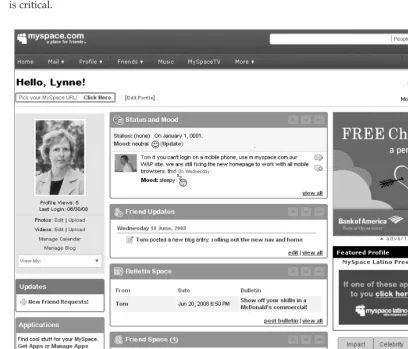
with boxed areas, each containing specific utilities. The left column is dominated by an image of the user and details about the user, followed by a listing of currently installed applications. The middle column contains MySpace-controlled utilities such as ‘‘Status and Mood’’ (both yours and your friends’), ‘‘Friend Updates’’ (what your friends are doing), ‘‘Bulletin Space,’’ and ‘‘Friend Spaces’’ (listing of friends). The far right column on the main interface displays installed applications running in this ‘‘home’’ view. You have access to some of these items through OpenSocial. For example, OpenSocial allows an application to get the current status of a person. Knowing where and how users on a network might use this feature can be important for your application. Becoming intimately familiar with a network from a user’s perspective is critical.
Figure 1-1: MySpace main user interface ‘‘‘‘home’’ view’’
The main MySpace navigation bar (which remains on most pages) contains the following links:
T Home takes you to the main (’’home’’) view shown in Figure 1-1.
T Mail takes you to the interface that lets you send and receive messages with others on MySpace
T Friends shows both current friends and ways to find new friends.
T Music shows media pages delivered by MySpace (much like the media you see at the Yahoo! Web site).
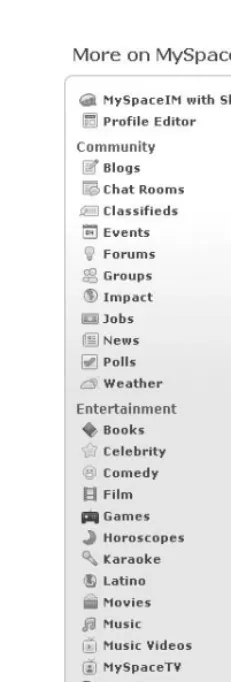
[image:26.612.193.309.132.474.2]T More displays a series of MySpace-sponsored applications, as shown in Figure 1-2.
Figure 1-2: More applications sponsored by MySpace
As users add more information, applications, and friends, their profiles grow in size. But, regardless of the amount, the information is divided into categories showing information about the user on the left-hand side of the profile page (such as interests, details, schools, networking, and so on). On the right side of the profile page are categories for Blurbs, Friends’ Comments, and Friend Space. Also featured on the profile are user-added applications that are deployed to run in the ‘‘profile’’ view. When users decide to add an application, they can determine if it appears in their profile or not.
hi5
Launched in 2003, hi5 is one of the world’s largest social networks, ranked as a top 20 Web site globally, and the number 1 social network in 25 countries across Latin America, Europe, Asia, and Africa. Accord-ing to comScore, more than 56 million individuals every month visit hi5, which is currently available in 27 language options. Recently, hi5 experienced one of the fastest growth rates of social networks. hi5 is a privately held company, headquartered in San Francisco, California.
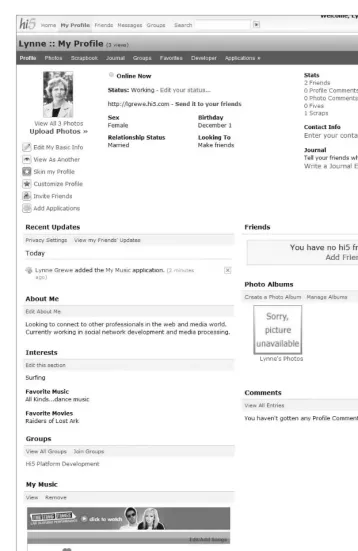
Figure 1-3 shows the main interface (or ‘‘home’’ view) seen by a typical hi5 user. Note that this interface consists of an upper navigation bar, as well as three vertical sections populated with boxed areas, each containing specific utilities.
Figure 1-3: hi5 main user interface (‘‘home’’ view)
The main navigation bar that appears on most pages seen by the user has links for Home (home view), Profile (profile view), Friends (listing of friends), Messages, and Groups (user and friend’s groups sub-scribed to). The left column is dominated by an image of and details about the user. The middle column contains such hi5-controlled utilities as ‘‘Find Friends.’’ The far-right column features a list of installed applications.
Of particular interest in a user’s hi5 profile is the Applications link on the navigation bar. Clicking this link takes you to a page that first displays hi5-featured applications, followed by a list of applications currently installed. Featured applications can be determined by factors such as applications most recently installed by a user’s friends.
orkut
orkut was founded in 2004 and, as of this writing, has more than 50 communities, with more than 37 million total members and nearly 1.3 million daily visitors. The majority of users are from Brazil, followed by smaller minorities in India and United States, as well as (to a much lesser degree) a handful of other countries. The large majority of users are in the age bracket of 18-30 years old.
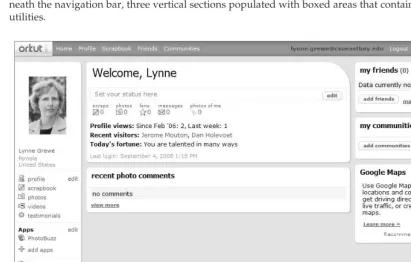
[image:29.612.91.502.242.504.2]Figure 1-5 shows the main interface (‘‘home’’ view) that consists of an upper navigation bar, and, under-neath the navigation bar, three vertical sections populated with boxed areas that contain links to specific utilities.
Figure 1-5: orkut ‘‘home’’ page
The main navigation bar provides links for Home (home view), Profile (profile view), Scrapbook (user postings such as twitters or blogs), Friends (listing of friends), and Communities (user-joined communi-ties).
Friendster
Launched in 2002, Friendster was one of the earliest social networks, appearing on the scene even before MySpace. With more than 80 million members worldwide, Friendster is a leading global online social net-work that is popular in Asia. Like hi5, Friendster is experiencing a good growth rate. In 2008, Friendster announced plans for users in some Asian countries to be eligible to subscribe to ‘‘Friendster Text Alerts,’’ which are Short Message Service (SMS) text messages users can receive on mobile phones to notify them of friend requests, new messages, and more. This is an intriguing possible new arena of contact for social networking applications. Friendster is headquartered in San Francisco, California.
[image:30.612.46.456.228.538.2]Figure 1-6 shows the main interface (‘‘home’’ view) of Friendster that consists of an upper navigation bar, and, underneath the navigation bar, two vertical sections populated with areas that contain links to specific utilities.
Figure 1-6: Friendster’s main interface, ‘‘home’’ view
The large left column below the navigation bar shows the user’s image, followed by information about Friends, Groups, and so on. The smaller right column also features My Friends, Bulletins, and some advertising.
imeem
Launched in 2004, imeem is an example of a targeted social network, meaning that it has a specific interest or targeted audience. In this case, imeem is focused on providing users with the capability to interact by watching, posting, and sharing all kinds of digital media, particularly music. Unlike YouTube (which concentrates on the sharing of video), imeem has the look and feel of ‘‘traditional’’ social networks like MySpace, but is focused around music and media. Like all of the other social networks mentioned thus far, imeem generates revenue through advertising, but also generates income by providing the capability for users to subscribe to additional services. imeem has reported more than 25 million visitors per month, with more than 65,000 new users every day. imeem is a privately held company, headquartered in San Francisco, California.
As of this writing, imeem was allowing applications only to run in a sandbox (meaning that the appli-cations are not available for installation and use by general users). However, because imeem is one of the larger ‘‘targeted’’ social networks and provides different challenges for application development, it is worth mentioning here. imeem does have plans to deploy live in the near future, and details will be posted on imeem’s Web site (www.imeem.com). imeem also currently offers a REST-like Web service that developers may use to access some data. Currently, imeem supports OpenSocial 0.7, but, with the RESTful API that is part of OpenSocial 0.8, it is expected that this functionality will be subsumed by OpenSocial 0.8 when imeem supports it.
Figure 1-7 shows imeem’s main interface (‘‘home’’ view) that consists of an upper main navigation bar, with a second navigation bar positioned directly below. Three vertical sections underneath the navigation bars are populated with boxed areas that contain specific utilities.
The main navigation bar that appears on most pages seen by the user has links for Home (home view), Music, Video, Playlists, and Community. The second menu bar changes with the page being viewed. For example, on the Home page shown in Figure 1-7, the second menu bar deals with user-related issues such as messages and uploads of media. A user profile page, on the other hand, would have a secondary navigation bar with links for elements such as Profile (profile info), Playlists, Music, Video, Photos, Games, Blog, Friends, Groups, and, in the case of developers, Applications.
Unlike the other social networks, there is no discernible trend to the organization of the utilities in the three columns appearing below imeem’s navigation bars. However, the columns feature similar kinds of utilities, such as Friend Status Updates, Friend Updates, and information about the user being featured on the page. In addition to these, there are media-related utilities such as ‘‘Media Tracker’’ and ‘‘Artists I am a Fan of.’’ imeem includes a number of media-related and music-related utilities for such tasks as the creation and sharing of music playlists. Applications that use this kind of social media would be well-suited to imeem users.
Freebar
approximately 500,000 members, predominately from Italy. Freebar is self-described as being
[image:32.612.49.456.131.574.2]youth-oriented, and has physical presence at youth-oriented events in Italy. As one of the first supporters of OpenSocial in Europe, Freebar is hoping to attract developers and new users alike with interesting application offers. Even though Freebar is a smaller beginning network, application developers may take advantage of Freebar’s new evolution in an emerging market.
Figure 1-7: imeem’s home page
user’s ‘‘space.’’ This is similar to a feature seen on the LinkedIn professional social network. The main navigation bar takes the user to My.Space (the user profile page), Chat, Video, Forums, and Friends.
Figure 1-8: Freebar’s main interface (the ‘‘home’’ view)
The user’s profile page can be accessed by clicking on the My.Space link. The other pages are very similar in nature (like the Friends page) to what you see in other networks.
Netlog
Netlog is one of the leading European social networks. Netlog is self-described as being specifically targeted at European youth. It has been developed by Netlog NV, based in Ghent, Belgium. Netlog is currently available in 20 languages, and has more than 35 million members throughout Europe. Because of the ethnic diversity in Europe, Netlog supports many different languages, as evidenced on the opening page shown to new visitors to the site. As shown in Figure 1-9, this page queries the visitor for a preferred language. Netlog is newer to OpenSocial, and, as of this writing, has recently begun its support for applications. Because of its large user base, it will likely become a desirable container for application deployment.
Figure 1-10 shows the main interface for a user on Netlog. At the top of the page is a main naviga-tion bar, with a secondary bar present on most main pages. The main naviganaviga-tion bar includes links to Explore (media, events, applications), Manage (your info, your profile, your applications, and so on), Logs (notifications and news about your friends, clans/groups, and so on), Messages (a mail Inbox), Friends (requests, add friends, and so on), and Settings (such as privacy, and so on). Netlog relies heavily on the secondary navigation bars, where the user clicks on the Application’s link once at the main user’s profile page in order to see applications being used.
Yahoo!
As one of the largest Web companies, Yahoo! has been around since the mid-1990s. It has recently announced the creation of the Yahoo! Open strategy, called Y!OS. This opens up Yahoo!’s social infras-tructure with a set of unifying APIs for social application development. Part of this is a unifying experi-ence for the user, much like a social network. Following are some of the services that Yahoo! is integrating under Y!OS:
T Yahoo! Music
T Flickr
T Yahoo! Search (search monkey)
T del.icio.us
T Yahoo! Shopping
T YUI (Yahoo! User Interface)
T Yahoo! Maps
T Yahoo! Messenger
T Yahoo! Travel
T Yahoo! Answers
T Yahoo! Mail
T Yahoo! Blueprint Platform (Mobile applications)
T Yahoo! Contacts (Yahoo! Address book)
Extending to 233 countries, Yahoo! has more than 500 million monthly users, and 180 billion monthly page views. These are impressive numbers for an application developer to possibly leverage.
A main feature of Y!OS for the application developer is the Yahoo! Application Platform called YAP. Chapter 9 provides more details on this and other emerging technologies.
Other Networks
Other networks are involved with OpenSocial, many of which are in the beginning stages of OpenSocial support and are not yet live. The OpenSocial Web site (http://code.google.com/apis/opensocial /gettingstarted.html) provides a current listing of all the supporting networks. Now that you are familiar with available social networks on the Web, let’s get a broad perspective of applications that can be developed for deployment on these containers.
Social Networ k Applications
A social network application is, as the name suggests, an application created and deployed on a social net-work, often by third-party developers. You may see this term in reference to applications that, while not on a social network, have social interactions. This book refers to these more generically as social applica-tions. Some of the existing APIs used to create social interactions outside of a pure social network such as Google Friend Connect are not covered in this book. Chapter 9 discusses the Yahoo! Open Strategy (Y!OS) platform that can be used outside of a social network. In addition, OpenSocial REST (a topic examined later in the book) can be used outside of the social network application. Your imagination is the limit for what a social network application can do. Many different kinds of applications exist today. If you were to browse a list of available applications, you most likely would see categories such as Entertainment/Fun, Shopping, Sports, Financial, Travel, and more. These types of categories are not standardized between networks. There are thousands of applications available on MySpace and hi5, and, within each category, there may be many kinds of applications.
For example, consider the category of Money/Finance. In this category, you might see applications that track current stock prices, help you to maintain your personal finances, help you trade stock with others, help you create fictional portfolios, or help you loan money to friends.
In the category of Entertainment, you would most likely see many diverse applications. There are applica-tions such as iLike that rates what music/media you like, and shares this with friends. Another example, ‘‘Kiss’’ by KlickNation, lets you virtually ‘‘kiss’’ users of the application.
The goals of an application can be varied. In the beginning stages of social network application develop-ment, many of the applications were designed for a general audience, and simple (if not often silly) in nature. Today, the trend seems to be leaning toward applications that are not meant to solely be popular (or viral), but also have retention and long-term use with more complex and longer interactions. Applica-tions involving music/media, business, and education are examples of this mold. One example currently under development is an application named ‘‘USpeak,’’ that is being created for learning ‘‘social’’ foreign languages.
While it is true you could create a social network application that has no social interactions, it would not really be social. Throughout this book, you will learn how to make truly social applications for the most popular social networks.
Let’s lay some groundwork, however, by examining how users find and install applications, as well as how social applications are controlled by networks.
Application Discovery
How users can find and then install your application is important. To a large extent, each network con-trols this. On most networks, ‘‘finding’’ an application can be done via the following operations:
T Browsing a subject/category index
T Searching through the use of keywords
T Being invited by a friend
T Viewing application on a user’s profile
T Using a feed posting
T Using network-sponsored applications
T Using a New Application index
T Using a Most Popular Application index T Using direct marketing (such as through email)
T Using Web site postings
T Using cross-application marketing
T Using paid advertisements
T Using purchased installments
Figure 1-11 shows a browsing index on hi5. Note that each network will have its own categorizations. Although there is no standard, networks do share many similar categories. When you create and register your application with a network, you are usually able to signify what category (or categories) your application belongs to. As you will see in Chapter 2, you are often limited to a few selections.
You may search for an application by using a simple search interface that allows you to enter a search term. Ranking of search results is done differently for each network; Figure 1-12 shows an example from hi5. The search algorithms take into account metrics such as the number of active (daily) users, the num-ber of installs, keyword matching, recent application updates, and so on, when returning search results.
In addition to the category index, some networks offer ‘‘popular’’ or ‘‘new application’’ listings in search return lists. Popularity is often determined by the number of active users. New applications are typically listed with more recent appearing first, and, after some network-specific amount of time, being removed from the list.
the creation of a graphic depicting the friend, or, better yet, something personalized to send with the invitation. Anything you can do to entice the user to install your application is a good idea.
Figure 1-11: hi5 browsing index
Notifications of what your friend is doing offer another way to spread the word about a new application. This is one of the more intriguing ways to introduce new users to your application. Think of it as using ‘‘peer pressure.’’ What teenager doesn’t want to use an application when he or she sees friends using it? Let’s face it, this works even with non-teenagers. The posting of notifications about friend usage of an application is a great way to use feeds to market the application. Some networks even have built-in facilities to allow users to invite friends to use any of the applications they have installed.
A new trend is for networks to sponsor applications at the top of the search return list (as you some-times see when using Yahoo! and Google search engines). Having your work as a developer become a network-sponsored application is another way to gain exposure for your efforts. Where and how spon-sored applications appear on each network is different. They can appear in news feeds and search results. They can also appear as cross-application advertising — an arrangement under which you are not paying the network, but instead the application owner or the advertising provider the application has registered with.
Later in this chapter, you will learn about some options for this and other kinds of marketing for the discovery of applications.
Application Installation
can be exceptions to this. For example, orkut currently allows users to land on a ‘‘canvas’’ page of a non-installed application and view it.
Figure 1-12: Results for searching on ‘‘kiss’’ for applications on hi5
Like many modern Web applications, the installation of a social network application is relatively painless. Because social networks are often very concerned about the user’s level of trust, installation usually involves a stage where permissions are asked from the user to allow the application to ‘‘do’’ or ‘‘access’’ various elements related to the user’s account. These typically include where the application appears on the user’s pages, and how the application can contact the user. These options can be different on each social network.
After an application has been added by a user, it will appear in the user’s pages. That appearance is controlled by the social network platform, as well as selected options the user made during application installation. Let’s take a look at a few popular social networks, and how applications appear within them.
Application Appearance
permission/account settings. As part of its ‘‘GUI design,’’ a network will often designate an area where installed applications are listed for a user. Figure 1-13 and Figure 1-14 show how the iLike application is displayed in different views on a MySpace user’s account. Typically, when creating an application, you can associate with it a logo that also appears in the user pages. Let’s take a look at how a number of popular networks designate application appearance.
[image:40.612.58.443.128.345.2]Figure 1-13: iLike application listed in ‘‘canvas’’ view on MySpace
OpenSocial applications can appear in three interfaces (called views) on a social network user’s pages, including the following:
T ‘‘Canvas’’ view — This view is defined as a ‘‘full-screen’’ running of an application. Of course, it will be still inside of the wrapper of the social network interface, but it takes up a large percent-age of the interface.
T ‘‘Home’’ view — This view is when the application runs on the main/home interface the user sees typically when logging into the network. Most often, this will be reduced in size compared to the ‘‘canvas’’ view.
T ‘‘Profile’’view — This is the view when the application is running on the user’s profile page. Like the ‘‘home’’ view, this is typically some smaller percentage of this page.
While these are the most common views, OpenSocial allows container’s to create container-specific views. Table 1-1 shows the size restrictions for different views for a number of the OpenSocial social networks. Exceptions and additions to these three views are noted.
Check the container’s developer documentation for possible changes in these numbers. Chapter 2 shows how to create an OpenSocial application that deploys to different views (pages).
Table 1-1: Application Size Specifications for Different Views on Different Networks
Social Network ‘‘Home’’ View ‘‘Canvas’’ View ‘‘Profile’’ View Other
MySpace Width=290 pixels
Width=960 pixels
Left-hand column: Width= 300 pixels; Height
=you set*
Preview/Profile page
Height=you set* Height=you set* Right-hand column: Width= 430 pixels; Height
=you set*
Directory Listing
hi5 Not supported Width=956 pixels
Width=456 pixels
Preview view: Width=620 pixels
Height=you set Height=you set Height=you set
orkut Not supported Width=835 pixels
Width=543 pixels
‘‘Preview’’ view: 400 pixels by 400 pixels maximum (currently uses a screen shot)
Height=600 pixels
Height=280 pixels up to 500 pixels
Directory Listing
Table 1-1: Application Size Specifications for Different Views on Different Networks
(continued)
Social Network ‘‘Home’’ View ‘‘Canvas’’ View ‘‘Profile’’ View Other
Friendster Not supported Not specified; default is 500 pixels; suggested 100%
Not specified; suggested 100%
imeem Not supported Width=865 pixels
Width=550 pixels
Preview view: Width=635 pixels
Height=2000 pixels
Height=2000 pixels
Height=2000 pixels
Freebar Not supported Width=1002 pixels
Not supported; future support.
Height=you set
Netlog Not supported Width=1000 pixels
Width=490 pixels
∗Recommendations are given on the container’s developer documentation.
Let’s take a look at a few specific networks, and how the appearance of applications is handled in each.
MySpace Application Appearance
An application appears in the different locations in MySpace user pages. When a user first logs in to the user’s home page (the ‘‘home’’ view), the page displays a list of all applications. For MySpace, the application can appear directly as a ‘‘box’’ space in the user’s profile, as seen with the iLike application in the lower-left of Figure 1-15. As you can see, this can take up a lot of real estate, which means that friends and others will see the application immediately when viewing this user’s profile. The user typically has the capability to simply remove the application or hide it.
A user can see a brief description of your application in the MySpace directory listing. This brief descrip-tion can launch to the applicadescrip-tion’s profile. When you create an applicadescrip-tion on MySpace, it has its own profile associated with it. This is sometimes called the ‘‘preview’’ view in other containers. This is where a user will find out information about your application. You can customize the look of your profile, but this is what the user will see before installing your application. This application profile is where you might have user forums or reviews/comments about your application. Another item on your applica-tion’s profile is ‘‘friends lists.’’ No size constraints are published on MySpace, and the profile may take up the width and remaining length of the page.
meaning that it is seen only by the user. Hence, it would be ideal for applications that are more utilitarian or communications-oriented.
An application launched on MySpace in ‘‘canvas’’ view is given a large space (960 pixels wide, as indi-cated in Table 1-1). The height of an application is up to you, but MySpace recommends not going beyond the page length. In practice, many applications require users to vertically scroll (sometimes because of poor design).
In ‘‘profile’’ view, applications can appear in either the left or right column. Applications in the left column are 300 pixels wide, and in the right column are 430 pixels wide, with the height up to the devel-oper. MySpace’s determination of which profile location (left or right) an application will appear in has changed over time.
Most applications take advantage of appearing on multiple views. This results in really long ‘‘home’’ and ‘‘profile’’ pages that can annoy users. As you add more and more applications, they may get lost in an ‘‘overlong’’ mess. Users have the option of removing applications from all or some of their pages to control this clutter. It seems there is no self-censoring when it comes to reducing the number of page views an application appears on. Recently, MySpace, orkut, and others have tested out limiting the number of applications that appear in ‘‘home’’ and ‘‘profile’’ views. For example, MySpace (for a brief time) tried limiting the number of applications listed on the ‘‘home’’ view. In some cases, these changes have been revoked, and other containers are still experimenting with this.
hi5 Application Appearance
As shown in Figure 1-16, hi5 lists currently installed applications while in ‘‘home’’ view, but the applica-tions cannot be run from this view. hi5 only allows applicaapplica-tions to run in ‘‘profile’’ and ‘‘canvas’’ views. As shown in Table 1-1, the ‘‘canvas’’ view is defined to be 956 pixels wide, with the height up to the discretion of the developer. The profile view has a width of 456 pixels, with the height again determined by the developer.
Figure 1-16: hi5 Application listing only on ‘‘home’’ view
orkut Application Appearance
As shown in Figure 1-17, Orkut gives a list of currently installed applications when the user is in the ‘‘home’’ view. However, orkut only allows applications to run in the ‘‘profile’’ and ‘‘canvas’’ views. As shown in Table 1-1, the ‘‘canvas’’ view on orkut is defined to be 835 pixels wide by 600 pixels high (default). The profile view on orkut is 543 pixels wide by 280 pixels high (default).
Figure 1-17: orkut ‘‘home’’ view only has application listings
orkut’s application directory provides a concise view of an application using a title, thumbnail image (120 pixels wide, 60 pixels tall) and brief text description (maximum of 300 characters). Most containers use the 120 x 60 size for thumbnail images, but a few containers vary from this (for example,. Friendster at 75 x 75 and MySpace at 64 x 64).
Similar to hi5, orkut also uses a ‘‘preview’’ view/page currently defined as a screen shot. This is a page that allows potential users of an application to click a link to find out more about application.
Friendster Application Appearance
Unlike many networks, Friendster does not provide a list of user-installed applications from the ‘‘home’’ page. Instead, the user clicks a MyApps link from the main navigation bar to be taken to the MyApps page, where the installed applications are displayed, as shown in Figure 1-18. The user may click on the name of an application appearing in this list to run the application in ‘‘canvas’’ view. Also, the user may click on the Share button to invite others to share the application, or click on the Edit button to change permissions for the application (including deleting it). Also, on this page, a user can view invitations from others to use an application, as well as track invitations that have been sent.
Figure 1-18: Friendster’s MyApps page for a user
Table 1-1 provides details for size specifications in all of the various Friendster views.
imeem Application Appearance
imeem is an example of a network that has only sandbox access. This means that only developers can see and run their applications, which are not yet ‘‘live’’ for general users.
imeem currently has support to run in both the ‘‘canvas’’ and ‘‘profile’’ views. As shown in Table 1-1, the ‘‘canvas’’ view for imeem is defined to be 865 pixels wide and up to 2000 pixels high. The profile view is 550 pixels wide and up to 2000 pixels high.
imeem also supports an ‘‘about page,’’ which is similar to MySpace’s application profile page or the preview pages found in other networks. This is controlled as the ‘‘preview’’ view in OpenSocial. The size of this page is 635 pixels wide and up to 2000 pixels high.
Freebar Application Appearance
Currently, the only way to reach applications a user has installed on the Freebar network is through the ‘‘Applications’’ link under the ‘‘Extra’’ box located on a user’s ‘‘home’’ page. This takes you to a page in ‘‘canvas’’ view, as shown in Figure 1-19. Since Freebar has just recently gone live with its OpenSocial support, the interface is rather simple. This page lists all applications — those that are installed and those that are not. The only way to distinguish whether an application has been installed is to look at the link next to the Application listing. If it says ‘‘View,’’ the application is installed. If it says ‘‘Install,’’ then the application obviously must be installed. Notice in Figure 1-19 that the first application, ‘‘Billardo,’’ is not installed, but the ‘‘Ping-Pong’’ application is installed. Clicking on ‘‘View’’ launches a ‘‘canvas’’ view of the Application.
Netlog Application Appearance
As of the writing of this book, Netlog, is currently in a beta version for applications. Previously, Netlog only offered sandbox support.
Applications, and the resulting screen is divided into divisions for Top and New applications. From this listing, you can select an application to install.
Figure 1-19: Application listing showing both uninstalled and installed applications on Freebar
Once the application is installed, you can access it by clicking Manage from the main navigation bar, and then clicking Applications from the secondary menu. From the resulting page shown in Figure 1-20, you can elect to add the application to the user’s profile.
Control of Applications
In addition to the control of an application imposed by the social network, the user and the developer also exert control on an application. Each can control different aspects of an application.
Network Control
Social networks limit applications in a number of ways, including the following:
T The capability to contact users
T The capability to contact non-users
T Where an application appears in the interface
Figure 1-20: Netlog’s user’s application page
How this is accomplished is, unfortunately, not uniform, and is specific to the social network. Some-times these services are even disabled. These controls are among the things that often change with social networks.
More specifically, the social network can control applications in the following ways:
T Controlling options through application setup
T Enforcing user-specified permission settings
T Using browsing indices and associated keyword searches
T Limiting ‘‘canvas’’ screen space
T Limiting access to user data
T Limiting (or preventing) access to non-user data
T Limiting the use of messaging, notifications, and other communication options
T Limiting the number of invitations you can send
T Enforcing the network’s ‘‘Terms of Use Policy,’’ including those pertaining to language and objectionable content
T Limiting data storage (when provided)
T Limiting media access
T Limiting client-side technologies
T Implementing an approval process for application development and application content/media
in any network’s application policies. For example, orkut has a limit on activity streams of one update per day, per application, per user.
The first stage of network control comes in the registration of an application. Commonly, this will include limitations on the name of the application, logo used, terms of use, information about pages, as well as the application URL configuration. Chapter 2 provides more detail for different networks.
Placement of an application in browsing indices (as well as placement in returned search results) is determined differently for each network. Each network has different browsable categories. Among the attributes that should be considered is the information given at registration time (such as the application category).
Chapter 4 discusses how different networks support and limit access to social data through the JavaScript (OpenSocial) API. Besides differences between versions of OpenSocial, the greatest difference is in the implementation of optional OpenSocial data fields.
Terms of use policies are enforced by each network. How this is done is proprietary for each network. However, there have been cases of applications being removed because of violations of these policies. Some of the container rules are motivated by applications that seemingly ‘‘scam’’ users into recommen-dations and other operations.
Checking the terms of use for applications is critical for any developer, and the terms are unique to the network platform. For example, the MySpace Web site provides a complete list of rules for developers that include what an application must do and what it must not do. (See http://developer.myspace.com/community/myspace/applicationguidelines.aspxfor complete information.)
In addition to Web pages documenting current social network application policies, some social networks (including MySpace) sponsor a forum on the topic. (For a MySpace example, see
http://developer.myspace.com/Community/forums/45.aspx.) This is a good place to post questions, or even make requests.
Typically, if an application is in violation of a social network’s terms of use and guidelines for stated policies, the developer will be notified and have some time to fix the problem. Rules surrounding notification are different for each network. The social network may also, under certain conditions, impose certain sanctions on the developer and the application. Again, using MySpace as an example, specific remedies are outlined for developers to correct violations (see
http://developer.myspace.com/Community/blogs/devteam/archive/2008/08/21/when-good-apps-go-bad.aspxfor complete details.)
Limitations on all forms of communications such as messages, postings to feeds, and notifications are set for applications, and are network-specific. When this limit is exceeded, further requests are refused until the limitation (typically an elapsed time period) is no longer true. Unfortunately, these rules do change, and developer’s must read the network’s current policies on these issues. Each network also limits the number of invitations an application can send out per user in a fixed amount of time.
User Control
A user can control applications in the following ways:
T Installation and removal
T Setting permissions at installation time
T Changing permissions
T Reporting on application
Upon installation of an application, the user may set the original permissions associated with the applica-tion. The user may also have the capability to alter these permission settings after installation, as shown in Figure 1-21. Basic user actions such as installation and removal can be tracked by your application. This is done through the recently added OpenSocial lifecycle support, which is discussed in more detail in Chapter 3.
Figure 1-21: A MySpace user’s list of applications, where applications can be removed, and permissions changed
Developer Control
Developers control their applications simply by how they code and deploy them. It is interesting to note that through the simple act of deployment, the developer can determine how the application appears in a network, and how it is found.
Now that you are familiar with social networks (containers) and have a broad understanding of applica-tions that can be deployed to these, let drill down a bit to see what distinguishes a good social network application from one that is not as successful.
Making Applications Social and V iral
Of primary interest to social network application developers is making an application viral and social. A viral application is one that is ‘‘wildly’’ popular. A distinctive feature of social network applications is that they can experience an explosive user growth rate in very short time periods. Another kind of application might take weeks and months to achieve a sizable user base, but a social application can expand its user base in a matter of days (and sometimes hours). This is exciting, but can also be challenging.
There is no uniform metric for viral growth. It is a relative concept. Regardless of the numerous formulas that ‘‘experts’’ apply, viral growth is related directly to the user growth rate. Following are some of the common metrics used in the calculation of viral growth:
T Average number of invitations a user will send out in a given time period
T Retention rate equals the percentage of users lost (application is uninstalled) in a time period
T Capacity equals the total number of potential users (with the maximum being the number of network members, or it can be less, and based on demographics)
T Invite conversion rate equals the percentage of invitees who accept
The reality is that each of these metrics is not constant, but instead each changes over the life of an appli-cation. Modeling the viral nature of your ap