DEVELOPMENT OF VIDEO BASED VIRTUAL STUDIO
Shakeel Khoja* and Qurban A. Memon**
*
Assistant Professor; **Associate Professor
Karachi Institute of Information Technology, ST-2, Sector-X/VII
Gulshan-e-Maymar, Karachi-75340, Pakistan
[email protected]; [email protected]
Abstract
The objective of this research is multi-fold: to explore the approach for video production in virtual studio with a degree of freedom; to combine various existing technologies targeting each specific feature into one with almost all of the features needed for virtual studio; and above all to create high quality video production using graphics and video. The approach requires breaking down multiple videos up to frame level, so that multiple components/objects can be handled like graphics for further object level processing within three dimensions (3-D). We also provide a framework for describing different features of the stored media object. Initially a workbench is developed; where a user is allowed to open any type of standard graphic format (jpg, gif, bmp, avi or mpg) and can provide annotations. If the object is time based, then a time line is also provided. Real images are considered as a single frame, however the user can select the part of image to construct another media object. Finally, all required objects are mixed together to construct a final video. We compare this approach with existing ones in terms of the degree of freedom, platform independence and show that it can be used effectively in the domain of entertainment and education etc.
Keywords: Virtual Studio, Graphics, Video,
Image, Camera Motion.
1. Introduction
Virtual Studio using computer graphics and real images is becoming increasingly popular method of new image production; and so are the videos using effects and various other methods. Recent
advancement in computer hardware, software and graphics technology, coupled with ideas of computer virtualization and image processing research, are significantly affecting TV and film production methods. The new products open up the possibilities for making new images/videos in the field of entertainment and education but also aim to raise cost efficiency and to reduce studio space. In order to create realistic virtual studio, the boundary between real images and computer graphics needs to be removed so that real images can be handled like computer graphics and then these graphics can be handled as media objects with distinct properties. In the same sense, the position, size as well as object properties could therefore be changed as elements that make up a scene during program production. The virtual studios are now considered as important tools for production houses, providing the flexibility of generating virtual backgrounds, media objects, silhouettes, etc.
the background image is also treated as a 2-D image. The quality of the background image from such systems can be truly photo realistic, limited only by the resolution of the original image and the quality of the interpolation used in the various transforms that maps the image to match the camera view. Background images may be derived in many ways, including still photographs of real scenes, rendered views of 3-D models, or video signals, although care needs to be taken to match the lens angle and camera height of that of the capture view point used in virtual studio.
A 3-D virtual production system allows translational camera movement in all three dimensions, as well as pan, tilt, roll and zoom. This necessitates the use of more complex tracking system, as well as a real-time 3-D renderer to generate the background image. It is worth noting that a 3-D virtual studio does not generate a 3-D result: the final image is a conventional 2-D image and all information on the 3-D nature of background has been lost in the rendering process.
2. Related work
With the advent of digital video players and image editing software, interest in the field of panoramic images started becoming popular. Meanwhile considerable research is also being conducted into systems for producing omni-directional images[1], using multiple camera inputs[2] and mirrors[3]. Still the problem of producing high-resolution images and mixing them in real videos remained unsolved. Blonde et. al.[4] while working on Mona Lisa project, developed virtual studio, however their study mainly focused on developing virtual backgrounds and 2-D physical objects. Soon interest in 3-D scene reconstruction started becoming popular, specially in the development of 3-D depth sensors[5]. However none of these systems[6,7] have shown significant performance, and the commercial market is still dominant by hardware solutions providing limited solutions such as chroma-keying, 3-D image rendering etc. Research in the field of virtual studios is going on at a tremendous pace. Various innovative ideas regarding image extraction, motion capture, etc are
coming up. However, it is felt that a framework is required for image and video objects that should be primarily based on different features related to these objects. This paper primarily focuses on design and development of a workbench where virtual graphics can be inserted into real videos. For this composition, several optical and visual techniques are matched between different kind of media or components from different sources. The following section discusses in detail about different design aspects for developing a virtual studio.
3. Designing Virtual Studio
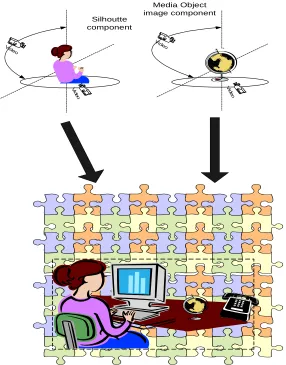
The concept of virtual studio starts with developing a workbench, where all the standard 2-D image and video formats can be opened (gif, jpg, bmp, pic, png, avi or mpeg) and then provided with different types of annotations to classify media objects. After mixing different type of media objects, the end result is a sequence of 2-D images. Here the key problem is the combination and proper placement of real and synthetic media objects. Conventionally this is achieved by setting the media object parameters (position, orientation and zoom) and based on this information, rendering the corresponding view of the synthetic media object, which will then be mixed into the final image. To tackle this issue, complex real images are broken into small components so that they can be handled as media objects. For example an image showing a person working on his desk with a computer screen in the background will be broken into small media objects such as desk, monitor, books, papers, silhouette of that person and the background ambient scene (figure 1). The virtual production studio itself combines various real-time and off-line components for generating video sequences. These include:
• Cameras (view point capturers) shooting foreground action against background.
• Camera tracking module to provide position information.
• A z-mixing module, combining the foreground and background signals and possibly an insert video, to generate the program to develop final output video. A simplified approach is to use a digitally recorded video as the base, and then inserting different media objects (2-D or 3-D) such as images from library, synthesized images or captured from other sources into different spatial and temporal co-ordinates of the base video. Additionally media objects can also be extracted from the base video and will be re-used as media objects. Figure 1 shows, how a media object containing some real world images and a silhouette is configured in 3-D, and then placed in virtual studio to develop a complete scene.
3.1 Modeling Physical Media Objects
The major complexity is to model, specify and exploit the different features of these media objects. Features like media object description, camera movement, motion trajectories, parametric movements and motion activity related to the media objects are provided to the system. Figure 2, shows an ER diagram showing all the media object features.
These media features are discussed as:
3.1.1 Media Object Entity
In the first place, we need to store the media object entity itself. This allows us providing unique id (object id) to the object, its type (static, synthetic, video, etc) and its description.
3.1.2 Camera Motion
This entity describes 3-D camera motion parameters. It is based on 3-D camera motion parameter information, which can be automatically extracted or generated by capture devices, but in our model the user has to provide this information manually. A camera motion can be fixed, panning (horizontal rotation), tracking (horizontal transverse movement, also called traveling in the film field), tilting (vertical rotation), booming (vertical transverse movement), zooming (change of the focal length), and dollying (translation along the optical axis) and rolling (rotation around the optical axis). The sub-shots for which all frames are characterized by a particular type of camera
motion, which can be single or mixed, determine the building blocks for this camera motion entity. Each building block is described by its start time, the duration, the speed of the induced image motion, by the fraction of time of its duration compared with a given temporal window size, and the focus-of-expansion (FOE) (focus-of-contraction – FOC).
The mixture mode captures the global information about the camera motion parameters, disregarding detailed temporal information, by jointly describing multiple motion types. On the other hand, the non-mixture mode captures the notion of pure motion type and their union within a certain time interval.
Elements of Camera Motion Entity include: start_time: an unsigned integer value. This represents the relative starting time of the segment, with respect to the beginning of the video sequence.
Duration: an unsigned integer value, representing the duration of the given temporal segment, in a specified time unit.
Fractional Presence: These values represent the temporal presence of the different motion types. Amount Of Motion: These values represent the amount of motion of the different motion types. FOE FOC Horizontal Position/FOE FOC Vertical Position: The values giving the normalized coordinates of the Focus Of Expansion (or Contraction).
3.1.3 Motion Trajectory
Motion trajectory is defined as the horizontal and vertical movements of the media object trajectory, and the motion trail that indicates the shape of the trajectory. It is a high-level feature associated to a moving 2D or 3D region, defined as the spatio-temporal localization of one of its representative points (such as its centroid).
Elements of Motion Trajectory are further defined as:
Co-ord System: This field specified the spatial coordinate system used to express trajectory: ‘local’ if the trajectory is expressed in the image reference, ‘world’ if it is expressed in an absolute reference taking into account global motion. If this field is not present, the local coordinate system is taken as the default reference system.
Spatial Units: This field will be used in all descriptors needing spatial units, describing a particular spatial region, depending on a particular object’s trajectory in world co-ordinates.
Co-ords Are 3D: This Boolean field indicates whether the trajectory is specified using 3-D or 2-D coordinates.
Key Points Number: This field contains the number of sampled positions, denoted as key points, used to represent this trajectory.
2D/3D Spatio Temporal Point: These types contain the times and coordinates associated to each key point. Time values are strictly monotonically increasing in time
Interval 3D: This field specifies the interpolation functions used for 3D trajectory.
Interval 2D: This field specifies the interpolation functions used for 2D trajectory.
3.1.4 Parametric Motion
Parametric motion addresses the motion of objects in video sequences, as well as mosaic description by modeling global motion. If it is associated to a region, it can be used to specify the relationship between two or more feature point motion trajectories according to the underlying motion model.
ModelCode: This integer number specifies the model type used in the description.
Incr Duration: This field specifies the length of the temporal interval to which this Descriptor is associated.
MotionParameters: This is a floating-point array that keeps the values of the model parameters. X origin, Y origin: These are the coordinates of the origin of the spatial reference, with respect to the image coordinates.
3.1.5 Motion Activity
A person watching a video or animation sequence perceives it as being a slow sequence, fast paced
sequence, action sequence etc. The activity descriptor captures this intuitive notion of ‘intensity of action’ or ‘pace of action’ in a video object. Examples of high ‘activity’ include scenes such as ‘goal scoring in a soccer match’, ‘scoring in a basketball game’, ‘a high speed car chase’ etc. On the other hand scenes such as ‘news reader shot’, ‘an interview scene’, ‘a still shot’ etc. are perceived as low action shots.
The activity entity includes the following attributes.
Intensity of Activity: A high value of intensity indicates high activity while a low value of intensity indicates low activity.
Direction of Activity: The Direction parameter expresses the dominant direction of the activity if any.
Spatial distribution of Activity: The spatial distribution of activity indicates whether the activity is spread across many regions or restricted to one large region. It is an indication of the number and size of “active” regions in a frame. For example, a talking head sequence would have one large active region, while an aerial shot of a busy street would have many small active regions. Temporal Distribution of Activity: The temporal distribution of activity expresses the variation of activity over the duration of the video segment/shot. In other words, whether the activity is sustained throughout the duration of the sequence, or whether it is confined to a part of the duration.
Intensity: This attribute can be expressed as a single integer lying in the range [0, 128], as used by semantics to express the intensity of activity. DirectionFlag: This flag indicates whether the directional attribute has been specified or not.
4. Media Object Placement in Virtual System
to do the above mentioned task, as well as to match the following considerations:
• It should be capable enough to run any sort of image and video format
• It should allow to rotate, skew and skim the media object in any direction
• Once media object is selected and worked on, it should allow inserting that object in the main video stream.
A player was developed in Microsoft Windows environment, using Microsoft Visual C++, which was capable of fulfilling the above-mentioned requirements. Figure 3 shows the front-end of our image and video editor.
Once the media object features are defined, it becomes relatively easy for the user to insert a media object at any frame. This is done by simply dragging the media object at any particular location and dropping it over there. Figure 4 shows a human object, its vertex image and its wired frame, and how it is inserted in a virtual studio, by providing a synthetic background and some other media objects.
5. Conclusions and Future Work
This paper mainly focused on design and development of a virtual video studio. We have discussed some of the features of our virtual studio workbench, and have shown results. Additionally we have proposed a frame work to store media objects’ features (object description, motion activity, camera movement, motion trajectories, etc) in a structured manner. Virtual studios offer greater creative freedom and expression than conventional scientific methods, with the added benefit of reducing the costs and time scales such methods impose.
The next task is to incorporate a database into virtual studio, so that the media object features are stored efficiently. Along with, hyperlinks will be provided so that every object have a separate URL, and can be linked within or outside the video document.
6. References
[1].S.E. Chen, “QuickTime VR – an image-based approach to virtual environment navigation”, SIGGRAPH’95, pp 29-38, 1995.
[2]. H. Fukumoto, et. al., “Construction of whole view image by synthesizing landscape images”, NIM-97-75, pp 1-6, 1997.
[3]. Y.Yagi, et. al., “Real time omni directional image sensor for vision guided navigation”, IEEE trans on Robotics and Automation, Vol. 10, No. 1, pp11-22, Feb, 1994
[4]. Laurent Blonde, M. Buck, R. Galli, W.Niem, “A Virtual Studio for Live Broadcasting: The Mona Lisa Project”, IEEE Multimedia, 1070-986X, 1996, Vol. 3, No. 2, pp 18-29, 1996. [5]. O. Grau, M. Price and G. Thomas, “ Use of 3-D Techniques for Virtual Production”, 2002, BBC Research & Development White paper WHP 033-2002.
[6]. M.J.P.M., Lemmens, “A survey on stereo matching techniques”, Int. Archives of Photogrammetry and Remote Sensing, Vol. 27, Comm. V., pp11-23, 1988
Media Object image component
V ide
o
Video
V id eo
Silhoutte component
[image:6.595.163.449.141.506.2]Video
Figure 1Concept of an Image and Video based Virtual Studio
MEDIA OBJECT MOTION
TRAJECTORY
CAMERA MOTION
PARAMETRIC MOTION MOTION
ACTIVITY
MOTION_DB
zoom_in zoom_out dolly_forward dolly_backword pan_left pan_right track_left track_right tilt_up tilt_down roll
seg_id Co-ord_system spatial_units camera_follows co-ord_are_3d key_points
2d_3d_spatio_temporal_pt interval_3d
interval_2d
seg_id start time Duration Fractional presence Amount of motion
FOE FOC Hori Position/ Vertical Pos
seg_id pace_speed intensity_of_action direction_of_activity temporal_distrib_of_activity spatial_distrib_of_activity
Object ID Object Type Object Descripton
Figure 2 ER diagram of Media Object Features
Figure 3 Front-end of Image and Video Editor
Normal Image Vertex Image Wired Frame