O R I G I N A L A R T I C L E
Open Access
How to optimize switch virtual keyboards
to trade off speed and accuracy
Xiao Zhang
1, Kan Fang
2and Gregory Francis
3*Abstract
In some circumstances, people interact with a virtual keyboard by triggering a binary switch to guide a moving cursor to target characters or items. Such switch keyboards are commonly used by patients with severely restricted motor capabilities. Typing with such systems enables patients to interact with colleagues, but it is slow and error prone. We develop a methodology that can automate an important part of the design process for optimally structured switch keyboards. We show how to optimize the design of simple switch keyboard systems in a way that minimizes the average entry time while satisfying an acceptable error rate. The first step is to model the user’s ability to use a switch keyboard correctly for different cursor durations. Once the model is defined, our optimization approach assigns characters to locations on the keyboard, identifies an optimal cursor duration, and considers a variety of cursor paths. For our particular case, we show how to build a user model from empirical data and demonstrate that the resulting optimized keyboards are quite different from existing keyboard designs.
Keywords: Switch virtual keyboard, Mixed integer programming, Locked-in patients, Motor disability
Significance
Patients with severe motor disability often use a switch keyboard, where binary actions from the user guide a moving cursor to items on the keyboard. Such switch devices enrich patients’ lives by allowing them to com-municate with friends, family, and work colleagues. How-ever, such devices are notoriously slow and even small benefits in performance can dramatically improve com-munication. We show how to measure and model human performance with a switch device in a way that enables the application of optimization algorithms to design switch keyboards that minimize entry time while satisfy-ing a defined acceptable error rate. The resultsatisfy-ing optimal designs are quite different from existing products.
Background
Computers play an integral role in the social and eco-nomic lives of most people, but some people are unable to use a traditional keyboard or touchscreen. For example, some spinal or brain injuries lead to locked-in syndrome where patients are almost fully paralyzed and cannot
*Correspondence: [email protected]
3Department of Psychological Sciences, Purdue University, West Lafayette 47907-2004, IN, USA
Full list of author information is available at the end of the article
speak, even though their cognitive abilities are intact (Laureys et al., 2005). Such patients have very limited interaction with their environment, and computer access can greatly enhance their quality of life. To provide com-puter access, human–comcom-puter interactions leverage the limited muscle control (e.g., an eye blink or a small mus-cle contraction) of the user to trigger binary signals in switch devices. As described in detail below, such devices work with a virtual keyboard to guide a cursor on the key-board to select a desired character or function. This type of switch keyboard thereby allows patients to engage in local and on-line discussions with caregivers, friends, and employers (Bauby, 1997; Tavalaro & Tayson, 1997).
Several virtual keyboard designs have been proposed by commercial companies. For example, the SwitchXS keyboard provides various modes that implement mouse input and keyboard characters (AssistiveWare, 2013). In a common design, an initial switch activation initiates a cursor that follows a path across the keyboard and stops to select an item when the user triggers the switch device again. A default approach is for the user first to select a row containing a desired item and thereby direct the cursor to move across that row’s items for an additional user selection. Other keyboard designs use a similar strat-egy but define differently the groups of items that can
be selected. For example, in the Logo keyboard (Norte & Lobo, 2007), two major scanning groups (numeric and alphabetic) are displayed, and the user first triggers the switch to select one of these two groups, and then selects the item in the selected group as the cursor moves across the group.
Because of the very limited type of user input (only a binary switch), the cursor must scan (or be guided by switch actions) across different keyboard items. Indeed, these types of systems are sometimes referred to as scan-ning keyboards (MacKenzie & Felzer, 2010). Such an approach means that some items are reached relatively quickly (those near the beginning of the cursor path) while other items take longer to select (those near the end of the cursor path). Thus, the arrangement of characters along the path significantly affects input efficiency, and many studies have explored ways to improve the design of virtual keyboards (not only for patients, but also for other specialized keyboards). A simple and effective way to improve keyboard efficiency is to place commonly used keyboard items early in the cursor path (Hughes, Warren, & Buyukkokten, 2002; Mayzner & Tresselt, 1965; Zhai, Hunter, & Smith, 2002).
Other factors also influence the usability of a virtual keyboard. For example, the scanning speed of the cur-sor cannot be too fast (users would not have enough time to respond correctly) nor too slow (users would have to wait unnecessarily for the cursor to reach a desired item). Francis and Johnson (2011) showed that charac-ter placement on a switch virtual keyboard can be treated as a mathematical optimization problem with a trade-off between speed and accuracy. They also proposed an algorithm to design a keyboard that optimized the cursor speed for a given desired accuracy.
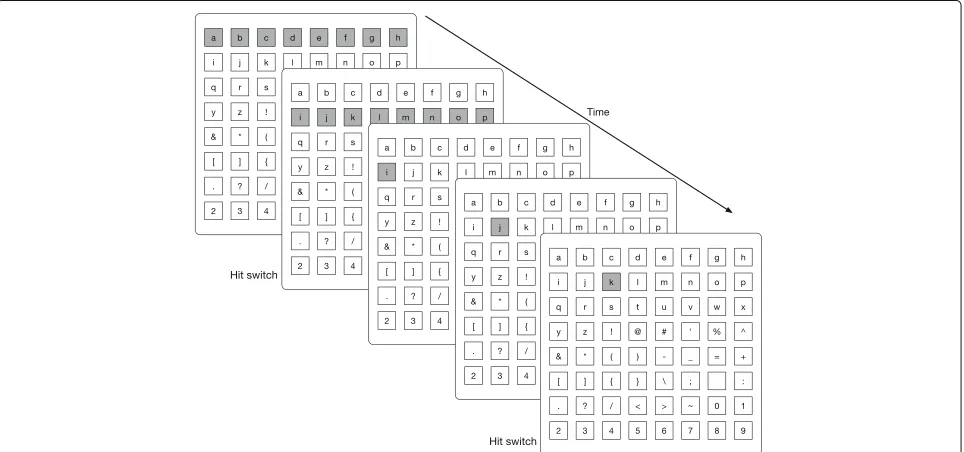
An important component of keyboard optimization is the path the cursor follows across the keyboard. There are many different possible cursor scan paths (MacKenzie & Felzer, 2010; MacKenzie 2012). Figure 1 shows a key-board where the cursor follows a linear cursor path (see Additional file 1: Movie 1 for an animated version). Here, the cursor starts at the first key (top left) and then pro-ceeds to each key one by one by wrapping from the end (right side) of one row to the beginning (left side) of the next row. When the cursor covers the key of interest, the user triggers the switch and thereby selects that item. With this kind of cursor path, selecting any virtual key requires only one action by the user, and 1 to 64 cursor steps.
Figure 2 (Additional file 2: Movie 2) demonstrates a row–column cursor path, which is commonly used in switch keyboard designs. Here, the cursor starts at the top row and first scans across the rows to allow the user to select the row containing the target character. When a row is selected, the cursor then scans the columns in the selected row so that the user is able to select the target
key by triggering the switch device again. With this kind of cursor path, selecting any virtual key requires two actions by the user and two to 16 cursor steps.
Figure 3 (Additional file 3: Movie 3) shows the same kind of keyboard where the cursor follows a quadrant cursor path. Here the cursor first moves across the four quad-rants of the keyboard. When the user triggers the switch, the cursor follows a row–column path within the selected quadrant. With this kind of cursor path, selecting any vir-tual key requires three selections by the user (one for the quadrant, one for the row, and one for the column), and three to 12 cursor steps.
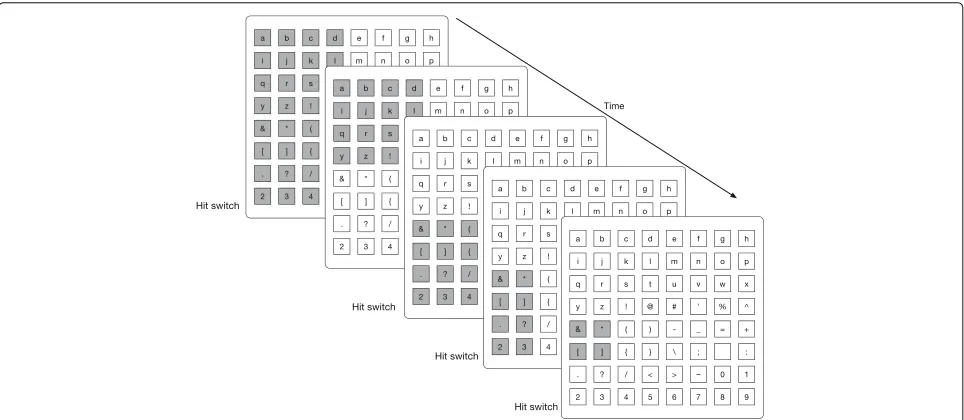
Figure 4 (Additional file 4: Movie 4) shows the same kind of keyboard where the cursor follows a binary cursor path. Here, the cursor first moves across the left and right halves of the keyboard. A selection by the user focuses the cursor path to the selected side, which is then divided into a top and bottom. Further selections keep dividing the number of remaining keys in half and guide the cursor toward the target key. With this kind of cursor path, selecting any vir-tual key requires six selections by the user and six to 12 cursor steps.
As Figs. 1, 2, 3 and 4 and Additional file 1: Movie 1, Additional file 2: Movie 2, Additional file 3: Movie 3, and Additional file 4: Movie 4 demonstrate, different cursor paths can be assigned to the very same physical layout of the keyboard. In terms of guiding the cursor to a tar-get key, it is the cursor path, rather than the physical layout of keys, that determines the efficiency of the key-board. To enable users to learn and remember the cursor path, the physical layout of the keyboard may reflect the groupings of virtual keys along the path, but our analysis supposes that users know the cursor path regardless of its complexity.
The choice of a cursor path is important because it imposes requirements on the user and determines the time needed to select an item. For example, accessing a key on the keyboard for the linear cursor path requires only one selection from the user, while the binary cursor path requires six selections. If triggering the switch device is difficult for the user, it might be best to use a cursor path that needs few selections. On the other hand, the linear cursor path will take a long time to reach items at the end of the path (64 cursor steps for the final item), while the binary cursor path takes no more than 12 cursor steps. Several studies have explored the costs and ben-efits of different types of cursor paths (e.g., Koester & Simpson, 2014).
Fig. 1Linear cursor path keyboard. In a linear cursor path, the cursor moves key by key across the keyboard. In this example, the cursor starts at the upper left cornerand moves in a wrap-around pattern across the keyboard rows. Thus, it would move from the “h” key at the right side of row 1 to the “i” key at the left side of row 2. When the cursor is over the desired key, the user triggers the switch to select that key (here, the letter “k”). To simplify the display, movement of the cursor is not explicitly shown between the “b” key and the “j” key
Zha, 2003). A challenge for these investigations is that different approaches require development of new tools for applying design constraints related to a particular instance. Here, we provide a general approach that can be modified to consider other constraints and aspects of switch keyboard designs.
Because it formed the motivation for the basic tion approach, in this paper we focus on the optimiza-tion of a switch virtual keyboard design by considering a variety of factors that influence the speed and accu-racy of a keyboard. The rest of the paper is organized as follows. The next section quantitatively describes the
Fig. 3Quadrant cursor path keyboard. In a quadrant cursor path, the cursor moves across different quadrants of the keyboard, then across rows in the selected quadrant, and then across the keys in the selected row. In the example shown, it takes five cursor steps and three switch actions to select the “m” key
keyboard design problem and develops a mixed integer programming (MIP) algorithm that solves a key part of the design problem. This algorithm is orders of magni-tude faster than one described in Francis and Johnson (2011), and many of the subsequent results are tractable only because the MIP algorithm provides a quick solution
to a critical part of keyboard design optimization. The subsequent section describes a behavioral experiment that measures performance for a switch keyboard. The sub-sequent section explains how to develop a performance model from the behavioral data. With the resulting model, the final section describes optimized keyboards for several
different situations and compares and contrasts differ-ent keyboard designs. The experimdiffer-ental data files, anal-ysis scripts, and optimization programs are available at the Open Science Framework (https://osf.io/vuaxj/?view_ only=489c5b2f9b8b45cbb866416ef1e50ef4).
An algorithm to solve the speed/accuracy trade-off
We describe the design problem in a general way because it demonstrates the common aspects of keyboard design for many different situations. An instance of the virtual keyboard design problem consists of an integer setI =
{1, 2,. . .,N} that refers to characters and an integer set
K = {1, 2,. . .,N} that refers to keyboard locations. The design task is to assign the characters to keyboard loca-tions. Let Fi be the frequency of the i-th character in a given text corpus. These character frequencies might be estimated from general databases, or might be based on the specific type of text entered by a specific user.
First consider the time needed to reach a location on the keyboard (speed of entry). LetSk be the number of cur-sor steps required to reach locationk from the start of the cursor path. For example, for the row–column cursor path shown in Fig. 2, to reach position 12 (supposing the keys are indexed in sequence from left-to-right and top-to-bottom), it will first take two steps to reach the second row, and then four steps to reach the fourth column in row 2. Therefore, in this cursor path, the total number of steps to reach position 12 isS12=2+4=6. Note that the
value ofSk depends on the cursor path; different cursor paths may lead to quite different values ofSkeven for the same key position. In addition, we letDbe the duration that a cursor will stay on each step of the path. Therefore, the time to reach positionkisD×Sk.
Now consider the accuracy of reaching a location on a keyboard. Let Pk be the probability of the user making an error while trying to guide the cursor to positionk. It is reasonable to imagine thatPkincreases asDdecreases (with a slower cursor the user is less likely to make an error), but the exact nature of the relationship needs to be measured or modeled. We will measure and model the relationship in later sections.
To promote subsequent calculations, we introduce an indicator variableXikthat is equal to 1 if thei-th character is assigned to positionkand 0 otherwise. Then we define theaverage entry timeacross all entries as
Ct=
i∈I
k∈K
FiDSkXik
i∈IFi
(1)
where most of the terms in the numerator summation will be zero, except for where itemi is at positionk. At those positions, the numerator sums the entry time (DSk)
multiplied by the frequency,Fi, of character i. We also define theaverage error rateas
Ce=
i∈I
k∈K
FiPkXik
i∈IFi
, (2)
which gives the average error probability across all char-acter entries.
In general,Ct andCe trade off each other. For exam-ple, placing the most commonly used characters near the beginning of the cursor path will decreaseCt, but if those locations are error prone, thenCewill increase. We sug-gest that a practical way to trade off speed and accuracy is to identify a user-defined acceptable error rate,ε. We then describe the problem as assigning characters to the keyboard so thatCe≤εandCtis minimized.
Another practical constraint on keyboard design is that some groups of characters should be spatially grouped because of historical reasons or user preferences. For example, the numerical characters (i.e., 0–9) are com-monly co-located and ordered. For the keyboards con-sidered here, we grouped them together and put them in the tail of the keyboard layout, that is, the numerical characters are assigned to locations as follows:
G = {(55, 55),(56, 56),(57, 57),(58, 58),(59, 59), (3) (60, 60),(61, 61),(62, 62),(63, 63),(64, 64)}
where the indices 55–64 for the first coordinate corre-spond to the numerical characters 0–9 and the indices 55–64 for the second coordinate indicate the last ten locations on the keyboard. Figures 1, 2, 3, and 4 (and Additional file 1: Movie 1, Additional file 2: Movie 2, Additional file 3: Movie 3, and Additional file 4: Movie 4) show keyboards that follow these constraints.
We now describe how to find (Pareto) optimal solutions in which no other solution has both a lower average entry time and satisfactory error rate. The task can be modeled as a MIP problem:
minimizeCt (4a)
subject to
k∈K
Xik=1, for alli∈I; (4b)
i∈I
Xik=1, for allk∈K; (4c)
Xik =1, for each(i,k)∈G; (4d)
Ce≤ε, (4e)
Xik ∈ {0, 1}, for eachi∈I;k∈K; (4f)
Ct,Ce≥0. (4g)
ensures that each character can be assigned to only one position on the keyboard. Constraint (4c) ensures that each position in the keyboard layout contains only one character. Constraint (4d) determines the arrangement of the numerical characters as mentioned above. Con-straint (4e) ensures that the average error rate is no larger than the user-identified acceptable error rate ε. Constraints (4f) and (4g) are variable-type constraints that ensure the objective functions remain true to their definitions.
As an initial check on the MIP approach, we took the
Sk,Fi,D, andPkterms as defined by Francis and Johnson (2011) and used Gurobi Optimizer 5.6 (Gurobi, 2013) to solve the MIP problem. The resulting solution of char-acters assigned to locations on the keyboard was very similar to what was produced by Francis and Johnson (2011) with a hill-climbing algorithm. However, the MIP algorithm was much faster. It took approximately 3 sec-onds to find a solution while the hill-climbing algorithm took approximately 3 h to generate essentially the same keyboard layout. Furthermore, the MIP algorithm is guar-anteed to find an optimal keyboard layout that satisfies the acceptable error rate condition (if one exists), while the hill-climbing algorithm yields a keyboard layout that may not be optimal.
For any given keyboard design task, most of the terms in the MIP model are readily available: the cursor dura-tion,D, can be taken as a given value for any instance; the character frequencies,Fi, can be estimated from a text cor-pus; the number of cursor steps,Sk, can be calculated for a given cursor path; and characters assigned to fixed posi-tions,G, can be readily created as needed. The only terms that remain to be identified are the error probabilities for different keyboard positions,Pk. In the next section, we describe how to estimate these terms with a behavioral study.
Estimates of error probabilities
This section demonstrates one way to estimate the Pk terms that are needed to drive the optimization approach described above. Pk corresponds to the probability that a user guiding the cursor to keyk on a switch keyboard makes an error some place along the cursor path to that keyboard location. Ideally, these values would be guided by basic research on how quickly and reliably humans respond to dynamic stimuli. Although the literature on reaction time, timing, and predicted movements is enor-mous (Jensen, 2006; Posner, 1978), we were unable to identify published work that provides a model framework for characterizing the probability of correct responses for the kind of task involved in using a switch keyboard. Speed/accuracy trade-offs are commonly studied in areas such as traditional typing (Yamaguchi, Crump & Logan, 2013), but there the users largely control their actions
rather than time their action to coincide with a stimu-lus event (the cursor being over an appropriate section of the keyboard). Likewise, the switch keyboard task seems related to simple reaction times, but effective use of the keyboard involves planning a precisely timed action rather than quickly responding to a stimulus. Such plans may occur well before the cursor covers a relevant part of the keyboard. Perhaps the area of basic research closest to the actions involved in a switch keyboard are mea-sures of coincidence timing (Smith & McPhee, 1987). Even here, though, the fit is not perfect, as the cursor move-ments are highly learned and initiated by switch keyboard users. Ultimately, we suspect that switch keyboard users memorize a planned set of timed actions that are learned for commonly used characters with a specific cursor duration (for example, see the user video at http://www. assistiveware.com/a-pivotal-role-in-the-household).
Here we describe an experiment that estimates these error probabilities for the different locations of the key-board for several different cursor durations. These esti-mates will both contribute directly to the optimization methods described above and provide basic research into the accuracy of a sequence of timed actions. For the design task, the ideal experiment would estimate these probabili-ties from the same kind of individuals who will ultimately use the switch keyboard. In many cases, the ultimate users are patients with severe motor disabilities and their per-formance with a switch device might be quite different from a non-patient population. To complicate matters fur-ther, performance on the switch keyboard should be esti-mated after users have had substantial experience using the switch keyboard; otherwise the estimated probabilities will become inaccurate as users improve with additional practice.
Subjects
Seven student participants used a button-style switch device (Origin Instruments, 2013) that is similar to a com-puter mouse, but specially designed for people with motor disabilities that use switch keyboards. A participant could attend at most two sessions each day (in the morning and afternoon, respectively). Before the formal experiments, a 1 h tutorial was given so that the participant could practice and get familiar with the keyboard and the switch devices. To motivate participants to perform their best, each par-ticipant received a base of $5 for each session and a reward of $0.025 for each correct character entry. On average, participants earned around $45 for a session.
Methods
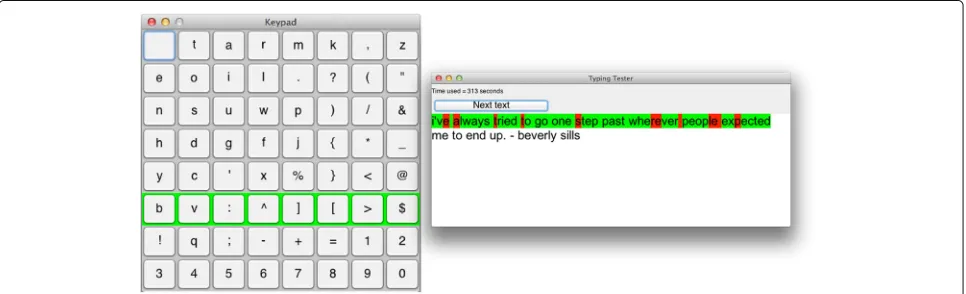
We created a typing program with a text window and a vir-tual keyboard with a row–column cursor path as shown in Fig. 5. The program was run on a computer using Mac OS X with an LCD monitor that has 1920×1200 pixels. Each character entry can be considered to be a trial where the participant’s task is to guide the cursor to the target char-acter on the keyboard by triggering the switch device at the appropriate times. To make the task somewhat engag-ing, participants were presented with a prompt window that displayed an inspiring quote. The participant’s task was to use the virtual keyboard to type the characters of the quote. To keep the task simple, all characters were in lower case. Throughout the experiment, the assignment of characters to keyboard positions was as given in Fig. 5, which tended to put the most commonly used items at the beginning of the cursor path (Francis & Johnson, 2011).
For each character to be entered, the participant initi-ated the cursor with a selection action (pressing the switch device), and then the cursor moved across the keyboard with a cursor duration,D, that was fixed for a block of
sessions. The cursor always started at the top row and moved down the rows of the keyboard. When the par-ticipant hit the switch device to select a row, the cursor started to move across the selected row from left to right until the participant again triggered the switch or the cursor went past the last character of the row. A cor-rect selection of the target character caused the prompt window to highlight the target character in green, and an incorrect selection (i.e., the participant responded too early or the cursor moved past the target) led to the target character being highlighted in red in the prompt window (see Fig. 5). There was no opportunity for the partici-pant to correct an error; instead, the trial was scored and the participant started the next trial when ready. When a given quote was finished, the participant clicked the “Next text” button in the prompt window to be presented with another quote. Additional file 5: Movie 5 shows the program in use for a small set of text entry.
The experiment was self-paced, with participants taking breaks as desired and continuing or stopping as moti-vated. In general, a given session lasted approximately 1 h. Within a session, the cursor duration was fixed, but across sessions it wasD = 0.200, 0.175, 0.150, 0.125, or 0.100 seconds. For each participant, sessions started with the longest cursor durations and the duration was gradually decreased for later sessions. The participant and exper-imenter together judged whether the participant should move to a faster cursor duration. In a few cases, a par-ticipant went back to a slower cursor duration because either they found the new duration to be too short or the wrong cursor duration was accidentally entered for a session. Because of the self-paced and self-motivated properties of the experiment, different participants had a different number of trials for different cursor durations and different numbers of overall sessions.
Results and discussion
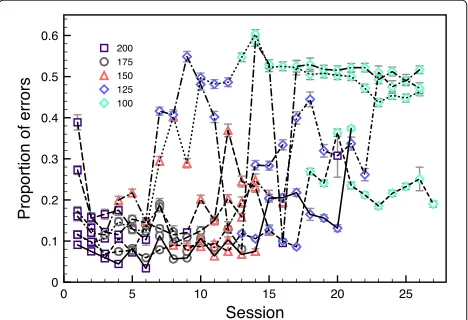
Figure 6 plots the proportion of entry errors as a function of session for each participant, split by the different cursor durations. There is a clear practice effect in the early ses-sions with the 200-ms cursor duration. It is more difficult to judge whether there are practice effects for other ses-sions because the cursor duration changes across sesses-sions. As expected, the proportion of errors generally increases as the cursor duration decreases. The exact relationship between cursor duration and proportion of errors varies quite a bit across participants because of the self-paced nature of data collection and the individualized progres-sion to shorter cursor durations. Pooling the character entries across all participants and counting the number of correct and incorrect entries produces the values in Table 1.
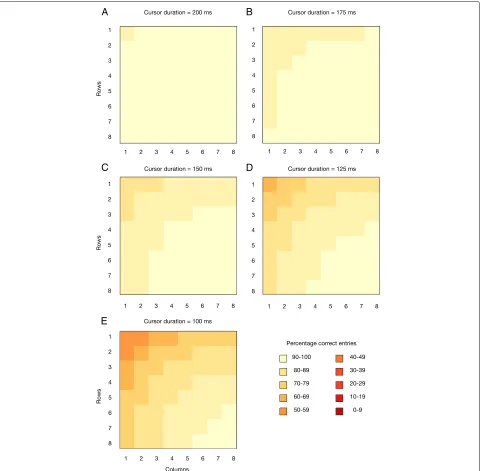
To optimize the design of a switch keyboard, we want to know how entry accuracy varies across the key-board locations as a function of the cursor duration. Figure 7 color codes the percentage of correct entries for each location on the row–column keyboard used in the experiment for each of the tested cursor durations. When the cursor movement is slow (cursor duration is 150–200 ms), Fig. 7a–c shows that performance is gen-erally above 70 %, although it deteriorates a bit as the cursor duration decreases. Figure 7d shows that perfor-mance notably drops for the 125-ms cursor duration, especially for the first (top) row of the keyboard. Presum-ably, this characteristic is because the cursor moves past the first row too quickly for the user to hit the switch. Figure 7e shows that the same behavior is present for the 100-ms cursor duration with even worse performance overall.
Fig. 6Experimental results. Proportion of entry errors as a function of experimental session. Each curve corresponds to a different participant and different symbols indicate the cursor duration (milliseconds) that was used for that session. Error bars indicate plus and minus one standard error of the proportion. For most statistics, these error bars are quite small because a session involved entering around 1,700 characters
Table 1General statistics describing text entry accuracy for the different cursor durations of the experiment
Cursor Number of Number of Proportion of Proportion of duration (ms) characters entry errors entry errors correct entries
200 37,602 4,480 0.119 0.881
175 44,314 4,720 0.107 0.893
150 47,891 7,807 0.163 0.837
125 45,815 12,887 0.281 0.719
100 98,808 41,365 0.419 0.581
Modeling of error probabilities
To promote optimal switch keyboard designs, we wanted to use the empirical data to develop a model that could predict performance for different cursor paths and differ-ent cursor durations. With that goal in mind, we focused on modeling a user’s ability to trigger the switch device at the appropriate times. Each successful trial in the row–column keyboard involves two such triggers: one for selecting the row containing the target and one for selecting the column/key within the selected row. An unsuccessful (error) trial may have one correct or incor-rect trigger selection (for selecting a row) but may not have any selection for a column (because there is no need if an error were already made by selecting the wrong row). On some error trials, there may be no selection at all (e.g., the cursor moves past the row containing the target). We hypothesized that trigger timing performance would be a function of the cursor duration and the number of cursor steps from the cursor start or last trigger (e.g., the row or column number).
We deliberately focused the model on the probability of correctly triggering the switch because it enables a predicted calculation of correct entry probabilities for a variety of cursor paths. An important part of this predic-tion is an independence assumppredic-tion, meaning that for the same index value of a row or column, the correct selec-tion probabilities are the same. Letπs be the probability of correctly selecting the switch followingscursor steps after the previous selection. For a row–column keyboard, there are two selections, with the first corresponding to the row,s=row(k), and the second corresponding to the column,s = column(k), so the error probability of guid-ing the cursor to positionkis modeled as the complement of the product of the correct selection probabilities:
Pk=1−πrow(k)πcolumn(k). (5)
The same type of probabilities can be used to pre-dict performance for a quadrant cursor path, where the predicted correct entry probability to reach position k
Fig. 7Experimental results. The percentage of correct keyboard entries, combined across all participants, for each row–column keyboard location with the indicated cursor duration
for a linear cursor path, there would be a single oppor-tunity to make an error with probability 1−πk and for the binary cursor path there would be six opportunities to make errors with associated probabilities.
To estimate theπs probabilities, we assume they are a function of the cursor duration and the number of cursor steps as defined by logistic regression, that is, the correct selection probabilities can be modeled as follows:
πs=
exp(β0+β1D+β2s)
1+exp(β0+β1D+β2s)
, (6)
where s indicates the number of cursor steps since the last selection action (e.g., the quadrant, row, or column to be selected). Theβ weights were estimated from the experimental data using logistic regression to produce β=[−1.85, 21.20, 0.41]. We also considered a model with an interaction of the cursor duration and the number of cursor steps, but it made the nonsensical prediction that performance deteriorates when the cursor duration increased beyond 400 ms.
estimated correct selection probabilities of πˆs for s = 1,. . ., 8 and cursor durations D = 0.1, 0.125, 0.150, 0.175, and 0.2 seconds. For the row–column keyboard, the predicted probability of a correct entry is the prod-uct of the selection probabilities for the row and column of a target key. To get a sense of how well the model matches the experimental data, Fig. 8 plots the propor-tion of correct entries for the experimental data against the model-predicted proportion of correct entries for the five experimental cursor durations. Here, only those con-ditions (key location and duration) with 100 or more trials are included because the model cannot be expected to match the proportions for poorly measured cases. The error bars indicate one standard error for the experimen-tal data (for many points the error bars are smaller than the symbols). Ideally, the points would fall on the diago-nal line from bottom left to top right, and while the model is not perfect, the predicted performance does correlate somewhat with the experimental data,r=0.57.
To understand the model’s behavior further, Fig. 9 dis-plays the predicted correct entry percentages in the same format as in Fig. 7. Unlike the data, the model has no missing conditions, but it generally behaves similarly as the data. In particular, performance deteriorates as the cursor duration decreases. For a cursor duration of 200 ms, there is little variation in performance across the dif-ferent keyboard locations. For shorter cursor durations, the model predicts improved performance for locations reached with late selections.
Fig. 8Model fit. Model-predicted and empirically measured proportion of correct keyboard entries. These are combined across all participants for row–column keyboard locations with the indicated cursor duration. Error bars (often too small to be seen) indicate plus/minus one standard error of proportion
Although far from perfect, our overall impression is that the model does a good enough job of accounting for the experimental data that it is fruitful to explore how it contributes to the optimization of switch keyboards. In particular, the model predicts performance for cursor durations and cursor paths that were not measured in the experiment. Hopefully, future research and theories will lead to better model predictions and thus better optimized switch keyboard designs.
Creating optimized keyboards
To demonstrate the construction of an optimized key-board, we first design a keyboard for entry of the quotes used in the experiment. Table 2 lists the frequencies,Fi, of the characters in the quotes. For a given cursor path, the optimal keyboard is the one that assigns characters to key-board locations and identifies a cursor duration, D, that satisfiesCe≤εand minimizesCt.
Note that the correct entry probabilities in Eq. (6) depend on the value of the cursor duration, thus the aver-age error rate also depends on the cursor duration. The cursor duration is restricted by the display capabilities of computer hardware. We supposed that a computer moni-tor refreshes the display at 100 Hz, which means that the shortest cursor duration would be 10 ms and that longer cursor durations would be multiples of 10 ms (covering multiple frames of the display). For a fixed acceptable error rate, we considered all possible cursor durations between 10 and 1,000 ms, in steps of 10 ms. For each of these cursor durations, the MIP algorithm identified the optimal placement of characters to keys to satisfy the acceptable error rate and minimize average search time. The optimal keyboard is the one with the cursor dura-tion that produces the shortest entry time and satisfies the acceptable error rate.
Optimal row–column keyboards
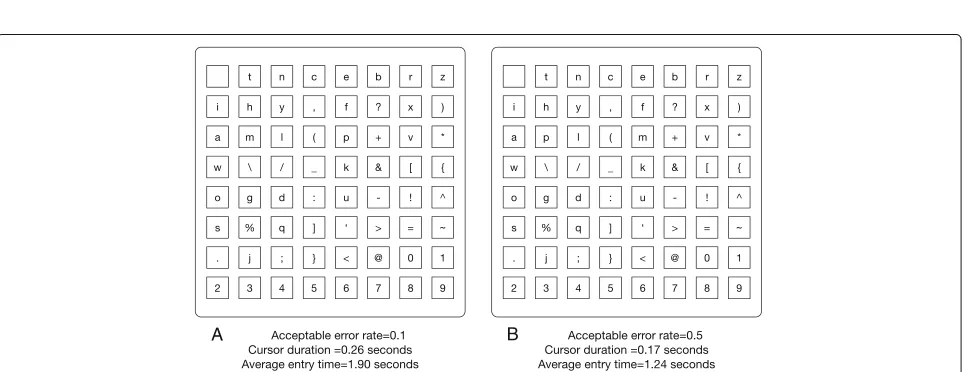
We start by considering a row–column keyboard. Figure 10 shows the character arrangements for opti-mal keyboards that satisfy different acceptable error rates. According to the entry error model, both of these keyboards perfectly match their respective acceptable error rate. Not surprisingly, the optimal cursor duration depends on the acceptable error rate. To satisfy theε=0.1 acceptable error rate, the cursor duration must be rather long, D = 0.19 seconds (190 ms), while a much shorter cursor duration can be used when the acceptable error rate isε=0.5,D=0.02 seconds (20 ms).
Fig. 9Model performance. Model-predicted percentage of correct keyboard entries for each row–column keyboard location with the indicated cursor duration. The pattern of correct entries is similar to the experimental data in Fig. 7
characters (space, “t”, “e”, “a”, “o”, and “i”) are located along the first few rows and columns of the keyboard. Less fre-quent characters, such as “&”, “%”, and “]”, are placed at locations that require more cursor steps. This strategy is a good one because the most frequent characters are reached with few steps, which tends to minimize average entry time.
However, an alternative approach is used for theε=0.5 condition. Here the cursor duration is set to be very brief, which means that there is a high probability of making an
error for the first few rows and columns. High-frequency characters (“s”, “o”, “e”, “a”, and “t”) tend not to be placed on those error-prone locations and instead are shifted to later rows and columns that have a lower probability of error. The large number of cursor steps needed to reach these frequent keys is offset by the short cursor duration, so the average entry time is low.
Table 2Character frequencies for the quotes used in the experiment and for the Python computer code
Frequency Frequency Frequency Frequency
Char Quotes Python Char Quotes Python Char Quotes Python Char Quotes Python
space 5,346 1,980 p 415 142 : 9 57 } or # 0 30
a 1,764 211 q 19 7 ∧ 0 0 [ 0 65
b 370 54 r 1,385 428 & 0 1 ] 0 65
c 800 132 s 1,655 198 * 0 649 - 325 13
d 758 171 t 2,076 271 ( 0 113 _ 0 91
e 2,876 297 u 827 117 ) 0 113 ∼ 0 0
f 521 76 v 306 48 ; 7 0 0 5 100
g 503 48 w 552 42 ’ 108 70 1 1 80
h 1,138 49 x 23 62 ? 15 0 2 2 29
i 1,803 204 y 620 58 + 0 22 3 0 7
j 61 17 z 29 2 = 0 81 4 0 13
k 223 56 ! 4 3 < 0 8 5 0 24
l 1,089 109 @ 0 1 > 0 3 6 0 19
m 590 167 , 165 101 / 0 21 7 0 12
n 1,680 213 . 434 152 \ 0 2 8 1 4
o 1,995 245 % 2 15 { or 0 244 9 1 6
case; sometimes increasing the cursor duration led to a decrease in the average search time because an increase in the cursor duration alters the probabilities of making an error and thereby enables a reconfiguration of the charac-ters that leads to faster entry. This kind of effect highlights the need to consider a range of cursor durations and to identify the optimal character assignments to best satisfy the accuracy and speed goals of an optimized keyboard design.
Optimal keyboard designs for other cursor paths
Figures 11, 12 and 13 show the properties of the optimal designs for keyboards using a linear, quadrant, or binary
cursor path, respectively. As shown in Fig. 11, a linear cursor path, where the cursor scans over individual keys, generally uses the shortest possible cursor duration (0.01 seconds) and assigns characters to different keys to alter the average error rate and average entry time. For theε= 0.5 condition, the optimal keyboard produces an average error rate of 0.35, which is lower than the acceptable error rate of 0.5. This mismatch is because the cursor duration is already at its smallest possible value, and the most fre-quently used characters are already assigned to their most error-prone locations (e.g., the top row). It simply is not possible for this cursor path to further trade off accuracy for speed for this text corpus.
Fig. 10Optimal row-column keyboards. Optimal row–column keyboard design and cursor duration. Acceptable error rates ofaε=0.1 andb
Fig. 11Optimal linear keyboards. Optimal linear keyboard design and cursor duration. Acceptable error rates ofaε=0.1 andbε=0.5. This combination of key assignments and cursor duration satisfies the acceptable error rate and minimizes average entry time
Fig. 12Optimal quadrant keyboards. Optimal quadrant keyboard design and cursor duration. Acceptable error rates ofaε=0.1 andbε=0.5. This combination of key assignments and cursor duration satisfies the acceptable error rate and minimizes average entry time
Figure 12 shows two optimal quadrant keyboards, where the cursor first moves over different quadrants and then rows and columns within a selected quadrant. Both key-boards tend to place high-frequency characters in the first two quadrants (top-left and top-right quadrants). They differ in the placement of low-frequency characters and in the cursor duration, with the keyboard requiring a low acceptable error rate having a cursor duration nearly twice as long as the keyboard requiring a high acceptable error rate.
Figure 13 shows two optimal binary keyboards, where the cursor alternates between remaining halves of the key-board to zero in on the desired key. Here, a change in the acceptable error rate from 0.1 to 0.5 hardly alters the assignment of characters to keys (only the “m” and “p” characters switch positions), which makes some sense because different key positions are nearly equivalent due to the way the cursor focuses in on a target key. For example, with a binary cursor path, 20 of the 64 keys are reached with nine cursor steps, while an additional 30 keys are reached with eight or ten cursor steps. With such homogeneity, changing the key assignments for a binary cursor path often has very little impact on the average entry time. In a similar way, key assignments have only a modest effect on the error entry rate. Thus, the main variable controlling speed and accuracy for a binary cur-sor path is the curcur-sor duration, which is longer for smaller acceptable error rates.
A user of a switch keyboard wants to identify the best possible keyboard design for the type of text entry they will use, and for an acceptable error rate. As described above, the optimal design depends on the cursor path, so users should compare the optimal keyboard designs for different cursor paths and choose the best. Figure 14 summarizes the properties of optimal keyboard designs for different cursor paths as a function of the acceptable error rate. Critically, Fig. 14a indicates that for all but the highest acceptable error rates, the linear cursor path pro-duces a much smaller average entry time than any other cursor path. This advantage for the linear cursor path is because it involves a single switch action, so there is only one opportunity for the user to make an entry error. In contrast, the row–column cursor path always involves two switch actions, and the quadrant and binary cursor paths have more switch actions and therefore more opportuni-ties for an entry error. The linear cursor path leverages this advantage by making the cursor duration extremely brief and assigning characters to keys in a way that satisfies the acceptable error rate.
It is notable that the optimal solution for a linear cur-sor path does not always look like a very good keyboard design. For example, the keyboard in Fig. 11b places the space character at the first key. The logistic model pre-dicts that a user has a 0.77 probability of making an entry
error at this key, so this most commonly used character is unlikely to be entered correctly. Such a property seems to make the keyboard essentially unusable, but this lim-itation simply reflects the requirements imposed on the design. A keyboard with an acceptable error rate of 0.5 is, indeed, unlikely to be a usable keyboard. The problem is not with the design process but with the design spec-ification. There is a similar problem for the keyboard in Fig. 11a, which satisfies an acceptable error rate of 0.1. Here, the “k” character is on the second key, which has a predicted error rate of 0.7. Clearly, someone entering the wordknockon such a keyboard faces low odds of success. But for the provided text corpus (the quotes used in the experiment), the letter “k” is rather uncommon (Table 2), so this type of entry is uncommon. One could impose additional constraints on the design process, such as to ensure that every key has an acceptable error rate in addi-tion to an acceptable average error rate. The optimizaaddi-tion process would be similar to what is described above, but the additional constraint would result in quite different optimized keyboards.
Effect of a different text corpus on optimal keyboard design
The optimal keyboard design also depends on the dis-tribution of character frequenciesFi, which are defined by the text corpus that is appropriate for a given user. These frequency distributions may vary widely depending on what kind of material is being entered into the key-board. For example, a user who writes novels or poems may rarely use characters such as “[” or “}”, while a user who writes Python computer programs would commonly use characters such as “i” and “f ” as well as “(” and “*”. To explore the effect of the text corpus on optimal keyboard design, we identified the frequency of 64 characters from an early version of Python code that was used to calculate the optimized keyboard, and we compared the resulting keyboards to the keyboards designed for the quotations used in the experiment. Table 2 shows the frequencies of the characters included in our Python code. To ensure that all Python-related characters were part of the keyboard, the characters “{” and “}” in the original keyboard were replaced by the characters “#” and “”.
Figure 15 shows optimal keyboards using a linear cur-sor path for the Python text corpus. Like the linear curcur-sor path keyboards for the quotes, the cursor duration is at the smallest possible value, 0.01 seconds. Given the differ-ences in character frequencies, it is not surprising that the optimized assignment of characters to keyboard positions varies with the text corpus, as a comparison of Figs. 11 and 15 demonstrates. Nevertheless, the same basic principles underlie each optimized keyboard. For a low acceptable error rate, the high-frequency characters are placed a bit down the cursor path so that they have a low probability of an entry error and low-frequency characters are placed
at the beginning of the cursor path. For a higher accept-able error rate, the high-frequency characters are placed at the beginning of the cursor path, where the keys have the highest predicted entry error probability and are reached most quickly.
The average entry time seems to be faster for the keyboards optimized for the quotes text than the key-boards optimized for the Python code text. This difference reflects the distribution of frequencies across the charac-ters in the text corpus. Among other things, the Python computer code has 294 uses of numerals, while the quotes text uses numerals only ten times. Since the numerals are all fixed at the end of the linear cursor path, they take a relatively long time to reach.
For completeness, we also investigated the relation-ships between average entry time, cursor duration, aver-age error rate, and the acceptable error rate for different cursor paths, using the Python code text corpus. These relationships are very similar to the results obtained for the quotes text corpus shown in Fig. 14.
Conclusions
People with severe motor control problems often rely on switch devices to communicate. We studied the fun-damental characteristics of a switch virtual keyboard by framing the design task as a speed/accuracy trade-off optimization problem. In particular, we proposed a MIP model for this problem to minimize the average entry time, given an acceptable error threshold. We further described how to estimate and model the necessary error probabilities. Automating these optimization tasks can be part of a general method for improving the usability of these kinds of devices (Koester & Simpson, 2014).
The approach considers many needs of the user. First, the acceptable error rate is established by the user, which allows them to specify their own typing style. Second, the user can choose their own text corpus depending on their personal interests and needs. We also tested the effects of different cursor paths, and showed that the optimization process selects an optimal keyboard for different cursor paths by balancing the trade-off between the average entry time and the average error rate.
Fig. 15Python-based optimal linear keyboards. Optimal linear keyboard design and cursor duration relative to the Python code text corpus. Acceptable error rates ofaε=0.1 andbε=0.5. This combination of key assignments and cursor duration satisfies the acceptable error rate and minimizes average entry time
When coupled with a short cursor duration, the average entry time for a linear cursor path can be quite short.
However, there are two important limitations to the current analysis that suggest additional investigation is required before broadly recommending linear cursor paths. First, the efficiency of a linear cursor path depends on the frequency distribution of characters in the text cor-pus. When more characters are part of the keyboard, the number of cursor steps for characters at the end of the path increases accordingly. If the frequency distribution of characters is fairly uniform, then average entry time will dramatically increase for larger keyboards, and there may then be an advantage to hierarchical cursor paths. Second, the predicted optimal linear keyboards used the smallest possible cursor duration (10 ms), but the model predic-tion of performance for such a cursor durapredic-tion is based on experimental data that measured performance for much longer cursor durations (the briefest being 100 ms). We do not have a lot of confidence in the model’s prediction for such short cursor durations. In a similar way, the pre-dicted performance for cursor steps beyond eight are also not directly supported by experimental data. We do not have evidence that the model does poorly in these con-ditions, but there should be validation of the model (and possibly refinement) with additional empirical studies.
The optimization approach can be elaborated to con-sider additional characteristics of keyboard function. For example, a popular approach is to enable predictive typ-ing, where the keyboard monitors what is typed and presents a list of options and the user can select a full word after entering the first few letters. Such a feature carries both positive and negative aspects for users of switch key-boards. On the positive side, it may require entering fewer characters to type common words and thereby it may speed communication. On the negative side, navigating
to the list of choices requires the user to guide the cur-sor to the list (either with a linear curcur-sor path or in a hierarchical structure). There is, of course, a risk of a selec-tion error when trying to reach an item in the predicselec-tion list, and an error in that context may alter the list and thereby render the system rather difficult to work with. If a prediction system is part of a keyboard, then there is a need to optimize its design within the keyboard, and the approach we have presented here can be modified to provide such optimization. Similarly, it is important to consider how users would correct errors with a switch keyboard. Error correction with a switch keyboard using a delete or undo command can only be initiated by the user guiding the cursor to an appropriate action key. To correct past text, switch keyboards have action keys that move a marker in the text (e.g., up a line or down a page). Some switch keyboards also allow for control of mouse actions (movement, hold, drag, select, stop, click, and double-click commands), which can be used to fix errors, among other things. Such command keys should also be optimized according to their frequency of use for a given user.
Simpson, Koester and LoPresti (2007) proposed that an appropriate cursor duration is one that generates a ratio of the user’s reaction time and the cursor duration equal to 0.65. If true in general, then it should be easy to model error probabilities. Regardless of the empirical method, once the error probabilities for a user’s abil-ity with a switch device are identified and modeled, the optimization algorithm described here can be readily applied.
Although our investigation was motivated by the needs of locked-in patients using switch keyboards, the com-putational optimization approach developed here should also apply to other users and keyboards. For example, touchscreen devices in automobiles (including keyboards) face a similar entry constraint (e.g., drivers and passengers tend to use single-finger entry rather than multiple-finger typing) and time-sensitive environments (e.g., Young Lee, Gibson & Lee, 2016). Although the interface method is rather different, there remains a speed/accuracy trade-off that can be optimized using some of the methods reported here. Military helicopter pilots face similar design issues when interacting with a multifunction display (Francis, 2000; Francis & Rash, 2005). Thus, basic research into the design of switch keyboards for locked-in patients should prove fruitful in addressing the design of other types of systems that face fundamentally similar problems despite substantial differences in users, use cases, and interface details.
Additional files
Additional file 1:Movie 1. Animation of a switch keyboard where the cursor follows a linear path across the keyboard. The “Hit switch” text below the virtual keyboard indicates when a user would need to trigger a switch device to guide the cursor toward a target letter (“k” in this case). The cursor duration isD=200 ms. (GIF 387 kb)
Additional file 2:Movie 2. Animation of a switch keyboard where the cursor follows a row–column path across the keyboard. The “Hit switch” text below the virtual keyboard indicates when a user would need to trigger a switch device to guide the cursor toward a target letter (“k” in this case). The cursor duration isD=500 ms. (GIF 211 kb)
Additional file 3:Movie 3. Animation of a switch keyboard where the cursor follows a quadrant path across the keyboard. The “Hit switch” text below the virtual keyboard indicates when a user would need to trigger a switch device to guide the cursor toward a target letter (“m” in this case). The cursor duration isD=750 ms. (GIF 214 kb)
Additional file 4:Movie 4. Animation of a switch keyboard where the cursor follows a binary path across the keyboard. The “Hit switch” text below the virtual keyboard indicates when a user would need to trigger a switch device to guide the cursor toward a target letter (“*” in this case). The cursor duration isD=750 ms. (GIF 310 kb)
Additional file 5:Movie 5. A movie of the switch keyboard typing program used in the experiment. The user clicks the mouse (a switch device) to guide the cursor (green highlighting on the virtual keyboard) toward the next letter in the quote. Color-coded feedback indicates whether the user was successful (green) or not (red) in selecting the desired character. Note that the cursor duration here (400 ms) is much longer than what was used in the experiment. (MP4 7137 kb)
Acknowledgements
This work was funded, in part, with support from the Indiana Clinical and Translational Sciences Institute by grant number RR025761 from the National Institutes of Health, National Center for Research Resources, Clinical and Translational Sciences Award.
Authors’ contributions
XZ, KF, and GF created the optimization programs. XZ and GF created the experimental programs and XZ gathered the experimental data. XZ and GF analyzed the data. XZ and GF wrote the manuscript. All authors read and approved the final manuscript.
Competing interests
The authors declare that they have no competing interests.
Ethics approval and consent to participate
The experimental protocol was approved by the local Internal Review Board at Purdue University (study number 1212013006). As part of the consent form, study participants agreed that their data could be part of a publication and that their data could be stored in perpetuity.
Author details
1Department of Computer Science, Purdue University, West Lafayette, IN
47907-2004, USA.2College of Management and Economics, Tianjin University,
300072 Tianjin, China.3Department of Psychological Sciences, Purdue University, West Lafayette 47907-2004, IN, USA.
Received: 13 June 2016 Accepted: 25 July 2016
References
AssistiveWare (2013).Switch XS keyboard. http://www.assistiveware.com/ product/switchxs. Accessed 15 Feb 2015.
Bauby, J.-D. (1997).Le scaphandre et le papillon. Paris: Robert Laffont. Broderick, T., & MacKay, D.J.C. (2009). Fast and flexible selection with a single
switch.PLoS ONE,4(10), e7481. doi:10.1371/journal.pone.0007481. Francis, G. (2000). Designing multifunction displays: An optimization approach.
International Journal of Cognitive Ergonomics,4, 107–124.
Francis, G., & Johnson, E. (2011). Speed-accuracy trade-offs in specialized keyboards.International Journal of Human-Computer Studies,69(7–8), 526–538.
Francis, G., & Rash, C.E. (2005).Analysis and design of keyboards for the AH-64D helicopter(Report No. 2005-11). Fort Rucker. AL: U.S. Army Aeromedical Research Laboratory.
Gurobi Optimization (2013).Gurobi Optimizer 5.6. http://www.gurobi.com/. Accessed 15 Feb 2015.
Hughes, D., Warren, J., & Buyukkokten, O. (2002). Empirical bi-action tables: A tool for the evaluation and optimization of text-input systems.Application I: Stylus keyboards. Human-Computer Interaction,17(2), 271–309. Jensen, A.R. (2006).Clocking the mind: Mental chronometry and individual
differences. Amsterdam: Elsevier.
Koester, H.H., & Simpson, R.C. (2014). Method for enhancing text entry rate with single-switch scanning.Journal of Rehabilitation Research Development, 51(6), 995–1012. http://dx.doi.org/10.1682/JRRD.2013.09.0201. Laureys, S., Pellas, F., van Eeckhout, P., Ghorbel, S., Schnakers, C., Perrin, F.,
. . . Goldman, S. (2005). The locked-in syndrome: What is it like to be conscious but paralyzed and voiceless?Progress in Brain Research,150, 495–511.
Lin, Y.-L., Wu, T.-F., Chen, M.-C., Yeh, Y.-M., & Wang, H.-P. (2008). Designing a scanning on-screen keyboard for people with severe motor disabilities. In K Miesenberger & et al (Eds.)Lecture Notes in Computer Science: Vol. 5105. Computers Helping People with Special Needs(pp. 1184–1187). Berlin: Springer-Verlag.
MacKenzie, I.S. (2012). Modeling text input for single-switch scanning. In Proceedings of the 13th International Conference on Computers Helping People with Special Needs, ICCHP 2012(pp. 423-430). Berlin: Springer. MacKenzie, I.S., & Felzer, T. (2010). SAK: Scanning ambiguous keyboard for
efficient one-key text entry.ACM Transactions on Computer-Human Interaction,17(3), 1–39. Article 11.
Miró-Borrás, J., & Bernabeau-Solar, P. (2009). Text entry in the e-commerce age: Two proposals for the severely handicapped.ACM Journal of Theoretical and Applied Electronic Commerce Research,4(1), 101–112.
Morland, D.V. (1983). Human factors guidelines for terminal interface design. Communications of the ACM,26(7), 484–494.
Norte, S., & Lobo, F G (2007). A virtual logo keyboard for people with motor disabilities.Proceedings of the 12th Annual Conference on Innovation and Technology in Computer Science Education: Vol. 39, 111–115.
Origin Instruments (2013). Button-style adaptive switch. http://www.orin.com/ access/orby.
Posner, M.I. (1978).Chronometric explorations of mind. Hillsdale, NJ: Erlbaum. Sears, A., & Zha, Y. (2003). Data entry for mobile devices using soft keyboards:
Understanding the effects of keyboard size and user task.International Journal of Human-Computer Interaction,16(2), 163–184.
Serby, H., Yom-Tov, E., & Inbar, G.F. (2005). An improved P300-based brain-computer interface.IEEE Transactions on Neural Systems and Rehabilitation Engineering,13, 89–98.
Simpson, R., Koester, H., & LoPresti, E. (2007). Selecting an appropriate scan rate: The “.65 rule”.Assistive Technology: The Official Journal of RESNA,19(2), 51–60. Smith, G.A., & McPhee, K.A. (1987). Performance on a coincidence timing task
correlates with intelligence.Intelligence,11, 161–167.
Tavalaro, J., & Tayson, R. (1997).Look up for yes. New York, NY: Kodansha America Inc.
Yamaguchi, M., Crump, M.J.C., & Logan, G.D. (2013). Speed-accuracy tradeoff in skilled typewriting: Decomposing the contributions of hierarchical control loops.Journal of Experimental Psychology: Human Perception and Performance,39, 678–699.
Young Lee, J., Gibson, M.C., & Lee, J.D. (2016). JError recovery in multitasking while driving.ACM CHI’16. doi:10.1145/2858036.2858238.
Zhai, S., Hunter, M., & Smith, B.A. (2002). Performance optimization of virtual keyboards.Human–Computer Interaction,17(2–3), 229–269.
Submit your manuscript to a
journal and benefi t from:
7Convenient online submission
7Rigorous peer review
7Immediate publication on acceptance
7Open access: articles freely available online
7High visibility within the fi eld
7Retaining the copyright to your article