9 Available online at www.ijiere.com
International Journal of Innovative and Emerging
Research in Engineering
e-ISSN: 2394 – 3343 p-ISSN: 2394 – 5494
BLIND REMINDERS INTEGRATION OF VOICE BASED
REMINDER SYSTEM WITH EMERGENCY ROUTING
JALEEL AHMED J S 1
a, SATHIK ALI I 2
aDepartment of computer applications, B.S Abdur Rahman University Vandalur Chennai-600048 Department of computer applications, B.S Abdur Rahman University Vandalur Chennai-600048
ABSTRACT:
The main objective of this project is to develop an electronic calendar app that provides interaction via voice commands, keyboard and touch. The goal is to create an accessible mobile application that is capable of
interactive through voice commands for visually impaired users and low vision users also touch screen input for normal end users. The functionalities included in this project are: creating, deleting, editing, reading, filtering reminders. And also included “Emergency” option, where normal user can click on it or visually impaired people can use it by voice recognition. Then “GPS” is initiated and the location of the user is sent as SMS alert to both Guardian and to the Police
.
Key Words: voice commands for visually impaired
1. INTRODUCTION
According to data from the World Health Organization (WHO), from August 2014, there are about 285 million visually impaired people in the world, of which 246 million have low vision and 39 million are blind. In Brazil, the country where this research is being conducted, according to IBGE (Brazilian Institute of Geography and Statistics), from the 2010 Census survey, 35,791,488 persons reported to have some type of visual impairment. Of these people, 528,624 stated that they do not see, 6,056,684 declared great difficulty to see and 29,206,180 reported having some difficulty. In a Web AIM survey about the usage of screen readers, 72% of the 1465 users answered that they used a screen reader with their mobile devices. A comparison drawn between this and previous surveys showed that mobile device adoption has been increasing in the last years, which demonstrates the importance of developing apps for this audience. This scenario, challenged the betterment for visually impaired people to help them with disabilities to use smart phones, not only by improving the access mode.
1.1 OBJECTIVE
The main objective of this project is to develop an electronic calendar app that provides interaction via voice commands, keyboard and touch. The goal is to create an accessible mobile application that is capable of interactive through voice commands for visually impaired users and low vision users also touch screen input for normal end users by using android.
2. EXISISTING SYSTEM
In existing social trust provides an alternative view of user preferences other than item ratings. Find that trust networks are small-world networks where two random users are socially connected in a small distance, indicating the implication of trust in recommender systems. In fact, it has been demonstrated that incorporating the social trust information of users can improve the performance of recommendations. There are two main recommendation tasks in recommender systems, namely item recommendation and rating prediction. Most algorithmic approaches are only designed for either one of the recommendations tasks, and our work focuses on the rating prediction task.
2.1 LITERATURE SURVEY
10 Shiri Azenkot [3], Much recent work has explored the challenge of non-visual text entry on mobile devices. While researchers have attempted to solve this problem with gestures, we explore a different modality: speech. We conducted a survey with 169 blind and sighted participants to investigate how often, what for, and why blind people used speech for input on their mobile devices. We found that blind people used speech more often and input longer messages than sighted people. We then conducted a study with 8 blind people to observe how they used speech input on an iPod compared with the on-screen keyboard with Voice Over. We found that speech was nearly 5 times as fast as the keyboard. While participants were mostly satisfied with speech input, editing recognition errors was frustrating. Participants spent an average of 80.3% of their time editing. Finally, we propose challenges for future work, including more efficient eyes-free editing and better error detection methods for reviewing text.
Maria Claudia Buzzi et al.[4], Investigated how visually impaired people perform gestures on touch-screen smart phones. To this end, the team recruited 36 visually impaired participants to explore differences and preferences in carrying out a set of gestures. A system to collect gestures from several participants interacting with mobile smart phones at the same time is developed for this purpose. Results confirms previous research regarding the preference of visually impaired users for simple gestures, made with one finger and a single stroke. Moreover, rounded shapes were greatly preferred to angular ones. Thus, concluded with the possibility of developing an application which can be used by the visually impaired and low vision users.
2.2 DISADVANTAGES OF THE EXISTING SYSTEM The major disadvantages of the Existing System are as follows
Manual device control Less effective
3. PROPOSED SYSTEM
In the PROPOSED SYSTEM, the main objective is to develop an electronic calendar app that provides interaction via voice commands, keyboard and touch. The goal is to create an accessible mobile application that is capable of interactive through voice commands for visually impaired users and low vision users also touch screen input for normal end users. The functionalities included here are: creating, deleting, editing, reading, filtering reminders with the possibility of voice commands.
3.1ADVANTAGES OF PROPOSED SYSTEM The major disadvantages of the Proposed System are as follows
Emergency alert using GPS
Voice commands for creating calendar events
4. METHODOLOGY
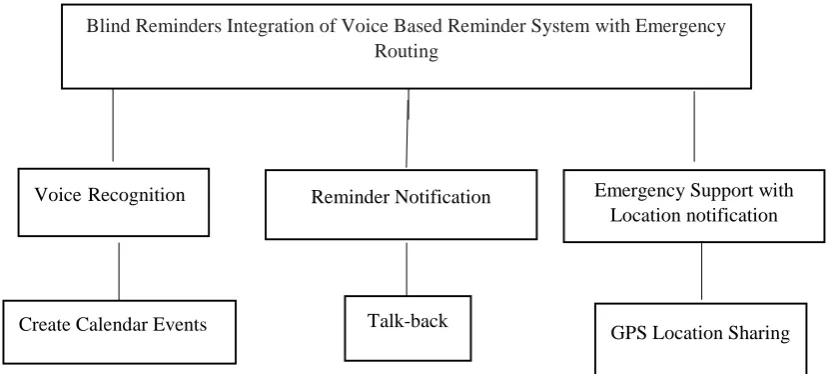
The methodology adopted in this project is top down approach. The various modules used in this project are: Voice Recognition, Reminder Notifications, Emergency support with Location Notification. Here Voice Playback is used to read out the created calendar events. And “Emergency” function uses the GPS to obtain the location of the user in order to send an SMS alert with the accurate location of the user to Guardian or care taker. This can be done when the user initiates the feature by voice recognition. Figure 3.2 displays the Hierarchical Diagram of Blind Reminders.
Figure 2.1 Hierarchical Diagram of Blind Reminders
VoiceRecognition Reminder Notification
Blind Reminders Integration of Voice Based Reminder System with Emergency Routing
Emergency Support with Location notification
Create Calendar Events Talk-back
11 In this chapter the problem definition and methodology are discussed. The next chapter discusses about the development process, which includes requirement analysis, design, implementation and testing.
5. RESULT:
The result of the project “Blind Reminders” is obtained as expected. This application is working successfully and the results are obtained as per the output requirements.
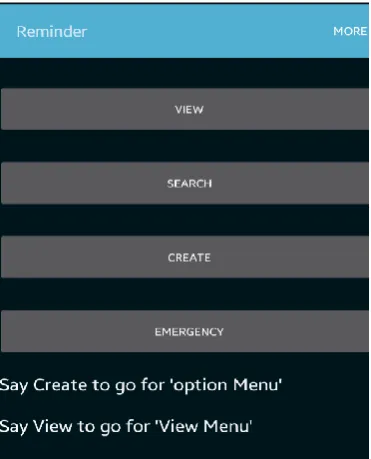
Figure 5.1 displays the screenshot for Home page. In this, the user can create, view and search reminders. The user can also launch the emergency feature. These can be done by voice recognition for visually impaired users and touch screen based input for normal end users. The more Button will take you to the registration form for emergency feature.
Figure 5.1 Screenshot for Home page
Figure 5.2 displays the screenshot for Register/Update page. It Enables the user to register and update the details required for emergency function. The user has to register the required details, in order to make use of the Emergency feature. If the user wants to change the registered details in future, they can simply update the registered details.
Figure 5.2 Screenshot for Register/Update
12 Figure 5.3 Screenshot for Registration
Figure 5.4 displays the screenshot for Update page. It will let the users to update the already registered details for the emergency feature.
Figure 5.4 Screenshot for Update
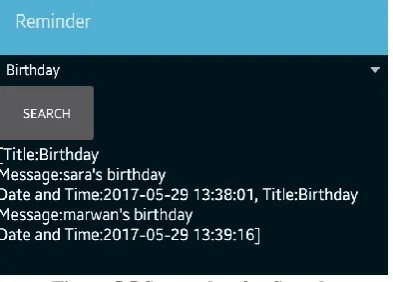
Figure 5.5 displays the screenshot for Search page. It will let the users to search predefined calendar events like birthday, personal, travel and much more. For instance, if we select Birthday, it will show all the Birthday calendar events created by the user. It will search with the keyword “Birthday” and show the matching results one by one.
Figure 5.5 Screenshot for Search
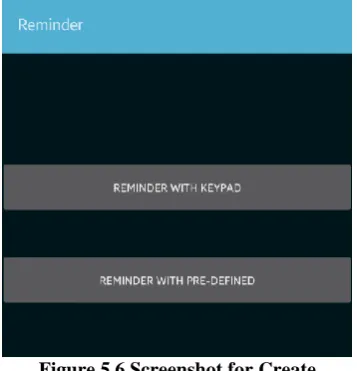
13 Figure 5.6 Screenshot for Create
Figure 5.7 displays the screenshot for manually creating reminders with keypad. In this, the user has to provide the title, body, reminder date and time. This is for the normal end users.
Figure 5.7 Screenshot for Manual Reminder with Keypad
Figure 5.8 displays the screenshot for manually creating reminders with keypad for normal end users. But it has pre-defined title events like Birthday, Personal and much more for ease of use.
14 6.CONCLUSION
Mobile devices such as smart phones increasingly add functionality to gain more space in daily life. However, innovation is challenging, for it has to fulfill the individual needs within an entire population, which include disabilities such as blindness. The lack of accessibility to innovation “may have the unintended effect of social exclusion from certain workplace activities, and may lower productivity”. Thus emerges the challenge of bringing greater accessibility, providing easier access and contributing to digital inclusion.
7. REFERENCES
[1] Buzzi, M.C., Buzzi, M., Donini, F., Leporini, B.,Paratore, M.T.: Haptic Reference Cues to Support the Exploration of Touchscreen Mobile Devices by Blind Users. In: Biannual Conference of the Italian Chapter of SIGCHI, Article 28. ACM, New York, 2013
[2] Knudsen, L.E., Holone, H.: A Multimodal Approach to Accessible Web Content on Smartphones. In: K.Miesenberger et al. (eds.) ICCHP 2012, Part II,LNCS 7383. Springer, Heidelberg, 2012, pp. 1-8.
[3] Azenkot, S., Lee, N. B.: Exploring the use of speech input by blind people on mobile devices. In: 15th International ACM SIGACCESS Conference on Computers and Accessibility. ACM, New York, 2013, p. 11.
[4] Buzzi, M. C., Buzzi, M., Leporini, B., Paratore, M.T.: Vibro-Tactile Enrichment Improves Blind User Interaction with Mobile Touchscreens. In: P.Kotzé et al. (eds.) INTERACT 2013, Part I, LNCS 8117. Springer, Heidelberg, 2013, pp. 641-648.