Chapter 8
Learning objectives
• After this lecture, you will be able to:
– explain the importance of conducting a structured
initiation phase for a BIS project;
– identify typical tangible and intangible costs and
benefits associated with the introduction of an
information system;
– apply different techniques to select the most
appropriate options from different software, hardware
and supplier alternatives;
Management issues
• From a managerial perspective, this lecture
addresses the following areas:
– How should we assess the feasibility of a project?
– What are the stages and techniques that can be
applied to assess feasibility?
– How can the return-on-investment of a BIS project be
assessed?
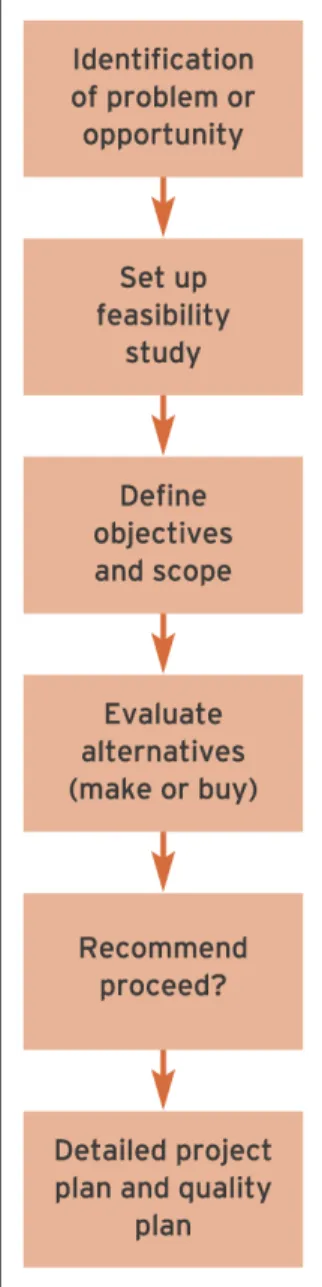
Initiation and feasibility
•
Initiation phase
: The first phase in an information
systems development project. Its aims are to
establish whether the project is feasible and prepare
to ensure that the project is successful.
•
Feasibility study
: The activity that occurs at the start
Initiation activities 1
Activity
Purpose
1
Assess feasibility
This is the most important aspect of the initiation stage. It
involves performing a cost–benefit analysis and
considering non-monetary considerations such as the
effect that the new system will have on staff. An overall
feasibility study may be conducted to establish the
business reasons for proceeding, followed by a
comparison of alternative technical solutions from
different suppliers.
2
Define business objectives
Check that the system is aligned with business needs by
and outline systems
defining critical success factors (CSFs) that must be
requirements
achieved by incorporation of particular features.
3
Evaluate acquisition
This evaluation will cover different aspects such as cost,
4
Define scope
This involves specifying system boundaries describing
which parts of the organisation will be affected by the
system. Will it be used in a single department, across the
whole organisation or beyond with suppliers?
5
Define responsibilities
Since a large input to a project in areas such as defining
the requirements and undertaking testing is from
managers and users of the final system, time for their
input must be set aside. Responsibilities of the system
developers will also be specified.
6
Assess risks
Identify potential problems which may cause the project
to fail, such as skills shortages or changes to the
company’s market. What precautions can be taken to
ensure that the project doesn’t fail?
7
Identify constraints and
Use estimating and planning to develop an initial project
develop project plan
plan. This will preview project size and complexity to
establish a preliminary budget and timescale, which will
be refined once the go-ahead for the project is given.
6Cs benefits of IS
Benefit
Achieved through
1
Cost reduction
Lower staffing requirements as online customers use
e-commerce system for ‘customer self-service’. Costs savings
can be calculated for each online transaction.
2
Capability
A new capability to deliver banking services 24 hours a day, 7
days a week, 365 days per year.
3
Communications
The Internet provides a new communications channel with
customers. SMS text alerts provide an alternative
communications medium.
4
Customer service
Customer choice is provided by the new channel, but
customers can still contact bank staff by traditional channels.
5
Control
Banks can monitor active and dormant online customers and
persuade dormant customers to use the system more.
Feasibility type 1
•
Organisational feasibility
: Reviews how well the
solution meets the needs of the business and
anticipates problems such as hostility to the system if
insufficient training occurs. (Considers the effect of
change, given a company’s culture and politics.)
• Question answered:
– Will the system meet the business’ needs and help
improve its performance?
• Technique used to control:
•
Economic feasibility
: An assessment of the
costs and benefits of different solutions to select
that which gives the best value. (Will the new
system cost more than the expected benefits?)
• Question answered:
– Will the costs outweigh the benefits?
• Technique used to control:
– Cost/benefit analysis
– Return-on-investment and payback calculations.
Costs and benefits
•
Tangible costs
:
A measure of cost can be
calculated for each tangible cost.
•
Intangible costs
: A monetary value cannot be
placed on an intangible cost.
•
Tangible benefits
: A definite measure of
improvement can be calculated for each tangible
benefit.
IS costs
• Hardware and software purchase costs;
• Systems development staff costs if a bespoke or tailored solution is
chosen;
• Installation costs including cabling, physically moving equipment and
bringing in new furniture to house the computers;
• Migration costs such as transferring data from an existing system to
the new system or running the new and original systems in parallel
until the reliability of the new system is established;
• Operating costs including maintenance costs of hardware such as
replacing parts or upgrading to new versions of software. Staff costs in
maintaining the hardware and software and trouble-shooting any
problems must also be factored in. Operating costs may also include
an environmental audit of the amount of energy and consumables
used;
• Training costs;
IS benefits
• Improved accuracy
• Improved availability and timeliness
• Improved usability (easier to understand and then
act on information)
• Improved utilisation
Feasibility type 3
•
Technical feasibility
:
Evaluates to what degree the
proposed solutions will work as required and whether
the right people and tools are available to implement
the solution.
• Question answered:
– Will it work efficiently (performance, availability and
stability)?
• Technique used to control:
– Risk analysis
– Capacity planning
•
Operational feasibility
:
An assessment of how the
new system will affect the daily working practices
within the organisation.
• Question answered:
– Is the system workable on a day-to-day basis?
– Will the system be accepted by end-users into their
day-to-day work?
• Technique used to control:
– Risk analysis
– Change management
– Usability analysis.
Risk management
Risk factors
1.
Project size
2.
Project complexity
3. People issues
4.
Project control
5.
Novelty
Request for proposals (RFP)
Factors in selecting systems
1. Functionality
: Does the software have the features described
to support the business requirements?
2. Ease of use
: For both end-users and initial setup and
administration.
3. Performance
: For different functions such as data retrieval and
screen display. If used in a customer-facing situation, this will
be a critical factor.
4. Compatibility
or
interoperability
: How well does your solution
5. Security
: This includes how easy it is to set up access control
for different users and the physical robustness of methods for
restricting access to information.
6. Stability
or
reliability of product
: Early versions of products
often have bugs and you will experience a great deal of
downtime and support calls, hence the saying ‘never buy one
dot zero’
7. Prospects for long-term support of product:
For
example if the vendor company is small or likely to be
taken over by a predator, will the product exist in three
years’ time?
8. Extensibility:
For example are the features available to
accommodate your future needs?
Contracts
• Contracts should define the following main
parameters:
– business requirements and features of system;
– deliverables such as hardware, software and
documentation;
– timescales and milestones for different modules;
– how the project is managed;
– division of responsibilities between different suppliers