University of New Orleans University of New Orleans
ScholarWorks@UNO
ScholarWorks@UNO
University of New Orleans Theses and
Dissertations Dissertations and Theses
Summer 8-13-2014
Feature selection and clustering for malicious and benign
Feature selection and clustering for malicious and benign
software characterization
software characterization
Dalbir Kaur R. Chhabra
University of New Orleans, [email protected]
Follow this and additional works at: https://scholarworks.uno.edu/td
Part of the Information Security Commons Recommended Citation
Recommended Citation
Chhabra, Dalbir Kaur R., "Feature selection and clustering for malicious and benign software characterization" (2014). University of New Orleans Theses and Dissertations. 1864.
https://scholarworks.uno.edu/td/1864
This Thesis is protected by copyright and/or related rights. It has been brought to you by ScholarWorks@UNO with permission from the rights-holder(s). You are free to use this Thesis in any way that is permitted by the copyright and related rights legislation that applies to your use. For other uses you need to obtain permission from the rights-holder(s) directly, unless additional rights are indicated by a Creative Commons license in the record and/or on the work itself.
Feature selection and clustering for malicious and benign software characterization
A Thesis
Submitted to the Graduate Faculty of the University of New Orleans
in partial fulfillment of the requirements for the degree of
Master of Science in
Computer Science Information Assurance
by
Dalbir Kaur Chhabra
B.E. Gujarat University, 2010
ACKNOWLEDGEMENT
I am very thankful to Dr. Mahdi Abdelguerfi and Dr. Shengru Tu for offering me wonderful
opportunity of pursuing Master’s degree at University of New Orleans. I would like to express
my deepest appreciation to my advisor, Dr. Irfan Ahmed, who provided me with a learning
opportunity in his laboratory and helped me to grow as a student. I would also like to express my
sincere gratitude to my thesis committee members, Dr. Golden Richard III and Dr. Adlai Depano
for providing me guidance and criticism that helped me in completion of my thesis successfully.
I would like to extend my sincere appreciation to my family for their guidance, encouragement,
and support. I would like to thank my colleagues and friends for their contributions during my
course of study. John Finigan, helped me to setup system and provided me with huge dataset of
malware and Aisha Ibrahim Ali-Gombe guided me through unsupervised learning algorithm and
Matlab. I take this opportunity to thank the faculty and administrative members of the
department of Computer Science for their availability, whenever needed, without making any
TABLE OF CONTENTS
LISTOFTABLES ... iii
LISTOFFIGURES ... iv
ABBREVIATIONS ... vi
ABSTRACT ... vii
CHAPTER 1 PROJECT OVERVIEW 1.1 Introduction ...1
1.2 Statement of problem ... 1
1.3 Project Objective ... 2
1.4 Project Scope ... 2
1.5 Limitation ... 3
1.6 Thesis Structure ... 3
CHAPTER 2 BACKGROUND 2.1 Malware and its types ... 6
2.2 Introduction to Malware Analysis ... 8
2.3 Malware Analysis Techniques ... 8
2.4 Introduction to Portable Executable Format ... 10
CHAPTER 3 RELATED WORK 3.1 Malware Detection ... 15
3.2 Data Mining ... 16
3.3 Discussions and Summary ... 16
CHAPTER 4 PROPOSED METHODOLOGY 4.1 Proposed Approach ... 18
4.2 Introduction to Data Mining ... 19
4.3 Data Collection ... 21
4.4 Data Pre-processing ... 23
4.4.1 Feature Extraction ... 24
4.5 Feature Selection ... 26
4.6 Clustering Algorithm ... 28
4.6.1 Hierarchical Learning Algorithm ... 28
4.6.2 K-mean Learning Algorithm ... 30
4.6.3 Self Organizing Mapping Algorithm ... 31
CHAPTER 5 EXPERIMENT AND OUTCOME OF PROJECT 5.1 Experimental Tools and Environment ... 37
5.1.1 Microsoft Visual Studio ... 37
5.1.2 Matlab ... 37
5.1.3 VMware Workstation ... 38
5.2 Experimental Results ... 38
5.3Discussion ... 69
CHAPTER 6 CONCLUSION AND FUTURE STUDY 6.1 Conclusion ... 72
6.2 Future Study ... 72
6.3 Summary ... 73
REFERENCES ... 74
LIST OF TABLES
Table 2.1 PE Header Fields ... 12
Table 2.2 PE Section ... 14
Table 4.1 Data Collection ... 22
Table 4.2 PE Features Extraction ... 24
Table 4.3 PE Features Selection ... 27
Table 4.4 PE Features ... 27
Table 5.1 Experiment 1 Clusters ... 40
Table 5.2 Experiment 2 Clusters ... 43
Table 5.3 Experiment 3 Clusters ... 46
Table 5.4 Experiment 4 Clusters ... 50
Table 5.5 Experiment 5 Clusters ... 53
Table 5.6 Experiment 6 Clusters ... 55
Table 5.7 Experiment 7 Clusters ... 60
Table 5.8 Experiment 8 Clusters ... 63
Table 5.9 Experiment 9 Clusters ... 65
Table 5.10 Results Summary ... 68
LIST OF FIGURES
Figure 2.1 PE File Format ... 11
Figure 4.1 Proposed Methodology ... 18
Figure 4.2 PE Headers Extraction ... 24
Figure 4.3 Hierarchical Matlab Code ... 29
Figure 4.4 K-mean Matlab Code ... 31
Figure 4.5 Neural Network Architecture ... 32
Figure 4.6 Neural Network Training ... 32
Figure 4.7 SOM Topology ... 33
Figure 4.8 SOM Neighbor Connections ... 33
Figure 4.9 SOM Neighbor Weight Distances ... 34
Figure 4.10 SOM Weight Planes ... 34
Figure 4.11 SOM Weight Positions ... 35
Figure 4.12 SOM Sample Hits ... 35
Figure 4.13 SOM Matlab Code ... 36
Figure 5.1 Experiment 1 Binary Tree ... 39
Figure 5.2 Experiment 1 Plot ... 40
Figure 5.3 Experiment 1 Graph ... 41
Figure 5.4 Experiment 2 Plot ... 43
Figure 5.5 Experiment 2 Graph ... 44
Figure 5.6 Experiment 3 SOM Hits ... 45
Figure 5.7 Experiment 3 Graph ... 48
Figure 5.8 Experiment 4 Binary Tree ... 49
Figure 5.10 Experiment 4 Graph ... 51
Figure 5.11 Experiment 5 Plot ... 52
Figure 5.12 Experiment 5 Graph ... 53
Figure 5.13 Experiment 6 SOM Hits ... 55
Figure 5.14 Experiment 6 Graph ... 57
Figure 5.15 Experiment 7 Binary Tree ... 59
Figure 5.16 Experiment 7 Plot ... 59
Figure 5.17 Experiment 7 Graph ... 61
Figure 5.18 Experiment 8 Plot ... 62
Figure 5.19 Experiment 8 Graph ... 63
Figure 5.20 Experiment 9 SOM Hits ... 65
Figure 5.21 Experiment 9 Graph ... 67
Figure 5.22 Result Summary Graph ... 69
ABBREVIATIONS
AV Antivirus
PE Portable Executable
SOM Self Organizing Map
COFF Common Object File Format
.EXE Executable Files
DLL Dynamic Link Library
.OBJ Object Code
KDD Knowledge Discovery in Database
SVM Support Vector Machines
ANN Artificial Neural Network
VS Visual Studio
IDE Integrated Development Environment
VC++ Visual C++
VM Virtual Machines
NFD Number of Files in dataset
HFC Hierarchical Falsely Clustered
KFC K-mean Falsely Clustered
ABSTRACT
Malware or malicious code is design to gather sensitive information without knowledge or
permission of the users or damage files in the computer system. As the use of computer systems
and Internet is increasing, the threat of malware is also growing. Moreover, the increase in data
is raising difficulties to identify if the executables are malicious or benign. Hence, we have
devised a method that collects features from portable executable file format using static malware
analysis technique. We have also optimized the important or useful features by either
normalizing or giving weightage to the feature. Furthermore, we have compared accuracy of
various unsupervised learning algorithms for clustering huge dataset of samples. So once the
clusters are created we can use antivirus (AV) to identify one or two file and if they are detected
by AV then all the files in cluster are malicious even if the files contain novel or unknown
malware; otherwise all are benign.
Keywords:
Static malware analysis, Portable Executable, unsupervised learning algorithm, malicious or
CHAPTER 1: PROJECT OVERVIEW
1.1
Introduction
As the use of computer systems and Internet is increasing, the need for network security is also
growing. The lack of sophisticated protection on network has attracted skilled and motivated
cyber criminals to introduce wide range of security attacks. This security attacks are the
‘malicious’ codes or software that are designed for performing illegal or unethical task, which
are commonly known as malware.
Malware or malicious codes are designed to gather sensitive information without knowledge or
permission of the users, gain unauthorized access to the system resources, or damage files in the
computer system. Malware does not damage the computer system or any network equipment
physically but it can harm the data or available resources by using all the available RAM, CPU
usage, network bandwidth or storage spaces. Malware should not be confused with the defective
software that is intended for legitimate work but has some errors. A majority of malware attacks
computer system or network through the Internet.
Earlier the anti-malware vendors and researchers used to detect malware on its signature but the
enormous increase in the malware has made their detection very difficult. Thus, it has now
become important to develop new technique(s) using malware analysis.
1.2
Statement of problem
Identifying malware from executables has become a huge problem. As the data are increasing,
then by just analyzing one executable, will help in generalizing if the executables in cluster are
benign or malicious. This method will increase the detection rate of malware.
1.3
Project Objective
The enormous increase in the malware has made it difficult for the researcher and anti-malware
vendors to detect the malicious executables. Moreover, there is an increase in the data and it is
difficult to distinguish between malicious and benign executables without running them. Our
objective was to understand the PE file format and extract the important and useful features that
will help in clustering them in benign and malicious groups.
The goal of our research was to explore a number of standard data mining techniques or
algorithms in order to cluster the executables using static anomaly detection with highest
accuracy.
1.4
Project Scope
The proposed method will help to identify the malicious executables from the collected
executables with highest accuracy. When there are large numbers of executables and identifying
malware is complex, then proposed method can be used to create clusters of benign and
malicious executables.
Analyzing the executables without running them saves lot of time and work. The static analysis
makes the method more effective, efficient and quick. Various clustering algorithms are
compared and one with the highest accuracy is used.
1.5
Limitation
This research aimed to enhance the malware detection by using data mining classification
techniques. The proposed method has following limitations:
The method is limited to the analysis of executables that can run on the various version of
Microsoft Windows Operating System; Win-32 and Win-64 bit Portable Executable (PE)
files. All datasets (benign and malware) used were in Win-32 or Win-64 PE format.
The research was limited to static malware detection technique.
The research was based on unsupervised learning algorithm to identify malware.
1.6
Thesis Structure
The thesis is organized as mentioned below.
Background:
In chapter 2, a broad background is given regarding the project. It introduces malware and its
types in brief and followed by that is Malware analysis and its techniques. This explains the
types of malware that we were using in our dataset and an important technique of our thesis
project called the static malware analysis techniques. In section 2.4 the Portable Executable file
format is introduced from which we will be collecting the features, which will be important for
Related Work:
In chapter 3, we have presented the related work for our thesis project. This section helps in
understanding what and how much is done related to techniques involved in this project. In
section 3.1, we have discussed few papers on malware detection and in section 3.2 we are
discussing work done using data mining techniques. Lastly in section 3.3 we discuss our project
and the work, which is already done in this field. We then summarized how our work is different
from other work and how it will be useful.
Proposed Methodology:
Chapter 4 proposes the method of our thesis work. It then explains each step of our method like
data collection, data preprocessing, feature extraction, and feature selection. At last in section
4.5, all the clustering algorithm such as Hierarchical, K-mean and Self Organizing Map (SOM),
which we implemented in our research work is explained.
Experiment and outcome of project:
Experimental tools and environment and the experiment results with regards to unsupervised
leaning algorithm are discussed in chapter 5. All 9 important experiments, their results and
detailed analysis are covered in this chapter. Then in section 5.3, discussion on the experiment
Conclusion and Future study:
Chapter 6 gives the conclusion on thesis project. Furthermore, the future studies are also
CHAPTER 2: BACKGROUND
2.1
Malware and its types
Malware are the malicious codes that are written to perform unethical tasks for example
accessing system without authorization from administrator, collecting sensitive information,
damaging data or system resources. Malware can be categorized into, among others, Virus,
Worm, Spyware, Trojan, Backdoor, Rootkit. The most common types of malware are Virus,
Worm and Trojan.
Types of malware [1]:
Virus:
It is a form of malware that copy itself and spread to other computers. It spread to other
computer by attaching themselves to the various programs or executing code when user executes
the infected program. Virus replicates itself and leaves its infections as it travels from one system
to another. Generally, virus is not released unless user executes the infected program but once it
is released it starts replicating itself.
Worm:
Worms are standalone programs that exploit operating system vulnerabilities to spread over
computer networks. Worms do not travel by linking itself to an existing program like Virus does.
Worms can also contain payloads, a piece of code designed to perform illegal or unethical task
Spyware:
Spyware, as the name suggest is the malware type that spies on the user activity. The spying
includes gathering information, among others like the websites visited, browser history, system
or account information, financial data, and banking details. These gathered information is then
transmitted to malware owners. Spyware does not infect host system but once it enters the
system; it installs itself and collects information in background so that it remains undetected.
Trojan:
A Trojan horse or commonly known as Trojan is a type of malware, which is non-self
replicating. It misrepresent itself as a normal executable and trick user to download and install
the malware. A Trojan can give remote access of infected system to hackers or attackers, which
allow them to steal data, install more malware or modify files.
Backdoor:
Backdoor malware allows the unauthorized access of the computer to the hackers while
remaining undetected. The threat of this kind of malware was initiated when multi-user and
network operating system were started using widely. Backdoors can be created by rewriting
compiler and not changing the code before or after the compilation. The complier can be written
in such a way that a piece of code, compiles the code normally but also triggers backdoor.
Rootkit:
Rootkit malware type is same as Trojan or backdoor in a way that it tries to gain access of the
The rootkit is different from Trojan as it is installed by the hacker after gaining the access or
automatically. Unlike other malware rootkit gains full access of the system, it can modify or
install any software. It is a standalone program that tries to hide processes, registry data, network
connections or files. It is nearly impossible or difficult to detect and remove a rootkit malware
from the infected computer.
2.2
Introduction to Malware Analysis
The intention of creating malicious codes has been changing from more widespread to more
sophisticated by targeting sensitive information such as passwords, credit card information and
bank details that has made malware analysis very crucial.
Since the malware causes significant loss of critical data and sometimes damage the network, the
malware detection has become one of the most critical issues in the field of computer security.
Thus, in order to detect malware efficiently, malware analysis plays an important role.
2.3
Malware Analysis Techniques
Malware analysis can be broadly classified into static and dynamic technique [2].
Dynamic Malware Analysis Technique:
Dynamic malware analysis technique is also commonly known as behavioral analysis as it
examines the behavior of malware by executing the binary code in the controlled environment.
malware is not provided the suitable environment then there are more chances that analyst will
miss the characteristics of malware.
Behavior or dynamic analysis can be further divided into two categories as basic and advanced.
Basic malware analysis provides suitable environment to malware, monitor their execution and
gather all the information related to their runtime behavior. These information can be related to
API or system calls, files added, removed and/or modified, new services installed, changes in
processes or registry files or any modifications in system settings.
Advanced behavior analysis requires knowledge of windows internals and specific
programming. Analysts can load binary code into debugger tools such as ollydbg or windbg and
run malware code line by line and monitor its activity.
Static Malware Analysis Technique:
Static malware analysis technique is performed by analyzing code statically without running the
sample using tools such as PE Viewer, CFF explorer and more. Thus it is also known as code
analysis. This technique is safer than dynamic malware analysis technique as malware are not
executed. If malware is packed then analysis cannot be performed on it without unpacking the
malware.
Code analysis technique can also be further classified into basic and advanced categories. Basic
code analysis technique is not very efficient but it is easy and very quick. The goal of static
analysis is to classify the sample into malicious and benign executables without understanding
code analysis includes identifying if antivirus detects any sample, sample is packed or unpacked,
its version information, any suspicious imports by executables or if any PE field format is
malformed.
Advanced code analysis, like advanced behavioral analysis, requires knowledge of windows
internals, Assemble language and compiler code. In this type of analysis analysts are required to
load the binary code into disassembler such as IDAPro to perform reverse engineering and
completely analyze the executables. After performing reverse engineering analysts will
understand how the code works or how malware infects the system, which in turn will help to
reduce infection or help to create better security and defense softwares. This is the most effective
technique.
2.4
Introduction to Portable Executable Format
The PE file format is derived from the earlier common object file format (COFF) found on
VAX/VMS. The primary goal behind designing PE file format was to standardize the executable
format of all the versions for windows operating system on all supported processors. The
secondary goal was to provide the smart and easy way for the windows operating system to run
program and also store essential information which is required to execute a piece of code [3].
The PE format was initially designed to support Win32-based systems or 32-bit operating system
of Microsoft. Later, few modifications were done in PE format to support Win64-based systems
or 64-bit operating system of Microsoft, also known as PE32+. The PE format can be used on
7, 32-bit or 64-bit. Executable files (.exe), Dynamic Link Library (DLL) (.dll), Object code (.obj)
are kind of PE file formats. The difference between .exe and .dll files is only of a single bit,
which indicates if the file should be treated as an exe or as a dll.
PE File Structure:
PE file consists of number of headers and sections, organized as a linear stream of data as shown
in Figure 2.1 and for better understanding of each field in headers we have created Table2.1. PE
file begins with an MS-DOS header, a real mode program stub, and a PE file signature.
Immediately following are all headers and sections [4].
(Table 2.1 Cont.)
Size Field
Description
IMAGE_DOS_HEAD
uint16_t e_magic Magic number
uint16_t e_cblp Bytes on last page of file
uint16_t e_cp Pages in file
uint16_t e_crlc Relocations
uint16_t e_cparhdr Size of header in paragraphs
uint16_t e_minalloc Minimum extra paragraphs
needed
uint16_t e_maxalloc Maximum extra paragraphs
needed
uint16_t e_ss Initial (relative) SS value
uint16_t e_sp Initial SP value
uint16_t e_csum Checksum
uint16_t e_ip Initial IP value
uint16_t e_cs Initial (relative) CS value
uint16_t e_lfarlc File address of relocation table
uint16_t e_ovno Overlay number
uint16_t e_res1[4] Reserved words
uint16_t e_oemid OEM identifier (for e_oeminfo)
uint16_t e_oeminfo OEM information; e_oemid
specific
uint16_t e_res2[10] Reserved words
uint32_t e_lfanew Address of image file header
IMAGE_FILE_HEAD
uint16_t Machine machine version
uint16_t NumberOfSections No. of Sections
uint32_t TimeDateStamp Date time stamp
uint32_t PointerToSymbolTable Pointer to symbol table
uint32_t NumberOfSymbols No. of Symbols
uint16_t SizeOfOptionalHeader Size of Optional header
uint16_t Characteristics characteristics
IMAGE_DATA_DIRECT
uint32_t VirtualAddress Virtual address of data directory
uint32_t Size Size of data directory
IMAGE_OPTIONAL_HEAD
unsigned char MajorLinkerVersion Version of Major Linker
unsigned char MinorLinkerVersion Version of Minor Linker
uint32_t SizeOfCode Size of Code
uint32_t SizeOfInitializedData Size of Initialized Data uint32_t SizeOfUninitializedData Size of Uninitialized Data
uint32_t AddressOfEntryPoint Address of Entry Point
uint32_t BaseOfCode Base of Code
uint32_t BaseOfData Base of Data
uint64_t ImageBase Image Base
uint32_t SectionAlignment Section Alignment
uint32_t FileAlignment File Alignment
uint16_t MajorOperatingSystemVersion Major Operating System Version uint16_t MinorOperatingSystemVersion Minor Operating System Version
uint16_t MajorImageVersion Major Image Version
uint16_t MinorImageVersion Minor Image Version
uint16_t MajorSubsystemVersion Major Subsystem Version
uint16_t MinorSubsystemVersion Minor Subsystem Version
uint32_t Reserved1 Reserved1
uint32_t SizeOfImage Size of Image
uint32_t SizeOfHeaders Size of Headers
uint32_t CheckSum Check Sum
uint16_t Subsystem Subsystem
uint16_t DllCharacteristics Dll Characteristics
uint64_t SizeOfStackReserve Size of Stack Reserve
uint64_t SizeOfStackCommit Size of Stack Commit
uint64_t SizeOfHeapReserve Size of Heap Reserve
uint64_t SizeOfHeapCommit Size of Heap Commit
uint32_t LoaderFlags Loader Flags
uint32_t NumberOfRvaAndSizes Number of Rva and Sizes
IMAGE_DATA_DIRECT DataDirectory[16] Array of Data Directory
IMAGE_NT_HEAD
uint64_t Signature Signature
IMAGE_FILE_HEAD FileHeader File Header
IMAGE_OPTIONAL_HEAD OptionalHeader Optional Header
IMAGE_SECTION_HEAD
unsigned char ; Name[8] Array for name of section
uint32_t PhysicalAddress Physical Address
uint32_t VirtualSize Virtual Size
uint32_t VirtualAddress Virtual Address
uint32_t PointerToRawData Pointer to Raw Data
uint32_t PointerToRelocations Pointer to Relocations
uint32_t PointerToLinenumbers Pointer to Line numbers
uint16_t NumberOfRelocations Number of Relocations
uint16_t NumberOfLinenumbers Number of Line numbers
uint32_t Characteristics Characteristics
Table 2.1 PE Header Fields [5]
All sections can be easily understood by looking at Table 2.2. In general PE file will have at least
two sections, one for code and the other for data.
Section
Name
Section Description
.text Code Section
Contains the executable code
CODE Code Section of file linked by Borland Delphi or Borland Pascal Contains the executable code
.data Data Section
Stores global data accessed throughout the program
DATA Data Section of file linked by Borland Delphi or Borland Pascal Stores global data accessed throughout the program
.rdata Section for Constant Data
Holds read-only data that is globally accessible within the program .idata Import Table
Sometimes present and stores the import function information; if this section is not present, the import function information is stored in the .rdata section
.edata Export Table
Sometimes present and stores the export function information; if this section is not present, the export function information is stored in the .rdata section
.pdata Exception section
Present only in 64-bit executable and stores exception-handling information
.tls TLS Table
Contains information of thread local variables .reloc Relocation Information
Contains information for relocation of library files .rsrc Resource Information
CHAPTER 3: RELATED WORK
Significant amount of research has been done in past to detect malware using windows PE file
format. Moreover, many anti-malware vendors have adopted different methods to identify the
malicious executables. Researcher and malware analysts have applied different approaches in
determining the process to detect malware by using static and/or dynamic malware analysis
technique. Additionally various data mining technique have also been used. The following
sections discuss the related work.
3.1
Malware Detection
Much of the research done in malware detection falls into realm of static and/or dynamic
malware analysis. Liao [7] has developed a method that extract features from the PE headers and
finds top 5 distinguishing features of malware to identify them. He has also developed an Icon
extractor to extract icons from PE file and find top 3 icons and eight misleading icons from
malware. The dataset consist of 5598 malware and 1237 benign samples. Treadwell [8]
presented an obfuscated malware detection technique that scans for suspicious patterns in PE
format on packed malware by comparing to signature available by antivirus products. Moreover,
Christodorescu [9] scans for malicious pattern in the code.
Comar [10] has developed a novel framework, which detects known and novel malware with
high precision. Features were collected from the layer 3 and layer 4 network flow characteristics.
The framework then transforms the features using tree, decreasing the imperfections in the data
from API call and have used n-gram to detect benign or malicious executable. The dataset used
for the experiment contains 242 malware and 72 benign files.
3.2
Data Mining
Iwamoto [12] has proposed a method of classifying samples into malware and benign by using
API call sequences. Aljamea [13] has proposed a static analysis approach using text based search
techniques, control flow graph, hashing, and decision tree algorithm to cluster samples.
Similarly, Mutant X-S [14] groups the malware according to similarity in their code instruction
whereas, OPEM [15] uses features such as counting the existence of operational codes extracted
using static analysis technique and the execution information using dynamic technique.
In 2008, McBoost [16] framework was proposed that is primarily a malware collection tool and
its utility as an online real-time malware detection tool is limited due to high processing
overheads and relatively low detection rates [17]. However, the scope of their work is limited to
the detection of packed executables only. In 2009, Shafiq [17] PE-Miner, a framework, which
collects structural features, performs feature reduction and does clustering using data mining was
proposed. PE-Miner extracts around 189 features, which were then reduced by RFR, PCA or
HWT. Dataset used by PE-Miner have 1447 benign, 10,339 malware from VX heaven and 5,526
malware from Malfease.
3.3
Discussion and Summary
Several methods have been proposed by extracting different features from the PE file format
search technique, and hashing. Some methods collect wide range of feature and uses feature
reduction technique to reduce the dimensionality of the features. Moreover, many supervised and
unsupervised data mining techniques such as decision tree, IBk, J48, NB, SMO, RIPPER,
hierarchical, K-mean and many more has been used to cluster or classify the samples.
We have proposed a method, which extracts fewer features from the PE header and compares
various data mining methods to increase the accuracy of the clusters, which in turn improves the
accuracy of detecting benign or malicious executables. The features that we used were file size,
number of sections, number of unknown sections, number of dll called, Size of Code, Size of
initialized data, size of uninitialized data, Size of Image, Check sum, DLL Characteristics, Size
of Stack Reserve, Size of Stack Commit and no. of directories. We have compared three
CHAPTER 4: PROPOSED METHODOLOGY
4.1
Proposed Approach
Malware has become serious problem, since the use of computers and high-speed network is
increasing in our day-to-day life. Thus there is an urgent need for effective methods to categorize
the malware automatically. Malware categorization is an important problem in malware analysis
and recently many clustering techniques have been created. However, such techniques have
limited effectiveness and few were used commercially.
The main objective of this research is to develop a method that improves the efficiency of
distinguishing benign and malicious executables by using data mining, feature reduction and
classification algorithms based on static malware analysis. The method can be understood easily
from the Figure 4.1.
Figure 4. 1 Proposed Methodology
Collecting datasets of benign and malicious executables to perform experiments
Writing code to parse PE format and extract important and useful features
Selecting the most related features and removing or eliminating the outliers
Finding appropriate data mining classification techniques such as Hierarchical clustering,
K-mean algorithm, and SOM neural network to create benign and malicious sample
clusters
Optimizing the approach by comparing various data mining techniques and increasing
efficiency of cluster
We have written code, which reads the entire directory passed and checks if the executables is a
PE file. Once it confirms, it will start extracting useful features and write them to an excel file.
Later an algorithm is implemented which selects the most related features and deletes the outliers
from the excel file. Then clustering techniques were used to cluster the samples effectively and
efficiently. Results of the clustering techniques were compared and optimized.
4.2
Introduction to Data Mining
Data Mining is a computational process of describing or finding similarity or patterns in the large
amount of data. It helps in the analysis of data by discovering new trends or correlation in data
already present in database in novel ways that it becomes useful to the data analysis. Data mining
is considered to be an application of machine learning which uses both pattern recognition
Data mining is also an integral part of knowledge discovery in database (KDDs). The steps
involved in KDD process are mentioned below [19].
Selection – Reducing dataset by maintaining the integrity of original dataset
Pre-processing – To remove noise or irrelevant data
Transformation – Transform data into required formats
Data Mining – To obtain or discover useful patterns in data
Interpretation/ Evaluation – To identify useful patterns by applying validation andevaluating the results
Below mentioned are primary six tasks involved in data mining process [19].
Clustering – Identify similarity in data and form groups or clusters
Classification – Categories new data in predefined classes by discovering predictive
learning function.
Regression – Discovering predictive learning function, which models data with the least
error.
Summarization – Finding a compact representation for a set or subset of data
Anomaly detection – Identify the most significant changes or errors in data set
Data mining process uses machine learning algorithms depending on whether the class labels are
provided for learning, these algorithms can be divided into two categories supervised learning or
unsupervised learning.
Supervised Learning uses labeled training data, which consists of both input and desired output
values. Supervised learning algorithm is trained using the training dataset and new data or test
data is categorized accordingly. Supervised learning algorithms include but are not limited to
decision tree, support vector machines (SVM), naïve bayes, random forest, regression models,
and nearest neighbor [20].
Unsupervised Learning algorithm tries to find hidden structure by using unlabeled data. The
model generating the output much either is stochastic to avoid producing same output each time.
Unsupervised algorithms include but are not limited to hierarchical, K-mean, SOM, DBSCAN
and OPTICS [21].
4.3
Data Collection
We have created three datasets of malware and benign binaries to obtain optimized results. Our
malware datasets were collected from [22] and our benign files were gathered from various
versions of Microsoft windows operating system files and various windows application of 32 bit
and 64 bit. Our first dataset contains 22,172 binaries, second contains 14,467 binaries and third
comprises of 11,960 binaries. The binaries contain both dlls and executables. The overview of
(Table 4.1 Cont.)
Dataset Benign Malware
1 Windows 7 Ent SP0 dll 1958 Backdoor 5046
Windows 7 Ent SP0 exe 442 Worm 5713
Windows 7 Ent SP1 dll 1941 Flooder 190
Windows 7 Ent SP1 exe 444
Windows 8 Ent SP0 dll 2593
Windows 8 Ent SP0 exe 483
Windows 8 Ent SP1 dll 2858
Windows 8 Ent SP1 exe 504
Total No. of Files 11223 10949
22172
Maximum File Size 67967488 9507381
Minimum File size 718 1476
2 Windows Vista Ent SP0 dll 1566 Trojan 7242
Windows Vista Ent SP0 exe 387 Packed 366
Windows Vista Ent SP1 dll 1579 Flooder 381
Windows Vista Ent SP1 exe 392
Windows Vista Ent SP2 dll 1594
Windows Vista Ent SP2 exe 394
Applications 34
System and others 532
Total 6478 7989
14467
Maximum File Size 30595068 34748928
Minimum File size 718 2097
3 Windows XP SP1 dll 1110 Constructor 616
Windows XP SP1 exe 305 Exploit 649
Windows XP SP2 dll 1128 Hacktool 705
Windows XP SP2 exe 311 Rootkit 3180
Windows XP SP3 dll 1242 Hoax 1125
Windows XP SP3 exe 323
Windows Server 2000 dll 959
Windows Server 2000 exe 307
Total 5685 6275
11960
Maximum File Size 11286096 7089664
Minimum File size 817 672
Table 4.1 Data Collection
4.4
Data Pre-processing
The goal of our research was to gather useful features and explore various data mining
techniques, which helps to create clusters with high accuracy. Our focus is to extract useful
features from PE headers that distinguish between benign and malicious files.
Some binaries collected were not in PE, win 32 bit or win 64 bit format, so we have written code
in such a way that it checks if the given binary is in the required format or not before trying to
extract features.
Some of the malware collected were packed as hacker tries to hide the content of malware by
packing it. Similarly, some of the benign files were packed so that the application can be
protected from cracking. In order to extract useful features by disassembling, the packed or
compressed binaries were unpacked. Then each binary is disassembled and all the features from
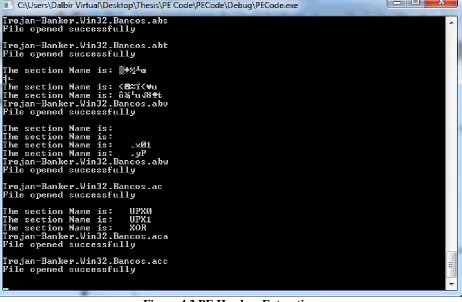
Figure 4.2 PE Headers Extraction
Figure 4.2 shows the output in command prompt window while running the code for feature
extraction. Only the unknown section names are printed on the output window.
4.4.1
Feature Extraction
This section explains and describes the features extracted from PE files. We have written code to
disassemble the PE file. We have collected 53 features from all the dataset of benign and
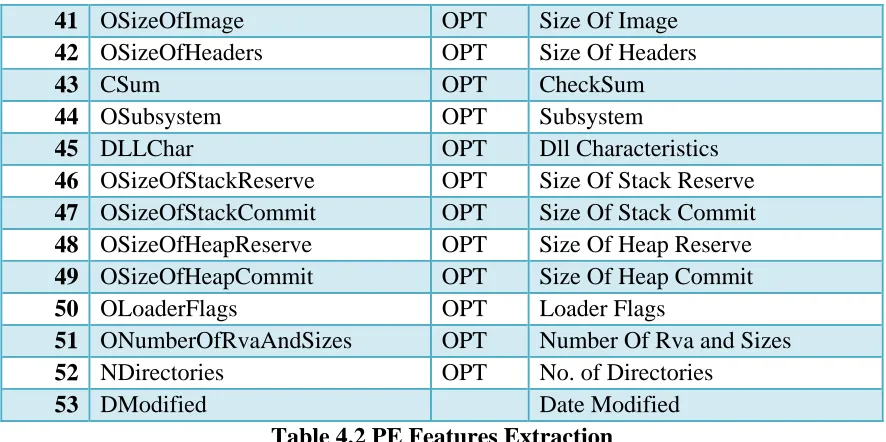
malicious files. All 53 features are mentioned and described in Table 4.2.
(Table 4.2 Cont.)
SR No.
Feature Name Header Description
1 FSize File Size
3 DPf DOS Pages in file
4 DR DOS Relocations
5 DShp DOS Size of header in paragraphs
6 Dmaxp DOS Minimum extra paragraphs
needed
7 Dminp DOS Maximum extra paragraphs
needed
8 Diss DOS Initial (relative) SS value
9 DSPv DOS Initial SP value
10 Dcsum DOS Checksum
11 DIPv DOS Initial IP value
12 Dicsv DOS Initial (relative) CS value
13 Dreltab DOS File address of relocation table
14 DONum DOS Overlay number
15 NSec File No. of Sections
16 DateTime File Date Time
17 FPointerToSymbolTable File Pointer To Symbol Table
18 FNumberOfSymbols File Number Of Symbols
19 FSizeOfOptionalHeader File Size Of Optional Header
20 FCharacteristics File Characteristics
21 USec File No. of Unknown Sections
22 IDll File No. of DLL Function call
23 OMajorLinkerVersion OPT Major Linker Version
24 OMinorLinkerVersion OPT Minor Linker Version
25 SCode OPT Size of Code
26 SIData OPT Size of Initialized Data
27 SUData OPT Size of Uninitialized Data
28 OAddressOfEntryPoint OPT Address Of Entry Point
29 OBaseOfCode OPT Base Of Code
30 OBaseOfData OPT Base Of Data
31 OImageBase OPT Image Base
32 OSectionAlignment OPT Section Alignment
33 OFileAlignment OPT File Alignment
34 OMajorOperatingSystemVersion OPT Major Operating System Version 35 OMinorOperatingSystemVersion OPT Minor Operating System Version
36 MImageVer OPT Major Image Version
37 OMinorImageVersion OPT Minor Image Version
38 OMajorSubsystemVersion OPT Major Subsystem Version 39 OMinorSubsystemVersion OPT Minor Subsystem Version
41 OSizeOfImage OPT Size Of Image
42 OSizeOfHeaders OPT Size Of Headers
43 CSum OPT CheckSum
44 OSubsystem OPT Subsystem
45 DLLChar OPT Dll Characteristics
46 OSizeOfStackReserve OPT Size Of Stack Reserve
47 OSizeOfStackCommit OPT Size Of Stack Commit
48 OSizeOfHeapReserve OPT Size Of Heap Reserve
49 OSizeOfHeapCommit OPT Size Of Heap Commit
50 OLoaderFlags OPT Loader Flags
51 ONumberOfRvaAndSizes OPT Number Of Rva and Sizes
52 NDirectories OPT No. of Directories
53 DModified Date Modified
Table 4.2 PE Features Extraction
Features like USec, IDll and DModified are the features, which were created using the data
obtained from PE headers. USec feature is for calculating number of unknown section name in
PE file. A counter representing USec feature is initialized and incremented if a section name
obtain from PE file is other than common name like .text, .data, .pdata, .rdata, .rsrc, .reloc, .tls,
.idata, .edata, CODE, DATA or BSS. Similarly, IDLL is for counting number of dlls called in
Import directory. DModified is the modification date of PE file. This feature is collected from
the properties of the PE file.
4.5
Feature Selection
All 53 extracted features were considered as initial set of features. Several experiments were
carried out using this set of features but the accuracy obtained after applying data mining
techniques was average. So, to improve the performance and accuracy of clustering with
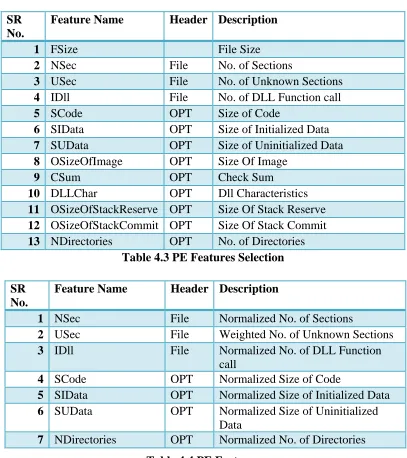
giving useful information. Thus we have selected 13 features, which are mentioned and
described in Table 4.3.
SR No.
Feature Name Header Description
1 FSize File Size
2 NSec File No. of Sections
3 USec File No. of Unknown Sections
4 IDll File No. of DLL Function call
5 SCode OPT Size of Code
6 SIData OPT Size of Initialized Data
7 SUData OPT Size of Uninitialized Data
8 OSizeOfImage OPT Size Of Image
9 CSum OPT Check Sum
10 DLLChar OPT Dll Characteristics
11 OSizeOfStackReserve OPT Size Of Stack Reserve 12 OSizeOfStackCommit OPT Size Of Stack Commit 13 NDirectories OPT No. of Directories
Table 4.3 PE Features Selection
Table 4.4 PE Features
Now for better understanding of the data, various features were normalized and given weightage.
Normalization helps in comparing the values for different data sets in a way that it eliminates the
effects of certain gross influences. There were some features in our list of selected features
whose data may vary according to the size of files. Thus for better comparison we have SR
No.
Feature Name Header Description
1 NSec File Normalized No. of Sections
2 USec File Weighted No. of Unknown Sections
3 IDll File Normalized No. of DLL Function
call
4 SCode OPT Normalized Size of Code
5 SIData OPT Normalized Size of Initialized Data 6 SUData OPT Normalized Size of Uninitialized
Data
normalized the features by dividing the data with its file size. We have also given more
weightage to a feature by multiplying its data with constant integer value hundred. The below
mentioned Table 4.4 contains normalized and weighted features.
4.6
Clustering Algorithm
The clustering algorithm forms group or clusters such that member inside a cluster are similar,
and distinct from the objects in other clusters. For statistical analysis of data, clustering method
is used frequently in the field of data mining. The cluster or groups can be formed, by using
various algorithms that differ in the criteria. The criteria used for forming clusters may include
groups with small distances among the data, dense areas, intervals or particular statistical
distributions [23].
We have used hierarchical, K-mean and self-organizing map clustering algorithm for our data
analysis. The notion of each of the clustering algorithm is different and varies significantly in
their properties.
4.6.1
Hierarchical Learning Algorithm
Hierarchical clustering is an example of connectivity models, which uses distance connectivity to
create groups or clusters. The hierarchy is a tree of clusters, which contains a node as child
We have used agglomerative hierarchical cluster analysis that is already implemented in Matlab.
The hierarchical algorithm distinguishes every pair of data in dataset. Then it links the pair of
data in close space using the distance criteria that is generated by distinguishing every pair of
data in dataset. In next step a binary tree is formed using data paired into binary clusters. At last,
the clusters were created either by finding natural clusters in the binary tree or by using cutting
off criteria [25].
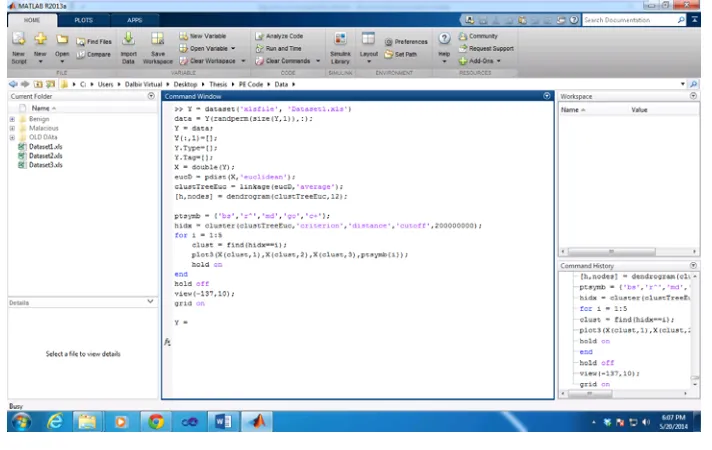
The function pdist calculates the Euclidean distance between each data pair to distinguish every
pair of data in dataset. The linkage function clusters data into binary tree and dendogram
function helps to view the binary cluster tree graphically for better understanding. The function
cluster is applied to find cut in tree to form clusters either naturally or by giving arbitrary cutoff
value in function itself. Figure 4.3 shows the code written in Matlab for hierarchical clustering.
Figure 4.3 Hierarchical Matlab Code
As mentioned in the above Hierarchical Matlab code, we used distance cutoff to create clusters
4.6.2
K-mean Learning Algorithm
K-mean is an example of partition based clustering algorithm. The k-mean algorithm forms
clusters from the data by allocating an index number to each observation according to their mean
value. Each cluster is created or given same index number with nearest mean value. Unlike
hierarchical clustering, k-mean creates cluster on single level and using each observation rather
than similarities or dissimilarities between data pair. Thus k-mean is more suitable and efficient
for cluster analysis of large datasets [26].
K-mean treats each observation in the data as unique. It creates partition in which objects within
each cluster are similar, and distinct from the objects in other clusters [27]. The centroid of the
cluster is calculated by the sum of distances from all data and it helps to increase the efficiency
of the cluster. K-mean iteratively improves by minimizing the sum of distances of each data from
its clusters centroid. The algorithm iterates until the sum of distances of data from centroid
cannot be reduced further. Thus the resultant clusters were compact and well separated as
possible.
The k-mean algorithm is already implemented in Matlab. As explained earlier, k-mean algorithm
returns index of the clusters. Figure 4.4 represents the code written in Matlab to use k-mean
Figure 4.4 K-mean Matlab Code
As mentioned in Figure 4.4 we asked the K-mean algorithm to create 10 clusters at maximum.
We came up with cluster number 10 by trial and error. When number of clusters was increased,
empty clusters were created and when the number of clusters was decreased, there was
significant drop in the accuracy.
4.6.3
Self Organizing Mapping Algorithm
The SOM is an excellent tool in exploratory phase of data mining [18]. SOM is a type of
artificial neural network (ANN) that produces discrete clusters by training the network using
unsupervised learning. SOM uses neighborhood function to preserve the topological properties
of input [28]. SOM groups the data based on similarity between objects. Thus it can be used to
create clusters of benign and malicious objects.
The other version of SOM training, which we have used is called batch algorithm. It presents
whole dataset to the network then algorithm determines winning neuron and updates each weight
Matlab has a tool, which can be used to run SOM algorithm. As shown in Figure 4.5 we can first
create grid and train data using batch algorithm in Figure 4.6.
Figure 4.5 Neural Network Architecture
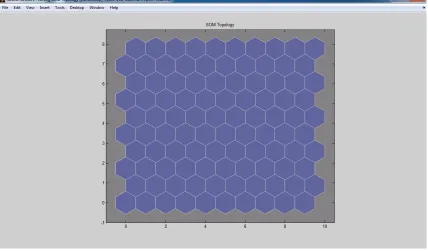
SOM creates different type of plots for the better understanding of analysis results. Figure 4.7
gives view of SOM topology.
Figure 4.7 SOM Topology
Figure 4.8 shows SOM neighbor connections
Figure 4.9 depicts SOM neighbor weight distances.
Figure 4.9 SOM Neighbor Weight Distances
Figure 4.10 gives overview of SOM weight planes.
Figure 4.11 shows SOM weight positions.
Figure 4.11 SOM Weight Positions
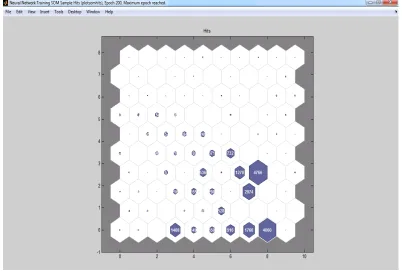
Figure 4.12 gives gist on SOM sample hits.
In SOM weight distance and planes, the weights were closer if it is indicated by light colors and
the distances were larger if it is indicated by darker band. The color difference distinguishes
between the data points weight and distance.
Figure 4.13 represents the code written in Matlab to use SOM algorithm.
Figure 4.13 SOM Matlab Code
As mentioned in the code, SOM algorithm is first trained and output is saved in Matlab. Then
CHAPTER 5: OUTCOME OF PROJECT
5.1
Experimental Tools and Environment
This section gives an overview on the tools and environment used for the thesis project.
5.1.1
Microsoft Visual Studio
Visual Studio (VS) is a comprehensive collection of tools and services that helps to create a wide
variety of applications [30]. VS is an integrated development environment (IDE) from Microsoft
that supports different programming languages that allows to write, edit or debug code. We have
created Visual C++ (VC++) project using Microsoft VS to disintegrate or collect PE headers
values from executables and dynamic link library files. Microsoft VC++ implements both C and
C++ compiler and specific tools for integration with VS IDE. We have added several packages
and in-built libraries to write code.
5.1.2
Matlab
Matlab is a language with strong abstraction and easy to use visual interface that can be used for
data analysis, developing algorithm, creating models and applications, for programming and
more. The built-in tools, mathematical functions and algorithms help to explore multiple
approaches and get the result faster. Matlab can be used in various fields but not limited to
computational biology, computational finance, simulation, image and video processing, signal
5.1.3
VMware Workstation
VMware workstation is a hypervisor, which helps users to create one or more virtual machines
(VM) on a single system. Each VM can run different operating systems such as Linux, Ubuntu,
and different version of Windows. VMware workstation supports host network, share hard
drives, and USB devices with VM [32].
VM plays an integral part in malware analysis. VM enables us to create a virtual environment
with all the necessary tools and applications required according to our need. We have used
VMware workstation version 10.0.1 build-1379776 with windows 7 operating system and 5.7
GB RAM.
VM has a very useful and important feature called snapshot, which saves the state of machine.
We can create snapshots of our VM that will save all the data, application installed and settings
of the operating system at that very moment. Once the snapshot is created we can restore the
saved state whenever it is necessary. For example, if a malware affects the system we can restore
the machine to its stored state by restoring a snapshot. The snapshot feature saves lot of time and
work while doing malware analysis.
5.2
Experimental Results
Experiment 1:
Algorithm: Hierarchical algorithm
Output: Figure 5.1 represent the binary tree of hierarchical algorithm on dataset1 in
dendogram form with top twelve nodes. We have created dendogram with cutoff as the
dataset is very large and dendogram representing the complete dataset was visually not clear.
Now, to go one step further we have created clusters and represented in Figure 5.2. Similarly,
for clearer view we have represented few cluster and data points in the graph.
Figure 5.2 Experiment 1 Plot
Clusters were created using cutoff on distance criteria. Table 5.1 represents the 28 clusters
created with useful details. Column “Value” represents the number of executables with type
benign or malicious and “Percentage” gives the idea on percent of executables type in cluster.
(Table 5.1 Cont.)
Hierarchical on Datset 1
Cluster Executable Value Percentage Cluster Executable Value Percentage Cluster Executable Value Percentage
1 Benign 0 0.00% 11 Benign 8 50.00% 20 Benign 11127 51.01%
Malacious 1 100.00% Malacious 8 50.00% Malacious 10686 48.99%
2 Benign 0 0.00% 12 Benign 0 0.00% 21 Benign 7 77.78%
Malacious 59 100.00% Malacious 1 100.00% Malacious 2 22.22%
3 Benign 6 85.71% 13 Benign 3 100.00% 22 Benign 0 0.00%
Malacious 1 14.29% Malacious 0 0.00% Malacious 56 100.00%
4 Benign 4 100.00% 14 Benign 0 0.00% 23 Benign 3 100.00%
Malacious 0 0.00% Malacious 1 100.00% Malacious 0 0.00%
5 Benign 3 100.00% 15 Benign 0 0.00% 24 Benign 0 0.00%
Malacious 0 0.00% Malacious 1 100.00% Malacious 91 100.00%
6 Benign 0 0.00% 16 Benign 0 0.00% 25 Benign 4 100.00%
Malacious 30 100.00% Malacious 1 100.00% Malacious 0 0.00%
7 Benign 6 100.00% 17 Benign 0 0.00% 26 Benign 7 100.00%
Malacious 0 0.00% Malacious 3 100.00% Malacious 0 0.00%
8 Benign 3 50.00% 18 Benign 0 0.00% 27 Benign 4 100.00%
Malacious 3 50.00% Malacious 1 100.00% Malacious 0 0.00%
9 Benign 3 75.00% 19 Benign 0 0.00% 28 Benign 3 100.00%
Malacious 1 25.00% Malacious 1 100.00% Malacious 0 0.00%
10 Benign 32 94.12%
Malacious 2 5.88%
Table 5.1 Experiment 1 Clusters
Figure 5.3 Experiment 1 Graph
Analysis: There were around 22,172 executables in dataset. After applying hierarchical
algorithm, 28 clusters were created using distance cutoff. Hereafter analyzing the cluster data
we found that around 10,702 executables were clustered wrongly, which results in accuracy
Now we further analyze the results or clusters obtained after applying Hierarchical algorithm
on Dataset1. We have created a graph in Figure 5.3 for better understanding of our results.
The X-axis represents the cluster with 50% to 100% accuracy rate divided in four groups.
The Y- axis represents the percentage of the clusters that belongs to the groups mentioned in
X-axis. Each of the bar has a percentage label which represents the percentage of executables
from Datset1 that belongs to the group. Moreover, from the figure 5.3 we observe that
98.54% of executables from Dataset1 have 50-79.99% accuracy and less than 20% of
clusters belong to this group. Thus, we know that most of the executables from Dataset1
belong to less than 20% of clusters and has efficiency between 50% to 79.99% and rest of the
clusters have only 1.46% of executables. Hence, the efficiency obtained in this experiment is
very low.
Experiment 2:
Input: Dataset1
Algorithm: K-means algorithm
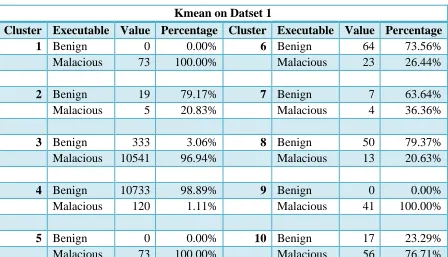
Output: Figure 5.3 represent centroid of the clusters created using kmean algorithm. Table
Figure 5.4 Experiment 2 Plot
Kmean on Datset 1
Cluster Executable Value Percentage Cluster Executable Value Percentage
1 Benign 0 0.00% 6 Benign 64 73.56%
Malacious 73 100.00% Malacious 23 26.44%
2 Benign 19 79.17% 7 Benign 7 63.64%
Malacious 5 20.83% Malacious 4 36.36%
3 Benign 333 3.06% 8 Benign 50 79.37%
Malacious 10541 96.94% Malacious 13 20.63%
4 Benign 10733 98.89% 9 Benign 0 0.00%
Malacious 120 1.11% Malacious 41 100.00%
5 Benign 0 0.00% 10 Benign 17 23.29%
Malacious 73 100.00% Malacious 56 76.71%
Figure 5.5 Experiment 2 Graph
Analysis: There were around 22,172 executables in dataset that is used for clustering. After
applying K-mean algorithm 10 clusters are created. The number of clusters were decided by
trial and error and given to the algorithm. If we create more than 10 clusters than empty
clusters were created and if we give less than accuracy is reduced significantly. After
analyzing the details of each cluster given in Table 5.2, we found that out of 22,172 around
515 executables were wrongly clustered, which gives accuracy of 97.68%. This accuracy is
significantly more than obtained in experiment1.
Similar to Experiment 1 we have created a graph in Figure 5.5 for better understanding and
analysis of the results or clustered obtained by applying K-mean algorithm on Dataset1. As
of 90-99.99% but out of the clusters created approximately 20% of clusters have this kind of
efficiency.
Experiment 3:
Input: Dataset1
Algorithm: SOM algorithm
Output: A gridof 10 X 10 is created according to the input. Figure 5.4 represents the sample
hits, which means it shows the number of elements in each cluster. Table 5.3 gives the details
of each cluster.
(Table 5.3 Cont.)
SOM on Datset 1
Cluster Executable Value Percentage Cluster Executable Value Percentage Cluster Executable Value Percentage
1 Benign 0 0.00% 30 Benign 536 100.00% 58 Benign 0 0.00%
Malacious 19 100.00% Malacious 0 0.00% Malacious 9 100.00%
2 Benign 0 0.00% 31 Benign 22 95.65% 59 Benign 0 0.00%
Malacious 16 100.00% Malacious 1 4.35% Malacious 11 100.00%
3 Benign 68 4.83% 32 Benign 1270 100.00% 60 Benign 10 100.00%
Malacious 1340 95.17% Malacious 0 0.00% Malacious 0 0.00%
4 Benign 67 19.20% 33 Benign 4718 98.99% 61 Benign 3 21.43%
Malacious 282 80.80% Malacious 48 1.01% Malacious 11 78.57%
5 Benign 0 0.00% 34 Benign 0 0.00% 62 Benign 6 100.00%
Malacious 350 100.00% Malacious 1 100.00% Malacious 0 0.00%
6 Benign 0 0.00% 35 Benign 0 0.00% 63 Benign 3 100.00%
Malacious 916 100.00% Malacious 13 100.00% Malacious 0 0.00%
7 Benign 16 0.91% 36 Benign 51 94.44% 64 Benign 6 100.00%
Malacious 1744 99.09% Malacious 3 5.56% Malacious 0 0.00%
8 Benign 118 2.91% 37 Benign 93 96.88% 65 Benign 11 91.67%
Malacious 3942 97.09% Malacious 3 5.56% Malacious 1 8.33%
9 Benign 4 80.00% 38 Benign 103 93.64% 66 Benign 3 100.00%
Malacious 1 20.00% Malacious 7 6.36% Malacious 0 0.00%
10 Benign 0 0.00% 39 Benign 188 100.00% 67 Benign 0 0.00%
Malacious 21 100.00% Malacious 0 0.00% Malacious 19 100.00%
11 Benign 0 0.00% 40 Benign 371 100.00% 68 Benign 0 0.00%
Malacious 30 100.00% Malacious 0 0.00% Malacious 18 100.00%
12 Benign 0 0.00% 41 Benign 732 100.00% 69 Benign 2 100.00%
Malacious 3 100.00% Malacious 0 0.00% Malacious 0 0.00%
13 Benign 0 0.00% 42 Benign 0 0.00% 70 Benign 3 100.00%
Malacious 19 100.00% Malacious 5 100.00% Malacious 0 0.00%
14 Benign 0 0.00% 43 Benign 0 0.00% 71 Benign 0 0.00%
Malacious 69 100.00% Malacious 8 100.00% Malacious 1 100.00%
15 Benign 12 2.27% 44 Benign 0 0.00% 72 Benign 6 66.67%
Malacious 516 97.73% Malacious 1 100.00% Malacious 3 33.33%
16 Benign 0 0.00% 45 Benign 88 96.70% 73 Benign 7 77.78%
Malacious 2 100.00% Malacious 3 3.30% Malacious 2 22.22%
Malacious 11 100.00% Malacious 157 100.00% Malacious 3 100.00%
18 Benign 0 0.00% 47 Benign 168 91.30% 75 Benign 4 100.00%
Malacious 20 100.00% Malacious 16 8.70% Malacious 0 0.00%
19 Benign 0 0.00% 48 Benign 246 100.00% 76 Benign 0 0.00%
Malacious 2 100.00% Malacious 0 0.00% Malacious 19 100.00%
20 Benign 1 0.46% 49 Benign 3 100.00% 77 Benign 0 0.00%
Malacious 215 99.54% Malacious 0 0.00% Malacious 3 100.00%
21 Benign 27 7.61% 50 Benign 0 0.00% 78 Benign 4 100.00%
Malacious 328 92.39% Malacious 18 100.00% Malacious 0 0.00%
22 Benign 3 1.01% 51 Benign 0 0.00% 79 Benign 6 100.00%
Malacious 295 98.99% Malacious 28 100.00% Malacious 0 0.00%
23 Benign 8 100.00% 52 Benign 0 0.00% 80 Benign 8 50.00%
Malacious 0 0.00% Malacious 5 100.00% Malacious 8 50.00%
24 Benign 2060 99.32% 53 Benign 47 97.92% 81 Benign 3 100.00%
Malacious 14 0.68% Malacious 1 2.08% Malacious 0 0.00%
25 Benign 3 60.00% 54 Benign 66 98.51% 82 Benign 3 100.00%
Malacious 2 40.00% Malacious 1 1.49% Malacious 0 0.00%
26 Benign 0 0.00% 55 Benign 0 0.00% 83 Benign 7 100.00%
Malacious 16 100.00% Malacious 154 100.00% Malacious 0 0.00%
27 Benign 0 0.00% 56 Benign 0 0.00% 84 Benign 3 100.00%
Malacious 3 100.00% Malacious 56 100.00% Malacious 0 0.00%
28 Benign 21 13.73% 57 Benign 12 92.31% 85 Benign 3 100.00%
Malacious 132 86.27% Malacious 1 7.69% Malacious 0 0.00%
29 Benign 0 0.00%
Malacious 3 100.00%
![Figure 2.1 PE File Format [4]](https://thumb-us.123doks.com/thumbv2/123dok_us/8925899.1845407/20.612.205.407.315.689/figure-pe-file-format.webp)
![Table 2.1 PE Header Fields [5]](https://thumb-us.123doks.com/thumbv2/123dok_us/8925899.1845407/23.612.68.540.291.708/table-pe-header-fields.webp)